1
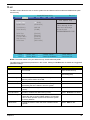
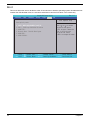
Boot
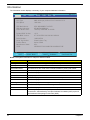
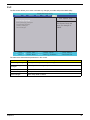
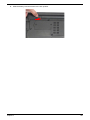
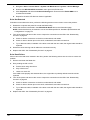
This menu allows the user to decide the order of boot devices to load the operating system. Bootable devices
includes the USB diskette drives, the onboard hard disk drive and the DVD drive in the module bay.
Information
Main
Advanced
InsydeH20 Setup Utility
Security
Power
Boot
Exit
Rev. 3.5
Item Specific Help
Boot priority order:
1.
2.
3.
4.
5.
6.
IDE0 : WDC WD2500BEVT-22ZCT0
IDE1 : TSSTcorp CDDVDW TS-U633A
USB FDD :
Network Boot : Realtek Boot Agent
USB HDD :
USB CDROM :
F1 Help
ESC Exit
32
Select Item
Select Menu
F 5 / F 6 C h a n g e Va l u e s
SubMenu
Enter Select
Use < > or < > to select
a device, then press
<F5> to move it down the
list, or <F6> to move
it up the list. Press
<Esc> to escape the menu
F9
F 10
Setup Default
Save and Exit
Chapter 2