1
Quick Start Guide
Cisco Small Business Pro
Cisco AP541N Ceiling Mount Installation
Instructions
Published: September 14, 2009
Revised: August 13, 2009
Part Number: 78-19182-01(OA)
This document describes the use of the AP540N-CMK Ceiling Mount to
deploy the Cisco AP541N.
WARNING Insecure mounting might damage the device or cause injury.
Cisco is not responsible for damages or injury incurred by
insecure wall-mounting.
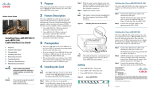
To install the ceiling mount onto the ceiling rail:
STEP 1 Spread the fixture so it fits over the flanges in the ceiling rail.
STEP 2 Compress the fixture to its original, closed position so that it grips
the ceiling rail.
STEP 3 Use the thumbscrew, on the underside of the fixture, to lock the
fixture onto the ceiling rail.
STEP 4 Place the two lugs on the bracket into the holes in the bottom of
the access point with the bracket oriented as shown in the next
figure.
1
Cisco AP541N Ceiling Mount Installation Instructions
STEP 5 Slide the bracket toward the front of the access point, so that the
small holes in the bracket align with the threaded holes in the
bottom of the access point.
STEP 6 Install the two M3 screws (provided) to secure the bracket in place.
Cisco AP541N Ceiling Mount Installation Instructions
2
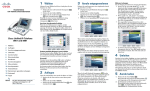
STEP 7 Rotate the access point so it is approximately 45 degrees
clockwise from its final orientation.
STEP 8 Raise the unit so that the three holes in the bracket fit over the
three lugs in the fixture.
3
Cisco AP541N Ceiling Mount Installation Instructions
STEP 9 Rotate the access point back 45 degrees to secure it in place.
Cisco AP541N Ceiling Mount Installation Instructions
4
5
Cisco AP541N Ceiling Mount Installation Instructions
Americas Headquarters
Cisco Systems, Inc.
170 West Tasman Drive
San Jose, CA 95134-1706
USA
http://www.cisco.com
Tel: 408 526-4000
800 553-NETS (6387)
Fax: 408 527-0883
Cisco, Cisco Systems, the Cisco logo, and the Cisco Systems logo are registered trademarks
or trademarks of Cisco Systems, Inc. and/or its affiliates in the United States and certain other
countries. All other trademarks mentioned in this document or Website are the property of
their respective owners. The use of the word partner does not imply a partnership relationship
between Cisco and any other company. (0705R)
© 2009 Cisco Systems, Inc. All rights reserved.
78-19182-01(OA)