1
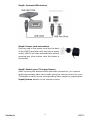
Step3: Connect USB devices
Step4: Power cord connection
Plug one end of the power cord into the back
of the VMP72 and the other end into a power
outlet. VMP72 will start automatically without
pressing any other button once the power is
connected.
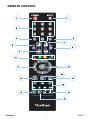
Step5: Switch your TV Input/Source
After choosing the desired video and audio connection, you need to
select appropriate video input mode using the remote control for your
TV/display to switch to the corresponding video output by pressing the
Input/Source button on the remote control.
9LHZ6RQLF
11
VMP72