1
Product Specification
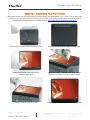
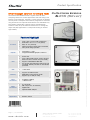
MyKover - Customize Your Front Panel
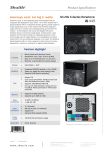
Unfasten the front panel by removing the four screws.
Remove both the transparent glass and the image.
Insert the new image and cover back the
transparent glass on top.
Align and correspond the transparent glass and new
image to screw holes on the front of the machine.
Carefully screw back the four screws.
Congratulation, you have your customized image now.
Page 5 | 13 June 2008
www.shuttle.com
S h u t t l e C o m p u t e r H a n de l s G m b H
Fritz-Stras s man n -Str. 5
25337 Elmshorn | Germany
Tel. +49 (0) 4121-47 68 60
Fax +49 (0) 4121-47 69 00
[email protected]
©2006 by Shuttle Computer Handels GmbH (Germany). All Information subject to change without notice. Pictures for illustration puposes only.
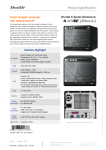
Users easily customize PC and make work fun with the specially designed MyKover. Just 1-minute, 2-clicks and 3-steps
to change your mood easily! Create a stunning look by inserting your memorial photos behind the crystal panel or
download panel images from Shuttle's website directly: http://global.shuttle.com/Event/kpc/index5.html