1
Cyborg _mouse_manual.qxd
05/03/2008
09:48
Page 2
SAITEK CYBORG MOUSE
Congratulations on buying your Saitek Cyborg Mouse. The Cyborg Mouse is a fully-featured,
adjustable, laser gaming mouse with 3200dpi for ultra high speed and accuracy.
•
Motorized length adjustment sets the mouse to match your hand size
•
Scroll detent force switch – set the sensitivity of your weapon selection
•
3200 dpi laser – new ‘anti-deceleration’ technology ensures reliable movement tracking, even
at higher speeds
•
•
•
•
•
Take frequent breaks, get up and walk around several times every hour.
Vary your tasks throughout the day.
Keep your shoulders relaxed with your elbows at your side. Position your keyboard and mouse
so you do not have to reach.
Adjust your chair and keyboard so your upper arms and wrists are straight.
Avoid resting your wrists on sharp edges.
System Compatibility
PC running Windows XP/XP64/Vista (all versions)
Software installation for users of Windows® XP, XP64 and Vista (all versions)
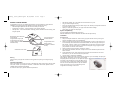
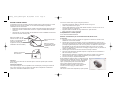
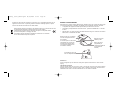
Mode button with tri-state LED
mode indicator
Programmable 4-way d-pad
incorporating mouse length
controls (requires installation of
software drivers)
Installation
Internet forward and
backward buttons
Programmable thumb
button (requires
installation of software
drivers)
Scroll detent force switch
Warning
Please ensure your fingers do not obstruct moving parts when opening or closing the Cyborg
Mouse.
Important Information
Some experts believe that using any mouse or trackball may cause serious injury to hands, wrists,
arms, neck, or back. If you feel pain, numbness, or weakness in these areas, please consult a
qualified health professional immediately.
To reduce the risk of injury, please follow these precautions:
A) Drivers Only
1. With your computer switched on, close down any programs that are currently running and
insert the Installation CD into your CD-ROM drive.
2. When the Introduction Screen appears, click Install Software to continue. If the CD does not
run automatically, select Start from the Windows® Taskbar, then Run and type D:\Setup.exe
and click OK - where D:\ is letter of your CD-ROM drive. For Vista users, the screen will ask
Do you want to run this file? Press Run. A screen will now appear saying A program needs
your permission to continue. Press Continue.
3. When the Welcome screen appears, click Next to continue.
4. After reading the Disclaimer, select the I accept the terms of the Disclaimer option and click
Next to continue.
5. At the Registration screen, select Check this box to register now and follow the on-screen
instructions, or you can choose to select this option later.
6. Click on Finish to complete the installation.
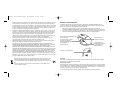
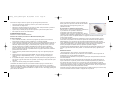
The software installation will create a Cyborg Mouse shortcut on your PC's desktop. To adjust your
Cyborg Mouse, double click on the shortcut - this will open
the Cyborg Mouse control panel. You can adjust the length of
the mouse or the DPI setting by moving the sliders on the
control panel. Click on Apply for the changes to take effect.
Click on "Launch Mouse Properties" to open the Windows
mouse control panel. You can now adjust the general
configuration and settings of the mouse.