1
Troubleshooting Checklist
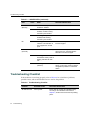
Table 4-3
LANVIEW LEDs (continued)
LED
Color
State
Recommended Action
RX
(Receive)
None
No link. No activity. Port
enabled or disabled.
None.
Green
Solid. Link present, port
enabled, no traffic is being
received by the interface.
None.
Amber
Flashing. Link present, port
enabled, traffic is being
received by the interface.
None.
RX
Red
Blinking. Indicates
collisions. This indication is
only supported on 10/100
ports.
Contact Enterasys Networks for
technical support.
TX
(Transmit)
None
Port enabled, but no activity.
If it is known that the port should be
active and is not, contact Enterasys
Networks for technical support.
Green
Flashing. Indicates data
transmission activity. Rate of
flashing indicates the data
rate.
None.
Red
Flashing. Fault or Error
(collision).
None, unless there is a high rate of
activity. In this case, check for network
configuration problems or a defective
device.
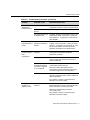
Troubleshooting Checklist
If the module is not working properly, refer to Table 4-4 for a checklist of problems,
possible causes, and recommended actions to resolve the problem.
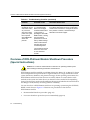
Table 4-4
4-4
Troubleshooting Checklist
Problem
Possible Cause
Recommended Action
All LEDs are OFF.
Loss of power.
Ensure that the module was installed properly
according to the installation instructions in
Chapter 3, and that the host chassis is providing
power.
Troubleshooting