1
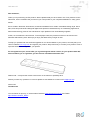
THE BULLET
THE WHITE LINE
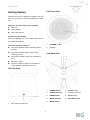
Turning the Speaker On/Off
Bluetooth Mode
Connect the plug at the end of power adapter cable
Press POWER button to turn the Speaker on.
to the DC IN socket on the back of the Speaker.
The MODE indicator will start blinking blue light as
Then insert the power adapter into the mains socket.
the speaker searches for devices to pair with via
Press POWER button to turn the Speaker on or off.
Bluetooth.
Switching Mode
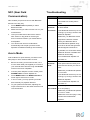
Pairing the Speaker with Bluetooth
device
Press MODE button to switch between Bluetooth
and Aux in modes.
1.
Switch the Speaker to Bluetooth mode.
2.
Activate your Bluetooth device and select the
search mode.
Volume Control
Adjust the Speaker volume by scrolling the VOLUME
3.
‘Bullet’ will appear on your Bluetooth device.
4.
Select ‘Bullet’ and enter “0000” for the password
if necessary.
+/- dial.
5.
complete when the blue light of MODE
Indicator light
indicator stops flashing and remains lit.
Indicator
Light
Indication
POWER
Off
The Speaker is power off.
indicator
Red
The Speaker is power on.
MODE
Blink
The Speaker is in Bluetooth
indicator
slowly
mode and it is in the
in Blue
process of connecting via
6.
Play your audio as you would normally use your
device.
7.
To pair the speaker with another Bluetooth
device you will first need to disconnect the
already connected device by selecting “Forget
device” from your device’s Bluetooth settings.
Once this is done you can set up a new
Bluetooth to another device.
Blue
The Speaker will indicate that the pairing is
connection by going through steps 1 to 5 again
The Speaker is in Bluetooth
mode and it has already
Resetting Bluetooth memory
connected by Bluetooth to
another device.
Green
Press and hold RESET button for 5 seconds to clear
The Speaker is in Aux in
Bluetooth pairing information.
mode.
5