1
remote control. Whilst the intensive function is active “HI” appears
on the centre of the display and the bottom right hand dot flashes
once a second.
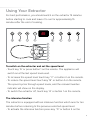
- To cancel the intensive function, touch key “D” or button 5 again and
the extractor will return to the previous speed level.
The extractor lights
- To switch the lights on and off, press key “G” or button 6 on the
remote control.
The extractor is equipped with an ambient light function, which dims
the lights. To activate the ambient light function, press key “H” or
press and hold button 6 on the remote control for three seconds.
The timer
The extractor is equipped with a timer that allows the extractor to run
for 30 minutes before switching off automatically.
- To activate the timer, touch key “F” or press button 1 on the remote.
The working speed and time remaining will flash alternative on the
display and a dot will flash in the lower right hand corner of the
display.
- To cancel the timer, touch key “F” or button 1 on the remote control.
Please note
The timer cannot be activated when the intensive function is on.
The clean air function
- The extractor is equipped with a clean air function that runs the
motor for 10 minutes every hour at 100m3/h to keep the air in the
kitchen refreshed.
6