1
14
Getting to know your phone
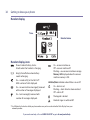
Handset display
Time
Handset name
Handset display icons
Shows handset battery status.
Scrolls when the handset is charging.
Empty frame flashes when battery
needs recharging.
On – missed call(s) in the Calls list*.
With number of calls displayed.
On – answer machine message(s) received
with number of messages displayed.
On – text message(s) received with
number of messages displayed.
On – answer machine on.
Off – answer machine off.
Flashing – new answer machine message
Memory full displayed when the answer
machine memory is full.
UnMute/Mute Indicates when Mute is on or off.
On – alarm is set.
Flashing – alarm time has been reached.
Off – alarm off.
The keypad is locked.
Handset ringer is switched off.
* For full details of who has called you please make sure you have subscribed to Caller Display from your
network provider.
If you need some help, call us on 0800 145 6789* or go to bt.com/producthelp