1
Installing the Gimbal
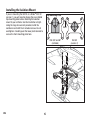
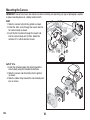
Install the gimbal with the vertical arm to the rear by
lining up the tracks of the gimbal and the mount and
pushing towards the rear of the plate as shown at left.
To remove the gimbal, push in the restraining clip and
pull the gimbal forward from the slot.
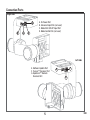
Plug the wire routed from the control board to the
correct port in the gimbal. See Connection Ports for
the port layout.
350 QX2 or 350 QX2 AP:
Insert the 3-wire harness into the Blade 350 QX2/AP
Input Port as shown at the left.
350 QX:
Insert the 2-wire harness into the Power Port. The
gimbal will stabilize roll and pitch normally, but will
have no transmitter control of the pitch axis.
If you wish to have transmitter control of the pitch
axis, a seperate remote receiver is required
(see below ).
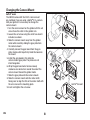
Using a Remote Receiver for Pitch Axis Control
On the original 350 QX quadcopter, the gimbal will
automatically level without installation of an optional
remote receiver. If transmitter control of the pitch
axis is desired, connect a Spektrum Remote Receiver
(SPM9645, sold separately ) to gimbal port G. Secure
the remote receiver to the upper gimbal body using
double-stick tape. Bind the remote receiver while
binding the quadcopter receiver to your transmitter.
If the gimbal does not respond to the transmitter,
re-bind.
9
EN