1
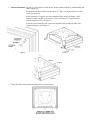
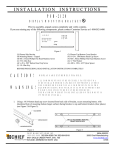
2. Bracket Installation: Lay the TV screen down on a flat surface. Remove table stand brace, antenna holder and
rubber tipped feet.
Insert M4 screws into keyhole slots in back of TV. Place 1/8" nylon washers over M4
screws (see Figure 4).
Place remaining 1/8" spacers over table stand brace holes in back of display. Place
interface bracket over M4 screws and use ¼-20 screws and .063" spacers to secure
bracket to bottom of TV (see Figure 5).
Insert M3 screws and acorn nuts. M4 screws should be fully seated in keyhole slots.
Tighten all fasteners (See Figure 6).
Figure 4
Figure 5
Figure 6
3. Follow the Chief mount instruction manual for screen installation.