1
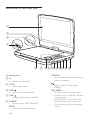
Overview of the main unit
a
b
c
d
e
a Display panel
b IR
• Remote control sensor.
c DC IN
• Power supply socket.
d OPEN
• Open the disc compartment.
e CHR /
• Charging indicator/Power indicator.
f SOURCE
• Switch between DVD, USB and TV.
SETUP
• Access or exit the setup menu.
6
EN
f
ghi j k l m n o
OPTIONS
• Access options relating to the current
activity or selection.
• Adjust brightness of the screen
backlight.
DISC MENU
• For DVD, access or exit disc menu.
• For VCD, turn on or off PBC (Playback
Control) mode.
• For VCD version 2.0 or SVCD with
PBC turned on, return to the menu.
• For data discs, go to the file manager
screen.