1
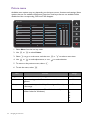
Picture menu
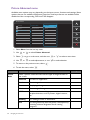
Available menu options may vary depending on the input sources, functions and settings. Menu
options that are not available will become grayed out. And keys that are not available will be
disabled and the corresponding OSD icons will disappear.
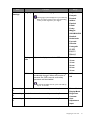
Mode: User
Display
Brightness
Normal
Picture
Contrast
Bluish
Picture Advanced
Sharpness
Reddish
System
Gamma
User Define
R
50 B
G
100 100 100
Color Temperature
Hue
Saturation
Reset Color
1. Select Menu from the hot key menu.
2. Use
or
3. Select
4. Use
to select Picture.
to go to a sub menu, and then use
or
to make adjustments, or use
5. To return to the previous menu, select
6. To exit the menu, select
Item
26
or
to select a menu item.
to make selection.
.
.
Function
Range
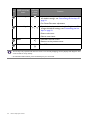
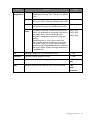
Brightness
Adjusts the balance between light and dark shades.
0 to 100
Contrast
Adjusts the degree of difference between darkness and
lightness.
0 to 100
Sharpness
Adjusts the clarity and visibility of the edges of the subjects 1 to 10
in the image.
Gamma
Adjusts the tone luminance. The default value is 3 (the
standard value for Windows).
Navigating the main menu
•1
•2
•3
•4
•5