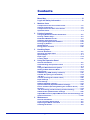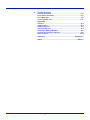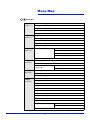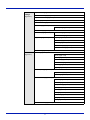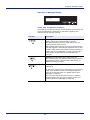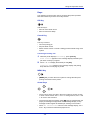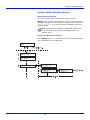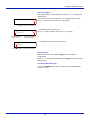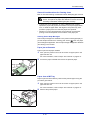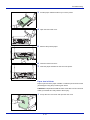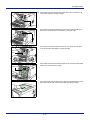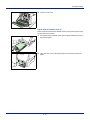
1
P-C2160DN P-C2660DN Operation Guide Introduction Thank you for your purchase of P-C2160DN/P-C2660DN. This Operation Guide is intended to help you operate the machine correctly, perform routine maintenance and take a simple troubleshooting action as necessary, so that you can always use the machine in good condition. Please read this Operation Guide before you start using the machine, and keep it close to the machine for easy reference. We recommend the use of our own brand supplies. We will not be liable for any damage caused by the use of third party supplies in this machine. Contents Menu Map ............................................................................. iii Legal and Safety Information ............................................. ix 1 Machine Parts Components at the Front of the Printer .................................... 1-2 Internal Components .................................................................. 1-2 Components at the Rear of the Printer ..................................... 1-3 Operation Panel .......................................................................... 1-4 2 Printing Operation Changing Network Interface Parameters ................................. 2-2 Printing a Status Page ................................................................ 2-4 Embedded Web Server RX ......................................................... 2-4 Installing the Printer Driver ...................................................... 2-13 Printing from Application Software ........................................ 2-20 Printing by AirPrint ................................................................... 2-20 Status Monitor ........................................................................... 2-21 Energy Saver Function ............................................................. 2-25 3 Handling Paper General Guidelines ..................................................................... 3-2 Selecting the Right Paper .......................................................... 3-4 Special Paper .............................................................................. 3-7 Paper Type ................................................................................ 3-12 Loading Paper ........................................................................... 3-13 4 Using the Operation Panel General Information .................................................................... 4-2 Understanding the Operation Panel ......................................... 4-3 Keys ............................................................................................. 4-6 Using the Menu Selection System ............................................ 4-8 Setting a Mode Selection Menu ............................................... 4-10 Report Print ............................................................................... 4-11 USB Memory (USB memory selection) ................................... 4-16 Custom Box (Using a Custom Box) ........................................ 4-18 Job Box ...................................................................................... 4-22 Counter (Viewing the counter value) ...................................... 4-28 Paper Settings ........................................................................... 4-29 Print Settings ............................................................................ 4-37 Network (Network settings) ..................................................... 4-47 Optional Network (Optional Network settings) ...................... 4-56 Device Common (Selecting/Setting the common device) .... 4-61 Security ...................................................................................... 4-79 Job Accounting (Job Accounting selection/setting) ............. 4-87 Administrator (Administrator settings) .................................. 4-94 Adjust/Maintenance (Adjust/Maintenance selection/setting) 4-97 Optional Functions ................................................................. 4-108 5 Maintenance General Information .................................................................... 5-2 Toner Container Replacement ................................................... 5-2 Replacing the Waste Toner Box ................................................ 5-6 Cleaning the Printer .................................................................... 5-8 i 6 Troubleshooting General Guidelines ..................................................................... 6-2 Print Quality Problems ............................................................... 6-3 Error Messages ........................................................................... 6-6 Clearing Paper Jams ................................................................ 6-11 Appendix Interface .......................................................................................A-2 USB Interface ..............................................................................A-2 Network Interface ........................................................................A-3 About the Options ......................................................................A-5 Expansion Memory Modules .....................................................A-6 General Description of Options .................................................A-8 Specifications ...........................................................................A-13 Glossary ............................................................... Glossary-1 Index ........................................................................... Index-1 ii Menu Map MENU Key Report Print (page 4-11) Print Menu Map (page 4-11) Print Status Page (page 4-13) Print Fonts List (page 4-15) Print RAM Disk File List (page 4-15) Print SSD Disk File List (page 4-15) USB Memory Print File (page 4-16) (page 4-16) Copies (page 4-17) Paper Source (page 4-17) Remove Device (page 4-17) Print File List (page 4-17) Custom Box (page 4-18) Select Box (page 4-18) Print All Files (page 4-19) (Selects the data) (page 4-20) Delete All Files (page 4-21) Print File List (page 4-21) Print Box List (page 4-21) Job Box (page 4-22) Quick Copy (page 4-23) Private/Stored (page 4-25) Job Box Configuration (page 4-26) Counter (page 4-28) Quick Copy (page 4-27) Delete (page 4-27) Printed Pages (page 4-28) Color (page 4-28) Black & White (page 4-28) Paper Settings (page 4-29) MP Tray Size (page 4-29) MP Tray Type (page 4-30) Cassette 1 Size (page 4-31) Cassette 2 Size (page 4-31) Cassette 3 Size (page 4-31) Cassette 4 Size (page 4-31) Cassette 1 Type (page 4-33) Cassette 2 Type (page 4-33) Cassette 3 Type (page 4-33) Cassette 4 Type (page 4-33) Type Adjust (page 4-34) Paper Weight (page 4-35) Duplex Path (page 4-35) Reset Type Adjust (page 4-36) iii Print Settings (page 4-37) Paper Source (page 4-37) Auto Cass. Change (page 4-38) Paper Feed Mode (page 4-38) Duplex (page 4-39) Override A4/LT (page 4-41) Emulation (page 4-41) Error Report (page 4-41) Color Mode (page 4-42) Print Quality (page 4-42) Gloss Mode (page 4-42) EcoPrint Mode (page 4-43) Page Set (page 4-43) Copies (page 4-44) Orientation (page 4-44) Wide A4 (page 4-44) XPS FitTo Page (page 4-45) TIFF/JPEG Size (page 4-45) Job Name (page 4-46) Network (page 4-47) TCP/IP (page 4-47) DHCP (page 4-48) Auto-IP (page 4-48) IP Address (page 4-48) Subnet Mask (page 4-49) Gateway (page 4-50) Bonjour (page 4-50) TCP/IP (IPv6) (page 4-51) RA (Stateless) (page 4-51) DHCPv6 (page 4-51) Protocol Detail (page 4-52) NetBEUI (page 4-52) SNMPv3 (page 4-52) FTP (Server) (page 4-53) SNMP (page 4-53) SMTP (page 4-53) POP3 (page 4-53) RAW Port (page 4-54) LPD (page 4-54) HTTP (page 4-54) Restart Network (page 4-55) iv Optional Network (page 4-56) ID (page 4-56) Password (page 4-56) TCP/IP (page 4-57) DHCP (page 4-48) Auto-IP (page 4-48) IP Address (page 4-48) Subnet Mask (page 4-49) Gateway (page 4-50) Bonjour (page 4-50) TCP/IP (IPv6) (page 4-57) RA (Stateless) (page 4-51) DHCPv6 (page 4-51) Netware (page 4-57) AppleTalk (page 4-58) IPSec (page 4-58) LAN Interface (page 4-58) MACAddressFilter (page 4-59) Communication (page 4-59) Restart Network (page 4-60) Device Common (page 4-61) Message Language (page 4-61) Date Setting (page 4-62) Date (Year/Mon/Day) (page 4-63) Time (Hour:Min:Sec) (page 4-63) Date Format (page 4-63) Time Zone (page 4-64) Summer Time (page 4-64) Buzzer (page 4-64) Key Confirmation (page 4-64) Job End (page 4-65) Ready (page 4-65) Error (page 4-65) RAM Disk Mode (page 4-66) RAM Disk Size (page 4-66) SSD (page 4-67) Format (page 4-67) Error Handling (page 4-68) Duplex (page 4-68) Paper Mismatch (page 4-68) MP Tray Empty (page 4-69) v Timer (page 4-69) Auto Panel Reset (page 4-70) Panel Reset Timer (page 4-70) Low Power Timer (page 4-71) Sleep Timer (page 4-71) Auto Error Clear (page 4-72) Error Clear Timer (page 4-72) Form Feed Time Out (page 4-73) Sleep Level Set. (page 473) Sleep Level (page 4-75) Network (page 4-74) TonerAlert Level (page 4-77) Off/On (page 4-78) TonerAlert Level (page 4-78) Security (page 4-79) I/F Block (page 4-80) USB Host (page 4-80) USB Device (page 4-80) Option I/F (page 4-81) USB Storage (page 4-81) WSD-PRINT (page 4-81) Enhanced WSD (page 4-81) EnhancedWSD(SSL) (page 4-82) IPP (page 4-82) SSL Server (page 4-83) DES (page 4-83) 3DES (page 4-83) AES (page 4-84) IPP over SSL (page 4-84) HTTPS (page 4-84) IPSec (page 4-85) Thin Print (page 4-85) ThinPrint over SSL (page 4-86) LAN Interface (page 4-86) Security Level (page 4-86) vi Job Accounting (page 4-87) Job Accounting (page 4-88) Select Account (page 4-89) Counter (page 4-89) Color Counter (page 4-89) Restriction (page 4-90) Color Restriction (page 4-90) Maximum Output (page 4-90) Color Max. Output (page 4-91) Reset Counter (page 4-91) Add Account (page 4-91) Delete Account (page 4-92) Print Job Accounting List (page 4-92) Apply Limit (page 4-93) Unknown ID Job (page 4-93) Administrator Change ID (page 4-95) (page 4-94) Change Password (page 4-95) Adjust/ Maintenance (page 4-97) Color Calibration (page 4-97) Registration Normal (page 4-97) Print Registration Chart (page 4-98) Adjust Magenta (page 4-99) Adjust Cyan (page 4-100) Adjust Yellow (page 4-100) Registration Details (page 4-100) Print Registration Chart (page 4-101) M 12345 3 (Adjust magenta) (page 4-102) C 12345 3 (Adjust Cyan) (page 4-103) Y 12345 3 (Adjust Yellow) (page 4-103) Restart Printer (page 4-104) Service (page 4-104) Print Status Page (page 4-104) Print Network Status Page (page 4-105) Print Op Network Status Page (page 4-105) Print Test Page (page 4-105) Maintenance (page 4-106) DEV-CLN (page 4-106) LSU (page 4-106) Drum (page 4-107) Altitude Adj. (page 4-107) MC (page 4-107) Optional Functions (page 4-108) vii viii Legal and Safety Information CAUTION NO LIABILITY IS ASSUMED FOR ANY DAMAGE CAUSED BY IMPROPER INSTALLATION. Notice on Software SOFTWARE USED WITH THIS PRINTER MUST SUPPORT THE PRINTER'S EMULATION MODE. The printer is factory-set to emulate the PCL. Notice The information in this guide is subject to change without notification. Additional pages may be inserted in future editions. The user is asked to excuse any technical inaccuracies or typographical errors in the present edition. No responsibility is assumed if accidents occur while the user is following the instructions in this guide. No responsibility is assumed for defects in the printer's firmware (contents of its read-only memory). This guide, any copyrightable subject matter sold or provided with or in connection with the sale of the page printer, are protected by copyright. All rights are reserved. Copying or other reproduction of all or part of this guide, any copyrightable subject matter without the prior written consent of Copyright owner is prohibited. Any copies made of all or part of this guide, any copyrightable subject must contain the same copyright notice as the material from which the copying is done. Regarding Tradenames • PRESCRIBE and KPDL are trademarks of Kyocera Corporation. • Microsoft, Windows, Windows XP, Windows Server 2003, Windows Vista, Windows Server 2008, Windows 7, Windows Server 2012, Windows 8 and Internet Explorer are registered trademarks or trademarks of Microsoft Corporation in the U.S.A. and/or other countries. • PCL is a trademark of Hewlett-Packard Company. • Adobe Acrobat, Adobe Reader and PostScript are trademarks of Adobe Systems, Incorporated. • Ethernet is a registered trademark of Xerox Corporation. • NetWare is a registered trademark of Novell, Inc. • IBM is a registered trademark of International Business Machines Corporation. • AppleTalk, Bonjour, Macintosh, and Mac OS are trademarks of Apple Inc., registered in the U.S. and other countries. • All European language fonts installed in this machine are used under licensing agreement with Monotype Imaging Inc. • Helvetica, Palatino and Times are registered trademarks of Linotype GmbH. • ITC Avant Garde Gothic, ITC Bookman, ITC ZapfChancery and ITC ZapfDingbats are registered trademarks of International Typeface Corporation. ix • UFST™ MicroType® fonts by Monotype Imaging Inc. are installed in this machine. • AirPrint and the AirPrint logo are trademarks of Apple Inc. • iOS is a trademark or registered trademark of Cisco in the U.S. and other countries and is used under license by Apple Inc. • ThinPrint is a trademark of Cortado AG in Germany and other countries. All other brands and product names are registered trademarks or trademarks of their respective companies. Thedesignations ™ and ® will not be used in this Operation Guide. License Agreements Typeface Trademark Acknowledgement All resident fonts in this printer are licensed from Monotype Imaging Inc. Helvetica, Palatino and Times are registered trademarks of Linotype-Hell AG. ITC Avant Garde Gothic, ITC Bookman, ITC ZapfChancery and ITC Zapf Dingbats are registered trademarks of International Typeface Corporation. Monotype Imaging License Agreement 1 “Software” shall mean the digitally encoded, machine readable, scalable outline data as encoded in a special format as well as the UFST Software. 2 You agree to accept a non-exclusive license to use the Software to reproduce and display weights, styles and versions of letters, numerals, characters and symbols (“Typefaces”) solely for your own customary business or personal purposes at the address stated on the registration card you return to Monotype Imaging. Under the terms of this License Agreement, you have the right to use the Fonts on up to three printers. If you need to have access to the fonts on more than three printers, you need to acquire a multi-user license agreement which can be obtained from Monotype Imaging. Monotype Imaging retains all rights, title and interest to the Software and Typefaces and no rights are granted to you other than a License to use the Software on the terms expressly set forth in this Agreement. 3 To protect proprietary rights of Monotype Imaging, you agree to maintain the Software and other proprietary information concerning the Typefaces in strict confidence and to establish reasonable procedures regulating access to and use of the Software and Typefaces. 4 You agree not to duplicate or copy the Software or Typefaces, except that you may make one backup copy. You agree that any such copy shall contain the same proprietary notices as those appearing on the original. 5 This License shall continue until the last use of the Software and Typefaces, unless sooner terminated. This License may be terminated by Monotype Imaging if you fail to comply with the terms of this License and such failure is not remedied within thirty (30) days after notice from Monotype Imaging. When this License expires or is terminated, you shall either return to Monotype Imaging or destroy all copies of the Software and Typefaces and documentation as requested. x 6 You agree that you will not modify, alter, disassemble, decrypt, reverse engineer or decompile the Software. 7 Monotype Imaging warrants that for ninety (90) days after delivery, the Software will perform in accordance with Monotype Imagingpublished specifications, and the diskette will be free from defects in material and workmanship. Monotype Imaging does not warrant that the Software is free from all bugs, errors and omissions. 8 THE PARTIES AGREE THAT ALL OTHER WARRANTIES, EXPRESSED OR IMPLIED, INCLUDING WARRANTIES OF FITNESS FOR A PARTICULAR PURPOSE AND MERCHANTABILITY, ARE EXCLUDED. 9 Your exclusive remedy and the sole liability of Monotype Imaging in connection with the Software and Typefaces is repair or replacement of defective parts, upon their return to Monotype Imaging. 10 IN NO EVENT WILL MONOTYPE IMAGING BE LIABLE FOR LOST PROFITS, LOST DATA, OR ANY OTHER INCIDENTAL OR CONSEQUENTIAL DAMAGES, OR ANY DAMAGES CAUSED BY ABUSE OR MISAPPLICATION OF THE SOFTWARE AND TYPEFACES. 11 Massachusetts U.S.A. law governs this Agreement. 12 You shall not sublicense, sell, lease, or otherwise transfer the Software and/or Typefaces without the prior written consent of Monotype Imaging. 13 Use, duplication or disclosure by the Government is subject to restrictions as set forth in the Rights in Technical Data and Computer Software clause at FAR 252-227-7013, subdivision (b)(3)(ii) or subparagraph (c)(1)(ii), as appropriate. Further use, duplication or disclosure is subject to restrictions applicable to restricted rights software as set forth in FAR 52.227-19 (c)(2). 14 YOU ACKNOWLEDGE THAT YOU HAVE READ THIS AGREEMENT, UNDERSTAND IT, AND AGREE TO BE BOUND BY ITS TERMS AND CONDITIONS. NEITHER PARTY SHALL BE BOUND BY ANY STATEMENT OR REPRESENTATION NOT CONTAINED IN THIS AGREEMENT. NO CHANGE IN THIS AGREEMENT IS EFFECTIVE UNLESS WRITTEN AND SIGNED BY PROPERLY AUTHORIZED REPRESENTATIVES OF EACH PARTY. BY OPENING THIS DISKETTE PACKAGE, YOU AGREE TO ACCEPT THE TERMS AND CONDITIONS OF THIS AGREEMENT. GPL/LGPL This product contains GPL (http://www.gnu.org/licenses/gpl.html) and/or LGPL (http://www.gnu.org/licenses/lgpl.html) software as part of its firmware. You can get the source code, and you are permitted to copy, redistribute and modify it under the terms of GPL/LGPL. OpenSSL License Copyright © 1998-2006 The OpenSSL Project. All rights reserved. Redistribution and use in source and binary forms, with or without modification, are permitted provided that the following conditions are met: 1 Redistributions of source code must retain the above copyright notice, this list of conditions and the following disclaimer. 2 Redistributions in binary form must reproduce the above copyright notice, this list of conditions and the following disclaimer in the documentation and/or other materials provided with the distribution. xi 3 All advertising materials mentioning features or use of this software must display the following acknowledgment: "This product includes software developed by the OpenSSL Project for use in the OpenSSL Toolkit. (http://www.openssl.org/)" 4 The names "OpenSSL Toolkit" and "OpenSSL Project" must not be used to endorse or promote products derived from this software without prior written permission. For written permission, please contact [email protected]. 5 Products derived from this software may not be called "OpenSSL" nor may "OpenSSL" appear in their names without prior written permission of the OpenSSL Project. 6 Redistributions of any form whatsoever must retain the following acknowledgment: "This product includes software developed by the OpenSSL Project for use in the OpenSSL Toolkit (http:// www.openssl.org/)" THIS SOFTWARE IS PROVIDED BY THE OpenSSL PROJECT "AS IS" AND ANY EXPRESSED OR IMPLIED WARRANTIES, INCLUDING, BUT NOT LIMITED TO, THE IMPLIED WARRANTIES OF MERCHANTABILITY AND FITNESS FOR A PARTICULAR PURPOSE ARE DISCLAIMED. IN NO EVENT SHALL THE OpenSSL PROJECT OR ITS CONTRIBUTORS BE LIABLE FOR ANY DIRECT, INDIRECT, INCIDENTAL, SPECIAL, EXEMPLARY, OR CONSEQUENTIAL DAMAGES (INCLUDING, BUT NOT LIMITED TO, PROCUREMENT OF SUBSTITUTE GOODS OR SERVICES; LOSS OF USE, DATA, OR PROFITS; OR BUSINESS INTERRUPTION) HOWEVER CAUSED AND ON ANY THEORY OF LIABILITY, WHETHER IN CONTRACT, STRICT LIABILITY, OR TORT (INCLUDING NEGLIGENCE OR OTHERWISE) ARISING IN ANY WAY OUT OF THE USE OF THIS SOFTWARE, EVEN IF ADVISED OF THE POSSIBILITY OF SUCH DAMAGE. Original SSLeay License Copyright © 1995-1998 Eric Young ([email protected]) All rights reserved. This package is an SSL implementation written by Eric Young ([email protected]). The implementation was written so as to conform with Netscapes SSL. This library is free for commercial and non-commercial use as long as the following conditions are adhered to. The following conditions apply to all code found in this distribution, be it the RC4, RSA, lhash, DES, etc., code; not just the SSL code. The SSL documentation included with this distribution is covered by the same copyright terms except that the holder is Tim Hudson ([email protected]). Copyright remains Eric Young's, and as such any Copyright notices in the code are not to be removed. If this package is used in a product, Eric Young should be given attribution as the author of the parts of the library used. This can be in the form of a textual message at program startup or in documentation (online or textual) provided with the package. Redistribution and use in source and binary forms, with or without modification, are permitted provided that the following conditions are met: 1 Redistributions of source code must retain the copyright notice, this list of conditions and the following disclaimer. xii 2 Redistributions in binary form must reproduce the above copyright notice, this list of conditions and the following disclaimer in the documentation and/or other materials provided with the distribution. 3 All advertising materials mentioning features or use of this software must display the following acknowledgement: "This product includes cryptographic software written by Eric Young ([email protected])" The word 'cryptographic' can be left out if the rouines from the library being used are not cryptographic related :-). 4 If you include any Windows specific code (or a derivative thereof) from the apps directory (application code) you must include an acknowledgement: "This product includes software written by Tim Hudson ([email protected])" THIS SOFTWARE IS PROVIDED BY ERIC YOUNG "AS IS" AND ANY EXPRESS OR IMPLIED WARRANTIES, INCLUDING, BUT NOT LIMITED TO, THE IMPLIED WARRANTIES OF MERCHANTABILITY AND FITNESS FOR A PARTICULAR PURPOSE ARE DISCLAIMED. IN NO EVENT SHALL THE AUTHOR OR CONTRIBUTORS BE LIABLE FOR ANY DIRECT, INDIRECT, INCIDENTAL, SPECIAL, EXEMPLARY, OR CONSEQUENTIAL DAMAGES (INCLUDING, BUT NOT LIMITED TO, PROCUREMENT OF SUBSTITUTE GOODS OR SERVICES; LOSS OF USE, DATA, OR PROFITS; OR BUSINESS INTERRUPTION) HOWEVER CAUSED AND ON ANY THEORY OF LIABILITY, WHETHER IN CONTRACT, STRICT LIABILITY, OR TORT (INCLUDING NEGLIGENCE OR OTHERWISE) ARISING IN ANY WAY OUT OF THE USE OF THIS SOFTWARE, EVEN IF ADVISED OF THE POSSIBILITY OF SUCH DAMAGE. The licence and distribution terms for any publically available version or derivative of this code cannot be changed. i.e. this code cannot simply be copied and put under another distribution licence [including the GNU Public Licence.] xiii Compliance and Conformity This equipment has been tested and found to comply with the limits for a Class B digital device, pursuant to Part 15 of the FCC Rules. These limits are designed to provide reasonable protection against harmful interference in a residential installation. This equipment generates, uses and can radiate radio frequency energy and, if not installed and used in accordance with the instructions, may cause harmful interference to radio communications. However, there is no guarantee that interference will not occur in a particular installation. If this equipment does cause harmful interference to radio or television reception, which can be determined by turning the equipment off and on, the user is encouraged to try to correct the interference by one or more of the following measures: • Reorient or relocate the receiving antenna. • Increase the separation between the equipment and receiver. • Connect the equipment into an outlet on a circuit different from that to which the receiver is connected. • Consult the dealer or an experienced radio/TV technician for help. • The use of a non-shielded interface cable with the referenced device is prohibited. CAUTION — The changes or modifications not expressly approved by the party responsible for compliance could void the user’s authority to operate the equipment. This device complies with Part 15 of FCC Rules and RSS-Gen of IC Rules. Operation is subject to the following two conditions; (1) this device may not cause interference, and (2) this device must accept any interference, including interference that may cause undesired operation of the device. * The above warning is valid only in the United States of America. Interface connectors IMPORTANT Be sure to power off the printer before connecting or disconnecting an interface cable. For protection against static electricity discharge to the printer's internal electronics through the interface connector(s), cover any interface connector that is not in use with the protective cap supplied. Note Use shielded interface cables. xiv CDRH Regulations The Center for Devices and Radiological Health (CDRH) of the U.S. Food and Drug Administration implemented regulations for laser products on August 2, 1976. These regulations apply to laser products manufactured after August 1, 1976. Compliance is mandatory for products marketed in the United States. A label indicating compliance with the CDRH regulations must be attached to laser products marketed in the United States. Canadian Department of Communications Compliance Statement This Class B digital apparatus complies with Canadian ICES-003. Avis de conformité aux normes du ministère des Communications du Canada Cet appareil numérique de la classe B est conforme à la norme NMB-003 du Canada. xv Energy Saving Control Function The device comes equipped with a Low Power Mode where energy consumption is reduced after a certain amount of time elapses since the device was last used, as well as a Sleep where printer functions remain in a waiting state but power consumption is still reduced to a minimum when there is no activity with the device within a set amount of time. Low Power Mode The device automatically enters Low Power Mode when 1 minute has passed since the device was last used. The amount of time of no activity that must pass before Low Power Mode is activated may be lengthened. For more information refer to Low Power Timer (Low Power Mode timer timeout time) on page 4-71. Sleep The device automatically enters Sleep when 15 minutes have passed since the device was last used. The amount of time of no activity that must pass before Sleep is activated may be lengthened. For more information, refer to Sleep Timer (Sleep timer timeout time) on page 4-71. Automatic 2-Sided Print Function This device includes 2-sided printing as a standard function. For example, by printing two 1-sided originals onto a single sheet of paper as a 2-sided print, it is possible to lower the amount of paper used. For more information refer to Duplex (Duplex printing) on page 4-39. Printing in duplex mode reduces paper consumption and contributes to the conservation of forest resources. Duplex mode also reduces the amount of paper that must be purchased, and thereby reduces cost. It is recommended that machines capable of duplex printing be set to use duplex mode by default. Resource Saving - Paper For the preservation and sustainable use of forest resources, it is recommended that recycled as well as virgin paper certified under environmental stewardship initiatives or carrying recognised ecolabels, which meet EN 12281:2002*1 or an equivalent quality standard, be used. This machine also supports printing on 64 g/m² paper. Using such paper containing less raw materials can lead to further saving of forest resources. *1: EN12281:2002 "Printing and business paper - Requirements for copy paper for dry toner imaging processes" Your sales or service representative can provide information about recommended paper types. Environmental benefits of "Power Management" To reduce power consumption when idle, this machine is equipped with a power management function that automatically activates energy-saving mode when the machine is idle for a certain period of time. Although it takes the machine a slight amount of time to return to READY mode when in energy-saving mode, a significant reduction in energy consumption is possible. It is recommended that the machine be used with the activation time for energy-saving mode set to the default setting. xvi Energy Star (ENERGY STAR®) Program We have determined as a participating company in the International Energy Star Program that this product is compliant with the standards laid out in the International Energy Star Program. ENERGY STAR® is a voluntary energy efficiency program with the goal of developing and promoting the use of products with high energy efficiency in order to help prevent global warming. By purchasing ENERGY STAR® qualified products, customers can help reduce emissions of greenhouse gases during product use and cut energyrelated costs. EN ISO 7779 Der höchste Schalldruckpegel beträgt 70 dB (A) oder weniger gemäß EN ISO 7779. EK1-ITB 2000 Das Gerät ist nicht für die Benutzung im unmittelbaren Gesichtsfeld am Bildschirmarbeitsplatz vorgesehen. Um störende Reflexionen am Bildschirmarbeitsplatz zu vermeiden, darf dieses Produkt nicht im unmittelbaren Gesichtsfeld platziert werden. xvii Safety Conventions in This Guide The sections of this guide and parts of the machine marked with symbols are safety warnings meant to protect the user, other individuals and surrounding objects, and ensure correct and safe usage of the machine. The symbols and their meanings are indicated below. WARNING: Indicates that serious injury or even death may result from insufficient attention to or incorrect compliance with the related points. CAUTION: Indicates that personal injury or mechanical damage may result from insufficient attention to or incorrect compliance with the related points. Symbols The symbol indicates that the related section includes safety warnings. Specific points of attention are indicated inside the symbol. .... [General warning] .... [Warning of danger of electrical shock] .... [Warning of high temperature] The symbol indicates that the related section includes information on prohibited actions. Specifics of the prohibited action are indicated inside the symbol. .... [Warning of prohibited action] .... [Disassembly prohibited] The symbol indicates that the related section includes information on actions which must be performed. Specifics of the required action are indicated inside the symbol. .... [Alert of required action] .... [Remove the power plug from the outlet] .... [Always connect the machine to an outlet with a ground connection] Please contact your service representative to order a replacement if the safety warnings in this Operation Guide are illegible or if the guide itself is missing (fee required). xviii Environment The service environmental conditions are as follows: • Temperature: 50 to 90.5 °F (10 to 32.5 °C) • Humidity: 15 to 80 % However, adverse environmental conditions may affect the image quality. Avoid the following locations when selecting a site for the machine. • Avoid locations near a window or with exposure to direct sunlight. • Avoid locations with vibrations. • Avoid locations with drastic temperature fluctuations. • Avoid locations with direct exposure to hot or cold air. • Avoid poorly ventilated locations. If the floor is delicate against casters, when this machine is moved after installation, the floor material may bedamaged. During printing, some ozone is released, but the amount does not cause any ill effect to one’s health. If, however, the machine is used over a long period of time in a poorly ventilated room or when printing an extremely large number of copies, the smell may become unpleasant. To maintain the appropriate environment for print work, it is suggested that the room be properly ventilated. Cautions for Toner Handling • Do not incinerate parts which contain toner. Dangerous sparks may cause burn. • Never open the parts which contain toner. • Do not inhale the toner. • If you get toner on your hands, do not rub your eyes or touch your mouth. Wash the toner from your hands. • For the disposal of the old toner container, consult your service technician or dispose of the toner or toner containers in accordance with Federal, State and Local rules and regulations. xix About the Operation Guide This Operation Guide has the following chapters: Chapter 1 - Machine Parts Explains the names of parts. Chapter 2 - Printing Operation Explains how to print from your workstation. Chapter 3 - Handling Paper Explains how to choose, handle and load paper. Chapter 4 - Using the Operation Panel Explains how to use the operation panel to configure the printer. Chapter 5 - Maintenance Explains how to replace the toner container and how to care for your printer. Chapter 6 - Troubleshooting Explains how to handle printer problems that may occur, such as paper jams. Appendix Explains the available printer interfaces, the optional products and the printer's specifications. Conventions This manual uses the following conventions. Convention Description Example Italic Typeface Used to emphasize a key word, phrase or reference to additional information. To replace the toner container, refer to Toner Container Replacement on page 5-2. Bold Used to denote buttons on the software. To start printing, click OK. Bracket Bold Used to denote operation panel keys. Press [GO] to resume printing. Note Used to provide additional or useful information about a function or feature. Important Used to provide important information. IMPORTANT Ensure paper is not folded, curled, or damaged. Caution Cautions are statements that suggest mechanical damage as a result of an action. CAUTION Do not pull the cassette out when holding the front of the machine. Warning Used to alert users to the possibility WARNING High voltage is present in the of personal injury. Note Check with your network administrator for the network address settings. charger section. xx 1 Machine Parts This chapter provides explanations and illustrations for you to determine the parts and their functions. Try to be familiar with the names and functions of these parts for correct use and optimal performance. This chapter contains explanations on the following topics: Components at the Front of the Printer Internal Components Components at the Rear of the Printer Operation Panel 1-1 1-2 1-2 1-3 1-4 Machine Parts Components at the Front of the Printer 1 3 2 6 4 5 7 1 Operation Panel 2 Top Cover (Top Tray) 3 Paper Stopper 4 MP (Multi-Purpose) Tray 5 Paper Cassette 6 USB Memory Slot 7 Power Switch Internal Components 10 11 12 13 8 9 8 Waste Toner Box Cover 9 Waste Toner Box 10 Black Toner Container (K) 11 Magenta Toner Container (M) 12 Cyan Toner Container (C) 13 Yellow Toner Container (Y) 1-2 Machine Parts 14 15 16 14 Paper Transfer Unit 15 Paper Ramp 16 Duplex Unit Components at the Rear of the Printer 25 21 17 22 18 19 20 26 23 26 24 1 2 17 Rear Cover 18 Rear Cover Lever 19 Network Indicators 20 Network Interface Connector 21 USB Interface Connector 22 USB Memory Slot (P-C2660DN only) 23 Option Interface Slot 24 Power Cord Connector 25 Right Cover 26 Carrying Handles 1-3 Machine Parts Operation Panel 27 31 28 29 27 Message Display 28 Ready Indicator 29 Data Indicator 30 Attention Indicator 31 Arrow Keys 32 [MENU] Key 33 [Cancel] Key 34 [OK] Key 35 [GO] Key 1-4 30 32 34 33 35 2 Printing Operation This chapter contains explanations on the following topics: Changing Network Interface Parameters Printing a Status Page Embedded Web Server RX Installing the Printer Driver Printing from Application Software Printing by AirPrint Status Monitor Energy Saver Function 2-1 2-2 2-4 2-4 2-13 2-20 2-20 2-21 2-25 Printing Operation Changing Network Interface Parameters This printer supports TCP/IP, TCP/IP (IPv6), NetWare, AppleTalk, IPP, SSL Server and the IPSec protocols and Security Level. The table below shows the items required for each of the settings. Configure the printer's network parameters as appropriate for your PC and your network environment. For details of the procedure, refer to the Using the Operation Panel on page 4-1. Note When Embedded Web Server RX is used, network parameters and security settings can be conveniently changed and checked from your PC. For more information, refer to Embedded Web Server RX on page 2-4. If the optional IB-50 or IB-51 is installed then NetWare and AppleTalk settings are possible. For details, refer to Optional Network (Optional Network settings) on page 4-56. Menu Submenu Setting Network TCP/IP On/Off DHCP On/Off Auto-IP On/Off IP Address IP address Subnet Mask IP address Gateway IP address Bonjour On/Off TCP/IP (IPv6) Security I/F Block 2-2 On/Off RA (Stateless) On/Off DHCPv6 On/Off USB Host Block/Unblock USB Device Block/Unblock Option I/F Block/Unblock USB Storage Block/Unblock WSD-PRINT On/Off Enhanced WSD On/Off EnhancedWSD (SSL) On/Off IPP On/Off Printing Operation Menu Submenu Setting SSL Server On/Off DES On/Off 3DES On/Off AES On/Off IPP over SSL On/Off HTTPS On/Off IPSec On/Off LAN Interface Auto/10BASE-Half/ 10BASE-Full/ 100BASE-Half/ 100BASE-Full/ 1000BASE-T Security Level High/Low Note After all network related settings have been done, turn the machine OFF and ON again. This is mandatory to make the settings effective! 2-3 Printing Operation Printing a Status Page After completing the network settings, print a status page. The status page allows you to confirm a range of information, including network addresses and network protocols. To print a status page, select Print Status Page from the Report Print menu. Refer to Report Print on page 4-11 for detailed information. Embedded Web Server RX If the machine is connected to the network, you can configure various settings using Embedded Web Server RX. This section explains how to access Embedded Web Server RX, and how to change security settings and the host name. For details on Embedded Web Server RX, refer to the Embedded Web Server RX User Guide. Note To fully access the features of the Embedded Web Server RX pages, enter the User Name and Password and click Login. Entering the predefined administrator password allows the user to access all pages, including Document Box, and Settings on the navigation menu. The factory default setting for the default user with administrator privileges is shown below. Login User Name Admin Login Password Admin * Upper case and lower case letters are distinguished (case sensitive). Settings that the administrator and general users can configure in Embedded Web Server RX are as follows. Administrator General User Setting Description Device Information The machine's structure can be checked. Configuration, Counter, About Embedded Web Server RX Job Status Displays all device information, including print jobs and job log history. Printing Jobs Status, Printing Job Log Document Box Add or delete document boxes, or delete documents within a document box. Custom Box, Job Box Settings Device Settings Configure the advanced settings of the machine. Paper/Feed/Output, Energy Saver/Timer, Date/Time, System — Function Settings Configure the advanced function settings. Common/Job Defaults, Printer, E-mail — Network Settings Configure the network advanced settings. General, TCP/IP, Protocol — Security Settings Configure the security advanced settings. Device Security, Network Security, Certificates — 2-4 Printing Operation Administrator Setting Description Management Settings Configure the advanced management settings. Job Accounting, Authentication, Notification/Report, History Settings, SNMP, Reset General User — Accessing Embedded Web Server RX 1 2 Launch your Web browser. In the address or location bar, enter the machine's IP address or the host name. Examples: https://192.168.48.21/ (for IP address) https://P001 (if the host name is "P001") The web page displays basic information about the machine and Embedded Web Server RX as well as their current status. Note If the screen There is a problem with this website's security certificate. is displayed, configure the certificate. For details on Certificates, refer to the Embedded Web Server RX User Guide. You can also continue the operation without configuring the certificate. 3 Select a category from the navigation bar on the left of the screen. When you log in to the machine as an administrator, you will see Device Settings, Function Settings, Network Settings, Security Settings, and Management Settings. 2-5 Printing Operation Changing Security Settings This section explains how to change the security settings. 1 Access Embedded Web Server RX by referring to Accessing Embedded Web Server RX on page 2-5. 2 From the Security Settings menu, select the setting you want to configure. The configurable settings are Device Security, Network Security, and Certificates. Note The configurable settings within Device Security and Network Security can also be configured from the machine's System Menu. For details, refer to Using the Operation Panel on page 4-1. For details on settings related to certificates, refer to the Embedded Web Server RX User Guide. 2-6 Printing Operation Changing Device Information Change the device information of the machine. 1 Access Embedded Web Server RX by referring to Accessing Embedded Web Server RX on page 2-5. 2 From the Device Settings menu, select System. 3 Enter the device information, and then click Submit. IMPORTANT After changing the setting, restart the network or turn the machine OFF and then ON. To restart the network interface card, click Reset in the Management Settings menu, and then click Restart Network in Restart. 2-7 Printing Operation E-mail settings By configuring the SMTP settings, you can send E-mail notifications on completed jobs. To use this function, this machine must be connected to a mail server using the SMTP protocol. In addition, check the following. • The network environment used to connect this machine to the mail server A full-time connection via a LAN is recommended. • SMTP settings Use Embedded Web Server RX to register the IP address or host name of the SMTP server. • If limits have been set on the size of E-mail messages, it may not be possible to send very large E-mails. The procedure for specifying the SMTP settings is explained below. 1 Access Embedded Web Server RX by referring to Accessing Embedded Web Server RX on page 2-5. 2 From the Function Settings menu, click E-mail. 2-8 Printing Operation 3 Enter the appropriate values to each field. Setting Description SMTP Set to send e-mail from the machine. SMTP Protocol Set SMTP protocol. Set the SMTP (E-mail TX) setting to On on the Protocol Settings page. SMTP Server Name Enter the host name or IP address of the SMTP server. SMTP Port Number Specify the port number to be used for SMTP. Use the SMTP default port 25. SMTP Server Timeout Set the amount of time to wait before time-out in seconds. Authentication Protocol Set whether SMTP authentication is used. To use authentication, enter the user information for authentication. SMTP Security Set SMTP security. Turn on SMTP Security in SMTP (E-mail TX) on the Protocol Settings page. POP before SMTP Timeout Specify the time in seconds until the connection to the POP server times outs. This can be set when POP before SMTP is selected in Authentication Protocol. Connection Test Tests to confirm that the settings are correct. Domain Restriction Set whether or not domains are restricted. Click the Domain List and enter the domain names of addresses to be allowed or rejected. Restriction can also be specified by e-mail address. POP3 Set to receive e-mail at the machine. POP3 Protocol Set POP3 protocol. Set the POP3 (E-mail RX) setting to On on the Protocol Settings page. Check Interval Specify the interval for checking for incoming e-mail in minutes. Run once now Click Receive to connect to the POP3 server immediately and check for incoming E-mails. Domain Restriction Set whether or not domains are restricted. Click the Domain List and enter the domain names of addresses to be allowed or rejected. Restriction can also be specified by e-mail address. POP3 User Settings Configure the settings for POP3 user accounts and the POP3 server. You can configure up to three users. 2-9 Printing Operation Setting E-mail Send Settings Description E-mail Size Limit Enter the maximum size of E-mail that can be sent in kilobytes. When E-mail size is greater than this value, an error message appears and E-mail sending is cancelled. Use this setting if you have set E-mail Size Limit for SMTP server. If not, enter a value of 0 (zero) to enable E-mail sending regardless of the size limit. Sender Address Enter the E-mail address of the person responsible for the machine, such as the machine administrator, so that a reply or non-delivery report will go to a person rather than to the machine. The sender address must be entered correctly for SMTP authentication. The maximum length of the sender address is 128 characters. Signature Enter the signature. The signature is free form text that will appear at the end of the E-mail body. It is often used for further identification of the machine. The maximum length of the signature is 512 characters. Function Default Change the function default settings in Common/Job Defaults Settings page. 4 Click Submit. 2-10 Printing Operation Registering a Custom Box You can register a custom box from Embedded Web Server RX. 1 Access Embedded Web Server RX by referring to Accessing Embedded Web Server RX on page 2-5. 2 From the Document Box menu, click Custom Box. 3 4 Click Add. Enter the box details. Enter the information for the custom box you want to register. The fields to populate are the same as when registering on the machine. For details, refer to Custom Box (Using a Custom Box) on page 4-18. 5 Click Submit. 2-11 Printing Operation Printing a document stored in a Custom Box A document stored in a Custom Box can be printed from Embedded Web Server RX. 1 Access Embedded Web Server RX by referring to Accessing Embedded Web Server RX on page 2-5. 2 From the Document Box menu, click Custom Box. 3 Click the number or name of the Custom Box in which the document is stored. 4 Select the document you wish to print. Select the checkbox of the document to be printed. 5 6 Click Print. For settings that are configurable, refer to Embedded Web Server RX User Guide. 2-12 Printing Operation Installing the Printer Driver Ensure the printer is plugged in and connected to the PC before installing the printer driver from the DVD-ROM. The printer driver is necessary to print data created in an application. For details on the printer driver, refer to Printing System Driver User Guide on the DVD-ROM. Note Installation on Windows must be done by a user logged on with administrator privileges. When connected by USB cable, Plug and Play is disabled on this device when in Sleep mode. To continue the installation, press the GO key to wake the device from Low Power Mode or Sleep before continuing. KX XPS DRIVER cannot be installed on Windows XP. Installing Printer Driver in Windows Express Install The following procedure is an example for installing the software in Windows 7 using Express Install. For details, refer to Custom Installation in the Custom Install on page 215. 1 Insert the DVD-ROM. Note Installation on Windows must be done by a user logged on with administrator privileges. If the Welcome to the Found New Hardware Wizard dialog box displays, select Cancel. If the autorun screen is displayed, click Run setup.exe. If the user account management window appears, click Yes (Allow). 2 Click View License Agreement and read the License Agreement. Click Accept. 3 Select Express Install tab. Note To install Status Monitor, it is necessary to install Microsoft .NET Framework 4.0 beforehand. 2-13 Printing Operation 4 Select the device to be installed. You can also select Use host name for port name and set to use the host name of the standard TCP/IP port. (A USB connection cannot be used.) Note The machine cannot be detected unless it is on. If the computer fails to detect the machine, verify that it is connected to the computer via a network or USB cable and that it is turned on and click (Reload). 5 Select the package to be installed. Packages include the following software: • Driver Package Printing System Driver, Status Monitor, Fonts 6 Click Install. 7 Finish the installation. When Your software is ready to use appears, you can use the software. To print a test page, click the Print a test page checkbox and select the machine. Click Finish to exit the wizard. Note When you have selected Device settings in Windows XP, the dialog box for device setting will appear after Finish is clicked. Configure the settings for options installed on the machine. Device settings can be configured after the installation is completed. For details, refer to the Device Settings in the Printing System Driver User Guide on the DVD-ROM. If a system restart message appears, restart the computer by following the screen prompts. This completes the printer driver installation procedure. 2-14 Printing Operation Custom Install The following procedure is an example for installing the software in Windows 7 using Custom Install. 1 Insert the DVD-ROM. Note Installation on Windows must be done by a user logged on with administrator privileges. If the Welcome to the Found New Hardware Wizard dialog box displays, select Cancel. If the autorun screen is displayed, click Run setup.exe. If the user account management window appears, click Yes (Allow). 2 Click View License Agreement and read the License Agreement. Click Accept. 3 Select Custom Install tab. 4 Select the device to be installed, and click the arrow button to move it to the Products to Install list. The following buttons are available. : This button is used to switch the display between icon and text display. : This button is used to select multiple items. : If the target device is not displayed, press this button to directly select the device to be used. 2-15 Printing Operation 5 Select the device to be installed and driver to be installed, and then click the arrow button to move it to the Products to Install list. 6 Select the utility to be installed, and then click the arrow button to move it to the Products to Install list. 7 Click Install. Note To install Status Monitor, it is necessary to install Microsoft .NET Framework 4.0 beforehand. 8 Finish the installation. When Your software is ready to use appears, you can use the software. To print a test page, click the Print a test page checkbox and select the machine. Click Finish to exit the wizard. Note When you have selected Device settings in Windows XP, the dialog box for device setting will appear after Finish is clicked. Configure the settings for options installed on the machine. Device settings can be configured after the installation is completed. For details, refer to the Device Settings in the Printing System Driver User Guide on the DVD-ROM. If a system restart message appears, restart the computer by following the screen prompts. This completes the printer driver installation procedure. 2-16 Printing Operation Uninstalling the Software Perform the following procedure to delete the Software from your computer. Note Uninstallation on Windows must be done by a user logged on with administrator privileges. 1 Click Start button on the Windows and then select All Programs, (name of offer company), and Uninstall Product Library to display the Uninstall Wizard. 2 Place a check in the check box of the software to be deleted. Click Uninstall. 3 If a system restart message appears, restart the computer by following the screen prompts. This completes the software uninstallation procedure. Note The software can also be uninstalled using the Product Library. In the Product Library installation screen, click Uninstall, and follow the on-screen instructions to uninstall the software. Installing Printer Driver in Macintosh The machine's printer functionality can be used by a Macintosh computer. The following is an explanation for installation in MAC OSX 10.7. Note Installation on MAC OS must be done by a user logged on with administrator privileges. When printing from a Macintosh computer, set the machine's emulation to KPDL or KPDL(Auto). For details, refer to Emulation (Setting the emulation) on page 4-41. If connecting by Bonjour, enable Bonjour in the machine's network settings. For details, refer to Bonjour (Bonjour setting) on page 4-50. In the Authenticate screen, enter the name and password used to log in to the operating system. 2-17 Printing Operation 1 Insert the DVD-ROM. 2 3 Double-click the GEN_LIB icon. 4 Double-click (Brand Name) OS X 10.5+. 5 The printer driver installation program starts up. 6 Install the printer driver as directed by the instructions in the installation software. Double-click OS X 10.5 or higher . This completes the printer driver installation. If a USB connection is used, the machine is automatically recognized and connected. If an IP connection is used, the settings below are required. 7 Open System Preferences and click Print & Scan. 2-18 Printing Operation 8 Click the plus symbol (+) to add the installed printer driver. 9 Click the IP icon for an IP connection and then enter the IP address and printer name. The number entered in Address will automatically appear in Name. Change if needed. Note When using a Bonjour connection, select Default and click the item that appears in Printer Name. The driver with the same name as the machine automatically appears in Driver. 10 Select the options available for the machine and click Continue. 11 The selected printer is added. 2-19 Printing Operation Printing from Application Software The steps required to print a document created with an application are explained below. 1 2 Load the paper required into the paper cassette. 3 4 5 Select the printer to be used from the printer list. From the application File menu, select Print. The Print dialog box displays. Use Number of copies to enter the number of prints required. To start printing, click OK. Note For information on how to use the printer driver software, refer to Printing System Driver User Guide. Printing by AirPrint AirPrint is a printing function that is included standard in iOS 4.2 and later products, and Mac OS X 10.7 and later products. This function enables you to connect and print to any AirPrint compatible device without installing a printer driver. To allow the machine to be found when printing by AirPrint, you can set machine location information in Embedded Web Server RX. For details, refer to the Embedded Web Server RX User Guide. 2-20 Printing Operation Status Monitor The Status Monitor monitors the printer status and provides an ongoing reporting function. Note When you activate Status Monitor, check the status below. • Printing System Driver is Installed. • Either Enhanced WSD or EnhancedWSD(SSL) are set to On in Security on page 4-79. Accessing the Status Monitor The Status Monitor also starts up when printing is started. Exiting the Status Monitor Use either of the methods listed below to exit the Status Monitor. • Exit manually: Click the settings icon and select Exit in the menu to exit the Status Monitor. • Exit automatically: The Status Monitor automatically shuts down after 7 minutes if it is not being used. Status Monitor Display The display of the Status Monitor is as follows. Quick View State The status of the printer is displayed using icons. Detailed information is displayed when the Expand button is clicked. Settings icon Expand button Alert Tab Toner Status Tab Paper Tray Status Tab Printing Progress Tab Detailed information is displayed by clicking on each icon tab. 2-21 Printing Operation Printing Progress Tab The status of the print jobs is displayed. Status icon Job list Select a job on the job list and it can be canceled using the menu displayed with a right-click. Paper Tray Status Tab Information is displayed about the paper in the printer and about the amount of paper remaining. Toner Status Tab The amount of toner remaining is displayed. 2-22 Printing Operation Alert Tab If an error occurs, a notice is displayed using a 3D image and a message. Status Monitor Context Menu The following menu is displayed when the settings icon is clicked. Settings icon • Configure... If the printer is connected to a TCP/IP network and has its own IP address, use a web browser to access the Embedded Web Server RX to modify or confirm the network settings. For more information, refer to the Embedded Web Server RX Operation Guide. This menu is not displayed when using USB connection. • Notification… This sets the display of the Status Monitor. For details, refer to Status Monitor Notification Settings on page 2-24. • Exit Exits the Status Monitor. 2-23 Printing Operation Status Monitor Notification Settings The Status Monitor settings and event list details are displayed. Select whether notification is performed when an error in the event list occurs. 1 Select Enable event notification. If this setting is set to Off, then the Status Monitor will not start up even when printing is executed. 2 Select an event to use with the text to speech function in Available events. 3 Click Sound file / Text to Speech column. Click the browse (...) button to notify the event by sound file. Note The available file format is WAV. When customizing the message texts to read on the screen aloud, enter the texts in the text box. 2-24 Printing Operation Energy Saver Function Low Power Mode When the set time (factory setting is 1 minute) elapses after the printer is last used, the printer automatically enters low power mode. The message display backlight and lights turn off and power consumption is reduced. This status is referred to as Low Power Mode. The amount of time of no activity that must pass before Low Power Mode is activated may be lengthened. For more information refer to Low Power Timer (Low Power Mode timer timeout time) on page 4-71. If print data is received during Low Power Mode, the message display lights up and printing starts. To resume, press [GO]. The printer will be ready to operate within 11 seconds. Note that ambient environmental conditions, such as ventilation, may cause the machine to respond more slowly. Sleep For Europe When the set time (factory setting is 15 minutes) elapses after the printer is last used, the printer automatically enters sleep mode. The message display backlight and lights turn off to minimize power consumption. This status is referred to as Sleep. To use the printer, press [GO]. The printer will be ready to operate within 17 seconds. For more information about configuring settings, refer to Sleep Timer (Sleep timer timeout time) on page 4-71. Except for Europe When the set time (factory setting is 15 minutes) elapses after the printer is last used, the printer automatically enters sleep mode. The message display backlight and lights turn off to minimize power consumption. This status is referred to as Sleep. For more information about configuring settings, refer to Sleep Timer (Sleep timer timeout time) on page 4-71. There are two sleep modes: Quick Recovery and Energy Saver. The default setting is Energy Saver mode. Quick Recovery Mode The recovery from the sleep mode is faster than when using Energy Saver mode. The message display goes off when sleep mode is entered and the Ready indicator flashes. The machine recovers quickly when [GO] is pressed. The machine also automatically recovers and prints when a job is detected. If print data is received during Sleep, the print job is performed while the message display remains unlit. To use the printer, press [GO]. Note that ambient environmental conditions, such as ventilation, may cause the machine to respond more slowly. 2-25 Printing Operation For more information about configuring settings, refer to Sleep Timer (Sleep timer timeout time) on page 4-71. Energy Saver Mode This mode reduces power consumption even more than quick recovery mode, and allows Sleep mode to be set separately for each function. To use the printer, press [GO]. The printer will be ready to operate within 17 seconds. For more information on Energy Saver settings, refer to Sleep Level Set. (Sleep level setting) on page 4-73. Note If the Low Power Timer is equal to the Sleep Timer, a Sleep mode is preceded. 2-26 3 Handling Paper This chapter contains explanations on the following topics: General Guidelines Selecting the Right Paper Paper Type Loading Paper 3-1 3-2 3-4 3-12 3-13 Handling Paper General Guidelines The machine is designed to print on standard copier paper (the type used in ordinary dry copier machines), but it can also accept a variety of other types of paper within the limits specified below. Note The manufacturer assumes no liability for problems that occur when paper not satisfying these requirements is used. Selection of the right paper is important. Using the wrong paper can result in paper jams, curling, poor print quality, and paper waste, and in extreme cases can damage the machine. The guidelines given below will increase the productivity of your office by ensuring efficient, trouble-free printing and reducing wear and tear on the machine. Paper Availability Most types of paper are compatible with a variety of machines. Paper intended for xerographic copiers can also be used with the machine. There are three general grades of paper: economy, standard, and premium. The most significant difference between grades is the ease with which they pass through the machine. This is affected by the smoothness, size, and moisture content of the paper, and the way in which the paper is cut. The higher the grade of paper you use, the less risk there will be of paper jams and other problems, and the higher the level of quality your printed output will reflect. Differences between paper from different suppliers can also affect the machine’s performance. A high-quality printer cannot produce highquality results when the wrong paper is used. Low-priced paper is not economical in the long run if it causes printing problems. Paper in each grade is available in a range of basis weights (defined later). The traditional standard weights are 60 to 120 g/m² (16 to 32 pounds). Paper Specifications The following table summarizes the basic paper specifications. Details are given on the following pages. Item Specification Weight Cassette, PF-520 (optional): 60 to 163 g/m² (16 to 43 lb/ream) MP Tray, PF-530 (optional): 60 to 220 g/m² (16 to 59 lb/ream) Thickness 0.086 to 0.110 mm (3.4 to 4.3 mils) Dimensions Refer to Paper Sizes on page 3-4 Dimensional accuracy ±0.7 mm (±0.0276 inches) Squareness of corners 90° ±0.2° Moisture content 4 % to 6 % Direction of grain Long grain Pulp content 80 % or more 3-2 Handling Paper Minimum and Maximum Paper Sizes The minimum and maximum paper sizes are as follows. For non standard paper such as transparency, labels, vellum, cardstock, envelope, and coated, the MP (Multi-Purpose) tray must be used. Minimum Paper Size 105 mm 4-1/8 inches 356 mm 14 inches 356 mm 14 inches 148 mm 5-13/16 inches MP Tray 148 mm 5-13/16 inches Paper Cassette Minimum Paper Size 70 mm 2-3/4 inches Maximum Paper Size Maximum Paper Size 216 mm 8-1/2 inches 216 mm 8-1/2 inches Recommended Paper The following products are recommended for use with the printer for optimum performance. Size Product Weight Letter, Legal International Paper Hammermill Tidal MP 75 g/m² (20 lb) A4 Nautilus ReFresh TRIOTEC 80 g/m² 3-3 Handling Paper Selecting the Right Paper This section describes the guidelines for selecting paper. Condition Avoid using paper that is bent at the edges, curled, dirty, torn, embossed, or contaminated with lint, clay, or paper shreds. Use of paper in these conditions can lead to illegible printing and paper jams, and can shorten the life of the machine. In particular, avoid using paper with a surface coating or other surface treatment. Paper should have as smooth and even a surface as possible. Composition Do not use paper that has been coated or surface-treated and contains plastic or carbon. The heat of fusing can cause such paper to give off harmful fumes. Bond paper should contain at least 80 % pulp. Not more than 20 % of the total paper content should consist of cotton or other fibers. Paper Sizes Cassettes and the MP tray are available for the paper sizes listed in the table below. For details, including the paper sizes for the paper feeder (Optional paper feeder PF-520, PF-530) refer to Cassette (1 to 4) Size (Setting the cassette paper size) on page 4-31. The dimensional tolerances are ±0.7 mm (±0.0276 inches) for the length and width. The angle at the corners must be 90° ±0.2°. Cassette or MP Tray MP Tray Only Size Size Envelope Monarch 3-7/8 × 7-1/2 inches Legal 8-1/2 × 14 inches Envelope #10 4-1/8 × 9-1/2 inches Letter 8-1/2 × 11 inches Envelope #9 3-7/8 × 8-7/8 inches ISO A4 210 × 297 mm Envelope #6 3-5/8 × 6-1/2 inches ISO A5 148 × 210 mm Envelope DL 110 × 220 mm ISO A6 105 × 148 mm JIS B6 128 × 182 mm Envelope C5 162 × 229 mm Hagaki 100 × 148 mm ISO B5 176 × 250 mm OufukuHagaki 148 × 200 mm JIS B5 182 × 257 mm Youkei 2 114 × 162 mm Statement 5-1/2 × 8-1/2 inches Youkei 4 105 × 235 mm Executive 7-1/4 × 10-1/2 inches Oficio II 8-1/2 × 13 inches Folio 210 × 330 mm 16 kai 197 × 273 mm 216 × 340 mm 216 × 340 mm Custom Cassette: 105 to 216 mm × 148 to 356 mm (4-1/8 to 8-1/2 inches × 5-13/16 to 14 inches) MP Tray: 70 to 216 mm × 148 to 356 mm (2-3/4 to 8-1/2 inches × 5-13/16 to 14 inches) 3-4 Handling Paper Smoothness The paper should have a smooth, uncoated surface. Paper with a rough or sandy surface can cause voids in the printed output. Paper that is too smooth can cause multiple feeding and fogging problems. (Fogging is a gray background effect.) Basis Weight Basis weight is the weight of paper expressed in grams per square meter (g/m²). Paper that is too heavy or too light may cause feed errors or paper jams as well as premature wear of the product. Uneven weight of paper, namely uneven paper thickness may cause multiple-sheet feeding or print quality problems such as blurring because of poor toner fusing. Paper Weight Equivalence Table The paper weight is listed in pounds (lb) and metric grams per square meter (g/m²). The shaded part indicates the standard weight. U. S. Bond Weight (lb) Europe Metric Weight (g/m²) 16 60 17 64 20 75 21 80 22 81 24 90 27 100 28 105 32 120 34 128 36 135 39 148 42 157 43 163 47 176 53 199 Thickness The paper used with the machine should be neither extremely thick nor extremely thin. If you are having problems with paper jams, multiple feeds, and faint printing, the paper you are using may be too thin. If you are having problems with paper jams and blurred printing the paper may be too thick. Moisture Content Moisture content is defined as the percent ratio of moisture to the dry mass of the paper. Moisture can affect the paper’s appearance, feed ability, curl, electrostatic properties, and toner fusing characteristics. 3-5 Handling Paper The moisture content of the paper varies with the relative humidity in the room. When the relative humidity is high and the paper absorbs moisture, the paper edges expand, becoming wavy in appearance. When the relative humidity is low and the paper loses moisture, the edges shrink and tighten, and print contrast may suffer. Wavy or tight edges can cause jams and alignment anomalies. The moisture content of the paper should be 4 to 6 %. To ensure correct moisture content, it is important to store the paper in a controlled environment. Some tips on moisture control are: • Store paper in a cool, dry location. • Keep the paper in its wrapping as long as possible. Re-wrap paper that is not in use. • Store paper in its original carton. Place a pallet etc. under the carton to separate it from the floor. • After removing paper from storage, let it stand in the same room as the machine for 48 hours before use. • Avoid leaving paper where it is exposed to heat, sunlight, or damp. Note When using coated paper, be aware that the sheets will stick together in a very humid environment. Paper Grain When paper is manufactured, it is cut into sheets with the grain running parallel to the length (long grain) or parallel to the width (short grain). Short grain paper can cause feeding problems in the machine. All paper used in the machine should be long grain. Other Paper Properties Porosity: Indicates the density of paper fiber. Stiffness: Limp paper may buckle in the machine, resulting in paper jams. Curl: Most paper naturally tends to curl one way if left unpacked. Electrostatic discharge: During the printing process the paper is electrostatically charged to attract the toner. The paper must be able to release this charge so that printed sheets do not cling together in the Output Tray. Whiteness: The contrast of the printed page depends on the whiteness of the paper. Whiter paper provides a sharper, brighter appearance. Quality control: Uneven sheet size, corners that are not square, ragged edges, welded (uncut) sheets, and crushed edges and corners can cause the machine to malfunction in various ways. A quality paper supplier should take considerable care to ensure that these problems do not occur. Packaging: Paper should be packed in a sturdy carton to protect it from damage during transport. Quality paper obtained from a reputable supplier is usually correctly packaged. Note You might see the printer emitting steam in the area around the top tray if you use damp paper, but it is safe to continue printing. 3-6 Handling Paper Special Paper The following types of special paper can be used: Paper Type to be Used Paper Type to be Selected Thin paper (60 to 64 g/m²) VELLUM Thick paper (90 to 220 g/m²) THICK Colored paper COLOR Recycled paper RECYCLED Overhead projector transparencies TRANSPARENCY Postcards CARDSTOCK Envelopes ENVELOPE Label LABELS Coated paper COATED Use paper that is sold specifically for use with copiers or printers (heatfusing type). When using transparencies, labels, thin paper, envelopes, postcards, or thick paper, feed the paper from the MP tray. For details, refer to Paper Source (Selecting the paper feed source) on page 4-37. Since the composition and quality of special paper vary considerably, special paper is more likely than white bond paper to give trouble during printing. No liability will be assumed if moisture and so forth given off during printing on special paper causes harm to the machine or operator. Note Before purchasing any type of special paper, test a sample on the machine and check that printing quality is satisfactory. Transparency Transparencies must be able to withstand the heat of fusing during the printing process. The recommended transparency product is 3M CG3700 (Letter, A4). The table below lists the specifications for transparency: Item Specification Tolerance of heat Must tolerate at least 190 °C (374 °F) Thickness 0.100 to 0.110 mm (3.9 to 4.3 mils) Material Polyester Dimensional accuracy ±0.7 mm (±0.0276 inches) Squareness of corners 90° ±0.2° 3-7 Handling Paper To prevent printing problems, feed transparencies into the printer one sheet at a time from the MP tray. Always load the transparencies vertically (with the long edge towards the printer). If the transparencies have rough edges on the back, it may cause a paper jam. Remove the rough edges, reverse the sides or feed the sheet from the opposite edge. When unloading transparencies (e.g., for clearing jams), hold them carefully by the edges to avoid leaving fingerprints on them. Labels Labels must be fed from the MP tray or optional paper feeder PF-530. The basic rule for printing on adhesive labels is that the adhesive must never come into contact with any part of the machine. Adhesive paper sticking to the drum or rollers will damage the machine. Top sheet (white bond paper) Adhesive Carrier sheet Label paper has a structure comprising of three layers, as shown in the diagram. The top sheet is printed on. The adhesive layer consists of pressure-sensitive adhesives. The carrier sheet (also called the linear or backing sheet) holds the labels until used. Due to the complexity of its composition, adhesive-backed label paper is particularly likely to give printing problems. Adhesive label paper must be entirely covered by its top sheet, with no spaces between the individual labels. Labels with spaces in between are liable to peel off, causing serious paper jam problems. Some label paper is manufactured with an extra margin of top sheet around the edge. Do not remove the extra top sheet from the carrier sheet until after printing is finished. Acceptable Unacceptable Top sheet Carrier sheet The table below lists the specifications for adhesive label paper. Item Specification Weight of top sheet 44 to 74 g/m² (12 to 20 lb/ream) Composite weight 104 to 151 g/m² (28 to 40 lb/ream) Thickness of top sheet 0.086 to 0.107 mm (3.9 to 4.2 mils) Composite thickness 0.115 to 0.145 mm (4.5 to 5.7 mils) Moisture content 4 to 6 % (composite) 3-8 Handling Paper Postcards Fan the stack of postcards and align the edges before loading them in the MP tray. Make sure the postcards you are going to set are not curled. Feeding curled postcards may cause paper jams. Rough Edge Some postcards have rough edges on the back (those are created when the paper is cut). In this case, put the postcards on a flat place and rub the edges with, for example, a ruler to smooth them. Rough Edge Envelopes Envelopes should always be fed from the MP tray, with the print-side up. Envelopes must be fed from the MP tray or optional paper feeder PF-530. Since the composition of an envelope is more complex than that of ordinary paper, it is not always possible to ensure consistent printing quality over the entire envelope surface. Normally, envelopes have a diagonal grain direction. Refer to Paper Grain on page 3-6. This direction can easily cause wrinkles and creases when envelopes pass through the printer. Before purchasing envelopes, make a test print to check whether the printer accepts the envelope. • Do not use envelopes that have an encapsulated liquid adhesive. • Avoid a long printing session for envelopes only. Extended envelope printing can cause premature printer wear. • If jams occur, try setting a lesser number of envelopes on the MP tray. • To avoid jams caused by curled envelopes, stack no more than 10 printed envelopes on the top tray. 3-9 Handling Paper When you load envelopes or cardstock in the MP tray Load envelope with the print side facing up. Close the flap. Return postcard (Oufuku Hagaki) Cardstock (Hagaki) Open the flap. Portrait form envelopes Landscape form envelopes Note Use unfolded return postcard (Oufuku Hagaki). Thick Paper Fan the stack of paper and align the edges before loading them. Some types of paper have rough edges on the back (those are created when the paper is cut). In this case, put the paper on a flat place and rub the edges once or twice with, for example, a ruler to smooth them. Feeding rough edged paper may cause paper jams. Note If the paper jams even after you smooth it out, load the paper in the MP tray with the leading edge raised up a few millimeters as shown in the illustration. If you use thick paper quite often, we recommend to use optional paper feeder PF-530. 3-10 Handling Paper Colored Paper Colored paper should satisfy the same conditions as white bond paper, refer to Paper Specifications on page 3-2. In addition, the pigments used in the paper must be able to withstand the heat of fusing during the printing process (up to 200 °C or 392 °F). Note If you use colored paper quite often, we recommend to use optional paper feeder PF-530. Preprinted Paper Preprinted paper should satisfy the same conditions as white bond paper, refer to Paper Specifications on page 3-2. The preprinted ink must be able to withstand the heat of fusing during the printing process, and must not be affected by silicone oil. Do not use paper with any kind of surface treatment, such as the type of paper commonly used for calendars. Recycled Paper Select recycled paper that meets the same specifications as the white bond paper except for whiteness, refer to Paper Specifications on page 3-2. Note Before purchasing recycled paper, test a sample on the machine and check that the printing quality is satisfactory. Coated Paper Coated paper is created by treating the surface of the base paper with a coating that provides higher printing quality than plain paper. Coated paper is used for particularly high quality printing. The surface of high-quality or medium-quality paper is coated with special agents that improve ink adhesion by making the paper surface smoother. These agents are used either to coat both sides of the paper or just one side. The coated side appears slightly glossy. IMPORTANT When printing on coated paper in very humid environments, ensure that the paper is kept dry as moisture may cause sheets to stick together when they are fed into the printer. Paper Type Indicators (Optional paper feeder PF-530) If you are going to load non-standard paper in the optional paper feeder PF-530, fold the provided paper type indicator sheet into thirds so that the appropriate paper type symbol faces out and is at the top, and insert it into the cassette's display folder. • Envelopes • Thick paper • Labels • Coated paper The blank sheet can be used to write in any name or symbol. When writing in a name or symbol on the bottom part of the sheet, invert it with respect to the top part. 3-11 Handling Paper Paper Type The printer is capable of printing under the optimum setting for the type of paper being used. Setting the paper type for the paper source from the printer’s operation panel will cause the printer to automatically select the paper source and print in the mode best suited to that type of paper. A different paper type setting can be made for each paper source including the MP tray. Not only can preset paper types be selected, but it is also possible for you to define and select customized paper types. Refer to Type Adjust (Creating custom paper type) on page 4-34. The following types of paper can be used. Paper Source MP Tray Paper Cassette / Optional Paper Paper Weight Feeder PF-520 Duplex Path Optional Paper Feeder PF-530 PLAIN Yes Yes Normal 2 Yes Yes TRANSPARENCY Yes No Extra Heavy No No PREPRINTED Yes Yes Normal 2 Yes Yes LABELS Yes No Heavy 1 No Yes BOND Yes Yes Normal 3 Yes Yes RECYCLED Yes Yes Normal 2 Yes Yes VELLUM Yes No Light No No ROUGH Yes Yes Normal 3 Yes Yes LETTERHEAD Yes Yes Normal 2 Yes Yes COLOR Yes Yes Normal 2 Yes Yes PREPUNCHED Yes Yes Normal 2 Yes Yes ENVELOPE Yes No Heavy 2 No Yes CARDSTOCK Yes No Heavy 1 No Yes COATED Yes No Heavy 1 Yes Yes THICK Yes Yes Heavy 2 Yes Yes HIGH QUALITY Yes Yes Normal 3 Yes Yes CUSTOM 1 (to 8)† Yes Yes Normal 2 Yes Yes Paper Type Yes: Can be stored †. No: Cannot be stored This is a paper type defined and registered by the user. Up to eight types of user settings may be defined. For details, refer toType Adjust (Creating custom paper type) on page 4-34. 3-12 Handling Paper Loading Paper The following explains the procedure for loading paper in the cassette and the MP tray. Loading Paper into the Cassette Paper Cassette 1 Fan the media (paper), then tap it on a level surface to avoid media jams or skewed printing. 2 Pull the paper cassette all the way out of the printer. 3 Turn the paper size dial so that the size of the paper you are going to use appears in the paper size window. Note When the paper size dial is set to Other the paper size must be set into the printer on the operation panel. Refer to Cassette (1 to 4) Size (Setting the cassette paper size) on page 4-31. A4 Paper Size Dial Paper Size Window 4 While pressing the release lever, slide the left and right paper guides to the desired paper size. Paper Guides Release Lever 3-13 Handling Paper 5 While pressing the release lever, slide the paper stopper to the desired paper size. Release Lever Paper Stopper Standard paper sizes are marked on the inside of the paper cassette. 6 Load Limit Slide the paper into the paper cassette. Note Do not load more paper than will fit under the load limits on the paper guides. The paper cassette will hold approximately 500 sheets of 80 g/ m² (21 lb.) paper with a thickness of 0.11 mm. (The PC2160DN will hold approximately 250 sheets of paper with a thickness of 0.11 mm/sheet. ) Load Limit 7 Insert the paper cassette into the slot in the printer. Push it straight in as far as it will go. There is a paper gauge on the right side of the front of the paper cassette to indicate the remaining paper supply. When paper is exhausted, the pointer will go down to the level of (empty). Paper Gauge 3-14 Handling Paper Loading Paper into the MP (Multi-Purpose) Tray 1 Fan the media (paper/transparencies), then tap it on a level surface to avoid media jams or skewed printing. 2 Press the center of the MP tray, and pull it towards you until it stops. 3 Pull the subtray toward you until it stops, making sure there are no gaps. 4 Adjust the position of the paper guides on the MP tray. Standard paper sizes are marked on the MP tray. For standard paper sizes, slide the guides to the position marked correspondingly. MP Tray Subtray 3-15 Handling Paper 5 Align the paper with the paper guides and insert as far as it will go. Note Do not load more paper than will fit under the load limits on the inside of the MP tray. When printing on transparencies, feed the sheets into the printer one at a time. Load Limit Load Limit If the paper is considerably curled in one direction, for example, if the paper is already printed on one side, try to roll the paper in the opposite direction to counteract the curl. Printed sheets will then come out flat. Correct Incorrect 6 Set the MP tray paper size on the printer’s operation panel. Refer to MP Tray Size (Setting MP tray paper size) on page 4-29. Paper stopper To use the sheet ejection stopper, open as shown below. (Example: Legal) 3-16 4 Using the Operation Panel This chapter contains explanations on the following topics: General Information 4-2 Understanding the Operation Panel 4-3 Keys 4-6 Using the Menu Selection System 4-8 Setting a Mode Selection Menu 4-10 Report Print 4-11 USB Memory (USB memory selection) 4-16 Custom Box (Using a Custom Box) 4-18 Job Box 4-22 Counter (Viewing the counter value) 4-28 Paper Settings 4-29 Print Settings 4-37 Network (Network settings) 4-47 Optional Network (Optional Network settings) 4-56 Device Common (Selecting/Setting the common device) 4-61 Security 4-79 Job Accounting (Job Accounting selection/setting) 4-87 Administrator (Administrator settings) 4-94 Adjust/Maintenance (Adjust/Maintenance selection/ setting) 4-97 Optional Functions 4-108 4-1 Using the Operation Panel General Information This chapter provides the information you need to configure the Color printer. In general you need to use the operation panel only to make default settings. You can make most changes to the printer settings using the printer driver through the application software. Note Changes to printer settings made using a software application override changes made using the operation panel. You can also access the printer's various settings from a remote location, by using the control panel, the printer driver or other utilities such as the Status Monitor Utility. Other printer utilities can be installed using the DVD-ROM supplied with the printer. The chapter describes the operation panel in detail, including its menus and the procedures for changing various printer settings. 4-2 Using the Operation Panel Understanding the Operation Panel The operation panel on the top of the printer has a 2-line by 21-character liquid crystal display (LCD), eight keys, and three indicators (LED). Messages that appear on the display and functions of indicators and keys are explained in this chapter. Message Display The message display on the operation panel shows: • Status information, the ten messages listed below which are displayed during normal operation. • For information on error code and errors where the printer requires the operator's attention, refer to Troubleshooting on page 6-1. 4-3 Using the Operation Panel Status Information Message Meaning Self test The printer is performing self-diagnostics after power-up. Please wait The printer is warming up and is not ready. When the printer is switched on for the first time, this message will take several minutes. Please wait (Paper loading) This message appears when the printer is preparing to print coated paper (COATED) fed from the optional paper feeder PF-530. Please wait (Adding toner) Toner is currently being replenished. This message may be displayed during continuous printing of a large volume of pages which require a large amount of toner such as with photographs, etc. Please wait (Calibrating) The color calibration function is being performed automatically as you powered on the printer. You can also execute this function manually on the operation panel. For details, refer to Color Calibration on page 4-97. Please wait (Cleaning) Displayed during LSU cleaning mode. Please wait (Cooling) The printer is being cooled down and is not ready. Ready The printer is ready to print. Processing The printer is receiving data to print. This is also shown when the printer is reading a USB memory, SSD or RAM disk. Low power. The printer is in Low Power Mode. The printer wakes from Low Power Mode whenever a print job is received. The printer then warms up and goes on-line. For details on Low Power Mode, refer to Low Power Timer (Low Power Mode timer timeout time) on page 4-71. Sleeping The printer is in Auto Sleep. The printer wakes from Auto Sleep whenever a print job is received. The printer then warms up and goes on-line. For details on Auto Sleep, refer to Sleep Timer (Sleep timer timeout time) on page 4-71. Canceling data Jobs inside the printer are being canceled. To cancel a job, refer to Canceling a Printing Job on page 4-6. Error Codes Refer to the Troubleshooting on page 6-1. 4-4 Using the Operation Panel Indicators in Message Display Ready Ready, Data, and Attention Indicators The following indicators light during normal operation and whenever the printer needs attention. Depending on the status of lighting, each indicator has the following meaning: Indicator Description Flashing. Indicates an error that you can resolve. For details, refer to the Troubleshooting on page 6-1. On. Indicates that the printer is ready and on-line. The printer prints the data it receives. Off. Indicates that the printer is off-line because printing is manually stopped or automatically stopped due to an error condition. Data can be received but will not be printed. For details, refer to Error Messages on page 6-6 if printing is automatically stopped when an error condition has occurred. Flashing. Indicates that a data is being received. On. Indicates either that data received is being processed before printing starts, or that the SSD, USB memory, or RAM disk is being accessed. Flashing. If Please wait is displayed, the printer is warming up. Or, the printer cannot print for some reason (e.g. there is no paper in the cassette). Check the message display and carry out the required action. For details, refer to Error Messages on page 6-6. On. The printer cannot print due to an error. Check the message display and carry out the required action. For details, refer to Error Messages on page 6-6. 4-5 Using the Operation Panel Keys The operation panel keys are used to configure the printer operation. Note that certain keys have a secondary function. GO Key Use this key to: • Recover from certain errors. • Recover from Auto Sleep. Cancel Key This key is used to: • Cancel a printing job. • Stop the alarm sound. • Reset numeric values or cancel a setting procedure while using menu system. Canceling a Printing Job 1 While the printer displays Processing, press [Cancel]. Print Cancel? appears on the message display followed by the job name currently in progress. 2 Press or to display the desired job and [OK]. Canceling data appears on the message display and printing stops after the current page is printed. MENU Key • [MENU] lets you enter the menu system to change the setup and printing environment of the printer. Arrow Keys • The four arrow keys are used in the menu system to access an item or enter numeric values. Use and to change menus, and and to move to the sub menu. • The arrow key with the question mark ( ) may be pressed when the paper jam message has appeared on the message display. A help message will then appear to facilitate jam clearing in the location. • When Use alternative? is shown in the message display, use and key to select an alternative paper source. 4-6 Using the Operation Panel OK Key This key is used to: • Finalize settings of numeric values and other selections. • Set the paper source when Use alternative? is shown in the message display. 4-7 Using the Operation Panel Using the Menu Selection System Menu Selection System This section explains how to use the menu selection system. [MENU] on the operation panel allows you to use the menu to configure the printer settings to your specific needs. Settings can be made when Ready, Processing, or a similar message is indicated on the printer message display. Note Settings that are received from application software and the printer driver will take priority over settings made in the operation panel. Entering the Mode Selection Menu Press [MENU] when Ready is indicated on the printer message display. The mode selection menu is displayed. 4-8 Using the Operation Panel Selecting a Menu The mode selection menu is hierarchical. Press or to display the desired menu. Paper Settings > If the selected menu has a sub-menu, > is displayed after the menu. Press to move to the sub-menu or to go back. Indicates that there is a sub-menu >Type Adjust CUSTOM 1 Indicates that this is the sub-menu > > is displayed before the sub-menu. Press to move to another sub-menu or to go back. Indicates that there is another sub-menu >>Paper Weight Normal 1 >> is displayed before the second sub-menu. Indicates that this is the second sub-menu Setting a Menu Select the desired menu and press [OK] to set or change the configuration. Press or to display the desired item and [OK] to finalize the value or selections set. Cancelling Menu Selection If you press [MENU] when a menu is selected, the message display returns to Ready. 4-9 Using the Operation Panel Setting a Mode Selection Menu This section explains the setting procedures used for each menu item in the mode selection menu. Report Print > 1 While the printer displays Ready, Please wait, Sleeping and Processing, press [MENU]. The mode selection menu is displayed. (For example : Report Print) 2 Each time you press or , the selection changes. • Report Print • USB Memory • Custom Box • Job Box • Counter • Paper Settings • Print Settings • Network • Optional Network • Device Common • Security • Job Accounting • Administrator • Adjust/Maintenance • Op functions IMPORTANT The Custom Box option appears in the mode selection menu when the SSD is installed. The Job Box option appears when the SSD is installed or the RAM disk has been set up. For more information, please refer to Custom Box (Using a Custom Box) on page 4-18, Job Box on page 4-22 or RAM Disk Mode (Using the RAM disk) on page 4-66. The Optional Network option appears when the network interface kit is installed Note If you use the mode first selected when the printer is turned on, Report Print is displayed. For the second and subsequent times, the last menu option you selected the previous time is displayed. 4-10 Using the Operation Panel Report Print The printer prints the report. Report Print includes the following items: • Print Menu Map • Print Status Page • Print Fonts List • Print RAM Disk File List • Print SSD File List Report Print > 1 Press [MENU]. 2 Press or repeatedly until Report Print > appears. Note that menus shown in the list may vary depending on which optional units installed in the printer. Print Menu Map The printer prints a full list of the menu selection system menu map. >Print Menu Map ? 1 2 Press while Report Print > is displayed. 3 Press [OK]. A question mark (?) appears. 4 Press [OK]. The message Processing appears and the printer prints a Menu Map. >Print Menu Map appears. In other displays, press or repeatedly until the map appears. 4-11 Using the Operation Panel Menu Map Sample Menu Map Printer Menu Map Printer FS-C5250DN 1 2 4-12 Using the Operation Panel Print Status Page You can check the printer's current status, including available memory space and option settings by printing a status page. >Print Status Page ? 1 2 Press while Report Print > is displayed. 3 Press [OK]. A question mark (?) appears. 4 Press [OK] again. The message Processing appears and the printer prints a status page. Press or repeatedly until >Print Status Page appears. For a sample status page and its full description, refer to the next section Understanding the Status Page. Understanding the Status Page The numbers in the following diagram refer the items explained below the diagram. The items and values on the status page may vary depending on the printer’s firmware version. Status Page Printer 1 Firmware version 2 Paper Settings Interface Block Group Settings Memory 5 6 EcoPrint Print Settings Emulation 7 Device Common Settings Option Status Counters 3 8 Network Toner Gauges 4 9 4-13 Using the Operation Panel 1 Firmware Version This item shows the version and release date of the printer firmware. 2 Printer Settings Information This item shows various printer settings for hardware-related items: 3 - Paper Settings - Group Settings - Print Settings - EcoPrint - Device Common Settings Installed Options This item shows the options installed in the printer: 4 - Paper Feeder - SSD Network Status This item shows the IP address, subnet mask address, and default gateway address for the network interface card in the printer. 5 Interface Information This information shows the block status for items including the USB memory slot, USB interface and option interface. 6 Memory This item shows: 7 - Standard memory in the printer - Option memory slot status in megabytes - Total memory in the printer - Current status of the RAM disk Emulation This item shows all available emulations of the printer. The default setting for North America is KPDL (AUTO) emulation. The default setting for all other regions is PCL 6 emulation. The emulations are: 8 - PCL 6 - KPDL (AUTO) - KPDL Page Information This shows counter information. Total printed page count and total page count of each paper size are shown, and are itemized by color/Black & White/total for each counter. 9 Consumable Status This item shows the approximate level of remaining toner. When the value is 100, the toner container is full. The closer to 0, the smaller the amount of remaining toner. 4-14 Using the Operation Panel Print Fonts List To help you decide in selecting a font, you can printout lists of the internal fonts or the optional fonts. >Print Fonts List ? 1 2 Press while Report Print > is displayed. 3 Press [OK]. A question mark (?) appears. 4 Press [OK] again. The message Processing appears and the printer prints a list of fonts with a sample and font ID (number) for each of them. Press or repeatedly until >Print Fonts List appears. Print RAM Disk File List This allows you to print a list of the files on the RAM disk. IMPORTANT This is displayed when RAM disk mode is enabled. 1 2 >Print RAM Disk File List ? Press while Report Print > is displayed. Press or repeatedly until >Print RAM Disk File List appears. 3 Press [OK]. A question mark (?) appears. 4 Press [OK] again. The message Processing appears and the printer prints a list of files stored in a RAM disk. Print SSD File List This allows you to print a list of the files on the SSD. IMPORTANT This is only displayed when the printer has a SSD installed and the disk is correctly formatted. >Print SSD File List ? 1 2 Press while Report Print > is displayed. 3 Press [OK]. A question mark (?) appears. 4 Press [OK] again. The message Processing appears and the printer prints a list of files stored in a SSD. Press or repeatedly until >Print SSD File List appears. 4-15 Using the Operation Panel USB Memory (USB memory selection) This specifies the settings for removing the USB memory and printing USB memory content. The USB Memory menu automatically appears when you install the USB memory. IMPORTANT This message is displayed only when the USB host block is set to Unblock. For more information, please refer to I/F Block (Interface (external device) block setting) on page 4-80 The options available in USB Memory are as follows: • Print File (Printing a file) Copies (Number of copies) Paper Source (Selecting the paper feed source) • Remove Device (Removing the USB memory) • Print File List (Printing a list of the files on a USB memory) USB Memory > 1 Press [MENU]. 2 Press or repeatedly until USB Memory > appears. Note that menus shown in the list may vary depending on which optional units installed in the printer. Print File (Printing a file) You can use this to specify printing for files in the USB memory. / 1 2 Press while USB Memory > is displayed. 3 Press [OK]. A question mark (?) appears. 4 Press [OK] again. The folder or file appears. (For example : Folder 1) Each time you press or , the next folder or file appears in succession. /00:Folder 1 >Print File appears. In other displays, press or repeatedly until the map appears. To view lower-level folders or files, press . (For example : Folder 2) /00:Folder 1 /01:Folder 2 To view folders or files on still lower levels, press . (For example : File 3) /.../01:Folder 2 02:File 3 IMPORTANT Note also that up to 3 levels of folders or files are displayed. It might take some time before the folder or file name appears, depending on the size of the USB memory or the number of files. You can move between the folder levels by pressing and or and . /.../01:Folder 2 ? 02:File 3 Copies 5 Press [OK]. A question mark (?) appears. (For example : File 3) 6 Press [OK] again. Copies appears. 001 4-16 Using the Operation Panel Copies (Number of copies) Sets the number of copies printed of the specified file in USB memory. IMPORTANT To use this feature, an optional SSD must be installed in the printer or the RAM disk must be set to On. Copies 1 While Copies in step 5 above is displayed, press and or and to display the number of copies. (E.g.: 10) 2 Press [OK]. Paper Source and a question mark (?) appears. 010 Paper Source ? Cassette 1 Paper Source (Selecting the paper feed source) Sets the paper used for printing the specified file in USB memory. Paper Source ? Cassette 2 1 While Paper Source in step 2 above is displayed, press and or and repeatedly until the paper source appears. (For example : Cassette 2) Note that menus shown in the list may vary depending on which optional units installed in the printer. 2 Press [OK]. The message Processing appears and the printer prints a file stored in a USB memory. Remove Device (Removing the USB memory) Specifies the setting for USB memory removal. >Remove Device ? 1 2 Press while USB Memory > is displayed. 3 Press [OK]. A question mark (?) appears. 4 Press [OK] again. Menu display ends and the USB memory device can be removed. Press or repeatedly until >Remove Device appears. Print File List (Printing a list of the files on a USB memory) This allows you to print a list of the files on a USB memory device. >Print File List ? 1 2 Press while USB Memory > is displayed. 3 Press [OK]. A question mark (?) appears. 4 Press [OK] again. The message Processing appears and the printer prints a list of files stored in a USB memory. Press or repeatedly until >Print File List appears. 4-17 Using the Operation Panel Custom Box (Using a Custom Box) IMPORTANT To use a Custom Box, an optional SSD must be installed in the printer. The SSD must be formatted from the printer. For more information, refer to SSD (Using the optional SSD) on page 467. A Custom Box is general-purpose box that allows users to store print data on the printer's SSD so that it can be reused as required. Use the Embedded Web Server RX to create and delete a Custom Box, but use the printer driver to send data stored in the box. For more information, refer to the Embedded Web Server RX User Guide and Printing System Driver User Guide. Use the printer's operation panel to print the print data stored in a Custom Box. The options available in Custom Box are as follows: • Select Box (Box number : Box name) (Selecting the Custom Box) • Print Box List (Prints a Custom Box list) Custom Box > 1 Press [MENU]. 2 Press or repeatedly until Custom Box > appears. Select Box (Box number : Box name) (Selecting the Custom Box) Use this procedure to select the Custom Box containing your document. IMPORTANT The Select Box menu item only appears when there is a Custom Box. 1 2 >Select Box ?0001:Box 1 >Select Box ?0001:Box 1 >Select Box 0001:Box 1 > Press while Custom Box > is displayed. Press or repeatedly until >Select Box > appears. The box number and box name are displayed. (For example : 0001:Box 1) 3 Press [OK]. A blinking question mark (?) appears before the box number. 4 Press or repeatedly until the desired box number and box name is displayed. Box numbers from 0001 to 1000 are displayed. Press or to scroll and view long box names. 5 Press [OK] to display the desired Custom Box. Next, refer to Manipulating Data in the Custom Box on page 4-19. IMPORTANT If you have set a password for the Custom Box, carry out the Box Password (Box password input) step next. 4-18 Using the Operation Panel Box Password (Box password input) User access to a Custom Box can be restricted by specifying a password for the box. The password is specified from the Embedded Web Server RX. Box Password _ 1 If you have set a password for the Custom Box, press while >Select Box > is displayed. Box Password is displayed and the blinking cursor (_) appears. 2 Press or to increase or decrease, respectively, the value at the blinking cursor. Enter the specified password. Press or to move the cursor left or right. 3 Press [OK] to set the password and proceed to the next step Manipulating Data in the Custom Box. IMPORTANT After you enter your password, the printer checks the password. If you entered the password incorrectly, Wrong Password is displayed and the input screen reappears. Re-enter the password correctly. Manipulating Data in the Custom Box The items you can manipulate in the Custom Box are as follows: • Print All Files (Prints all the data) • Box number : Box name / Document number : Document name (Selects the data) • Delete All Files (Deletes all the data) • Print File List (Prints a document list) IMPORTANT The menus Box number: Box name/Document number: Document name, Print All Files, and Delete All Files are displayed when more than one document. Print All Files (Prints all the data) Use this procedure to print all the documents in the Custom Box. >Select Box 0001:Box 1 > 1 Press or until >>Print All Files, and press [OK]. A question mark (?) is displayed. >>Print All Files ? >>All Files Copies 010 Press while >Select Box > and the box number and box name are displayed. 2 Press [OK] again. The screen for setting the number of copies appears. Press , , or to enter the number of copies. (E.g.: 10) You can select a number between 001 and 999 as the number of copies. >>All Files ? MP tray 3 Press [OK]. The screen for selecting the paper source appears. Press or repeatedly until the desired paper source is displayed. Depending on the installed optional units, one or more of the following are displayed: MP tray Cassette (only the printer's standard cassette used) 4-19 Using the Operation Panel Cassette 1 to 4 (optional paper feeder installed) Auto Note Cassette 4 is only available on the P-C2660DN. >>Delete after Printed ? Off 4 Press [OK]. The screen for choosing whether to delete the data after printing appears with a blinking question mark (?). 5 6 Select Off or On using or . Press [OK]. Processing is displayed and the specified number of copies of all the documents are printed. If you selected On in the Delete after Printed screen, all the documents are deleted after printing ends. Box number : Box name / Document number : Document name (Selects the data) Use this procedure to select a document and then print or delete the selected document. >Select Box 0001:Box 1 > 1 The document number and document name are displayed beneath the box number and box name with a blinking question mark (?) in front of the document number. Select the document name. (For example : 0001:Data 1) >>0001:Box 1 ?0001:Data 1 >>0001:Data 1 Copies 010 Press [OK] while >Select Box > and the box number and box name are displayed. 2 Press or repeatedly until the desired document number and document name is displayed. 3 Press [OK]. The screen for setting the number of copies appears. Press , , or to enter the number of copies (e.g.: 10). You can select a number between 001 and 999 as the number of copies. Note If you select Delete in step 3, the selected document can be deleted. Press [OK]. Processing is displayed, and the selected document in the Custom Box is deleted. >>0001:Data 1 ? MP tray 4 Press [OK]. The screen for selecting the paper source appears. Press or repeatedly until the desired paper source is displayed. Depending on the installed optional units, one or more of the following are displayed: MP tray Cassette (only the printer's standard cassette used) Cassette 1 to 4 (optional paper feeder installed) Auto Note Cassette 4 is only available on the P-C2660DN. >>Delete after Printed ? Off 5 Press [OK]. The screen for choosing whether to delete the data after printing appears with a blinking question mark (?). 4-20 Using the Operation Panel 6 7 Select Off or On using or . Press [OK]. Processing is displayed and the specified number of copies of the selected document are printed. If you selected On in the Delete after Printed screen, the selected document is deleted after printing ends. Delete All Files (Deletes all the data) Use this procedure to delete all the documents in the Custom Box. >Select Box 0001:Box 1 > 1 Press while >Select Box > and the box number and box name are displayed. Press or until >>Delete All Files, and press [OK]. A question mark (?) is displayed. >>Delete All Files ? 2 Press [OK] again. Processing is displayed, and all the documents in the Custom Box are deleted. Print File List (Prints a document list) Use this procedure to print a list of the documents in the selected Custom Box. >Select Box 0001:Box 1 > 1 Press while >Select Box > and the box number and box name are displayed. Press or until >>Print File List, and press [OK]. A question mark (?) is displayed, press [OK]. >>Print File List ? 2 Press [OK] again. Processing is displayed and a list of the documents in the selected Custom Box is printed. Print Box List (Prints a Custom Box list) Use this procedure to print a Custom Box list. >Print Box List ? 1 Press while Custom Box > is displayed. 2 Press or repeatedly until >Print Box List appears. Press [OK]. A question mark (?) appears. 3 Press [OK] again. Processing is displayed and a Custom Box list is printed. 4-21 Using the Operation Panel Job Box IMPORTANT To use the Job Box, an optional SSD must be installed in the printer. The SSD must be formatted from the printer. For more information, refer to SSD (Using the optional SSD) on page 4-67. The RAM disk may also be used in the Proof-and-Hold and Private Print modes. For more information, refer to RAM Disk Mode (Using the RAM disk) on page 4-66. Job Box is a print function that makes the Job Retention function possible. The settings are specified from the printer driver. Refer to Printing System Driver User Guide for the driver settings. Job Retention Job Retention has four modes as summarized below. These modes are selected from the printer driver through the application software: Quick Copy Proof-and-Hold Private Print Stored Job Primary function To later print additional copies To proof the first copy before printing multiple copies To hold the document in printer to prevent unauthorized access To electronically store documents such as fax cover pages Start storing by Printer driver Printer driver Printer driver Printer driver On terminating print setting from application software Prints simultaneously Prints one copy simultaneously Does not print Does not print Retrieved by Operation panel Operation panel Operation panel Operation panel Default number of copies printed at retrieval Same as storing (can be changed) One less (can be changed) Same as storing (can be changed) One (can be changed) Maximum number of jobs stored † 32, expandable to 50 32, expandable to 50 Depends on the SSD capacity (the job is automatically deleted after printing) Depends on the SSD capacity PIN security No No Yes Yes (if necessary) Data after printing Stored Stored Deleted Stored Data at power off Deleted Deleted Deleted Stored SSD Necessary Unnecessary (RAM disk may also be used) Unnecessary (RAM disk may also be used) Necessary †. Jobs in excess will cause the earlier ones to be deleted. Note Refer to the Printing System Driver User Guide for the driver settings and print (save) procedures. The options available in Job Box are as follows: • Using Quick Copy/Proof-and-Hold Quick Copy (User Name) (Selecting the User) (User Name) (Data Name) (Selecting the data) (Data Name) Copies (number of copies) (Number of copies / deleted) 4-22 Using the Operation Panel • Printing a Private Print/Stored Job Private/Stored (User Name) (Selecting the User) (User Name) (Data Name) (Selecting the data) (Data Name) ID (number of copies) (Input passwords) (Data Name) Copies (number of copies) (Number of copies / deleted) • Job Box Configuration (Job Box Configuration) Job Box > 1 Press [MENU]. 2 Press or repeatedly until Job Box > appears. Note that menus shown in the list may vary depending on which optional units installed in the printer. Quick Copy (Using Quick Copy) This mode enables you to print the requested number of copies of a job, simultaneously storing the job on the SSD. When additional copies are required, you can reprint the required number of copies from the printer operation panel. To print a job as a quick copy job, refer to Printing System Driver User Guide. The default number of print jobs that can be stored on the SSD is 32. This value can be increased to up to 50 from the Job Box Configuration menu. For details, refer to Changing the Maximum Number of Quick Copy on page 4-27. When the number of jobs reaches the limit, the oldest job will be overwritten by the new one. When the printer is turned off, all stored jobs will be deleted. Note Refer to the Printing System Driver User Guide for the driver settings. Printing Additional Copies using Quick Copy >Quick Copy ?Harold >Quick Copy ?Arlen >Arlen ?Report 1 2 Press while Job Box > is displayed. 3 Press [OK]. A blinking question mark (?) appears before the user name. 4 Press or to display the desired user name, Arlen, in this example. 5 Press [OK]. The job name entered in the printer driver (Report, in this example) appear with a blinking question mark (?) before the letters. 6 Press or to scroll to the desired job title. Press or repeatedly until >Quick Copy appears. The name entered in the printer driver (Harold, in this example) also appears. Note If you selected All Files, this process is applied to all the documents in the Quick Copy/Proof-and-Hold. 4-23 Using the Operation Panel >Report Copies 7 001 Press [OK]. The number of copies to be printed can be set. To increase the copy count, press ; to decrease the copy count, press . Note If you selected All Files, press after Copies -- is displayed to set the number of copies. When using the number of copies specified with print job, select Copies ---. 8 Press [OK] to finalize the copy count. The printer prints the specified number of copies for the job. Deleting a Quick Copy Job >Report Copies >Report Delete 1 Follow steps 1 through 6 in the above section to let the title of the job to be deleted displayed. 2 When the title of the job to be deleted is displayed, e.g. Report, press [OK]. The cursor (_) below the copy count starts to blink. 3 Press repeatedly until Delete appears below the title. 001 Note If you selected All Files, this process is applied to all the documents in the Quick Copy/Proof-and-Hold. 4 Press [OK]. The message Processing appears and the stored quick copy job is deleted. Using Proof-and-Hold When you print multiple copies, this mode first prints one copy so that you can proof it before continuing to print the remaining copies. Since you can proof the printouts before printing the remaining copies, wastage of paper can be reduced. The printer prints one copy and, at the same time, saves the print job on the SSD/RAM disk. You can also change the number of copies when resuming printing from the operation panel. When the printer is turned off, all stored jobs will be deleted. Note Refer to Printing System Driver User Guide for the driver settings. Printing Remaining Copies of a Proof-and-Hold Job >Quick Copy ?Harold >Quick Copy ?Arlen 1 2 Press while Job Box > is displayed. 3 Press [OK]. A blinking question mark (?) appears before the user name. 4 Press or to display the desired user name, Arlen, in this example. Press or repeatedly until >Quick Copy appears. The name entered in the printer driver (Harold, in this example) also appears. 4-24 Using the Operation Panel >Arlen ?Report 5 Press [OK]. The job name entered in the printer driver (Report, in this example) appear with a blinking question mark (?) before the letters. 6 Press or to scroll to the desired job title. Note If you selected All Files, this process is applied to all the documents in the Quick Copy/Proof-and-Hold. >Report Copies 7 001 Press [OK]. The number of copies to be printed can be set. To increase the copy count, press to decrease the copy count, press . Note If you selected All Files, press after Copies -- is displayed to set the number of copies. When using the number of copies specified with print job, select Copies ---. 8 Press [OK] to finalize the copy count. The printer prints the specified number of copies for the job. Deleting a Proof-and-Hold Job >Report Copies >Report Delete 1 Follow steps 1 through 6 in the above section to let the title of the job to be deleted displayed. 2 When the title of the job to be deleted is displayed, e.g. Report, press [OK]. The cursor (_) below the copy count starts to blink. 3 Press repeatedly until Delete appears below the title. 4 Press [OK]. The message Processing appears and the stored job is deleted. 001 Private/Stored (Printing a private print/stored job) In private printing, you can specify that a job is not printed until you release the job from the operation panel. When sending the job from the application software, specify a 4-digit access code in the printer driver. The job is released for printing by entering the access code on the operation panel ensuring confidentiality of the print job. In the stored job mode, access codes are not mandatory, but can be set on the printer driver if printing with PIN security is required. Then, the access code must be entered on the operation panel to print a stored job. Print data will be stored in the SSD after printing. Refer to Printing System Driver User Guide for the driver settings. Releasing a Private/Stored Job 1 2 >Private/Stored ?Harold 3 Press while Job Box > is displayed. Press or repeatedly until >Private/Stored appears. The name entered in the printer driver (Harold, in this example) also appears. Press [OK]. A blinking question mark (?) appears before the user name. 4-25 Using the Operation Panel >Arlen ?Agenda 4 Press or to display the desired user name (Arlen, in this example). 5 Press [OK]. The user name and the job name (Agenda, in this example) entered in the printer driver appear with a blinking question mark (?). 6 Press or to display the desired job title. Note If you selected All Files, this process is applied to all the documents in the Private/Stored Job. >Agenda ID 7 0000 Press [OK]. The ID input line appears. Enter the four-digit access code entered in the printer driver and press [OK]. To enter the ID, press or to move the cursor to the number to be changed and then enter the correct number by pressing or . Note If you selected All Files and the stored access code does not match any of the documents. or if no access codes was specified, ID error is displayed. >Agenda Copies 8 001 You can set the number of copies to be printed. To increase the copy count, press ; to decrease the copy count, press . Note If you selected All Files, press after Copies -- is displayed to set the number of copies. 9 Press [OK] to finalize the copy count. The printer prints the specified number of copies for the job. Deleting a Private/Stored Job You can individually delete stored jobs by performing the following procedure. Jobs saved using Private Print will be automatically deleted if you turn the power off after printing, but jobs saved using Stored Job will not be deleted automatically. >Agenda Copies >Agenda Delete 1 Follow steps 1 through 6 in the above section. 2 When the title of the job to be printed is displayed (Agenda, in this example), press [OK]. Enter the four-digit access code entered in the printer driver and press [OK]. 3 Press repeatedly until Delete appears for the number of copies. 4 Press [OK]. The private job is deleted. 001 Job Box Configuration Change Job Box settings, such as the maximum number of storable documents in the SSD, and automatic delete settings. The following items are available in the Job Box detail settings. • Changing the Maximum Number of Quick Copy • Set Automatic Delete times for Temporary Jobs 4-26 Using the Operation Panel Changing the Maximum Number of Quick Copy This changes maximum number of Quick Copy from 0 to 50. The default is 32. >Job Box Configuration > >>Quick Copy 1 Press while Job Box > is displayed. 2 Press or repeatedly until >Job Box Configuration > appears. 3 Press . 4 Press or repeatedly until >>Quick Copy appears. 5 Press [OK]. A blinking cursor (_) appears. 6 Press or to increase or decrease the value at the blinking cursor. The value can be set between 0 and 50. Use and to move the cursor right and left. 7 8 When the desired maximum number of jobs is set, press [OK]. 32 >>Quick Copy 32 Press [MENU]. The display returns to Ready. Set Automatic Delete times for Temporary Jobs >Job Box Configuration >>Delete ? Off > 1 Press while Job Box > is displayed. 2 Press or repeatedly until >Job Box Configuration > appears. 3 4 Press . 5 Press [OK]. A blinking question mark (?) appears. 6 Press or repeatedly until the desired Automatic Delete time is displayed. The list shows the following times: Press or repeatedly until >>Delete appears. Off (automatic delete is not performed) 1 hour (deleted in 1 hour) 4 hours (deleted in 4 hours) 1 day (deleted on the next day) 1 week (deleted after one week) 7 8 Press [OK]. Press [MENU]. The display returns to Ready. 4-27 Using the Operation Panel Counter (Viewing the counter value) Displays the number of pages printed. The options available in Counter are as follows: • Printed Pages (Displaying the total printed pages) • Color (Displaying the color printed pages) • Black & White (Displaying the Black & White printed pages) Counter > 1 Press [MENU]. 2 Press or repeatedly until Counter > appears. Printed Pages (Displaying the total printed pages) This only displays the total number of pages printed. You cannot change the displayed number. >Printed Pages 1 Press while Counter > is displayed. 2 Press or repeatedly until >Printed Pages appears. The total number of pages printed is displayed. (E.g.: 2000) 3 Press [MENU]. The display returns to Ready. 2000 Color (Displaying the color printed pages) This only displays the number of color pages printed. You cannot change the displayed number. >Color 1 Press while Counter > is displayed. 2 Press or repeatedly until >Color appears. The total number of pages printed is displayed. (E.g.: 1000) 3 Press [MENU]. The display returns to Ready. 1000 Black & White (Displaying the Black & White printed pages) This only displays the number of Black & White pages printed. You cannot change the displayed number. >Black & White 1 Press while Counter > is displayed. 2 Press or repeatedly until >Black & White appears. The total number of pages printed is displayed. (E.g.: 1000) 3 Press [MENU]. The display returns to Ready. 1000 4-28 Using the Operation Panel Paper Settings This sets the paper size and type for the MP tray and cassettes from which paper is supplied. The options available in Paper Settings are as follows: • MP Tray Size (Setting MP tray paper size) • MP Tray Type (Setting the MP tray paper type) • Cassette (1 to 4) Size (Setting the cassette paper size) • Cassette (1 to 4) Type (Setting the cassette paper type) • Type Adjust (Creating custom paper type) • Reset Type Adjust (Resetting the custom paper type) Paper Settings > 1 Press [MENU]. 2 Press or repeatedly until Paper Settings > appears. MP Tray Size (Setting MP tray paper size) When you use the MP tray, you should set the MP tray size to the paper size that is used to format the job to print. If the sizes do not match, printing will not be performed on the correct size paper. The default setting is Letter size for the U.S. and Canada and A4 for other countries. For more information about the paper sizes that you can feed from the MP tray, refer to Paper Specifications on page 3-2. Note Feeding the paper having a paper size which does not match the current paper size from the MP tray can cause paper jam. >MP Tray Size ? A4 1 2 Press while Paper Settings > is displayed. 3 Press [OK]. A blinking question mark (?) appears. 4 Press or to display the desired paper size. The message display toggles through the following paper sizes: Press or repeatedly until >MP Tray Size appears. Envelope Monarch Envelope #10 Envelope DL Envelope C5 Executive Letter Legal A4 B5 A5 A6 B6 Envelope #9 Envelope #6 ISO B5 Custom Hagaki Oufuku Hagaki 4-29 Using the Operation Panel Oficio II 216x340mm 16K Statement Folio Youkei 2 Youkei 4 5 6 Press [OK]. Press [MENU]. The display returns to Ready. MP Tray Type (Setting the MP tray paper type) You can use this to set the paper type that can be supplied from the MP tray. The default setting is PLAIN. For more information about paper types that you can feed from the MP tray, refer to Paper Specifications on page 3-2. >MP Tray Type ? PLAIN 1 2 Press while Paper Settings > is displayed. 3 Press [OK]. A blinking question mark (?) appears. 4 Press or to display the desired paper type. The message display toggles through the following paper types: Press or repeatedly until >MP Tray Type appears. PLAIN TRANSPARENCY PREPRINTED LABELS BOND RECYCLED VELLUM ROUGH LETTERHEAD COLOR PREPUNCHED ENVELOPE CARDSTOCK COATED THICK HIGH QUALITY CUSTOM 1 (to 8) Note You can define any paper type and store that definition in the printer. For more information, refer to Type Adjust (Creating custom paper type) on page 4-34. 5 6 Press [OK]. Press [MENU]. The display returns to Ready. 4-30 Using the Operation Panel Cassette (1 to 4) Size (Setting the cassette paper size) To set the standard sizes A6, A5, A4, B5, Letter, and Legal size for the paper cassette, load the paper and turn the paper size dial so that the size of the paper you are going to use appears in the paper size window. To load a non-standard paper size (sizes other than A6, A5, A4, B5, Letter and Legal) into a paper cassette, refer to the custom paper sizes listed on page 4-31. If the PF-520 or PF-530 optional paper feeder is installed, use the same procedure to load paper into the paper feeder cassettes. Note The maximum number of cassettes on the P-C2160DN is three (when two optional paper feeders are installed). 1 Pull the cassette out of the printer and set the paper size using the paper size dial. 2 Adjust the paper guides in the cassette to the size of the paper to be used for printing and load the paper into the cassette. A4 Paper Size Dial Custom Paper Size If you use a non-standard size paper, load the paper and turn the paper size dial to Other (refer to Loading Paper on page 3-13). Selecting the Size Dial Setting 1 Pull the cassette out of the printer and set the paper size dial to Other. For details, refer to step 1 in Cassette (1 to 4) Size (Setting the cassette paper size) on page 4-31. 2 Adjust the paper guides in the cassette to the size of the paper to be used for printing and load the paper into the cassette. Setting the Paper Size from the Operation Panel Use the operation panel to set the size of paper loaded in the cassette on the printer. This menu appears if the size dial for the cassette is set to Other. 1 2 Press while Paper Settings > is displayed. Press or repeatedly until >Cassette Size > appears. If optional paper feeders are added, Cassette 1 Size will appear for the standard paper cassette and Cassette 2 Size, Cassette 3 Size, and Cassette 4 Size will appear for the optional paper feeders. Note Cassette4 Size is only available on the PC2660DN. 4-31 Using the Operation Panel >Cassette Size > ? Custom 3 Press [OK]. A blinking question mark (?) appears. 4 Press or to display the desired paper size. The message display toggles through the following paper sizes: Envelope Monarch Envelope #10 Envelope DL Envelope C5 Executive Letter Legal A4 B5 A5 A6 Envelope #9 Envelope #6 ISO B5 Custom Oufuku Hagaki Oficio II 216x340mm 16K Statement Folio Youkei 2 Youkei 4 Note A6 is displayed for Cassette Size or Cassette 1 Size. Envelope Monarch, Envelope #10, Envelope #9, Envelope #6, Envelope DL, OufukuHagaki, Youkei 2 and Youkei 4 are displayed when one of cassettes 2 to 4 in the optional paper feeder PF-520/PF-530 is installed. 5 When the desired paper size is displayed, press [OK]. The paper size is set for the paper cassette. If you selected Custom in step 4, be sure to set the unit of measurement and the dimensions of the paper as described in the following sections. Select the units of measurement as described in the next section. Unit (Selecting the unit of measurement) 1 2 >>Unit ? mm Press . Press or repeatedly until >>Unit appears. The unit of measurement can be selected between millimeters and inches. The current unit of measurement is displayed (the default setting is mm). 3 Press [OK]. A blinking question mark (?) appears. 4 5 Select mm or inch using or . Press [OK]. Set the dimensions of the paper as described in the next section. 4-32 Using the Operation Panel Entering the Width and Length 105 to 216 mm (4.13 to 8.5 inches) >>X Dimension X Dimension 148 to 356 mm (5.83 to 14.02 inches) Y Dimension Enter the paper size for X Dimension and Y Dimension as shown in the figure. 1 When the unit of measurement is set, press . >>X Dimension appears (the paper width setting). 2 Press [OK]. A blinking cursor (_) appears. 3 Press or to increase or decrease the value of the figure where the cursor is blinking and display the desired width. Acceptable paper widths are as follows: 216 mm • Cassette : 105 to 216 mm (4.13 to 8.5 inches) • Paper Feeder PF-520/PF-530 (optional) : 92 to 216 mm (3.62 to 8.5 inches) 4 5 Display the paper width and press [OK]. When the width is set, press. >>Y Dimension appears (the paper length setting). Set the desired length in the same way as the width. Acceptable paper lengths are as follows: • Cassette : 148 to 356 mm (5.83 to 14.02 inches) • Paper Feeder PF-520/PF-530 (optional) : 162 to 356 mm (6.38 to 14.02 inches) 6 7 Display the paper length, press [OK]. Press [MENU]. The display returns to Ready. Cassette (1 to 4) Type (Setting the cassette paper type) By setting a paper type (plain, recycled, etc.) for the paper cassette, you can automatically select the paper in the paper cassette according to the paper type you command on the printer driver. The default setting is plain paper for all paper cassettes. If the PF-520 or PF-530 optional paper feeder is installed, use the same procedure to setting the cassette paper type. For more information about paper types that you can feed from the paper cassette, refer to Paper Specifications on page 3-2. 1 2 Press while Paper Settings > is displayed. Press or repeatedly until >Cassette Type appears. 4-33 Using the Operation Panel If optional paper feeders are added, Cassette 1 Type will appear for the standard paper cassette and Cassette 2 Type, Cassette 3 Type, and Cassette 4 Type will appear for the optional paper feeders. Note Cassette 4 Type is only available on the PC2660DN. >Cassette Type ? PLAIN 3 To change paper type, press [OK]. A blinking question mark (?) appears. 4 Press or to display the desired paper type. The message display toggles through the following paper types: PLAIN PREPRINTED LABELS BOND RECYCLED ROUGH LETTERHEAD COLOR PREPUNCHED ENVELOPE CARDSTOCK COATED THICK HIGH QUALITY CUSTOM 1 (to 8) IMPORTANT LABELS, ENVELOPE, CARDSTOCK and COATED will only appear when the optional paper feeder PF-530 is installed. Note You can define any paper type and store that definition in the printer. For more information, refer to Type Adjust (Creating custom paper type) on page 4-34. 5 6 Press [OK]. Press [MENU]. The display returns to Ready. Type Adjust (Creating custom paper type) The following describes the procedure used to set a user-defined paper type for the printer. Eight custom user settings may be registered. After having been set, any of these may be called up when setting the paper type for a paper source. The paper weight and duplex path can be set (refer to Paper Weight (Setting the paper weight) on page 4-35, and Duplex Path (Setting the duplex path) on page 4-35) after selecting the paper type to be customized as follows. For how to reset the customized settings, refer to Reset Type Adjust (Resetting the custom paper type) on page 4-36. >Type Adjust ? PLAIN > 1 2 Press while Paper Settings > is displayed. 3 Press [OK]. A blinking question mark (?) appears. Press or repeatedly until >Type Adjust > appears. 4-34 Using the Operation Panel 4 Press or to display the desired paper type. The display changes as shown below. PLAIN TRANSPARENCY PREPRINTED LABELS BOND RECYCLED VELLUM ROUGH LETTERHEAD COLOR PREPUNCHED ENVELOPE CARDSTOCK COATED THICK HIGH QUALITY CUSTOM 1 (to 8) 5 6 Press [OK]. Press and proceed to the next step Paper Weight (Setting the paper weight). Paper Weight (Setting the paper weight) You can set the paper thickness for your custom paper type to be customized.The default setting is Normal 2. >>Paper Weight ? Normal 2 1 Display the custom paper type (refer to Type Adjust (Creating custom paper type) on page 4-34) and press . 2 Press or repeatedly until >>Paper Weight appears. 3 Press [OK]. A blinking question mark (?) appears. 4 Press or to display the desired paper thickness. The display changes as shown below. For details of the default setting for each paper type, refer to Paper Specifications on page 3-2. Light Normal 1 Normal 2 Normal 3 Heavy 1 Heavy 2 Heavy 3 Extra Heavy 5 6 Press [OK]. Press [MENU]. The display returns to Ready. Duplex Path (Setting the duplex path) 1 Display the custom paper type (refer to Type Adjust (Creating custom paper type) on page 4-34) and press . 2 Press or repeatedly until >>Duplex Path appears. 4-35 Using the Operation Panel >>>Duplex Path ? Enable 3 Press [OK]. A blinking question mark (?) appears. 4 Select Enable or Disable using or . For details of the default setting for each paper type, refer to Paper Specifications on page 3-2. 5 6 Press [OK]. Press [MENU]. The display returns to Ready. The custom paper type setting is completed. Reset Type Adjust (Resetting the custom paper type) Reset all the custom paper type that was set in Type Adjust (Creating custom paper type) on page 4-34. >Reset Type Adjust ? 1 2 Press while Paper Settings > is displayed. 3 Press [OK]. A question mark (?) appears. 4 Press [OK] again. All customized paper types will be reset to the default. The display returns to Ready. Press or repeatedly until >Reset Type Adjust appears. 4-36 Using the Operation Panel Print Settings These settings specify printing parameters such as the print quality used for printing (Normal or Fine), the gloss mode (Low or High), the number of copies, reduced printing and the page orientation. The options available in Print Settings are as follows: • Paper Source (Selecting the paper feed source) • Auto Cass. Change (Auto Cassette Change setting) • Paper Feed Mode (Setting the paper feed source) • Duplex (Duplex printing) • Override A4/LT (Overriding difference between A4 and Letter) • Emulation (Setting the emulation) • Color Mode (Selecting color or Black & White printing) • Print Quality (Setting print quality) • Page Set (Setting pagination) • Job Name (The Job Name display settings) Print Settings > 1 Press [MENU]. 2 Press or repeatedly until Print Settings > appears. Paper Source (Selecting the paper feed source) You can select the paper source, from which the printer feeds paper as the default. If an optional paper feeder(s) is installed, it is also available for the default paper source. >Paper Source ? Cassette 1 1 2 Press while Print Settings > is displayed. 3 To change the current paper feed source, press [OK]. A blinking question mark (?) appears. 4 Press or to display the desired paper feed source. The message display toggles through the following paper feed sources, depending on the installed optional paper feeders (from the top most paper cassette to the bottom paper cassette): Press or repeatedly until >Paper Source appears. MP tray Cassette Cassette Cassette Cassette 1 2 3 4 Cassettes 2, 3 and 4 are available for selection when the optional paper feeders are installed. Note Cassette 4 is only available on the P-C2660DN. 5 6 Press [OK]. Press [MENU]. The display returns to Ready. 4-37 Using the Operation Panel Auto Cass. Change (Auto Cassette Change setting) You can select the following actions when the paper runs out in the paper source while printing. By default, this feature is On. >Auto Cass. Change ? On Off The printer displays Load Cassette # (# is a cassette number) or Load MP Tray, and stops printing. Load the paper according to the paper source displayed to resume printing. To print from the other paper cassette, press or to display Use alternative?, press or to select the desired paper source, and then press [GO]. On The printer continues printing automatically when the other paper cassette contains the same paper as the currentlyused paper cassette. 1 2 Press while Print Settings > is displayed. 3 To change the current paper feed source, press [OK]. A blinking question mark (?) appears. 4 Select On or Off using or . 5 6 Press [OK]. Press or repeatedly until >Auto Cass. Change appears. Press [MENU]. The display returns to Ready. Note You can also configure the Auto Cassette Change in the Embedded Web Server RX. Access to the Embedded Web Server RX, and then go to Basic > Defaults > Device Defaults page. For more information on access to the Embedded Web Server RX, refer to the Embedded Web Server RX User Guide. Paper Feed Mode (Setting the paper feed source) This mode specifies how the paper should be fed once the paper feed source and paper type have been chosen. If Auto is selected, the printer searches for a paper feed source that matches the paper size and type, and paper is then delivered from that source. If Fixed is selected and there is no matching paper feed source, handling proceeds as specified by Paper Mismatch for Error Handling. For details on paper feeding when Fixed is selected, refer to Paper Mismatch (Detection settings for paper size/type errors when the paper source is fixed) on page 4-68. The default setting is Auto. To change the settings, follow the steps described below. >Paper Feed Mode ? Auto 1 2 Press while Print Settings > is displayed. 3 Press [OK]. A blinking question mark (?) appears. 4 5 6 Press or until Auto or Fixed appears. Press or repeatedly until >Paper Feed Mode appears. Press [OK]. Press [MENU]. The display returns to Ready. 4-38 Using the Operation Panel When the Paper Runs Out During Printing When Paper Feed Mode is set to Fixed, if the paper in the cassette runs out during printing, Load Cassette 1 is displayed and the printer stands by. In this event, either replenish the paper in the empty cassette or use the procedure below to print from another paper source. 1 While Load Cassette 1 is displayed, press or repeatedly until Use alternative? appears. 2 Press or repeatedly until the desired paper source and size appears. Each time you press or , another paper cassette or the paper size that can currently be fed from the MP tray appears. 3 Press [OK]. Printing continues. Duplex (Duplex printing) Using the duplexer, you can automatically print on both sides of the paper. The duplexer is mounted underneath the printer. Duplex printing is available for the following paper types: PLAIN PREPRINTED BOND RECYCLED ROUGH LETTERHEAD COLOR PREPUNCHED THICK HIGH QUALITY Activating the duplexer is done by selecting either short edge or long edge binding mode. Note Duplex printing can be also performed from the MP tray. If the paper to be fed from the MP tray does not match the paper size and paper type of the current paper feed source cassette, a paper jam may occur. IMPORTANT Duplex printing for coated paper (COATED) is possible if the optional paper feeder PF-530 is installed. 4-39 Using the Operation Panel Binding Modes Binding refers to the manner in which printed pages of paper are joined together (by gluing, stitching, etc.) in book form. The two possible types of binding are: long-edge binding, in which pages are joined together along their long edge; and short-edge binding, in which they are joined together along their short edge. In selecting a binding type, you must also consider the orientation of the printed page. You can use long-edge or short-edge binding with either landscape or portrait printing. Depending on the binding type and print orientation, the duplexer provides four types of binding. These are: (1) portrait, long-edge, (2) portrait, short edge, (3) landscape, long-edge, and (4) landscape, shortedge. The figure below shows these binding methods. (1) (2) Portrait, long-edge Portrait, short-edge Landscape, short-edge (3) Landscape, long-edge >Duplex ? Off (4) 1 2 Press while Print Settings > is displayed. 3 Press [OK]. A blinking question mark (?) appears. 4 Press or to display the desired binding mode. The message display toggles through the following: Press or repeatedly until >Duplex appears. Off (default) Short edge bind Long edge bind 5 6 Press [OK]. Press [MENU]. The display returns to Ready. 4-40 Using the Operation Panel Override A4/LT (Overriding difference between A4 and Letter) When the Override A4/LT is turned On using the operation panel, the printer ignores the difference between A4 and Letter paper sizes. Printing is performed without an error message even if the actual paper size in the current cassette differs from the paper size formatting the job. By default, this feature is Off. >Override A4/LT ? Off 1 2 Press while Print Settings > is displayed. 3 Press [OK]. A blinking question mark (?) appears. 4 5 6 Select On or Off using or . Press or repeatedly until >Override A4/LT appears. Press [OK]. Press [MENU]. The display returns to Ready. Emulation (Setting the emulation) You can change the emulation mode for the current interface. Use the procedure below to select the mode. >Emulation ? PCL 6 1 2 Press while Print Settings > is displayed. 3 Press [OK]. A blinking question mark (?) appears. 4 Press or repeatedly until the desired emulation mode is displayed. Press or repeatedly until >Emulation > appears on the message display. One of the emulation modes appears, indicating the emulation currently in use. PCL 6 KPDL KPDL (AUTO) Note The default setting for North America is KPDL (AUTO) emulation. The default setting for all other regions is PCL 6 emulation. 5 Press [OK]. 6 Press [MENU]. The display returns to Ready. Error Report (Printing KPDL errors) The printer can print error descriptions when printing error occurs during KPDL emulation. The default is On — the printer does not print KPDL errors. 1 2 Press while Print Settings > is displayed. Press or repeatedly until >Emulation > appears. 4-41 Using the Operation Panel >Emulation ? PCL 6 >Emulation ? KPDL (AUTO) > >>Error Report ? On 3 Press [OK]. A blinking question mark (?) appears. 4 Select KPDL or KPDL (AUTO) using or . Press [OK]. 5 6 Press . >>Error Report appears. 7 Select On or Off using or . Press [OK]. 8 Press [MENU]. The display returns to Ready. Press [OK]. A blinking question mark (?) appears. Color Mode (Selecting color or Black & White printing) You can use the Color Mode menu on the operation panel to select the Black & White or Color printing mode. By default, the printer is set to print in color mode. >Color Mode ? Color 1 2 Press while Print Settings > is displayed. 3 Press [OK]. A blinking question mark (?) appears. 4 5 Press or to change color mode — Color or Black & White. 6 Press or repeatedly until >Color Mode appears. When the desired color mode is displayed, press [OK]. Color mode is changed. Press [MENU]. The display returns to Ready. Print Quality (Setting print quality) This selects the gloss mode (Low or High) and whether EcoPrint (lowtoner printing) is used for printing. The options available in Print Quality are as follows: • Gloss Mode (Selecting the gloss mode) • EcoPrint Mode (Selecting the EcoPrint mode) >Print Quality > 1 Press while Print Settings > is displayed. 2 Press or repeatedly until >Print Quality > appears. Gloss Mode (Selecting the gloss mode) Gloss mode, when set to High, increases the effect of glossiness in printing by reducing the printing speed by half. Gloss mode is not available when LABELS and TRANSPARENCY is selected as the paper type setting. 4-42 Using the Operation Panel IMPORTANT Depending on the paper used, printing in gloss mode may cause wrinkle in paper. To reduce wrinkle, try using thicker paper. Use the procedure below to select Gloss mode. The default setting is Low. >>Gloss Mode ? Low 1 2 Press while >Print Quality > is displayed. 3 Press [OK]. A blinking question mark (?) appears. 4 5 6 Select Low or High using or . Press or repeatedly until >>Gloss Mode appears. Press [OK]. Press [MENU]. The display returns to Ready. EcoPrint Mode (Selecting the EcoPrint mode) By enabling EcoPrint mode, you can minimize the amount of toner used during printing. Because images printed in this mode may be slightly coarser than those printed in standard resolution, you should use EcoPrint for test prints or other situations where high-quality prints are not required. Use the procedure below to select EcoPrint mode. The default setting is Off. >>EcoPrint Mode ? Off 1 2 Press while >Print Quality > is displayed. 3 Press [OK]. A blinking question mark (?) appears. 4 5 6 Select On or Off using or . Press or repeatedly until >>EcoPrint Mode appears. Press [OK]. Press [MENU]. The display returns to Ready. Page Set (Setting pagination) In Page Set menus, you can set the number of copies, page orientation, and other settings regarding pagination. The options available in Page Set are as follows: • Copies (Number of copies) • Orientation (Print orientation) • Wide A4 (Wide A4 pitch) • XPS FitTo Page (Print area setting for XPS data) • TIFF/JPEG Size (Print mode setting for TIFF/JPEG files) >Page Set > 1 Press while Print Settings > is displayed. 2 Press or repeatedly until >Page Set > appears. 4-43 Using the Operation Panel Copies (Number of copies) You can set the number of copies of each page to be printed for the current interface. >>Copies 1 2 Press while >Page Set > is displayed. 3 Press [OK]. A blinking cursor (_) appears. 4 Press or to increase or decrease, respectively, the value at the blinking cursor. The number of copies can be set between 1 and 999. Use and to move the cursor right and left. 5 6 When the desired size is displayed, press [OK]. Press or repeatedly until >>Copies appears. 001 Press [MENU]. The display returns to Ready. Orientation (Print orientation) You can select portrait (upright) or landscape (sideways) page orientation. Portrait Orientation A >>Orientation ? Portrait Landscape Orientation A 1 2 Press while >Page Set > is displayed. 3 Press [OK]. A blinking question mark (?) appears. 4 5 6 Select Portrait or Landscape using or . Press or repeatedly until >>Orientation appears. Press [OK]. Press [MENU]. The display returns to Ready. Wide A4 (Wide A4 pitch) Turn this to On to increase the maximum number of characters that can be printed in a line for an A4 page (78 characters at 10 pitch) and Letter size page (80 characters at 10 pitch). This setting is only effective in PCL 6 emulation. 1 2 Press while >Page Set > is displayed. Press or repeatedly until >>Wide A4 appears. 4-44 Using the Operation Panel >>Wide A4 ? Off 3 Press [OK]. A blinking question mark (?) appears. 4 5 6 Select On or Off using or . Press [OK]. Press [MENU]. The display returns to Ready. XPS FitTo Page (Print area setting for XPS data) Select On in this setting to enlarge or reduce XPS files to fit the printable area during printing. >>XPS FitTo Page ? Off 1 2 Press while >Page Set > is displayed. 3 Press [OK]. A blinking question mark (?) appears. 4 5 6 Select On or Off using or . Press or repeatedly until >>XPS FitTo Page appears. Press [OK]. Press [MENU]. The display returns to Ready. TIFF/JPEG Size (Print mode setting for TIFF/JPEG files) Use this setting to select the printing method used when TIFF or JPEG files are printed directly. The default setting is Paper Size. >>TIFF/JPEG Size ? Paper Size 1 2 Press while >Page Set > is displayed. 3 Press [OK]. A blinking question mark (?) appears. 4 Press or repeatedly until the desired print mode is displayed. The list shows the following print modes: Press or repeatedly until >>TIFF/JPEG Size appears. Paper Size (scaled to fit the paper size) Images are resized so that they fill the paper size when printed. Image Resolution (matched to the image resolution) Image files are printed at the resolution specified in the resolution information. Images with no resolution information are printed using the Paper Size setting. Print Resolution (matched to the print resolution) Images are printed using a 1-to-1 correspondence between the image file pixels and printed dots. For example, the printed size of a 600 × 300-pixel image file is 1 inch × 1/2 inch. 5 Press [OK]. 6 Press [MENU]. The display returns to Ready. Note Images are automatically rotated during printing to provide a closer match between the aspect ratios of the image file and the paper used for printing. 4-45 Using the Operation Panel Job Name (The Job Name display settings) Set whether the job name set in the printer driver is displayed. >Job Name ? Off 1 2 Press while Print Settings > is displayed. 3 Press [OK]. A blinking question mark (?) appears. 4 Press or to display the job name to be used. Press or repeatedly until >Job Name appears. Off Job Name (Use the job name set in the printer driver.) Job No.+Job Name Job Name+Job No. 5 6 When the desired job name is displayed, press [OK]. Press [MENU]. The display returns to Ready. 4-46 Using the Operation Panel Network (Network settings) This printer supports TCP/IP and TCP/IP (IPv6) protocols. IP is an abbreviation for Internet Protocol. This printer routinely uses the TCP/IP (IPv4) protocol, but provides a separate setting for the nextgeneration IP, IPv6. TCP/IP (IPv4) uses 32-bit IP addresses, but the rapid growth in the number of Internet users has resulted in a shortage of IP addresses. IPv6 was developed to expand the range of available IP addresses by using 128-bit IP addresses. The options available in the Network settings are as follows: • TCP/IP (IPv4 settings) • TCP/IP (IPv6) (IPv6 settings) • Protocol Detail (Detailed settings for the network protocol) • Restart Network (Restarting the network card) Note Check with your network administrator when selecting the network setting. After all network related settings have been done, restart the network. Refer to Restart Network (Restarting the network card) on page 4-55. This is mandatory to make the settings effective! When Embedded Web Server RX is used, network parameters and security settings can be conveniently changed and checked from your PC. For more information, refer to the Embedded Web Server RX User Guide. Network > 1 Press [MENU]. 2 Press or repeatedly until Network > appears. TCP/IP (IPv4 settings) This selects the settings for TCP/IP (IPv4). The TCP/IP system refers to the Internet system, which has a 5-layer structure consisting of the interface layer, link layer, network (IP) layer, transport (TCP/UDP) layer and application layer. The interface layer is a key layer in the TCP/IP system that provides an abstracted interface that is not dependent on the link (communication line: frame relay or Ethernet, etc.) to the IP module (IP layer). This means that the IP module can use this abstracted interface (which is not dependent on the link type) to exchange IP packets back and forth with the link layer. The options available in the TCP/IP (IPv4) settings are as follows: • DHCP (DHCP setting) • Auto-IP (Auto-IP setting) • IP Address (IP address setting) • Subnet Mask (Subnet mask setting) • Gateway (Gateway setting) • Bonjour (Bonjour setting) IMPORTANT The DHCP, IP address, subnet mask, gateway and Bonjour menu options for TCP/IP are displayed when TCP/IP is enabled. 4-47 Using the Operation Panel >TCP/IP ? Off > 1 2 Press while Network > is displayed. 3 Press [OK]. A blinking question mark (?) appears. 4 5 Select On or Off using or . Press or repeatedly until >TCP/IP > appears. Select On and press [OK]. Configure the settings shown below. DHCP (DHCP setting) DHCP (Dynamic Host Configuration Protocol) is the protocol that assigns the information required to establish a network connection when a host attempts to connect to the network (Internet). This information includes the IP address of the local node and the default router (the router in the host's own network system) and the DNS (Domain Name System) server. DHCP is an extension of the BOOTP (Bootstrap) startup protocol. >>DHCP ? Off 1 Press while >TCP/IP 2 Press or repeatedly until >>DHCP appears. 3 Press [OK]. A blinking question mark (?) appears. 4 5 6 Select On or Off using or . On > is displayed. Press [OK]. Press [MENU]. The display returns to Ready. Auto-IP (Auto-IP setting) This protocol is used for automatic assignment of an IP address when you connect to a small network that does not have a DHCP server. Select an address from the range 169.254.0.1 to 169.254.255.254, and if no other device on the network is using that address, it is used as your address. >>Auto-IP ? Off 1 Press while >TCP/IP 2 Press or repeatedly until >>Auto-IP appears. 3 Press [OK]. A blinking question mark (?) appears. 4 5 6 Select On or Off using or . On > or >TCP/IP Off > is displayed. Press [OK]. Press [MENU]. The display returns to Ready. IP Address (IP address setting) An IP address is the address of a network device such as a computer and is included in IP packets as needed for the sending and receiving of Internet data (IP packets). (IP addresses can be either destination addresses or source addresses.) Specifically, an IP address is a bit string consisting of a host address (or host section) that identifies a computer connected to the Internet and a 4-48 Using the Operation Panel network address (or network section) that identifies the network to which that computer belongs (or more specifically, the computer's network interface). Bit strings (IP addresses) that are unique throughout the entire Internet system are allocated to each computer or interface. The IP addresses currently used on the Internet (IPv4) have a fixed length of 32 bits. Note When you enter the IP address, be sure to set the DHCP setting to Off. >>IP Address 000.000.000.000 1 2 Press while >TCP/IP 3 Press [OK]. A blinking cursor (_) appears. 4 Press or to increase or decrease, respectively, the value at the blinking cursor. You can set any value between 000 and 255. Use and to move the cursor right and left. 5 6 Display the desired IP address and press [OK]. On > is displayed. Press or repeatedly until >>IP Address appears. Press [MENU]. The display returns to Ready. Subnet Mask (Subnet mask setting) The subnet mask is a way of augmenting the network address section of an IP address. A subnet mask represents all network address sections as 1 and all host address sections as 0. The number of bits in the prefix indicates the length of the network address. The term "prefix" refers to something added to the beginning and, in this context, indicates the first section of the IP address. When an IP address is written, the length of the network address can indicated by the prefix length after a forward slash (/). For example, "24" in the address "133.210.2.0/24". In this way, "133.210.2.0/24" denotes the IP address "133.210.2.0" with a 24-bit prefix (network section). This new network address section (originally part of the host address) made possible by the subnet mask is referred to as the subnet address. Note When you enter the subnet mask, be sure to set the DHCP setting to Off. >>Subnet Mask 000.000.000.000 1 2 Press while >TCP/IP 3 Press [OK]. A blinking cursor (_) appears. 4 Press or to increase or decrease, respectively, the value at the blinking cursor. You can set any value between 000 and 255. Use and to move the cursor right and left. 5 6 Display the desired subnet mask and press [OK]. On > is displayed. Press or repeatedly until >>Subnet Mask appears. Press [MENU]. The display returns to Ready. 4-49 Using the Operation Panel Gateway (Gateway setting) Gateway generally refers to a protocol conversion device used to allow networks with differing protocol systems to interconnect. For example, a "Gateway" device is required to connect a different closed network (using its own protocols) to the open Internet (using TCP/IP). By installing a gateway, the communications protocols and data display modes on different networks can be made compatible. On TCP/IP networks, the term gateway is used to refer to routers. Note Before you input the gateway, be sure to set the DHCP setting to Off. >>Gateway 000.000.000.000 1 2 Press while >TCP/IP 3 Press [OK]. A blinking cursor (_) appears. 4 Press or to increase or decrease, respectively, the value at the blinking cursor. You can set any value between 000 and 255. Use and to move the cursor right and left. 5 6 Display the desired gateway and press [OK]. On > is displayed. Press or repeatedly until >>Gateway appears. Press [MENU]. The display returns to Ready. Bonjour (Bonjour setting) Bonjour, also known as zero-configuration networking, is a service that automatically detects computers, devices and services on an IP network. Bonjour, because an industry-standard IP protocol is used, allows devices to automatically recognize each other without an IP address being specified or DNS server being set. Bonjour also sends and receives network packets by UDP port 5353. If a firewall is enabled, the user must check that UDP port 5353 is left open so that Bonjour will run correctly. Some firewalls are set up so as to reject only certain Bonjour packets. If Bonjour does not run stably, check the firewall settings and ensure that Bonjour is registered on the exceptions list and that Bonjour packets are accepted. If you install Bonjour on Windows XP Service Pack 2 or later, the Windows firewall will be set up correctly for Bonjour. >>Bonjour ? Off 1 2 Press while >TCP/IP 3 Press [OK]. A blinking cursor (_) appears. 4 Select On or Off using or . 5 6 Press [OK]. On > is displayed. Press or repeatedly until >>Bonjour appears. Press [MENU]. The display returns to Ready. 4-50 Using the Operation Panel TCP/IP (IPv6) (IPv6 settings) This selects the settings for TCP/IP (IPv6). TCP/IP (IPv6) is based on the current Internet protocol, TCP/IP (IPv4). IPv6 is the next-generation Internet protocol and expands the available address space, which resolves the problem of the lack of addresses under IPv4, while also introducing other improvements such as additional security functionality and the capacity to prioritize data transmission. The options available in the TCP/IP (IPv6) settings are as follows: • RA (Stateless) (RA (Stateless) setting) • DHCPv6 (DHCPv6 setting) IMPORTANT The RA (Stateless) and DHCPv6 menu options for TCP/ IP (IPv6) are displayed when TCP/IP (IPv6) is enabled. >TCP/IP (IPv6) > ? Off 1 2 Press while Network > is displayed. 3 Press [OK]. A blinking question mark (?) appears. 4 5 Select On or Off using or . Press or repeatedly until >TCP/IP (IPv6) > appears. Select On and press [OK]. Configure the settings shown below. RA (Stateless) (RA (Stateless) setting) The IPv6 router communicates (transmits) information such as the global address prefix using ICMPv6. This information is the Router Advertisement (RA). ICMPv6 stands for Internet Control Message Protocol, and is a IPv6 standard defined in the RFC 2463 "Internet Control Message Protocol (ICMPv6) for the Internet Protocol Version 6 (IPv6) Specification". >>RA(Stateless) ? Off 1 2 Press while >TCP/IP (IPv6) 3 Press [OK]. A blinking question mark (?) appears. 4 5 6 Select On or Off using or . On > is displayed. Press or repeatedly until >>RA(Stateless) appears. Press [OK]. Press [MENU]. The display returns to Ready. DHCPv6 (DHCPv6 setting) DHCPv6 is the next-generation of the Internet's Dynamic Host Configuration Protocol and supports IPv6. It extends the BOOTP startup protocol that defines the protocols used for transferring configuration information to hosts on the network. DHCPv6 permits the DHCP server to use its expanded functionality to send configuration parameters to an IPv6 node. Because the network addresses that can be used are allocated automatically, the IPv6 node management workload is reduced in systems where the administrator has to exercise close control over IP address allocation. 4-51 Using the Operation Panel >>DHCPv6 ? Off 1 2 Press while >TCP/IP (IPv6) 3 Press [OK]. A blinking question mark (?) appears. 4 5 6 Select On or Off using or . On > is displayed. Press or repeatedly until >>DHCPv6 appears. Press [OK]. Press [MENU]. The display returns to Ready. Protocol Detail (Detailed settings for the network protocol) This selects the settings for Protocol Detail. The options available in the Protocol Detail settings are as follows: • NetBEUI (NetBEUI setting) • SNMPv3 (SNMPv3 setting) • FTP (Server) (FTP (Server) setting) • SNMP (SNMP setting) • SMTP (SMTP setting) • POP3 (POP3 setting) • RAW Port (RAW Port setting) • LPD (LPD setting) • HTTP (HTTP setting) 1 2 Press while Network > is displayed. Press or repeatedly until >Protocol Detail > appears. NetBEUI (NetBEUI setting) Selects whether or not to receive documents using NetBEUI. >>NetBEUI ? On 1 2 Press while >Protocol Detail > is displayed. 3 Press [OK]. A blinking question mark (?) appears. 4 5 6 Select On or Off using or . Press or repeatedly until >>NetBEUI appears. Press [OK]. Press [MENU]. The display returns to Ready. SNMPv3 (SNMPv3 setting) Set SNMPv3. >>SNMPv3 ? Off 1 2 Press while >Protocol Detail > is displayed. 3 Press [OK]. A blinking question mark (?) appears. Press or repeatedly until >>SNMPv3 appears. 4-52 Using the Operation Panel 4 5 6 Select On or Off using or . Press [OK]. Press [MENU]. The display returns to Ready. FTP (Server) (FTP (Server) setting) Select whether or not to receive documents using FTP. >>FTP(Server) ? On 1 2 Press while >Protocol Detail > is displayed. 3 Press [OK]. A blinking question mark (?) appears. 4 5 6 Select On or Off using or . Press or repeatedly until >>FTP(Server) appears. Press [OK]. Press [MENU]. The display returns to Ready. SNMP (SNMP setting) Select whether or not to communicate using SNMP. >>SNMP ? On 1 2 Press while >Protocol Detail > is displayed. 3 Press [OK]. A blinking question mark (?) appears. 4 5 6 Select On or Off using or . Press or repeatedly until >>SNMP appears. Press [OK]. Press [MENU]. The display returns to Ready. SMTP (SMTP setting) Select whether or not to send email using SMTP. >>SMTP ? Off 1 2 Press while >Protocol Detail > is displayed. 3 Press [OK]. A blinking question mark (?) appears. 4 5 6 Select On or Off using or . Press or repeatedly until >>SMTP appears. Press [OK]. Press [MENU]. The display returns to Ready. POP3 (POP3 setting) Select whether or not to receive email using POP3. 1 2 Press while >Protocol Detail > is displayed. Press or repeatedly until >>POP3 appears. 4-53 Using the Operation Panel >>POP3 ? Off 3 Press [OK]. A blinking question mark (?) appears. 4 5 6 Select On or Off using or . Press [OK]. Press [MENU]. The display returns to Ready. RAW Port (RAW Port setting) Select whether or not to communicate using RAW Port. >>RAW Port ? On 1 2 Press while >Protocol Detail > is displayed. 3 Press [OK]. A blinking question mark (?) appears. 4 5 6 Select On or Off using or . Press or repeatedly until >>RAW Port appears. Press [OK]. Press [MENU]. The display returns to Ready. LPD (LPD setting) Select whether or not to receive documents using LPD as the network protocol. >>LPD ? On 1 2 Press while >Protocol Detail > is displayed. 3 Press [OK]. A blinking question mark (?) appears. 4 5 6 Select On or Off using or . Press or repeatedly until >>LPD appears. Press [OK]. Press [MENU]. The display returns to Ready. HTTP (HTTP setting) Select whether or not to communicate using HTTP. >>HTTP ? On 1 2 Press while >Protocol Detail > is displayed. 3 Press [OK]. A blinking question mark (?) appears. 4 5 6 Select On or Off using or . Press or repeatedly until >>HTTP appears. Press [OK]. Press [MENU]. The display returns to Ready. 4-54 Using the Operation Panel Restart Network (Restarting the network card) After all network related settings have been done, restart the network card of the device. This is mandatory to make the settings effective. >Restart Network ? 1 2 Press while Network > is displayed. 3 Press [OK]. A question mark (?) appears. 4 Press [OK] again. The message Restarting… Please wait. appears and the network is restarted. Press or repeatedly until >Restart Network appears. 4-55 Using the Operation Panel Optional Network (Optional Network settings) This selects the settings for the optional network interface kit (IB-50) or wireless network interface kit (IB-51). Note This is only displayed when a network interface kit (IB-50) or wireless network interface kit (IB-51) is installed as an option. Refer to the IB-51 User’s Manual for information on the wireless network settings. Manual setting from the printer is not supported on this device. The options available in the Optional Network settings are as follows: • ID (Administrator ID input) • Password (Administrator Password input) • TCP/IP (IPv4 settings) • TCP/IP (IPv6) (IPv6 settings) • Netware (NetWare setting) • AppleTalk (AppleTalk setting) • IPSec (IPSec setting) • LAN Interface (LAN Interface setting) • MACAddressFilter (MAC address filtering setting) • Communication (Select the network interface to use) • Restart Network (Restarting the optional network interface kit) Optional Network > 1 Press [MENU]. 2 Press or repeatedly until Optional Network > appears. ID (Administrator ID input) To use the Optional Network function, you must enter an administrator ID. For information on how to set the administrator ID, refer to Administrator (Administrator settings) on page 4-94. ID _ 1 Press while Optional Network > is displayed. 2 The message display shows ID and a blinking cursor (_). 3 Press or to increase or decrease, respectively, the value at the blinking cursor. Enter the specified ID. Use and to move the cursor right and left. Enter an ID consisting of between 1 and 16 numbers. 4 Press [OK]. Proceed to the next step Password (Administrator Password input). Password (Administrator Password input) To set up the Optional Network functions, you must enter an administrator ID and administrator password. For information on how to set the administrator password, refer to Administrator (Administrator settings) on page 4-94. 4-56 Using the Operation Panel Password _ 1 Once you have entered the correct ID in the previous step (ID (Administrator ID input)), the message display shows Password (Administrator password input) and a blinking cursor (_). 2 Press or to increase or decrease, respectively, the value at the blinking cursor. Enter the specified password. Use and to move the cursor right and left. Enter a password consisting of between 0 (no settings) and 16 numbers. Note If you enter the incorrect administrator ID or password, the message Wrong ID or Wrong Password appears and the input screen then reappears. Re-enter the ID or password correctly. 3 Press [OK]. The Security screen appears. TCP/IP (IPv4 settings) This selects the settings for TCP/IP (IPv4). The method for setting is the same as for the standard Network settings. For details, refer to TCP/IP (IPv4 settings) on page 4-47. TCP/IP (IPv6) (IPv6 settings) This selects the settings for TCP/IP (IPv6). The method for setting is the same as for the standard Network settings. For details, refer to TCP/IP (IPv6) (IPv6 settings) on page 4-51. Netware (NetWare setting) NetWare is a PC-based network operating system specifically for servers. NetWare is a client-server system that operates by installing the NetWare OS on the server and dedicated client modules (NetWare clients) on the client machines (running MS-DOS, OS/2, Windows, etc.). The basic network layer protocol used is NetWare's own IPX (Internetwork Packet eXchange)/SPX (Sequenced Packet eXchange), but the system also supports TCP/IP. The feature of the NetWare OS is that it is specifically for servers, unlike general-purpose operating systems such as Windows NT and UNIX. Only the minimum required for server operation can be performed from the NetWare OS console on the server. Server and file management is basically carried out using management tools from the clients. Also, all drivers and protocol stacks are in the form of modules called NetWare Loadable Modules (NLMs), and the ability of NLMs to load and unload flexibly and dynamically is a major advantage of this system. >Netware ? On 1 After entering the administrator ID and password, press or repeatedly until >Netware appears. 2 Press [OK]. A blinking question mark (?) appears. 3 Press or to select whether NetWare is enabled. 4 5 Press [OK]. Press [MENU]. The display returns to Ready. 4-57 Using the Operation Panel AppleTalk (AppleTalk setting) AppleTalk is a communications protocol used primarily on Macintosh computers and also refers to the Mac OS network functions. AppleTalk assigns 24-bit network addresses (a 16-bit network section and an 8-bit node address) that are used to identify devices (computers, printers, etc.) on the network. When the power is turned on, a broadcast signal is sent out onto the network and the addresses and machine names are automatically assigned. The default setting is On. >AppleTalk ? On 1 After entering the administrator ID and password, press or repeatedly until >AppleTalk appears. 2 Press [OK]. A blinking question mark (?) appears. 3 4 Press or to select whether AppleTalk is enabled. 5 Press [MENU]. The display returns to Ready. Press [OK]. IPSec (IPSec setting) IPSec (IP Security Protocol) is a security protocol adopted as the standard by the IETF for authentication and encryption in the third network layer (IP layer). It can be used with both IPv4 and IPv6. Note IPv4 uses 32-bit IP addresses and IPv6 uses 128-bit IP addresses. >IPSec ? Off 1 After entering the administrator ID and password, press or repeatedly until >IPSec appears. 2 Press [OK]. A blinking question mark (?) appears. 3 4 5 Press or to select whether IPSec is enabled. Press [OK]. Press [MENU]. The display returns to Ready. LAN Interface (LAN Interface setting) Specify the settings for the LAN interface to be used. The default setting is Auto. Note LAN Interface is only displayed when the optional network interface kit (IB-50) is installed. 1 After entering the administrator ID and password, press or repeatedly until >LAN Interface appears. 4-58 Using the Operation Panel >LAN Interface ? Auto 2 Press [OK]. A blinking question mark (?) appears. 3 Press or to select the desired LAN Interface. The available LAN Interface are as follows: Auto 10BASE-Half 10BASE-Full 100BASE-Half 100BASE-Full 1000BASE-T 4 5 Press [OK]. Press [MENU]. The display returns to Ready. MACAddressFilter (MAC address filtering setting) This sets whether or not to enable MAC address filtering. Note The detailed settings for MAC address filtering are selected using the optional network interface kit utility software. >MACAddressFilter ? Off 1 After entering the administrator ID and password, press or repeatedly until >MACAddressFilter appears. 2 Press [OK]. A blinking question mark (?) appears. 3 4 5 Press or to select whether MAC address filtering is enabled. Press [OK]. Press [MENU]. The display returns to Ready. Communication (Select the network interface to use) Select the interface to be used for network connection. >Communication ? Standard NIC 1 After entering the administrator ID and password, press or repeatedly until >Communication appears. 2 Press [OK]. A blinking question mark (?) appears. 3 Press or to select the desired NIC. Standard NIC (standard network interface of the printer) Option NIC (optional network interface kit) 4 Press [OK]. 5 Press [MENU]. The display returns to Ready. 4-59 Using the Operation Panel Restart Network (Restarting the optional network interface kit) After all network related settings have been done, restart the network card of the device. This is mandatory to make the settings effective. >Restart Network ? 1 After entering the administrator ID and password, press or repeatedly until >Restart Network appears. 2 Press [OK]. A question mark (?) appears. 3 Press [OK] again. The message Restarting… Please wait. appears and the network is restarted. 4-60 Using the Operation Panel Device Common (Selecting/Setting the common device) Selects/sets all the functions in this printer. The options available in Device Common are as follows: • Message Language (Selecting the message language) • Date Setting (Date and time settings) • Buzzer (Alarm (Buzzer) setting) • RAM Disk Mode (Using the RAM disk) • SSD (Using the optional SSD) • Error Handling (Error detection setting) • Timer (Timer setting) • Sleep Level Set. (Sleep level setting) • TonerAlert Level (Setting for the alert level for toner addition) IMPORTANT SSD appears if an optional SSD is inserted and not formatted in the machine. Device Common > 1 Press [MENU]. 2 Press or repeatedly until Device Common > appears. Message Language (Selecting the message language) You can select the language of the message display by following the procedure given below. You can optionally download messages in other languages. Contact your service technician for information. >Message Language ? English 1 2 Press while Device Common > is displayed. 3 To change the language, press [OK]. A blinking question mark (?) appears. 4 Press or . The display cycles through the available selection in the following order: Press or repeatedly until >Message Language appears. The default message language is English. English Français Deutsch Italiano Nederlands Español Русский Português 5 6 Press [OK]. Press [MENU]. The display returns to Ready. 4-61 Using the Operation Panel Date Setting (Date and time settings) Set the date and time. The date and time settings consist of the following items: • ID (Administrator ID input) • Password (Administrator Password input) • Date (date setting) • Time (time setting) • Date Format (date format selection) • Time Zone (time difference setting) • Summer Time (summer time setting) >Date Setting > 1 Press while Device Common > is displayed. 2 Press or repeatedly until >Date Setting > appears. ID (Administrator ID input) To use the Date settings, you must enter an administrator ID. For information on how to set the administrator ID, refer to Administrator (Administrator settings) on page 4-94. ID _ 1 Press while >Date Setting > is displayed. 2 The message display shows ID and a blinking cursor (_). 3 Press or to increase or decrease, respectively, the value at the blinking cursor. Enter the specified ID. Use and to move the cursor right and left. Enter an ID consisting of between 1 and 16 numbers. 4 Press [OK]. Proceed to the next step Password (Administrator Password input). Password (Administrator Password input) To set up the Date settings, you must enter an administrator ID and administrator password. For information on how to set the administrator password, refer to Administrator (Administrator settings) on page 4-94. Password _ 1 Once you have entered the correct ID in the previous step (ID (Administrator ID input)), the message display shows Password (Administrator password input) and a blinking cursor (_). 2 Press or to increase or decrease, respectively, the value at the blinking cursor. Enter the specified password. Use and to move the cursor right and left. Enter a password consisting of between 0 (no settings) and 16 numbers. Note If you enter the incorrect administrator ID or password, the message Wrong ID or Wrong Password appears and the input screen then reappears. Re-enter the ID or password correctly. 3 Press [OK]. The Date settings screen appears. 4-62 Using the Operation Panel Date (date setting) >>Date (Year/Mon/Day) 2013 / 01 / 01 1 After entering the administrator ID and password, press or repeatedly until >>Date (Year/Mon/Day) appears. 2 Press [OK]. A blinking cursor (_) appears. 3 Use the arrow keys to set the year, month, and day. Press or to increase or decrease, respectively, the value at the blinking cursor. Use and to move the cursor right and left. Note The order in which the year, month, and day appear varies depending on the Date Format (date format selection) on page 463. 4 5 Press [OK]. Press [MENU]. The display returns to Ready. Time (time setting) >>Time (Hour:Min:Sec) 11 : 19 : 21 1 After entering the administrator ID and password, press or repeatedly until >>Time (Hour:Min:Sec) appears. 2 Press [OK]. A blinking cursor (_) appears. 3 Use the arrow keys to set the hour, minute, and second. Press or to increase or decrease, respectively, the value at the blinking cursor. Use and to move the cursor right and left. 4 5 Press [OK]. Press [MENU]. The display returns to Ready. Date Format (date format selection) One of three formats can be selected for the date format. >>Date Format ? Month/Day/Year 1 After entering the administrator ID and password, press or repeatedly until >>Date Format appears. 2 Press [OK]. A blinking question mark (?) appears. 3 Press or to select Date Format. The following date formats can be selected: Month/Day/Year Day/Month/Year Year/Month/Day 4 Press [OK]. 5 Press [MENU]. The display returns to Ready. 4-63 Using the Operation Panel Time Zone (time difference setting) Set the time difference from GMT. >>Time zone ? -05:00 Estn Time 1 After entering the administrator ID and password, press or repeatedly until >>Time zone appears. 2 Press [OK]. A blinking question mark (?) appears. 3 4 5 Press or to select the location. Press [OK]. Press [MENU]. The display returns to Ready. Summer Time (summer time setting) Set summer time. >>Summer Time ? Off 1 After entering the administrator ID and password, press or repeatedly until >>Summer Time appears. 2 Press [OK]. A blinking question mark (?) appears. 3 4 5 Press or to select whether the summer time is enabled. Press [OK]. Press [MENU]. The display returns to Ready. Buzzer (Alarm (Buzzer) setting) This function uses tones to notify the user of printer operations and the printer status. This setting is useful, for example, when the printer is located some distance from the user. The options available in Buzzer are as follows: • Key Confirm. (Key confirmation tone setting) • Job End (Job completed tone setting) • Ready (Preparation completed tone setting) • Error (Error tone setting) >Buzzer > 1 Press while Device Common > is displayed. 2 Press or repeatedly until >Buzzer > appears. Key Confirm. (Key confirmation tone setting) When On is selected in this setting, a tone sounds each time a key is used. The default setting is On. >>Key Confirmation ? On 1 Press while >Buzzer > is displayed. 2 Press or repeatedly until >>Key Confirmation appears. 3 Press [OK]. A blinking question mark (?) appears. 4-64 Using the Operation Panel 4 5 6 Select On or Off using or . Press [OK]. Press [MENU]. The display returns to Ready. Job End (Job completed tone setting) When On is selected in this setting, a tone sounds when printing ends. The default setting is Off. >>Job End ? Off 1 2 Press while >Buzzer > is displayed. 3 Press [OK]. A blinking question mark (?) appears. 4 5 6 Select On or Off using or . Press or repeatedly until >>Job End appears. Press [OK]. Press [MENU]. The display returns to Ready. Ready (Preparation completed tone setting) When On is selected in this setting, a tone sounds when print preparation has been completed. The default setting is Off. >>Ready ? Off 1 2 Press while >Buzzer > is displayed. 3 Press [OK]. A blinking question mark (?) appears. 4 5 6 Select On or Off using or . Press or repeatedly until >>Ready appears. Press [OK]. Press [MENU]. The display returns to Ready. Error (Error tone setting) When On is selected in this setting, a tone sounds when a problem such as running out of paper or a paper jam occurs during printing. The default setting is On. >>Error ? On 1 2 Press while >Buzzer > is displayed. 3 Press [OK]. A blinking question mark (?) appears. 4 5 6 Select On or Off using or . Press or repeatedly until >>Error appears. Press [OK]. Press [MENU]. The display returns to Ready. 4-65 Using the Operation Panel RAM Disk Mode (Using the RAM disk) The RAM disk is a memory space shared within the printer memory that can temporarily store print jobs. The stored print job can then be used to print multiple copies of the job reducing the total amount of time required to print the whole job. It acts similar to the SSD except that the data is effective only when the printer is powered up. To use the RAM disk, activate and enter the desired size of the RAM disk in the manner described below. The maximum RAM disk size can be calculated as follows: When the RAM disk is activated = The maximum RAM disk size is 32 MB (when no options are attached) When the optional memory is installed = The maximum RAM disk size is 1/2 of the total optional memory installed To activate RAM disk in the printer's memory, first you must set the RAM disk mode to On and set the desired data size for the RAM disk as described in the following section. This allows you to perform the following operations on the RAM disk. Note The printer supports two types of storage device; optional SSD and RAM disk. The optional SSD is installed into the dedicated slot of the printer. The RAM disk is an allocated part of the printer’s memory. IMPORTANT The RAM disk can not be used when an optional SSD is installed. The RAM disk stores data only temporarily. When the printer is reset or turned off, the stored data will be erased. The RAM disk allows some Job Box functions to be used. The RAM disk is allocated from the printer memory available to users. If the size of the RAM disk is set too large, the printing speed may decrease or the memory may become insufficient. >RAM Disk Mode > ? On 1 2 Press while Device Common > is displayed. 3 Press [OK]. A blinking question mark (?) appears. 4 Select On or Off using or . 5 6 Press [OK]. Press or repeatedly until >RAM Disk Mode > appears. Press [MENU]. The display returns to Ready. RAM Disk Size (Setting the RAM disk size) Use this procedure to set the amount of memory used for the RAM disk. IMPORTANT The RAM Disk Size menu option only appears when RAM Disk Mode is set to On. >>RAM Disk Size 032 MByte 1 Press while >RAM Disk Mode 2 Press [OK]. The message display shows a blinking cursor (_). Press or to display the desired size. Use and to move the cursor right and left. On > is displayed. This range varies depending on the total memory size of the printer. 4-66 Using the Operation Panel 3 4 When the desired RAM disk size is displayed, press [OK]. Press [MENU]. The display returns to Ready. Turn the printer off and then on again. The selected RAM disk size is activated after the printer is restarted. SSD (Using the optional SSD) Installing the optional SSD into the printer allows you to perform the following operations on the SSD. • Format (Formatting SSD) When an optional SSD is inserted into the printer for the first time, it must be formatted before use. This menu is displayed only when the optional SSD is installed on the printer. Note If the optional SSD is installed in the printer, the Custom Box and Job Box will be available. >SSD > 1 Press while Device Common > is displayed. 2 Press or repeatedly until >SSD > appears. Format (Formatting SSD) A new SSD must be formatted before it can be used in the printer. Formatting allows data to be written to the SSD. This menu is displayed only when the optional SSD is installed on the printer. Note Formatting will destroy any existing data on a storage device including a used SSD. Formatting of the SSD must be executed from the printer. Use the procedure below to format the SSD. When a new SSD is inserted in the printer's slot, Format SSD. will appear on the message display. >>Format ? 1 2 Press while >SSD > is displayed. 3 Press [OK]. A blinking question mark (?) appears. 4 Press [OK] again. >>Format appears. Processing appears and formatting of the SSD starts. When the formatting is successfully completed, the display returns to Ready. 4-67 Using the Operation Panel Error Handling (Error detection setting) This specifies the settings for the detection methods used for duplex printing errors and for paper size and paper type errors when the paper source is fixed. The options available in Error Handling are as follows: • Duplex (Duplex printing error detection setting) • Paper Mismatch (Detection settings for paper size/type errors when the paper source is fixed) • MP Tray Empty (Warning when the MP tray is empty) >Error Handling > 1 Press while Device Common > is displayed. 2 Press or repeatedly until >Error Handling > appears. Duplex (Duplex printing error detection setting) If the error detection setting for duplex printing has been turned On, and you attempt to print onto a paper size and paper type that cannot be used for duplex printing, the Duplex disabled Press GO error message will be displayed and printing will stop. On • To print onto one-side of the paper only when this message is displayed, press [GO]. • Press [Cancel] to cancel the printing itself. Off >>Duplex ? On • To print onto one-side of the paper. 1 2 Press while >Error Handling > is displayed. 3 Press [OK]. A blinking question mark (?) appears. 4 5 6 Select On or Off using or . Press or repeatedly until >>Duplex appears. Press [OK]. Press [MENU]. The display returns to Ready. Paper Mismatch (Detection settings for paper size/type errors when the paper source is fixed) Turn this setting to Off if you want to continue printing even if the paper size or type you specified is different from the fixed paper source, or turn it to On to have the paper feed error displayed. >>Paper Mismatch ? On 1 2 Press while >Error Handling > is displayed. 3 Press [OK]. A blinking question mark (?) appears. 4 5 Select On or Off using or . Press or repeatedly until >>Paper Mismatch appears. Press [OK]. 4-68 Using the Operation Panel 6 Press [MENU]. The display returns to Ready. MP Tray Empty (Warning when the MP tray is empty) Turn this setting to On if you want the error displayed when the MP tray is configured as the default paper source, and there is no paper in the MP tray, or turn it to Off not to have the error displayed. The setting On enables the paper-empty message to display when the MP tray is empty. >>MP Tray Empty ? On 1 2 Press while >Error Handling > is displayed. 3 Press [OK]. A blinking question mark (?) appears. 4 5 6 Select On or Off using or . Press or repeatedly until >>MP Tray Empty appears. Press [OK]. Press [MENU]. The display returns to Ready. Timer (Timer setting) This specifies timer-related settings such as the automatic form-feed timeout and the timeout settings for Sleep timer. The options available in Timer are as follows: • ID (Administrator ID input) • Password (Administrator Password input) • Auto Panel Reset (Auto panel reset settings) • Panel Reset Timer (Setting the panel reset timer) • Low Power Timer (Low Power Mode timer timeout time) • Sleep Timer (Sleep timer timeout time) • Auto Error Clear (Auto error clear setting) • Error Clear Timer (Setting the error clear time) • Form Feed Time Out (Automatic form feed timeout setting) >Timer > 1 Press while Device Common > is displayed. 2 Press or repeatedly until >Timer > appears. ID (Administrator ID input) To use the Timer settings, you must enter an administrator ID. For information on how to set the administrator ID, refer to Administrator (Administrator settings) on page 4-94. ID _ 1 Press while >Timer > is displayed. 2 The message display shows ID and a blinking cursor (_). 3 Press or to increase or decrease, respectively, the value at the blinking cursor. Enter the specified ID. Use and to move the 4-69 Using the Operation Panel cursor right and left. Enter an ID consisting of between 1 and 16 numbers. 4 Press [OK]. Proceed to the next step Password (Administrator Password input). Password (Administrator Password input) To set up the Timer settings, you must enter an administrator ID and administrator password. For information on how to set the administrator password, refer to Administrator (Administrator settings) on page 4-94. Password _ 1 Once you have entered the correct ID in the previous step (ID (Administrator ID input)), the message display shows Password (Administrator password input) and a blinking cursor (_). 2 Press or to increase or decrease, respectively, the value at the blinking cursor. Enter the specified password. Use and to move the cursor right and left. Enter a password consisting of between 0 (no settings) and 16 numbers. Note If you enter the incorrect administrator ID or password, the message Wrong ID or Wrong Password appears and the input screen then reappears. Re-enter the ID or password correctly. 3 Press [OK]. The Timer settings screen appears. Auto Panel Reset (Auto panel reset settings) The Auto Panel Reset function automatically restores the default settings if the panel is not used for a set time. The default setting is On. For setting the time until the panel is reset, refer to the next section Panel Reset Timer (Setting the panel reset timer). >>Auto Panel Reset ? On 1 After entering the administrator ID and password, press or repeatedly until >>Auto Panel Reset appears. 2 Press [OK]. A blinking question mark (?) appears. 3 4 5 Select On or Off using or . Press [OK]. Press [MENU]. The display returns to Ready. Panel Reset Timer (Setting the panel reset timer) When Auto Panel Reset is set to On, this sets the time until the panel is automatically reset after the user stops using the panel. >>Panel Reset Timer 090sec. 1 After entering the administrator ID and password, press or repeatedly until >>Panel Reset Timer appears. 2 Press [OK]. The message display shows a blinking cursor (_). 3 Press or to increase or decrease the value at the blinking cursor and set the desired time. The time must be set between 005 and 495 4-70 Using the Operation Panel seconds, in 5-second increments. Use and to move the cursor right and left. 4 5 Press [OK]. Press [MENU]. The display returns to Ready. Low Power Timer (Low Power Mode timer timeout time) You can adjust the length of time the printer waits before entering Low Power Mode in the absence of a print job. The printer reverts to normal operation mode when the printer receives a print job or [GO] is pressed on the operation panel. The default time is 1 minute. >>Low Power Timer 005 min. 1 After entering the administrator ID and password, press or repeatedly until >>Low Power Timer appears. 2 To change the timeout time, press [OK]. A blinking cursor (_) appears. 3 Press or to increase or decrease the value at the blinking cursor and set the desired time. The timer can be set between 1 and 60 min (for Europe) or 1 and 240 min (except for Europe). Use and to move the cursor right and left. 4 5 Press [OK]. Press [MENU]. The display returns to Ready. Sleep Timer (Sleep timer timeout time) You can adjust the length of time the printer waits before entering Auto Sleep in the absence of data. The printer reverts to normal operation mode when the printer receives a print job, or [GO] is pressed on the operation panel. The default time is 15 minutes. Note Color calibration is automatically executed before the printer reverts to normal operation mode. >>Sleep Timer 015 min. 1 After entering the administrator ID and password, press or repeatedly until >>Sleep Timer appears. 2 To change the timeout time, press [OK]. A blinking cursor (_) appears. 3 Press or to increase or decrease the value at the blinking cursor and set the desired time. The timer can be set between 1 and 60 min (for Europe) or 1 and 240 min (except for Europe). Use and to move the cursor right and left. 4 5 Press [OK]. Press [MENU]. The display returns to Ready. 4-71 Using the Operation Panel Auto Error Clear (Auto error clear setting) If an error that still allows you to continue printing occurs, the next received data is automatically printed after a set period of time elapses. For example, if the printer is shared over a network as a network printer and one person causes one of the above errors, after the set period of time elapses, the data sent from the next person is printed. The default setting is Off (Auto Error Clear disabled). The auto clear errors are: • Memory overflow Press GO • KPDL error ## Press GO • SSD error ## Press GO • RAM disk error## Press GO • Illegal Account Press GO • Exceeded Max.out Press GO • Job restricted Press GO • Account error ## Press GO • Duplex disabled Press GO • Job not stored Press GO • No multi copies Press GO • USB memory error ## Press GO For setting the auto error clear recovery time, refer to the next section Error Clear Timer (Setting the error clear time). >>Auto Error Clear ? Off 1 2 Press while >Timer > is displayed. 3 Press [OK]. A blinking question mark (?) appears. 4 5 6 Select On or Off using or . Press or repeatedly until >>Auto Error Clear appears. Press [OK]. Press [MENU]. The display returns to Ready. Error Clear Timer (Setting the error clear time) If Auto Error Clear is set to On and a non-fatal error (an error that allows printing to continue) occurs, this setting specifies the time until the error is recovered and printing resumes. >>Error Clear Timer 030sec. 1 2 Press while >Timer > is displayed. 3 Press [OK]. A blinking cursor (_) appears. 4 Press or to increase or decrease the value at the blinking cursor and set the desired time. The time must be set between 005 and 495 seconds, in 5-second increments. You can use and to move the cursor right and left. 5 6 Press [OK]. Press or repeatedly until >>Error Clear Timer appears. Press [MENU]. The display returns to Ready. 4-72 Using the Operation Panel Form Feed Time Out (Automatic form feed timeout setting) If the printer receives no data for a certain period, it will time out and release the current interface. It prints whatever data it has in its buffer and feeds out the page. The default form feed timeout time is 30 seconds. >>Form Feed Time Out 005sec. 1 2 Press while >Timer > is displayed. 3 Press [OK]. A blinking cursor (_) appears. 4 Press or to increase or decrease the value at the blinking cursor and set the desired time. The timeout time can be between 5 and 495 seconds, in 5-second increments. Use and to move the cursor right and left. 5 6 Press [OK]. Press or repeatedly until >>Form Feed Time Out appears. Press [MENU]. The display returns to Ready. Sleep Level Set. (Sleep level setting) For Europe This sets whether or not the machine enters sleep mode when connected to a network. • ID (Administrator ID input) • Password (Administrator Password input) • Network (Setting for entering sleep mode when connected to a network) >Sleep Level Set. > 1 Press while Device Common > is displayed. 2 Press or repeatedly until >Sleep Level Set. > appears. ID (Administrator ID input) To use the Sleep Level settings, you must enter an administrator ID. For information on how to set the administrator ID, refer to Administrator (Administrator settings) on page 4-94. ID _ 1 Press while >Sleep Level Set. > is displayed. 2 The message display shows ID and a blinking cursor (_). 3 Press or to increase or decrease, respectively, the value at the blinking cursor. Enter the specified ID. Use and to move the cursor right and left. Enter an ID consisting of between 1 and 16 numbers. 4 Press [OK]. Proceed to the next step Password (Administrator Password input). 4-73 Using the Operation Panel Password (Administrator Password input) To set up the Sleep Level settings, you must enter an administrator ID and administrator password. For information on how to set the administrator password, refer to Administrator (Administrator settings) on page 4-94. Password _ 1 Once you have entered the correct ID in the previous step (ID (Administrator ID input)), the message display shows Password (Administrator password input) and a blinking cursor (_). 2 Press or to increase or decrease, respectively, the value at the blinking cursor. Enter the specified password. Use and to move the cursor right and left. Enter a password consisting of between 0 (no settings) and 16 numbers. Note If you enter the incorrect administrator ID or password, the message Wrong ID or Wrong Password appears and the input screen then reappears. Re-enter the ID or password correctly. 3 Press [OK]. The Sleep Level settings screen appears. Network (Setting for entering sleep mode when connected to a network) This sets whether or not the machine enters sleep mode when connected to a network. >>Network ? On 1 After entering the administrator ID and password, press or repeatedly until >>Network appears. 2 Press [OK]. A blinking question mark (?) appears. 3 4 5 Select On or Off using or . Press [OK]. Press [MENU]. The display returns to Ready. Except for Europe Select the sleep level. The options available in Sleep Level Set. are as follows: • ID (Administrator ID input) • Password (Administrator Password input) • Sleep Level (Sleep level setting) • Network (Setting for entering energy-saving mode when connected to a network) Note Network is only displayed when Sleep Level is set to Energy Saver. >Sleep Level Set. > 1 Press while Device Common > is displayed. 2 Press or repeatedly until >Sleep Level Set. > appears. 4-74 Using the Operation Panel ID (Administrator ID input) To use the Sleep Level settings, you must enter an administrator ID. For information on how to set the administrator ID, refer to Administrator (Administrator settings) on page 4-94. ID _ 1 Press while >Sleep Level Set. > is displayed. 2 The message display shows ID and a blinking cursor (_). 3 Press or to increase or decrease, respectively, the value at the blinking cursor. Enter the specified ID. Use and to move the cursor right and left. Enter an ID consisting of between 1 and 16 numbers. 4 Press [OK]. Proceed to the next step Password (Administrator Password input). Password (Administrator Password input) To set up the Sleep Level settings, you must enter an administrator ID and administrator password. For information on how to set the administrator password, refer to Administrator (Administrator settings) on page 4-94. Password _ 1 Once you have entered the correct ID in the previous step (ID (Administrator ID input)), the message display shows Password (Administrator password input) and a blinking cursor (_). 2 Press or to increase or decrease, respectively, the value at the blinking cursor. Enter the specified password. Use and to move the cursor right and left. Enter a password consisting of between 0 (no settings) and 16 numbers. Note If you enter the incorrect administrator ID or password, the message Wrong ID or Wrong Password appears and the input screen then reappears. Re-enter the ID or password correctly. 3 Press [OK]. The Sleep Level settings screen appears. Sleep Level (Sleep level setting) There are two sleep modes with different levels of sleep: Quick Recovery and Energy Saver. Quick Recovery Mode: The recovery from the sleep mode is faster than when using Energy Saver mode. Energy Saver Mode: This makes it possible to reduce energy consumption even further than with Quick Recovery mode. With Energy Saver mode, you can set whether to enable the Energy Saver mode for each separate function. Note For information on the Quick Recovery mode and Energy Saver mode, refer to Energy Saver Function on page 2-25. Sleep Level Set. menu is not displayed when the optional network interface kit (IB-50) or wireless network interface kit (IB-51) has been installed. 1 After entering the administrator ID and password, press or repeatedly until >>Sleep Level appears. 4-75 Using the Operation Panel >>Sleep Level ? Energy Saver 2 Press [OK]. A blinking question mark (?) appears. 3 4 5 Press or to select Quick Recovery or Energy Saver. Press [OK]. Press [MENU]. The display returns to Ready. Network (Setting for entering energy-saving mode when connected to a network) This sets whether or not the machine enters Energy Saver mode when connected to a network. >>Network ? On 1 After entering the administrator ID and password, press or repeatedly until >>Network appears. 2 Press [OK]. A blinking question mark (?) appears. 3 4 5 Select On or Off using or . Press [OK]. Press [MENU]. The display returns to Ready. 4-76 Using the Operation Panel TonerAlert Level (Setting for the alert level for toner addition) This sets the toner addition alert level displayed on the status monitor. The options available in TonerAlert Level are as follows: • ID (Administrator ID input) • Password (Administrator Password input) • Off/On • TonerAlert Level (Setting for the alert level for toner addition) >TonerAlert Level > 1 Press while Device Common > is displayed. 2 Press or repeatedly until >TonerAlert Level > appears. ID (Administrator ID input) To use the TonerAlert Level settings, you must enter an administrator ID. For information on how to set the administrator ID, refer to Administrator (Administrator settings) on page 4-94. ID _ 1 Press while >TonerAlert Level > is displayed. 2 The message display shows ID and a blinking cursor (_). 3 Press or to increase or decrease, respectively, the value at the blinking cursor. Enter the specified ID. Use and to move the cursor right and left. Enter an ID consisting of between 1 and 16 numbers. 4 Press [OK]. Proceed to the next step Password (Administrator Password input). Password (Administrator Password input) To set up the TonerAlert Level settings, you must enter an administrator ID and administrator password. For information on how to set the administrator password, refer to Administrator (Administrator settings) on page 4-94. Password _ 1 Once you have entered the correct ID in the previous step (ID (Administrator ID input)), the message display shows Password (Administrator password input) and a blinking cursor (_). 2 Press or to increase or decrease, respectively, the value at the blinking cursor. Enter the specified password. Use and to move the cursor right and left. Enter a password consisting of between 0 (no settings) and 16 numbers. Note If you enter the incorrect administrator ID or password, the message Wrong ID or Wrong Password appears and the input screen then reappears. Re-enter the ID or password correctly. 3 Press [OK]. The TonerAlert Level settings screen appears. 4-77 Using the Operation Panel Off/On (Setting toner addition notifications) Select whether Toner Alert Level is enabled. >>Off/On ? Off 1 After entering the administrator ID and password, press or repeatedly until >>Off/On appears. 2 Press [OK]. A blinking question mark (?) appears. 3 4 5 Select On or Off using or . Press [OK]. Press [MENU]. The display returns to Ready. TonerAlert Level (Setting for the alert level for toner addition) This sets the level at which toner addition alerts will be displayed. >>TonerAlert Level 005 % 1 After entering the administrator ID and password, press or repeatedly until >>TonerAlert Level appears. 2 Press [OK]. A blinking cursor (_) appears. 3 Press or to increase or decrease the value at the blinking cursor and set the level at which an alert will be displayed. The setting is possible between 005 and 100%. Use and to move the cursor right and left. 4 5 Press [OK]. Press [MENU]. The display returns to Ready. 4-78 Using the Operation Panel Security The security functions can be set up to protect printer operation and the print data. The options available in Security are as follows: • ID (Administrator ID input) • Password (Administrator Password input) • I/F Block (Interface (external device) block setting) • WSD-PRINT (WSD-PRINT setting) • Enhanced WSD (Enhanced WSD setting) • EnhancedWSD(SSL) (Enhanced WSD (SSL) setting) • IPP (IPP setting) • SSL Server (SSL Server setting) • IPSec (IPSec setting) • Thin Print (Thin Print setting) • LAN Interface (LAN Interface setting) • Security Level (Security Level setting) Note When Embedded Web Server RX is used, network parameters and security settings can be conveniently changed and checked from your PC. For more information, refer to the Embedded Web Server RX User Guide. Security > 1 Press [MENU]. 2 Press or repeatedly until Security > appears. ID (Administrator ID input) To use the Security function, you must enter an administrator ID. For information on how to set the administrator ID, refer to Administrator (Administrator settings) on page 4-94. ID _ 1 Press while Security > is displayed. 2 The message display shows ID and a blinking cursor (_). 3 Press or to increase or decrease, respectively, the value at the blinking cursor. Enter the specified ID. Use and to move the cursor right and left. Enter an ID consisting of between 1 and 16 numbers. 4 Press [OK]. Proceed to the next step Password (Administrator Password input). Password (Administrator Password input) To set up the Security functions, you must enter an administrator ID and administrator password. For information on how to set the administrator password, refer to Administrator (Administrator settings) on page 4-94. Password _ 1 Once you have entered the correct ID in the previous step (ID (Administrator ID input)), the message display shows Password (Administrator password input) and a blinking cursor (_). 4-79 Using the Operation Panel 2 Press or to increase or decrease, respectively, the value at the blinking cursor. Enter the specified password. Use and to move the cursor right and left. Enter a password consisting of between 0 (no settings) and 16 numbers. Note If you enter the incorrect administrator ID or password, the message Wrong ID or Wrong Password appears and the input screen then reappears. Re-enter the ID or password correctly. 3 Press [OK]. The Security screen appears. I/F Block (Interface (external device) block setting) You can use this to lock and thereby protect the interface. The options available in Interface Block are as follows: • USB Host (USB memory slot setting) • USB Device (USB interface setting) • Option I/F (Network interface card setting) • USB Storage (USB memory setting) >I/F Block > 1 After entering the administrator ID and password, press or repeatedly until >I/F Block > appears. USB Host (USB memory slot setting) This locks and protects the USB memory slot (USB host). The default setting is Unblock. >>USB Host ? Unblock 1 2 Press while >I/F Block > is displayed. 3 Press [OK]. A blinking question mark (?) appears. 4 Select Block or Unblock using or . 5 6 Press [OK]. Press or repeatedly until >>USB Host appears. Press [MENU]. The display returns to Ready. USB Device (USB interface setting) This locks and protects the USB interface. The default setting is Unblock. >>USB Device ? Unblock 1 2 Press while >I/F Block > is displayed. 3 Press [OK]. A blinking question mark (?) appears. 4 5 6 Select Block or Unblock using or . Press or repeatedly until >>USB Device appears. Press [OK]. Press [MENU]. The display returns to Ready. 4-80 Using the Operation Panel Option I/F (Network interface card setting) This locks and protects the network interface card (NIC). The default setting is Unblock. Note Option I/F is displayed only when the optional network interface is installed on the printer. >>Option I/F ? Unblock 1 2 Press while >I/F Block > is displayed. 3 Press [OK]. A blinking question mark (?) appears. 4 5 6 Select Block or Unblock using or . Press or repeatedly until >>Option I/F appears. Press [OK]. Press [MENU]. The display returns to Ready. USB Storage (USB memory setting) This blocks and protects the USB storage (USB memory). The default setting is Unblock. >>USB Storage ? Unblock 1 2 Press while >I/F Block > is displayed. 3 Press [OK]. A blinking question mark (?) appears. 4 5 6 Select Block or Unblock using or . Press or repeatedly until >>USB Storage appears. Press [OK]. Press [MENU]. The display returns to Ready. WSD-PRINT (WSD-PRINT setting) Select whether or not to use WSD Print. The default setting is On. >WSD-PRINT ? On 1 After entering the administrator ID and password, press or repeatedly until >WSD-PRINT appears. 2 Press [OK]. A blinking question mark (?) appears. 3 4 5 Press or to select whether WSD-PRINT is enabled. Press [OK]. Press [MENU]. The display returns to Ready. Enhanced WSD (Enhanced WSD setting) Set whether to use our proprietary web services. Network driver use this Enhanced WSD Web service. The default setting is On. 1 After entering the administrator ID and password, press or repeatedly until >Enhanced WSD appears. 4-81 Using the Operation Panel >Enhanced WSD ? On 2 Press [OK]. A blinking question mark (?) appears. 3 4 5 Press or to select whether Enhanced WSD is enabled. Press [OK]. Press [MENU]. The display returns to Ready. EnhancedWSD(SSL) (Enhanced WSD (SSL) setting) Set whether to use our proprietary web services over SSL. SSL must be set to On in SSL Server (SSL Server setting) on page 4-83. The default setting is On. >EnhancedWSD(SSL) ? On 1 After entering the administrator ID and password, press or repeatedly until >EnhancedWSD(SSL) appears. 2 Press [OK]. A blinking question mark (?) appears. 3 Press ? or ? to select whether Enhanced WSD (SSL) is enabled. 4 5 Press [OK]. Press [MENU]. The display returns to Ready. IPP (IPP setting) IPP (Internet Printing Protocol) is a standard that uses TCP/IP networks such as the Internet to enable print jobs to be sent between remote computers and printers. IPP is an extension of the HTTP protocol used to view websites and enables printing to be carried out via routers on printers in remote locations. It also supports the HTTP authentication mechanisms along with SSL server and client authentication as well as encryption. The default setting is Off. Note Check with your network administrator when selecting network settings. >IPP >IPP ? Off 1 After entering the administrator ID and password, press or repeatedly until >IPP appears. 2 Press [OK]. A blinking question mark (?) appears. 3 4 5 Select On or Off using or . Press [OK]. Press [MENU]. The display returns to Ready. 4-82 Using the Operation Panel SSL Server (SSL Server setting) SSL (Secure Sockets Layer) refers to a protocol used to encrypt information sent and received over a network. SSL can currently be used to encrypt data such as the WWW or FTP files widely used on the Internet so that privacy-related information, credit card numbers, corporate secrets and other confidential information can be sent and received safely. SSL servers use this protocol to authenticate servers and clients. The default setting is Off. Note Check with your network administrator when selecting network settings. >SSL Server > >SSL Server ? Off > 1 After entering the administrator ID and password, press or repeatedly until >SSL Server > appears. 2 Press [OK]. A blinking question mark (?) appears. 3 4 5 Select On or Off using or . Press [OK]. Press [MENU]. The display returns to Ready. DES (SSL Server DES setting) DES (Data Encryption Standard) is a typical symmetric-key cryptographic algorithm that divides data in to 64-bit blocks and then encrypts each block using a 56-bit key. Note Symmetric-key cryptography, because it uses the same key for both encryption and decryption, uses the same key in both directions when encrypted data is exchanged. Accordingly, to prevent the key from being divulged, key transfer and storage must be very strictly managed. The default setting is Off. >>DES ? Off 1 Press while >SSL Server 2 Press [OK]. A blinking question mark (?) appears. 3 4 5 Select On or Off using or . On > is displayed. >>DES appears. Press [OK]. Press [MENU]. The display returns to Ready. 3DES (SSL Server 3DES setting) 3DES (Triple Data Encryption Standard) is a high level of encryption in which DES encryption is repeated threefold. The default setting is On. 1 Press while >SSL Server 4-83 On > is displayed. >>3DES appears. Using the Operation Panel >>3DES ? On 2 Press [OK]. A blinking question mark (?) appears. 3 4 5 Select On or Off using or . Press [OK]. Press [MENU]. The display returns to Ready. AES (SSL Server AES setting) AES (Advanced Encryption Standard) was developed to replace DES as the standard encryption as the safety of DES has declined. AES is a block encryption system that uses 128-bit blocks and an SPN structure (a typical structure for repeated encryption) with three selectable key lengths of 128, 192 and 256 bits. The default setting is On. >>AES ? On 1 Press while >SSL Server 2 Press [OK]. A blinking question mark (?) appears. 3 4 5 Select On or Off using or . On > is displayed. >>AES appears. Press [OK]. Press [MENU]. The display returns to Ready. IPP over SSL (SSL Server IPP over SSL setting) IPP over SSL is an encryption function that uses SSL for communications between users and servers in network printing. To use IPP over SSL, both server and client must support the protocol. The default setting is Off. >>IPP over SSL ? Off 1 Press while >SSL Server On > is displayed. >>IPP over SSL appears. 2 Press [OK]. A blinking question mark (?) appears. 3 4 5 Select On or Off using or . Press [OK]. Press [MENU]. The display returns to Ready. HTTPS (SSL Server HTTPS setting) HTTPS (HyperText Transfer Protocol Secure) is a protocol that adds SSL data encryption, message authentication and a digital signature function to the HTTP protocol used for data transfer between WWW servers and clients. S-HTTP is a similar protocol, but HTTPS differs in that it uses SSL. The default setting is On. 1 Press while >SSL Server On > is displayed. >>HTTPS appears. 4-84 Using the Operation Panel >>HTTPS ? On 2 Press [OK]. A blinking question mark (?) appears. 3 4 5 Select On or Off using or . Press [OK]. Press [MENU]. The display returns to Ready. IPSec (IPSec setting) IPSec (IP Security Protocol) is a security protocol adopted as the standard by the IETF for authentication and encryption in the third network layer (IP layer). It can be used with both IPv4 and IPv6. Note IPv4 uses 32-bit IP addresses and IPv6 uses 128-bit IP addresses. The default setting is Off. Note Check with your network administrator when selecting network settings. >IPSec >IPSec ? Off 1 After entering the administrator ID and password, press or repeatedly until >IPSec appears. 2 Press [OK]. A blinking question mark (?) appears. 3 4 5 Select On or Off using or . Press [OK]. Press [Menu]. The display returns to Ready. Thin Print (Thin Print setting) Select whether or not to use ThinPrint. >ThinPrint > >ThinPrint ? On > 1 After entering the administrator ID and password, press or repeatedly until >ThinPrint > appears. 2 Press [OK]. A blinking question mark (?) appears. 3 Select On or Off using or . 4 5 Press [OK]. Press [MENU]. The display returns to Ready. 4-85 Using the Operation Panel Thin Print over SSL (Thin Print over SSL setting) Select whether or not to use ThinPrintOverSSL. SSL must be set to [On] in SSL Server (SSL Server setting) on page 4-83. >>ThinPrint over SSL ? On 1 Press while >ThinPrint On > is displayed. >>ThinPrint over SSL appears. 2 Press [OK]. A blinking question mark (?) appears. 3 4 5 Select On or Off using or . Press [OK]. Press [MENU]. The display returns to Ready. LAN Interface (LAN Interface setting) Specify the settings for the LAN interface to be used. The default setting is Auto. >LAN Interface Auto >LAN Interface ? Auto 1 After entering the administrator ID and password, press or repeatedly until >LAN Interface appears. 2 Press [OK]. A blinking question mark (?) appears. 3 Press or to select the desired LAN Interface. The available LAN Interfaces are as follows: Auto 10Base-Half 10Base-Full 100Base-Half 100Base-Full 1000Base-T 4 5 Press [OK]. Press [MENU]. The display returns to Ready. Security Level (Security Level setting) Security Level is primarily a menu used by service personnel for maintenance work. There is no need for customers to use this menu. 4-86 Using the Operation Panel Job Accounting (Job Accounting selection/ setting) Job Accounting is a function that allows the number of pages used to be managed by each department to be managed through the use of entered account IDs. Job accounting on this machine offers the following features: • Support for up to 100 departments • Department codes up to 8 digits long from 1 to 99999999 • Collective print management for the same department code • Totaling of the number of pages used for each department • Specifiable limits (1 to 9,999,999) on the number of pages used • Resetting of the number of pages used for individual departments The options available in Job Accounting are as follows: • ID (Administrator ID input) • Password (Administrator Password input) • Job Accounting (Job Accounting selection/setting) • Select Account (Department-specific settings) • Add Account (Department registration) • Delete Account (Department removal) • Print Job Accounting List (Job Accounting list output) • Apply Limit (Operation settings when limits are exceeded) • Unknown ID Job (Operation settings for unknown account IDs) IMPORTANT Select Account and Delete Account are only displayed if one or more department codes have been registered. Also, Add Account is not displayed if the number of registered accounts has already reached the permitted maximum. Job Accounting > 1 Press [MENU]. 2 Press or repeatedly until Job Accounting > appears. ID (Administrator ID input) To set up Job Accounting, you must enter an administrator ID. For information on how to set the administrator ID, refer to Administrator (Administrator settings) on page 4-94. ID _ 1 Press while Job Accounting > is displayed. 2 The message display shows ID and a blinking cursor (_). 3 Press or to increase or decrease, respectively, the value at the blinking cursor. Enter the specified ID. Use and to move the cursor right and left. Enter an ID consisting of between 1 and 16 numbers. 4 Press [OK]. Proceed to the next step Password (Administrator Password input). 4-87 Using the Operation Panel Password (Administrator Password input) To set up Job Accounting, you must enter an administrator ID and administrator password. For information on how to set the administrator password, refer to Administrator (Administrator settings) on page 4-94. Password _ 1 Once you have entered the correct ID in the previous step (ID (Administrator ID input)), the message display shows Password (Administrator password input) and a blinking cursor (_). 2 Press or to increase or decrease, respectively, the value at the blinking cursor. Enter the specified password. Use and to move the cursor right and left. Enter a password consisting of between 0 and 16 numbers. Note If you enter the incorrect administrator ID or password, the message Wrong ID or Wrong Password appears and the input screen then reappears. Re-enter the ID or password correctly. 3 Press [OK]. The Job Accounting selection/setting screen reappears. Job Accounting (Job Accounting selection/setting) This allows you to turn the Job Accounting function On and Off. The default setting is Off. >Job Accounting ? Off 1 After entering the administrator ID and password, press or repeatedly until >Job Accounting appears. 2 Press [OK]. A blinking question mark (?) appears. 3 4 5 Select On or Off using or . Press [OK]. Press [MENU]. The display returns to Ready. Job Accounting Enabled If department administration is enabled, an account ID entry screen appears each time you retrieve a status page or list. Enter Account _ 1 A blinking cursor (_) appears in the account ID entry screen. 2 Press or to increase or decrease, respectively, the value at the blinking cursor. Enter the specified account ID. Use and to move the cursor right and left. Enter an account ID consisting of between 1 and 8 numbers. Note If you enter an incorrect account ID, the input screen reappears. Re-enter the account ID correctly. 3 Press [OK]. The account is confirmed and printing begins. 4-88 Using the Operation Panel Select Account (Department-specific settings) This specifies the functions used for managing individual account IDs. The options available in Select Account are as follows: • Counter (Account-specific counter management [color + Black & White total]) • Color Counter (Account-specific counter management [color]) • Restriction (Print restriction selection [color + Black & White total]) • Color Restrict (Print restriction selection [color]) • Maximum Output (Maximum print output setting [color + Black & White total]) • Color Max. Output (Maximum print output setting [color]) • Reset Counter (Counter reset) >Select Account ?00000000 > 1 2 Press while Job Accounting > is displayed. 3 Press [OK]. A blinking question mark (?) appears. 4 Each time you press or , the next registered account ID in the sequence appears. 5 Display the desired account ID and press [OK]. Press , the display changes to the individual department setting screen. Press or repeatedly until >Select Account > appears. Counter (Account-specific counter management [color + Black & White total]) Displays the total number of pages printed for the currently selected account. IMPORTANT You can only view the counter. You cannot change it. 1 >>Counter 0000100 Set the account ID and then press or repeatedly until >>Counter appears. (E.g.: 100) The counter shows a number between 0000000 and 9999999. 2 Press [MENU]. The display returns to Ready. Color Counter (Account-specific counter management [color]) Displays the total number of color pages printed for the currently selected account. IMPORTANT You can only view the counter. You cannot change it. >>Color Counter 0000050 1 Set the account ID and then press or repeatedly until >>Color Counter appears. (E.g.: 50) The counter shows a number between 0000000 and 9999999. 2 Press [MENU]. The display returns to Ready. 4-89 Using the Operation Panel Restriction (Print restriction selection [color + Black & White total]) Sets restricted functionality for all printing on the currently selected account. You can use the restrictions to prohibit printing by individual departments or to limit the number of pages they can print. >>Restriction ? Off 1 Set the account ID and then press or repeatedly until >>Restriction appears. 2 Press [OK]. A blinking question mark (?) appears. 3 Press or repeatedly to select the desired restriction. The displayed restrictions are as follows: • Off (no restrictions) • Counter Limit (to limit the number of pages) • Reject Usage (to prohibit printing) 4 Press [OK]. The restriction is set. 5 Press [MENU]. The display returns to Ready. Color Restrict (Print restriction selection [color]) Sets restricted functionality for color printing on the currently selected account. You can use the restrictions to prohibit printing by individual departments or to limit the number of pages they can print. >>Color Restriction ? Off 1 Set the account ID and then press or repeatedly until >>Color Restriction appears. 2 Press [OK]. A blinking question mark (?) appears. 3 Press or repeatedly to select the desired restriction. The displayed restrictions are as follows: • Off (no restrictions) • Counter Limit (to limit the number of pages) • Reject Usage (to prohibit printing) 4 Press [OK]. The restriction is set. 5 Press [MENU]. The display returns to Ready. Maximum Output (Maximum print output setting [color + Black & White total]) Limits the number of pages for all printing on the currently selected account. >>Maximum Output 0000001 1 Set the account ID and then press or repeatedly until >>Maximum Output appears. 2 Press [OK]. The message display shows a blinking cursor (_). 4-90 Using the Operation Panel 3 Press or to increase or decrease, respectively, the value at the blinking cursor. Set the desired number of pages. You can set a number between 0000001 and 9999999 as the number of pages. Use and to move the cursor right and left. 4 5 Press [OK]. Press [MENU]. The display returns to Ready. Color Max. Output (Maximum print output setting [color]) Limits the number of pages for color printing on the currently selected account. >>Color Max. Output 0000001 1 Set the account ID and then press or repeatedly until >>Color Max. Output appears. 2 Press [OK]. The message display shows a blinking cursor (_). 3 Press or to increase or decrease, respectively, the value at the blinking cursor. Set the desired number of pages. You can set a number between 0000001 and 9999999 as the number of pages. Use and to move the cursor right and left. 4 5 Press [OK]. Press [MENU]. The display returns to Ready. Reset Counter (Counter reset) Resets the counter (pages used) for the currently selected account. >>Reset Counter? 1 Set the account ID and then press or repeatedly until >>Reset Counter appears. 2 Press [OK]. A blinking question mark (?) appears. 3 4 Press [OK] again. The counter is reset. Press [MENU]. The display returns to Ready. Add Account (Department registration) This allows you to add a new account for which printing is permitted. IMPORTANT Because account IDs are managed as numeric strings, "1" and "001" are handled as different accounts. Also, once Job Accounting is enabled, no jobs are printed unless information is attached showing the accounts from which the jobs are being printed. >Add Account _ 1 2 Press while Job Accounting > is displayed. 3 Press [OK]. The message display shows a blinking cursor (_). Press or repeatedly until >Add Account appears. 4-91 Using the Operation Panel 4 Press or to increase or decrease, respectively, the value at the blinking cursor. Set the desired account ID. You can set a number between 1 and 8 digits. Use and to move the cursor right and left. Note If you enter an existing account ID, Wrong Account is displayed and the input screen reappears. Re-enter the new account ID. 5 6 Press [OK]. Account registration ends. Press [MENU]. The display returns to Ready. Delete Account (Department removal) You can use this to delete a registered account. IMPORTANT Because account IDs are managed as numeric strings, "1" and "001" are handled as different accounts. Also, once Job Accounting is enabled, no jobs are printed unless information is attached showing the accounts from which the jobs are being printed. >Delete Account ?001 1 2 Press while Job Accounting > is displayed. 3 Press [OK]. A blinking question mark (?) appears. (E.g.: 001) 4 Each time you press or , the next registered account ID in the sequence appears. 5 Display the desired account ID and press [OK]. The account ID is deleted. 6 Press [MENU]. The display returns to Ready. Press or repeatedly until >Delete Account appears. Print Job Accounting List (Job Accounting list output) This enables you to print the total number of pages for all accounts as a Job Accounting list. 1 2 >Print Job Accounting List? Press while Job Accounting > is displayed. Press or repeatedly until >Print Job Accounting List appears. 3 Press [OK]. A blinking question mark (?) appears. 4 When you press [OK] again, Processing appears and printing begins. 5 Press [MENU]. The display returns to Ready. 4-92 Using the Operation Panel Apply Limit (Operation settings when limits are exceeded) Use this to specify the action taken when a department exceeds its printing limits. >Apply Limit ? Subsequently 1 2 Press while Job Accounting > is displayed. 3 Press [OK]. A blinking question mark (?) appears. 4 Press or to select a setting. Press or repeatedly until >Apply Limit appears. Immediately (prohibit printing from this job onwards) Subsequently (prohibit printing from the next job onwards) 5 6 Press [OK]. Press [MENU]. The display returns to Ready. Unknown ID Job (Operation settings for unknown account IDs) Use this procedure to specify whether print jobs from departments with unknown account IDs are permitted. >Unknown ID Job ? Reject 1 Press while Job Accounting > is displayed. 2 Press or repeatedly until >Unknown ID Job appears. 3 Press [OK]. A blinking question mark (?) appears. 4 Press or to select a setting. Reject (Not printed) Permit (Printed) 5 6 Press [OK]. Press [MENU]. The display returns to Ready. 4-93 Using the Operation Panel Administrator (Administrator settings) The Administrator setting is a function that identifies a user who can use the printer and manage other users. When using the Security and Job Accounting functions, the administrator ID and password set here are authenticated, and settings can be specified after they are properly authenticated. The options available in Admin are as follows: • ID (Administrator ID input) • Password (Administrator Password input) • Change ID (Administrator ID change) • Change Password (Administrator Password change) Administrator > 1 Press [MENU]. 2 Press or repeatedly until Administrator > appears. ID (Administrator ID input) You can use this to set the administrator ID. Note The default setting is "2600" for the P-C2660DN, "2100" for the P-C2160DN. ID _ 1 Press while Administrator > is displayed. 2 The message display shows ID and a blinking cursor (_). 3 Press or to increase or decrease, respectively, the value at the blinking cursor. Enter the specified ID. Use and to move the cursor right and left. Enter an ID consisting of between 1 and 16 digits. 4 Press [OK]. Proceed to the next step Password (Administrator Password input). Password (Administrator Password input) You can use this to set the administrator password. Note The default setting is "2600" for the P-C2660DN, "2100" for the P-C2160DN. Password _ 1 Once you have entered the correct ID in the previous step (ID (Administrator ID input)), the message display shows Password (Administrator password input) and a blinking cursor (_). 2 Press or to increase or decrease, respectively, the value at the blinking cursor. Enter the specified password. Use and to move 4-94 Using the Operation Panel the cursor right and left. Enter a password consisting of between 0 and 16 digits. Note If you enter the incorrect administrator ID or password, the Wrong ID or Wrong Password message appears and the input screen then reappears. Re-enter the ID or password correctly. >Change ID 00000001 3 Once you enter the correct ID and password, the Admin (change) screen appears. (E.g.: Where the administrator ID is 00000001) Each time you press or , the following settings to be changed appear in succession. • Change ID • Change Password Note If a change is required, refer to the procedures in Change ID (Administrator ID change) and Change Password (Administrator Password change) below. 4 5 Press [OK] again. The administrator ID and password are confirmed. Press [MENU]. The display returns to Ready. Change ID (Administrator ID change) You can use this to change the administrator ID. >Change ID 001 >Change ID _ OK? 002 1 In step 3 in Password (Administrator Password input) above, press or while the Admin (Change) screen is displayed until >Change ID appears. (E.g.: Where the administrator ID is 001) 2 When you press [OK], a blinking cursor (_) appears. 3 Press or to increase or decrease, respectively, the value at the blinking cursor. Enter the ID to be changed. Use and to move the cursor right and left. Enter an ID consisting of between 1 and 16 numbers. 4 Press [OK]. A confirmation screen appears. (E.g.: Where the administrator ID is changed to 002) 5 6 Press [OK]. The new administrator ID is confirmed. Press [MENU]. The display returns to Ready. Change Password (Administrator Password change) You can use this to change the administrator password. >Change Password 1 In step 3 in Password (Administrator Password input) above, press or while the Admin (Change) screen is displayed until >Change Password appears. IMPORTANT The administrator password is not displayed. >Change Password _ 2 Press [OK]. A blinking cursor (_) appears. 4-95 Using the Operation Panel OK? 010 3 Press or to increase or decrease, respectively, the value at the blinking cursor. Enter the password to be changed. Use and to move the cursor right and left. Enter a password consisting of between 0 and 16 numbers. 4 Press [OK]. A confirmation screen appears. (E.g.: Where the administrator password is changed to 010) 5 6 Press [OK]. The new administrator password is confirmed. Press [MENU]. The display returns to Ready. 4-96 Using the Operation Panel Adjust/Maintenance (Adjust/Maintenance selection/setting) Adjust/Maintenance is used to adjust the print quality and to carry out printer maintenance. The options available in Adjust/Maintenance are as follows: • Color Calibration • Registration Normal (Color registration [standard]) • Registration Details (Color registration [detailed]) • Restart Printer • Service (for maintenance) IMPORTANT Service is primarily a menu used by service personnel for maintenance work. There is no need for customers to use this menu. Adjust/Maintenance > 1 Press [MENU]. 2 Press or repeatedly until Adjust/Maintenance > appears. Color Calibration This printer contains a calibration function that automatically makes adjustments to compensate for changes that occur over time due to variations in the ambient temperature and humidity. So that the highest quality color printing can be maintained, this color calibration operation is carried out automatically each time the power to the printer is turned on. The color calibration operation may be carried out automatically during recovery from the Auto Sleep or during printing. >Color Calibration ? 1 2 Press while Adjust/Maintenance > is displayed. 3 Press [OK]. A question mark (?) appears. 4 Press [OK] again. The message display shows Please wait (Calibrating) and calibration will start. 5 When calibration is finished, the display returns to Ready. Press or repeatedly until >Color Calibration appears. Registration Normal (Color registration [standard]) When using the printer for the first time after set-up or after having moved it, or if printout of any color (magenta, cyan or yellow) is skewed, use this mode to correct the color registration on the operation panel. The options available in Registration Normal (Color registration (standard)) are as follows: • Print Registration Chart (Printing the color registration correction chart) • Adjust Magenta • Adjust Cyan • Adjust Yellow 4-97 Using the Operation Panel Print Registration Chart (Printing the color registration correction chart) You can use this option to print a color registration correction chart for use in correcting the color registration. 1 2 3 4 >>Print Registration Chart ? Press while Adjust/Maintenance > is displayed. Press or repeatedly until >Registration Normal > appears. Press . Press or repeatedly until >>Print Registration Chart appears. 5 Press [OK]. A question mark (?) appears. 6 Press [OK]. Processing appears and a color registration correction chart is printed out. There are left (L), vertical (V) and right (R) registration charts for each color (magenta, cyan and yellow) included on the color registration correction chart. 4-98 Using the Operation Panel Sample Color Registration Correction Chart Color Registration Correction Chart MV MH-L I G E C A 1 3 5 7 9 H F D B 0 2 4 6 8 H F D B 0 2 4 6 8 I G E C A 1 3 5 7 9 H F D B 0 2 4 6 8 I G E C A 1 3 5 7 9 H F D B 0 2 4 6 8 MH-R I G E C A 1 3 5 7 9 H F D B 0 2 4 6 8 CV CH-L I G E C A 1 3 5 7 9 H F D B 0 2 4 6 8 CH-R I G E C A 1 3 5 7 9 H F D B 0 2 4 6 8 YV YH-L I G E C A 1 3 5 7 9 H F D B 0 2 4 6 8 7 I G E C A 1 3 5 7 9 YH-R I G E C A 1 3 5 7 9 H F D B 0 2 4 6 8 When printing ends, the display returns to Ready. Adjust Magenta Corrects the registration for magenta (red). >>Adjust Magenta L=0 V=0 R=0 1 2 Press while Adjust/Maintenance > is displayed. 3 4 Press . 5 Press [OK]. 0 will be displayed for each value and the cursor (_) will flash under the left (L) value. Press or repeatedly until >Registration Normal > appears. Press or repeatedly until >>Adjust Magenta appears. 4-99 Using the Operation Panel >>Adjust Magenta L=B V=0 R=0 6 Look at the left chart (L) in the magenta portion of the color registration correction chart. Find the two lines that most seem to overlap as a single straight line and note the number value listed there. In the left example, the value would be B. 7 Press or until that value is displayed. 8 Use and to move the cursor right and left. Perform the same operation as you did for the left (L) value in order to find the vertical (V) and right (R) values for magenta in the color registration correction chart, and select those values on the operation panel as well. 9 Press [OK]. OK? and each of the entered values will be displayed. If the displayed values are correct, press [OK]. Now continue to the settings for cyan and yellow. Adjust Cyan (Cyan correction) and Adjust Yellow (Yellow correction) These options correct the registration for cyan (blue) and yellow. 10 After completing the settings for magenta in step 9 above, press . >>Adjust Cyan will be displayed and, once you complete the settings for that color, >>Adjust Yellow will be displayed. Perform the same operation as you did for the magenta chart in order to find the values for cyan and yellow in the color registration correction chart, and perform those settings in the same way. 11 Once you have completed the settings for all 3 colors, press [MENU]. The display returns to Ready. This completes the standard color registration correction. Note As confirmation, try printing the color registration correction chart again. If the section where the lines most closely coincide as a single straight line is not 0, redo the settings again from step 4 above. IMPORTANT If the problem of skewed-color printout still persists even after correcting the color registration, call for service. Registration Details (Color registration [detailed]) This allows you to make fine horizontal and vertical adjustments to the color registration corrections. The options available in Registration Details (Color registration (detailed)) are as follows: • Print Registration Chart (Printing the color registration correction chart) • M 12345 3 (Adjust magenta) • C 12345 3 (Adjust cyan) • Y 12345 3 (Adjust yellow) 4-100 Using the Operation Panel Print Registration Chart (Printing the color registration correction chart) You can use this option to print a color registration correction chart for use in correcting the color registration. >>Print Registration Chart ? 1 2 Press while Adjust/Maintenance > is displayed. 3 4 Press . 5 Press or repeatedly until >Registration Details > appears. Press or repeatedly until >>Print Registration Chart appears. Press [OK]. A question mark (?) appears. 4-101 Using the Operation Panel 6 Press [OK]. Processing appears and a color registration correction chart is printed out. There are horizontal (H) and vertical (V) registration charts for each color (magenta, cyan and yellow) included on the color registration correction chart. 7 When printing ends, the display returns to Ready. M 12345 3 (Adjust magenta) Makes detailed corrections to the registration for magenta (red). 1 2 Press while Adjust/Maintenance > is displayed. 3 Press . Press or repeatedly until >Registration Details > appears. 4-102 Using the Operation Panel >>M 12345 3 MH=00000 MV=0 >>M 12345 3 MH=B0000 MV=0 >>M 12345 MH=00000 MH-1 MH-2 MH-3 MH-4 MH-5 4 Press or repeatedly until >>M 12345 3 appears. 5 Press [OK]. 00000 or 0 will be displayed for each value and the cursor (_) will flash under the H value. 6 In the color registration correction chart printed in Print Registration Chart above, note the numbers of the sections in the magenta H and V charts where the lines most closely coincide as a single straight line. In the left example, the value would be B. 7 Press or until that value is displayed. 8 Use and to move the cursor right and left. Perform the same operation as you did for the H value in order to find the V values in the color registration correction chart, and select those values on the operation panel as well. 9 Press [OK]. OK? and each of the entered values will be displayed. If the numbers shown are correct, press [OK]. This completes the settings for magenta. 3 MV=0 MV-3 Now continue to the settings for cyan and yellow. C 12345 3 (Adjust Cyan) and Y 12345 3 (Adjust Yellow ) These options make detailed corrections to the registration for cyan (blue) and yellow. 10 After completing the settings for magenta in step 9 above, press the key. >>C 12345 3 and >>Y 12345 3 are displayed. As with magenta, note down the values for cyan and yellow from the color registration correction chart. 11 After completing the settings for all three colors, press [MENU]. The display returns to Ready. This completes the detailed color registration correction. Note As confirmation, try printing the color registration correction chart again. If the section where the lines most closely coincide as a single straight line is not 0, redo the settings again from step 4 above. IMPORTANT If the problem of skewed-color printout still persists even after correcting the color registration, call for service. 4-103 Using the Operation Panel Restart Printer The procedure described below resets the printer’s temporary conditions, such as the current page orientation, font, etc., set by commands to their default values. Downloaded fonts and macros are deleted from the printer’s memory. >Restart Printer ? 1 2 Press while Adjust/Maintenance > is displayed. 3 Press [OK]. A question mark (?) appears. 4 Press [OK] again. Self test appears while the printer is resetting itself, followed by Please wait and then Ready. Press or repeatedly until >Restart Printer appears. Service (for maintenance) The options available in Service are as follows: • Print Status Page (Printing the service status page) • Print Network Status Page (Printing the network status page) • Print Op Network Status Page (Printing the option network status page) • Print Test Page • Maintenance (New Maintenance Kit replacement confirmation setting) • DEV-CLN (Developer/Refresh mode setting) • LSU (LSU cleaning mode setting) • Drum (Drum/Refresh mode setting) • Altitude Adj. (Altitude adjustment setting) • MC (Main charger output setting) IMPORTANT Service is primarily a menu used by service personnel for maintenance work. There is no need for customers to use this menu. >Service > 1 Press while Adjust/Maintenance > is displayed. 2 Press or repeatedly until >Service > appears. Print Status Page (Printing the service status page) The service status page contains printer settings information that is more detailed than the standard status page and is therefore mostly for service purposes. However, there is a great deal of information on the service status page that may be useful to you. >>Print Status Page ? 1 2 Press while >Service > is displayed. 3 Press [OK]. A question mark (?) appears. 4 Press [OK] again. Processing appears and a service status page is printed out. Press or repeatedly until >>Print Status Page appears. 4-104 Using the Operation Panel 5 When printing ends, the display returns to Ready. Print Network Status Page (Printing the network status page) The network status page contains detailed information on the network settings. This is primarily used for maintenance by service personnel, but it contains information that may also be useful to you. 1 2 >>Print Network Status Page? Press while >Service > is displayed. Press or repeatedly until >>Print Network Status Page appears. 3 Press [OK]. A question mark (?) appears. 4 Press [OK] again. Processing appears and a network status page is printed out. 5 When printing ends, the display returns to Ready. Print Op Network Status Page (Printing the option network status page) The option network status page contains detailed information on the network settings. This is primarily used for maintenance by service personnel, but it contains information that may also be useful to you. >>Print Op Network Status Page? 1 2 Press while >Service > is displayed. 3 Press [OK]. A question mark (?) appears. 4 Press [OK] again. Processing appears and an option network status page is printed out. 5 When printing ends, the display returns to Ready. Press or repeatedly until >>Print Op Network Status Page appears. Print Test Page The test page is printed to check the effectiveness of printer adjustments. This is primarily used for maintenance by service personnel, but it contains information that may also be useful to you. >>Print Test Page ? 1 2 Press while >Service > is displayed. 3 Press [OK]. A question mark (?) appears. 4 Press [OK] again. Processing appears and a test page is printed out. 5 When printing ends, the display returns to Ready. Press or repeatedly until >>Print Test Page appears. 4-105 Using the Operation Panel Maintenance (New Maintenance Kit replacement confirmation setting) This specifies the setting for confirmation of replacement with the new Maintenance Kit (resets the total number of Maintenance Kit print images). This is primarily used for maintenance by service personnel. (PC2660DN only) Note The Maintenance menu is displayed only when Replace MK appears. >>Maintenance ? 1 2 Press while >Service > is displayed. 3 Press [OK]. A question mark (?) appears. 4 Press [OK] again. The confirmation of replacement with the new Maintenance Kit is set. 5 When the replacement ends, the display returns to Ready. Press or repeatedly until >>Maintenance appears. DEV-CLN (Developer/Refresh mode setting) This sets the refresh mode for the developer. When the printing quality declines, refreshing the developer can restore the printing quality. This is primarily used for maintenance by service personnel. >>DEV-CLN ? 1 2 Press while >Service > is displayed. 3 Press [OK]. A question mark (?) appears. 4 Press [OK] again. Developer refreshing begins and Please wait is displayed. 5 When refreshing ends, the display returns to Ready. Press or repeatedly until >>DEV-CLN appears. LSU (LSU cleaning mode setting) This sets the cleaning mode for the LSU. When the printing quality declines, cleaning the LSU can restore the printing quality. This is primarily used for maintenance by service personnel. >>LSU ? 1 Press while >Service > is displayed. 2 Press or repeatedly until >>LSU appears. 3 Press [OK]. A question mark (?) appears. 4 Press [OK] again. LSU cleaning mode begins and Please wait (Cleaning) is displayed. 5 When cleaning ends, the display returns to Ready. 4-106 Using the Operation Panel Drum (Drum/Refresh mode setting) This sets the refresh mode for the drum. When the printing quality declines, refreshing the drum can restore the printing quality. This is primarily used for maintenance by service personnel. >>Drum ? 1 2 Press while >Service > is displayed. 3 Press [OK]. A question mark (?) appears. 4 Press [OK] again. Drum refreshing begins and Please wait is displayed. 5 When refreshing ends, the display returns to Ready. Press or repeatedly until >>Drum appears. Altitude Adj. (Altitude adjustment setting) This sets the altitude adjustment mode. If you are using the machine at an altitude of 1500 m or higher and print quality has deteriorated, the Altitude Adjustment mode setting can be used to restore print quality. >>Altitude Adj. ? Normal 1 2 Press while >Service > is displayed. 3 Press [OK]. A blinking question mark (?) appears. 4 5 6 Press or to select Normal, High 1 or High 2. Press or repeatedly until >>Altitude Adj. appears. Press [OK]. Press [MENU]. The display returns to Ready. MC (Main charger output setting) This sets the output of the main charger. When print quality has deteriorated, the output of the main charger can be changed to restore print quality. Note This menu only appears when the Altitude Adj. (Altitude adjustment setting) on page 4-107 is set to Normal. >>MC ? 3 1 2 Press while >Service > is displayed. 3 Press [OK]. A blinking question mark (?) appears. 4 5 Press or to select 1 to 5. 6 Press [MENU]. The display returns to Ready. Press or repeatedly until >>MC appears. Press [OK]. 4-107 Using the Operation Panel Optional Functions You can use the optional applications installed on this machine. Op Functions See Optional Functions on page A-11. 4-108 5 Maintenance This chapter contains explanations on the following topics: General Information Toner Container Replacement Replacing the Waste Toner Box Cleaning the Printer 5-1 5-2 5-2 5-6 5-8 Maintenance General Information This chapter describes basic maintenance tasks you can perform on the printer. You can replace the following component according to the printer’s display: • Toner Kits • Waste Toner Box Also, the following parts need periodic cleaning: • Paper Transfer Unit Note Information Collection on Memory Chips - The memory chip attached to the toner container is designed to improve convenience for the end user; to support the recycling operation of empty toner containers; and to gather information to support new product planning and development. The information gathered is anonymous - it cannot be associated to any specific individual and the data is intended to be used anonymously. Toner Container Replacement The toner container in the printer should be replaced as soon as the message display shows Toner low or soon after. If you continue to use the printer, eventually the toner supply will be exhausted at which point the printer will stop printing and the Replace toner C,M,Y,K message will be shown instructing you to install a new toner kit. Frequency of Toner Container Replacement The life of the toner containers depends on the amount of toner required to accomplish your printing jobs. According to ISO/IEC 19798 and EcoPrint switched off the toner container can print as follows (A4/Letter paper is assumed): P-C2160DN Toner Color Life of the Toner Container (Printable pages) Black 3,500 images Cyan 2,800 images Magenta 2,800 images Yellow 2,800 images P-C2660DN Toner Color Life of the Toner Container (Printable pages) Black 7,000 images Cyan 5,000 images Magenta 5,000 images Yellow 5,000 images Note The toner container packed with the new printer has to fill up the system when operating the first time. Therefore only 30~50% of the first toner kits can be used for printing. 5-2 Maintenance Toner Kits For best results, we recommend that you only use genuine Parts and Supplies. The toner kits are supplied in 4 different colors: cyan, magenta, yellow and black. A new toner kit for each color contains the following items: • Toner Container • Plastic waste bags for old toner container and old waste toner box • Waste Toner Box • Installation Guide Note Do not remove the toner container from the carton until you are ready to install it in the printer. Understanding Messages Requesting Toner Container Replacement The printer displays messages for individual colors at two stages of toner usage. This message is automatically alternated with the other printer message (such as Ready): • When the printer becomes low on toner, for example in the cyan container, the printer displays the message Toner low C as the first caution. Note the replacement is not always necessary at this stage. • If you ignore the above message and continue printing, the printer displays the message Replace toner — just before the toner is used up. The toner container must be replaced immediately. Clean the separate charger wires, etc. After the cleaning is finished, however, the message does not automatically change to Ready. To restart printing, you must press [GO] and make the printer ready. In either case, replace the toner container, refer to Toner Container Replacement on page 5-2. 5-3 Maintenance Replacing the Toner Container This section explains how to replace the toner containers. When replacing the toner container of any color, always replace the waste toner box at the same time. If this box is full, the printer may be damaged or contaminated by the waste toner that may spill over the box. CAUTION Do not attempt to incinerate parts which contain toner. Dangerous sparks may cause burns. IMPORTANT During toner container replacement, temporarily move storage media and computer supplies (such as floppy disks) away from the toner container. This is to avoid damaging media by the magnetism of toner. IMPORTANT We are not liable against any damages or problems arising from the use of toner containers other than those designated as original our toner containers. For optimum performance, it is also recommended to use only the our toner containers which are specifically intended for use in your country or region. If the toner container for another destination is installed, the printer will stop printing. Note You do not have to turn printer power off before starting the replacement. Any data that may be processing in the printer will be deleted if you turn the printer power off. To replace the toner container, first make sure of the color of the toner container requiring replacement. In this example, it is assumed that you are replacing the cyan toner container. 1 Open the top cover (top tray). 2 Carefully remove the old toner container from the printer. Top Cover (Top Tray) 5-4 Maintenance Plastic Bag 3 Put the old toner container in the plastic bag (contained in the toner kit) and discard it later according to the local code or regulations for waste disposal. 4 Take the new toner container out of the toner kit. 5 Shake the new toner container 5 or 6 times as shown in the figure in order to distribute the toner evenly inside the container. Do not press too firmly on the center of the toner container or touch the toner feed slot. 6 Holding the new toner container with the toner feed slot facing down, align with the left and right slots and insert horizontally into the printer. 7 Push down on the top of the toner container to install it firmly in place. Toner Feed Slot Use the same procedure to replace the other color toner containers. 8 Close the top cover (top tray). Note If the top cover (top tray) does not close, check that the new toner container is installed correctly (in step 7). After use, always dispose of the toner container and the waste toner box in accordance with Federal, State and Local rules and regulations. Proceed to the next section. 5-5 Maintenance Replacing the Waste Toner Box Replace the waste toner box when the Check waste toner box message is displayed. A new waste toner box is included with the toner kit. The waste toner box needs to be replaced before the printer will operate. 1 Open the waste toner box cover. 2 Press the lock button and gently remove the waste toner box. Waste Toner Box Cover Note Remove the waste toner box as gently as possible so as not to scatter the toner inside. Do not let the opening of the waste toner box face downward. Lock Button 3 Close the cap to the old waste toner box after removing the box from the printer. 4 To prevent toner from spilling, put the old waste toner box in the plastic bag (contained in the toner kit) and discard it later according to the local code or regulations for waste disposal. 5 Open the cap of the new waste toner box. Cap Old Waste Toner Box Plastic Bag Cap New Waste Toner Box 5-6 Maintenance 6 Insert the new waste toner box as shown in the figure. When the box is set correctly, it will snap into place. 7 Make sure that the waste toner box is correctly inserted and close the waste toner box cover. New Waste Toner Box After replacing the toner containers and the waste toner box, clean the paper transfer unit. For instructions, refer to Cleaning the Printer on page 5-8. 5-7 Maintenance Cleaning the Printer The paper transfer unit should be cleaned each time the toner container and waste toner box are replaced. To maintain optimum print quality, it is also recommended that the inside of the printer be cleaned once a month as well as when the toner container is replaced. It should also be cleaned if streaking or lines appear on printed copies, or if printouts appear faint or blurred. Cleaning the Paper Transfer Unit Print problems such as soiling of the reverse side of printed pages may occur if the paper transfer unit becomes dirty. To clean the paper transfer unit, you must use the dry cloth. 1 Pull up the rear cover lever and open the rear cover. 2 Wipe away the paper dust on the registration roller and the paper ramp using the cleaning cloth. Transfer Belt (Brown) Cleaning Cloth Registration Roller (Metal) Paper Transfer Unit Paper Ramp Duplex Unit Transfer Roller (Black) Note Be careful not to touch the black transfer roller and brown transfer belt during cleaning as this may adversely affect print quality. 3 Close the rear cover. 5-8 6 Troubleshooting This chapter contains explanations on the following topics: General Guidelines Print Quality Problems Error Messages Clearing Paper Jams If a problem cannot be corrected, contact your service technician. 6-1 6-2 6-3 6-6 6-11 Troubleshooting General Guidelines The table below provides basic solutions for problems you may encounter with the printer. We suggest you consult this table to troubleshoot the problems before calling for service. Symptom Check Items Corrective Action Print quality is not good. Refer to Print Quality Problems on page 6-3. Paper is jammed. Refer to Clearing Paper Jams on page 6-11. Nothing lights on the operation panel Check that the power cord is properly even when power is turned on and the plugged into the power outlet. fan makes no noise. Turn off the printer’s power, plug in the power cord securely, and try turning on the printer’s power again. Push the power switch securely. The printer prints a status page, but does not print jobs from the computer. Check the printer cable or the interface Connect both ends of the printer cable cable. securely. Try replacing the printer cable or the interface cable. Check program files and application software. The printer is emitting steam in the area around the top tray. Try printing another file or using another print command. If the problem occurs only with a specific file or application, check the printer driver settings for that application. Check the room temperature to see if it Depending on the printing environment is low, or if damp paper was used. and the paper's condition, the heat generated during printing will cause the moisture in the paper to evaporate, and the steam emitted may look like smoke. This is not a problem, and you can continue printing. If the steam concerns you, raise the room temperature, or replace the paper with a newer, dryer paper. Tips Printer problems may be solved easily by following the tips below. When you have encountered a problem that following the above guidelines will not solve, try the following: • Turn the printer power off and wait for several seconds. Then, turn on the printer. • Reboot the computer which sends the print jobs to the printer. • Make sure that the procedures for printing are correctly followed in the application software. Consult the documentation supplied with the application software. 6-2 Troubleshooting Print Quality Problems The tables and diagrams in the following sections define print quality problems and the corrective action you can conduct to solve the problems. Some solutions may require cleaning or replacing parts of the printer. If the suggested corrective action will not solve the problem, call for service. Printed Results Corrective Action Skewed-color printout Conduct color registration using the printer operation panel. For details, refer to Registration Normal (Color registration [standard]) on page 4-97 or Registration Details (Color registration [detailed]) on page 4100. Completely blank printout Check the toner containers. Open the printer top cover (top tray) and check that the toner containers are correctly installed in the printer. For more information on installing the toner containers, refer to Toner Container Replacement on page 5-2. Check that the application software is correctly operated. Dropouts or stray dots Clean the LSU. For details, refer to LSU (LSU cleaning mode setting) on page 4-106. Black or white vertical streaks Check the operation panel for toner. If the Toner low C,M,Y,K message is displayed with color description, install a new toner kit for the color. To replace the toner container, refer to Toner Container Replacement on page 5-2. Clean the LSU. For details, refer to LSU (LSU cleaning mode setting) on page 4-106. Direction of Paper Feed Refresh drum. For details, refer to Drum (Drum/Refresh mode setting) on page 4-107 6-3 Troubleshooting Printed Results Corrective Action Faint or blurred printing Clean the LSU. For details, refer to LSU (LSU cleaning mode setting) on page 4-106. Make sure the paper type setting is correct the paper being used. For details, refer to Paper Settings on page 4-29. Conduct color calibration either by switching the printer off then on or using the printer operation panel. For details, refer to Color Calibration on page 4-97. Try adjusting the color control settings using the printer driver. Check the operation panel. If the Toner low C,M,Y,K message is displayed with color description, install a new toner kit for the color. To replace toner, refer to Toner Container Replacement on page 5-2. Refresh drum. For details, refer to Drum (Drum/Refresh mode setting) on page 4-107. Run [MC] and decrease the adjustment value. Decrease the adjustment value 1 level at a time from the current value. If there is no improvement after the value is decreased by 1 level, decrease by 1 level again. If there is still no improvement, return the setting to the original value. For details, refer to MC (Main charger output setting) on page 4-107. Grey background Conduct color calibration either by switching the printer off then on or using the printer operation panel. For details, refer to Color Calibration on page 4-97. Dirt on the top edge or back of the paper Check the paper chute and the ramp. Open the rear cover and check for toner on the paper ramp inside the paper transfer unit. Clean the paper ramp using a soft, dry, lint-free cloth. For details, refer to Cleaning the Paper Transfer Unit on page 5-8. Offset occures. Refresh drum. For details, refer to Drum (Drum/Refresh mode setting) on page 4-107. Run [MC] and increase the adjustment value. Increase the adjustment value 1 level at a time from the current value. If there is no improvement after the value is increased by 1 level, increase by 1 level again. If there is still no improvement, return the setting to the original value. For details, refer to MC (Main charger output setting) on page 4-107. 6-4 Troubleshooting Printed Results Corrective Action Part of the image is periodically faint or blurred. Run [MC] and decrease the adjustment value. Decrease the adjustment value 1 level at a time from the current value. If there is no improvement after the value is decreased by 1 level, decrease by 1 level again. If there is still no improvement, return the setting to the original value. For details, refer to MC (Main charger output setting) on page 4-107. Irregular horizontal lines appear in the image. Run [MC] and decrease the adjustment value. Decrease the adjustment value 1 level at a time from the current value. If there is no improvement after the value is decreased by 1 level, decrease by 1 level again. If there is still no improvement, return the setting to the original value. For details, refer to MC (Main charger output setting) on page 4-107. The altitude is 1500 m or higher and Run [Altitude Adj.] and set the adjustment value to High 1. If there is no irregular horizontal white lines appear in improvement when the value is set to High 1, set to High 2. the image. For details, refer to Altitude Adj. (Altitude adjustment setting) on page 4107. The altitude is 1500 m or higher and dots Run [Altitude Adj.] and set the adjustment value to High 1. If there is no appear in the image. improvement when the value is set to High 1, set to High 2. For details, refer to Altitude Adj. (Altitude adjustment setting) on page 4107. 6-5 Troubleshooting Error Messages The following table lists errors and maintenance messages that you can be dealt with by yourself. If Call service appears, turn off the printer, disconnect the power cord, and contact your service technician. If Call service or Error Power off is displayed, turn off the printer then turn it back on to see if the printer has recovered. If the printer has not recovered, turn off the printer, disconnect the power cord, and contact your service representative or authorized service center. Some errors cause the alarm to sound. To stop the alarm, press [Cancel]. Message Account error ## Press GO Add paper MPTray Call service F### Call service ####:0123456 Canceling data Cassette # not loaded Check cassette # Corrective Action This message is displayed when the Job Accounting function is enabled and an attempt to specify job accounting settings or to register or delete an account fails. To return the printer to the print-ready status, press [GO]. The paper has run out in the paper source displayed. Supply paper according to the paper source displayed (paper cassettes, MP tray, or optional paper feeders). The paper cassette number only appears when optional paper feeders are installed. This message is displayed alternately with messages indicating the printer status, such as, Ready, Please wait, and Processing. F### represents a controller error (#=0, 1, 2, ...). Call for service. The printer does not operate when this message is displayed. #### represents a mechanical error (#=0, 1, 2, ...). Call for service. The printer does not operate when this message is displayed. The total number of pages printed is also indicated, e.g. 0123456. Displayed when data is being canceled. The corresponding paper cassette is not installed. Install the cassette. The paper cassette number only appears when optional paper feeders are installed. This message is displayed when a paper lift error has occurred in the paper source's cassette. Pull out the cassette for the paper source displayed (either the paper cassettes or optional paper feeders) and check if the paper is loaded correctly. The paper cassette number only appears when optional paper feeders are installed. The message Call service is displayed when this error occurs repeatedly. Check the toner container Check waste toner box Close rear cover # Close top cover Close the waste toner cover The toner container is not correctly installed. Open the top cover and correctly reinstall it. This message warns following two cases. Install the new waste toner box. The waste toner box is not installed. The waste toner box is full. The rear cover of the printer or optional paper feeder is open. Close the rear cover whose number appears. The top cover of the printer is open. Close the printer top cover. The waste toner box cover is open. Close the waste toner box cover. 6-6 Troubleshooting Message Corrective Action This message is displayed when Remove Device was selected while a USB memory was being used. The previous screen is displayed again 1 or 2 seconds. Device busy Duplex disabled Press GO An account code must be entered. This message is displayed if you try to print from the operation panel (e.g. printing a status page or using the Job Retention function) when the Job Accounting function is enabled. For more information, refer to Job Accounting (Job Accounting selection/setting) on page 4-87. Enter Account Error Power off F### Error Power off F000 Exceeded Max.output Press GO Turn the power switch off and then back on again. If this message still remains, turn the power switch off, and contact your service representative or authorized service center. The printer controller and operation panel cannot exchange data. Turn the power switch off and then back on again. If this message still remains, turn the printer off and unplug it from the mains power supply. Then contact your service representative or authorized service center. See the back page of this manual for the relevant phone numbers. This message is displayed when the Job Accounting function is enabled and an attempt has been made to exceed the print limit set for each account. To return the printer to the print-ready status, press [GO]. For more information, refer to Job Accounting (Job Accounting selection/setting) on page 4-87. The SSD installed in the printer is not formatted, and therefore cannot be read or written. Format SSD The user ID entered for a private job is not correct. Check the user ID that you specified on the printer driver. For more information, refer to Job Box on page 4-22. ID error Illegal Account Press GO Job not stored Press GO Job restricted Press GO KPDL error Press GO You attempted to print with a paper size and paper type that cannot be used for duplex printing. Press [GO] to print onto one-side of the paper only. ## This message is displayed when the Job Accounting function is enabled and no account is set for a transmitted print job or the specified account is not registered (the incorrect account is set). To return the printer to the print-ready status, press [GO]. For more information, refer to Job Accounting (Job Accounting selection/setting) on page 4-87. Printing using the Job Box function failed because there was insufficient space available on the SSD or RAM disk, or because the RAM disk was disabled when demounting the SSD. To print an error report and return the printer to the print-ready status, press [GO]. This message is displayed when printing was attempted, despite the Job Account function being on with Restriction applied as the job limit for each job account. To return the printer to the print-ready status, press [GO]. For more information, refer to Job Accounting (Job Accounting selection/setting) on page 4-87. Current print processing cannot continue because of occurrence of KPDL error which is categorized by ##. To print out an error report, display >>Error Report from the menu system, and select On. Press [GO] to resume printing. You can abandon printing by pressing [Cancel]. If Auto Error Clear is set to On, printing will be automatically resumed after a preset period of time. For more information, refer to Auto Error Clear (Auto error clear setting) on page 4-72. 6-7 Troubleshooting Message Load Cassette # (A4)/(PLAIN) Load MP Tray (A4)/(PLAIN) Low security Memory overflow Press GO Corrective Action The paper cassette matching the paper size and paper type of the print job is empty. Load paper into the paper cassette as displayed in place of #. Press [GO] to resume printing. If you want to print from a different paper source, press or to display Use alternative? and you can change the source for paper feeding. After selecting a paper source and pressing [MENU], Paper Settings > appears. By pressing the , the paper type settings menu appears. After setting the correct paper type, press [OK] and printing starts. There is no paper cassette installed in the printer that matches the paper size and paper type of the print job. Set paper in the MP tray. Press [GO] to resume printing. (Note that feeding the paper having a paper size which does not match the current paper size from the MP tray can cause paper jam.) If you want to print from a different paper source, press or to display Use alternative? and you can change the source for paper feeding. After selecting a paper source and pressing [MENU], Paper Settings > appears. By pressing the , the paper type settings menu appears. After setting the correct paper type, press [OK] and printing starts. This message is displayed when Low was selected in Security Level. The total amount of data received by the printer exceeds the printer’s internal memory. Try adding more memory. Press [GO] to resume printing. You can abandon printing by pressing [Cancel]. If Auto Error Clear is set to On, printing will be automatically resumed after a preset period of time. For more information, refer to Auto Error Clear (Auto error clear setting) on page 4-72. No multi copies Press GO Multi copies cannot be printed because RAM disk is disabled or the SSD is not installed. Try adding more memory or installing SSD, and configuring the RAM disk settings. No power supply Cassette This message is displayed when the optional paper feeder PF-530 is not connected to a power source and COATED (coated paper) is selected as the paper type setting. Connect it to a power source via the printer. Not completed. Press GO. Paper jam ############### Paper loading Paper path error RAM disk error## Press GO Replace MK The restarting of the option network failed. Please restart it again. A paper jam has occurred. The location of the paper jam is indicated in place of the #’s. For more information, refer to Clearing Paper Jams on page 6-11. The selected cassette is being prepared. There is no paper cassette in the printer, or the cassette is not inserted properly. After reinserting the paper cassette, you should be able to print. When two or more optional feeders are installed and the lowest one is selected, the same message will appear if any of the upper paper feeder and the printer cassette is improperly installed. A RAM disk error has occurred. Look at the error code given in place of ## and refer to Storage Error Codes on page 6-10. To ignore the RAM disk error, press [GO]. Replace Maintenance Kit which is displayed on the message display. Replacement of the maintenance kit is necessary at every 200,000 images of printing and requires professional servicing. Contact your service technician. 6-8 Troubleshooting Message Replace toner C,M,Y,K SSD error ## Press GO Toner low C,M,Y,K Top tray paper full Unknown toner installed Unknown toner PC C,M,Y,K USB memory error ## Press GO Use alternative? Cassette 1 Wrong Account Wrong ID Wrong Password Corrective Action Toner has run out in the toner container(s). Replace the toner container using a new toner kit for the particular color. The printer does not operate when this message is displayed. For example, if Replace toner C,K is displayed, replace the cyan and the black toner containers. For more information, refer to Toner Container Replacement on page 5-2. Clean inside the printer when replacing the toner container. For more information, refer to Cleaning the Printer on page 5-8. A SSD error has occurred. Look at the error code given in place of ## and refer to Storage Error Codes on page 6-10. To ignore the SSD error, press [GO]. Replace the toner container using a new toner kit. Color of the toner container that needs to be replaced is represented by C (Cyan), M (Magenta), Y (Yellow), and K (Black). For more information, refer to Toner Container Replacement on page 5-2. The top tray has become full (approx. 250 pages). You must remove all printed pages from the top tray. When the printer detects that the top tray is empty again, the printer will continues printing into the top tray. We will not be liable for any damage caused by the use of third party supplies in this machine. This message is displayed if the installed toner container's regional specification does not match the printer's. Install the specified toner container. An error has occurred in the USB memory device. To return the printer to the printready status, press [GO]. When the cassette does not contain any paper that matches the print data (paper size and type), this message allows you to specify an alternative cassette to use instead. A paper source number is only displayed when an optional paper feeder is installed. To print from a different paper source, refer to Paper Feed Mode (Setting the paper feed source) on page 4-38. Displayed when an attempt is made to register an account in the Job Accounting menu by entering an account code that already exists. For more information, refer to Job Accounting (Job Accounting selection/setting) on page 4-87. The administrator ID entered to open the Security function or Job Accounting menu is not correct. Enter the correct administrator ID. For more information, refer to Administrator (Administrator settings) on page 4-94. The password does not match the password set. Enter the correct password. For more information, refer to Administrator (Administrator settings) on page 4-94. 6-9 Troubleshooting Storage Error Codes SSD Errors Code Meaning 03 The SSD is write protected using command operation. Remove the write protection using the command. 04 There is no available SSD space. Delete unnecessary files, etc., in order to free up space. 05 The desired file does not exist in the SSD. Stored the file in the SSD. 10 The file stored in the SSD is write protected using command operation. Remove the write protection using the command. USB Memory Errors Code Meaning 01 The amount of data that can be saved at once has been exceeded. Split the large file into multiple smaller files. The USB memory is write protected. Remove the write protection. The USB memory is broken. Even if the problem is not solved, format the USB memory with the device or use the new USB memory compatible with the printer. 04 There is no available space. Delete unnecessary files, etc., in order to free up space. RAM Disk Errors Code Meaning 02 RAM disk mode is Off. Turn RAM disk mode On from the operation panel. 03 The RAM disk is write protected using command operation. Remove the write protection using the command. 04 No disk space. Purge unnecessary files or increase the RAM disk size. 05 The desired file does not exist in the RAM disk. Stored the file in the RAM disk. 10 The file stored in the RAM disk is write protected using command operation. Remove the write protection using the command. 6-10 Troubleshooting Clearing Paper Jams If the paper jammed in the paper transport system, or no paper sheets were fed at all, the Paper jam message appears and the location of the paper jam (the component where the paper jam has occurred) is also indicated. The printer automatically goes off-line when this message is displayed. Remove jammed paper. After removing jammed paper, the printer will re-start printing. Possible Paper Jam Locations The figure below explains the printer’s paper paths including the options. The locations where paper jams might occur are also shown here, with each location explained in the table below. Paper jams can occur in more than one component on the paper paths. MP Tray Paper Cassette Paper Feeder PF-520, PF-530 (Only 2 stacked paper feeders can be used with the P-C2160DN) Paper Jam Message Paper jam Printer Paper jam MP Tray Paper jam Cassette 2 (to 4) Description Reference Page Paper is jammed inside the printer or paper cassette. page 6-12 page 6-13 page 6-15 Paper is jammed at the MP Tray. page 6-12 Paper is jammed at the optional paper feeder’s cassette. page 6-15 6-11 Troubleshooting General Considerations for Clearing Jams Bear in mind the following considerations when attempting jam removal: CAUTION When pulling the paper, pull it gently so as not to tear it. Torn pieces of paper are difficult to remove and may be easily overlooked, deterring the jam recovery. • If paper jams occur frequently, try using a different type of paper, replace the paper with paper from another ream, flip the paper stack over, or rotate the paper stack 180 degrees. The printer may have problems if paper jams recur after the paper was replaced. • Whether or not the jammed pages are reproduced normally after printing is resumed depends on the location of the paper jam. Utilizing Online Help Messages Online help messages are available in the printer’s message display to provide simple instructions for clearing jams. Press ( ) when the paper jam message has appeared. Then a help message will appear to facilitate jam clearing in the location. Paper jam at Cassette Paper is jammed at paper cassette. 1 First, open the printer's rear cover and check for paper jams in the paper transfer unit. For more information, refer to Paper Jam in Printer on page 6-13. 2 Pull out the paper cassette and remove the jammed paper. Paper Jam at MP Tray Paper is jammed at the MP tray. Remove the jammed paper using the procedure given below. 1 First, open the printer's rear cover and check for paper jams in the paper transfer unit. For more information, refer to Paper Jam in Printer on page 6-13. 2 Remove the jammed paper. 6-12 Troubleshooting 3 Pull the paper cassette all the way out of the printer. 4 Open the lower feed cover. 5 Remove the jammed paper. 6 7 Close the lower feed cover. Insert the paper cassette into the slot in the printer. Paper Jam in Printer Paper is jammed at the paper cassette or inside the printer. Remove the jammed paper using the procedure given below. CAUTION Components inside the fuser cover are hot. Do not touch it with your hands as it may result in burn injury. 1 Pull up the rear cover lever and open the rear cover. 6-13 Troubleshooting 2 A If the paper has jammed near the registration roller, as shown in A, remove the paper by pulling its edge. Registration Roller If the paper has jammed inside the fuser unit, as shown in B, open the fuser cover and remove the paper by pulling its edge. B Fuser Cover C If the paper has jammed inside as shown in C, open the rear feed cover and remove the paper by pulling its edge. Rear Feed Cover D Duplex Unit E If the paper has jammed inside the duplex unit, as shown in D, lift the duplex unit and remove the paper. If the paper has jammed with most of the paper protruding out in the top tray as shown in E, remove the paper by pulling its edge. 6-14 Troubleshooting 3 Close the rear cover. Paper Jam at Cassette 2 (to 4) Paper is jammed at the paper cassette. Remove the jammed paper using the procedure given below. 1 Pull out the paper cassette of the optional paper feeder and remove the jammed paper. 2 Open the rear cover of the paper feeder and remove the jammed paper. 6-15 Troubleshooting 6-16 Appendix This chapter lists the provides details of the available interfaces and describes the optional hardware that can be installed on the printer and shows the printer's specifications. Interface USB Interface Network Interface About the Options Expansion Memory Modules General Description of Options Specifications A-2 A-2 A-3 A-5 A-6 A-8 A-13 For availability of the options, consult your service technician. A-1 Appendix Interface This chapter explains the signals used in the printer's USB, and network interfaces. It also lists pin assignments, signal functions, timings, connector specifications, and voltage levels. • USB Interface • Network Interface USB Interface This printer supports the Hi-Speed USB. USB (Universal Serial Bus) interface specifications and interface signals are as follows. Specifications Basic Specification Complies with the Universal Serial Bus Specification Revision 2.0. Connectors Printer: B-type receptacle (female) with upstream port Cable: B-type plug (male) Cable Use a shielded cable that complies with USB 2.0 (Hi-Speed USB) and not longer than 5 meters (16 feet). Transfer Mode High speed (480 Mbps maximum) Full-Speed (12 Mbps maximum) Power Control Self-power device Interface Signals USB Connector Pin Assignment Pin Signal Description 1 Vbus Power supply (+5 V) 2 D- Data transmission 3 D+ Data transmission 4 GND Signal ground Shell — Shield A-2 Appendix Network Interface Features Automatically Obtains an IP Address Supports the DHCP/DHCPv6 protocol and can receive an IP address assigned by a DHCP/DHCPv6 server. Management Using a Web Browser (Embedded Web Server RX) HTTP pages (Embedded Web Server RX) are incorporated into the interface, so that a web browser can be used to access the Embedded Web Server RX to monitor and change a range of settings. The settings can be password-protected. Support for a Range of Protocols The SMTP, POP3, SSL, SNMP, IPv6 and NetBIOS over TCP/IP protocols are supported for easier printer management and more robust security. Support for IEEE 802.1X The interface supports EAP-TLS and PEAP authentication. Supports IPv6 Supports IPv6, which is based on IPv4 with improvements, such as increased manageable address space, additional security functions and priority based data transmission. Supports IPSec Supports IPSec, the security protocol that authenticates and encrypts in the network layer (IP layer). Specifications Connector 10 Base-T/100 Base-TX/1000 Base-T Operating Systems Windows XP/Vista/7/8/Server2003/Server2008/Server2012 R2, Mac OS X 10.5 or later Network Protocols • IPv6: HTTP, HTTPS, LPD, FTP, IPP, RawPort, ICMPv6, LLTD, SNTP, DHCPv6, SMTP, POP3, DNS, SNMPv1/v2c/v3, IPPS, WSD • IPv4: HTTP, HTTPS, LPD, FTP, IPP, RawPort, ICMP, DHCP, SMTP, POP3, SNTP, DNS, WINS, NetBIOS over TCP/IP, SNMPv1/v2c/v3, Bonjour, IPPS, LLTD, WSD • Etc.: IPX/SPX, NetWare (NDS/Bindery), NetBEUI Security Protocols SSL/TLS (HTTPS, IPPS), SNMPv3, EAP-TLS, PEAP, AH, ESP A-3 Appendix Operation Environment 10 to 35 °C (50 to 95 °F), 20-80 % RH (condensation-free) EMI Countermeasures VCCI Class B, FCC Class B (U.S.), CE (Europe) IMPORTANT When IPv6 functions are used, the devices used on the network (routers, PCs, etc) must support IPv6. A-4 Appendix About the Options This printer has the following options available to satisfy your printing requirements. For instructions on installing individual options, refer to the documentation included with the option. Some options are explained in the following sections. USB memory Paper Feeder PF-520/ PF-530 (Only 2 stacked paper feeders can be used with the PC2160DN) Software option UG-33 SSD HD-6/HD-7 Expansion Memory (DIMM 512/1024 MB) Network Interface Kit IB-50 Wireless Network Interface Kit IB-51 A-5 Appendix Expansion Memory Modules The printer's main controller board has a memory slot into which you can plug in optional memory modules (dual in line memory modules). You can increase the printer's memory up to 1,536 MB by plugging in the optional memory modules. Note A 512 MB memory module is already installed at the factory. To expand memory up to 1,536 MB, install 1,024 MB memory module. Expansion Memory Modules You can select additional memory modules from 512 or 1,024 MB. The maximum memory size is 1,536 MB. Precautions for Handling the Printer's Main Controller Board and Memory Modules To protect electronic parts, discharge static electricity from your body by touching a water pipe (faucet) or other large metal object before handling the memory modules. Or, wear an antistatic wrist strap, if possible, when you install the memory modules. YES Always hold the main controller board or a memory module by its edges as shown below to avoid damaging electronic parts. NO Installing the Memory Modules IMPORTANT Remove any USB memory that is attached to the printer's USB memory slot. 1 Power off the printer and unplug the printer power cord. 2 Pull the right cover of the printer toward you and remove. A-6 Appendix 3 Open the inside cover. 4 Remove the memory module from its package. 5 With the memory connection terminal pointing toward the socket, align the cut-out part with the socket terminal and insert directly in at an angle. CAUTION Before inserting a memory module in the machine, make sure that the machine is switched off. 6 Carefully press the inserted memory down and into the machine. 7 Reinstall the right cover. Removing a Memory Module To remove a memory module, remove the right cover, open the inner cover, and then carefully open the two socket clamps. Ease the memory module out of the socket to remove. Testing the expanded memory After you finish installing the memory module in the printer, test the printer to see if the installation was successful. To test the expansion memory, proceed as follows: 1 Make sure the printer is turned off. Plug the power cord into the printer and turn the printer on. 2 3 4 Press [Menu] on the operation panel. 5 6 7 Press or repeatedly until > Print Status Page appears. Press or repeatedly until Report Print > appears. Press while Report Print > is displayed. Press [OK] twice. If the installation was successful, the amount of memory shown on the status page will correspond with the amount of expanded memory. (The factory installed memory size is 512 MB.) A-7 Appendix General Description of Options PF-520, PF-530 Paper Feeder The optional paper feeder PF-520 (for plain paper) and PF-530 (for multiuse media) will each hold approximately 500 sheets of paper (80 g/m²). Up to 3 optional feeders can be added to the bottom of the printer (only 2 stacked paper feeders can be used with the P-C2160DN), allowing continuous feeding of up to 2,000 sheets of paper (1,250 sheets in the P-C2160DN) when combined with the printer's own cassette. IMPORTANT When you use the paper feeder, place the papers and envelopes print-side up. The papers that can be used in the cassettes supplied with the paper feeders are as follows: PF-520 : Paper size : Envelope Monarch, Envelope #10, Envelope #9, Envelope #6, Envelope DL, Envelope C5, A5, B5, ISO B5, A4, Executive, Letter, Legal, OufukuHagaki, Oficio II, Statement, Folio, Youkei 2, Youkei 4, 16K and custom (92 × 165 mm to 216 × 356 mm) Paper type : Plain, preprinted, bond, recycled, rough, letterhead, color, prepunched, thick, high quality, custom 1 (to 8) PF-530 : Paper size : Envelope Monarch, Envelope #10, Envelope #9, Envelope #6, Envelope DL, Envelope C5, A5, B5, ISO B5, A4, Executive, Letter, Legal, OufukuHagaki, Oficio II, Statement, Folio, Youkei 2, Youkei 4, 16K and custom (92 × 162 mm to 216 × 356 mm) Paper type : Plain, preprinted, labels, bond, recycled, rough, letterhead, color, prepunched, cardstock, envelope, coated, thick, high quality, custom 1 (to 8) IMPORTANT Place the paper feeders on a stable desk or base. When moving the printer with the PF-530 installed, disconnect the AC relay cord that connects the printer and the PF-530. Make sure the cover is attached during use. A-8 Appendix SSD (HD-6/HD-7) Insert the SSD into the option interface slot. If a SSD is installed in the printer, received data can be rasterized and stored on this SSD. This enables high-speed printing of multiple copies using an electric sort function. Also, you can use the Job Box functions. For details, refer to Job Box on page 4-22. Network Interface Kit (IB-50) The network interface kit is a high-speed interface for communications speeds of 1 gigabit per second. In addition to the TCP/IP and NetBEUI supported by the machine's standard network interface, it also supports IPX/SPX and Apple Talk, so network printing becomes possible in various environments, including Windows, Macintosh, UNIX and Netware. For details, refer to IB-50 User's Manual. Wireless Network Interface Kit (IB-51) This is a wireless network interface kit which supports the wireless network specifications IEEE802.11n (Max 300 Mbps) and 11 g/b. With the utilities supplied, settings are possible for a variety of OS and network protocols. For details, refer to IB-51 User's Manual. A-9 Appendix USB Memory USB memory is a type of simple, highly portable flash memory that plugs into the USB memory slot. Files stored in USB memory can be printed by plugging the USB memory into the printer and then specifying the desired file names from the operation panel. The operation panel displays the names of PDF, TIFF, JPEG and XPS files. Up to 100 files can be printed from USB memory. Files with names consisting of up to 99 single-byte alphanumeric characters can be printed. However, because the message display will only show 12 characters, files with 13 or more characters cannot be identified on the message display. Any double-byte characters included in a file name appear as corrupted text in the message display. Also, when the file is printed an error message appears and printing fails. For information on printing PDF files stored in USB memory, refer to USB Memory (USB memory selection) on page 4-16. For information on supported USB memory devices, contact your service technician. Other Option ThinPrint Option This application allows print data to be printed directly without a print driver. A-10 Appendix Optional Functions You can use the optional applications installed on this machine. Overview of the Applications The applications listed below are installed on this machine. • UG-33 (ThinPrint) This application allows print data to be printed directly without a print driver. Note Restrictions such as the number of times the application can be used during the trial period differ depending on the application. Op functions > 1 Press [MENU]. 2 Press or repeatedly until Op functions > appears. ID (Administrator ID input) To use the Optional functions, you must enter an administrator ID. For information on how to set the administrator ID, refer to Administrator (Administrator settings) on page 4-94. ID _ 1 Press while Op functions > is displayed. 2 The message display shows ID and a blinking cursor (_). 3 Press or to increase or decrease, respectively, the value at the blinking cursor. Enter the specified ID. Use and to move the cursor right and left. Enter an ID consisting of between 1 and 16 numbers. 4 Press [OK]. Proceed to the next step Password (Administrator Password input). Password (Administrator Password input) To set up the Optional functions, you must enter an administrator ID and administrator password. For information on how to set the administrator password, refer to Administrator (Administrator settings) on page 4-94. Password _ 1 Once you have entered the correct ID in the previous step (ID (Administrator ID input)), the message display shows Password (Administrator password input) and a blinking cursor (_). 2 Press or to increase or decrease, respectively, the value at the blinking cursor. Enter the specified password. Use and to move the cursor right and left. Enter a password consisting of between 0 (no settings) and 16 numbers. Note If you enter the incorrect administrator ID or password, the message Wrong ID or Wrong Password appears and the input screen then reappears. Re-enter the ID or password correctly. 3 Press [OK]. The Op functions screen appears. A-11 Appendix Activate applications Enter a license key to activate the applications. >>Activate ? Official 1 2 3 Press while Op functions > is displayed. 4 Press [OK]. A blinking question mark (?) appears. 5 Press or to select Official or Trial. Press or repeatedly until >UG-33 Activate appears. Press . If you select Official, the License key entry screen is displayed. Press or to increase or decrease the value at the blinking cursor. Enter the License key. Use or to move the cursor right and left. Once you have entered the license key and press [OK], the confirmation screen appears. If you select Trial and press [OK], the confirmation screen appears. 6 Press [OK]. Licensed. is displayed and the application is installed. Checking Application Details Use the procedure below to check the details of an application. Op functions > >UG-33 Details > 1 Press while Op functions > is displayed. 2 3 Press or repeatedly until >UG-33 Details > appears. Press . You can now view detailed information on the selected application. A-12 Appendix Specifications Note Specifications are subject to change without notice. Description Item P-C2160DN Printing Method P-C2660DN Electrophotographic four color (CMYK) printing using tandem (4) drum system Cassette A4: 21 ppm, B5, A5, A6: 23 ppm*1, Letter: 23 ppm, Legal: 18 ppm A4: 26 ppm, B5, A5, A6: 28 ppm*1, Letter: 28 ppm, Legal: 23 ppm MP Tray A4: 15 ppm, B5, A5, A6: 15 ppm*1, Letter: 15 ppm, Legal: 15 ppm A4: 19 ppm, B5, A5, A6: 19 ppm*1, Letter: 19 ppm, Legal: 19 ppm Duplex Printing Speed A4: 11 ppm, B5, A5, A6: 11 ppm, Letter: 11 ppm, Legal: 10 ppm A4: 13 ppm, B5, A5, A6: 14 ppm*2, Letter: 13 ppm, Legal: 12 ppm Resolution 600 dpi First Print Out Time B/W : 10.5 seconds or less Color : 12 seconds or less B/W : 9 seconds or less Color : 10.5 seconds or less Printing Speeds Warm-up Time (22°C, 60%RH) Power On 32 seconds or less 29 seconds or less Sleep 15 seconds or less 17 seconds or less Memory Standard 512 MB Maximum 1,536 MB Operating Systems Interface Microsoft Windows XP/Vista/7/8, Windows Server 2003/2008/2012 R2 Apple Macintosh OS X 10.5 or later USB USB Interface : 1 USB Memory Slot : 1 Monthly Duty Paper Sizes USB Memory Slot : 2 Network Network Interface : 1 (10 Base-T/100 Base-TX/1000 Base-T) Option eKUIO Slot : 1 Network Interface Kit (IB-50), Wireless Network Interface Kit (IB-51), SSD (HD6/HD-7) Average 1,000 pages 1,500 pages Maximum 50,000 pages 65,000 pages Cassette Envelope C5, Executive, Letter, Legal , A4, B5, A5, A6, ISO B5, Custom, Oficio II, 216 × 340 mm, 16K, Statement, Folio Optional Paper Feeder PF-520/ PF-530 Envelope Monarch, Envelope #10, Envelope DL, Envelope C5, Executive, Letter, Legal , A4, B5, A5, Envelope #9, Envelope #6, ISO B5, Custom, Oufuku Hagaki, Oficio II, 216 × 340 mm, 16K, Statement, Folio, Youkei 2, Youkei 4 MP Tray Envelope Monarch, Envelope #10, Envelope DL, Envelope C5, Executive, Letter, Legal, A4, B5, A5, A6, B6, Envelope #9, Envelope #6, ISO B5, Custom, Hagaki, Oufuku Hagaki, Oficio II, 216 × 340 mm, 16K, Statement, Folio, Youkei 2, Youkei 4 *1 : After 16 pages the printing speed becomes 14 ppm. *2 : With the MP tray installed, the printing speed becomes 13 ppm. A-13 Appendix Description Item Paper Types† Paper Feed Source Capacity P-C2660DN P-C2160DN Cassette, Optional Plain, preprinted, bond, recycled, rough, letterhead, color, prepunched, thick, Paper Feeder PF- high quality, and custom 520 Optional Paper Feeder PF-530 Plain, preprinted, labels, bond, recycled, rough, letterhead, color, prepunched, envelope, cardstock, coated, thick, high quality, and custom MP Tray Plain, transparency, preprinted, labels, bond, recycled, vellum, rough, letterhead, color, prepunched, envelope, cardstock, coated, thick, high quality, and custom Cassette 250 sheets (80 g/m2) 500 sheets (80 g/m2) MP Tray 50 sheets (80 g/m2) 50 sheets (80 g/m2) Margin 4 mm (left, right, top and bottom) Output Tray Capacity Top Tray 250 sheets (80 g/m2) Operation Environment Temperature 10 to 32.5 °C (50 to 90.5 °F) Relative Humidity 15 to 80 % Altitude 2,500 m (8,202 feet) maximum Illumination 1,500 lux maximum Power Source Power Consumption 120 V, 60 Hz, max. 8.5 A (U.S.A./Canada) 220-240 V, 50 Hz/60 Hz, max. 4.5 A (European countries) Max. allowable voltage fluctuation: ±10 % Max. allowable frequency fluctuation: ±2 % Maximum 1,217 W or less (U.S.A./Canada) 1,277 W or less (European countries) Operating Noise†† During Printing LpA = 50 dB (A) During Standby LpA = 30 dB (A) During Sleep Mode immeasurably low 1,259 W or less (U.S.A./Canada) 1,318 W or less (European countries) Dimensions (W × D × H) 390 × 523 × 370 mm 15-3/8 × 20-9/16 × 14-9/16" 390 × 523 × 397 mm 15-3/8 × 20-9/16 × 15-5/8" Weight Approx. 29.3 kg (64.6 lbs) Approx. 30.2 kg (66.6 lbs) †. When using CUSTOM 1 (to 8), use the MP tray for paper sizes smaller than 105 × 148 mm (4-1/8 × 5-13/16 inches). The MP tray can be used with paper sizes over 70 × 148 mm (2-3/4 × 5-13/16 inches). ††. Sound pressure level at bystander position [front] in accordance with EN ISO 7779. A-14 Glossary Additional memory An additional memory (optional) is used for increasing the memory capacity of this machine. For DIMM that can be used in this machine, contact your service technician. AppleTalk AppleTalk offers file sharing and printer sharing and it also enables you to utilize application software that is on another computer on the same AppleTalk network. Custom Box The Custom Box function stores print data for each individual user on the printer and allows the user to print single or multiple copies of the stored data later using the printer's operation panel. Default Gateway This indicates the device, such as a computer or router, that serves as the entrance/exit (gateway) for accessing computers outside of the network that you are on. When no specific gateway is designated for a destination IP address, data is sent to the host that is designated as the Default Gateway. DHCP (Dynamic Host Configuration Protocol) This is a protocol that automatically resolves the IP address, Subnet Mask and Gateway address on a TCP/IP network. Use of DHCP minimizes the load of network administration, especially on network environments with a large number of client computers where it is not specifically necessary to assign a separate IP address to each client, including printers. dpi (dots per inch) This indicates the number of dots printed per inch (25.4 mm) as a unit for expressing resolution. EcoPrint This is a printing mode that reduces toner consumption. Pages printed in the EcoPrint mode are lighter than pages printed in the normal mode. Emulation This refers to emulation of other manufacturers’ printers. The printer emulates operation of the following printers: PCL6 and KPDL. Form Feed Timeout While data is being sent to a printer, some pauses may occur. At this time, the printer waits for the next data without making a page break. Form feed timeout is a function to wait only a preset amount of time before it executes an automatic page break. After the waiting period begins, once the designated amount of time is exceeded, the printer will automatically process the currently received data and print it out. If the machine has Glossary-1 Glossary received no print data for the last page, the printer ends processing of that job without outputting paper. IP Address (Internet Protocol Address) The Internet Protocol address is a unique number that represents a specific computer in a network. The format of an IP Address is four numbers separated by dots, e.g. 192.168.110.171. Each number should be a decimal between 0 and 255. Job Box The Job Box function stores print data on the printer and allows users to print single or multiple copies of the stored data later using the printer's operation panel. KPDL KPDL is Kyocera’s implementation of the PostScript page description language Level3. MP Tray This tray is used instead of the cassette when printing on envelopes, postcards, transparency sheets, and labels. NetBEUI (NetBIOS Extended User Interface) An enhanced version of the NetBIOS protocol, it enables the utilization of more advanced functions on small-scale networks than do other protocols such as TCP/IP, etc. Outline font With outline fonts, character outlines are represented with numerical expressions and fonts can be enlarged or reduced in different ways by changing the numeric values of those expressions. Printing remains clear even if you enlarge fonts, since the characters are defined with outlines represented with numerical expressions. You can specify the font size in steps of 0.25 points up to 999.75 points. PostScript This is a page description language developed by Adobe Systems, Inc. It enables flexible font functions and highly-functional graphics, allowing higher quality printing. PPM (prints per minute) This indicates the number of printouts made in one minute. Printer driver The printer driver makes it possible for you to print data created using application software. The printer driver for the printer is contained on the DVD-ROM supplied with the printer. Install the printer driver on the computer connected to the printer. Glossary-2 Glossary Sleep mode This mode is provided to save power. It is activated when the machine is not used for a preset period of time. In this mode, power is reduced to the minimum. The default setting can be changed. Status page This lists machine conditions, such as the machine’s memory, the total number of prints and paper source settings. You can print the status page from the operation panel. Subnet Mask This is a 32-bit numerical value that defines which bits of the IP address specify the network address and which specify the host address. TCP/IP (Transmission Control Protocol/Internet Protocol) TCP/IP is a suite of protocols designed to define the way computers and other devices communicate with each other over a network. USB (Universal Serial Bus) 2.0 A USB interface standard for Hi-Speed USB 2.0. The maximum transfer rate is 480 Mbps. This machine is equipped with USB 2.0 for high-speed data transfer. Glossary-3 Glossary Glossary-4 Index A Administrator ID 4-56, 4-62, 4-69, 4-73, 4-75, 4-77, 4-79, 4-87, 4-94, A-11 Change . . . . . . . . . . . . . . . . . . . . . . . . . . . . . . . . . . . . 4-95 Administrator Password 4-56, 4-62, 4-70, 4-74, 4-75, 4-77, 4-79, 4-88, 4-94, A-11 Change . . . . . . . . . . . . . . . . . . . . . . . . . . . . . . . . . . . . 4-95 Auto Cassette Change . . . . . . . . . . . . . . . . . . . . . . . . . . 4-38 Auto Error Clear . . . . . . . . . . . . . . . . . . . . . . . . . . . . . . . 4-72 Timer . . . . . . . . . . . . . . . . . . . . . . . . . . . . . . . . . . . . . . 4-72 Auto Panel Reset . . . . . . . . . . . . . . . . . . . . . . . . . . . . . . 4-70 Timer . . . . . . . . . . . . . . . . . . . . . . . . . . . . . . . . . . . . . . 4-70 Auto Sleep Timer . . . . . . . . . . . . . . . . . . . . . . . . . . . . . . . . . . . . . . 4-69 Auto-IP . . . . . . . . . . . . . . . . . . . . . . . . . . . . . . . . . . . . . . 4-48 B C Firmware Version . . . . . . . . . . . . . . . . . . . . . . . . . . . . . . 4-14 Fonts List . . . . . . . . . . . . . . . . . . . . . . . . . . . . . . . . . . . . . 4-15 Form Feed Timeout . . . . . . . . . . . . . . . . . . . . . . . . . . . . . 4-73 Gateway . . . . . . . . . . . . . . . . . . . . . . . . . . . . . . . . . . . . . 4-50 Gloss Mode . . . . . . . . . . . . . . . . . . . . . . . . . . . . . . . . . . . 4-42 I Canceling a Printing Job . . . . . . . . . . . . . . . . . . . . . . . . . 4-6 Cleaning Paper transfer unit . . . . . . . . . . . . . . . . . . . . . . . . . . . . . 5-8 Coated Paper . . . . . . . . . . . . . . . . . . . . . . . . . . . . . . . . . 3-11 Color Calibration. . . . . . . . . . . . . . . . . . . . . . . . . . . . . . . 4-97 Color Mode Color or Black & White . . . . . . . . . . . . . . . . . . . . 4-42, 4-46 Color Registration Detailed . . . . . . . . . . . . . . . . . . . . . . . . . . . . . . . . . . . 4-100 Standard . . . . . . . . . . . . . . . . . . . . . . . . . . . . . . . . . . . 4-97 Colored Paper . . . . . . . . . . . . . . . . . . . . . . . . . . . . . . . . 3-11 Counter. . . . . . . . . . . . . . . . . . . . . . . . . . . . . . . . . . . . . . 4-28 Custom Box . . . . . . . . . . . . . . . . . . . . . . . . . . . . . . . . . . 4-18 Custom box list . . . . . . . . . . . . . . . . . . . . . . . . . . . . . . . 4-21 Manipulating data . . . . . . . . . . . . . . . . . . . . . . . . . . . . . 4-19 Select box . . . . . . . . . . . . . . . . . . . . . . . . . . . . . . . . . . 4-18 D 4-62 4-48 4-39 4-40 4-68 1-3 E EcoPrint Mode . . . . . . . . . . . . . . . . . . . . . . . . . . . . . . . . Embedded Web Server RX . . . . . . . . . . . . . . . . . . . . . . . Emulation Error report . . . . . . . . . . . . . . . . . . . . . . . . . . . . . . . . . . on the status page . . . . . . . . . . . . . . . . . . . . . . . . . . . . Setting . . . . . . . . . . . . . . . . . . . . . . . . . . . . . . . . . . . . . Enhanced WSD . . . . . . . . . . . . . . . . . . . . . . . . . . . . . . . F G Bonjour . . . . . . . . . . . . . . . . . . . . . . . . . . . . . . . . . . . . . . 4-50 Buzzer . . . . . . . . . . . . . . . . . . . . . . . . . . . . . . . . . . . . . . 4-64 Date Setting . . . . . . . . . . . . . . . . . . . . . . . . . . . . . . . . . . DHCP . . . . . . . . . . . . . . . . . . . . . . . . . . . . . . . . . . . . . . . Duplex Printing . . . . . . . . . . . . . . . . . . . . . . . . . . . . . . . . Binding modes . . . . . . . . . . . . . . . . . . . . . . . . . . . . . . . Error detection . . . . . . . . . . . . . . . . . . . . . . . . . . . . . . . Duplex Unit . . . . . . . . . . . . . . . . . . . . . . . . . . . . . . . . . . . . Enhanced WSD (SSL). . . . . . . . . . . . . . . . . . . . . . . . . . . 4-82 Envelopes . . . . . . . . . . . . . . . . . . . . . . . . . . . . . . . . . . . . . 3-9 Error Detection Duplex printing . . . . . . . . . . . . . . . . . . . . . . . . . . . . . . . 4-68 MP tray empty . . . . . . . . . . . . . . . . . . . . . . . . . . . . . . . . 4-69 Paper mismatch. . . . . . . . . . . . . . . . . . . . . . . . . . . . . . . 4-68 Setting. . . . . . . . . . . . . . . . . . . . . . . . . . . . . . . . . . . . . . 4-68 Error Messages . . . . . . . . . . . . . . . . . . . . . . . . . . . . . . . . . 6-6 RAM disk. . . . . . . . . . . . . . . . . . . . . . . . . . . . . . . . . . . . 6-10 SSD . . . . . . . . . . . . . . . . . . . . . . . . . . . . . . . . . . . . . . . 6-10 USB Memory . . . . . . . . . . . . . . . . . . . . . . . . . . . . . . . . . 6-10 Indicators Attention . . . . . . . . . . . . . . . . . . . . . . . . . . . . . . . . . 1-4, 4-5 Data . . . . . . . . . . . . . . . . . . . . . . . . . . . . . . . . . . . . 1-4, 4-5 Ready . . . . . . . . . . . . . . . . . . . . . . . . . . . . . . . . . . . 1-4, 4-5 Interface. . . . . . . . . . . . . . . . . . . . . . . . . . . . . . . . . . . . . . . A-2 Interface Block. . . . . . . . . . . . . . . . . . . . . . . . . . . . . . . . . 4-80 IPP (Internet Printing Protocol) . . . . . . . . . . . . . . . . . . . . 4-82 IPSec (IP Security Protocol) . . . . . . . . . . . . . . . . . . . . . . 4-85 J Job Accounting . . . . . . . . . . . . . . . . . . . . . . . . . . . . . . . . Add account . . . . . . . . . . . . . . . . . . . . . . . . . . . . . . . . . Apply Limit . . . . . . . . . . . . . . . . . . . . . . . . . . . . . . . . . . Delete account . . . . . . . . . . . . . . . . . . . . . . . . . . . . . . . Job accounting list . . . . . . . . . . . . . . . . . . . . . . . . . . . . . Select account . . . . . . . . . . . . . . . . . . . . . . . . . . . . . . . . Setting. . . . . . . . . . . . . . . . . . . . . . . . . . . . . . . . . . . . . . Unknown ID Job . . . . . . . . . . . . . . . . . . . . . . . . . . . . . . Job Box . . . . . . . . . . . . . . . . . . . . . . . . . . . . . . . . . . . . . . Job Retention . . . . . . . . . . . . . . . . . . . . . . . . . . . . . . . . . Configuration . . . . . . . . . . . . . . . . . . . . . . . . . . . . . . . . . Private print job . . . . . . . . . . . . . . . . . . . . . . . . . . . . . . . Proof-and-Hold . . . . . . . . . . . . . . . . . . . . . . . . . . . . . . . Quick copy . . . . . . . . . . . . . . . . . . . . . . . . . . . . . . . . . . 4-88 4-91 4-93 4-92 4-92 4-89 4-88 4-93 4-22 4-22 4-26 4-25 4-24 4-23 K 4-43 2-4 4-41 4-14 4-41 4-81 Keys Arrow keys . . . . . . . . . . . . . . . . . . . . . . . . . . . . . . . 1-4, Basic operation . . . . . . . . . . . . . . . . . . . . . . . . . . . . . . . . Cancel. . . . . . . . . . . . . . . . . . . . . . . . . . . . . . . . . . . 1-4, GO . . . . . . . . . . . . . . . . . . . . . . . . . . . . . . . . . . . . . 1-4, MENU . . . . . . . . . . . . . . . . . . . . . . . . . . . . . . . . . . . 1-4, OK . . . . . . . . . . . . . . . . . . . . . . . . . . . . . . . . . . . . . 1-4, Index-1 4-6 4-6 4-6 4-6 4-6 4-7 L Labels. . . . . . . . . . . . . . . . . . . . . . . . . . . . . . . . . . . . . . . . LAN Interface . . . . . . . . . . . . . . . . . . . . . . . . . . . . . . . . . Loading Paper Cassette . . . . . . . . . . . . . . . . . . . . . . . . . . . . . . . . . . . . MP tray . . . . . . . . . . . . . . . . . . . . . . . . . . . . . . . . . . . . Low Power Mode . . . . . . . . . . . . . . . . . . . . . . . . . . . . . . Low Power Timer . . . . . . . . . . . . . . . . . . . . . . . . . . . . . . 3-8 4-86 3-13 3-15 2-25 4-71 4-59 4-57 4-60 4-57 4-57 Options . . . . . . . . . . . . . . . . . . . . . . . . . . . . . . . . . . . . . . . A-5 Override A4/Letter . . . . . . . . . . . . . . . . . . . . . . . . . . . . . . 4-41 P Page Set M Machine Parts . . . . . . . . . . . . . . . . . . . . . . . . . . . . . . . . . Maintenance . . . . . . . . . . . . . . . . . . . . . . . . . . . . . . . . . . . Memory Expanding memory modules . . . . . . . . . . . . . . . . . . . . . . Installing . . . . . . . . . . . . . . . . . . . . . . . . . . . . . . . . . . . . . Removing . . . . . . . . . . . . . . . . . . . . . . . . . . . . . . . . . . . . Status page . . . . . . . . . . . . . . . . . . . . . . . . . . . . . . . . . Testing . . . . . . . . . . . . . . . . . . . . . . . . . . . . . . . . . . . . . . Menu Map . . . . . . . . . . . . . . . . . . . . . . . . . . . . . . . . . . . Menu Selection System . . . . . . . . . . . . . . . . . . . . . . . . . . Message Display Message language . . . . . . . . . . . . . . . . . . . . . . . . . . . . Status information . . . . . . . . . . . . . . . . . . . . . . . . . . . . . . Message Language . . . . . . . . . . . . . . . . . . . . . . . . . . . . MP Tray . . . . . . . . . . . . . . . . . . . . . . . . . . . . . . . . . . . . . . Paper jam. . . . . . . . . . . . . . . . . . . . . . . . . . . . . . . . . . . Paper size . . . . . . . . . . . . . . . . . . . . . . . . . . . . . . . . . . Paper source . . . . . . . . . . . . . . . . . . . . . . . . . . . . . . . . Paper type . . . . . . . . . . . . . . . . . . . . . . . . . . . . . . . . . . MACAddressFilter . . . . . . . . . . . . . . . . . . . . . . . . . . . . . Netware . . . . . . . . . . . . . . . . . . . . . . . . . . . . . . . . . . . . Restart Network . . . . . . . . . . . . . . . . . . . . . . . . . . . . . . . TCP/IP . . . . . . . . . . . . . . . . . . . . . . . . . . . . . . . . . . . . . TCP/IP (IPv6) . . . . . . . . . . . . . . . . . . . . . . . . . . . . . . . . 1-1 5-1 A-6 A-6 A-7 4-14 A-7 4-12 4-8 4-61 4-4 4-61 1-2 6-12 4-29 4-37 4-30 N Network TCP/IP (IPv4) . . . . . . . . . . . . . . . . . . . . . . . . . . . . . . . . TCP/IP (IPv6) . . . . . . . . . . . . . . . . . . . . . . . . . . . . . . . . 4-47 4-51 Network Interface . . . . . . . . . . . . . . . . . . . . . . . . . . . 1-3, A-3 Network Settings . . . . . . . . . . . . . . . . . . . . . . . . . . . . . . 4-47 Network settings FTP (Server) . . . . . . . . . . . . . . . . . . . . . . . . . . . . . . . . 4-53 HTTP . . . . . . . . . . . . . . . . . . . . . . . . . . . . . . . . . . . . . . 4-54 LPD . . . . . . . . . . . . . . . . . . . . . . . . . . . . . . . . . . . . . . . 4-54 NetBEUI . . . . . . . . . . . . . . . . . . . . . . . . . . . . . . . . . . . . 4-52 POP3 . . . . . . . . . . . . . . . . . . . . . . . . . . . . . . . . . . . . . . 4-53 Protocol Detail . . . . . . . . . . . . . . . . . . . . . . . . . . . . . . . 4-52 RAW Port . . . . . . . . . . . . . . . . . . . . . . . . . . . . . . . . . . . 4-54 Restart Network . . . . . . . . . . . . . . . . . . . . . . . . . . . . . . 4-55 SMTP . . . . . . . . . . . . . . . . . . . . . . . . . . . . . . . . . . . . . . 4-53 SNMP . . . . . . . . . . . . . . . . . . . . . . . . . . . . . . . . . . . . . 4-53 SNMPv3 . . . . . . . . . . . . . . . . . . . . . . . . . . . . . . . . . . . . 4-52 O Online Help Messages . . . . . . . . . . . . . . . . . . . . . . . . . . 6-12 Operation Panel . . . . . . . . . . . . . . . . . . . . . . . . . . . . 1-2, 1-4 Optional Functions . . . . . . . . . . . . . . . . . . . . . . . . . . . . 4-108 Optional Network settings . . . . . . . . . . . . . . . . . . . . . . . 4-56 AppleTalk . . . . . . . . . . . . . . . . . . . . . . . . . . . . . . . . . . . 4-58 Communication . . . . . . . . . . . . . . . . . . . . . . . . . . . . . . 4-59 IPSec . . . . . . . . . . . . . . . . . . . . . . . . . . . . . . . . . . . . . . 4-58 LAN Interface . . . . . . . . . . . . . . . . . . . . . . . . . . . . . . . . 4-58 Number of copies . . . . . . . . . . . . . . . . . . . . . . . . . . . . . Print orientation . . . . . . . . . . . . . . . . . . . . . . . . . . . . . . . TIFF/JPEG size . . . . . . . . . . . . . . . . . . . . . . . . . . . . . . . Wide A4 pitch . . . . . . . . . . . . . . . . . . . . . . . . . . . . . . . . XPS FitTo page . . . . . . . . . . . . . . . . . . . . . . . . . . . . . . . 4-44 4-44 4-45 4-44 4-45 Paper Availability . . . . . . . . . . . . . . . . . . . . . . . . . . . . . . . . . . . . 3-2 Coated . . . . . . . . . . . . . . . . . . . . . . . . . . . . . . . . . . . . . 3-11 Colored . . . . . . . . . . . . . . . . . . . . . . . . . . . . . . . . . . . . . 3-11 Envelope . . . . . . . . . . . . . . . . . . . . . . . . . . . . . . . . . . . . . 3-9 Guidelines . . . . . . . . . . . . . . . . . . . . . . . . . . . . . . . . . . . . 3-2 Label . . . . . . . . . . . . . . . . . . . . . . . . . . . . . . . . . . . . . . . . 3-8 Loading paper into the cassette . . . . . . . . . . . . . . . . . . . 3-13 Loading paper into the MP tray . . . . . . . . . . . . . . . . . . . . 3-15 Minimum and maximum sizes . . . . . . . . . . . . . . . . . . . . . 3-3 Postcard . . . . . . . . . . . . . . . . . . . . . . . . . . . . . . . . . . . . . 3-9 Preprinted . . . . . . . . . . . . . . . . . . . . . . . . . . . . . . . . . . . 3-11 Recycled . . . . . . . . . . . . . . . . . . . . . . . . . . . . . . . . . . . . 3-11 Right paper . . . . . . . . . . . . . . . . . . . . . . . . . . . . . . . . . . . 3-4 Special paper . . . . . . . . . . . . . . . . . . . . . . . . . . . . . . . . . 3-7 Specifications . . . . . . . . . . . . . . . . . . . . . . . . . . . . . . . . . 3-2 Thick . . . . . . . . . . . . . . . . . . . . . . . . . . . . . . . . . . . . . . . 3-10 Transparency . . . . . . . . . . . . . . . . . . . . . . . . . . . . . . . . . 3-7 Paper Cassette . . . . . . . . . . . . . . . . . . . . . . . . . . . . . . . . . 1-2 Clearing paper jam . . . . . . . . . . . . . . . . . . . . . . . . . . . . 6-13 Paper feed mode . . . . . . . . . . . . . . . . . . . . . . . . . . . . . . 4-38 Paper size . . . . . . . . . . . . . . . . . . . . . . . . . . . . . . . . . . . 4-31 Paper source . . . . . . . . . . . . . . . . . . . . . . . . . . . . . . . . . 4-37 Paper type . . . . . . . . . . . . . . . . . . . . . . . . . . . . . . . . . . . 4-33 Paper Feeder. . . . . . . . . . . . . . . . . . . . . . . . . . . . . . . . . . . A-8 Paper jam . . . . . . . . . . . . . . . . . . . . . . . . . . . . . . . . . . . 6-15 Paper Jam . . . . . . . . . . . . . . . . . . . . . . . . . . . . . . . . . . . . 6-11 Cassette . . . . . . . . . . . . . . . . . . . . . . . . . . . . . . . . . . . . 6-12 Locations. . . . . . . . . . . . . . . . . . . . . . . . . . . . . . . . . . . . 6-11 MP tray . . . . . . . . . . . . . . . . . . . . . . . . . . . . . . . . . . . . . 6-12 Paper feeder . . . . . . . . . . . . . . . . . . . . . . . . . . . . . . . . . 6-15 Printer . . . . . . . . . . . . . . . . . . . . . . . . . . . . . . . . . . . . . . 6-13 Paper Stopper . . . . . . . . . . . . . . . . . . . . . . . . . . . . . 1-2, 3-16 Paper Transfer Unit . . . . . . . . . . . . . . . . . . . . . . . . . . . . . . 1-3 Cleaning . . . . . . . . . . . . . . . . . . . . . . . . . . . . . . . . . . . . . 5-8 Paper jam . . . . . . . . . . . . . . . . . . . . . . . . . . . . . . . . . . . 6-13 Postcards. . . . . . . . . . . . . . . . . . . . . . . . . . . . . . . . . . . . . . 3-9 Power Cord Connector . . . . . . . . . . . . . . . . . . . . . . . . . . . 1-3 Power Switch. . . . . . . . . . . . . . . . . . . . . . . . . . . . . . . . . . . 1-2 Preprinted Paper . . . . . . . . . . . . . . . . . . . . . . . . . . . . . . . 3-11 Print Application software . . . . . . . . . . . . . . . . . . . . . . . . . . . . 2-20 Custom box list . . . . . . . . . . . . . . . . . . . . . . . . . . . . . . . 4-21 Fonts list . . . . . . . . . . . . . . . . . . . . . . . . . . . . . . . . . . . . 4-15 Job accounting list . . . . . . . . . . . . . . . . . . . . . . . . 4-92, 4-93 Menu map . . . . . . . . . . . . . . . . . . . . . . . . . . . . . . . . . . . 4-11 Network status page . . . . . . . . . . . . . . . . . . . . . . . . . . 4-105 Option network status page . . . . . . . . . . . . . . . . . . . . . 4-105 Index-2 RAM disk file list . . . . . . . . . . . . . . . . . . . . . . . . . . . . . . 4-15 SSD file list . . . . . . . . . . . . . . . . . . . . . . . . . . . . . . . . . . 4-15 Status page . . . . . . . . . . . . . . . . . . . . . . . . . . . 4-13, 4-104 Printing from Application Software . . . . . . . . . . . . . . . . . 2-20 Printing Problems General guidelines tabled . . . . . . . . . . . . . . . . . . . . . . . . 6-2 Print quality problems, blank printing, etc. . . . . . . . . . . . . 6-3 W Waste Toner Box. . . . . . . . . . . . . . . . . . . . . . . . . . . . . . . . 1-2 Replacement . . . . . . . . . . . . . . . . . . . . . . . . . . . . . . . . . . 5-6 Waste Toner Box Cover . . . . . . . . . . . . . . . . . . . . . . . . . . 1-2 WSD-PRINT . . . . . . . . . . . . . . . . . . . . . . . . . . . . . . . . . . 4-81 R RAM Disk . . . . . . . . . . . . . . . . . . . . . . . . . . . . . . . . . . . . 4-66 RAM Disk File List . . . . . . . . . . . . . . . . . . . . . . . . . . . . . 4-15 Rear Cover . . . . . . . . . . . . . . . . . . . . . . . . . . . . . . . . . . . . 1-3 Recycled Paper . . . . . . . . . . . . . . . . . . . . . . . . . . . . . . . 3-11 Restart Printer . . . . . . . . . . . . . . . . . . . . . . . . . . . . . . . 4-104 S Safety Conventions . . . . . . . . . . . . . . . . . . . . . . . . . . . . . Size Dial . . . . . . . . . . . . . . . . . . . . . . . . . . . . . . . . . . . . . Sleep . . . . . . . . . . . . . . . . . . . . . . . . . . . . . . . . . . . . . . . Energy Saver Mode . . . . . . . . . . . . . . . . . . . . . . . . . . . Quick Recovery Mode . . . . . . . . . . . . . . . . . . . . . . . . . . Sleep Level. . . . . . . . . . . . . . . . . . . . . . . . . . . . . . . . . . . Sleep Timer . . . . . . . . . . . . . . . . . . . . . . . . . . . . . . . . . . Specifications . . . . . . . . . . . . . . . . . . . . . . . . . . . . . . . . . SSD . . . . . . . . . . . . . . . . . . . . . . . . . . . . . . . . . . . . . . . . Format . . . . . . . . . . . . . . . . . . . . . . . . . . . . . . . . . . . . . SSD File List. . . . . . . . . . . . . . . . . . . . . . . . . . . . . . . . . . SSL (Secure Sockets Layer) Server. . . . . . . . . . . . . . . . Status Page . . . . . . . . . . . . . . . . . . . . . . . . . . . . . . . . . . Subnet Mask . . . . . . . . . . . . . . . . . . . . . . . . . . . . . . . . . Symbols . . . . . . . . . . . . . . . . . . . . . . . . . . . . . . . . . . . . . . xviii 4-31 2-25 2-26 2-25 4-73 4-71 A-13 4-67 4-67 4-15 4-83 4-13 4-49 xviii T Thick Paper . . . . . . . . . . . . . . . . . . . . . . . . . . . . . . . . . . Thin Print . . . . . . . . . . . . . . . . . . . . . . . . . . . . . . . . . . . . Time Setting . . . . . . . . . . . . . . . . . . . . . . . . . . . . . . . . . . Toner Alert Level . . . . . . . . . . . . . . . . . . . . . . . . . . . . . . Toner Containers . . . . . . . . . . . . . . . . . . . . . . . . . . . . . . . Frequency . . . . . . . . . . . . . . . . . . . . . . . . . . . . . . . . . . . Replacement . . . . . . . . . . . . . . . . . . . . . . . . . . . . . . . . . Toner kits . . . . . . . . . . . . . . . . . . . . . . . . . . . . . . . . . . . . Top Cover. . . . . . . . . . . . . . . . . . . . . . . . . . . . . . . . . . . . . Top Tray . . . . . . . . . . . . . . . . . . . . . . . . . . . . . . . . . . . . . . Transparency . . . . . . . . . . . . . . . . . . . . . . . . . . . . . . . . . . Troubleshooting . . . . . . . . . . . . . . . . . . . . . . . . . . . . . . . . 3-10 4-85 4-62 4-77 1-2 5-2 5-4 5-3 1-2 1-2 3-7 6-1 U Unit of Measurement . . . . . . . . . . . . . . . . . . . . . . . . . . . 4-32 USB Interface . . . . . . . . . . . . . . . . . . . . . . . . . . . . . . 1-3, A-2 USB Memory . . . . . . . . . . . . . . . . . . . . . . . . . . . . . . . . . A-10 Copies . . . . . . . . . . . . . . . . . . . . . . . . . . . . . . . . . . . . . 4-17 Paper source . . . . . . . . . . . . . . . . . . . . . . . . . . . . . . . . 4-17 Print file . . . . . . . . . . . . . . . . . . . . . . . . . . . . . . . . . . . . 4-16 Print file list . . . . . . . . . . . . . . . . . . . . . . . . . . . . . . . . . . 4-17 Remove device . . . . . . . . . . . . . . . . . . . . . . . . . . . . . . . 4-17 USB Memory Slot . . . . . . . . . . . . . . . . . . . . . . . . . . . 1-2, 1-3 Index-3 Index-4 A1 TA Triumph-Adler GmbH Betriebsstätte Norderstedt Ohechaussee 235 22848 Norderstedt Germany Rev.2 2014.5 2PTGEEN002