1
Example installation
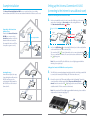
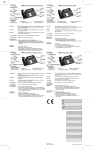
The Universal Connection Kit wireless UNO serves as a peripheral device to an existing
Universal Connection Kit DUO. There are two situations in which the UNO device can be used:
Setting up the Universal Connection Kit UNO
(connecting to the Internet in an additional room)
Preparation: Connecting the new Connection Kit UNO
1. DUO
Existing installation
TV-Box
1.
Router
WPS
DUO
3 meters distance
UNO
Already existing installation
WPS
WPS
DUO
UNO
WPS
WPS
2.a
2.
2.a Press the WPS button ( WPS ) on the existing DUO device (next to the router) and then
on the new UNO device a few seconds later (2.b).
The connection LEDs (
) start to flash and the devices connect automatically.
This process will take five minutes. The connection has been established once
5 min.
the
lights up green.
WPS
Router
TV-Box
WPS
TV-Box
Note: If the connection LED on the UNO device does not light up green within five
minutes, please repeat step 2.
Setting up the Connection Kit UNO in the room of your choice
DUO
Increasing the range
As an additional option, the range
of an existing Universal Connection
Kit DUO can be increased by
positioning the UNO between the
two DUO devices of the Universal
Connection Kit.
3.
The UNO device can now be unplugged and placed next to the device that you would like
to connect to the Internet (in this example, the TV-Box in another room).
4.
UNO
2.b
Connect the device to the TV-Box using the Ethernet cable (yellow plug). The wireless
connection will be established automatically. This process will take up to five
minutes. Once the connection LED ( ) lights up green, the connection has been 5 min.
established and the TV-Box is connected to the Internet.
WPS
Note: If the connection LED do not light up green within five minutes, please consult the
chapter entitled «Troubleshooting» (page 17).
DUO
Router
TV-Box
WPS
UNO
1
on
12V DC
1.5A
Restore
factory
default
settings
off
Power
15
HDMI
SCART out
Reset
2
3
4
Power On/Off
L
R
Audio
Video
Optical
Digital Audio
USB/eSATA
LAN
IR
4.
16
English
Connecting to the Internet in an
additional room
Thanks to the Universal Connection
Kit UNO, you can connect up to
four devices in another room to the
Internet via Ethernet connection
(for example the Swisscom TV-Box,
a computer or a game console).
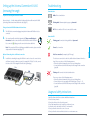
In the room in which the router is located, connect the UNO device to the mains
and position it at a distance of three metres from the existing DUO device.
2 min.
Wait two minutes until the device
flashes.