1
Use DAB+ menu
1
2
3
4
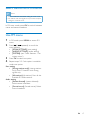
In DAB+ mode, press MENU//
DAB+ menu.
Show DAB+ information
to access
Press
/
to scroll through the menu
options:
• [STATION LIST] (station list): Tune
to a DAB+ radio station from a list of
available DAB+ stations, or scan DAB+
stations if no station is stored in the list.
• [FULL SCAN] (full scan): Scan and
store all available DAB+ radio stations.
• [MANUAL TUNE] (manual tune):
Tune to a specific channel/frequency
manually.
• [PRUNE] (prune): Remove invalid
stations from the station list.
• [SYSTEM] (system): Adjust system
settings (see ‘Other features - Use
system menu').
While listening to DAB+ radio, press
RDS/DISPLAY repeatedly to scroll through the
following information (if available):
»» Station name
»» Dynamic Label Segment (DLS)
»» Signal strength
»» Program type (PTY)
»» Ensemble Name
»» Frequency
»» Signal error rate
»» Bitrate
»» Codec
»» Time and date
Press OK to select an option.
Repeat steps 2-3 if sub-option is available
under one option.
Note
•• If the system is idle for 10 seconds, the menu exits.
EN
15