1
TM250HD
USER MANUAL
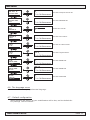
3.3 - Menu structure
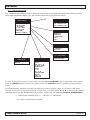
The TM250HD has different menus allowing easy access to the differents parameters and to change
them when necessary. Below you will find the structure of the different menus.
CONFIGURATION
MAIN MENU
IP-STREAMER
DVB-T MODULATOR
DVB-C MODULATOR
CONFIGURATION
DVB SETTINGS
IP SETTINGS
A/V SETTINGS
TS SETTINGS
LANGUAGE
DEFAULT CONFIG.
DVB SETTINGS
FREQUENCY
BANDWIDTH
ATTENUATION
DVB-T
DVB-C
IP SETTINGS
PROTOCOL
IP ADDRESS
UDP PORT
A/V SETTINGS
LANGUAGE
FRANCAIS
ENGLISH
TS SETTINGS
VIDEO SETTINGS
AUDIO SETTINGS
NIT RELEASE
NET ID.
ORIG. NET. ID.
NETWORK NAME
PROGRAM ID.
LCN ID.
L.C.N.
HD L.C.N.
SERVICE NAME
PMT PID
VIDEO PID
AUDIO PID
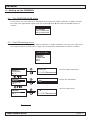
In order to go from one menu to the other use the MOVE UP/DOWN keys to select the menu option.
Press the ENTER button to select this option. Press the CANCEL button to go back to the previous
menu.
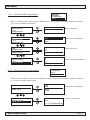
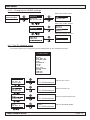
To set parameters, whether you have the option to select a specific value. In the other case some
number or text string should be entered. In that case, use the buttons u and t to move to the desired
character and press the ENTER button to confirm. Please note the following SPECIAL CHARACTERS :
8 confirm the modified value / X
bc
erase all / f
backspace
move cursor back or forward
ANTTRON ©2013
PAGE 6