1
•
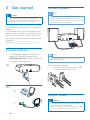
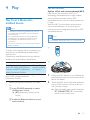
Connect the AC power cable to the wall
socket.
Install radio stations
automatically
When you connect power and no radio
stations are stored, the unit automatically begins
to store radio stations.
1
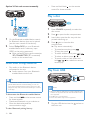
Prepare the remote control
Note
2
•• Risk of explosion! Keep batteries away from heat,
replaced. Replace only with the same or equivalent
type.
3
»» When all the available radio stations
are stored, the first preset radio station
is broadcast automatically.
Open the battery compartment.
Insert one AAA battery with correct
polarity (+/-) as indicated.
Close the battery compartment.
Set clock
1
2
Note
3
•• If you are not going to use the remote control for a
long time, remove the battery.
•• Batteries contain chemical substances, so they should
be disposed of properly.
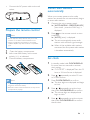
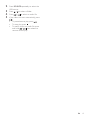
Press
on the remote control to start
installation.
»» [AUTO] (auto) is displayed.
»» The unit automatically stores radio
stations with sufficient signal strength.
sunshine or fire. Never discard batteries in fire.
•• Danger of explosion if the battery is incorrectly
1
2
Connect the unit to power supply.
»» [AUTO INSTALL - PRESS PLAY KEY]
(auto install - press the PLAY key) is
displayed.
4
5
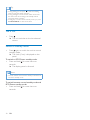
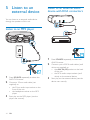
In standby mode, hold CLOCK/DISPLAY
for more than two seconds to activate
clock setting.
»» 'CLOCK SET' is displayed. Then, the 12
hour or 24 hour format is displayed.
Press / repeatedly to select 12 hour
or 24 hour format.
Press CLOCK/DISPLAY to confirm.
»» The hour digits are displayed and begin
to blink.
Press / repeatedly to set the hour,
then press CLOCK/DISPLAY to confirm.
»» The minute digits are displayed and
begin to blink.
Press / repeatedly to set the minute,
then press CLOCK/DISPLAY to confirm
the set clock.
EN
9