1
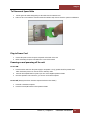
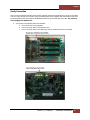
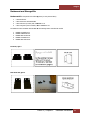
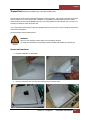
Roben-3
User Manual
Thunderbolt™ to PCIe Expansion & PCIe to PCIe Expansion
ROBEN-3
Magma
Contents
Preface .................................................................................................................................... 4
Advisories ............................................................................................................................ 4
Safety Instructions ................................................................................................................ 5
Chapter 1
Introduction ...................................................................................................... 7
Internal Hardware Parts ......................................................................................................... 8
Expansion Board and Backplane .............................................................................................. 9
PCI Express Features ............................................................................................................. 9
Thunderbolt Features............................................................................................................. 9
24 Lanes Available for 3 PCIE slots ........................................................................................ 10
Roben 3 – Thunderbolt Specifications ................................................................................. 10
Pre-Installation Information .................................................................................................. 11
Tools Required for Installation .............................................................................................. 11
Chapter 2
Hardware Installation...................................................................................... 11
3TX (3 Slot Thunderbolt – Expansion Only) ............................................................................ 12
Open Enclosure ................................................................................................................... 13
Install Thunderbolt Interface card ......................................................................................... 13
Install PCIe Cards ............................................................................................................... 13
Extra Power ........................................................................................................................ 14
High Power PCIe card installation .......................................................................................... 15
Plug-in Power Cord .............................................................................................................. 16
Connect Thunderbolt Cable................................................................................................... 17
Powering On and Off the Expansion Unit ................................................................................ 17
Hardware LEDs ................................................................................................................... 18
Thunderbolt Interface card LEDs ........................................................................................... 18
Link and Activity LEDs ......................................................................................................... 20
Thunderbolt Interface Card Installation .................................................................................. 22
Internal Front Fan (Control Settings) ..................................................................................... 23
Daisy Chaining .................................................................................................................... 24
Attaching Displays ............................................................................................................... 24
3TS (3 Slot Thunderbolt – Storage) ....................................................................................... 25
Controller Card Installation................................................................................................... 27
Plug-in Power Cord .............................................................................................................. 28
Thunderbolt Card Installation................................................................................................ 29
Thunderbolt Cable Installation .............................................................................................. 29
Roben 3 | 2
Magma
3TM (3 Slot Thunderbolt – Mac mini) ..................................................................................... 31
Lockable ILok ..................................................................................................................... 34
Installation of ILok Security Lock .......................................................................................... 34
Roben 3 PCI Express® Expansion ......................................................................................... 36
Roben 3 – PCI Express Specifications ................................................................................. 38
3PX2 (3 Slot iPass Expansion –Gen2) .................................................................................... 39
Expansion Interface Card Installation..................................................................................... 40
3PS (3 Slot iPass Storage – Gen2) ........................................................................................ 45
Rack-Ears Installation .......................................................................................................... 52
Rackmount and Storage Kits................................................................................................. 53
Securing the Cover .............................................................................................................. 55
Thermal Pad ....................................................................................................................... 56
Chapter 3
Verify Installation............................................................................................ 59
Hardware ........................................................................................................................... 59
Verify Link Status on Models: 3TX, 3TS, 3TM .......................................................................... 59
Verify Link Status on Models: 3PX & 3PS2 .............................................................................. 60
Software ............................................................................................................................ 61
How to check Magma device - Mac OS X ................................................................................ 61
How To Check PCIe cards - Mac OS X .................................................................................... 62
Thunderbolt Aware Driver is required for PCIe cards............................................................. 63
How to Check Magma Device - Windows 7 and 8 ..................................................................... 65
How To Check PCIe cards - Windows7 and 8 .......................................................................... 66
How to Configure SAS / SATA Raid ........................................................................................ 68
Disk Utility on Mac OS X....................................................................................................... 75
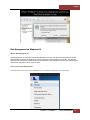
Disk Management on Windows OS......................................................................................... 78
What is Disk Management? ............................................................................................... 78
How To Access Disk Management: ..................................................................................... 78
Troubleshooting .................................................................................................................. 82
Chapter 4
How to Get More Help ...................................................................................... 86
Frequently Asked Questions (FAQ) ........................................................................................ 86
Contacting Technical Support ............................................................................................... 86
Returning Merchandise to MAGMA ......................................................................................... 86
Roben 3 | 3
Magma
Preface
Advisories
Five types of advisories are used throughout this manual to provide helpful information, or to alert you to the
potential for hardware damage or personal injury.
NOTE
Used to amplify or explain a comment related to procedural steps or text.
IMPORTANT
Used to indicate an important piece of information or special “tip” to help you
CAUTION
Used to indicate and prevent the following procedure or step from causing damage to the
equipment.
WARNING
Used to indicate and prevent the following step from causing injury.
DANGER or STOP
Used to indicate and prevent the following step from causing serious injury or significant data loss
Disclaimer: We have attempted to identify most situations that may pose a danger, warning, or caution condition in
this manual. However, Magma does not claim to have covered all situations that might require the use of a Caution,
Warning, or Danger indicator.
Roben 3 | Preface 4
Magma
Safety Instructions
Always use caution when servicing any electrical component. Before handling the Magma Expansion chassis, read the
following instructions and safety guidelines to prevent damage to the product and to ensure your own personal
safety. Refer to the “Advisories” section for advisory conventions used in this manual, including the distinction
between Danger, Warning, Caution, Important, and Note.
§
Always use caution when handling/operating the computer. Only qualified, experienced, authorized
electronics personnel should access the interior of the computer and expansion chassis.
WARNING
Never modify or remove the radio frequency interference shielding from your workstation or
expansion unit. To do so may cause your installation to produce emissions that could interfere with
other electronic equipment in the area of your system.
When Working Inside a Computer
1.
2.
3.
Before taking covers off a computer, perform the following steps:
Turn off the computer and any peripheral devices.
Disconnect the computer and peripheral power cords from their AC outlets or inlets in order to prevent
electric shock or system board damage.
In addition, take note of these safety guidelines when appropriate:
§
§
To help avoid possible damage to systems boards, wait five seconds after turning off the computer before
removing a component, removing a system board, or disconnecting a peripheral device from the computer.
When you disconnect a cable, pull on its connector or on its strain-relief loop, not on the cable itself. Some
cables have a connector with locking tabs. If you are disconnecting this type of cable, press in on the
locking tabs before disconnecting the cable. As you pull connectors apart, keep them evenly aligned to avoid
bending any connector pins. Also, before connecting a cable, make sure both connectors are correctly
oriented and aligned.
CAUTION
Do not attempt to service the system yourself except as explained in this manual. Follow installation
instructions closely.
Roben 3 | Preface 5
Magma
Protecting Against Electrostatic Discharge
Electrostatic Discharge (ESD) Warning
Electrostatic Discharge (ESD) is the enemy of semiconductor devices. You should always take
precautions to eliminate any electrostatic charge from your body and clothing before touching any
semiconductor device or card by using an electrostatic wrist strap and/or rubber mat.
Static electricity can harm system boards. Perform service at an ESD workstation and follow proper ESD procedures
to reduce the risk of damage to components. Magma strongly encourages you to follow proper ESD procedures,
which can include wrist straps and smocks, when servicing equipment.
You can also take the following steps to prevent damage from electrostatic discharge (ESD):
•
When unpacking a static-sensitive component from its shipping carton, do not remove the component’s antistatic packaging material until you are ready to install the component in a computer. Just before
unwrapping the anti-static packaging, be sure you are at an ESD workstation or are grounded.
•
When transporting a sensitive component, first place it in an anti-static container or packaging.
•
Handle all sensitive components at an ESD workstation. If possible, use anti-static floor pads and workbench
pads.
•
Handle components and boards with care. Don’t touch the components or contacts on a board. Hold a
board by its edges or by its metal mounting bracket.
Roben 3 | Preface 6
Magma
Chapter 1
Introduction
The ROBEN-3 is available in FIVE model configurations that include Thunderbolt™ and native PCI Express host
computer connection options. It has the potential to house three-full length, full-height Peripheral Component
Interconnect Express (PCIe) cards. There are three different ROBEN-3 models offering unique features for full
customization. The ROBEN-3 basic model offers the potential of (2) 5.25-in expansion bays, while the ROBEN-3
storage model offers (8) 2.5-inch hot swappable bays, and finally the ROBEN-3 Mac Mini version allows for a direct
integration of an Apple Mac Mini, making it the most versatile Thunderbolt™ product ever offered by Magma.
The ROBEN-3 has a rack-mountable aluminum chassis designed for integrated removable storage expansion, with
room for up to 8 hot pluggable 2.5” SSD, SAS or SATA hard drives. This added power can be channeled through
lightning fast Thunderbolt technology at 10Gbps, with the option of 20Gbps bandwidth with the roll-out of
Thunderbolt 2 capable devices like the new Mac Pro. With 3-Slot PCIe and internal storage expansion, ROBEN-3
enables the serious audio professional to transform their computer into a powerful workstation - a sidekick for the
creative hero.
Add a Mac mini
ROBEN-3 will also allow you the option to host a Mac mini within the chassis creating an integrated rackmount server
with direct Thunderbolt connection to 3-slot PCIe expansion slots. Mac mini external connectivity is provided through
the front and rear panels, including a secure I-Lok housing allowing you to lock your valuable application or plug-in
licenses right to the chassis.
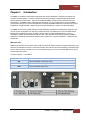
3 Variants of Roben 3 - Thunderbolt
Product Name
3TX
3TS
3TM
Description
3 Slot Thunderbolt (Expansion Only)
3 Slot Thunderbolt (Storage)
3 Slot Thunderbolt (Mac mini)
Roben 3 | Chapter 1
Introduction 7
Magma
Additional Chassis Features
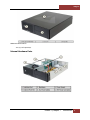
Two (2) 5.25” option bays
Internal Hardware Parts
Roben 3 | Chapter 1
Introduction 8
Magma
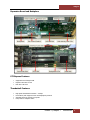
Expansion Board and Backplane
PCI Express Features
•
•
•
Supports three full-length cards
Physical connectors are x16
Each slot is x8 Gen 2
Thunderbolt Features
•
•
•
•
High-speed Thunderbolt connection – 10Gbps
Dual channel, with support for PCIe and DisplayPort protocols
Automatic power-up control by computer
Daisy-chain or end-point device
Roben 3 | Chapter 1
Introduction 9
Magma
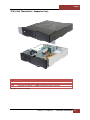
24 Lanes Available for 3 PCIE slots
Roben 3 – Thunderbolt Specifications
Item
Technology
Backplane
Interconnect Bandwidth
Host Connection
Cable
Enclosure
System Cooling
Power Supply Options
Environmental
MTBF
Regulatory Compliance
Supported Operating Systems
Warranty
Description
PCI Express Bus Specification Revision 2.0
PCI Local Bus Specification Revision 2.3
PCI Bridge Architecture Revision 1.2
(3) available full length/full height expansion slots, X8 PCIe Gen 2.0
Electrical - x8 PCIe
Physical – x16 PCIe
10Gbps (1.25 GB/s) Bi-directional
Host Side: Any Thunderbolt equipped computer with one or more Thunderbolt
ports
Expansion side: Two Thunderbolt connectors supporting one host connection
and one daisy chain out port / display port.
Thunderbolt cable sold separately
2U Aluminum Desktop – Black
14.25” Wide x 3.48” High x 17” Deep (363mm x 88.4mm x 432mm)
8.5 lbs or 3.6Kg
Tool-less cover removal. White power-on indicator front panel light
One 80mm 33.4 CFM Expansion Cards/Backplane Fan
Variable speed thermistor control option (or full speed)
540 Watt
100-240 VAC, 50-60 Hz Power Input
Four 4-pin Molex Connector
Two 6-pin + PCIe connector
Input Frequency: 50-60HZ
Input Current: 8.0A Max
DC Output: 540 Watts Max
+12V 45.0A maximum
-12V .5A maximum
+5V 24.0A maximum
+3.3V 24.0A maximum
5Vsb 3.0A maximum
Total power on +3.3V and 5V must not exceed 150W max
Ambient Temperature 0° to 50° C
Storage Temperature -55° to 125° C
Relative Humidity 5% to 85% non-condensing
35k hours
FCC Class A Verified
CE
RoHS Compliant
Windows 7, Windows8, Server and MacOS 10.6.8 or higher
30 day money back guarantee. 1 Year Return to factory
Roben 3 | Chapter 1
Introduction 10
Magma
Pre-Installation Information
Before using the Magma Expansion chassis you should perform the following steps:
Inventory the shipping carton contents for all of the required parts
Gather all of the necessary tools required for installation
Read this manual
•
•
•
Tools Required for Installation
To complete the installation of the Magma product you will need a Phillips-head screwdriver and ESD wrist strap to
prevent electrostatic discharge.
Chapter 2
Hardware Installation
The following steps will guide you through the installation of your Magma Expansion System.
CAUTION
Hardware installation shall be performed only by qualified service personnel.
Electrostatic Discharge (ESD) Warning
All add-in cards are susceptible to electrostatic discharge. When moving cards, it is best to carry the
cards in anti-static packaging. If you need to set a circuit card down, be sure to place it inside or on
top of an anti-static surface. For more information, see “Protecting Against Electrostatic Discharge”
in the Preface.
WARNING
High voltages are present inside the expansion chassis when the unit’s power cord is plugged into
an electrical outlet. Disconnect the power cord from the AC outlet before removing the enclosure
cover. Turning the system power off at the power on/off switch does not remove power to
components. High voltage is still present.
CAUTION
Before touching anything inside the enclosure, move to an ESD station and follow proper ESD
procedures. Failure to do so may result in electrostatic discharge, damaging the computer or its
components. For more information, see “Protecting Against Electrostatic Discharge” in the Preface.
Roben 3 | Chapter 2
Hardware Installation 11
Magma
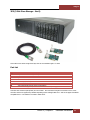
3TX (3 Slot Thunderbolt – Expansion Only)
Qty
1
1
1 set
Item
Power Cord
Thunderbolt Interface Card (Installed)
Rackmount Kit (Optional). For Roben
Roben-3 Rackmount model, see page 53
Thunderbolt cable is not included
Roben 3 | Chapter 2
Hardware Installation 12
Magma
Open Enclosure
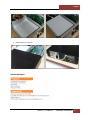
Loosen the thumbscrew that retains the top cover of the chassis and slide the lid towards you as shown below:
Install Thunderbolt Interface card
The thunderbolt Interface card is already installed for this model. No need to install the Thunderbolt Interface card
If you need to replace or install a Thunderbolt Interface card, go to Thunderbolt Interface card Installation on page
19. If you bought an expansion 3slot chassis with an Ipass interface card you have to remove it first prior to
installing the Thunderbolt Interface card.
Install PCIe Cards
Some card manufacturers recommend that you install their software driver prior to installing the card. If this is the
case, be sure to install the card driver before connecting Roben-3to the computer.
•
•
•
Slot 3 accepts all types of PCIe cards x1, x2, x4, x8 or x16
Slot 2 accepts all types of PCIe cards x1, x2, x4, x8 or x16
Slot 1 accepts all types of PCIe cards x1, x2, x4, x8 or x16 (next to Thunderbolt interface card)
Roben 3 | Chapter 2
Hardware Installation 13
Magma
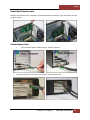
Remove slot covers and install PCIe cards.
Make sure that all cards are fully seated in their connectors. When correctly seated, there will be a firm resistance
when you pull up gently on the card. To keep the cards in place, secure them in the enclosure with their retaining
screws. After securing the cards verify that they do not touch each other.
Extra Power
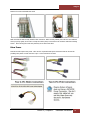
Some PCIe cards require extra power. There are four 4-pin Molex AUX power connectors that can be used for
providing extra power to cards. And Two 6-pin + 2 PCIe connectors for GPUs.
Roben 3 | Chapter 2
Hardware Installation 14
Magma
High Power PCIe card installation
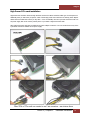
High Power PCIe cards also known as High End PCIe cards such as GPUs and other similar type of card requires an
additional power (or AUX Power) to operate. Most of these High power PCIe cards have an auxiliary power adapter
cables that are included with it when you buy them. If it is not available, there are 6-pin PCIE connectors built in to
the power supply that can be used to provide power to your GPUs or High Power PCIe cards.
Other High power PCIe cards may use different Aux power adapter connectors. You can connect them to any of the
4-pin Molex connectors available on the power supply.
Roben 3 | Chapter 2
Hardware Installation 15
Magma
Plug-in Power Cord
NOTE
If at all possible, plug all power cords from the expansion chassis and your host computer into
a shared power strip, preferably one that has surge and noise suppression circuitry built into
it.
1.
Plug in power cord to Roben-3. Make sure the Power Switch on the power supply is turned OFF.
2.
3.
Turn power supply switch to ON position.
Two green LED on the Interface card are illuminated. No LEDs are illuminated on the backplane.
Roben 3 | Chapter 2
Hardware Installation 16
Magma
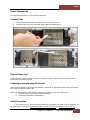
Connect Thunderbolt Cable
Attach Thunderbolt cable into either top or bottom port on the Roben-3. Plug in Display Monitor, DVI/HDMI, or
Display. If no display will be used, you can daisy chain other Thunderbolt devices. Plug in the other end of the
Thunderbolt cable to the Thunderbolt port on the computer.
Connect the Thunderbolt cable to one of the ports on the back of Roben 3 and connect the other end of the cable to
the Thunderbolt port on the computer. You can use the available Thunderbolt port for attaching a Thunderbolt
device or an external display monitor.
Powering On and Off the Expansion Unit
Roben-3 will automatically turns ON when the computer is turned ON. A White light located on the front panel will
shine when the expansion chassis is ON. Roben-3 will automatically turn OFF when the computer is turned OFF or
goes into Standby mode. If either end of the Thunderbolt cable is removed while the system is ON, the expansion
chassis will automatically power down.
The White light on the front of Roben-3 is not an ON (On-off push button), it simply indicates whether the chassis is
on or off. If either end of the Thunderbolt cable is disconnected, Roben-3 will automatically turn off.
Roben 3 | Chapter 2
Hardware Installation 17
Magma
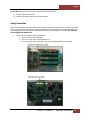
Verify Connection
1.
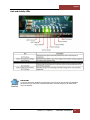
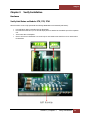
You should see four (or Five) Green LEDS illuminated on the interface card and three on the backplane. For
more information on LEDs go to Thunderbolt Interface Card LEDs on page 19 and Backplane LED on page
20
Hardware LEDs
Thunderbolt Interface card LEDs
IMPORTANT
If you are only seeing Two Green LEDs that are illuminated on the Thunderbolt Interface card after
the Magma Roben-3 is turned on, this indicates that there a hardware failure within your expansion
unit. Check your Thunderbolt cable, make sure it is connected firmly and the Thunderbolt Interface
card is seated in the PCIE slot properly.
Roben 3 | Chapter 2
Hardware Installation 18
Magma
Backplane LED
IMPORTANT
If you are only seeing One or Two Green LEDs that are illuminated on the Backplane after the
Magma Roben-3 is turned on, this indicates that there a powers supply problem or the standbypower cable is not attached to the interface card.
Roben 3 | Chapter 2
Hardware Installation 19
Magma
Link and Activity LEDs
IMPORTANT
If you have PCIE cards installed in the PCIe slot(s) and none of the Link UP LEDs are illuminated
this means that you either have a defective PCIE card or the PCIE card that is not seated all the
way in the PCIE slot.
Roben 3 | Chapter 2
Hardware Installation 20
Magma
Standby-power Cable
IMPORTANT
Make sure the standby-power cable is connected to the backplane and Thunderbolt Interface card.
If the Thunderbolt Interface card fails to turn ON you could be having a bad Thunderbolt Interface
card, faulty backplane or a defective standby-power cable / wires.
Roben 3 | Chapter 2
Hardware Installation 21
Magma
Thunderbolt Interface Card Installation
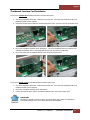
If you need to replace the thunderbolt Interface card follow these steps:
1.
2.
3.
4.
Turn off the Expansion chassis first. Disconnect the power cord. Disconnect the Thunderbolt cable from
Expansion chassis or from computer.
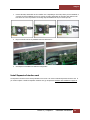
Unplug the Interface power cable from Thunderbolt Interface card. Unscrew to remove the interface card.
Plug-in the Thunderbolt Interface card in PCIE slot#0. This is the designated slot for the interface card.
Installing the Interface card in a non-designated slot will cause the system to malfunction.
Plug-in the power cable Thunderbolt Interface card. Secure the interface card.
If you need to install a new Thunderbolt Interface card follow these steps
1.
2.
3.
Turn off the Expansion chassis first. Disconnect the power cord. Disconnect the Thunderbolt cable from
Expansion chassis or from computer.
Plug-in the Thunderbolt Interface card in PCIE slot#0.
Connect the Interface power cable to Thunderbolt Interface card. Secure the interface card.
IMPORTANT
The Roben 3 expansion unit will not power up if the Interface power cable is not attached to
Thunderbolt Interface card or if it is disconnected from the backplane.
Roben 3 | Chapter 2
Hardware Installation 22
Magma
Internal Front Fan (Control Settings)
Some PCI Express cards produce substantial heat and must be cooled properly to eliminate over heating problem.
One Fan is located in the front of the enclosure to provide cooling required for the hottest PCI Express Cards. Some
graphics cards GPU's require these fans to be at full capacity to prevent over-heating.
As safety measure, Magma provides ROBEN-3 with the fan functioning at full speed (MAX). However, noise is a
concern for many applications. For noise sensitive applications, we have provided this Thermistor setting (THERM) to
help alleviate fan noise in situations when a low heat producing card is installed in Magma Roben-3.
By default, the fan will run at maximum speed when the DIP Switch is to MAX that control fan speed. When setting
to Thermistor (THERM), the fan speed is controlled by the temperature inside the enclosure. Thermally controlled
fans will run at maximum speed when the Thermistor senses temperature at or above an upper limit. Fans will run
at minimum speed if the temperature is at or below lower limit.
To set the FAN (speed) locate the red DIP switch SW500 on the expansion board. MAX = Fan runs at fast mode.
THERM = Fan is set to Thermistor controlled.
The DIP switch SW500 controls the front fan of the Roben 3 expansion unit.
Roben 3 | Chapter 2
Hardware Installation 23
Magma
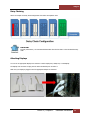
Daisy Chaining
Here’s an example of a Daisy Chain Configuration of 6 Roben-3T Expansion units
IMPORTANT
For best performance, it is recommended that Roben-3be the first device in the Thunderbolt Daisychain.
Attaching Displays
You can use an appropriate Display Port connector to add a Display Port, HDMI, DVI, or VGA Display.
The Display Port connector can plug into the other Thunderbolt port on Roben-3
Make sure your display is plugged in and the appropriate adapter is connected.
Roben 3 | Chapter 2
Hardware Installation 24
Magma
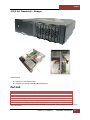
3TS (3 Slot Thunderbolt – Storage)
Chassis Features
1.
2.
Eight (8) 2.5” hot swap drive bays
Supports up to eight (8) SATA/SAS HDD or SSD drives.
Part List
Qty
Item
1
Thunderbolt Interface card (Installed)
1
Power Cord
8
Drive Trays (Installed)
2
SAS Cable (Installed)
32
3mm Centering Screws for Drives (32 quantities)
1 set
Rackmount Kit (Optional). For Roben
Roben-3 Rackmount model, see page 53
Thunderbolt Cable, Controller card and Drives (SATA/ SSD) are not included. We recommend the standard 2.5 in
SSD or SATA drives.
Roben 3 | Chapter 2
Hardware Installation 25
Magma
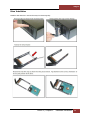
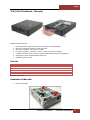
Drive Installation
Install the disk drives first. Remove drive tray from the storage bay.
Roben 3 | Chapter 2
Hardware Installation 26
Magma
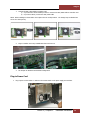
Controller Card Installation
Use a disk controller card that can support 8 drives. We recommend using Areca Controller card or a PCIe controller
card that is supported by Windows Operating system and Apple Mac OS X. And has an Apple Thunderbolt
compatible driver. Below are pictures of two Arecas PCIe Controller cards.
1.
2.
8-port Controller card support 8 drives.
4-port Controller card support 4 drives.
Roben 3 | Chapter 2
Hardware Installation 27
Magma
1.
Connect the SAS / SATA Cable to controller card.
a) If you have four drives installed you have to connect one SAS / SATA Cable to controller card.
b) If you have 8 drives, connect two SAS / SATA cable.
NOTE: When installing four drives make sure to place them in one-bay location. The storage bays are divided into
two or four drives per bay.
2.
Plug-in controller card in any available PCIe slots and secure it.
3.
See Chapter for Hardware and Software Configuration
Plug-in Power Cord
1.
Plug in power cord to Roben-3. Make sure the Power Switch on the power supply is turned OFF.
Roben 3 | Chapter 2
Hardware Installation 28
Magma
2.
3.
Turn power switch to ON position.
Thunderbolt expansion unit goes into stand-by mode when the power supply is turned ON. Two green LEDs
on the Interface card are illuminated. No LEDs are illuminated on the backplane.
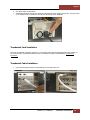
Thunderbolt Card Installation
Roben-3T (Thunderbolt 3 Slot PCIe expansion) + 8 Drive Bays comes with Thunderbolt Interface card installed. If
you need to install a Thunderbolt Interface card go to Thunderbolt Interface Card Installation on page 22 for
instructions.
Thunderbolt Cable Installation
1.
Connect the thunderbolt cable to thunderbolt port on the back of the unit.
Roben 3 | Chapter 2
Hardware Installation 29
Magma
2.
Connect the other end of the cable to host computer via thunderbolt port
Powering on and powering off the unit
Roben-3 will automatically turns ON when the computer is turned ON. A White light located on the front panel will
shine when the expansion chassis is ON.
Roben-3 will automatically turn OFF when the computer is turned OFF or goes into Standby mode.
A. Two green LEDs on the Interface card are illuminated.
B. No LEDs are illuminated on the backplane
Verify Connection
2.
You should see four (or Five) Green LEDS illuminated on the interface card and three on the backplane.
For more information on LEDs go to Thunderbolt Interface Card LEDs on page 18 and Backplane LED on
page 19
Roben 3 | Chapter 2
Hardware Installation 30
Magma
3TM (3 Slot Thunderbolt – Mac mini)
Additional Chassis Features
1.
2.
3.
4.
5.
6.
7.
Mounting bracket for internal housing of Mac mini (Mac mini sold separately).
Mac mini connectivity provide to front and rear panels.
Rear panel: 2 USB 3.0, 1 Gb Ethernet, 1 HDMI.
Front panel: 2 USB 3.0, 1 Firewire, 1 Audio in, 1 Audio out, power on/off button.
Lockable iLok secure location using one of the front panel USB ports (lock sold separately.
Single power cord for expansion slots and Mac mini.
Thunderbolt cable included.
Part List
Qty
Item
1
Thunderbolt Interface card (Installed)
1
Power Cord
1
Thunderbolt Cable (Installed)
1 set
Rackmount Kit (Optional). For Roben-3 Rackmount model, see page 53
1
Thermal Pad, see page 56
Mac mini not included.
Installation of Mac mini
1.
Remove Top bracket
Roben 3 | Chapter 2
Hardware Installation 31
Magma
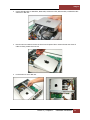
2.
Connect all Audio Cable, 4 USB Cables, HDMI cable, and Firewire cable, Ethernet Cable, Thunderbolt Cable
and Power to Mac mini.
3.
Place the Mac mini inside the chassis as shown from the picture below. Position the Mac mini where all
cables are facing towards the front end.
4.
Put the bracket to secure Mac mini.
Roben 3 | Chapter 2
Hardware Installation 32
Magma
Install Thermal Pad
Go to page 56 for instructions on how to install Thermal pad.
Connect Cable
1.
2.
Connect the thunderbolt cable to thunderbolt port on the back of the unit.
Connect the other end of the Thunderbolt cable to Mac mini thunderbolt port.
Plug-in Power Cord
Connect the power cord to the power receptacle on the back of the unit. The Mac mini does not have a Rocker
On/Off switch on the back of the unit.
Powering on and powering off the unit
Roben-3 will automatically turns ON when the computer is turned ON. A White light located on the front panel will
shine when the expansion chassis is ON.
Roben-3 will automatically turn OFF when the computer is turned OFF or goes into Standby mode.
C. Two green LEDs on the Interface card are illuminated.
D. No LEDs are illuminated on the backplane.
Verify Connection
1. You should see four (or Five) Green LEDs illuminated on the interface card and three on the backplane. For
more information on LEDs go to Thunderbolt Interface Card LEDs on page 18 and Backplane LED on page 19.
Roben 3 | Chapter 2
Hardware Installation 33
Magma
Lockable ILok
This is another feature of Roben 3 Mac mini that allows you to lock your valuable application or plug-in licenses right
to the chassis. The Ilok security housing is located on the front panel USB port as shown from the picture below.
IMPORTANT
The ILok security lock is sold separately and it comes with an installation guide.
Installation of ILok Security Lock
1.
Using a flat screwdriver, push the metal tab to remove from the notch as shown from the picture below.
2.
Install or insert ILok into USB Port as shown from pictures below.
Roben 3 | Chapter 2
Hardware Installation 34
Magma
3.
Mount ILok Security lock
4.
Push the key and rotate counter clockwise until it stops as shown from the pictures below.
5.
Pull the Key out.
Roben 3 | Chapter 2
Hardware Installation 35
Magma
Roben 3 PCI Express® Expansion
Ideal connection for small, local networks that require high-speed PCIe connectivity.
The ROBEN-3 PCI Express Expansion is available in two model configurations. A standard PCI Express Expansion
model that offers the potential of (2) 5.25-in expansion bays and can accommodate three-full length, full-height
Peripheral Component Interconnect Express (PCIe) cards. The PCIExpress Expansion-Storage model offers (8) 2.5inch hot swappable bays.
•
•
•
•
Connect PCI Express Host to Expansion over cable
Support speeds up to 40Gbps
Use same PCIe interface card for both sides of the connection
Industry standard iPass cable
Two Variants of Roben-3 PCI Express
Product Name
3PX2
3PS2
Description
3 Slot iPass – Expansion Only (“2”stands for Gen2). Non-Thunderbolt
3 Slot iPass – Storage (“2” stands for Gen2). Non-Thunderbolt
Use Magma’s PCI Express Expansion to create a super-fast PCIe connection outside the computer
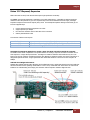
The Roben 3 PCIe x8 Gen 2 Expansion is the perfect solution for creating a super-fast local PCIe connection from a
host computer to a target PCI Express device. The Magma 01-04978-03 interface card installs into any x8 or x16
PCIe slot in the host computer motherboard and the other Magma 01-04978-03 interface card can be inserted into a
designated upstream PCIe slot. A high-speed iPass cable allows data transfers to and from the host computer at
40Gbps.
Onboard Visual Diagnostic Features
Multiple LEDs and dip switches make debugging and troubleshooting easy. Visible LEDs show the PCIe link width that
each PCIe interface card is operating. Other LEDs for “Loss of Lock,” “Reset ON” and “Clock Good” are useful visual
indicators for troubleshooting and verifying the connection without expensive software diagnostic tools.
Roben 3 | Chapter 2
Hardware Installation 36
Magma
How it Works
Features:
•
•
•
•
•
•
•
High-speed x8 PCI Express connection
Low profile bracket provides for easy installation in low profile computers
Easily visible LEDs indicate correct installation and PCIe link width
Low power consumption - less than 4 Watts
LEDs show status of connection for quick debug- reset indicator, clock indicator, link width indicator
Supports Spread Spectrum Clocking, LOS (Loss of Signal), LOL (Loss of Lock Indicator)
Low Latency and Low Jitter
Benefits:
•
•
•
•
•
•
•
•
Transparent extension of PCI Express signals outside the computer
No software required - connection is automatically recognized and configured by system BIOS
Attach large power hungry PCI Express cards to computer with limited card space
Low latency PCIe connection between host and target without using bridges or switches
Same PCIe card used for both the host and expansion device
Interface Card can be used with any PCIe compliant expansion chassis - Magma
Automated x1, x4 and x8 link negotiation for PCI Express Gen1 and Gen2
Ability to override automatic PCIe link training through dip-switch settings
Roben 3 | Chapter 2
Hardware Installation 37
Magma
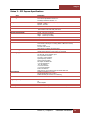
Roben 3 – PCI Express Specifications
Item
Technology
Backplane
PCIe Link Cards
Interconnect Bandwidth
Physical Characteristics
Cable
Enclosure
System Cooling
Power Supply Options
Environmental
MTBF
Regulatory Compliance
Supported Operating Systems
Warranty
Description
PCI Express Bus Specification Revision 2.0
PCI Local Bus Specification Revision 2.3
PCI Bridge Architecture Revision 1.2
(3) available full length/full height expansion slots, X8 PCIe Gen 2.0
Electrical - x8 PCIe
Physical – x16 PCIe
Form Factor: X8 PCIE, low Profile, half length
LED Indicators: PCIe Link width, reset clock
40Gbps (PCI Express Gen2)
Length 139.7mm (5.5 inches)
Width
12.7mm (0.5 inches)
Height 69.9mm (2.75 inches)
X8 Ipass Cable
1-meter or 3 meter long
2U Aluminum Desktop – Black
14.25” Wide x 3.48” High x 17” Deep (363mm x 88.4mm x 432mm)
8.5 lbs or 3.6Kg
Tool-less cover removal
White power-on indicator front panel light
One 80mm 33.4 CFM Expansion Cards/Backplane Fan
Variable speed thermistor control option (or full speed)
540 Watt
100-240 VAC, 50-60 Hz Power Input
Four 4-pin Molex Connector
Two 6-pin + PCIe connector
Input Frequency: 50-60HZ
Input Current: 8.0A Max
DC Output: 540 Watts Max
+12V 45.0A maximum
-12V .5A maximum
+5V 24.0A maximum
+3.3V 24.0A maximum
5Vsb 3.0A maximum
Total power on +3.3V and 5V must not exceed 150W max
Ambient Temperature 0° to 50° C
Storage Temperature -55° to 125° C
Relative Humidity 5% to 85% non-condensing
35k hours
FCC Class A Verified
CE
RoHS Compliant
MacOS 10.6.8 or higher
30 day money back guarantee. 1 Year Return to factory
Roben 3 | Chapter 2
Hardware Installation 38
Magma
3PX2 (3 Slot iPass Expansion –Gen2)
Part List
Qty
1
1
1
1
1 set
Item
Expansion Interface card (Installed)
Power Cord
Ipass Cable
Host Interface card
Rackmount Kit (Optional). For Roben-3 Rackmount model, see page 53
Computer is not included.
This model cannot be connected to laptop. It uses an Ipass cable that plugs into a Host Interface card which is
installed in a PCIE slot of a motherboard Host Computer (Desktop, PC, Workstation, Sever, and similar form factors).
Roben 3 | Chapter 2
Hardware Installation 39
Magma
Installation
Expansion Interface Card Installation
By default the Expansion Interface card is already installed for this model. No need to install the Expansion
Interface card. Host Interface card (HIF), is the same exact card as the EIF only that its SW1 switch is set to
“ON=EXP.” The expansion system will NOT function if SW1 is set to OFF=HOST.
If you need to replace or install an Expansion Interface card follow these steps.
1.
2.
3.
4.
Turn off the Expansion chassis first. Disconnect the power cord. Disconnect the Thunderbolt cable from
Expansion chassis or from computer
Unscrew the Expansion Interface
Install new Expansion Interface card
Plug-in the card in PCIE slot#0. This is the designated slot for the interface card. Installing the Interface
card in a non-designated slot will cause the system to not operate
Roben 3 | Chapter 2
Hardware Installation 40
Magma
Host Interface card Installation
Begin the installation of your PCI Express (PCIe) host card by first powering down your computer.
The PCIe host card is a “half-height,” x8-capable PCIe card mounted to a “full-height” bracket as shown below.
For low profile case applications, you may need to change the mounting bracket to the low profile bracket that
shipped with your system. This is done by removing the screws that hold the card to the bracket. Be sure
you are using proper ESD procedures when completing this action.
WARNING
YOU MUST ONLY INSTALL THE PCIe HOST CARD INTO A PCI EXPRESS SLOT.
Only use Interface card WITH bracket. This will ensure that your PCIe host card can only be
inserted into a PCIe slot. Although PCI Express cards without brackets may fit into conventional PCI
slots, you run the risk of damaging the PCI Express host card if you insert it into a PCI slot.
1.
2.
Once the host computer is off and all power cords are disconnected from the AC outlet, remove the cover.
Check the red DIP switch (SW1) on the interface card, this should be set to OFF= HOST.
Roben 3 | Chapter 2
Hardware Installation 41
Magma
3.
Insert the PCI Express host card into a vacant x8 (or x16) PCIe slot by gently pushing the card until it is
firmly seated. Then secure the card to the slot with a mounting screw.
Connect Ipass Cable
Proper way of connecting the Ipass cable to Interface card, see pictures below.
1.
Connect the Ipass cable to Expansion port on the back of the unit.
Roben 3 | Chapter 2
Hardware Installation 42
Magma
2.
Connect the other end of the cable to host computer via Host Interface card.
To Disconnect Ipass Cable
1.
2.
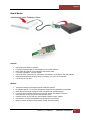
Pull the green tab while slowly pulling out the cable from the interface card.
Failure to do so can break the connector inside the interface card, which can cause the system to
malfunction.
Plug-in Power Cord
1.
2.
Connect the power cord to the power receptacle on the back of the unit.
Before connecting the power cord make sure to turn off the switch.
Powering on and powering off the unit
NOTE: Always turn on the chassis first prior to turning on the host computer.
To Turn ON:
1.
2.
3.
Press the power supply Rocker switch to On position. The (I) symbol should be pressed down.
When the chassis power is on the unit is set to stand-by mode
Press the front On/Off switch to power up or turn on the Magma expansion chassis.
Once the expansion unit is turned on, you can turn on the Host computer.
Roben 3 | Chapter 2
Hardware Installation 43
Magma
To Turn Off (Always power down the Host computer first before the chassis.)
1.
2.
Press Off or shutdown computer
Press the front On/Off switch on the expansion chassis
Verify Connection
Once you have installed the Interface cards correctly and both computer and expansion are running, the next thing
to do is to check the LED Link up status. Verify the following LEDs on the expansion and host interface cards. Host
Card and Expansion card with proper link established should show up with FIVE solid green LEDs. The Interface
card is plugged into X8 PCIe slot.
1.
You should see the following LEDs are illuminated:
a. Three green LEDs on the backplane
b. Four to Five green LEDs on the Expansion card
c. Four to Five green LEDs on the HOST card, which is installed inside the host computer
Roben 3 | Chapter 2
Hardware Installation 44
Magma
3PS (3 Slot iPass Storage – Gen2)
This model comes with 8 storage drive bays that can accommodate eight 2.5” drives.
Part List
Qty
1
1
1
1
8
2
32
1 set
Item
Expansion Interface card (Installed)
Power Cord
Ipass Cable
Host Interface card
Drive Trays (Installed)
SAS Cable (Installed)
3mm Centering Screws for Drives (32 quantities)
Rackmount Kit (Optional). For Roben-3 Rackmount model, see page 53
Controller card and Drives (SATA/ SSD) are not included. We recommend using Areca Controller card or a PCIe
controller card that is supported by Windows Operating system and Apple Mac OS X. And has an Apple Thunderbolt
compatible driver. Use standard 2.5 in SSD or SATA drives.
Roben 3 | Chapter 2
Hardware Installation 45
Magma
Drive Installation:
Install the drive first. Remove drive tray from the storage bay.
Roben 3 | Chapter 2
Hardware Installation 46
Magma
Controller Card Installation:
Use a disk controller card that can support 8 drives. We recommend using Areca Controller card or a PCIe controller
card that is supported by Windows (Windows 7 and Windows 8) Operating system and Apple Mac OSx. When using
with Apple Computer make sure it has a Thunderbolt compatible driver. Below are pictures of two Arecas PCIe
Controller cards.
1.
2.
8-port Controller card support 8 drives.
4-port Controller card support 4 drives.
Roben 3 | Chapter 2
Hardware Installation 47
Magma
1.
Connect the SAS / SATA Cable to the controller card. Depending on how many drives you have installed. If
you have four drives installed you have to connect one SAS / SATA Cable to controller card. Make sure all
four drives are in one bay location. The storage bays are divided into two, four drives per bay.
2.
Plug-in controller card in any available PCIe slots and secure it.
3.
See Chapter for Hardware and Software Configuration
Install Expansion Interface card
The Expansion Interface card is already installed for this model. No need to install the Expansion Interface card. If
you need to replace or install an Expansion Interface card, go to Expansion Interface card Installation on page 40.
Roben 3 | Chapter 2
Hardware Installation 48
Magma
Install Host Interface card
Install the Host Interface card in a PCIE slot of a motherboard inside the computer. Plug in the Interface card into
any X8 or X16 slot.
Connect Ipass Cable
1.
2.
Connect the Ipass cable to Expansion port on the back of the unit.
Connect the other end of the cable to host computer via Host Interface card.
Roben 3 | Chapter 2
Hardware Installation 49
Magma
To Disconnect Ipass Cable
1.
2.
Pull the green tab while slowly pulling out the cable from the interface card.
Failure to do so can break the connector inside the interface card; this can cause the system to malfunction.
Plug-in Power Cord
1.
2.
Connect the power cord to the power receptacle on the back of the unit.
Before connecting the power cord make sure to turn off the switch.
Powering on and powering off the unit
To Turn ON:
1.
2.
3.
Press the Rocker switch on the power supply to On position. The (I) symbol should be pressed down.
When the chassis power is on the unit is set to stand-by mode
Press the front On/Off switch to power up or turn on the Magma expansion chassis.
Once the expansion unit is turned on, you can turn on the Host computer.
To Turn Off (Always power down the Host computer first before the chassis.)
1.
2.
Press Off or shutdown computer
Press the front On/Off switch on the expansion chassis
Roben 3 | Chapter 2
Hardware Installation 50
Magma
Verify Connection
Once you have installed the Interface cards correctly and both computer and expansion are running, the next thing
to do is to check the LED Link up status. Verify the following LEDs on the expansion and host interface cards. Host
Card and Expansion card with proper link established should show up with FIVE solid green LEDs. The Interface
card is plugged into X8 PCIe slot.
2.
You should see the following LEDs are illuminated:
d. Three green LEDs on the backplane
e. Four to Five green LEDs on the Expansion card
f. Four to Five green LEDs on the HOST card, which is installed inside the host computer.
Roben 3 | Chapter 2
Hardware Installation 51
Magma
Rack-Ears Installation
1.
Remove the left and right metal brackets as shown from the pictures below.
2.
Mount Left and right rack ears. Use the existing screws on the unit to secure the rack ears.
3.
Mount the left and right extender rails to rear panel of the unit as shown from the pictures below.
Roben 3 | Chapter 2
Hardware Installation 52
Magma
Rackmount and Storage Kits
Rackmount kit is composed of the following items (or sees pictures below)
1.
2.
3.
4.
2 Front Rack Ears
2 Rear Inner Ears with SCREW M4
2 Rear rack Ears (4 inches) with 4 SCREWS 10
10-32
2 Rear Long Ears (8 inch extender) with 4 SCREWS 10
10-32
The Rackmount kit is available and included for the following Roben
Roben-3 Rackmount models.
1.
2.
3.
4.
5.
ROBEN-3TX Rackmount
ROBEN-3TM Rackmount
ROBEN-3PX2 Rackmount
ROBEN-3TS Rackmount
ROBEN-3PS2 Rackmount
Front Ear, QTY 2
Rear Inner Ear, QTY 2
Roben 3 | Chapter 2
Hardware Installation 53
Magma
Rear Ear Short (4 inch extender), QTY 2
Rear Ear Long (8 inch extender), QTY 2
Storage Kit comes with 32 screws for mounting the disk drives. This is only available for ROBEN
ROBEN-3TS
3TS Rackmount
and ROBEN-3PS2 Rackmount.
For disk drive installations go to page 26 or page 46.
Note: You can buy the Rackmount kit for standard Roben
Roben-3 Desktop model. Visit www.magma.com or contact our
Sales Team for pricing and availability.
Roben 3 | Chapter 2
Hardware Installation 54
Magma
Securing the Top Cover
It is best to secure the top cover with the three thumb screws on the back of the unit when carrying, transporting or
shipping the expansion unit. If required, additional retention of the cover may be achieved using the four mounting
holes under the enclosure.
NOTE: All Roben 3 models come with the 4 mounting screws (enclosed in a small plastic bag) for the option of
securing the bottom part of the cover to the chassis.
1.
Turn over the expansion chassis to expose the bottom part where the mounting holes are located as shown for
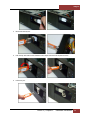
the pictures below.
2.
Install the screws to their designated mounting holes to secure the bottom part of the cover as shown from the
pictures below.
Roben 3 | Chapter 2
Hardware Installation 55
Magma
Thermal Pad (thermally conductive pad or thermal interface pad)
Thermal pads are used to reduce operating temperature in electronic device. They aid the conduction of heat away
from the component or device being cooled. Installation of the MAGMA provided Thermal pad creates surface
contact between the Mac mini and ROBEN metal top cover, which spreads the heat from Mac mini to the top cover,
increasing the effective cooling of the Mac mini.
Use of the provided Thermal Pad is required to dissipate heat from the Mac mini, to ensure operating temperatures
remain within specification.
The Thermal Pad is silicone-based material.
WARNING
Silicone is hypo allergenic material which can cause allergic reactions.
It is highly recommended to use hand gloves before handling and installing the Thermal pad.
Thermal Pad Installation
1. Remove cellophane on both sides.
2.
Place the thermal pad on top of Mac mini as shown from the pictures below.
Roben 3 | Chapter 2
Hardware Installation 56
Magma
3.
Install and secure Top Cover
Thermal Pad Specs
Roben 3 | Chapter 2
Hardware Installation 57
Magma
Roben 3 | Chapter 2
Hardware Installation 58
Magma
Chapter 3
Verify Installation
Hardware
Verify Link Status on Models: 3TX, 3TS, 3TM
When the Roben-3 unit is fully operational the following GREEN LEDs are illuminated (Solid Green).
•
•
•
•
Four Solid Green LEDs on Interface card are illuminated.
Five Solid Green LEDs are on, if an external display device is attached to Thunderbolt port of the expansion
unit.
Three Green LEDs on backplane.
SLOT 0 Link UP Led is illuminated. You would only see one SOLID Green LED if there are no PCIE cards in
the PCIE slots.
Roben 3 | Chapter 3
Verify Installation 59
Magma
Verify Link Status on Models: 3PX & 3PS2
Once you have installed the Interface cards correctly and both computer and expansion are running, the next thing
to do is to check the LED Link-up status. Verify the following LEDs on the expansion and host interface cards. Host
Card and Expansion card with proper link established should show up with FIVE solid green LEDs. The Interface card
is plugged into X8 PCIe slot
Onboard Visual Diagnostic Features
Multiple LEDs and Dip switches make debugging and troubleshooting easy. Visible LEDs show the PCIe link width
that each PCIe interface card is operating. Other LEDs for "Loss of Clock", "Reset ON", and "Clock Good" are useful
visual indicators for troubleshooting and verifying the connections without expensive software diagnostic tools.
Roben 3 | Chapter 3
Verify Installation 60
Magma
Software
How to check Magma device - Mac OS X
IMPORTANT
Magma requires no driver in Apple Mac Operating System.
To verify a successful installation of Magma Roben
Roben-3
3 on Mac select “About This Mac” under the Apple Icon.
1.
Your first step will vary depending on which version of Mac OS X you are using:
Mac OS X 10.6.8 Snow Leopard or earlier:
•
Open Apple System Profiler by choosing About this Mac from the Apple ( ) menu. Then, click More Info.
OS X Lion 10.7 or later:
•
2.
Open System Information by choosing About this Mac from the Apple ( ) menu. Then, click System Report
Click Thunderbolt
Roben 3 | Chapter 3
Verify Installation 61
Magma
How To Check PCIe cards - Mac OS X
IMPORTANT
For Mac OS, a driver modification is required from the PCIe card provider. A Mac OS driver that is
“Thunderbolt Aware” is required so the PCIe hardware will be recognized by Mac OS through
Thunderbolt™ Technology
1.
Your first step will vary depending on which version of Mac OS X you are using:
Mac OS X 10.6.8 Snow Leopard or earlier:
•
Open Apple System Profiler by choosing About this Mac from the Apple ( ) menu. Then, click More Info.
OS X Lion 10.7 or later:
•
2.
Open System Information by choosing About this Mac from the Apple ( ) menu. Then, click System Report
Click PCI cards
Roben 3 | Chapter 3
Verify Installation 62
Magma
Thunderbolt Aware Driver is required for PCIe cards
For Mac OS, a Thunderbolt Aware (Compatible) driver is required because it allows PCIe cards to be detected in
Roben-3. Ensure you have a “Thunderbolt Aware or Thunderbolt Compatible” driver from the PCIe card
manufacturer otherwise the PCIe card will not be functional.
If the driver is installed, make sure it supports Thunderbolt. If the driver does not support Thunderbolt you will see a
message “Driver Installed: No
Click on the specific PCIe card in question to see if it’s Thunderbolt Compatible. If it shows “Yes” then it’s compatible,
if it shows “No”, the PCIe card will not be visible in Roben-3.
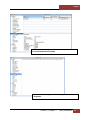
System Profiler showing two PCIE cards with thunderbolt
compatible drivers installed
NOTE
Magma does not provide nor supply any third party PCIe drivers. If you need driver you must
contact the vendor or manufacturer of the PCIE card. If you would like to determine whether the
3rd party PCIE card has a Thunderbolt Compatible driver or not you must also contact the vendor or
manufacturer of the PCIe card.
Roben 3 | Chapter 3
Verify Installation 63
Magma
System Profiler showing two PCIE cards with One PCIe card with
a non-thunderbolt driver installed
System Profiler showing no PCIe cards being detected or
recognized.
Roben 3 | Chapter 3
Verify Installation 64
Magma
How to Check Magma Device - Windows 7 and 8
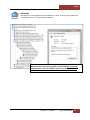
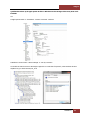
Open ACPI (BIOS) à Open PCI BusàClick the ‘+’ sign several times until your reach a PCI Express Root Port with a
PCI Standard PCI-to-PCI Bridge beneath it.
If the verification is successful, you can install 3rd Party cards as well as auxiliary peripherals, such as hard drives
into the chassis.
If, however, the installation was unsuccessful, you may not see the PCI to PCI Bridge, or it will have a small yellow
symbol in front of it as shown below.
IMPORTANT
Magma requires no driver in Windows Operating System, Unix OS, Linux and other flavor of
Operating Systems.
Screenshot of Windows Device Manager showing Magma Thunderbolt
Expansion device is being recognized / detected (No PICe cards installed).
Roben 3 | Chapter 3
Verify Installation 65
Magma
How To Check PCIe cards - Windows7 and 8
No special drivers have been required for Thunderbolt compatibility with Windows 7. As a general rule, if the PCIe
card works in a workstation using Windows, it will most likely work with ExpressBox 3T, using Windows.
Screenshot of Windows Device Manager showing Magma Thunderbolt
Expansion device is being recognized / detected with third party PCIe
card with driver installed and configured correctly
Roben 3 | Chapter 3
Verify Installation 66
Magma
IMPORTANT
Third party driver can be obtained from the manufacturer / vendor of the PCIe card. Magma does
not supply the driver for 3rd party PCIe card / hardware.
Screenshot of Windows Device Manager showing Magma Thunderbolt
Expansion device is being recognized / detected with third party PCIe
card with Error. This error indicates either the driver is not installed,
missing or corrupted.
Roben 3 | Chapter 3
Verify Installation 67
Magma
How to Configure SAS / SATA Raid
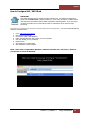
IMPORTANT
This chapter describes how to configure the disk controller card. This software configuration is
specific only to vendor Areca. Different vendors (i.e. ATTO, Intel, LSI and etc.) of disk controller
cards have their own software utility for RAID configuration and management. If you are using a
non-Areca card make sure to check with the vendor or manufacturer of the card for further
instructions.
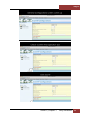
Areca has its own Graphical User Interface for RAID configuration and management. You need to install Archttp first,
follow the instructions below
1.
2.
3.
4.
5.
6.
7.
8.
Go to http://www.areca.com.tw
Click Support & Downloads
Go to Driver / Utility, select Windows
Under "Windows-ArcHTTP" click, Version V2.3.4 to download
Save File "winhttp_V2.3.4_130325.zip"
Extract the File
Click Install.exe to install Archttp
After Installation, reboot Computer
NOTE: These steps are applicable to Windows 7, Windows 8 and Mac OSx. Use Firefox / Mozilla as
your Browser to launch the ARCHTTP.
Roben 3 | Chapter 3
Verify Installation 68
Magma
Roben 3 | Chapter 3
Verify Installation 69
Magma
Roben 3 | Chapter 3
Verify Installation 70
Magma
Roben 3 | Chapter 3
Verify Installation 71
Magma
Roben 3 | Chapter 3
Verify Installation 72
Magma
Roben 3 | Chapter 3
Verify Installation 73
Magma
Roben 3 | Chapter 3
Verify Installation 74
Magma
After completing the Raid setup you must activate the drive and create partition. Different Operating Systems have
their own utility for creating partitions. On Mac OS you have to use the Disk Utility. On Windows you have to use
Disk Management.
IMPORTANT
“The Disk Utility on Mac OSx and Disk Management on Windows OS” are applicable to all disk
controller cards / vendors.
Disk Utility on Mac OS X
What is Disk Utility?
Disk Utility is a free application that’s built into OS X that can perform lots of useful actions, is a multipurpose, easyto-use tool for working with hard drives and drive images. Disk Utility can erase, format, repair, and partition hard
drives, as well as create RAID arrays.
Where is Disk Utility?
Open up your Applications folder and open the Utilities folder.
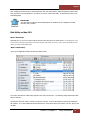
The version and features of Disk Utility depend on the version of Mac OS X. The following image demonstrates Disk
Utility in Mac OS X.
The left pane shows the "disks" currently connected to your Mac. You'll see the hard drive that has the "Macintosh
HD" partition. If you have additional internal hard drives or external hard drives connected to your Mac, they too will
be visible.
Roben 3 | Chapter 3
Verify Installation 75
Magma
Start Disk Utility
Once you find Disk Utility, launch it and you should see a window something like the one below. Any drive
connected to your machine, internal or external, should appear in the menu on the left.
Roben 3 | Chapter 3
Verify Installation 76
Magma
Roben 3 | Chapter 3
Verify Installation 77
Magma
Disk Management on Windows OS
What is Disk Management?
Disk Management is an extension of the Microsoft Management Console that allows full management of the diskbased hardware recognized by Windows. It is used to manage the drives installed in a computer - like hard disk
drives (internal and external), optical disk drives, and flash drives. Disk Management can be used to partition drives,
format drives, assign drive letters, and much more
How To Access Disk Management:
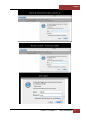
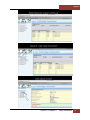
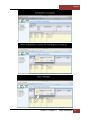
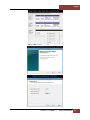
The most common way to access Disk Management is via Computer Management, see image below.
Roben 3 | Chapter 3
Verify Installation 78
Magma
Roben 3 | Chapter 3
Verify Installation 79
Magma
Roben 3 | Chapter 3
Verify Installation 80
Magma
Roben 3 | Chapter 3
Verify Installation 81
Magma
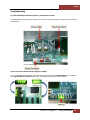
Troubleshooting
Q: If the Thunderbolt card fails to power up, what should I check?
A: Check the power / stand-by cable; make sure it is firmly connected to the power receptacle of the Thunderbolt
Interface card.
Q: How do I know if Roben-3power supply is working?
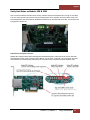
A: If the Thunderbolt card is properly seated and connected, there should be 4 green LEDs lit on the Interface
card, 3 green LEDs lit on the backplane, and 1 green LINK LED is turned ON as shown below.
Roben 3 | Chapter 3
Verify Installation 82
Magma
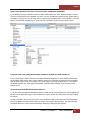
Q: How can I determine if the driver for my PCIe card is Thunderbolt Compatible?
A: Thunderbolt Tunneling is required for MacOS. In Apple System Profile, click on the specific PCIe card in question
to see if it’s Thunderbolt Tunnel Compatible. If it shows “Yes” then Thunderbolt tunneling has been enabled and it is
compatible. If it shows “No”, then the driver does not work through Thunderbolt and it is not compatible. Even if the
driver is not thunderbolt compatible the 3rd party PCIE card is still visible (as shown from the picture below).
Q. My PCIe card is not getting detected when installed in 1st PCIE slot, what should I do?
A. Turn off the Laptop computer. Disconnect the Magma thunderbolt expansion unit form Laptop by disconnecting
the thunderbolt cable. Remove power cord from Magma. Remove and reseat PCIe card. Reconnect the thunderbolt
cable to Laptop. Plug-in power cord to Magma. Turn on the Laptop. This should automatically turn on the Magma
thunderbolt expansion unit. Check Apple System profiler or Windows Device Manager to see if the PCIe card is
detected or not.
Q: Can I daisy chain Roben-3with another Roben-3?
A: Yes, but realize that aggregate bandwidth is limited to 10Gbps through the Thunderbolt port and PCI address and
IO space can be limited so the type of cards installed in the chassis may limit the number that can be daisy chained
successfully.
If a daisy chain device doesn’t work; check to see if the Thunderbolt Cable is connected firmly into the thunderbolt
port (on the Magma Thunderbolt Card of Roben-3) and the power supply is also turned ON. Also make sure each
Thunderbolt Roben-3 is working and functional before attempting to daisy chain them together.
Roben 3 | Chapter 3
Verify Installation 83
Magma
Q: Will Roben-3show up in Apple System Profiler or Windows Device Manager without any PCIe cards
installed?
Yes.
In Apple System Profiler à Thunderbolt à Status: Connected à Roben-3
In Windowsà Control Panel à Device Manager à View by connection
You should see these three PCI-to-PCI bridges. Right click on it and select “Properties”, select Hardware Ids from
dropdown list, you should see PCI\Ven_111D
Roben 3 | 84
Magma
Q: My host computer is having problem linking up with the expansion chassis. I have both interface
cards installed and seated firmly in their corresponding slot; one is installed in the host computer PCIe
slot and the other one in the expansion PCIE slot. Is there something wrong with the Interface card?
A: When using the 01-04973-03, in which comes in pair, one should be set to OFF-host and the other is set to ONExp.
1.
2.
3.
There's a Red Dip switch on the interface card that must be set correctly in order to work. The Red Dip
switch is labeled SW1.
01-04973-03, SW1 when set to ON=EXP should be installed only inside the Magma Expansion unit.
01-04973-03, SW1 when set to OFF=HOST should be installed inside the host computer.
If the 01-04973-03 cards are not set properly your computer won't link up with the Magma expansion.
See photos below:
Roben 3 | 85
Magma
Chapter 4
How to Get More Help
Frequently Asked Questions (FAQ)
You can visit the Magma Technical Support FAQ pages on the Internet at:
www.magma.com/support/
Contacting Technical Support
Our support department can be reached by fax at (858) 530-2733 or by phone at (858) 530-2511. Support is
available Monday through Friday, 8:00 AM to 5:00 PM PT.
When contacting MAGMA Technical Support make sure to include the following information:
1.
2.
3.
4.
5.
Exact and correct Magma Serial #
Service Ticket or Case # (if you already submitted an online request)
Computer Type & Model: Operating System
Make & Model of PCI/PCIe cards: Application
Problem description
When submitting an online technical support request always provide a valid working e-mail address, phone number,
shipping address and proper contact name. Check your e-mail for an automated response containing the case # and
updates.
You can also visit our web site at: www.magma.com/support. For Video Tutorial visit youtube.com/magmaexpansion
For a quick response, use the Technical Support and RMA Request Form available in the Support Section of the
website. Simply complete the form with all required information. Please make sure that your problem description is
sufficiently detailed to help us understand your problem.
Shipping or Transporting of Expansion Unit with PCI / PCIe cards
Red Rocket, Pro Tools HDx cards or any full length PCIe cards in Roben-3T should be removed (or not to be
installed) prior to shipment to avoid or prevent possible damage. Note: Expansion board and PCIe / PCI cards that
arrive damaged in shipment will not be covered under warranty.
Returning Merchandise to MAGMA
If factory service is required, a Service Representative will give you a Return Merchandise Authorization (RMA)
number. Put this number and your return address on the shipping label when you return the item(s) for service.
Magma will return any product that is not accompanied by an RMA number. Please note that Magma WILL
NOT accept COD packages, so be sure to return the product freight and duties-paid.
Ship the well-packaged product to the address below:
MAGMA RETURNS DEPT.
RMA # ________
9918 Via Pasar
Roben 3 | 86
Magma
San Diego, CA 92126
USA
It is not required, though highly recommended, that you keep the packaging from the original shipment of your
Magma product. However, if you return a product to Magma for warranty repair/ replacement or take advantage of
the 30-day money back guarantee, you will need to package the product in a manner similar to the manner in which
it was received from our plant. Magma cannot be responsible for any physical damage to the product or component
pieces of the product (such as the host or expansion interfaces for the expansion chassis) that are damaged due to
inadequate packing. Physical damage sustained in such a situation will be repaired at the owner’s expense in
accordance with Out of Warranty Procedures. Please, protect your investment, a bit more padding in a good box will
go a long way to insuring the device is returned to use in the same condition you shipped it in. Please call for an RMA
number first.
Roben 3 | Chapter 4
How to Get More Help 87
Magma
Appendix A
Compliance
FCC
NOTE: This equipment has been tested and found to comply with the limits for a Class A digital device, pursuant to
part 15 of the FCC Rules. These limits are designed to provide reasonable protection against harmful interference
when the equipment is operated in a commercial environment. This equipment generates, uses, and can radiate
radio frequency energy and, if not installed and used in accordance with the instruction manual, may cause harmful
interference to radio communications. Operation of this equipment in a residential area is likely to cause harmful
interference in which case the user will be required to correct the interference at his/her own expense.
This device complies with Part 15 of the FCC Rules. Operation is subject to the following two conditions: (1) this
device may not cause harmful interference, and (2) this device must accept any interference received including
interference that may cause undesired operation.
Changes or modifications not expressly approved by the party responsible for compliance could void the user‘s
authority to operate the equipment.
NOTE
The assembler of a personal computer system may be required to test the system and/or make
necessary modifications if a system is found to cause harmful interferences or to be noncompliant
with the appropriate standards for its intended use.
Industry Canada
This Class A digital apparatus complies with Canadian ICES-003.
Cetappareilnumériqué de la classe A estconformé à la norme NMB-003 du Canada
CE
The product(s) described in this manual complies with all applicable European Union (CE) directives. Magma will not
retest or recertify systems or components that have been reconfigured by customers
Roben 3 | Chapter 4
How to Get More Help 88
Manual P/N 09-09993-00 Rev B