1
VS-30FW Quick Start Guide
This page guides you through a basic installation and first-time use of your VS-30FW.
For more detailed information, see the VS-30FW user manual. You can download the latest
manual at http://www.kramerelectronics.com.
Step 1: Check what’s in the box
The VS-30FW FireWire 800/1394b Repeater/HUB
1 12V DC power adapter (12V, 500mA)
4 rubber feet and mounting bracket
1 FireWire® cable (C-FM9/FM9-3)
1 Quick start sheet
1 User Manual
Save the original box and packaging materials in case your Kramer
product needs to be returned to the factory for service.
Step 2: Install the VS-30FW
Mount the machine in a rack (using the RK-2TB rack adapter) or place on a table.
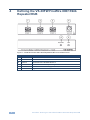
Step 3: Connect the inputs and outputs
Always switch off the power on each device before connecting it to your VS-30FW.
PC (via FW)
Video
Camcorder
Hard Drive
For best results, we recommend that you always use Kramer high-performance cables to
connect AV equipment to the VS-30FW.
Step 4: Connect the power
Connect the 12V DC power adapter to the VS-30FW and plug the adapter into the mains
electricity.
Each FireWire device can derive its power in one of two ways:
Independently, by connecting each FireWire device to its own power supply, while the
VS-30FW is connected to the external 12VDC (12V, 500mA) power supply.
Via the VS-30FW that is connected to an external powerful power supply: the 12VDC
(12V, 2.1A) (optional with the VS-30FW). In this case, each of the (up to) 3 FireWire devices
can derive its power (up to 1A per port) from the respective VS-30FW FireWire port.