1
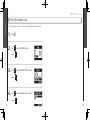
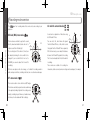
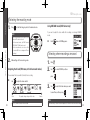
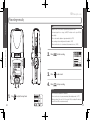
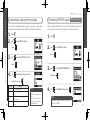
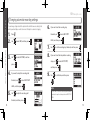
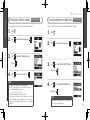
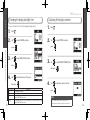
Operation manual
©ZOOM Corporation
Reproduction or duplication of this manual without
permission, in whole or in part, is prohibited.
H2n Handy Recorder
Usage and safety precautions
SAFETY PRECAUTIONS
In this manual, symbols are used to highlight
warnings and cautions that you must read to
prevent accidents. The meanings of these symbols
are as follows:
Something that could cause serious
Warning injury or death.
Never open the case or attempt to modify the
product.
Precautions
Required (mandatory) actions
Product handling
Do not drop, bump or apply excessive force to
the unit.
Be careful not to allow foreign objects or
liquids to enter the unit.
Prohibited actions
Operating environment
Other symbols
Warning
Operation using an AC adapter
Use only a ZOOM AD-17 (sold separately) AC
adapter with this unit.
Do not use do anything that could exceed the
ratings of outlets and other electrical wiring
equipment. Before using the equipment in
a foreign country or other region where the
electrical voltage differs from that indicated
on the AC adapter, always consult with a shop
that carries ZOOM products beforehand and
use the appropriate AC adapter.
Operation using batteries
02
Alterations
Use 2 conventional 1.5-volt AA batteries
(alkaline or nickel-metal hydride).
Do not use in extremely high or low temperatures.
Do not use near heaters, stoves and other
heat sources.
Do not use in very high humidity or near
splashing water.
Do not use in places with excessive vibrations.
Do not use in places with excessive dust or
sand.
AC adapter handling
When disconnecting the AC adapter from an
outlet, always pull the body of the adapter
itself.
During lightning storms or when not using
the unit for a long time, disconnect the power
plug from the AC outlet.
Battery handling
Install the batteries with the correct +/orientation.
Use a specified battery type. Do not mix new
and old batteries or different brands or types
at the same time. When not using the unit
for an extended period of time, remove the
batteries from the unit.
If a battery leak should occur, wipe the battery
compartment and the batter y terminals
carefully to remove all battery residue.
Connecting cables with input and output
jacks
Always turn the power OFF for all equipment
before connecting any cables.
Always disconnect all connection cables and
the AC adapter before moving the unit.
Volume
Do not use the product at a loud volume for a
long time.
Usage Precautions
Interference with other electrical equipment
In c onsider ation o f safe t y, the
has
been designed to minimize the emission of
electromagnetic radiation from the device and to
minimize external electromagnetic interference.
However, equipment that is very susceptible to
interference or that emits powerful electromagnetic
waves could result in interference if placed nearby.
If this occurs, place the
and the other
device farther apart. With any type of electronic
device that uses digital control, including the
, electromagnetic interference could cause
malfunction, corrupt or destroy data and result in
other unexpected trouble. Always use caution.
Cleaning
Use a soft cloth to clean the panels of the unit if
they become dirty. If necessary, use a damp cloth
that has been wrung out well. Never use abrasive
cleansers, wax or solvents, including alcohol,
benzene and paint thinner.
Malfunction
If the unit becomes broken or malfunctions,
immediately disconnect the AC adapter, turn the
power OFF and disconnect other cables. Contact
the store where you bought the unit or ZOOM
service with the following information: product
model, serial number and specific symptoms
of failure or malfunction, along with your name,
address and telephone number.
Copyrights
•Windows, Windows Vista, Windows XP and
Windows 7 are trademarks or registered trademarks
of Microsoft Corporation. •Macintosh and Mac OS
are trademarks or registered trademarks of Apple
Inc. •The SD and SDHC logos are trademarks.
•The use of MPEG Layer-3 audio compression
technology is licensed from Fraunhofer IIS and
Sisvel SpA.
* All other product names, trademarks and company names
in this document are the property of their respective
owners.
Usage and safety precautions
Usage and safety precautions
Something that could cause injury or
Caution damage to the equipment.
Read battery warning labels carefully.
Always close the battery compartment cover
when using the unit.
03
H2n Handy Recorder
Introduction
Thank you very much for purchasing a ZOOM
The features of the
include the following.
Handy Recorder.
• Four-channel recording captures sound in 360°
The built in microphones are divided into mid-side (MS) mics on the rear side
and XY mics on the front side. This independent placement allows you to record
sound coming from every direction. This unrestricted range means you can
record diverse sound sources in all kinds of conditions.
The MS mic includes a directional mid mic that covers the front and a
bidirectional side mic that covers both sides. By controlling the amount of side
mic signal, you can freely adjust the stereo width of recordings.
The built-in USB 2.0 high-speed port allows direct connection with a computer.
Use the recorder as an SD card reader with a computer to transfer recordings to
your computer for use in DAW software or to burn them to CDs. You can even
use the recorder as a computer audio interface at USB 1.0 speed.
• Tuner, metronome and other practice features
In addition to standard chromatic tuning, the tuner also supports seven-string
guitar, five-string bass and alternate tunings. The convenient metronome can
even provide a count in and the speed and pitch of playback can be adjusted,
making it a useful practice companion.
Introduction
Introduction
• New microphone array allows control of stereo width
• Use as an SD card reader and computer audio interface
• Stereo recording is clear and three-dimensional
Using the XY mic, you can realize three-dimensional stereo recordings that
faithfully capture a sense of depth.
• Uninterrupted long recordings possible at high-quality
Recording is possible without interruption for very long times. You can even fill
an entire 32GB SDHC card in one session!
• Runs for a long time on standard batteries
You can record for up to 20 hours (44.1kHz/16bit WAV format) with one set of
alkaline batteries. So, even in situations where you must rely on batteries, you
can keep recording without worrying about the time.
04
Please read this manual carefully to fully understand the
so that
you can maximize your use of its features. After reading the manual once,
please keep it with the warranty in a safe place.
05
H2n Handy Recorder
Contents
Adjusting the playback pitch
(KEY CONTROL) ............................................. 38
Changing the S level (MS-RAW only) .............. 39
Mixing a 4ch surround file ............................... 40
Checking & Editing Files
Checking file information ................................ 42
Checking track marks (WAV files only) ............ 43
Changing file names (Stereo files only)........... 44
Convert WAV files into MP3 files
(Stereo files only) ............................................ 46
Normalizing WAV files ..................................... 48
Dividing files (Stereo files only) ....................... 50
Deleting files ................................................... 52
Deleting all files in a folder .............................. 53
Converting MS-RAW files into stereo files ..... 54
Converting 4ch surround files into
stereo files ...................................................... 56
Using USB
Exchanging files with a computer
(Card reader) ................................................... 58
Audio interface use (MS/XY stereo and
2ch surround modes only)............................... 60
Tuner
Using the tuner ............................................... 62
Metronome
Using the metronome ..................................... 64
Various settings
Reducing noise (LO CUT) ................................ 66
Monitoring the input signal ............................. 67
Compressing/limiting the input signal ............. 68
Automatically adjusting the input gain ............ 70
Monitoring MS-RAW signals
(MS stereo mode only) ................................... 71
Setting the recording format ........................... 72
Changing automatic recording settings........... 74
Setting how files are named
(Stereo files only) ............................................ 76
Pausing recording when adding marks
(WAV format only) .......................................... 77
Changing the display backlight time................ 78
Adjusting the display contrast ......................... 79
Checking the software versions ...................... 80
Restoring the unit to its factory settings ......... 81
Checking the open capacity of the SD card .... 82
Formatting an SD card..................................... 83
Other functions
Updating the system software........................ 84
Using SD cards from older H series
recorders ......................................................... 85
Using a remote control .................................. 86
Troubleshooting............................................... 87
Specifications .................................................. 88
Package contents
Package contents
Contents
06
Usage and safety precautions......................... 02
Introduction ..................................................... 04
Contents ......................................................... 06
Package contents ............................................ 07
Part names ...................................................... 08
Display ............................................................ 10
Preparation
Powering the recorder..................................... 12
Using batteries ............................................ 12
Using an AC adapter (sold separately) ......... 12
Installing an SD card ....................................... 13
Turning the power ON and OFF ...................... 14
Turning the power ON ................................. 14
Turning the power OFF ................................ 14
Using the hold function ............................... 15
Connecting an external mic ............................ 16
Using plug-in power..................................... 16
Setting the date and time................................ 17
Setting the battery type .................................. 18
Recording
Recording mode overview .............................. 20
Mid-side (MS) stereo mode......................... 20
XY stereo mode........................................... 20
2ch and 4ch surround modes ...................... 21
Selecting the recording mode ......................... 22
Adjusting the S level (MS stereo,
2ch/4ch surround modes) ............................ 22
Using MS-RAW mode (WAV format only) ... 23
Selecting where recordings are saved ............ 23
Recording manually......................................... 24
Recording automatically .................................. 26
Pre-recording................................................... 28
Counting in before recording .......................... 29
Playback
Playing back recordings................................... 30
Selecting the file to playback from a list ......... 32
Changing the playback speed ......................... 33
Loop playback of a set interval (AB REPEAT) .. 34
Changing the play mode ................................. 36
Please confirm that the package contains the following items.
2 AA batteries
(for testing the unit)
Wave Lab LE
Installer CD
Operation manual
©ZOOM Corporation
Reproduction or duplication of this manual without
permission, in whole or in part, is prohibited.
recorder
SD card
(2GB)
Operation manual
(this document)
07
H2n Handy Recorder
Part names
Left side
Front
Right side
Part names
MENU button
LINE IN jack for
mic/line input
(can provide
plug-in power)
PLAY control
Press to play/pause
(in menu, set item)
Shift up/down to search
forward/backward
(in menu, select item)
Volume control
Speaker
Recording
indicator
Remote control
jack (Remote
control sold
separately)
USB port
Recording mode
selection dial
XY mic indicator
Lights when the XY
mic (front) is ON.
Flashes when the
input signal is
distorting.
MIC GAIN dial
Adjusts mic
input gain
Headphones
/LINE OUT jack
Bottom
Battery
compartment
cover
Power
/HOLD switch
SD card slot cover
Record button
Strap attachment
(Use to prevent dropping)
08
Part names
MS mic indicator
Lights when the MS
mic (rear) is ON.
Flashes when the
input signal is
distorting.
XY stereo mic
MS stereo mic
Top
Tripod mounting socket
09
H2n Handy Recorder
Display
Home (recording) screen
Playback screen
AUTO GAIN/AUTO REC indicator
Recording mode
(File name shown during recording)
(When AUTO REC enabled)
Recording time
Playback time
Full
LINE IN jack in
use indicator
Playing
File name
Display
Display
Remaining
battery level
indicator
(Playback paused)
Clipping
indicator
Recording format
(WAV example)
Recording level
AB repeat
Empty
(MP3 example)
LO CUT
indicator
COMP/LIMITER
indicator
Playback speed
Side level adjustment
(When set to MS-RAW)
Playback level
MS mic recording level
XY mic recording level
(Appearance in 4ch surround mode)
10
Key control
Side mic level
Mixer
(when in 4ch surround mode)
Remaining recordable time
(When using built-in memory)
(Appearance in 4ch surround mode)
11
H2n Handy Recorder
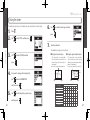
Powering the recorder
Installing an SD card
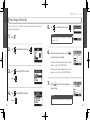
Turn the power OFF, and then remove the battery cover.
2.
Insert batteries.
3.
Close the cover.
Using an AC adapter (sold separately)
12
Plug the adapter into a power outlet.
Insert the card into the slot.
Press here
and slide down
NOTE
Connect the cable to the USB port.
2.
To remove a card, push it further into
the slot and then pull it out.
∙ Use alkaline or nickel-metal hydride batteries.
∙ If the “Low battery!” warning appears, turn the power OFF
soon and put in new batteries.
∙ Set the type of battery used. (➝P.18)
1.
2.
After turning the power OFF, open the SD card slot cover.
NOTE
∙ Always turn the power OFF before inserting or removing an SD card. Doing so
when the power is ON could cause data to be lost.
∙ Be sure to insert the SD card correctly, using the cut-off corner illustration next
to the slot as a guide.
∙ The built-in memory will be used if no SD card is in the recorder.
∙ Format the SD card if necessary. (➝ P.83)
Installing an SD card
Powering the recorder
1.
1.
Preparation
Preparation
Using batteries
HINT
Built-in memory
∙ The built-in memory only keeps the most recent recording.
∙ The recording format is fixed at 96kbps MP3.
∙ It cannot be used to record in 4ch surround or MS-RAW modes.
∙ Recording time is limited to 1 minute.
∙ Recordings saved to the built-in memory cannot be copied to an SD card or a
computer.
13
H2n Handy Recorder
Turning the power ON and OFF
Using the hold function
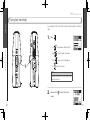
•
In order to prevent accidental operation during recording, the
function that disables the use of controls other than the MIC GAIN.
Slide
down.
has a hold
Preparation
Preparation
Turning the power ON
Enabling the hold function
NOTE
Turning the power OFF
•
Slide
•
Slide
up to the HOLD position.
NOTE
Even when the hold function is on, the remote control
(sold separately) can still be used.
Disabling the hold function
•
Slide
back to the middle.
Turning the power ON and OFF
Turning the power ON and OFF
∙ If “No SD card!” appears, confirm that an SD card is
correctly inserted into the recorder.
∙ If “Card Protected” appears, SD card write
protection is ON. Turn write protection OFF by
sliding the “Lock” switch on the card.
∙ If “Invalid card” appears, the card format is
incorrect. Use a different card or format the card.
(➝ P.83)
down and hold it until “Goodbye
see you!” appears on the screen.
14
15
H2n Handy Recorder
Connecting an external mic
Connect an external mic (sold separately) to the
LINE IN jack.
NOTE
∙ An external mic can be used instead of the XY stereo mic.
∙ An external mic cannot be used with MS Stereo mode.
Using plug-in power
1.
2.
Press
Use
press
3.
Use
.
Use
Use
to select INPUT, and then
.
4.
Use
Press
to select PLUG-IN POWER,
Use
.
to select ON, and then
Press
5.
.
to select SYSTEM, and then press
.
to select DATE/TIME, and then
.
Adjust the settings.
Use
press
16
Press
press
and then press
4.
1.
2.
3.
Setting the date and time
Connecting an external mic
Make the following setting before connecting a mic that requires plug-in power.
The date and time is added to recording files automatically, so set it correctly
whenever the batteries are replaced.
Use
Preparation
Preparation
1.
Setting the date and time
to move the cursor
to select the item
to change the value
to confirm the setting
to select OK, and then press
.
.
17
H2n Handy Recorder
Setting the battery type
Press
2.
Use
press
3.
Use
press
4.
Use
press
18
.
to select SYSTEM, and then
.
to select BATTERY TYPE, and then
Setting the battery type
Setting the battery type
1.
Preparation
Preparation
Set the battery type in order to show the remaining battery charge accurately.
.
to select the battery type, and then
.
19
H2n Handy Recorder
Recording mode overview
has four recording modes that can be selected according to your
Mid-side (MS) stereo mode
Mid
Sound can be captured in all directions using
L
R
both MS and XY mics.
Side
(adjustable)
You can select 2ch, which mixes the signals
from the MS and XY mics, or 4ch, which records
the signals from the MS and XY mics separately.
With 4ch surround, you can adjust the balance
Display
(front) side
between the MS and XY signals after recording.
The S level can be adjusted for both 2ch and 4ch
90°
R
L
recordings.
These modes are suitable for recording live
rehearsals, studio sessions, business meetings and soundscapes, for example.
Recording mode overview
Recording mode overview
This mode uses a mid mic to capture the sound
Mid
L
R
directly ahead and a bidirectional side mic to
Side
(adjustable)
capture sound from left and right.
The recording level of the side mic (S level) can
be adjusted, allowing the stereo width to be
changed. If you record with the S level set to
Display
(front) side
MS-RAW, you can also adjust the S level after
recording.
MS mics can capture a rich stereo image, so it is ideal for recording sounds in
wide and open conditions, including orchestras, live concerts and soundscapes.
2ch and 4ch surround modes
Recording
Recording
The
purposes.
XY stereo mode
This mode records in stereo with mics at 90º angles.
This allows a natural, deep and accurate sound image
to be captured, making it optimal for recording sources
nearby, including solo performances, chamber music,
interviews, live rehearsals and field recordings.
Display
(front) side
90°
R
20
L
21
H2n Handy Recorder
Selecting the recording mode
Turn
Using MS-RAW mode (WAV format only)
so that the triangle points to the desired mode.
If you want to adjust the stereo width after recording, record using MS-RAW
mode.
NOTE
2.
•
Make settings for the recording mode.
1.
2.
You can adjust the stereo width (S level) before recording.
Use
down until RAW appears.
Selecting where recordings are saved
Adjusting the S level (MS stereo, 2ch/4ch surround modes)
•
Hold
Press
Use
press
.
to select FOLDER, and then
.
to adjust the stereo width.
3.
Use
to select the folder where you want
to save files, and then press
Wide
22
The graphic changes along with the value
Selecting where recordings are saved
Selecting the recording mode
∙ The 4ch surround mode can only be used
when an SD card is in the unit.
∙ In 4ch surround mode, only WAV formats
(44.1/48kHz, 16/24bit) can be used.
∙ In 4ch surround mode, two stereo files
are created (MS mic recording and XY mic
recording).
Recording
Recording
1.
.
Narrow
NOTE
NOTE
Set to OFF, RAW or between –24 and +6 dB.
Select from among 10 folders. There are separate sets of folders for stereo and 4ch recordings.
23
H2n Handy Recorder
Recording manually
Press
3.
Press
4.
Press
to start recording.
1
2, 4
1.
24
2.
Turn
to adjust the input level.
Recording manually
Recording manually
3
Recording
Recording
HINT
∙ Adjust the MIC GAIN so that the peak level stays around -12 dB.
∙ If an input signal is too strong, the MS/XY indicator on the top will flash
immediately.
∙ The recorder can also adjust mic gain automatically. (➝ P.70)
∙ You can change the recording format beforehand. (➝ P.72)
∙ The mic can also be set to cut wind and other unwanted noise. (➝ P.66)
to add a mark.
to stop recording.
NOTE
∙ One file can have a maximum of 99 marks.
∙ The mic can also be set to pause immediately after adding a mark. (➝ P.77)
∙ During recording, if the size of the file exceeds 2 GB, recording will continue in
a new file that will be created automatically.
25
H2n Handy Recorder
Recording automatically
Press
2.
Use
3.
Use
press
Use
press
26
to select ON, and then press
.
NOTE
.
Other settings can also be made for automatic
recording. (➝ P.74)
to select REC, and then press
.
6.
After the home screen reopens, press
to put the recorder in standby.
Recording will start automatically when the input
signal exceeds the REC START LEVEL.
Recording will stop automatically when the input
signal becomes less than the REC STOP LEVEL.
to select AUTO REC, and then
.
7.
4.
Use
Recording automatically
Recording automatically
1.
5.
Recording
Recording
The mic can be set to start and stop recording automatically in response to
changes in the input level.
to select ON/OFF, and then
.
Press
to end recording standby and
stop recording.
NOTE
Automatic recording can only be used with an SD
card.
27
H2n Handy Recorder
Counting in before recording
Pre-recording
1.
2.
Press
Use
Press
2.
Use
Use
.
3.
to select PRE REC, and then
press
4.
.
to select ON, and then press
28
Press
NOTE
Use
to select TOOL, and then
.
to select METRONOME, and then
.
to select PRE COUNT, and then
.
to select the pre-count number,
and then press
after returning to the home screen to start recording.
∙ PRE REC cannot be used at the same time as the metronome PRE COUNT function.
∙ Pre-recording can only be used with an SD card.
Use
press
.
5.
5.
Use
.
6.
Press
Counting in before recording
Pre-recording
Use
press
4.
to select REC, and then
1.
press
press
3.
.
The built-in metronome can play a count-in sound before recording starts. This
pre-count sound is output through the
/LINE OUT jack.
Recording
Recording
When pre-recording is on, this recorder can continuously capture two seconds of
sound before recording is started manually. When
is pressed, these two
seconds are included at the beginning of the recording. This is useful when, for
example, performances start suddenly.
.
after returning to the home
screen to start pre-count and recording.
NOTE
PRE COUNT cannot be used at
the same time as PRE REC.
29
H2n Handy Recorder
Playing back recordings
1.
2
Press
.
to jump between marks and files
Hold
to search forward or backward
Use
to pause and restart playback
to adjust the volume
Playing back recordings
Playing back recordings
Use
Press
1
Playback
Playback
You can play files in the current folder. Change the folder to play files in a different
folder.
HINT
The longer you hold the PLAY control the faster it will
search in that direction.
2.
30
Press and hold
to return to the home
screen.
31
Selecting the file to playback from a list
1.
When the playback screen is open, press
2.
Use
.
You can change the playback speed to between 50% and 150% of normal
speed.
When the playback screen is open, press
2.
Use
to select FILE LIST, and then
press
.
to select SPEED, and then
press
3.
.
Use
.
to select a file, and then press
to start playback of that file.
3.
Use
press
NOTE
After a file plays once, playback will stop or continue
according to the PLAY MODE setting.
to set the playback speed, and then
Changing the playback speed
Selecting the file to playback from a list
1.
Playback
Playback
You can select a file in the current folder for playback. Change the folder to select
files from a different folder.
H2n Handy Recorder
Changing the playback speed
.
Files will be played at the set speed.
NOTE
32
4.
Press and hold
to return to the home screen.
The set value will be saved even when the power is
turned OFF.
33
H2n Handy Recorder
Loop playback of a set interval (AB REPEAT)
1.
When the playback screen is open, press
2.
Use
3.
Press
.
∙ Use
to search for the stopping point quickly.
∙ If you set the stopping point before the starting
point, they will be automatically swapped.
.
5.
Press
6.
Use
at the point you want to start
press
to stop loop playback.
to select STOP REPEAT, and then
.
playback.
NOTE
Use
4.
Press
to search for the starting point quickly.
at the point you want to stop
7.
Press
.
Loop playback of a set interval (AB REPEAT)
Loop playback of a set interval (AB REPEAT)
press
to select AB REPEAT, and then
NOTE
Playback
Playback
You can loop playback between two set points. Select the file that you want to
play back first.
playback.
Loop playback between the points will start.
34
35
H2n Handy Recorder
Changing the play mode
When the playback screen is open, press
2.
Use
press
Use
press
4.
Press
mode.
to start playback in the selected
to select PLAY MODE, and then
.
to set the mode, and then
.
Changing the play mode
Changing the play mode
3.
.
Playback
Playback
1.
NOTE
PLAY ALL:
PLAY ONE:
REPEAT ONE:
REPEAT ALL:
36
Play all the files in the current
folder once.
Play the current file once.
Play the current file repeatedly.
Play all the files in the current
folder repeatedly.
37
H2n Handy Recorder
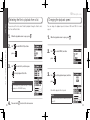
Adjusting the playback pitch (KEY CONTROL)
1.
When the playback screen is open, press
.
The S level (stereo width) of files recorded using MS-RAW mode can be changed.
Select a file that has been recorded in MS-RAW mode first.
1.
When the playback screen is open,
press
Use
to select KEY CONTROL, and then
press
.
2.
Use
.
to select MS SIDE MIC LEVEL, and
then press
3.
Use
to adjust the playback pitch, and
then press
3.
Use
press
to start playback at the
HINT
If you select a file recorded
using MS-RAW mode the
icon will appear.
.
to adjust the S level, and then
Changing the S level
Adjusting the playback pitch (KEY CONTROL)
38
2.
MS-RAW only
Playback
Playback
You can change the pitch without changing the playback speed.
Changing the S level
.
NOTE
adjusted pitch.
Set to OFF or between –24 and +6 dB.
NOTE
∙ The pitch can be adjusted by ±6 semitones.
∙ The set value will be saved even when the power is
turned OFF.
∙ KEY CONTROL cannot be used with 96kHz WAV
files.
4.
Press
to start playback with the adjusted S
level.
39
H2n Handy Recorder
Mixing a 4ch surround file
1.
Set the recorder to 4ch surround mode, select
the file you want to mix, and then press
Press
3.
Use
.
5.
Press
Parameter setting ranges
MUTE, –48 ~ +12 dB
(0.5 dB increments)
L100 ~ CENTER ~ R100
(even values only)
Explanation
Adjusts volume
Adjusts left-right balance
to turn the mixer ON or OFF.
NOTE
.
The mixer setting is only applied to playback. It does
not change the recordings.
to select SURROUND MIXER, and
then press
.
6.
Press
screen.
twice to return to the playback
Mixing a 4ch surround file
Mixing a 4ch surround file
2.
4.
MS LEVEL
XY LEVEL
MS PAN
XY PAN
Playback
Playback
You can adjust the levels and panning of the MS and XY recordings made for 4ch
surround files.
Change the values of the parameters.
Use
to move the cursor and change
values
Push
40
to select a parameter to change
41
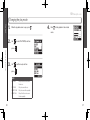
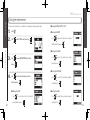
Checking file information
Checking track marks
WAV files only
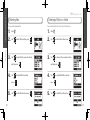
You can view a list of the marks in a WAV file.
1.
Press
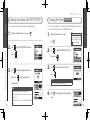
1.
Press
2.
Use
2.
Use
3.
Select the file that you want to check, and
3.
Select the file that you want to check, and
.
to select FILE, and then press
then press
4.
Use
press
.
.
to select INFORMATION, and then
to show information about the
.
to select FILE, and then press
then press
4.
Use
press
.
.
Checking track marks
Checking file information
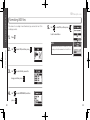
You can check various types of information about the current file.
Checking & Editing Files
Checking & Editing Files
H2n Handy Recorder
to select MARK LIST, and then
to open the mark list.
file.
Use
to scroll through the screen to see
additional information
42
Shows an added mark
This mark appears when skipping
occurred during recording
43
Changing file names
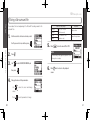
1.
Press
2.
Use
Use
.
Push
to select FILE, and then press
Use
to select the file name that you
want to change, and then press
Use
press
5.
.
to select RENAME, and then
to select a character to change and to confirm a change
Use
to select OK, and then press
.
NOTE
∙ The following characters can be used in file names.
(Space)!#$% &'()+,-0123456789;=@ABCDEFGHIJKLMNOPQRSTUVWXYZ[]^_`
abcdefghijklmnopqrstuvwxyz{ }~
∙ A file name cannot be only spaces.
∙ If a file with the same name already exists in the same folder, a warning
appears and the screen shown in step five automatically reopens.
Changing file names
Changing file names
3.
to move the cursor and change characters
.
6.
4.
44
Stereo files only
Checking & Editing Files
Checking & Editing Files
H2n Handy Recorder
.
Edit the name.
45
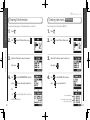
Convert WAV files into MP3 files
WAV files (other than MS-RAW) that have been recorded in any mode other than
4ch surround can be converted to MP3 files.
1.
2.
Press
Use
6.
Use
press
.
to select FILE, and then press
.
7.
Use
to select the bit rate, and then
.
to select EXECUTE, and then press
3.
Use
to select the file you want to
convert, and then press
4.
Use
5.
.
to select MP3 ENCODE, and then
NOTE
.
If you want to change the bit rate, use
select BIT RATE, and then press
Convert WAV files into MP3 files
Convert WAV files into MP3 files
to start encoding.
press
46
Stereo files only
Checking & Editing Files
Checking & Editing Files
H2n Handy Recorder
to
.
∙ The converted file will be created in the same folder.
∙ If the SD card lacks open space, the screen shown in
step 4 will reopen automatically.
∙ If a file already exists with the name that will be given
to the converted file, the screen at right will appear.
Rename the file before conversion.
47
Normalizing WAV files
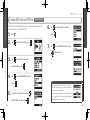
If the volume of a recording is lower than desired, you can raise the level of the
recording as a whole.
1.
Press
Use
to select YES, and then press
to start normalization.
.
NOTE
Use
to select FILE, and then press
3.
Use
to select the file you want to
4.
Use
press
.
Normalization increases the overall level of the
recording so that the maximum level in the file is 0
dB.
Normalizing WAV files
Normalizing WAV files
2.
change, and then press
48
5.
Checking & Editing Files
Checking & Editing Files
H2n Handy Recorder
.
to select NORMALIZE, and then
.
49
Dividing files
5.
You can divide a file into two at any point.
1.
Press
.
Set the dividing point.
Use
Press
Use
to select FILE, and then press
Press
.
to move the point
to play and pause the file
to confirm the dividing point
Dividing files
Dividing files
2.
HINT
The longer you hold the PLAY control the faster it will
search in that direction.
3.
Use
to select the file you want to divide,
and then press
4.
Use
press
50
Stereo files only
.
to select DIVIDE, and then
.
6.
Use
Checking & Editing Files
Checking & Editing Files
H2n Handy Recorder
to select YES, and then press
.
NOTE
∙ If a file already exists with the name that will
be given to a divided file, rename the file before
dividing.
∙ When a file is divided, “A” will be added to the end
of the name of the file made from the part before
the dividing point, and “B” will be added to the end
of the name of the file made from the part after the
dividing point.
∙ The original file is deleted.
51
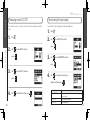
Deleting files
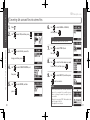
You can delete all the files in the current folder at once.
1.
Press
1.
Press
2.
Use
to select FILE, and then press
.
2.
Use
to select FILE, and then press
3.
Use
to select the file you want to delete,
3.
Use
to select one file you want to delete,
.
4.
Use
press
5.
Use
.
and then press
4.
to select DELETE, and then
.
to select YES, and then press
.
Use
press
.
5.
Use
.
.
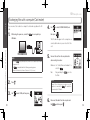
Deleting all files in a folder
Deleting files
You can delete unwanted files.
and then press
52
Deleting all files in a folder
Checking & Editing Files
Checking & Editing Files
H2n Handy Recorder
to select DELETE ALL, and then
.
to select YES, and then press
.
53
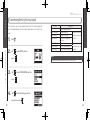
Converting MS-RAW files into stereo files
You can convert an MS-RAW file into a stereo file. S level (stereo width)
adjustments will affect stereo files.
1.
Press
2.
Use
press
.
to select FILE, and then press
4.
Use
5.
.
If you want to adjust the S level, use
to select EXECUTE, and then press
NOTE
.
select MS SIDE MIC LEVEL, and then press
54
Use
to start conversion.
to select MS-RAW TO STEREO, and
then press
.
Set to OFF or between –24 and +6 dB.
to select the file you want to
change, and then press
to adjust the S level, and then
NOTE
.
7.
Use
Use
∙ If a file already exists with the name that will be
given to the converted file, you will have a chance to
change the name to be given to the converted file.
∙ When a file is converted, the S level value will be
added to the end of the name of the file.
∙ The original file is not deleted.
Converting MS-RAW files into stereo files
Converting MS-RAW files into stereo files
3.
6.
Checking & Editing Files
Checking & Editing Files
H2n Handy Recorder
to
.
55
Converting 4ch surround files into stereo files
1.
2.
Press
Use
6.
.
to select FILE, and then press
Use
to select ENABLE or DISABLE,
and then press
.
.
NOTE
For an explanation about how to mix, see P.40.
to select the file you want to
change, and then press
4.
Use
.
Use
to select STORE IN, and
then press
8.
Use
.
to select the folder where you want
to save the file, and then press
to select STEREO ENCODE, and
then press
5.
.
7.
9.
Use
.
to select EXECUTE, and then press
to start conversion.
Use
press
to select MIXER, and then
.
NOTE
∙ If a file already exists with the name that will be
given to the converted file, you will be given a
chance to change the name to be given to the
converted file.
∙ When a file is converted, “MIX” will be added to the
end of the name of the file.
∙ The original file is not deleted.
Converting 4ch surround files into stereo files
Converting 4ch surround files into stereo files
3.
Use
Checking & Editing Files
Checking & Editing Files
56
H2n Handy Recorder
57
H2n Handy Recorder
Exchanging files with a computer (Card reader)
1.
After turning the power on, connect the
4.
Mac:
select the
Drag and drop the
the Trash
icon into
NOTE
.
Always follow the proper procedures on your
SD card before
computer to unmount the
disconnecting the USB cable.
to select USB, and then press
.
6.
58
disconnecting the recorder.
Windows: Use “Safely Remove Hardware” to
Windows XP, Windows Vista, Windows 7, Macintosh OS X (10.2 or later)
Use
Unmount the card from the computer before
Exchanging files with a computer (Card reader)
Exchanging files with a computer (Card reader)
5.
∙ To run the
using USB bus power, connect it to a computer by USB while
the power is OFF.
∙ The
is compatible with the following operating systems.
3.
.
The SD card will appear on the computer as a
connected drive where you can check the files
on it.
NOTE
Press
to select SD CARD READER, and
then press
to a computer by a
USB cable.
2.
Use
Using USB
Using USB
You can connect the recorder to a computer to check and copy data on the SD
card.
Disconnect the cable from the computer and
the
, and then press
.
59
H2n Handy Recorder
Audio interface use
MS/XY stereo and 2ch surround modes only
1.
2.
Use
press
Follow steps 1–3 in “Exchanging files with a computer” on P.58.
to select CONNECT, and then
.
NOTE
Use
Use
∙ For information about the menu items that can be used see the following.
LO CUT (➝P.66)
PLUG-IN POWER (➝P.16)
AUTO GAIN (➝P.70)
COMP/LIMITER (➝P.68)
MONITOR (➝P.67)
DISCONNECT
MS-RAW MONITOR (➝P.71) TUNER (➝P.62)
INPUT
∙ If you want to send signals from the recorder to the computer, set INPUT to
ON in the USB AUDIO MENU.
to select AUDIO I/F, and then
.
to select SAMPLING FREQUENCY,
and then press
.
6.
To disconnect the recorder, press
, use
to select DISCONNECT, and then press
4.
Use
to select the sampling frequency,
and then press
.
.
7.
Use
8.
Disconnect the cable from the computer and the
to select YES, and then press
Audio interface use
Audio interface use
press
3.
5.
Using USB
Using USB
You can record the signal from the
directly to a computer, and output the
playback signal from a computer through the
.
.
NOTE
60
Make sure that the sampling frequency settings are
and the software you
the same for both the
are using.
.
61
H2n Handy Recorder
Using the tuner
1.
2.
Press
.
6.
Use
to select the tuner type, and then
press
Use
to select TOOL, and then press
.
.
7.
Tune the instrument.
3.
Use
press
to select TUNER, and then
.
■ Using the guitar and bass tuners
■ Using the chromatic tuner
The input pitch is automatically
detected and the nearest pitch is
shown along with the amount of
discrepancy.
4.
The correct pitch is indicated by the middle circle
String
number
If you want to change the standard pitch,
use
to select CALIBRATION,
and then press
5.
The input pitch is automatically
detected and the nearest string
and pitch are shown along with the
amount of discrepancy.
Use
.
to select the pitch you want to use,
and then press
.
Using the tuner
Using the tuner
The available tuner types work as follows.
The correct pitch is indicated by the middle circle
62
Tuner
Tuner
The built-in tuner can help you tune instruments by detecting the pitches of input signals.
Pitch
Low
High
Tuner type
GUITAR
BASS
OPEN A
OPEN D
OPEN E
OPEN G
DADGAD
Low
1
E
G
E
D
E
D
D
2
B
D
C#
A
B
B
A
String number/pitch
3
4
5
6
G
D
A
E
A
E
B
–
A
E
A
E
F#
D
A
D
G#
E
B
E
G
D
G
D
G
D
A
D
High
7
B
–
–
–
–
–
–
63
H2n Handy Recorder
Using the metronome
■ Setting the PRE COUNT (➝P.29)
1.
Press
■ Setting the TEMPO
2.
Use
.
to select TOOL, and then press
.
to adjust the metronome tempo
(BPM), and then press
.
3.
Use
press
to select METRONOME, and then
Use
to select the metronome sound,
and then press
.
.
Using the metronome
Using the metronome
■ Setting the SOUND
4.
■ Setting the PATTERN
Use
to select the desired menu item,
and then press
.
Use
to select the metronome pattern,
.
■ Setting the LEVEL
to select when the click should
sound, and then press
Use
and then press
■ Setting the CLICK
64
Use
Metronome
Metronome
You can use the metronome to count in before recording and to provide a guide tempo.
.
Use
to adjust the metronome volume,
and then press
.
65
H2n Handy Recorder
The recorder can be set to reduce the sound of wind, vocal pops and other
noise.
Press
2.
Use
.
1.
Press
2.
Use
press
press
Use
press
to select INPUT, and then
.
to select INPUT, and then
3.
.
Use
press
3.
.
to select LO CUT, and then
4.
.
Use
to select MONITOR, and then
.
to select when monitoring is
enabled, and then press
4.
66
Use
to select ON, and then press
.
Monitoring the input signal
Reducing noise (LO CUT)
1.
You can listen to the input signal level through headphones.
Various settings
Various settings
Monitoring the input signal
Reducing noise (LO CUT)
Setting
HOME AND REC
ALWAYS ON
ALWAYS OFF
.
Explanation
Monitoring enabled when home screen open and
when recording
Monitoring always enabled
Monitoring disabled
67
H2n Handy Recorder
The recorder can be set to automatically increase the level of input signals that
are too weak and decrease the level of input signals that are too strong for each
input.
Press
2.
Use
press
3.
Use
press
4.
Use
.
to select INPUT, and then
NOTE
.
This cannot be used at the same time as the AUTO GAIN function.
to select COMP/LIMITER, and then
.
to select the setting you want to
use, and then press
68
LIMIT1(GENERAL)
LIMIT2(CONCERT)
LIMIT3(STUDIO)
Explanation
Compressor/limiter disabled
Standard compressor
Compressors decrease
Compressor for vocals
high levels and increase
Compressor for drums and
low levels.
percussion
Standard limiter
Limiters reduce high
Limiter for live performances
levels that exceed a set
Limiter for studio recording
threshold.
Compressing/limiting the input signal
Compressing/limiting the input signal
1.
Setting
OFF
COMP1(GENERAL)
COMP2(VOCAL)
COMP3(DRUM)
Various settings
Various settings
Compressing/limiting the input signal
.
69
H2n Handy Recorder
The recorder can automatically adjust the amount of gain used on signals input
through the built-in microphones and the LINE IN input in order to avoid distortion.
1.
2.
Press
Use
press
press
4.
When recording in MS-RAW mode, you can monitor the MID input signal on the
left output channel and the SIDE input signal on the right output channel.
1.
Press
2.
Use
.
to select INPUT, and then
.
to select INPUT, and then
press
Use
Use
MS stereo mode only
Monitoring MS-RAW signals
Automatically adjusting the input gain
70
3.
.
Monitoring MS-RAW signals
Various settings
Various settings
Automatically adjusting the input gain
.
to select AUTO GAIN, and then
.
3.
to select the setting you want to
use, and then press
Use
to select MS-RAW MONITOR, and
then press
.
.
Setting
Explanation
OFF
AUTO GAIN disabled
CONCERT For concerts and other loud sound
sources
SOLO
For acoustic guitars and other solo
performances
MEETING For meetings and other quiet sound
sources
NOTE
∙ When AUTO GAIN is ON, the
MIC GAIN dial setting has no
effect.
∙ This cannot be used at the
same time as the automatic
recording function.
4.
Use
to select RAW, and then press
.
NOTE
If you want to monitor an ordinary stereo mix of the
signals, select STEREO.
71
H2n Handy Recorder
You can set the recording format according to your sound quality and file size needs.
1.
Press
2.
Use
Sound quality File size
High
Large
.
WAV96kHz/24bit
to select REC, and then press
WAV96kHz/16bit
.
Use
to select REC FORMAT, and then
press
WAV48kHz/24bit
WAV44.1kHz/24bit
WAV48kHz/16bit
Setting the recording format
Setting the recording format
Only these formats
can be selected
when using 4ch
recording mode
3.
WAV44.1kHz/16bit
MP3 320kbps
MP3 256kbps
MP3 224kbps
.
MP3 192kbps
MP3 160kbps
4.
Use
to select the recording format, and
then press
.
Various settings
Various settings
Setting the recording format
MP3 128kbps
MP3 112kbps
MP3 96kbps
MP3 80kbps
MP3 64kbps
72
NOTE
MP3 56kbps
∙ Use WAV formats for higher audio quality.
∙ Use MP3 formats, which are compressed and have much smaller file sizes, to
save space on the SD card. Beware, however, that MP3 compression reduces
audio quality.
MP3 48kbps
Low
Small
73
H2n Handy Recorder
You can change settings related to the input level threshold that causes recording to start
and stop automatically, as well as the amount of delay before automatic stopping.
1.
2.
Use
Use
press
.
threshold, use
to select REC, and then press
to select AUTO REC, and then
7.
8.
Use
If you want to set the delay before recording
stops, use
If you want to adjust the recording start
threshold, use
to select REC START
5.
Use
.
to select AUTO STOP,
Use
.
to set the time, and then press
.
.
NOTE
to adjust the recording start
threshold, and then press
9.
.
to set the recording stop threshold, and then press
and then press
4.
to select REC STOP
LEVEL, and then press
.
.
LEVEL, and then press
74
If you want to set the recording stop
Changing automatic recording settings
Changing automatic recording settings
3.
Press
6.
Various settings
Various settings
Changing automatic recording settings
.
The AUTO REC STOP time is the delay until recording
stops after the input level drops below the REC STOP
LEVEL.
75
Stereo files only
You can change how stereo files are automatically named.
Press
2.
Use
3.
Use
press
4.
.
to select REC, and then press
.
Press
2.
Use
to select REC, and then press
3.
Use
to select PLAY KEY FUNCTION, and
.
.
then press
Use
.
to select FILE NAME, and then
to select, and then press
.
.
NOTE
∙ File names are assigned in the following manner.
DEFAULT: ZOOM0001(MS).wav/mp3 ~ ZOOM9999(MS).wav/mp3
DATE: YYMMDD-HHMMSS(MS).wav/mp3
(for example, 110531-130512.wav)
76
1.
∙ DATE uses the starting time of the recording.
∙ If a file already exists with the same name in the folder, the
new file will have a number added to the end of its name.
Numbers will be added sequentially in the case of multiple
duplicates.
4.
Use
to select PAUSE AND MARK, and
then press
Pausing recording when adding marks
Setting how files are named
1.
You can set the unit to pause when you add a mark during recording.
Various settings
Various settings
Setting how files are named
H2n Handy Recorder
Pausing recording when adding marks WAV format only
.
NOTE
Marks cannot be added to MP3 files, so this setting has
no effect when recording MP3 files.
77
You can set the amount of time that the display backlight stays lit.
1.
Press
2.
Use
.
to select SYSTEM, and then
press
Use
2.
Use
to select BACK LIGHT, and then
press
.
to select SYSTEM, and then
press
.
.
3.
Use
.
to select DISPLAY CONTRAST, and
then press
4.
Use
Setting
OFF
ON
15sec
30sec
.
to select the amount of time, and
then press
78
Press
.
Explanation
The backlight stays unlit.
The backlight stays lit when the unit is on.
The backlight stays lit for 15 seconds after the last time that a control
(besides MIC GAIN) was used.
The backlight stays lit for 30 seconds after the last time that a control
(besides MIC GAIN) was used.
4.
Use
press
Adjusting the display contrast
Changing the display backlight time
3.
1.
Various settings
Various settings
Changing the display backlight time
H2n Handy Recorder
Adjusting the display contrast
to adjust the contrast, and then
.
NOTE
∙ The contrast can be set to a value from 1–8.
∙ The higher the number, the greater the contrast.
79
You can view the versions of the system and other software used by the
1.
Use
press
3.
.
to select SYSTEM, and then
You can restore the recorder to the settings it had when it was shipped from the
factory.
1.
Press
2.
Use
to select SYSTEM, and then press
.
.
3.
Use
.
to select SOFTWARE VERSION,
and then press
Use
press
to select FACTORY RESET, and then
.
to show the software
4.
System software version
Use
to select YES, and then press
.
Restoring the unit to its factory settings
Checking the software versions
2.
Press
.
Various settings
Various settings
Checking the software versions
versions in use.
80
H2n Handy Recorder
Restoring the unit to its factory settings
NOTE
∙ The date and time, recording mode and input gain
settings are not reset by this.
∙ This also erases any recording in the built-in
memory.
81
H2n Handy Recorder
1.
Press
2.
Use
press
You can format an SD card for use with the
.
to select SD CARD, and then
1.
Press
2.
Use
press
.
3.
Use
to select REMAIN, and then press
Use
press
.
.
to select SD CARD, and then
.
Formatting an SD card
Checking the open capacity of the SD card
82
3.
Formatting an SD card
Various settings
Various settings
Checking the open capacity of the SD card
to select FORMAT, and then
.
to show the open space on the card.
4.
Use
to select YES, and then press
.
NOTE
∙ You must format an SD card after purchase or if it
has been formatted by a computer or other device
.
before using it with the
∙ Be aware that when you format an SD card, all data
saved on it will be erased.
83
Updating the system software
You can update the system software used by your
1.
to the latest version.
Copy the updater file to the root directory of the SD card.
NOTE
Download the latest system software at the ZOOM
website (http://www.zoom.co.jp).
With the SD card in the
, turn the power
ON while pressing and holding
.
With the SD card inserted, turn the power ON.
2.
Use
to select YES, and then press
NOTE
3.
Use
4.
After updating completes, turn the power OFF.
to select OK, and then press
1.
.
A file must be renamed before moving if another
file with the same name already exists in the
folder.
.
Using SD cards from older H series recorders
Updating the system software
2.
This recorder can read SD cards that have been used in older H series recorders
and copy their files into folders for use by the
.
Other functions
Other functions
H2n Handy Recorder
Using SD cards from older H series recorders
NOTE
84
You cannot update the system software if the battery
charge is low. In such a case, install new batteries or
use an AC adapter (sold separately).
85
H2n Handy Recorder
Other functions
Using a remote control
By using a remote control (sold separately) you can operate the
distance.
•
Connect the remote control to the REMOTE jack on the
The functions of the buttons on the remote are as follows.
Start and stop recording
from a
If you think that the
first.
.
Recording/playback trouble
is not operating properly, please check the following
◆ There is no sound or output is
very quiet
· Check the connections to your
monitoring system and its volume
setting.
· Confirm that the volume of the
is not too low.
◆ The recorded sound cannot be
heard or is very quiet
· If you are using built-in mics,
confirm that the active mics are
oriented correctly and that the
recording mode is suitable. (➝ P.20)
· Check the MIC GAIN setting.
(➝ P.24, 70)
· If you are recording from a CD
player or other device connected to
the LINE IN jack, raise the output
level of the connected device.
◆ Recording is not possible
· Confirm that the SD card has open
space. (➝ P.82)
· If “Hold” appears on the display,
the hold function is enabled.
Disable the hold function. (➝ P.15)
Other trouble
◆ The recorder is not recognized by
a computer when connected by
USB
· Check that the OS of the computer
is compatible. (➝ P.58)
· The
operation mode must
be selected on the recorder before
it will be recognized by a computer.
(➝ P.58)
Troubleshooting
Using a remote control
Add marks (WAV format only)
Troubleshooting
Lights during recording
86
Pause (resume) recording
87
H2n Handy Recorder
Specifications
Recording media
16MB–2GB SD cards, 4GB–32GB SDHC cards
(Cards that can be used with this recorder are to be verified individually)
Built-in memory
Recording
Microphones
KEY CONTROL
Playback pitch adjustable ±6 semitones (cannot be used with
96kHz files)
Can be used to record up to 1 minute in 96 kbps MP3 format (recording to this memory
overwrites any previous recording in it)
AB REPEAT
Repeats playback between selected points in a file
Mic arrangements
MS stereo with adjustable side mic level
90º XY stereo
FILE DIVIDE
Divides a file into two
FILE NORMALIZE
Maximizes file volume (cannot be used with MP3s)
Modes
MS, XY, MS+XY (stereo) and MS+XY (4ch)
FILE MP3 ENCODE
WAV files can be converted to MP3 formats at fixed bit rates
Types
Directional (XY, MS mid mics)
Bidirectional (MS side mic)
MARK
Up to 99 marks can be added as desired when recording WAV
files
Maximum sound
pressure input
120 dB spl (directional)
122 dB spl (bidirectional)
SURROUND MIXER
Mix balance can be adjusted when playing back 4ch surround
recordings
Stereo
Uncompressed PCM
44.1/48/96kHz, 16/24bit WAV (BWF)
Compressed MP3
(recording)
44.1kHz, 48/56/64/80/96/112/128/160/192/224/256/320kbps
(Not compatible with MS-RAW recording)
Compressed MP3
(playback)
44.1/48kHz, 32/40/48/56/64/80/96/112/128/160/192/224/256/
320kbps
4ch
Uncompressed PCM
88
44.1/48kHz, 16/24bit WAV (BWF)
Two stereo files for each recording
Digital processing A/D conversion
24-bit 128× oversampling
D/A conversion
24-bit 128× oversampling
Signal processing
32-bit
Recording time
2GB card example
3:08:00 (44.1kHz/16bit WAV)
34:43:00 (128kbps MP3)
Features
LO CUT
80Hz high-pass filter
COMP/LIMITER
3 types of compressors and 3 types of limiters
AUTO GAIN
Automatic input gain adjustment
PRE REC
2 seconds of pre-recording
AUTO REC
Automatic recording start/stop, continuous standby
TUNER
Chromatic, guitar, bass and alternate (A/E/G/D/DADGAD) tunings
with automatic string detection
METRONOME
40–250 BPM range, five tones, pre-count
SPEED
Playback speed adjustable between 50–150%
Display
Graphic LCD (128×64 pixels) with backlight
Input gain
0 to +39 dB
Input jack
Line/mic stereo mini jack can supply plug-in power
2 kΩ impedance at input levels of 0 to –39 dBm
Output jack
Line/headphone stereo mini jack
Rated output level: −10 dBm (output impedance 10 kΩ or more)
Headphones: 20 mW + 20 mW (into 32 Ω load)
Built-in speaker
400mW, 8Ω, mono
USB
Mini-B type
Card reader operation
USB 2.0 High Speed
Audio interface operation
USB 1.0 Full Speed
Supports 44.1/48kHz sampling rates and 16-bit rate
Bus power operation supported
Power
AD-17 USB to AC adapter (DC 5V 1A), operates using two AA batteries
Continuous operation of 20 or more hours when recording 44.1kHz/16-bit WAV files using
alkaline batteries
Physical features
Tripod mounting socket, strap attachment
Dimensions (mm): 67.6 (W) × 113.85 (H) × 42.7 (D)
Weight: 130 g (without batteries)
Included
accessories
Operation manual, SD card (2GB), 2 AA batteries, WAVELAB LE CD-ROM
Specifications
Specifications
File formats
Features
* Recording concerts and public performances, for example, without permission from rights holders is prohibited by law.
* Product specifications and appearance might be changed for the purpose of improvement without warning.
* 0 dBm = 0.775 Vrms
89
FCC regulation warning (for U.S.A.)
This equipment has been tested and found to comply with the limits for a Class B digital device,
pursuant to Part 15 of the FCC Rules. These limits are designed to provide reasonable protection
against harmful interference in a residential installation. This equipment generates, uses, and can
radiate radio frequency energy and, if not installed and used in accordance with the instructions,
may cause harmful interference to radio communications. However, there is no guarantee that
interference will not occur in a particular installation. If this equipment does cause harmful
interference to radio or television reception, which can be determined by turning the equipment off
and on, the user is encouraged to try to correct the interference by one or more of the following
measures:
• Reorient or relocate the receiving antenna.
• Increase the separation between the equipment and receiver.
• Connect the equipment to an outlet on a circuit different from that to which the receiver is
connected.
• Consult the dealer or an experienced radio/TV technician for help.
For EU Countries
Declaration of Conformity:
This product complies with the requirements of EMC Directive 2004/108/
EC, Low Voltage Directive 2006/95/EC and ErP Directive 2009/125/EC
Disposal of Old Electrical & Electronic Equipment
(Applicable in European countries with separate collection systems)
This symbol on the product or on its packaging indicates that this product
shall not be treated as household waste. Instead it shall be handed over to
the applicable collection point for the recycling of electrical and electronic
equipment. By ensuring this product is disposed of correctly, you will help
prevent potential negative consequences for the environment and human
health, which could otherwise be caused by inappropriate waste handling
of this product. The recycling of materials will help to conserve natural
resources. For more detailed information about recycling of this product,
please contact your local city office, your household waste disposal service
or the shop where you purchased the product.
Zoom Corporation
4-4-3 Kanda-Surugadai, Chiyoda-ku, Tokyo 101-0062 Japan
http://www.zoom.co.jp
H2n-5000-1
H2n Handy Recorder
Installing WAVELAB LE7
In WaveLab LE, you can perform various edits such as recording audio, adjusting
the volume of the recorded files, and cutting unwanted sections.
Windows
1. Insert the supplied WAVELAB LE7 CD-ROM into the CD drive
of your computer.
2.On the screen for selecting the way to AutoPlay, click Run
WaveLab_LE_7_Start_Center.exe.
If nothing happens when you insert the CD-ROM, select
Computer from the Start menu. Click the WaveLab LE7 icon that
appears, and select Open Auto Play... on the File tab.
3.In the Start Center WaveLab LE7 that appears, select the
[Minimum System
Requirements]
Windows 7
・2 GHz of CPU
・1024 MB of RAM
・DVD-ROM drive
・200 MB of free hard disk
space
・1024x768 of monitor resolution
language you use for the installation. After the selection, follow the on-screen prompts.
Mac OS
1. Insert the supplied WaveLab LE CD-ROM into the CD drive
of your Macintosh computer.
2.When the contents of the CD-ROM appear, double-click
WaveLab LE 7 for Mac OS X.
If the contents do not appear automatically, double-click to open the WaveLab LE 7
icon on the desktop, and double-click WaveLab LE7 for Mac OS X.
3.When the contents in the folder appear, use
WaveLab LE 7.mpkg to perform the installation.
[Minimum System
Requirements]
Mac OS X 10.6
・Intel CPU
・1024 MB of RAM
・DVD-ROM drive
・200 MB of free hard disk
space
・1024x768 of monitor resolution