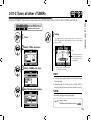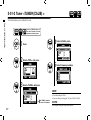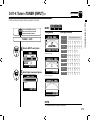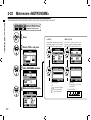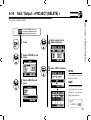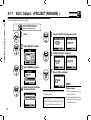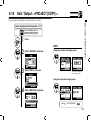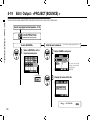
1
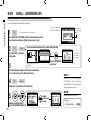
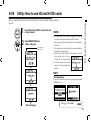
English
OPERATION MANUAL
© ZOOM Corporation
Reproduction of this manual, in whole or in part,by any means, is prohibited.
Special features of H4n
Special features of H4n
Thank you very much for purchasing our ZOOM H4n Handy Recorder (hereinafter abbreviated to H4n).
The H4n has the following special features.
• An all-in-one handy recorder.
You can enjoy recording and creating your own music any time, anywhere with
the H4n.
The H4n has a very compact 280 g lightweight design, equipped with high quality
stereo condenser microphones arranged in an XY pickup pattern, a built-in speaker,
SD card recording, mixer and internal effects.
• Versatile field recorder with multi-track capability.
The H4n is capable of recording in several different operation modes: <STEREO mode> which is capable of high quality stereo recording; <4CH mode>
which can record 4 discrete channels simultaneously using the on-board microphones and the external inputs; <MTR mode> which allows you to record
multiple tracks in multiple passes, overdubbing one or two tracks at a time. In
<STAMINA mode> you can record for up to 11 hours using batteries only.
• Newly designed XY stereo microphones allow variable
recording patterns from 90 to 120 degrees.
The H4n allows the user to adjust the angle of the onboard microphones to address a wider range of recording scenarios. If you want a wider area of sound,
you can set the microphones to 120 degrees. Or set them to 90 degrees for a
more focused sound source. Either way, the mics retain their XY configuration,
so you can record natural stereo sound with no phase cancellation.
• XLR-1/4-inch combo jacks allow direct connection of
any sound source.
We’ve loaded the H4n with a versatile array of input options to accommodate a
variety of recording sources. Any type of microphone (including condensers),
electric instrument (guitar, bass, keyboard) or line level source can be connected
to the H4n.
• It can be used as an Audio Interface/SD card reader for
a computer.
An onboard USB 2.0 Hi-Speed jack allows direct connection to a computer. You
can use it as an audio interface with built-in effects (sampling rate 44.1 kHz).
You can also use the H4n as an SD card reader for your computer. You can even
take the recorded files from your computer and create an audio CD using those
files as material in any DAW software.
• Other built-in functions: Tuner/Metronome/Karaoke.
The H4n can be used as a standard chromatic tuner. It is also capable of more
irregular tuning functions, like for a 7-string guitar or a 5-string bass, along with
others. The H4n has a metronome function convenient for practice and multitrack recording.
You can change playback speed between the ranges of 50% to 150%.
There are many other effects functions included, such as center cancel function
for stereo files, Karaoke function with variable key control, language learning and
voice training function
* Please read this manual carefully to ensure comprehensive knowledge and proper use of the H4n.
After reading through it, please keep the manual for future reference
001
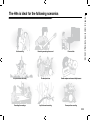
Vocal recording
Recording acoustic guitar sound
Piano recitals
Live performance recording
The band practices
Transfer analogue sound sources to digital sources
Recording the meetings
Any field sound recording
Drum practice recording
The H4n is ideal for the following scenarios
The H4n is ideal for the following scenarios
002
A table of contents
A table of contents
Special features of H4n ����������������������� 001
6-3 Setting up: Built-in microphones /outside microphone with plug-in power � 031
The H4n is ideal for the following scenarios �������������� 002
6-4 Setting up: INPUT [1], [2] connections and phantom power source�� 032
A table of contents ������������������������� 003
6-5 Setting up: USB connection, H4n used as an Audio Interface ���� 033
Safety precautions for users ��������������������� 006
6-6 Setting up: USB connection, H4n used as a SD card reader����� 035
Copyright warnings������������������������� 007
6-7 Setting up: Built-in speaker ������������������� 036
Getting started
7-1 About H4n modes ����������������������� 037
7-2 Selecting a <MODE>���������������������� 038
1-1 Recording flow using the H4n ������������������ 009
7-3 Details about modes ���������������������� 039
1-2 Easy recording guide [STEREO MODE]�������������� 011
8-1 <MODE> screens: STEREO and STAMINA modes ��������� 040
2-1 Name and function of each part ����������������� 013
8-2 <MODE> screen: 4CH mode ������������������ 041
2-2 Included Accessories���������������������� 015
8-3 <MODE> screen: MTR mode ������������������ 042
3
8-4 <MODE> screen: MAIN MENU����������������� 043
Battery/Power setting ��������������������� 017
4-1 Power On and Off, How to use power and hold switch ������� 019
4-2 How to use the [REC] and transport control buttons �������� 021
4-3 How to use the track [1], [2], [3] and [4] buttons ���������� 022
9
Option: Remote control operation ���������������� 045
Operations
4-4 How to use the input [MIC], [1] and [2] buttons����������� 023
1-01
Setting / Recording: Set input source and recording level����� 047
4-5 How to use REC LEVEL and VOLUME �������������� 024
1-02
Setting / Recording: Recording in STEREO and STAMINA mode�� 049
4-6 How to use [DIAL] and [MENU] buttons�������������� 025
1-03
Setting / Recording: Recording format <REC FORMAT> ����� 051
5-1 Insert a SD card ������������������������ 027
1-04
Setting / Recording: File name <FILE NAME>���������� 052
5-2 Set date and time <DATE/TIME>����������������� 028
1-05
Setting / Recording: Recording on 4CH mode���������� 053
6-1 Setting up: How to connect external audio devices��������� 029
1-06-1 Setting / Recording: Recording in MTR mode���������� 055
6-2 Setting up: Built-in microphones����������������� 030
1-06-2 Setting / Recording: Recording <OVER WRITE> in MTR mode �� 057
003
3-03-5 Effect <EDIT (EFX) >, editing EFX modules ����������� 086
1-07
Setting / Recording: TRACK MENU in MTR mode �������� 059
3-03-6 Effect <EDIT (LEVEL/RENAME) > ��������������� 087
1-08-1 Setting / Recording: Re-recording, <PUNCH IN/OUT> automatic � 061
3-03-7 Effect <EDIT (STORE) > ������������������� 088
1-08-2 Setting / Recording: Re-recording, <PUNCH IN/OUT> manual �� 063
3-03-8 Effect <IMPORT>, taking in a patch from another PROJECT ��� 089
2-01-1 Recording function <AUTO REC> ��������������� 065
3-04-1 A sing-along machine <KARAOKE> preparation��������� 091
2-01-2 Recording function <AUTO REC STOP> ������������ 066
3-04-2 A sing-along machine <KARAOKE> recording���������� 093
2-02
Recording function <PRE REC>���������������� 067
4-01
Playback : Playback files (stereo, 4ch and stamina modes) ���� 094
2-03
Recording function <LO CUT> ���������������� 068
4-02
Playback : <PLAY MODE> ������������������ 095
2-04
Recording function <COMP/LIMIT> �������������� 069
4-03
Playback : Setting marks������������������� 096
2-05
Recording function <REC LEVEL AUTO>������������ 070
4-04
Playback : <AB REPEAT>������������������� 097
2-06
Recording function <MONITOR> ��������������� 071
4-05
Playback : <SPEED>��������������������� 099
2-07
Recording function <MONO MIX> ��������������� 072
4-06
Playback : <MIXER>��������������������� 100
2-08
Recording function <MS STEREO MATRIX>���������� 073
4-07
Playback : Playback files (MTR mode) ������������� 101
3-01-1 Tuner <TUNER (CHROMATIC) >���������������� 075
4-08
Playback : Appointing time with a counter ����������� 102
3-01-2 Tuner, all other <TUNER>������������������� 076
5-01
Edit / Output : <FOLDER SELECT> �������������� 103
3-01-3 Tuner <TUNER (CALIB) >������������������� 077
5-02
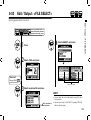
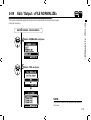
Edit / Output : <FILE SELECT> ���������������� 104
3-01-4 Tuner <TUNER (INPUT) >������������������� 078
5-03
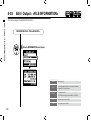
Edit / Output : <FILE INFORMATION> ������������� 105
3-02
Metronome <METRONOME> ����������������� 079
5-04
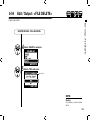
Edit / Output : <FILE DELETE> ���������������� 106
3-03-1 All about EFFECT ���������������������� 081
5-05
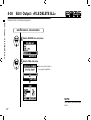
Edit / Output : <FILE DELETE ALL> �������������� 107
3-03-2 Effect <EFFECT> ���������������������� 083
5-06
Edit / Output : <FILE (COPY)>����������������� 108
3-03-3 Effect <EDIT>, patch edit������������������� 084
5-07
Edit / Output : <FILE RENAME>���������������� 109
3-03-4 Effect <EDIT (PRE AMP) >, editing PRE AMP modules ������ 085
5-08
Edit / Output : <FILE MP3 ENCODE> ������������� 111
004
A table of contents
1-06-3 Setting / Recording: Recording <ALWAYS NEW> in MTR mode �� 058
A table of contents
5-09
Edit / Output : <FILE NORMALIZE> �������������� 112
5-10
Edit / Output : <FILE STEREO ENCODE>������������ 113
5-11
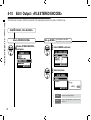
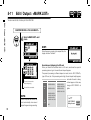
Edit / Output : <MARK LIST> ����������������� 115
5-12
Edit / Output : <DIVIDE> ������������������� 116
5-13
Edit / Output : <MOVE> ������������������� 117
5-14
Edit / Output : <NEW PROJECT> ��������������� 118
5-15
Edit / Output : <PROJECT (SELECT) > ������������� 119
5-16
Edit / Output : <PROJECT (DELETE) > ������������� 120
5-17
Edit / Output : <PROJECT (RENAME) > ������������ 121
5-18
Edit / Output : <PROJECT (COPY) >�������������� 122
5-19
Edit / Output : <PROJECT (BOUNCE) > ������������ 123
5-20
Edit / Output : <PROJECT (PROTECT) > ������������ 125
6-01
Utility : <DISPLAY BACK LIGHT> ��������������� 126
6-02
Utility : <DISPLAY CONTRAST>���������������� 127
6-03
Utility : <BATTERY TYPE> ������������������ 128
6-04
Utility : <VERSION> ��������������������� 129
6-05
Utility : <FACTORY RESET>����������������� 130
6-06
Utility : <REMAIN>���������������������� 131
6-07
Utility : <FORMAT> ��������������������� 132
6-08
Utility : <VERSION UP> ������������������� 133
6-09
Utility: How to use H2 and H4 SD cards ������������ 134
005
Reference
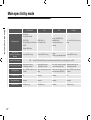
Main spec list by mode ����������������������� 137
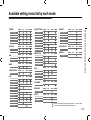
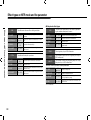
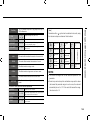
Available setting menu list by each mode ��������������� 138
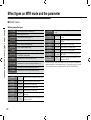
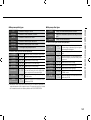
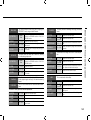
Effect types on MTR mode and the parameter ������������� 139
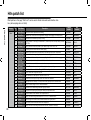
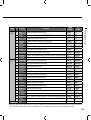
H4n patch list ��������������������������� 145
H4n products spec ������������������������� 147
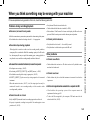
When you think something may be wrong with your machine������� 148
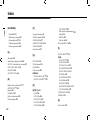
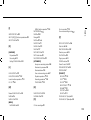
Index ������������������������������� 149
SAFETY PRECAUTIONS
In this manual, the warning and caution symbols are used
to highlight dangerous accidents and troubles for users to
read so that accidents can be prevented. The meanings of
these symbols are as follows:
If the users ignore this symbol and handle the
device the wrong way, serious injury or death
could result.
If the users ignore this symbol and handle the
device the wrong way, bodily injury and damage
to the equipment could result.
Please read through the following safety tips and
precautions to ensure hazard-free use of the H4n.
Power requirements
Since power consumption of this unit is fairly
high, we recommend the use of an AC adapter
whenever possible. In case you use batteries, use
either alkaline or nickel-metal hydride batteries.
[AC adapter operation]
• Make sure to use only an AC adapter, DC5 center
plus 1A (ZOOM AD 14).The use of other than the
specified type may damage the unit and pose a
safety hazard.
• Connect the AC adapter only to an AC outlet
that supplies the rated voltage required by the
adapter.
• When disconnecting the AC adapter from the AC
outlet, make sure grasp the adapter itself and
never pull at the cable.
• During lightning or when not using for an
extended period, disconnect the AC adapter
from the AC outlet.
[Battery operation]
• Use two conventional size AA-1.5 volt batteries.
• H4n cannot be used for recharging. Pay close
attention to the labeling of the batteries to make
sure you choose the correct ones.
• When not using for an extended period, remove
the batteries from the unit.
• If battery leakage has occurred, wipe the battery
compartment and battery terminals carefully to
remove all remnant of battery fluid.
• When using the unit, the battery compartment
cover should be closed.
Environment
To prevent unexpected troubles and malfunctions,
avoid using H4n in environment where it will be
exposed to:
• Extreme temperatures
• Heat sources such as radiators or stoves
• High humidity or moisture
• Excessive dust or sand
• Excessive vibration or shock
Handling
• Never place any objects filled with liquids, such
as a vase, on the H4n since this can cause
electric shock.
• Never place naked flame sources, such as lighted
candles, on the H4n since this can cause fire.
• The H4n is a precision instrument. Do not exert
undue pressure on the keys and other controls.
Take care not to drop, bump, and do not subject
it to shock or excessive pressure, which can
cause serious troubles.
• Take care that no foreign objects (coins or pins
etc.) or liquids (water, alcoholic drinks and
juice)can enter the unit.
• Do not place the H4n speaker closer to other
precision instruments (watch and computer),
electronic medical instruments, or magnetic cards.
Alterations
Never open the case of the H4n or attempt to
modify the product in any way since this can result
in damage to the unit.
Volume
Do not use the H4n at a loud volume for a long
time since this can cause hearing impairment.
USAGE PRECAUTIONS
Electrical interference
For safety considerations, the H4n has been designed
to provide maximum protection against the emission of
electromagnetic radiation from inside the device, and
protection from external interference. However, the
equipment that is very susceptible to interference or that
emits powerful electromagnetic waves should not be placed
near the H4n, as the possibility of interference cannot be
ruled out entirely.
With any type of digital control device, the H4n included,
electromagnetic interference can cause malfunctioning
and can corrupt or destroy data. Care should be taken to
minimize the risk of damage.
Cleaning
Use a soft, dry cloth to clean the H4n. If necessary, slightly
moisten the cloth. Do not use abrasive cleanser, wax, or
solvents (such as paint thinner or cleaning alcohol), since
these may dull the finish or damage the surface.
Please keep this manual in a convenient
place for future reference.
Connecting cables and input and output jacks
You should always turn off the power to the H4n and
all other equipment before connecting or disconnecting
any cables. Make sure to disconnect all a connection
cables and the power code before moving the H4n.
006
Safety precautions for users
Safety precautions for users
Copyright warnings
Copyright warnings
Recording of live performances
Many artists and most live venues do not allow recording and photography
and will check for cameras and recorders at the entrance. Even if recording is
allowed, it is prohibited to sell, distribute, or upload to the Internet without the
organizer’s authorization. Copyright violation is a crime.
Capturing music and sound files
Saving music to CD, MP3, or other media, reproducing files for personal use can
be considered a copyright violation.
Trademarks:
• The SD symbol and SDHC symbol are trademarks.
• The use of MPEG Layer-3 audio compression technology is licensed from Fraunhofer IIS
and Sisvel SpA.
• Windows is a registered trademark of US Microsoft Corporation.
• Mac OS and Macintosh is a trademark of Apple Inc.
• Steinberg and Cubase are registered trademarks of Steinberg Media Technologies GmbH Inc.
• Names of manufacturers and products are each respective owner’s trademarks or registered.
007
Getting started
Getting started
008
Recording flow using the H4n
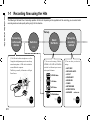
1-1 Recording flow using the H4n
The following is the basic flow of recording operation for the H4n. Depending on the application of the recording, you can select which
recording mode and audio quality setting is right for the situation.
Set-up
Connecting
to other audio
devices
Switch on
Select
the Mode
P.019
1) The H4n has built-in microphones as well as
2 input jacks with phantom power for use with any
external microphone. A USB cable is included to
connect H4n to the computer.
The H4n is powered by AA batteries or a Plug-in
Power Source.
2) You can select among 4 Modes;
STEREO, 4CH, MTR & STAMINA
suitable for different input sources
and output file formats.
STEREO Mode
4CH Mode
MTR Mode
STAMINA Mode
〉〉〉〉 P.029
009
〉〉〉〉 P.037
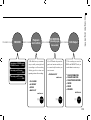
Set-up the
recording
method
3) You can select your favorite
settings;
• AUTO REC
• REC LEVEL AUTO
• LO CUT
• COMP/LIMIT
• MONO MIX
• TUNER
• METRONOME
• EFFECT/PATCH
• KARAOKE
and so on.
〉〉〉〉 P.065-
Recording on STEREO mode/
STAMINA mode………P.049
Recording on 4CH mode
……………P.053
Playback
and confirm
5) The H4n has very convenient
ways to swiftly review/playback
a recording as well as marking
/finding specific sections and
repeating sections of the recording:
Recording on MTR mode
……………P.055
RE-RECORDING
(Recording again
from scratch)
Edit·Output
6) In MTR mode the punch-in/
punch-out function enables you
to re-record only the section you
want to correct.
7) The recordings are saved as
FILES and PROJECTS, and you
can edit them in various ways.
• PUNCH-IN/OUT
and so on.
• PLAY MODE
• AB REPEAT
• SPEED
• MARK LIST
and so on.
〉〉〉〉 P.094-
〉〉〉〉 P.061-
•
•
•
•
•
•
Recording flow using the H4n
RECORD
FILE INFORMATION
FILE MP3 ENCODE
FILE STEREO ENCODE
DIVIDE
MOVE
BOUNCE
and so on.
〉〉〉〉 P.105-
010
Easy recording guide [STEREO MODE]
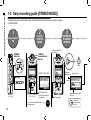
1-2 Easy recording guide [STEREO MODE]
The following is basic recording instructions using the built-in stereo microphones and built-in speaker
in STEREO MODE.
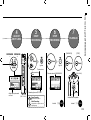
1
2
3
Confirm
STEREO
MODE
Power switch
ON
[POWER]
switch on.
RECORD READY
OR STANDBY
CONDITION
STEREO
mode indicator
light on
Input from the built-in
microphones
Press.
blinks
Recording
standby mark
[STEREO TOP SCREEN]
Made new file
blinks
[LEFT PANEL]
[FRONT PANEL]
MIC button light on
*switch on from built-in
microphones.
In case of a wrong MODE indicator
or a wrong screen
011
〉〉〉〉 P.038
MIC lamp lights
Monitor the input sound
rec level
Press here
when you want
to stop.
5
START
RECORDING
6
STOP
RECORDING
DECREASE INCREASE
−
+
Press.
Press.
light on
Counter turns
Now recording
mark
Adjust the input sound
rec level
7
PLAYBACK
[PLAYBACK]
or
Easy recording guide [STEREO MODE]
4
ADJUST
INPUT LEVEL
Press.
[STOP]
Press.
light off
Counter returns 0:00:00:00:000
[BACK PANEL]
Remaining time on SD CARD
[RIGHT PANEL]
Pause Recording
Output: Built-in speaker
Counter doesn’t return 0
Mark Recording
Places Mark at specific time in
WAV file format
In detail
〉〉〉〉 P.049
In detail
〉〉〉〉 P.094
012
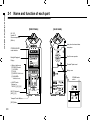
Name and function of each part
2-1 Name and function of each part
[FRONT PANEL]
[BACK PANEL]
90 / 120°
Variable XY
Stereo microphones
(Built-in)
STEREO/4CH/MTR
mode indicator
Backlight Equipped
Display
• Short cut buttons on
STEREO/4CH mode
[1] <FOLDER>
[2] <FILE>
[3] <SPEED>*STEREO mode
[4] <WAV/MP3>
*STEREO/4CH mode
• On MTR mode
Buttons for
TRACK [1], [2], [3], [4]
INPUT: Buttons for
[MIC] [1], [2]
Transport Control Buttons
[REC] Button
013
Input jacks for external stereo
microphone
A built-in mono speaker
Threaded Tripod mount
Battery cover
STAMINA mode
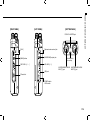
switch
[LEFT PANEL]
Name and function of each part
[RIGHT PANEL]
[BOTTOM PANEL]
DC5V AC ADAPTER jack
[DIAL]
Optional remote-control jack
[MENU] button
[LINE/PHONE] output jack
REC LEVEL [ + / − ]
VOLUME [ + / − ]
USB port
Installed hole
for a strap
XLR/STANDARD PHONE
INPUT [1] jack
XLR/STANDARD PHONE
INPUT [2] jack
SD card slot
POWER switch
HOLD switch
014
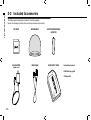
Included Accessories
2-2 Included Accessories
The following accessories are included in the H4n package.
Inspect the package contents to be sure all accessories are included.
SD CARD
WINDSHIELD
MICROPHONE STAND
ADAPTER
AC ADAPTER
USB CABLE
MAIN BODY CASE
Instruction manual
(ZOOM AD-14)
DAW start-up guide
Cubase LE4
015
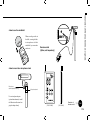
Installation of the attachments and options
•How to use the windshield
When recording outside in
the field, covering the builtin microphones with this
windshield, you can reduce
wind noise.
Remote control
(Option, sold separately)
•How to mount to a microphone stand
Microphone
stand adapter(Accessory)
Use a microphone adapter
(optional attachment) to install
the H4n unit and the stand can
grip the adapter firmly.
Microphone stand
[FRONT PANEL]
[SIDE PANEL]
Operation of
remote control
〉〉〉〉 P.045
016
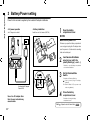
Battery/Power setting
3 Battery/Power setting
Power for H4n recorder is supplied by the included AC adapter or batteries.
• AC power operation
• Battery installation
An AC adapter is included.
Install two size AA batteries (IEC R6)
1
Open the battery
compartment cover.
NOTE:
Make sure the power is off!
Whenever you open the battery compartment
cover or plug in/unplug the AC adapter, make
sure the power is off, otherwise the recording
data can be destroyed.
2
Insert two size AA batteries
ensuring you match the
polarity markings ( + and − ).
* Illustration : open the battery compartment
cover and insert batteries.
3
Set the Stamina Mode
Switch.
4
Close the battery
compartment cover.
An attached AC adapter
Zoom AD-14
Use of an AC adapter other
than the one included may
cause trouble.
Ref.
017
* Illustration of a Stamina Switch on.
: Use in general (Using AC adapter,
batteries)
ON: Stamina Mode On (Eco-power mode
when using batteries)
* Illustration of closing the battery
compartment cover.
☞ Explanation about the Stamina Mode.
P.037
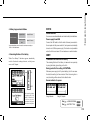
Alkaline battery
Battery/Power outlet setting
• Battery’s approximate lifetime
NOTE:
in general use
about 6 hours
in stamina mode
use
about 11 hours
Usable batteries
You can use conventional alkaline and nickel metal hydride batteries.
Power supply from USB
* Approximate lifetime when it is used for continuous recording on
WAV 44.1 kHz/16bit format.
Connect the USB cable to the H4n while it’s already connected to
the computer with the power switch off, and power is automatically
turned on via USB bus power supply. This function is only available
when the H4n is used as an SD card reader or an audio interface.
• Remaining lifetime of the battery
HINT:
When “Low Battery!” indication appears, immediately
switch off unit and exchange batteries, or shift power
source to AC adapter.
To measure the lifetime of the battery
The remaining lifetime of the battery is measured more precisely
by using the battery type setting on the H4n.
Saving period for the setting <DATE/TIME>
FULL
Whenever power supply is off by dead battery, the H4n can save
the date/time setting for three minutes. When the saving time is
over, the setting will be returned to the default value.
Screen indicator for power
EMPTY
When remaining battery
life is getting short, “Low
Battery” indication will
be shown every two
seconds and the power
will switch off shortly after.
Using batteries
Using AC adapter
Ref.
Ref.
☞ <USB BUS POWER>
☞ <BATTERY TYPE>
P.033
P.128
018
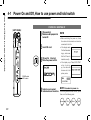
Power On and Off, How to use power and hold switch
4-1 Power On and Off, How to use power and hold switch
POWER ON / BOOTING UP
[LEFT PANEL]
1
[Preparation]
Make sure all equipment is
turned off.
2
Insert SD card.
3
[Power On _ Boot up]
Slide the power switch.
POWER switch
HOLD switch
NOTE
• Before switching the power on, lower
the volume of instruments and monitors
connected to the H4n.
• If the display reads
"No Card" when booting up, make sure
that the SD card is
inserted correctly.
• If the display says "Reset DATE/TIME"
when booting
up, the date and
time are set to the
primary value.
Ref.
P.028
<DATA/TIME>
4
019
HINT: Procedure for power on.
Switch on connected
instruments and monitors. When using additional audio devices, power
them on in the following order:
Instruments
H4n
Mixer
AMP
ON
ON
ON
ON
Power On and Off, How to use power and hold switch
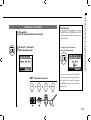
POWER OFF / SHUT DOWN
HOLD Function
1
[Preparation]
Turn off monitors first then instruments
The H4n features a HOLD function to make
any button operation inactive, preventing errors
during recording.
2
[Power Off _ Shut down]
Slide the power switch.
To engage the hold function,
slide switch to hold position.
* ‘Key Hold’ display
* shut down screen
HINT
Procedure for power off
AMP
Mixer
H4n
Instruments
OFF
OFF
OFF
OFF
If you press any button while the HOLD
function is engaged, the screen will display
“Key Hold” for two seconds. To disengage
the HOLD mode, slide power switch out of
hold position.
020
How to use the [REC] and transport control buttons
4-2 How to use the [REC] and transport control buttons
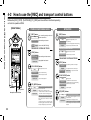
Buttons like [REC], [STOP], [PLAY/PAUSE], [FF], [REW] each have different functions depending
on the H4n’s operation MODE.
[FRONT PANEL]
STEREO/4CH/STAMINA MODE
[REC] button
Stop
Enter recording standby mode and
reset the counter to 0
Recording Standby Start recording and counter
Record
Playback Place a mark (WAV FILE only)
transport control BUTTONS
Playback-pause
Stop
Stop recording and reset counter
Stop playback and counter
Start playback and counter
Pause or restart recording
recording standby Start recording and counter
Playback-pause
Set to overwrite recording
Stop
Playback
Pause or restart playback
[FF], [REW] buttons
Stop
Playback
Playback-pause
Press for less than one second
[FF] move to next file
[REW] returns to the begining of the file
* However if there is a marker in a WAV file,
the button moves to the marking place.
Press for more than one second
Scans through file in forward or reverse
direction.
The longer the button is pressed, the faster
the scanning speed. Fast Forward or Rewind
will stop at the beginning or end of the file.
021
Stops recording and resets the counter
Recording in always new mode
Stops recording and counter
transport control BUTTONS
[STOP] button
Recording
Playback
Recording-pause
Stop recording and the counter stops
Stop playback and the counter stops
Playback-pause
Stop each movement
[PLAY/PAUSE] button
Stop
Recording
[REC] button
transport control buttons
Engages recording standby mode
recording
Record, Recording Standby Stop
(You can continue playback while recording)
Recording Standby Starts recording and counter
[PLAY/PAUSE] button
Recording,
Recording-pause
[REC] button
Stop
[STOP] button
Recording,
recording standby,
Recording-pause
MTR MODE
Starts playback
In overwrite mode: No function
In always new mode: pause recording
Recording standby Starts recording and counter
Playback
Pause Playback
[FF] [REW] buttons
Stop
Playback
Playback-pause
Press for less than one second
[FF] : Moves forward through file in one second increments
[REW]: Returns to the begining of the file
Press for more than one second
Scans through file in forward or reverse
direction.
How to use the track [1], [2], [3] and [4] buttons
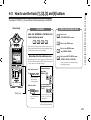
4-3 How to use the track [1], [2], [3] and [4] buttons
The buttons of TRACK [1] – [4] have different functions depending on the MODE.
[Front Panel]
MTR MODE
Switch from ‘RECORDING’ to ‘PLAYBACK’ of the
tracks, or the other way around
STEREO/4CH/STAMINA MODE
Move to the
<FOLDER SELECT> menu
Move to the <FILE> menu
When you start recording, press the track number you want
to record and the track becomes ‘Recording Standby’ status.
That track button will then become illuminated.
Make settings of the track and the input source
After selecting the track, use the input source buttons to select
the input for that track.Using the INPUT button you can record
in mono, stereo or a combination of those.
Select only one track
Move to the <SPEED> menu
(only STEREO MODE)
Move to the <REC FORMAT> menu
(STEREO MODE, 4CH MODE)
These operations are not available during
recording and playback.
For stereo input you
select from
[MIC] and [1] [2]
* track #2-#4 are the
same, press the
number you select
Select two tracks
TRACK [1]–[4]
* track #3 and #4 are
the same
For a mono input you
can select either from
[1] or [2]
* Input selections are
those four different
combinations.
* Those operations are not valid
during recording and playback.
022
How to use the input [MIC], [1] and [2] buttons
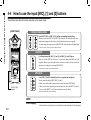
4-4 How to use the input [MIC], [1] and [2] buttons
These buttons have different functions depending on the various modes.
[FRONT PANEL]
STEREO/STAMINA MODE
Select INPUT [MIC] or INPUT [1] [2] and the corresponding button lights up.
Whether you select the INPUT [1] or INPUT [2] button, they will both respond the same
Both buttons light up after the selection. (Once lighted the buttons do not respond)
Any other settings about input sources like [REC LEVEL, should be made to the lighted target.
* When the presently selected input clips its button will blink.
4CH MODE
Use all input sources like [MIC], [1] and [2] = All [MIC], [1] and [2] light on.
When you switch to 4CH, H4n will receive 2- system stereo inputs from [MIC] and [1] [2]
altogether. When you press the lighted button, each shows its input level and you can make
adjustment to recording level operating [REC LEVEL].
* When the input clips the corresponding button blinks.
MTR MODE
Select [MIC], [1] and [2] individually and the corresponding button lights up.
You can select individually INPUT [MIC], [1] and [2]
• When you use built-in and the external stereo microphones, select INPUT [MIC].
• When you make stereo input using the external input jack, select both INPUT [1] and [2].
You press either INPUT [1] or [2] button and then press another button.
INPUT [1] & [2]
buttons
* When the selected input clips its button blinks.
HINT:
What is clipping?
023
The input level reaches up to the maximum which the H4n can record, that is 0 dB.
In this case the recording sound can be distorted and need adjustment of recording level.
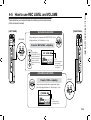
These keys allow you to adjust the levels of recording input and output volume.
(All the modes are the same)
[LEFT PANEL]
[RIGHT PANEL]
‘REC LEVEL’ IN ANY MODE
REC LEVEL
The recording levels coming from the INPUT [1] & [2] can
be adjusted from 1 to 100 with the (+/−) key.
Press the ‘REC LEVEL’ = Adjusting
Target setting:
Press INPUT [MIC], [1]
and [2] buttons and
select the input source
which you want to
adjust the recording
level.
1 _ 100
+: Increase reception
level (amplify)
−: Decrease reception
level (reduce)
[VOLUME] IN ANY MODE
Press the ‘VOL’ = Adjusting
VOLUME
Output volume from the built-in speaker and output
jacks can be adjusted from 0 to 100 with the (+/−) key.
0 _ 100
+ : Increase Volume
− : Decrease Volume
024
How to use REC LEVEL and VOLUME
4-5 How to use REC LEVEL and VOLUME
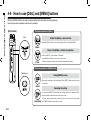
How to use [DIAL] and [MENU] buttons
4-6 How to use [DIAL] and [MENU] buttons
[DIAL] and [MENU] buttons are used for various settings while recording and during playback.
Here are some basic explanations about each operation.
The basic operation for [DIAL]
[RIGHT PANEL]
Rotate the [DIAL] = select an item
[DIAL]
Rotate the [DIAL], and the cursor on the display will move along the [DIAL]
Select
Press in the [DIAL] = confirm the selection
Press
Press down [DIAL], your selection is confirmed.
➞ for additional selections, move on to the next screen.
➞ When you complete selections, the screen returns back to the previous one.
The basic operation for [MENU] button
[MENU]button
Calling [MENU] screen
When setting recording or playback method, Press [MENU] button at the top screen
of each mode.
Select
Canceling the setting
If you press the [MENU] button during any setting operation, its operation will be
canceled and the screen returns back to the previous one.
To cancel setting operation and to return back to the top screen of the each mode,
Long Press press [MENU] button for more than 2 seconds.
025
How to use [DIAL] and [MENU] buttons
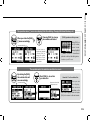
The operation when [ ] cursor is on display (Date·Time Setting, Changing File Name Directory, etc)
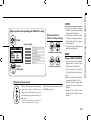
When you rotate the [DIAL],
[ ] moves accordingly.
Pressing [DIAL] in, change
the numbers and letters.
[ ] move accordingly.
The item letters or
numbers are reversed
→Rotate [DIAL] to
change the numbers
and letters→Press
[DIAL] down to confirm
your selection.
[DIAL] operation on the top screen
Moving [DIAL] on
the top screen,
'cursor' moves.
Pressing (highlight)
[ ] selects 'COUNTER' to enable adjustment or calls up the setting menu.
* Available only on MTR mode.
The operation when the selections are listed on screen
By rotating the [DIAL],
the selection lists will
move accordingly.
[ ] move accordingly.
Push [DIAL] in, to confirm
your selection.
the screen returns back
to the previous one.
About the ‘⁄’ on the selection lists
When you see
t h i s d i s p l a y,
there are more
selections on the
next screen. Highlight arrow and press
[DIAL] in to move on to the next screen.
026
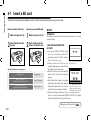
Insert a SD card
5-1 Insert a SD card
The SD card is required to record. Make sure to turn off power before inserting or removing the SD card.
[How to install the SD card]
[How to remove the SD card]
1
2
1
2
Make sure power is off.
Insert the SD card into
the slot.
Make sure power is off.
Push the SD card in to
remove it from the slot.
SD card capacity time to record (approx.)
4GB SDHC card
Recording time
WAV 44.1 kHz/16 bits
(measured in terms of stereo track)
approx. 380 minutes
MP3 44.1 kHz/128 kbps
(measured in terms of stereo track)
approx. 68 hours
NOTE:
POWER OFF !
Never insert or remove the SD card while the power is on. This may
destroy the data.
CAUTIONS WHEN INSERTING
SD CARD
• You can use 16MB to 32GB SD cards.
For a list of operation certified SD
cards please refer to ZOOM’s website:
h ttp: / / www. zo o m . co . jp/
"War ning" no SD card in
• When you use the SD card for your when booting - up.
computer, digital camera or other machine,
formatting in the H4n is required.
• When “No Card” is seen on the display at
boot-up, check if the SD card is correctly
inserted.
• When “Format Card” is seen on the display
at booting-up, this means the SD card has This “War ning” will show
not been formatted in the H4n. To format, when an SD card is not in
a recognized format. Select
press [DIAL] down and select OK button.
<YES> to format card and all
• When the booting-up screen says “Card of the data will be deleted.
Protect”, the card is covered with OVERWRITE PROTECT. To release
this protect slide the lock switch of the SD card.
Ref.
027
☞ To use SD card for H2/H4
P.134
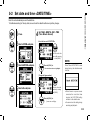
Set date and time <DATE/TIME>
5-2 Set date and time <DATE/TIME>
Each file will automatically record the date/time.
To facilitate searching for files by date, be sure to set the date/time after every battery change.
1
Press.
2
Select <SYSTEM> and press.
4
Set YEAR➝MONTH➝DAY➝TIME
(Time: Minute: Second)
Select the item on <DATE/TIME>:
You can select the
item while moving
[ ] of the [DIAL].
3
Select <DATE/TIME> and press.
Press the [DIAL] in
* The selected item values are highlighted.
NOTE:
When “Reset DATE/TIME” is seen
during boot-up, the date/time needs
to be set.
[Change the figure number]:
5
Select <OK> and press.
You can select the
number by rotating
the [DIAL].
Press the [DIAL] in
* [ ] comes out on display.
• When there is no power source
connected for more than three
minutes, the DATE/TIME setting
will return to the default value.
• You cannot use this setting during
recording and playback.
028
Setting up: How to connect external audio devices
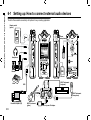
6-1 Setting up: How to connect external audio devices
The H4n offers versatile connectivity with options for any recording application.
Remote control
(option)
Stereo
microphones
Headphones
Monitor
SD card
Mixer
INPUT: instrument
(keyboard)
USB
INPUT: instrument
(microphone)
Personal computer (PC)
029
INPUT: instrument
(guitar)
H4n’s very own AC adapter
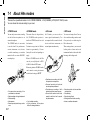
These are special features of the H4n’s built-in microphones.
High quality microphones in an XY
pattern ensure a natural stereo image
when recording sounds.
Stereo recording is often done by placing two
microphones in a V shape. Pointing microphones outward
will result in stereo separation, however the recording
will lack defintion around the center position, resulting in
a poor stereo image.
The H4n utilizes an X Y stereo mic configuration. By
placing two microphones in a crossed pattern (opposing
angles), the H4n can cover a wide area and capture sound
sources in the center with clarity and definition. Sounds
reach both mics simultaneously, and therefore no phase
cancellation occurs between right and left channels.
LOCATION OF THE MICROPHONES UNDER XY SYSTEM
DIRECTIVITY OF 90°, 120°
Capturing sound in a stereo image.
Center 90°
General stereo microphones
H4n stereo microphones
Stereo images with no phase cancellation.
movable
Width 120°
Time lag
General stereo microphones
H4n stereo microphones
030
Setting up: Built-in microphones
6-2 Setting up: Built-in microphones
Setting up: Built-in microphones /outside microphones with plug-in power
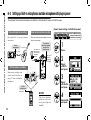
6-3 Setting up: Built-in microphones /outside microphone with plug-in power
The input jack for the external microphone is suitable for microphones that require <PLUG-IN> power.
[How to make setting of <PLUG-IN> power]
Close microphone recording
External microphone recording
Please put H4n 30 - 50 cm away from the
sound source.
When you use the external microphone, be sure to
select the correct setting.
Built-in
microphones
Sound source
*You cannot use
both the built-in
and the external
microphone
together.
30_50cm
The external
stereo microphone
input-jack for
plug-in power
Here you can
connect a
microphone.
INPUT [MIC]
Make sure the recording sound
sources are all located in the
range of T zone of the Built-in
microphones.
Press.
2
3
Select
<PLUG-IN>
and press.
Built-in
microphones
NOTE:
Plug-in and phantom
power can not be set
during recording and
playback.
031
1
Select
<INPUT>
and press.
Off microphone recording
INPUT [MIC]
Press the [MENU] button for
more than 2 seconds, and start
operation from the top screen.
4
Select<ON>
and press.
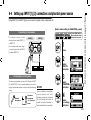
Using INPUT [1] and INPUT [2] you can connect to a guitar, a bass, a keyboard, etc.
[How to make setting of <PHANTOM> power]
Connecting to instruments
For a guitar or a bass, you can
directly plug into either INPUT [1]
or INPUT [2].
For a keyboard with stereo output,
you can plug into both the INPUT
[1] and the INPUT [2].
INPUT[1]
Press the [MENU] button for
more than 2 seconds, and start
operation from the top screen.
INPUT[2]
1
Press.
2
Select
<INPUT>
and press.
Connecting to a microphone
To connect a microphone you connect X L R plugs to INPUT
[1] and INPUT [2]. In case you need phantom power, such as
using a condenser microphone, be sure to select the following NOTE:
setting.
Some condenser microphones
cannot operate with +24V
Condenser
phantom power, but comparing
microphone
Dynamic
to +48V setting this function is
*for phantom
microphone
useful for battery operation to
power
economize electric consumption.
3
Select
<PHANTOM>
and press.
4
Select
the voltage
and press.
032
Setting up: INPUT [1], [2] connections and phantom power source
6-4 Setting up: INPUT [1], [2] connections and phantom power source
Setting up: USB connection, H4n used as an Audio Interface
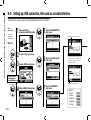
6-5 Setting up: USB connection, H4n used as an Audio Interface
The H4n can be used as a two-in/two-out USB interface at 44.1kHz or 48kHz.
From
power ON
Connect H4n
to computer
with USB cable.
1
Connect H4n to
computer with USB cable.
5
Select <FREQUENCY>
and press.
6
Select a sampling rate
and press.
7
Select <CONNECT>
and press.
displayed input or output level
From
power OFF
USB
2
Press on the top screen.
3
Select <USB> and press.
Two channels can be sent and
received while it connects a
computer and by using of
44.1kHz or 48 kHz.
Using USB bus power,
H4n start booting-up
Display of USB setting screen
4
Select <AUDIO I/F> and press.
displayed a active function
Ref.
☞
<EFFECT>
<TUNER>
<MONITOR>
<PHANTOM>
<PLUG-IN>
033
P.083
P.075
P.071
P.032
P.031
[Button operation during setting and <AUDIO I/F> menu]
[You can use those
buttons during setting]
Press.
<AUDIO I/F> MENU
EFFECT
Use EFFECT (only on 44.1 kHz)
TUNER
Use TUNER
MONITOR
Use MONITOR
PHANTOM
Use PHANTOM power
PLUG-IN
DISCONNECT
* Call [MENU] and make setting
Disconnect
* Adjust input / output level
[Selection of input source]
When you select an input the corresponding
input button lights, confirming the
selection. To turn off the input, press the
corresponding input button and the light
will turn off.
HINT:
Usage of AUDIO INTERFACE
Use PLUG-IN power
Select
and press.
• You cannot change a sampling
rate while computer is recognizing
H4n as an audio interface.
• To connect as an Audio I/F, make
sure that a sampling rate (step 6)
matches the recording software
and playback file.
• You cannot use this setting during
recording and playback.
To monitor input signals, you must turn the
<MONITOR> setting on.
• You can record and playback
signals directly to and from your
DAW software using the H4n.
• In this mode, you can use the
H4n’s built-in effects on input signals.
• Effects can only be used when the
sampling rate is set to 44.1kHz.
• You do not need a specific driver
to use the H4n as an USB audio
interface.
• When using a specific DAW,
please refer to its respective user
manual.
* When no input is selected and no input buttons are
lit, you are sending no signal to the computer.
034
Setting up: USB connection, H4n used as an Audio Interface
NOTE:
Setting up: USB connection, H4n used as a SD card reader
6-6 Setting up: USB connection, H4n used as a SD card reader
When you use the H4n as a SD card reader, make the following settings.
From
power ON
USB
From
power OFF
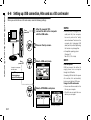
1
After it’s powered ‘ON’,
connect the H4n to the computer
with the USB cable.
2
Press on the top screen.
3
Select <USB> and press.
• Before physically unplugging USB
cable (and H4n) from computer,
be sure to perform the “safely
remove hardware” function on the
computer first. Unplugging USB
cable (and H4n) without performing
this function may damage files.
• Compatible operating system
Windows XP
Mac OS X (10.2 or later)
HINT:
USB bus power
USB bus power is the method to
supply power from a computer
through the USB cable.
Connecting USB with the H4n power
off condition, H4n automatically
boots up and displays USB menu.
Connect H4n to computer
with USB cable.
Using USB bus power,
H4n start booting-up
Display of USB setting screen
4
Usage of a SD card reader
Select <STORAGE> and press.
connection completed
035
NOTE:
• You can use files recorded on the
H4n on your computer.
• The H4n can use audio files created on your computer.
Setting up: Built-in speaker
6-7 Setting up: Built-in speaker
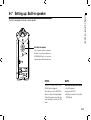
The H4n is equipped with a built-in mono speaker.
H4n built-in speaker
This is a mono speaker for playback.
Without connecting headphones to
[LINE/PHONE] jack, you can easily
playback the recorded data and listen.
NOTE:
HINT:
There is no output when [LINE/
PHONE] jack is plugged in.
When setting is the <MONITOR>,
there is no output of the input signals.
The built-in speaker cannot be used
when recording in standby on MTR
mode.
When you can use this function:
• The FILE playback
• Using as <AUDIO I/F>.
• Nothing connected to the [LINE/
PHONE] jack.
036
About H4n modes
7-1 About H4n modes
There are four operational modes in H4n: STEREO/STAMINA, 4 CH (CHANNEL), MTR (MULTI TRACK) mode.
You can choose the mode according to your need.
• STEREO mode
• STAMINA mode
• 4CH mode
• MTR mode
You can easily create a stereo recording
via the built-in microphones or an
external microphone.
The STEREO mode is convenient
to record a band’s live performance,
acoustic instrument, voice, lecture,
or a subtle soundscape. you can then
transfer the file to a stereo WAV/MP3
recorder,player.
This mode allows for longer battery
life. STAMINA mode operation is
similar to STEREO mode, but with
less functions.
Continuous usage time for Alkaline
batteries: approximately 11 hours
(battery life can be less depending on
usage).
When in STAMINA mode, the H4n
can only record/playback in WAV
44.1kHz/16-bit and MP3 format.
When using batteries STAMINA mode
can be turned on using the stamina
switch before booting up. ▶P.017
In 4Ch mode, you can record two
stereo signals simultaneously. You
can capture both live sounds via builtin mics and direct instruments via
external inputs simultaneously.
You can record using effects. You can
also overdub recordings and use sound
files previously recorded using the
H4n’s other modes.
When creating a demo, you can record
backing tracks at home and record
instrumental tracks at the studio while
listening to the backing tracks.
• One-pass stereo recording of live
performance or rehearsal.
• Direct recording of a single instrument.
• Field recording.
• Voice memos.
• Record important points during a conference.
037
• Simultaneous recording with both
line input and a microphone.
• Surround recording via front and
rear microphone placement.
• Simultaneous recording of both
ambient and direct sound sources.
• Record both ambient and direct
sounds to add a live feel to recorded performances.
• ‘Live’ outside recording.
• At the conference, or the places
difficult to change batteries.
• Record one track at a time and then
combine them.
• Overdubbing.
• Record using effects
• Mixing track levels after recording.
• Indoor or outdoor rehearsals.
Selecting a <MODE>
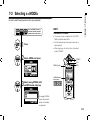
7-2 Selecting a <MODE>
Be sure to select the appropriate mode for your application.
Press the [MENU] button for
more than 2 seconds, and start
operation from the top screen.
HINT:
Confirmation of the mode
• The current mode is indicated on the front
panel by Mode Indicator LEDs.
• The H4n will power up in the same mode it was in
when turned off.
• When booting up for the first time, the default
mode is ‘STEREO’.
1
Press.
2
Select <MODE> and press.
MODE indicator
3
STEREO
4CH
MTR
STAMINA mode
display here.
Select among STEREO, 4CH
and MTR modes and press.
*To engage STAMINA
mode, use the switch
located in the battery
compartment.
038
Details about modes
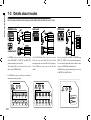
7-3 Details about modes
Input and output levels as well as saving and formatting data are different in each mode.
STEREO mode
4CH mode
MTR mode
In 4CH MODE the H4n records two stereo
WAV files: one stereo WAV file for the built-in
microphones and one stereo WAV file for the inputs.
These files are saved in one of the ten fixed
folders.
You can record tracks in MONO or STEREO from
INPUT [1], INPUT [2] or the internal microphones.
You can combine them with tracks recorded in other
modes or <OVERDUB> additional tracks.
In MTR mode, project data and settings are saved as
a PROJECT in the MTR folder.
STAMINA MODE
In STEREO mode, you can select 2 different inputs
either INPUT[MIC] or INPUT[1] and INPUT[2],
and operate them as one stereo file.
The resulting FILE is saved in one of the ten subfolders of the STEREO folder.
In STAMINA mode, the functions are limited to
maximize the battery life time.
039
<MODE> screens: STEREO and STAMINA modes
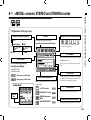
8-1 <MODE> screens: STEREO and STAMINA modes
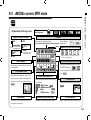
• Explanation of the top screen
Display of recorder’s condition
STOP
●
Recording Standby
blink
Counter
REMAINING BATTERY LIFETIME during battery running
Recording lapse and playback lapse:
REC
Display: 00(time):00(minute):00(second):000(1/1000second)
[REC] button
lights on
[REC] button
blinks
▲
PLAY
PAUSE
FILE NAMES
blink
FILE NAMES during selecting, recording
and playback work.
FILE FORMAT
File format during selecting,
recording and playback.
If there is no file in any folder, the screen says ‘No
Data’.
• WAV FILE: Hz/bit
• MP3 FILE: bit rate
CLIP METER
Display example of 96kHz/24bit
Display example of MP3 128kbps
STAMINA MODE
Indicator of option settings: ON or OFF
When each optional function is ON, display
says following:
<LO CUT> function
Stamina
Icon
When the display of “Low Battery” is shown,
it is time to change battery.
P.068
<COMP/LIMIT> function P.069
<PHANTOM> power source
48V/24V
P.032
<MS STEREO MATRIX>
P.073
The clip meter light turns on when the recording
and playback level reach 0dB and remains lit until
the file ends or the stop button is pressed.
LEVEL METER
Displays the recording and playback level.
REMAINING RECORDING TIME
Remaining recording capacity time on SD card.
040
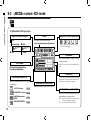
• Explanation of the top screen
Display of recorder’s condition
STOP
Recording Standby
blink
Counter
REMAINING BATTERY LIFETIME during battery running
Recording lapse and playback lapse:
Display: 00(time):00(minute):00(second):000(1/1000second)
●
<MODE> screen: 4CH mode
8-2 <MODE> screen: 4CH mode
REC
[REC] button
lights on
[REC] button
blinks
▲
PLAY
PAUSE
When the display of “Low Battery” is shown,
it is time to change battery.
FILE NAMES
blink
FILE NAMES during selecting, recording
and playback work.
FILE FORMAT
If there is no file in any folder, the screen says ‘No
Data’.
File format during selecting,
recording and playback.
CLIP METER
Indicator of option settings: ON or OFF
When each optional function is ON, display
says following:
<LO CUT> function
P.068
<COMP/LIMIT> function P.069
041
<PHANTOM> power source
48V/24V
P.032
<MS STEREO MATRIX>
P.073
REMAINING RECORDING TIME
The clip meter light turns on when the recording
and playback level reach 0dB and remains lit until
the file ends or the stop button is pressed.
Remaining recording capacity time on SD card.
INPUT SOURCE and LEVEL METER
Displays the recording and playback level
corresponding to each input source.
[MIC]�����Input from either the built- in microphones
or an external stereo microphone
[IN]��������Input from INPUT [1] and INPUT [2]
• Explanation of the top screen
[DIAL] operations
on the top screen
➀
●
REC
Recording Standby
only when recording
[ALWAYS NEW] setting
blink
[REC] button
blinks
[REC] button
lights on
➂
➃
➀ Counter
Display of recorder’s condition
STOP
➁
<MODE> screen: <MTR> mode
8-3 <MODE> screen: MTR mode
Recording lapse and playback lapse:
Display: 00(time):00(minute):00(second):000(1/1000second)
Cursor
Counter Function:
Appoint time
Ref.
☞
P.102
REMAINING BATTERY LIFETIME during battery running
PAUSE
blink only when recording
<ALWAYS NEW> setting
▲
When the display of “Low Battery” is shown,
it is time to change battery.
PLAY
TRACK NUMBER
➂ AUTO PUNCH IN and AUTO PUNCH OUT ICONS
During recording standby operation the track or its
icon is highlighted.
Selecting this icon brings up the PUNCH IN/
PUNCH OUT settings.
➁ TRACK MENU ICON
The icon only appears when recording in OVERWRITE
This is where track settings like ‘volume,’ ‘pan,’
‘stereo or mono’ are made. Selecting this icon
with the jog dial will access the track menu.
P.059
mode.
P.058
Indicator of option settings: ON or OFF
When each optional function is ON, display
says following:
<EFFECT> function
P.081
<PHANTOM> power source P.032
48V/24V
<PROTECT> function
P.125
➃ BOUNCE ICON
Selecting this icon brings up BOUNCE settings.
P.123
LEVEL METER
REMAINING RECORDING TIME
L R LEVEL METER
This displays the recording and playback level
corresponding to each track 1-4..
Remaining recording capacity time on SD card.
Displays the master left and right output levels
042
<MODE> screen: MAIN MENU
8-4 <MODE> screen: MAIN MENU
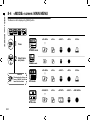
The Menu icon list is displayed by [MENU] button.
1
<FOLDER>
<FILE>
<INPUT>
<REC>
<TOOL>
<FOLDER>
<FILE>
<INPUT>
<REC>
<TOOL>
<PROJECT>
<FILE>
<EFFECT>
<INPUT>
<REC MODE>
Press.
STEREO mode
2
Select items
and press.
STAMINA mode
CANCEL:
To return back to the top,
p re s s [ M E N U ] b u t t o n
more than 2 seconds.
4CH mode
MTR mode
043
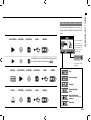
In the recording and playback menu, the current recording condition is displayed at the bottom left of the
screen.
<PLAY MODE>
<SYSTEM>
<SD CARD>
<USB>
<MODE>
On the right bottom
of the screen the
current folder number
is displayed (On
Stereo, 4ch and
Stamina mode).
Set STAMINA mode with the STAMINA switch before starting
the unit when operating with battery power. P.019
<MIXER>
<PLAY MODE>
<SYSTEM>
<SD CARD>
<USB>
<MODE>
In MTR mode, the
current project name
is displayed.
Stop
Pause (playback)
Playback
<TOOL>
<SYSTEM>
<SD CARD>
<USB>
<MODE>
Recording Standby /
Pause
Recording Standby
On MTR mode and recording on
OVERWRITE
Recording
044
<MODE> screen: MAIN MENU
Display at the bottom of Menu screen
Option: Remote control operation
9 Option: Remote control operation
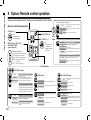
When you use the optional remote controller, you can operate the H4n from a distance.
Remote control button operation
Recording and placing marks.
Engages recording standby condition and
counter resets to 0.
Stop
recording and the counter begins to
Recording Standby Start
move
VOLUME[+/−]
INDICATOR (red)
0-100
+: increase (higher)
−: decrease (lower)
REC LEVEL [ +/− ]
Recording Playback Place a mark (only for WAV FILE)
[REC]
button
1-100
+: increase reception
= amplification
−: decrease reception
= diminution
INPUT buttons, [MIC] [1] [2]
AND INDICATORS
(green, yellow, red)
Select the input source
* the indicator corresponding to the
button shows input condition.
Green: The input source selected
Yellow:The level of the input is
over −6dB.
Red : The input is clipping
* This can be used only when the recording standby track available.
Set to overwrite recording
Stop
Engage recording standby condition
recording
Record, Recording Standby Stop
(You can continue playback while recording)
Playback
Starts recording and sets the counter to 0
Set always new recording
Stop
Stop recording and the counter stops
recording and the counter begins to
Recording Standby Start
move
LOCATOR buttons
[FF], [REW] buttons
Stop
Playback
Playback temporary stop
Press for less than one second
[FF] move to next file
[REW] returns to the begining of the file
* However if there is a marker in a WAV file,
the button moves to the marking place.
Press for more than one second
Scans through file in forward or reverse direction.
The longer the button is pressed, the faster
the scanning speed. Fast Forward or Rewind
will stop at the beginning or end of the file.
Stop
Playback
Playback temporary stop
045
Press for less than one second
[FF] : Moves forward through file in one second increments
[REW]: Returns to the begining of the file
Press for more than one second
Scans through file in forward or reverse
direction.
[STOP] button
[PLAY/PAUSE] button
Stop
Start playback and the counter begins
to move
Record, Recording Standby,
Stop recording and return to 0
Temporary stop
Recording standby Starts recording
Playback temporary stop Stop playback and the counter stops
Recording,temporary stop Restarts recording
Playback, temporary stop Starts playback
Recording
Stop recording and the counter stops
Stop
Playback
Stop playback and the counter stops
Recording
Start playback
While overwrite setting : Stops recording
While always new setting : Pauses recording
Recording standby Start recording and the counter begins to move
Recording temporary stop
Stop each movement
Playback temporary stop
Playback
Pause playback
Operations
Operations
046
1-01
Setting / Recording: Set input source and recording level
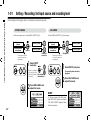
Control settings for the targets, built-in microphones or external input jacks.
Setting / Recording: Set input source and recording level
STEREO MODE
4CH MODE
Use both [MIC] and INPUT [1] [2] stereo input.
Use the stereo input source of either [MIC] or INPUT [1] [2].
Built-in microphones
(stereo)
External stereo
microphone
Light on
Connecting the external
microphone sets input
automatically
or
INPUT [1] jack
Built-in Microphones
(stereo)
INPUT [1] jack
INPUT [2] jack
External stereo
microphone
INPUT [2] jack
or
Both light
up at once
1
Connecting the external
microphone sets input
automatically
Select INPUT
and press.
or
* Selection is available at
any time during Stop,
Recording Standby or The selected
Recording.
buttons light on.
2
All lights on
1
Select INPUT and press.
2
Press REC LEVEL and
adjust the levels.
The recording level selected is
displayed
Press REC LEVEL and
adjust the levels.
HINT:
On the top screen of the 4CH mode,
press REC LEVEL button, and display
“REC LEVEL TARGET” appears. Select
the input and press.
047
Setting / Recording: Set input source and recording level
MTR MODE
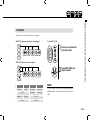
Any of tracks 1-4 can be set for mono or stereo input.
SELECT the input per track one by one and adjust.
Use the REC LEVEL
+
1
Press the selected track
and input button.
2
Press REC LEVEL and
adjust the level.
SELECT the input to 2 tracks and adjust.
TRACK 1
TRACK 2
TRACK 3
TRACK 4
MONAURAL
STEREO
MONAURAL
MONAURAL
MONAURAL
MONAURAL
STEREO
MONAURAL
MONAURAL
STEREO
STEREO
HINT:
In MTR mode, you can record multiple tracks in
multiple passes. You can also send any input to any
track.
STEREO
048
1-02
Setting / Recording: Recording in STEREO and STAMINA mode
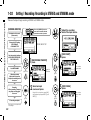
These are the steps to begin recording in STEREO or STAMINA mode.
Setting / Recording: Recording in STEREO and STAMINA mode
[RECORDING DIRECTION]
Press the [MENU] button for
more than 2 seconds, and start
operation from the top screen.
Confirmation of the mode.
(Stereo mode)
* Change the FILE setting.
• REC FORMAT,
• FILE NAME TYPE
1
[RECORDING STANDBY]
press.
* Use METRONOME
a new file
name here
light blinks
1. Recording standby
2. Select the input source
3. Adjust the recording level of
the source
2
light on
049
4
[REC START]
press.
The number
figures rotate.
light on
blinks
Recording
4. Start recording: Temporary
stop, Start recording again,
Put a mark
*marks mean you can record without
those settings.
Adjust the recording
level of the input source.
STEREO MODE TOP
* Use the recording functions.
AUTO REC/STOP, PRE REC,
REC LEVEL AUTO
5. Recording completes
3
5
Select an input
source and press.
Using built-in microphones, press [MIC],
using external inputs press INPUT [1] and
INPUT [2].
light off
[REC FINISH]
press.
The counter
returns back
to 0.
light blinks
Press
blinks
Counter doesn’t return to 0.
HINT:
<REC FORMAT>
<FILE NAME> change
MARK
In STEREO mode you can
record in 19 different file formats using WAV and MP3.
Recording format must be
selected before recording of
a file begins.
Recorded files are named
a u t o m a t i c a l l y. Yo u c a n
choose from two formats:
<DEFAULT> and <DATE>.
<DEFAULT>:STE-×××
<DATE>:090531-×××
* The recording date is written.
The initial format is
<DEFAULT>
When the recording format
is WAV, you can mark your
file by pressing the [REC]
b u t t o n w h i l e re c o rd i n g .
You can move swiftly to
the marked position during
playback. When you make
a temporary stop on WAV
FILE, the mark will be placed
at the stop position.
[RECORDING AGAIN]
light on
Press
NOTE:
While recording and playback, no <REC FORMAT> change
nor FILE NAME TYPE change is possible.
Ref.
You can start recording from
the position you stopped on
the same file.
☞
<REC FORMAT>
P.051
<FILE NAME>
Mark setting
<AUTO REC>
P.096
<METRONOME> P.079
<PRE REC>
P.067
P.065
<REC LEVEL AUTO> P.070
P.052
050
Setting / Recording: Recording on STEREO and STAMINA mode
[TEMPORARY STOP]
1-03
Setting / Recording: Recording format <REC FORMAT>
Choose recording file settings <REC FORMAT> before recording.
Setting / Recording: Recording format <REC FORMAT>
Press the [MENU] button for
more than 2 seconds, and start
operation from the top screen.
1
2
Press.
Select <REC> and press.
NOTE:
How to use WAV and MP3 format
• The WAV FILES with no compression are used for
high quality sound recording. Because data is not
compressed, the volume of the file will increase
compare to MP3 format.
• MP3 FILES decrease the sound quality because of
data compression, but are useful to save SD card
capacity and to record much more sounds.
REC FORMAT
STEREO mode
WAV
44.1kHz/16bit
44.1kHz/24bit
48kHz/16bit
48kHz/24bit
96kHz/16bit
96kHz/24bit
MP3
48kbps
56kbps
64kbps
80kbps
96kbps
112kbps
128kbps
160kbps
192kbps
224kbps
256kbps
320kbps
VBR
HINT:
VARIETY OF WAV FILES
3
Select <REC FORMAT> and press.
"Short cut"
Pressing TRACK
on the top screen.
4
default;
WAV44.1 kHz/16bit.
051
Formats are: 44.1/48/96 kHz indicates the sampling
rate of the analog-to-digital conversion. 16/24-bit
indicates the bit depth of the analog-to-digital conversion.
The larger the number, the higher the sound quality,
but the files that are created are larger as well.
The WAV files recorded on STEREO/4CH/STAMINA
mode correspond to BWF (Broadcast Wave Format)
and include marks and production date.
VARIETY OF MP3
Select one and press.
Select the bit rate which indicates information
volume per minute. The bigger the number, the lower the rate of compression and the higher the sound
quality. The higher compression MP3 will occupy
less space on an SD card
VBR (Variable Bit Rate) means the bit rate (recording quality) is automatically adjusted based on input
information.
4CH mode
WAV
44.1kHz/16bit
44.1kHz/24bit
48kHz/16bit
48kHz/24bit
1-04
Setting / Recording: File name <FILE NAME>
When recording, a file name is automatically assigned. To change that, take the following steps.
1
2
File Name
STEREO mode:
Press.
<DEFAULT>
<DATE>
Select <REC> and press.
090531-×××.wav(mp3) : year, date yymmdd-3 figures, extension
4CH mode:
No change
3
STE-×××.wav (mp3) : 'STE-'3 figures, extension
* <MONO MIX> setting
MONO-×××.wav(mp3) : 'MONO' 3 figures, extension
Select <FILE NAME> and press.
4CH-×××M.wav
Record file of the built-in microphones: '4CH-' 3 figures 'M' extension
4CH-×××I.wav
Record file of the external input: '4CH-' 3 figures 'I' extension
MTR mode:
STEREO FILE
MONO FILE
TRK1-××.wav : 'TRK' track number- 2 figures, extension
* On stereo tracks put the track number like [1] [2] using L and R.
NOTE:
4
Select and press.
The initial notation
is <DEFAULT>
• You can set the DATE type only on STEREO
mode.
• You can use other file names on STEREO
and MTR mode. Those setting is operated on
<FILE RENAME>
Ref.
☞
<FILE RENAME>
P.109
052
Setting / Recording: File name <FILE NAME>
Press the [MENU] button for
more than 2 seconds, and start
operation from the top screen.
1-05
Setting / Recording: Recording on 4CH mode
Setting / Recording: Recording on 4CH mode
This is the method to record 4 channel stereo sounds coming from the built-in mic and the external
input jack.
[RECORDING DIRECTION]
Press the [MENU] button for
more than 2 seconds, and start
operation from the top screen.
Change to 4CH mode
* Change the FILE setting.
• REC FORMAT
3
Adjust the recording level
of the input sources.
4
[START RECORDING]
press.
STEREO
MODE TOP
* Use the recording functions: •
AUTO REC/STOP
• PRE REC
• REC LEVEL AUTO
1
[RECORDING STANDBY]
press.
or
The number
figures rotate.
* Use the METRONOME
1. Recording standby.
2. Select the input source.
3. Adjust the recording level of
the source.
Recording operation.
4. Start recording
• temporary stop
• record again
• put a mark on a file.
5. Recording completes.
*You can record skipping this step.
053
a new file
name here
light blinks
light on
blinks
light on
2
5
[Adjust the recording level]
Select the input sources and
press.
* When you use the built-in microphones:
select [MIC]
Connection from outside:
INPUT [1] and [2]
light off
[COMPLETE RECORDING]
press.
Counter
returns back
to 0.
light blinks
Press.
blinks
Counter doesn’t return back to 0.
[RECORDING AGAIN]
light on
FILE NAME
<REC FORMAT> CHANGE
Mark
On 4CH mode the input from
the built-in and the external
microphones is saved separately
as STEREO WAV FILE.
Those 2 files are always
administered as one pair and
named as the following depending
on the input:
[MIC] file: 4CH×××M.wav
INPUT [1] [2] file: 4CH×××I.wav
On screen 2 files noted 'M/I' at
one time.
If you want change, operate before
recording.
While the recording format is WAV,
if you press [REC] button during
recording operation, the mark is
put on the file and you can move
swiftly to the marked position
during playback.
When you pause, that becomes
the mark position.
* You cannot change the file name.
Press.
NOTE:
While recording and playback, no <REC FORMAT> is
possible.
file name
Continue recording from the
position stopped on the same file.
Ref.
☞
<REC FORMAT>
P.051
<FILE NAME>
Mark setting
<AUTO REC>
P.096
<METRONOME> P.079
<PRE REC>
P.067
Mode change
P.038
P.065
<REC LEVEL AUTO> P.070
P.052
054
Setting / Recording: Recording on 4CH mode
HINT:
[TEMPORARY STOP]
1-06-1 Setting / Recording: Recording in MTR mode
Using multiple tracks, you can combine mono and stereo recordings.
Setting / Recording: Recording in MTR mode
[RECORDING DIRECTION]
Change to <REC MODE>, <OVERWRITE/ ALWAYS NEW>
Press the [MENU] button for
more than 2 seconds, and start
operation from the top screen.
Change to MTR mode
Create a new PROJECT.
Record the first track.
Select the [REC] mode
<OVERWRITE> and SAVE.
* Setting up PUNCH IN/OUT
<ALWAYS NEW>.
* Use the METRONOME
* Set up the EFFECT
* Use the METRONOME
* Set up the EFFECT
1
Press.
2
Select <REC MODE>
and press.
3
Select either <OVERWRITE> or
<ALWAYS NEW> and press.
Recording Standby
Select the track to record
• Select the input source
• Adjust the recording level of
the source
Select the track to record
• Select the input source
• Adjust the recording level of
the source
Start recording
Temporary Stop
Re-start
Complete recording
Make setting (mix)
• TRACK MENU setting
Adjust the track
• LEVEL • PAN
Make setting (mix)
• TRACK MENU setting
Adjust the track
• LEVEL • PAN
Record the second track
* This means you can record without this setting.
055
Setting / Recording: Recording in MTR mode
About INPUT SOURCE and TRACK
Only one recording track
Two recording tracks
1. Input source comes from either INPUT [1] or INPUT [2].
INPUT [1] or [2]
1. Input source comes from either INPUT [1] or INPUT [2].
TRACK
Track 1 or 3
INPUT [1] or [2]
Track 2 or 4
The same signals are sent to both tracks.
2. Input sources come from both [MIC]s or INPUT [1] & [2].
Built-in microphone L
Built-in microphone R
+
Recording is created by mixing signals from both sources
INPUT [1]
INPUT [2]
+
2. The input source comes from either [MIC] or INPUT [1] [2].
Built-in microphone L
Track 1 or 3
Built-in microphone R
Track 2 or 4
TRACK
or
or
INPUT [1]
Track 1 or 3
INPUT [2]
Track 2 or 4
TRACK
056
1-06-2 Setting / Recording: Recording <OVER WRITE> in MTR mode
Setting / Recording: Recording <OVER WRITE> in MTR mode
You can select from two recording modes.
Using the <OVERWRITE> mode, you can overwrite new sounds on the existing file.
Press the [MENU] button for
more than 2 seconds, and start
operation from the top screen.
Choose the appropriate
settings for your application
1
☞ Input setting … P.055
☞ Recording functions … P.059−
Select the TRACK.
MTR MODE
TOP
[START RECORDING]
press.
4
[STOP RECORDING]
press.
light on
The selected
‘TRACK’ light on.
2
3
displays input level
Press.
light off
light on
Counter doesn’t return back to 0.
Counter won’t be reset to 0 when
using.
057
You can get back to the beginning of the file with the REW button. This will allow
you to listen to what you’ve just recording by pressing the PLAY/PAUSE button.
1-06-3 Setting / Recording: Recording <ALWAYS NEW> in MTR mode
In ALWAYS NEW, a new file is made whenever it records.
Setting / Recording: Recording <ALWAYS NEW> in MTR mode
Press the [MENU] button for
more than 2 seconds, and start
operation from the top screen.
Choose the appropriate
settings for your application
1
☞ Input setting … P.055
☞ Recording functions … P.059−
Select the TRACK.
3
[START RECORDING]
press.
4
[STOP RECORDING]
press.
or
MTR MODE
TOP
light on
The selected
TRACK light on.
2
displays input level
Press.
light off
Light blinks
blink
Counter return back to 0.
Counter won’t be reset to 0 when using.
The PLAY/PAUSE button will allow you to listen back to the recorded file.
058
1-07
Setting / Recording: TRACK MENU in MTR mode
Setting / Recording: TRACK MENU in MTR mode
This is an exclusive menu available only in MTR mode to set a track.
Link tracks together, create a stereo track, or you can create a special setting for output effects.
Press the [MENU] button for
more than 2 seconds, and start
operation from the top screen.
HINT
Select a target project and start ……P.119
Select TRACK MENU
1
On the top screen select
'TRACK MENU ICON' and
press.
HINT:
LEVEL
Set the output level of a track
Setting value: Mute, −48.0dB _ +12.0dB
Default: 0.0dB
PAN
Set the balance of Left and Right position of the tracks
Setting value: L100 _ C _ R100
Default: C (Center)
Adjust the output level of a track
Adjust the output pan of a track
Select <LEVEL> and press.
Select <PAN> and press.
Set the value and press.
Set the value and press.
TRACK MENU icon
TRACK MENU
file names allocated to tracks
fader Icon changes
currently selecting track
059
pan Icon
changes
Only on MTR MODE
Setting for <STEREO LINK>,
<FILE> and <KARAOKE> are
not available during recording,
playback and also when
tracks are armed.
HINT:
STEREO LINK
Setting stereo link on creates a stereo track from tracks
1 and 2 or 3 and 4. Setting stereo link off creates a mono
track. Setting value: ON/OFF Default: OFF
NOTE:
NOTE:
• You can only playback a mono file on 'MONO TRACK' and
a stereo file on 'STEREO TRACK'.
• When <STEREO LINK> is turned on, no file will be
assigned to the track, and "NO DATA" will be displayed.
• When you change from 'ON' to 'OFF', the setting of <PAN>
returns to the previous one.
• When you change from 'OFF' to 'ON', the setting of
<LEVEL> and <PAN> return to 'DEFAULT'.
• You cannot record on the <KARAOKE> track.
• When the <STEREO LINK> turns on automatically with a
monaural track setting, it turns to "NO DATA" condition.
• When the <KARAOKE> track has been set, you cannot
make the other tracks <KARAOKE>.
Allocate files to a track
Setting <KARAOKE>
Setting <STEREO LINK>
HINT:
You can only use KARAOKE setting on one pair of stereo
tracks; either 1 and 2 or 3 and 4. In KARAOKE mode, you
can set KEY CONTROL and CENTER CANCEL operations.
Setting value: ON/OFF Default: OFF
Select <STEREO LINK> and press.
Select <FILE> and press.
Select <KARAOKE> and press.
Set the value and press.
Select the <FILE> to be
allocated and press.
Set the value and press.
When change the
format, the display
says "NO DATA".
Display for the file list available
to allocate with corresponding
file style.
The display of
'LEVEL METER'
changes 'STEREO'.
060
Setting / Recording: TRACK MENU in MTR mode
NOTE:
1-08-1 Setting / Recording: Re-recording, <PUNCH IN/OUT> automatic
Setting / Recording: Re-recording, <PUNCH IN/OUT> automatic
This function, <PUNCH IN/OUT>, allows you to partially re-record a recorded file.
Here we explain how to start <PUNCH IN> and end <PUNCH OUT> automatically.
Press the [MENU] button for
more than 2 seconds, and start
operation from the top screen.
Change from <REC MODE>
to <OVERWRITE> …………P.055
Allocate files to a track
1
Set the recording start position, <PUNCH IN>
On the top screen select
'TRACK MENU ICON' and press.
4
Press[START PLAYBACK].
5
Select PUNCH IN _ PUNCH OUT ICON and press.
TRACK MENU icon
2
Select <FILE> and press.
PUNCH IN / PUNCH
OUT icon
3
Select any desirable <FILE> and press.
6
Find the desirable position for ‘PUNCH IN’
and press.
Icon interchanges
061
Only on MTR MODE
Setting available on MTR
mode and <OVERWRITE>
recording.
Set the recording end position, <PUNCH OUT>
7
Re-recording
Press the desirable position for
‘PUNCH OUT’.
+
8
Rewind the file to the head
(Counter: 0) or to the position to
start re-recording ‘PUNCH IN’.
9
Press TRACK [1], Recording Standby.
The PUNCH OUT setting
confirmed
→
PUNCH OUT
PUNCH OUT
REC
PLAY
Start
[1] When in punch in / out mode,
the light is on during recording and
blinks during record standby.
PLAY
Stop
the practical re-recording parts
10
Press TRACK [1] [PLAYBACK _ RECORDING].
When the track reaches the ‘PUNCH
IN’ point, the REC light will turn on,
recording will start.
[1] When the track reaches the
‘PUNCH OUT’ point, the light will
blink and recording will stop.
HINT:
• You can set the position for <PUNCH IN / OUT> while
stopped by using the counter. First set each time and move
the cursor to <PUNCH IN / OUT>, and then press [DIAL].
• During <PUNCH OUT> _ Step 7-, if you press [DIAL]
again, all the setting will be cancelled.
Ref.
☞
Appointing the time
P.102
using a counter
062
Setting / Recording: Re-recording, <PUNCH IN/OUT> automatic
NOTE
1-08-2 Setting / Recording: Re-recording, <PUNCH IN/OUT> manual
Setting / Recording: Re-recording, <PUNCH IN/OUT> manual
Using [OVERWRITE] recording operation in MTR mode, you can manually punch in and out. Press [REC] button
during playback, from that pressed position you can start re-recording.
Press the [MENU] button for
more than 2 seconds, and start
operation from the top screen.
Change from <REC MODE>
to <OVERWRITE> …………P.055
Allocate files to a track
1
On the top screen select
'TRACK MENU ICON' and press.
Playback
4
Press [RECORDING STANDBY].
点滅
063
light on
2
Select <FILE> and press.
3
Select any desirable <FILE> and press.
5
Press [START PLAYBACK].
Only on MTR MODE
Setting / Recording: Re-recording, <PUNCH IN/OUT> manual
Re-recording (Manual <PUNCH IN/OUT>)
6
Performance (Not recording).
7
Press [START RECORDING].
9
Press [FINISH RECORDING].
light off
light on
10
light on
Press [PLAYBACK FINISH].
light on
Performance (Recording).
→
RECORDING START
▲
▲
8
FINISH RECORDING
REC
PLAY
Start
PLAY
Stop
Re-recording
064
2-01-1 Recording function <AUTO REC>
The H4n can detect when the input level surpasses your predetermined level, and can automatically start recording from the recording standby position.
Recording function <AUTO REC>
Pressing the [MENU] button long
for two seconds, start to operate
from the top screen of the MODE.
1
2
Press.
5
Adjust the level.
HINT:
Display of “Wait for Signal”
While <AUTO REC> operation
is on, the display of “Wait for
Signal” appears during recording
standby. That watches whether
the present input level goes
over the recording start level.
Select <REC> and press.
Set the input level to start recording
automatically.
3
Select <AUTO REC> and press.
6
Select<ON/OFF> and press.
Present input level
Start level
During “wait for signal” you can
also start recording manually by
pressing the REC button.
4
065
[START LEVEL SETTING]
Select <START LVL> and press.
7
Select<ON>and press.
NOTE:
• You cannot use this setting
during recording and playback.
• You cannot use this function
together with <REC LEVEL
AUTO>, <PRE REC> and
<PRE COUNT>.
2-01-2 Recording function <AUTO REC STOP>
When <AUTO REC> is on and recording, the H4n will automatically stop recording when the input level goes below a predetermined level.
1
2
Press.
5
4
Set the input level at which
recording will stop
Select <REC> and press.
HINT:
6
3
Adjust the level.
When<[AUTO REC STOP>
is on, ‘STOP LEVEL’ display
Select <AUTO STOP> and press. appears during recording.
Select <AUTO REC> and press.
[STOP LEVEL SETTING]
Select <STOP LVL> and Press.
7
Stop level
Select the time setting.
Select from 1-5 seconds to stop
recording after the signals have become lower than the STOP LEVEL.
Present input level
NOTE:
• Yo u c a n n o t u s e t h i s
function during recording
and playback.
• When <AUTO REC STOP>
is on, you can finish
recording with pressing
[STOP] button.
066
Recording function <AUTO REC STOP>
Press the [MENU] button for
more than 2 seconds, and start
operation from the top screen.
2-02
Recording function <PRE REC>
Recording function <PRE REC>
The <PRE REC> setting can be initialized by pressing the [REC] button, automatically adding the
previous 2 seconds to your recording.
Press the [MENU] button for
more than 2 seconds, and start
operation from the top screen.
1
Press.
2
Select <REC> and press.
4
Select <ON> and press.
HINT
In PRE REC mode the H4n will pre-record audio two seconds before the record button is pressed.
3
067
Select <PRE REC> and press.
NOTE
• You cannot use this setting during recording and playback.
• When recording on 96 kHz, 4CH mode, the maximum
PRE REC time is one second.
• You cannot use this function together with AUTO REC and
PRE COUNT.
2-03
Recording function <LO CUT>
The <LO CUT> filter setting allows you to eliminate wind or blowing noises.
Recording function <LO CUT>
Press the [MENU] button for
more than 2 seconds, and start
operation from the top screen.
1
Press.
2
Select <INPUT> and press.
3
Select <LO CUT>and Press.
4
Select the setting input source.
5
Select the cutoff frequency.
HINT:
• You can Select the <LO CUT> filter among eleven
frequencies, such as OFF, 80, 98, 115, 133, 150, 168,
185, 203, 220, and 237 Hz. When selecting higher
numbers, you should verify the outcome before recording.
• The smaller the number, the lower the cut-off frequency.
.
068
2-04
Recording function <COMP/LIMIT>
Recording function <COMP/LIMIT>
The <COMP / LIMIT> setting can compensate for volume differences. For each input source, low
level input signals are lifted up and high level input signals are controlled down when recording.
Press the [MENU] button for
more than 2 seconds, and start
operation from the top screen.
1
2
3
4
Select the setting input source.
5
Select the setting target.
Press.
Select <INPUT> and press.
HINT:
Select <COMP/LIMIT> and press.
OFF
COMP1(GENERAL)
COMP2(VOCAL)
COMP3(DRUM)
LIMIT1 (GENERAL)
LIMIT2 (CONCERT)
LIMIT3 (STUDIO)
069
Compressor and Limiter are off
Standard compressor
Compressor suitable for vocal
Compressor suitable for drum and
percussion
Standard limiter
Limiter suitable for ‘live’
Limiter suitable for ‘studio’ recording
The compressor
can compress
higher level sounds
and raise the level.
The limiter can
compress when
the input signals go
over the fixed level
2-05
Recording function <REC LEVEL AUTO>
This function automatically sets the level for recording.
1
Press.
2
Select <INPUT> and press.
3
Select <LEVEL AUTO>and press.
HINT:
When <REC LEVEL AUTO> is used, the unit automatically
determines the recording levels using the signal present during recording standby. If the volume surpasses 6dB during
recording, the input level is automatically adjusted with the
new level displayed on the screen for two seconds.
Display when
recording standby
STEREO MODE
Present input level
4CH MODE
Display when -6dB is exceeded while recording
4
Select <ON>
NOTE:
• You cannot use this function together with <AUTO REC>.
• You cannot use this setting during recording and playback.
070
Recording function <REC LEVEL AUTO>
Press the [MENU] button for
more than 2 seconds, and start
operation from the top screen.
2-06
Recording function <MONITOR>
Turning on the MONITOR function allows you to monitor input signals at all times.
Recording function <MONITOR>
Press the [MENU] button for
more than 2 seconds, and
start operation from the top
screen.
1
Press.
2
Select <INPUT> and press.
3
4
Select <ON> and press.
HINT:
Select <MONITOR> and press.
You can always monitor the input source through [LINE/
PHONE MINI STEREO OUT] during recording standby.
NOTE:
You cannot monitor the input sound through the built-in
speaker.
071
2-07
Recording function <MONO MIX>
Engaging <MONO MIX> blends the left and right signals down to mono then records dual-mono to each left and right channel.
Recording function <MONO MIX>
Press the [MENU] button for
more than 2 seconds, and start
operation from the top screen.
1
Press.
2
Select <INPUT> and press.
3
Select <MONO MIX> and press.
4
Select <ON> and press.
NOTE:
• The name of the recorded file making <MONO MIX> valid
is “MONO-xxx”
• You cannot use this function together with <MS STEREO
MATRIX>.
• You cannot use this setting during recording and playback.
072
2-08
Recording function <MS STEREO MATRIX>
This function enables you to convert the stereo microphone signals when using a MID/SIDE recording configuration.
Recording function <MS STEREO MATRIX>
Press the [MENU] button for
more than 2 seconds, and start
operation from the top screen.
1
Press.
2
Select <INPUT> and press.
3
4
073
<ON / OFF>
<MID LEVEL>
Make the setting <ON/OFF> of
<MS STEREO MATRIX>.
<MID>is a directional microphone receiving
the recording targets.
Setting value: MUTE, −48.0 _ +12.0dB
Default: +0.0dB
Select
Select
Select
Adjust
Select <MS MATRIX> and press.
Make each setting accordingly.
<SOURCE>
<CH SETTING>
A bi-directional microphone <SIDE> and
<MID> are perpendicular each other.
Setting value: MUTE, −48.0 _ +12.0dB
Default: +0.0dB
Enable to select what input is effective.
(Only on 4CH mode)
Allocate <MID> inputs and <SIDE>
inputs between
L-ch (INPUT [1]) and R-ch (INPUT [2]).
Select
Select
Select
Adjust
Select
Select
NOTE:
You cannot use this function
together with <MONO MIX>.
074
Recording function <MS STEREO MATRIX>
<SIDE LEVEL>
3-01-1 Tuner <TUNER (CHROMATIC) >
The H4n features a tuner with multiple tuning modes.
Tuner <TUNER (CHROMATIC) >
Press the [MENU] button for
more than 2 seconds, and start
operation from the top screen.
1
Press.
2
Select <TOOL> and press.
5
Tuning.
The indicator shows the input signals are higher or lower than the
‘NOTE’ described below.
Both marks light on when the inputs signals match the ‘NOTE’.
Low
High
These dots show how
much gaps exist between
the input signals and the
indicated NOTE.
3
4
Select <TUNER> and press.
The name of the [NOTE] shows the
nearest one to the input signals.
HINT:
Select <CHROMATIC> and press.
• The input source signals selected at the present become
the tuning target.
• Operating under 4CH mode, at Step 4 select <INPUT>
and select the input source, and then continue to steps 5.
NOTE:
Not available during recording and playback.
Ref.
075
☞
Display of tuning
Relationship between string numbers and notes P.078
3-01-2 Tuner, all other <TUNER>
Aside from CHROMATIC, there are other tuning modes such as GUITAR, BASS, OPEN A, OPEN D, OPEN E, OPEN G and DADGAD.
1
Press.
2
Select <TOOL> and press.
5
Tuning.
The indicator shows the input signals are higher or lower than the
‘NOTE’ described below. Both marks light on when the input signals
match the ‘NOTE’.
Low
High
These dots show how
much gaps between the
input signals and the
indicated NOTE.
3
Select <TUNER> and press.
String number currently selected.
You can [DIAL] and select.
HINT:
4
Select the tuning mode and press.
• The input source signals selected at the present become
the tuning target.
• Operating under 4CH mode, at Step 4 select <INPUT>
and select the input source, and then continue to steps 5.
NOTE:
Not available during recording and playback.
Ref.
☞
Display of tuning
Relationship between string numbers and notes P.078
076
Tuner, all other <TUNER>
Press the [MENU] button for
more than 2 seconds, and start
operation from the top screen.
3-01-3 Tuner <TUNER (CALIB) >
This function allows you to calibrate the tuner.
Tuner <TUNER (CALIB) >
Press the [MENU] button for
more than 2 seconds, and start
operation from the top screen.
1
Press.
2
Select <TOOL> and press.
3
Select <TUNER> and press.
4
Select <CALIB> press.
5
Select frequency numbers.
HINT:
The <TUNER> operation
up to here is in common.
• The initial setting is 440Hz.
• You can make any setting per 1Hz from 435Hz to 445Hz.
NOTE:
Not available during recording and playback.
077
3-01-4 Tuner <TUNER (INPUT) >
Only on 4CH MODE
In 4CH mode you can select the input source for the tuner.
HINT:
Tuning display
5
Tuner type and code
String number/ note name
…P.075
〈TUNER〉
4
Tuner <TUNER (INPUT) >
Press the [MENU] button for
more than 2 seconds, and start
operation from the top screen.
Tuner type
Select <INPUT> and press.
When tuning is low
Select input source and press.
1
2
3
4
5
6
7
GUITAR
E
B
G
D
A
E
B
BASS
G
D
A
E
B
OPEN A
E
C#
A
E
A
E
OPEN D
D
A
F#
D
A
D
OPEN E
E
B
G#
E
B
E
OPEN G
D
B
G
D
G
D
DADGAD
D
A
G
D
A
D
When tuning is high
No input sound (chromatic)
NOTE:
Not available during recording and playback.
078
3-02
Metronome <METRONOME>
The metronome has other convenient functions such as click, pre-count, tempo, sound, etc.
Metronome <METRONOME>
Press the [MENU] button for
more than 2 seconds, and start
operation from the top screen.
1
Press.
2
Select <TOOL> and press.
3
<CLICK>
<PRE COUNT>
This setting turns the metronome on or off during recording, playback or both. This setting
must be made before recording or playback.
Set the count number just before the
beginning of recording. Setting is impossible
when <PRE REC> and <AUTO REC> is ON.
Select
Select
Select
Select
Select <METRONOME>and press.
Select conditions
4
079
Make each setting selection.
OFF
/ --Recording / Playback
---Only during recording
---Only during playback
Select beat.
Select among OFF,1-8 beat
and SPECIAL.
Count of <SPECIAL>
The metronome starts at the beginning of recording and playback. If you
start in the middle of a song or track, the metronome beats may not be in
sync with the song.
<TEMPO>
<SOUND>
<PATTERN>
<LEVEL>
Set the metronome speed.
Set the metronome tone.
Set the pattern of the metronome.
Set for the volume of the metronome.
Select
Select
Select
Select
Adjust
Select
Select
Select
default: 120.0.
default: bell sound.
default: 4/4.
You can set between 40.0
and 250.0 BPM, per 0.1.
You can select among BELL,
CLICK, STICK, COWBELL
and HI-Q.
You can select among 0/4
(no accent), 1/4_ 8/4, and 6/8.
You can select among eleven
levels.
080
Metronome <METRONOME>
NOTE:
3-03-1 All about EFFECT
Brief outline about how to use <EFFECT>, its flow, input and output
All about EFFECT
[Flow of the EFFECT]
Change of the mode (MTR mode) P.038
#1 Use <EFFECT>
Use the pre-set patch as it is P.083
Select the pre-set that’s closest to your desired sound.
Edit the modules
Select modules
<PRE AMP>
<EFX>
Adjust the level of the patch
P.085
Change the name of the patch
P.087
P.086
Adjust the parameter
P.139
Store the contents of editing : <STORE> P.088
Recording P.055
081
#3 Import the patch <IMPORT>
Select the mode
Import one <EACH>
Import all <ALL> P.089
#2 Edit the patch <EDIT>
P.087
Only on MTR MODE
All about EFFECT
About input and output of [EFFECT]
You can use EFFECT in MTR mode for mono or stereo signals. The flow of signals will
change corresponding to the input sources and recording tracks.
1. Input source comes from either INPUT [1] or [2]
EFFECT
INPUT [1] or [2]
One recording
track:
PRE AMP
EFX
+
TRACK
+
TRACK
2. Input source comes from either [MIC] or INPUT [1] [2]
Built-in MIC L or INPUT [1]
+
Built-in MIC R or INPUT [2]
EFFECT
PRE AMP
EFX
1. Input source comes from either INPUT [1] or [2]
Two recording
tracks:
TRACK
EFFECT
INPUT [1] or [2]
PRE AMP
EFX
TRACK
2. Input source comes from either [MIC] or INPUT [1] [2]
Built-in MIC L or INPUT [1]
Built-in MIC R or INPUT [2]
+
TRACK
EFFECT
PRE AMP
EFX
TRACK
082
3-03-2 Effect <EFFECT>
Only on MTR MODE
Using the EFFECT made up of 2 modules in MTR mode, you can add various effects to the input signals.
Effect <EFFECT>
Press the [MENU] button for
more than 2 seconds, and start
operation from the top screen.
1
Press.
4
Select No. : PATCH NAME and press.
PATCH NUMBER: PATCH NAME.
When EFFECT is on, display
will show off.
2
IMPORT: Carry in a PATCH from
the other PROJECT
Press <EFFECT> and press.
5
Select PATCH and press.
EDIT: Create a new PATCH,
Edit a PATCH.
Ref.
☞
patch list
P.145
P.146
3
083
Press <ON> and press.
6
NOTE:
Pressing [MENU] for more
than two seconds returns PATCH
Effects module settings are
you to the top screen.
saved as a ‘patch’.
60 patches are available
and 50 of them have been
programmed.
3-03-3 Effect <EDIT>, patch edit
Only on MTR MODE
You can create your own patch by combining effects and adjusting the parameter settings.
6
Effect <EDIT>, patch edit
5
Select the desired sound No.
:PATCH NAME and press.
EDIT MENU
<PRE AMP>
<LEVEL>
PRE AMP module contains
guitar and bass amp modeling effects.
Adjust PATCH level.
Select <EDIT> and press.
<RENAME>
Change the PATCH NAME.
<EFX>
EFX module contains modulation, chorus and delay effects.
7
Select the PARAMETER which
you want to change and press.
<STORE>
Save the set the PATCH.
084
3-03-4 Effect <EDIT (PRE AMP) >, editing PRE AMP modules
Only on MTR MODE
You can edit the PATCH using PRE SET EFFECT.
Effect <EDIT (PRE AMP) >, editing PRE AMP modules
Select the desired PATCH and edit it....P084
ADJUST PRE AMP module
7
Select <PRE AMP>and press.
ADJUST PARAMETER
ICON
PRE AMP MODULE CONDITION
ON / OFF
8
Press <ON/OFF> and PRE AMP
module turns on.
EFFECT TYPE: SET THE AMP TYPE
CABINET.EQ.LEVEL. ETC.
9
Select editing PARAMETER
and press.
ZNR ICON
☞
Ref.
PRE AMP module PARAMETER
P.139
085
3-03-5 Effect <EDIT (EFX) >, editing EFX modules
Only on MTR MODE
Edit the patch by selecting from various parameters that correspond closest to your desired effect.
Effect <EDIT (EFX) >, editing EFX modules
Select the nearest image PATCH and edit it....P084
ADJUST EFX module
7
Select <EFX> and press.
ICON
HINT:
8
9
Press <ON/OFF> and EFX
module turns on.
To select PRE AMP and EFX
modules, make setting after
changing the module status
ON.
Default: When a module
is OFF, no parameters or
settings are shown.
When OFF, you cannot select
modules.
PRE AMP MODULE CONDITION
ON / OFF
EFFECT TYPE: SET THE EFX
Select editing PARAMETER
and press.
VARIOUS PARAMETERS
☞
Ref.
EFX module PARAMETER
P.141
086
3-03-6 Effect <EDIT (LEVEL/RENAME) >
Only on MTR MODE
Adjust the levels of the patch and change the name.
Effect <EDIT (LEVEL/RENAME) >
EFFECT
…P.084
〈EDIT〉
LEVEL
087
RENAME
1
Select <LEVEL> and press.
1
Select <RENAME> and
press.
2
Change the number and
press.
2
Change the PATCH name
and press.
3
Select <OK> and press.
NOTE:
Select <STORE> to save
the patch. To return to the
top without saving the edit/
change, hit MENU.
3-03-7 Effect <EDIT (STORE) >
Only on MTR MODE
Effect <EDIT (STORE) >
EFFECT
…P.084
〈EDIT〉
STORE
10
Select <STORE> and press.
NOTE:
The items you edited have ‘ED’ display and confirmed by
<STORE>operation.
11
Select the ‘PATCH No.’
where to save and press.
12
Select <EXECUTE> and press.
Select not <STORE>.
(not stored)
Confirmed <STORE>.
Selecting “YES” will overwrite
the current patch. To save
without overwriting an existing patch, select an empty
patch during STORE operation. Patch changes are only
stored for the current project.
088
3-03-8 Effect <IMPORT>, taking in a patch from another PROJECT
You can apply the edited and saved EFFECT PATCH, used in other project to the current PROJECT.
Effect <IMPORT>, taking in a patch from another PROJECT
SELECTED EFFECT...P.083<EFFECT>
1
Press <IMPORT> from
the <EFFECT> screen.
2
Select <MODE> and press.
3
Select your desired mode
and press.
4
Select PROJECT
and press.
<ALL> read in all patches
5
Select <NEXT> and press.
6
Select <YES> and press.
All the patch selected at
step 4 are now read in to
the present project.
089
Only on MTR MODE
Effect <IMPORT>, taking in a patch from another PROJECT
<EACH> import one patch
5
6
Select <NEXT> and press.
8
Select <YES> and press.
The patch selected at step6 is now
imported to the present project.
Select an import patch and press.
NOTE:
When pressing the
<IMPORT>, “No Other
Project!” display will
appear when there is
no PROJECT.
7
Select which patch you want
to import to the present
project and press.
HINT:
Read in MODE
Read in PROJECT
Start importing
current PROJECT
Selected PROJECT
090
3-04-1 A sing-along machine <KARAOKE> preparation
Create spontaneous music files and convert them into KARAOKE form, then record vocals or additional guitar sounds over those files.
A sing-along machine <KARAOKE> preparation
[Flow of the KARAOKE]
Press the [MENU] button for
more than 2 seconds, and start
operation from the top screen.
[Preparation]
Prepare the stereo files for the
background
Create a new project for
“Karaoke” ………P.118
Import the file to the project
• Copy the file to the project folder
……P.039
• Use <MOVE> function……P.117
KARAOKE track preparation
Allocate an optional file on to KARAOKE track
1
Select TRACK MENU icon and press.
4
Select TRACK MENU icon and press.
2
Select <KARAOKE> and press.
5
Select <FILE> and press.
3
Select <ON> and press.
6
Select an optional file and press.
[Setting KARAOKE]
(Prepare tracks for the Karaoke)
1. Select 'TRACK MENU ICON' and
open the 'TRACK MENU'
2. Make <KARAOKE> on.
3. Allocate files.
[Adjustment of the Karaoke tracks]
• LEVEL
• CENTER CANCEL
• KEY
• FINE·FINE
[KARAOKE OPERATION]
4. Connect the microphone
5. Make the setting for the
recording tracks
6. Make 'RECORDING' on.
• Playback
• Recording
091
Only on MTR MODE
7
8
Change the KEY of KARAOKE track
Select TRACK MENU icon
and press.
10
Select <CNT CANCEL> and press.
11
Select TRACK MENU icon
and press.
HINT:
Select <KEY> and press.
The contents of KARAOKE
TRACK are different from a
general TRACK MENU.
(LEVEL)
(CNT CANCEL)
9
Convert that into <ON> and press.
12
Adjust and press.
(KEY)
(FINE)
(FILE)
(KARAOKE)
092
A sing-along machine <KARAOKE> preparation
Continue to the next page
Make CENTER CANCELATION of the KARAOKE track
3-04-2 A sing-along machine <KARAOKE> recording
A sing-along machine <KARAOKE> recording
Recording on KARAOKE
A slight adjustment of KARAOKE TRACK KEY.
13
14
15
Only on MTR MODE
Select TRACK MENU icon
and press.
1
Connect the microphone.
2
Select the track menu icon and press.
3
Press ‘PRACTICE’ (no recording).
Press the INPUT button corresponding
to the connected input jack.
Select <FINE> and press.
4
Make adjustment and press.
+
[START RECORDING]
NOTE:
Press [REC] button and make
recording standby condition. You cannot use this function
After that press [PLAY/PAUSE] together with <EFFECT>.
button to start recording.
Ref.
☞
<TRACK MENU> P.059
093
4-01
Playback : Playback files (stereo, 4ch and stamina modes)
Playback : Playback files (stereo, 4ch and stamina modes)
Immediately after recording, you can playback the file by pressing the [PLAY/PAUSE] button.
If you prefer to call up the files for later playback, take the following steps.
Press the [MENU] button for
more than 2 seconds, and start
operation from the top screen.
1
Press.
2
Select <FILE> and press.
4
Select <SELECT> and press.
5
[START PLAYBACK]
Press.
“Short cut”
You can select the
file in the folders
on the top screen.
"Short cut"
Pressing TRACK
on the top screen.
3
Select the targeted file
and press.
HINT:
You should confirm the file name.
• On the top screen you can move directly to Step 3,
just press TRACK [2] button.
• If you press [PLAY/PAUSE] button after selecting
files, the selected file starts playback immediately.
• You can select files in the folder directly using [DIAL]
from the top screen.
Ref.
☞
<FILE SELECT>
P.104
094
4-02
Playback : <PLAY MODE>
Playback : <PLAY MODE>
Aside from general playback, you can also select
1) one file only playback, 2) repeat playback of one file, and 3) all files repeat playback.
Press the [MENU] button for
more than 2 seconds, and start
operation from the top screen.
1
Press.
2
Select <PLAY MODE> and press.
3
Select a play mode and press.
Select desirable mode.
095
4
[START PLAYBACK]
Press.
PLAY ALL
Playback all the files in the folder.
PLAY ONE
Playback one file.
REPEAT ONE
Playback repeat of one composition only.
REPEAT ALL
Playback all files in the folder.
NOTE:
You cannot use this setting during recording
and playback.
4-03
Playback : Setting marks
Playback : Setting marks
While operating file playback you can create marks at desired spots.
You can move easily to the spot during playback.
During playback operation,
press the [REC] button.
How to create marks
Mark A
Mark B
How to playback the marked file
You can move to the marked position
pressing [FF] and [REW] buttons in the
files with marks.
FILE
Current position
NOTE:
• Mark function is available only in case of WAV format.
• The maximum marks you can place in one file are 99.
• Once a mark has been created it cannot be deleted.
HINT:
• Pressing [REC] button during recording, you can
create marks.
• You can recognize marks in the file in the <MARK LIST>.
Ref.
☞
<MARK LIST>
P.115
096
4-04
Playback : <AB REPEAT>
The <AB REPEAT> repeat setting allows you to playback two points on the file repeatedly.
Playback : <AB REPEAT>
Press the [MENU] button for
more than 2 seconds, and start
operation from the top screen.
1
Press.
2
Select <TOOL> and press.
3
4
[START PLAYBACK] Press.
5
[Set up point A] Press.
point A moves.
Select <AB REPEAT > and press.
6
A mark is placed at point A, then mark B appears and moves until set
[Set up point B] Press.
Playback continues
repeatedly between the
indicated locations.
HINT:
You can set point [A] and [B] while stopped.
097
Playback : <AB REPEAT>
HINT:
NOTE:
Caution:
or
Movable with
a long press.
When you move around in the file using [FF]
and [REW] buttons and whenever you press
the button for less than 2 seconds (quick
press), it will move to the next file. If there is
a mark, it will move to the marked point.
By pressing the [FF] and [REW] buttons for
more than 2 seconds you can move to a
desired point.
After setting up A and B
points press the [REC] button,
you can cancel all settings.
During recording and playback,
you cannot make any settings
after Step 3 of <AB REPEAT>.
<AB REPEAT>
FIX/CLEAR of A & B point
STOP
PLAYBACK/TEMPORARY STOP of the file
Holding the key for more than one second,
operate wind-forward and rewind
Just press the button, and move back or
forward to the file
* However if there is a marker in a WAV file,
the button moves to the marking place.
098
4-05
Playback : <SPEED>
Only on STEREO MODE
You can adjust playback speed of the file.
Playback : <SPEED>
Press the [MENU] button for
more than 2 seconds, and start
operation from the top screen.
1
2
"Short cut"
Pressing TRACK
on the top screen.
4
Press.
Select <TOOL> and press.
5
Adjust playback speed.
You can set up playback
speed between 50% and
150% with increments or
decrements of 5%.
[START PLAYBACK] Press.
or
3
NOTE:
Select <SPEED> and press.
During recording and playback, you cannot make any settings after Step 3 of
<SPEED>.
HINT:
• You can move swiftly to this menu pressing TRACK [3] button on the top
screen of each mode.
• You can set up playback speed between 50% and 150% with increments or
decrements of 5%. (Default; 100%)
• You can move the playback location using [FF] [REW] button.
099
4-06
Playback : <MIXER>
Only on 4CH MODE
In 4CH mode you can use the mixer to adjust the playback LEVEL and PAN settings of two stereo files.
1
Press.
2
Select <MIXER> and
press.
<LEVEL> setting
Playback : <MIXER>
Press the [MENU] button for more
than 2 seconds, and start operation
from the top screen.
<PAN> setting
MUTE
48.0dB_+12.0dB
Default; -0.0dB
Indicates if you are modifying
the MIC or Input tracks
name of parameter where the cursor
is positioned and its setting value
L 100 _ C _ R 100
Default; Center
fader Icon
pan pod Icon
after setting, confirm
with the icons
the cursor setting the
parameter
100
4-07
Playback : Playback files (MTR mode)
Only on MTR MODE
Playback : Playback files (MTR mode)
There are various ways to playback in MTR mode: Create and record files separately,
assign them to tracks and play them back simultaneously.
Initial recording
to a track
+
Press.
Next recording
to a track
+
Press.
The third recording
to a track
+
Press.
The last recording
to a track
+
Press.
Press.
Playback 4 tracks
Second time
recording
to a track
Playback
+
Press.
OVER WRITE
ALWAYS NEW
Press.
allocate random files
TRACK[ 1]
[ 2]
[3]
[4 ]
REC
NO FILE
NO FILE
NO FILE
REC
NO FILE
NO FILE
REC
NO FILE
TRK1-00.wav
PLAY
TRK2-00.wav
PLAY
PLAY
TRK3-00.wav
PLAY
PLAY
PLAY
PLAY
PLAY
PLAY
PLAY
TRK1-00.wav
TRK2-00.wav
TRK3-00.wav
TRK4-00.wav
REC
PLAY
PLAY
PLAY
TRK1-00.wav
TRK1-01.wav
TRK2-00.wav
TRK3-00.wav
TRK4-00.wav
PLAY
PLAY
PLAY
PLAY
Guitar.wav
Bass.wav
TRK3-01.wav
TRK4-01.wav
Ref.
101
REC
TRK4-00.wav
☞
<TRACK MENU>
P.059
4-08
Playback : Appointing time with a counter
Only on MTR MODE
Using the counter, you can scroll to any desired point in a recording.
Playback : Appointing time with a counter
Press the [MENU] button for
more than 2 seconds, and start
operation from the top screen.
1
2
Select the counter
figures on the top
screen and press.
Set the time:
Select the figures according
to the appointing
hour / minute / second.
counter
3
Change the figures and press.
HINT
time : minute : second : 1/1000 second
102
5-01
Edit / Output : <FOLDER SELECT>
Select the folder that contains your targeted file.
Edit / Output : <FOLDER SELECT>
Press the [MENU] button for
more than 2 seconds, and start
operation from the top screen.
1
Press.
2
Select <FOLDER> and press.
3
Select an optional folder and press.
"Short cut"
Pressing TRACK
on the top screen.
NOTE:
• You cannot use this setting during recording and playback.
• You can select any one separately among 10 folders in
STEREO/ STAMINA and 4CH mode.
HINT:
present folder
103
You can call the <FOLDER SELECT> pressing TRACK
[1]button on the top screen.
5-02
Edit / Output : <FILE SELECT>
Selecting playback files from the file list.
Edit / Output : <FILE SELECT>
Press the [MENU] button for
長押し
more than 2 seconds, and start
トップ画面より
operation from the top screen.
1
Press.
2
Select <FILE> and press.
4
Select <SELECT> and press.
"Short cut"
Pressing TRACK
on the top screen.
3
Verify the file name.
Select an optional file and press.
HINT:
<FILE> operation to
here is the same
• You can select files in the folder directly using [DIAL] from
the top screen.
• You can move to step 3 <FILE SELECT> pressing TRACK [2]
button on the top screen.
104
5-03
Edit / Output : <FILE INFORMATION>
This function displays the selected file information.
Edit / Output : <FILE INFORMATION>
SELECTING THE FILES…P.104 <FILE SELECT>
4
Select <INFORMATION> and press.
NAME
Name of the file
DATE
The recorded date of the file, or the renewal date when
it created by PC or other device.
FORMAT
105
The format of the file.
* On MTR Mode, display is either MONO or STEREO.
SIZE
Capacity of the file. (kB or MB)
TIME
The recording time of the file.
5-04
Edit / Output : <FILE DELETE>
Delete a selected file.
Edit / Output : <FILE DELETE>
SELECTING THE FILES…P.104 <FILE SELECT>
4
Select <DELETE> and press.
5
Select <YES> and press.
a deleting file
NOTE:
Caution;
Once deleted, you cannot retrieve
the file.
106
5-05
Edit / Output : <FILE DELETE ALL>
Delete all the files in the folders and projects.
Edit / Output : <FILE DELETE ALL>
SELECTING THE FILES…P.104 <FILE SELECT>
4
Select <DELETE ALL> and press.
5
Select <YES> and press.
The name of the folder or
the project to delete files.
NOTE:
Once deleted, you cannot retrieve
the file.
107
5-06
Edit / Output : <FILE (COPY)>
Only on MTR MODE
Edit / Output : <FILE (COPY)>
In MTR mode you can copy files. The copies are saved in the same project as the original files.
This function is useful when you want to preserve the original master copy.
Press the [MENU] button for
more than 2 seconds, and start
operation from the top screen.
1
Press.
2
Select <FILE> and press.
3
4
Select <COPY> and press.
5
Select <EXECUTE> and press.
Select your desired file and press.
HINT:
Change the file name: The default name given to copied files is “COPY-XXX”. You
can change that if necessary.
Ref.
☞
<FILE RENAME>
P.109
108
5-07
Edit / Output : <FILE RENAME>
Edit / Output : <FILE RENAME>
In STEREO, MTR and STAMINA MODE, you can change the name of the file.
When recorded in 4CH MODE, the file names cannot be changed.
SELECTING THE FILES…P.104 <FILE SELECT>
4
Select <RENAME> and press.
6
[Input a letter or number.]
Select.
select the letter with [DIAL]
5
[Make change of each letter or number.]
Select and press.
7
press the [DIAL] and then the
change is confirmed
select the letter to
be changed
8
press the [DIAL]
and then the letter
is reversed
109
Press.
Select <OK> and press.
NOTE:
Display when the file When converting letters,
follow the next order:
name is over
12 characters.
In case of two files with the
same name. The display
shows "This file name already
exists!", the screen returns
to the previous one and you
will need to create a different
name.
When the name of the file
has more than 12 letters, a
triangle mark appears telling
letters available outside the
screen.
(space)!#$%&'()+,-01234
56789;=@ABCDEFGHIJ
KLMNOPQRSTUVWXYZ[
]^_`abcdefghijklmnopqrst
uvwxyz{}˜
Edit / Output : <FILE RENAME>
HINT:
110
5-08
Edit / Output : <FILE MP3 ENCODE>
Only on STEREO MODE
In STEREO MODE you can encode a WAV FILE into MP3 format at various bit rates.
Edit / Output : <FILE MP3 ENCODE>
SELECTING THE FILES…P.104 <FILE SELECT>
4
Select <MP3 ENCODE> and press.
7
5
Select <BIT RATE> and press.
HINT:
6
Select your desired bit rate and
press.
• The name of the encode-completed file becomes
automatically the “Original file name.mp3”
• You cannot have two files
with the same name. When
the screen says “The file
name already exists!”, select
<RENAME> and create a
different name.
Select <EXECUTE> and press.
Bit rate that can be
selected unit : kbps
Ref.
111
48, 56, 64, 80, 96, 112, 128, 160, 192, 224,
256, 320, VBR Default; 128 kbps
☞
<FILE RENAME>
P.109
5-09
Edit / Output : <FILE NORMALIZE>
Edit / Output : <FILE NORMALIZE>
This function automatically adjusts the volume level of a recorded file for enhanced sound quality
and audio consistency.
SELECTING THE FILES…P.104<FILE SELECT>
4
Select <NORMALIZE> and press.
5
Select <YES> and press.
NOTE:
<NORMALIZE> function is only available for files recorded in
WAV format
112
5-10
Edit / Output : <FILE STEREO ENCODE>
This function will mix down a 4CH file to a stereo file. The resulting files are stored in the folder in STEREO mode.
Edit / Output : <FILE STEREO ENCODE>
SELECTING THE FILES…P.104 <FILE SELECT>
Select <STEREO ENCODE>
4
Select <STEREO ENCODE>
and press.
should select to make MIXER
Set up <MIXER>: You
settings effective when you start encoding.
5
Select <MIXER> and press.
6
Select and press.
Ref.
☞
<MIXER>
113
P.100
ENABLE
means to make setting effective.
DISABLE
means to inactivate setting, in other words mix
two files 1:1
Only on 4CH MODE
Select <SAVE IN>
7
Select <SAVE IN> and press.
8
Select the <SAVE IN> folder and press.
EXECUTION
9
Select <EXECUTE>
and press.
You cannot have two files
with the same name. If the
screen says “File name exists!”,
select <RENAME> and set
up a different name.
The encoded files are stored
in the folder.
The file name automatically
given is the same as the one
on 4CH mode but M/I is
changed to MIX.
Ref.
☞
<FILE RENAME> P.109
114
Edit / Output : <FILE STEREO ENCODE>
HINT:
Select the folder on STEREO mode
to save the encoded files.
5-11
Edit / Output : <MARK LIST>
You can view the list of marks put in the WAV FILE.
Edit / Output : <MARK LIST>
SELECTING THE FILES…P.104 <FILE SELECT>
4
Select <MARK LIST> and
press.
HINT:
When there are no marks on the required files, the
display will show "No Mark!".
Sound dropout (skipping) of a SD card
This mark shows sounds
dropout happening.
The mark the user created.
When you transfer the recorded data to a SD card, sometimes the speed of
processing does not go in time and Sound dropout happens.
The speed of processing is different depend on mode, kind of <REC FORMAT>,
type of SD card, etc. If the processing work is light, Sound dropout hardly happens,
and when the work is heavy,
STEREO MODE
4CH MODE
it often happens. In that case,
WAV96kHz/24bit
WAV48kHz/24bit
change <REC FORMAT> to
Heavy
WAV44.1kHz/24bit
p
lighter.
WAV48kHz/16bit
WAV96kHz/16bit
WAV44.1kHz/16bit
NOTE:
The H4n will place the mark on the
point automatically when sound
dropout happens during recording.
115
q
Light
WAV48kHz/24bit
WAV44.1kHz/24bit
WAV48kHz/16bit
WAV44.1kHz/16bit
MP3
Ref.
☞
<REC FORMAT>
Setting the mark
P.051
P.096
5-12
Edit / Output : <DIVIDE>
Only on STEREO MODE
On STEREO MODE, you can divide files at any desired position.
4
Select <DIVIDE> and press.
6
[DIVIDE POSITION]
You should press at the
desirable dividing spot.
Operation of button on
<DIVIDE>
DIVIDE
5
PLAYBACK
or TEMPORARY
STOP of the file
[START PLAYBACK]
Press.
Up: the current position in the file.
7
Select <Yes> and press.
Holding the button
for more than one
second ‘HOLD’.
WIND-FORWARD
and REWIND
Moves for
one second.
The marked file
moves to the
'MARK'.
(Just press)
Below: the current time in the file.
HINT:
• After the <DIVIDE> operation, there will be
2 files: the first portion will get [A] and the
second one will get [B] at the end of the file
name.
116
Edit / Output : <DIVIDE>
SELECTING THE FILES…P.104 <FILE SELECT>
5-13
Edit / Output : <MOVE>
NOTE:
This function is used to move files to a different folder or mode.
Edit / Output : <MOVE>
MOVABLE FILE FORMAT
SELECTING THE FILES…P.104 <FILE SELECT>
4
5
7
Select <NEXT> and press.
8
Select the moving
folder(project).
Select <MOVE> and press.
• Only stereo files can move to
stereo folder. Monaural files
cannot move to the stereo folders.
• Only 4CH files can move to
4CH folders.
• Moving to the MTR project
you need 44.1 kHz/16bit format.
• If you try to move the files in
the other format, the screen
says, “44.1 kHz/16 bit WAV
Format Only! ”.
Select <MOVE TO> and
press.
MOVE TO MTR FOLDER
To move to the folders on
MTR mode, the project folders
6
must be prepared. If there is
no project folder, The screen
Select the moving mode.
says “No Project!”.
Ref.
☞
<NEW PROJECT>
<FILE RENAME>
117
P.118
P.109
5-14
Edit / Output : <NEW PROJECT>
Only on MTR MODE
Here you can make a new project and adjust settings for AUDIO TRACK or EFFECT in MTR mode.
1
2
HINT:
To change the name of the new project.
Press.
Select <NAME> and
press.
Select <PROJECT> and press.
Select the letter to change and press.
3
Numbering of the
projects
• The H4n numbers new
projects automatically.
• You cannot change the
number.
• You can use the same
name in multiple projects
Select <NEW PROJECT> and press.
Select <OK> and press.
4
SELECT <EXECUTE> and press.
The maximum number of
the projects
You can create a maximum of
1000 projects. Each project
name can be up to 8 letters long.
(space)!"#$%&'()*+,-./0123456789:;<=>?@ABCDEF
GHIJKLMNOPQRSTUVWXYZ[ \ ]^_`abcdefghijklmnop
qrstuvwxyz{¦}˜
When you change letters, you can change in the above-mentioned order:
118
Edit / Output : <NEW PROJECT>
Press the [MENU] button for
more than 2 seconds, and start
operation from the top screen.
5-15
Edit / Output : <PROJECT (SELECT) >
Select a project stored on the SD card.
Edit / Output : <PROJECT (SELECT) >
P re s s t h e [ M E N U ] b u t t o n f o r
more than 2 seconds, and start
operation from the top screen.
119
1
Press.
2
Select <PROJECT> and
press.
3
Select <SELECT> and
press.
4
Select your desired project
and press.
Only on MTR MODE
5-16
Edit / Output : <PROJECT (DELETE) >
Only on MTR MODE
This function will delete a project.
Edit / Output : <PROJECT (DELETE) >
Press the [MENU] button for
more than 2 seconds, and start
operation from the top screen.
1
Press.
2
Select <PROJECT> and
press.
3
Select <DELETE> and
press.
4
Select a project to be
deleted and press.
5
Select <YES> and press.
NOTE:
Once deleted, you cannot
retrieve the project.
HINT:
You cannot delete a project
under protection. You need
to release it from protection
before delete operation.
Ref.
☞
<PROTECT>
P.125
120
5-17
Edit / Output : <PROJECT (RENAME) >
Only on MTR MODE
You can change the name of the project.
Edit / Output : <PROJECT (RENAME) >
Press the [MENU] button for
more than 2 seconds, and start
operation from the top screen.
1
Press.
2
Select <PROJECT> and press.
3
Select <RENAME> and press.
4
Select the project to change
the name and press.
5
Select the letter to change and press.
6
Change the letter and press.
7
Select <OK> and press.
HINT:
Project number;
When you change letters, you can change in
the following order:
(Space)!"#$%&'()*+,-./0123456789:;<=>
?@ABCDEFGHIJKLMNOPQRSTUVWXY
Z[ \ ]^_`abcdefghijklmnopqrstuvwxyz{¦}˜
121
• The H4n numbers new projects automatically.
• You cannot change the number.
• You can use the same name
in multiple projects.
5-18
Edit / Output : <PROJECT (COPY) >
Only on MTR MODE
Copy the project and create a new project with a new number.
Edit / Output : <PROJECT (COPY) >
Select a target project and start operation.…P.119
Press the [MENU] button for
more than 2 seconds, and start
operation from the top screen.
1
Press.
2
Select <PROJECT> and press.
3
Select <COPY> and press.
HINT:
Change the number of the target project
Automatically displays the
lowest unused number
Change the name of the target project.
4
Select <EXECUTE> and press.
Ref.
☞
<PROJECT(RENAME)>
P.121
122
5-19
Edit / Output : <PROJECT (BOUNCE) >
You can combine tracks created in MTR mode and mix them down to one mono or stereo track.
Edit / Output : <PROJECT (BOUNCE) >
Select a target project and start operation.…P.119
Press the [MENU] button for
more than 2 seconds, and start
operation from the top screen.
Select <BOUNCE>
1
Select the name to bounce to.
Select <BOUNCE> on the
top screen and press.
2
* If you have no change, proceed to next.→
Select <NAME> and press.
when you do not change
the name, automatically
given a file name:
BOUNCE XX
BOUNCE icon
3
Change the name of the file.
Ref.
123
☞
<FILE RENAME>
P.109
Only on MTR MODE
4
Select <FORMAT> and press.
5
Select the file type and press.
STEREO
MONO
STEREO file
MONAURAL file
6
Select <EXECUTE> and press.
HINT:
BOUNCE means to put
together the various music
data divided in different
tracks and files into the stereo
or monaural files.
If you make <BOUNCE>
operation, a new file will be
created in the same project.
NOTE:
You cannot use this setting
during recording and playback.
124
Edit / Output : <PROJECT (BOUNCE) >
Execution
Select output file format: mono or stereo
5-20
Edit / Output : <PROJECT (PROTECT) >
Only on MTR MODE
Edit / Output : <PROJECT (PROTECT) >
Using the PROTECT function on your project prohibits dividing of tracks and the change of files
in that project.
Select a target project and start operation.…P.119
Press the [MENU] button for
more than 2 seconds, and start
operation from the top screen.
1
Press.
2
Select <PROJECT> and press.
4
Select <ON> and press.
The mark shows the protected
projects.
NOTE:
3
Select <PROTECT> and press.
If you try to change a file allocated
in a track, the screen will say
"Project Protected".
HINT:
<PROTECT> is useful protection against the case when the
setting of the completed music might be changed mistakenly.
125
6-01
Utility : <DISPLAY BACK LIGHT>
You can set the lighting time of the LCD BACK LIGHT on the display.
Utility : <DISPLAY BACK LIGHT>
Press the [MENU] button for
more than 2 seconds, and start
operation from the top screen.
1
Press.
2
Select <SYSTEM> and
press.
3
Select <LIGHT> and
press.
4
Select the time you desire and press.
OFF
Switch off the light all the time.
ON
Switch on the light all the time.
15sec
Light on for 15 seconds after the last key
operation.
30sec
Light on for 30 seconds after the last key
operation.
* default; 15 seconds.
NOTE:
You cannot use this setting during recording and playback.
126
6-02
Utility : <DISPLAY CONTRAST>
Adjust the display contrast.
Utility : <DISPLAY CONTRAST>
Press the [MENU] button for
more than 2 seconds, and start
operation from the top screen.
1
Press.
2
Select <SYSTEM> and
press.
4
Change the number
and press.
* You can adjust from #1 to #8.
A higher the number
corresponds to more contrast.
−
1
8
3
Select <CONTRAST> and
press.
weak
get lighter ↑
↓
strong get darker
* default; #5
NOTE:
You cannot use this setting during recording and playback.
127
6-03
Utility : <BATTERY TYPE>
By setting your battery type, H4n can correctly display the remaining lifetime of the battery.
Utility : <BATTERY TYPE>
Press the [MENU] button for
more than 2 seconds, and start
operation from the top screen.
1
Press.
2
Select <SYSTEM> and
press.
4
Select the battery type and
press.
ALKALINE
Ni-MH
Alkaline battery
Nickel hydrogen storage battery
* Default; ALKALINE
3
Select <BATTERY> and
press.
NOTE:
Battery that can be used.
• Please use the alkaline or the nickel hydrogen storage battery.
• You cannot use this setting during recording and playback.
128
6-04
Utility : <VERSION>
After it starts, the version of H4n can be confirmed.
Utility : <VERSION>
Press the [MENU] button for
more than 2 seconds, and start
operation from the top screen.
1
Press.
2
Select <SYSTEM> and press.
3
Select <VERSION> and press.
system version
NOTE:
You cannot use this setting
during recording and playback.
boot program
version
129
6-05
Utility : <FACTORY RESET>
Returns all the settings back to the original default condition.
Utility : <FACTORY RESET>
Press the [MENU] button for
more than 2 seconds, and start
operation from the top screen.
1
Press.
2
Select <SYSTEM> and
press.
3
Select <FACTORY RESET>
and press.
4
Select <YES> and press.
NOTE:
• You cannot use this setting during recording and playback.
• Caution: if you operate the <FACTORY RESET>, all the
settings stored in this unit will be deleted and the settings
will return to the original default condition.
130
6-06
Utility : <REMAIN>
You can confirm the remaining capacity of the SD CARD.
Utility : <REMAIN>
Press the [MENU] button for
more than 2 seconds, and start
operation from the top screen.
1
Press.
2
Select <SD CARD> and press.
3
Select <REMAIN> and press.
approximate remaining
capacity
remain volume (MB)
Remaining recording
time on the current
recording format.
131
NOTE:
You cannot use this setting
during recording and playback.
6-07
Utility : <FORMAT>
Formatting the SD card for the H4n.
Utility : <FORMAT>
Press the [MENU] button for
more than 2 seconds, and start
operation from the top screen.
1
Press.
2
Select <SD CARD> and
press.
4
Select <YES> and press.
HINT:
“Format Card”
3
If you insert an SD card not formatted for the H4n, during boot up the
unit says “Format Card?”
Select <FORMAT> and
press.
NOTE:
• You cannot use this setting during recording and playback.
• Caution: When you format the SD card, all data will be
deleted.
• The SD cards used in a computer or a digital camera,
should be formatted by the H4n before using.
Ref.
☞
SD card of H4 and H2 P.134
132
6-08
Utility : <VERSION UP>
Utility : <VERSION UP>
If H4n (and SD card) is connected to the computer (PC) that has access to the internet,
you can download H4n software upgrades.
1
PC
2
PC
You can verify H4n version
at <SYSTEM (VERSION)>.
The version of
the main body
system
* PC = computer (Windows and Macintosh)
Open Web site of ZOOM on PC and download the most
recent system software. [http://www.zoom.co.jp]
H4n
To set-up connection of H4n and PC, connect with USB cable.
Connect H4n to PC with
USB cable.
You can operate
SD card data in
H4n through PC.
USB
3
Select <STORAGE>
and press.
Connect H4n to PC with
USB cable.
The downloaded system software is copied onto
the root directory of the SD card of H4n.
4
PC
HINT:
Connect to a PC and select
<STORAGE>. The H4n will be
recognized as a SD card reader
and you can make use of it.
H4n
Cancel the connection of PC and H4n.
5
+
Switch on while holding
down PLAY/PAUSE button.
133
NOTE:
Select
<OK> and
press.
Please disconnect through PC.
Ref.
☞
<SYSTEM(VERSION)>
P.129
6-09
Utility: How to use H2 and H4 SD cards
1
Insert SD card for H2/H4 unit into H4n and
boot up the unit.
2
Select MOVE FILES and
<YES>, and press.
it is displayed
for H4 as H4.
NOTE:
• The stereo files of H2/H4 and the projects of H4 will be
moved to the H4n stereo folders and MTR projects.
• After moving to H4n, those SD cards are not recognized in
H2/H4 unit.
• The projects move in order from the lowest numbered to
the highest numbered project.
• When the H4n has more than 1000 projects in the unit
after transfer, the unit says,
“Project Full ! ” and stop moving.
• You must reduce the project
number in H4n and continue the
transfer.
HINT:
"File Name Exists!"
If there is the same file name in the moving folder, operate
<RENAME> work.
Start booting up
Ref.
☞
< FILE RENAME>
P.109
134
Utility: How to use H2 and H4 SD cards
When you use the SD cards for H2 and H4 in the H4n, you can move their files and projects to
the H4n.
135
Reference
Reference
136
Main spec list by mode
Main spec list by mode
STEREO MODE
4CH
STEREO WAV:
44.1/48/96kHz 16/24bit
Recording Format
STEREO WAV × 2:
STEREO MP3:
48, 56, 64,80,96,112,128,160,192, 44.1/48kHz 16/24bit
224,256,
MTR
44.1kHz 16it STEREO WAV,
MONAURAL WAV,
those total 4 tracks can be
combined
STAMINA
44.1 kHz/16bit WAV type only
(fixed)
320kbps, VBR44.1kHz
Maximum Track
Numbers on Simultaneous
Recording
2 tracks (STEREO 1 track)
2 GB
Limitation on File Capacity
File Making During Recording
File Saving Place
File Name Change
Folder Name Change
Marking Function
137
4 Tracks (STEREO 2 Tracks)
2 tracks
2 tracks (STEREO 1 track)
(STEREO 1 track, Monaural 2 tracks)
* during STEREO and 4CH mode you should make a separate file when the recording capacity is over 2GB.
Always save the initial one
(impossible to overwrite)
Always save the initial one
( impossible to overwrite)
Select either overwrite recording Always save as the initial one
(save) or new recording (save)
(impossible to overwrite)
Save in STEREO mode’s very own Save in 4CH mode’s very own 10 Collect multiple numbers of files Save in STEREO mode’s very own
10 folders
folders
and control them as [PROJECT]
10 folders
OK
Impossible
Impossible
OK
Impossible
Impossible
Impossible
Impossible
OK (WAV file only)
OK (WAV file only)
Impossible
OK (WAV file only)
Available setting menu list by each mode
SD CARD
STEREO
STEREO
4CH
4CH
MTR
MTR
STAMINA
STAMINA
FORMAT
REMAIN
USB
STEREO
4CH
MTR
AUDIO IF
STORAGE
STAMINA
−
−
MODE
MODE
STEREO
4CH
MTR
STAMINA
FOLDER SELECT
FOLDER SELECT
STEREO
4CH
MTR
STAMINA
FILE
STEREO
FILE INFORMATION
FILE RENAME
FILE MP3 ENCODE
NORMALIZE
DIVIDE
MOVE
MARK LIST
FILE DELETE
FILE DELETE ALL
FILE STEREO ENCODE
FILE COPY
−
−
4CH
−
−
MTR
STAMINA
−
−
−
−
−
−
−
−
−
−
−
−
−
−
INPUT SETTING
LO CUT
COMP/LIMIT
MONITOR
REC LEVEL AUTO
MONO MIX
MS STEREO MATRIX
PHANTOM
PLUG−IN POWER
STEREO
REC SETTING
REC FORMAT
AUTO REC
PRE REC
FILE NAME
STEREO
TOOL
TUNER
METRONOME*
A−B REPEAT
SPEED
STEREO
PLAY MODE
PLAY MODE
4CH
MTR
STAMINA
−
−
−
−
−
−
−
−
PROJECT
NEW PROJECT
SELECT
RENAME
COPY
DELETE
STEREO
4CH
−
−
−
−
−
−
−
−
−
−
−
−
−
−
−
PUNCH IN/OUT
STEREO
4CH
−
−
STEREO
4CH
−
−
PUNCH IN/OUT
4CH
MTR
STAMINA
−
−
BOUNCE
BOUNCE
MTR
MTR
*
MTR
STAMINA
STAMINA
−
STAMINA
−
−
−
−
−
4CH
MTR
−
STAMINA
−
−
−
−
−
−
−
STEREO
4CH
MTR
STAMINA
REC MODE
REC MODE
STEREO
4CH
MTR
−
−
EFFECT
EDIT
IMPORT
STEREO
4CH
−
−
−
−
−
STAMINA
−
MTR
STAMINA
−
−
…You can use this setting during recording and playback. "*" has the exception.
…You cannot use this setting during recording and playback.
138
Available setting menu list by each mode
SYSTEM
DATE/TIME
BACK LIGHT
LCD CONTRAST
BATTERY TYPE
FACTORY RESET
Effect types on MTR mode and the parameter
■ PREAMP module
● Guitar preamp effect types
Effect types on MTR mode and the parameter
FD CLEAN
Clean sound of Fender TwinReverb ('65)
VX CLEAN
Clean sound of Vox AC30
HW CLEAN
Clean sound of Hiwatt Custom 100
(1) TOP
This effect makes an electric guitar sound like an acoustic
guitar.
0 − 10
Adjusts the characteristic string tone of the acoustic guitar.
Adjusts the characteristic body tone of the acoustic guitar.
UK BLUES
Crunch sound of Marshall 1962 Bluesbreaker
(2) BODY
0 − 10
BGcrunch
Crunch sound of Mesa Boogie MK
(3) BASS
-12 − 12
Adjusts boost/cut in the low range.
MS #1959
Crunch sound of Marshall 1959
(4) MIDDLE
-12 − 12
Adjusts boost/cut in the middle range.
PV DRIVE
High-gain sound of Peavey 5150
(5) TREBLE
-12 − 12
Adjusts boost/cut in the high range.
RECT VNT
High-gain sound using the red channel of Mesa Boogie
Dual Rectifier (Vintage mode)
(6) LEVEL
1 − 100
Adjusts the level of the signal after passing the PREAMP module.
DZ DRIVE
High-gain sound of Diezel Herbert channel 3
(7) ZNR
(ZOOM Noise Reduction)
OFF,
1 − 16
Adjusts the sensitivity of the noise reduction circuit
developed by ZOOM.
TS+FDcmb
Combination of Fender Combo amp and Ibanez TS-9
SD+MSstk
Combination of Marshall stack amp and Boss SD-1
FZ+MSstk
Combination of FuzzFace and Marshall stack amp
The above 12 effect types have the same parameters.
(1) CABINET
0−2
Adjusts the intensity of the speaker cabinet sound.
(2) GAIN
0 − 100
Adjusts the preamp gain (distortion depth).
(3) BASS
-12 − 12
Adjusts boost/cut in the low range.
(4) MIDDLE
-12 − 12
Adjusts boost/cut in the middle range.
(5) TREBLE
-12 − 12
Adjusts boost/cut in the high range.
(6) LEVEL
1 − 100
Adjusts the level of the signal after passing the PREAMP module.
(7) ZNR
(ZOOM Noise Reduction)
OFF,
1 − 16
Adjusts the sensitivity of the noise reduction circuit
developed by ZOOM.
139
ACO SIM
• Manufacturer names and product names mentioned in this table are trademarks or
registered trademarks of their respective owners. The names are used only to illustrate
sonic characteristics and do not indicate any affiliation with ZOOM CORPORATION.
● Bass preamp effect types
BASSMAN
HARTKE
● Mic preamp effect types
Simulation of Ampeg SVT sound.
Simulation of Fender Bassman 100 sound.
Simulation of Hartke HA3500 sound.
SUP-Bass
Simulation of Marshall Super Bass sound.
SANSAMP
Simulation of Sansamp Bass Driver DI sound.
TUBE PRE
ZOOM original tube preamplifier sound.
The above 6 effect types have the same parameters.
(1) CABINET
0−2
(2) GAIN
0 − 100
Adjusts the preamp gain (distortion depth).
(3) BASS
-12 _ 12
Adjusts boost/cut in the low range.
(4) MIDDLE
−12 _ 12
Adjusts boost/cut in the middle range.
(5) TREBLE
−12 _ 12
Adjusts the intensity of the speaker cabinet sound.
VO MPRE
Preamp with characteristics optimized for vocals.
AG MPRE
Preamp with characteristics optimized for recording an acoustic
guitar.
FlatMPRE
Preamp with flat characteristics.
The above 3 effect types have the same parameters.
(1) COMP
OFF,
1 − 10
Adjusts the parameter which keeps the level within
a certain range by attenuating high-level signals
and boosting low-level signals.
(2) DE-ESSER
OFF,
1 − 10
Adjusts the degree by which sibilants are attenuated.
(3) LOW CUT
OFF,
1 − 10
Adjusts the frequency of a filter designed to attenuate low-frequency noise that is easily picked
up my a mic.
(4) BASS
-12 − 12
Adjusts boost/cut in the low range.
Adjusts boost/cut in the high range.
(5) MIDDLE
-12 − 12
Adjusts boost/cut in the middle range.
(6) TREBLE
-12 − 12
Adjusts boost/cut in the high range.
(7) LEVEL
1 − 100
Adjusts the level of the signal after passing the
PREAMP module.
(8) ZNR
(ZOOM Noise Reduction)
OFF,
1 − 16
Adjusts the sensitivity of the noise reduction circuit
developed by ZOOM.
(6) BALANCE
0 − 100
(7) LEVEL
1 − 100
Sets the mixing balance between the signal before
input and after passing the module. Higher values
result in a higher ratio of post-module signal.
Adjusts the level of the signal after passing the
PREAMP module.
(8) ZNR
(ZOOM Noise Reduction)
OFF,
1 − 16
Adjusts the sensitivity of the noise reduction circuit
developed by ZOOM.
• Manufacturer names and product names mentioned in this table are trademarks or
registered trademarks of their respective owners. The names are used only to illustrate
sonic characteristics and do not indicate any affiliation with ZOOM CORPORATION.
140
Effect types on MTR mode and the parameter
SVT
Effect types on MTR mode and the parameter
■ EFX module
● Compressor/limiter effect types
Effect types on MTR mode and the parameter
RackComp
This is a compressor which attenuates high-level signals
and boosts lowlevel signals.
(1) THRSHOLD
0 − 50
Adjusts the threshold level of the compressor.
(2) RATIO
1 − 10
Adjusts the compression ratio of the compressor.
(3) ATTACK
1 − 10
(4) LEVEL
2 − 100
LIMITER
Adjusts the attack speed of the compressor.
Adjusts the level of the signal after passing the
EFX module.
This is a limiter which attenuates high-level signals that
exceed a certain threshold.
(1) THRESHOLD
0 − 50
Adjusts the threshold level of the limiter.
(2) RATIO
1 − 10
Adjusts the compression ratio of the limiter.
(3) RELEASE
1 − 10
(4) LEVEL
2 − 100
Adjusts the speed of the limiter release after the
signal falls below the threshold level.
Adjusts the level of the signal after passing the
EFX module.
● Modulation effect types
AUTO WAH
(1) POSITION
(2) SENSE
Before,
After
-10 − -1,
1 − 10
(3) RESONANC
0 − 10
(4) LEVEL
2 − 100
PHASER
Selects the insertion position of the EFX module:
"Before" the PREAMP module or "After" the
PREAMP module.
Adjusts the effect sensitivity.
Adjusts the resonance characteristic of the effect.
Adjusts the level of the signal after passing the
EFX module.
This effect produces sound with a pulsating character.
(1) POSITION
Before,
After
(2) RATE
0 − 50,
Ref. P144
(3) COLOR
4STAGE,
8STAGE,
INVERT 4,
INVERT 8
(4) LEVEL
2 − 100
TREMOLO
141
This is an auto wah effect that tracks the input signal
intensity.
Selects the insertion position of the EFX module:
"Before" the PREAMP module or "After" the
PREAMP module.
Adjusts the modulation rate.
Selects the sound type of the effect.
Adjusts the level of the signal after passing the
EFX module.
This effect periodically varies the volume.
(1) DEPTH
0 − 100
Adjusts the modulation depth.
(2) RATE
0 − 50,
Adjusts the modulation rate.
Ref. P144
(3) WAVE
UP 0 − 9,
DOWN 0 − 9,
TRI 0 − 9
(4) LEVEL
2 − 100
Allows selection of the modulation waveform.
Available settings are UP (rising sawtooth),
DOWN (falling sawtooth), and TRI (triangle).
Higher setting values result in more clipping of
wave peaks, which reinforces the effect.
Adjusts the level of the signal after passing the
EFX module.
This effect produces a metallic ringing sound. Adjusting the
FREQUENCY drastic change of sound character.
(1) POSITION
Before,
After
Selects the insertion position of the EFX module:
"Before" the PREAMP module or "After" the
PREAMP module.
(2) FREQ
1 − 50
Adjusts the modulation frequency.
(3) BALANCE
0 − 100
(4) LEVEL
2 − 100
SLOW ATK
Adjusts the balance between original sound and
effect sound.
Adjusts the level of the signal after passing the
EFX module.
This effect softens the attack rate of each note, resulting
in a violin playing style sound.
(1) POSITION
Before,
After
Selects the insertion position of the EFX module:
"Before" the PREAMP module or "After" the
PREAMP module.
(2) TIME
1 − 50
Adjusts the rise time.
(3) CURVE
0 − 10
Adjusts the attack volume change curve.
(4) LEVEL
2 − 100
Adjusts the level of the signal after passing the
EFX module.
CHORUS
This effect mixes a variable pitch-shifted component
to the original signal, resulting in full-bodied resonating
sound.
ENSEMBLE
This is a chorus ensemble with three-dimensional movement.
The above 2 effect types have the same parameters.
(1) DEPTH
0 − 100
(2) RATE
1 − 50
Adjusts the modulation rate.
(3) TONE
0 − 10
Adjusts the tone.
(4) MIX
0− 100
Adjusts the level of effect sound mixed to the
original sound.
Adjusts the modulation depth.
FLANGER
This effect produces a resonating and strongly undulating
sound.
(1) DEPTH
0 − 100
Adjusts the modulation depth.
(2) RATE
0 − 50,
Adjusts the modulation rate.
(3) RESONANC
-10 − 10
(4) MANUAL
0 − 100
STEP
Ref. P144
Adjusts the resonance characteristic of the effect.
Adjusts the frequency range in which the effect
operates.
Special effect that changes the sound in a staircase pattern.
(1) DEPTH
0 − 100
Adjusts the modulation depth.
(2) RATE
0 − 50,
Adjusts the modulation rate.
Ref. P144
(3) RESONANC
0 − 10
Adjusts the resonance characteristic of the effect. Adjusts the effect sound envelope.
(2) SHAPE
0 − 10
Adjusts the effect sound envelope.
VIBE
This is an automatic vibrato effect.
(1) DEPTH
0 − 100
Adjusts the modulation depth.
(2) RATE
0 − 50,
Adjusts the modulation rate.
(3) TONE
0 − 10
(4) BALANCE
0 − 100
Ref. P144
Adjusts the balance between original sound and
effect sound.
This effect varies the sound like a talking modulator.
142
Effect types on MTR mode and the parameter
RING MOD
Effect types on MTR mode and the parameter
● Delay/reverb effect types
Effect types on MTR mode and the parameter
CRY
(1) RANGE
(2) RESONANC
This effect varies the sound like a talking modulator.
1 − 10
0 − 10
(1) SIZE
1 − 100
(2) REFLEX
0 − 10
Adjusts the amount of wall reflections.
(3) TONE
0 − 10
Adjusts the tone.
(4) MIX
0 − 100
-10 − -1,
1 − 10
Adjusts the effect sensitivity.
(4) BALANCE
0 − 100
Adjusts the balance between original sound and
effect sound.
This effect shifts the pitch up or down.
(2) TONE
-12 − 12,
24
0 − 10
(3) FINE
-25 − 25
(4) BALANCE
0 − 100
(1) SHIFT
Adjusts the pitch shift amount in semitones.
Adjusts the tone.
Fine-adjusts the pitch shift amount in cent (1/100
semitone units).
Adjusts the balance between original sound and
effect sound.
Adjusts the size of the simulated space.
Adjusts the level of effect sound mixed to the
original sound.
DELAY
This a long delay of up to 5000 milliseconds.
ECHO
This simulates a tape echo with a long delay time of up to
5000 milliseconds.
ANALOG
This simulates a warm-sounding analog delay with a long
delay time of up to 5000 milliseconds.
The above 3 effect types have the same parameters.
(1) TIME
1 − 5000ms,*
Ref. P144
(2) FEEDBACK
0 − 100
(3) HIDAMP
0 − 10
(4) MIX
0 − 100
* ms = milliseconds.
143
This effect lends spatial depth to the sound by reproducing the ambient atmosphere of a room.
Adjusts the frequency range in which the effect
operates.
Adjusts the resonance characteristic of the effect.
(3) SENSE
PITCH
AIR
Adjusts the delay time.
Adjusts the feedback amount.
Adjusts the delay sound damping characteristics
in the high frequency range.
Adjusts the level of effect sound mixed to the
original sound.
This is a reverse delay with a long delay time of up to
2500 milliseconds.
(1) TIME
10−2500
ms,*
Adjusts the delay time. (Ref. P144)
(2) FEEDBACK
0 − 100
Adjusts the feedback amount.
(3) HIDAMP
0 − 10
(4) BALANCE
0 −100
[Table]
Parameters with a < > symbol can be selected in note units, using
the metronome tempo as reference. Note durations
Adjusts the delay sound damping characteristics
in the high frequency range.
Adjusts the balance between original sound and
effect sound.
Thirty-second
note
* ms = milliseconds.
HALL
This reverb effect simulates the acoustics of a concert hall.
ROOM
This reverb effect simulates the acoustics of a room.
SPRING
This effect simulates a spring reverb.
ARENA
This effect simulates a large venue such as an arena.
T ROOM
M SPRING
This effect simulates the acoustics of a tiled room.
This effect simulates a bright and clear sounding spring
reverb.
The above 6 effect types have the same parameters.
(1) DECAY
1 − 30
(2) PRE DLY
1 − 100
(3)TONE
0 − 10
(4) MIX
0 − 100
Adjusts the reverb duration.
Adjusts the delay between the original sound
and the start of the reverb sound.
Effect types on MTR mode and the parameter
RvsDelay
3
3
Half triplet
note
Sixteenth note
Dotted eighth
note
Quarter triplet
note
Quarter note
Dotted sixteenth note
Dotted
quarter note
Eighth note
×2
Quarter note
x2
×3
Quarter note
x3
× 20
Quarter note
x 20
NOTE:
• The actual note range that can be selected depends on the
parameter.
• Some tempo and note symbol combinations may result in values
that exceed the parameter range. In such a case, the value will
automatically be set to 1/2. If this would still exceed the range,
the value is set to 1/4.
Adjusts the tone.
Adjusts the level of effect sound mixed to the
original sound.
144
H4n patch list
Effect patches in this page" Patch List" can be used in 4track mode and audio interface function. (with sampling rate in 44.1kHz )
H4n patch list
145
Patch Name
Description
PREAMP
module
EFX
module
Category
No.
Guitar
00
Fender Clean
Basic clean sound optimized for recording.
FD CLEAN
OFF
01
Natural Cho
Versatile clean chorus sound for applications ranging from arpeggio to melody playing.
OFF
ENSEMBLE
02
FunkyCutting
Great sound for seventies style funky cutting.
FD CLEAN
AUTO WAH
03
Clean Lead
HW CLEAN
DELAY
04
Vox Clean
Sound suitable for solo play, characterized by clean delay with a tempo setting of about
120 BPM.
Mersey beat sound as exemplified by the Beatles using the Vox AC30TBX.
VX CLEAN
LIMITER
05
Light AcoSim
Acoustic guitar simulation ideal for stroke playing.
ACO SIM
HALL
06
Clean Comp
Natural compressor sound that differs from a conventional stomp box compressor.
FD CLEAN
RackComp
07
CuttingPhase
Phaser with a wide range of applications for various cutting styles.
OFF
PHASER
08
Smooth Trem
Tremolo sound that smoothly enhances everything from full notes to delicate arpeggios.
FD CLEAN
TREMOLO
09
Deep Vibe
Vibrato sound provides body to sound effects and band sound.
OFF
VIBE
10
Octave Down
Distorted unison sound adds a one octave lower component.
TS+FDcmb
PITCH
11
MS Crunch
Marshall Bluesbreaker crunch sound that closely tracks your picking.
UK BLUES
RackComp
12
Full Crunch
Simulation of the versatile Mesa Boogie Mk III for backing or lead.
BGcrunch
RackComp
13
Air Crunch
Crunch sound with a light and airy feel.
UK BLUES
AIR
14
Blues Tone
Solid backbone for lead parts in Blues and Rock'n Roll.
TS+FDcmb
ROOM
15
Crossover
Overdrive tone with just the right chorus for Fusion and Crossover.
BGcrunch
ENSEMBLE
16
Peavey Lead
High gain sound of Peavey 5150 fits power chords, speedy riffs, or technical solos.
PV DRIVE
OFF
17
Diezel Riff
Heavy riff sound using a DIEZEL Herbert simulation.
DZ DRIVE
OFF
18
Rectify Lead
Simulation of the Mesa Boogie Rectifier high-gain sound.
RECT VNT
RackComp
19
Melody Line
Delay sound for playing everything from melody to improvised solos.
PV DRIVE
DELAY
20
Classic MS
Sound modeled on the Marshall 1959 SuperLead 100.
MS #1959
ROOM
21
Fuzz Box
Distinct fuzz tone using a combination of FUZZ FACE + Marshall sound.
FZ+MSstk
SPRING
22
Air Lead
Mesa Boogie Mk III drive sound combines airiness with a gutsy touch.
BGcrunch
AIR
23
Jet Flanger
Well-known jet sound makes chords more expressive.
SD+MSstk
FLANGER
24
Wah Lead
Heavy wah sound combining distortion and auto wah, suitable for lead play.
SD+MSstk
AUTO WAH
Category
Mic
50 - 59
Patch Name
Description
PREAMP
module
EFX
module
25
Hartke
Tight sound modeled on the HARTKE HA3500.
HARTKE
OFF
26
Bassman
Standard bass sound inspired by the FENDER BASSMAN 100.
BASSMAN
OFF
27
SVT
Rock bass sound modeled on the AMPEG SVT.
SVT
OFF
28
29
SuperBass
SANSAMP
Drive sound modeled on the MARSHALL 1992 SuperBass.
Simulates the sound of the SANSAMP BASS DRIVER DI.
SUP-Bass
SANSAMP
OFF
OFF
30
31
Studio Pre
Pick Bass
Straightforward tube preamp sound is highly versatile.
HARTKE HA3500 sound optimized for picking.
TUBE PRE
HARTKE
OFF
OFF
32
Chorus Bass
33
34
Slap Comp
Flange Bass
Sound with chorus blend, suitable for melody playing.
Compressor sound that allows free selection of styles, such as slap (chopper), picking and finger playing.
Flanging bass sound such as used in Fusion music.
BASSMAN
SVT
TUBE PRE
ENSEMBLE
RackComp
FLANGER
35
36
37
38
39
40
41
42
43
44
45
46
47
48
49
StandardComp
Studio Comp
Chorus Vocal
Flange Vocal
Light Vocal
Spring
Arena
Doubling
Lead Vocal
Analog Echo
Reverse Trip
AG Reverb
AG Arpeggio
AG Ensemble
AG Lead
EMPTY
Standard compressor optimized for recording.
Compressor sound suitable for vocal recording.
Deep chorus sound for solo vocals.
Flanger sound for soothing pop music vocals.
Effect sound for bright and articulate vocals.
Effect sound with effective use of spring reverb.
Deep reverb sound as if singing in an arena.
Conventional doubling effect.
Delay effect suitable for main vocal parts.
Vocal echo sound using an analog delay effect.
Trippy sound using a reverse delay.
Preamp + reverb combination optimized for mic recording of acoustic guitar.
Preamp + chorus combination optimized for mic recording of acoustic guitar (arpeggio play).
Preamp + ensemble combination optimized for mic recording of acoustic guitar (arpeggio play).
Preamp + delay combination optimized for mic recording of acoustic guitar (lead play).
FlatMPRE
VO MICPRE
VO MICPRE
VO MICPRE
FlatMPRE
VO MPRE
VO MPRE
VO MPRE
VO MPRE
VO MPRE
VO MPRE
AG MPRE
AG MPRE
AG MPRE
AG MPRE
RackComp
RackComp
CHORUS
FLANGER
ROOM
SPRING
ARENA
DELAY
DELAY
ANALOG
RvsDelay
ARENA
CHORUS
ENSEMBLE
DELAY
H4n patch list
Bass
No.
* Manufacturer names and product names mentioned in this patch list are trademarks or registered trademarks of their respective owners and do not indicate any affiliation with
ZOOM CORPORATION. All product and artist names are intended only to illustrate sonic characteristics that were used as reference in the development of this product.
146
H4n products spec
H4n products spec
Recorder
STEREO MODE
4CH MODE
Number of simultaneous
recording tracks
2
4
2
Number of simultaneous
playback tracks
2
4
4
Recording time
MP3 Format
MTR MODE
4GB
( SDHC)
Approx. 380 minutes
(converted to WAV 44.1 kHz/16 bit stereo track)
Approx. 68 hours
(converted to MP3 44.1 kHz/128 kbps stereo track)
<Recording>
Data type
<Playback>
Sampling frequency 44.1/48 kHz
Display
128 x 64 dots
* Recording times are approximations. Actual times
may differ according to recording conditions.
Maximum number of
simultaneous recording 2GB
file size
Projects
1000/card
Locate function
Hours/Minutes/Seconds/Milliseconds
Other functions
Punch-in/out, Bounce, A-B repeat
Modules
2
INPUT [1] [2]
Inputs
Built-in stereo mic
EXT MIC
STEREO MODE / 4CH MODE : LO CUT, COMP/LIMITER
MTR MODE : PRE AMP module , EFX module
Effects
Types
50
Patches
60
Tuners
Chromatic, Guitar, Bass, Open A/D/E/G, DADGAD
Metronome sound sources 5
Variable beat
1/4 - 8/4, 6/8, unaccentuated
Tempo
40.0 - 250.0 BPM
A/D conversion
24 bit
24 bit × 128 oversampling
D/A conversion
24 bit
24 bit × 128 oversampling
Recording media
SD card (16MB – 2GB) , SDHC card (4GB – 32GB)
Metronome
WAV Format
Data type
147
<Record/Play>
Quantization 16/24 bit
Sampling frequency 44.1/48/96 kHz
Bit rate 48, 56, 64, 80, 96, 112, 128, 160, 192,
224, 256, 320 kbps, VBR
Sampling frequency 44.1 kHz
Bit rate 32, 40, 48, 56, 64, 80, 96, 112, 128,
160, 192, 224, 256, 320 kbps, VBR
Outputs
L I N E / LINE
PHONE
PHONE
Monaural speaker
Phantom
power supply
USB
Power
requirements
Continuous
recording time
Full-dot LCD (with backlight)
XLR (balanced input) / standard phone
(unbalanced input) combo jack
Input impedance
(using balanced input) 1 kΩ balanced, pin 2 hot
(using unbalanced input) 480 kΩ unbalanced
Input level
(using balanced input) −10 dBm _ −42 dBm
(using unbalanced input) +2 dBm _ −32 dBm
Unidirectional condenser microphone
Gain +7 dB _ +47 dB
Mini stereo phone jack
Input impedance 2 kΩ
Input level −7 dBm _ −47 dBm
Output load impedance 10 kΩ or more
Rated output level −10 dBm
20 mW+20 mW (into 32-Ω load)
400 mW 8 Ω
48 V, 24 V, OFF
USB2.0High Speed Mass Storage Class operation,
Audio Interface operation
USB functions can be operated by USB bus power
DC 5 V 1A AC from AC adapter ( ZOOM AD-14 ),
Batteries IEC R6 ( size AA ) x 2
6 hours (Usually)
11 hours (STAMINA MODE)
Dimensions
73 (W) × 156.3 (D) × 35 (H) mm
Weight
280 g
* 0 dBm = 0.755 Vrms
* Design and specifications subject to change without notice.
When you think something may be wrong with your machine
If there are problems during operation of the H4n, check the following points first.
Problems during recording/playback
• Check the connections to your monitor system, and the volume setting of the system.
• Check whether the volume level setting of tracks 1 − 4 is appropriate.
◆ Recorder stops during playback
• When playback is carried out with a track in recording standby condition,
a temporary file is created in the H4n. If the remaining capacity of the SD card is
low, the temporary file may use up all the remaining space, causing playback to
stop. In such a case, cancel the recording standby condition of the track.
◆ No sound from connected instrument,or sound is very weak
• Check input source settings (➝P.047).
• Check setting of INPUT [1], INPUT [2], and [MIC] buttons. (➝P.047).
• Check whether recording level setting is appropriate. (➝P.047).
• If INPUT [1]/INPUT [2] jacks are used, try raising output level of connected
instrument.
• When the monitor function (➝P.071) is off, the input signal can only be
monitored if a track is set to recording standby or if the recorder is in the
recording standby condition.
◆ Cannot record on a track
• Verify that [REC] button and button for recording target track are lit in red.
• If a project is protected, recording is not possible. Use another project or turn
protection off (➝P.125).
◆ Cannot perform bounce
• Verify that the level of tracks 1 − 4 is not fully lowered.
• Verify that there is sufficient free space on the SD card.
Other problems
◆ Cannot use effects
• Check whether effect section is on. The effect section is off by default in stereo
mode and in 4-track mode.
◆ Cannot use tuner
• Check whether the jack to which the instrument is connected is selected as
input source.
◆ Unit is not recognized when connected to a computer via USB
• Check whether the operating system of the computer meets the
requirements listed on page 035.
• To have the H4n recognized by the computer, USB mode must first be
selected at the H4n (➝P.033).
148
When you think something may be wrong with your machine
◆ No sound, or sound is very weak
• Verify that an SD card is inserted in the slot.
• Check whether the hold function is enabled (➝P.020).
• If the indication "Card Protected" is shown on the display, the SD card is writeprotected. Slide the write-protect switch to the non-protected position.
Index
[4CH MODE]
Index
Details uP37·39
Mode and top screen uP41
Mode selection uP37·38
Playback operation uP94
Recording operation uP53
[A]
[C]
Copyright warnings uP7
CANCEL operation uP25
CARIB/TUNER uP77
CHROMATIC/TUNER uP75
COMP/LIMIT uP69
Connections uP29
[D]
AB repeat uP97
Always New recording mode uP58
AUDIO I/F (Audio interface), use as uP33
AUTO PUNCH IN/OUT uP61
AUTO REC uP65
AUTO REC STOP uP66
[B]
Battery/Power outlet setting uP17
BATTERY TYPE uP128
Bit rate uP51
BOUNCE uP123
Built-in microphones uP30
Built-in speaker uP36
149
DATE/TIME uP28
DAW software uP34
DIVIDE uP116
[DIAL] use as uP25
[DISPLAY]
DISPLAY BACK LIGHT uP126
DISPLAY CONTRAST uP127
[E]
[EFFECT] uP81−
EDIT uP84
EDIT (EFX) uP86
EDIT (LEVEL) uP87
EDIT (PRE AMP) uP85
EDIT (RENAME) uP87
EDIT (STORE) uP88
Effect types and parameters uP139
Effects uP81
IMPORT uP89
Patch List uP145
EFX module/EFFECT uP86
[F]
FACTORY RESET uP130
[FILE]
FILE (COPY) uP108
FILE DELETE uP106
FILE DELETE ALL uP107
FILE INFORMATION uP105
FILE MP3 ENCODE uP111
FILE NAME uP52
FILE NORMALIZE uP112
FILE RENAME uP109
FILE SELECT uP104
FILE STEREO ENCODE uP113
FILE/TRACK MENU uP59
FOLDER SELECT uP103
FORMAT uP132
[H]
HOLD switch uP20
[I]
[M]
[N]
Manual PUNCH IN/OUT uP63
MARK uP96
MARK LIST uP115
[MENU]
MAIN MENU uP43
NEW PROJECT uP118
NORMALIZE uP112
IMPORT/EFFECT uP89
INPUT [MIC][1][2] buttons operations uP23
INPUT/TUNER uP78
[K]
[KARAOKE]
Preparation uP91
Recording uP93
Setting/TRACK MENU uP59
[L]
[O]
On-mic recording uP31
Over write recording mode uP57
Index
LEVEL/EFFECT uP87
LEVEL/TRACK MENU uP59
Locator buttons operations uP21
LO CUT uP68
[MENU] button operations uP25
METRONOME uP79
MIXER uP100
Mixing uP59
MODE uP37−44
MONITOR uP71
MONO MIX uP72
MOVE uP117
MP3 ENCODE uP111
MP3 file format uP51
MS STEREO MATRIX uP73
[MTR MODE]
Always new recording mode uP58
Mode and top screen uP42
Mode selection uP38
Over write recording mode uP57
Playback operations uP101
Recording operations uP55
TRACK MENU uP59
[P]
PATCH EDIT/EFFECT uP84
Patch List uP145
PAN/TRACK MENU uP59
Phantom power uP32
PLAY MODE uP95
Plug-in power uP31
POWER switch uP19
Power On and Off uP19
PRE AMP/EFFECT uP85
PRE REC uP67
[PROJECT]
BOUNCE uP123
COPY uP122
DELETE uP120
NEW PROJECT uP118
RENAME uP121
PROTECT uP125
SELECT uP119
PUNCH IN/OUT (Auto) uP61
PUNCH IN/OUT (Manual) uP63
Off-mic recording uP31
150
Index
[R]
Index
REC FORMAT uP51
REC LEVEL AUTO uP70
REC LEVEL operations uP24
[REC] button operations uP21
Recording (stereo/stamina mode) uP49
Recording (4CH mode) uP53
Recording (MTR mode) uP55
Recording track selection uP47
REMAIN uP131
Remote control (option) uP16·45
RENAME/EFFECT uP87
RENAME/FILE uP109
RENAME/PROJECT uP121
[S]
[STAMINA MODE]
Details uP37,39
Mode and top screen uP40
Mode setting uP17·38
Playback operation uP94
Recording operation uP49
STEREO ENCODE uP113
[STEREO MODE]
Details uP37·39
Mode and top screen uP40
Mode selection uP38
Playback operation uP94
Recording operation uP49
STEREO LINK uP60
STORAGE uP35·133
STORE/EFFECT uP88
[T]
Safety precautions for users uP6
Setting uP29
[SD CARD]
Audio Interface, use as uP33
H2, H4 SD card, use as uP134
Checking available space on the SD card uP131
SD card reader, use as uP35
Software version upgrading uP133
SPEED uP99
151
TRACK MENU uP59
TRACK [1][2][3][4] buttons operations uP22
[TUNER]
CARIB uP77
CHROMATIC uP75
GUITAR, OPEN G, DAGDAG uP76
INPUT uP78
TUNER types uP78
[U]
[USB connection]
H4n used as a SD card reader uP35
H4n used as an Audio Interface uP33
USB bus power uP35
[V]
VOLUME operations uP24
WAV file format uP51
Write-protect uP125
The FCC regulation warning (for U.S.A.)
This equipment has been tested and found to comply with the limits
for a Class B digital device, pursuant to Part 15 of the FCC Rules.
These limits are designed to provide reasonable protection against
harmful interference in a residential installation. This equipment
generates, uses, and can radiate radio frequency energy and, if not
installed and used in accordance with the instructions, may cause
harmful interference to radio communications. However, there is no
guarantee that interference will not occur in a particular installation.
If this equipment does cause harmful interference to radio or television reception, which can be determined by turning the equipment off
and on, the user is encouraged to try to correct the interference by one
or more of the following measures:
• Reorient or relocate the receiving antenna.
• Increase the separation between the equipment and receiver.
• Connect the equipment into an outlet on a circuit different from that to which the receiver is connected.
• Consult the dealer or an experienced radio/TV technician for help.
Disposal of Old Electrical & Electronic Equipment
(Applicable in European countries with separate collection systems)
This symbol on the product or on its packaging indicates that this product
shall not be treated as household waste. Instead it shall be handed over to the
applicable collection point for the recycling of electrical and electronic equipment. By ensuring this product is disposed of correctly, you will help prevent
potential negative consequences for the environment and human health, which could
otherwise be caused by inappropriate waste handling of this product. The recycling
of materials will help to conserve natural resources. For more detailed information
about recycling of this product, please contact your local city office, your
household waste disposal service or the shop where you purchased the product.
152
ITOHPIA Iwamotocho 2chome Bldg. 2F, 2-11-2, Iwamoto-cho,
Chiyoda-ku, Tokyo 101-0032, Japan
Web Site: http://www.zoom.co.jp
H4n-5000-2
USB/Cubase LE 4 Startup Guide
USB/Cubase LE 4 Startup Guide
This USB/Cubase LE 4 Startup Guide explains how to install Cubase LE 4 on a computer, make connections and settings for the H4n, and perform recording.
Cubase LE 4 installation
Connections and preparation
To connect the H4n to a computer running Windows Vista (or
Windows XP) and to enable audio input/output, proceed as
follows. The installation description uses Windows Vista as an
example.
Download the latest ZOOM H4 ASIO driver from the
web site of ZOOM Corporation (http://www.zoom.co.jp)
and install the driver.
The ZOOM H4 ASIO driver software is required to enable use of
Cubase LE 4 for audio input and output with a computer. Refer to the
read_me file included in the download package for instructions on
how to install the driver correctly.
Use Cubase LE 4 to record
Windows Vista / XP
[PHONES/LINE] jack of the H4n to monitor the signal.
• Use a high-quality USB cable and keep the connection as short as
possible. If USB bus power is supplied to the H4n via a USB cable
that is more than 3 meters in length, the low voltage warning
indication may appear.
Bring up the "Sound" window from the Control Panel
and make the input device setting for the computer.
To bring up the "Sound" window, select "Control Panel" from the
Start menu and click "Hardware and Sound", then click "Sound".
Cubase LE 4 installation
Cubase LE 4 installation
Connections and preparation
Connections and preparation
Use Cubase LE 4 to record
Use Cubase LE 4 to record
MacOS X
To connect the H4n to a computer running MacOS X and enable
audio input/output, proceed as follows.
Insert the supplied "Cubase LE 4" DVD-ROM into the
DVD drive of the Macintosh.
The contents of the DVD-ROM appear automatically. If nothing
happens when you insert the DVD-ROM, double-click the "Cubase LE
4" icon shown on the desktop.
Install Cubase LE 4 on the Macintosh.
When the contents of the DVD-ROM appear, open the "Cubase LE 4
for MacOS X" folder by double-clicking it, and then double-click the
"Cubase LE 4.mpkg" file to start the installation process.
NOTE
If the system software of the H4n is not up to date, the H4n may not
be recognized correctly by the computer. You should always upgrade
the system software to the latest version. The latest version can also
be downloaded from the web site of ZOOM Corporation.
Insert the supplied "Cubase LE 4" DVD-ROM into the
DVD drive of the computer, and perform the
installation steps.
When you insert the DVD-ROM, a screen asking what you want to do
appears. Select "Open folder to view files".
When the contents of the DVD-ROM are shown, open the "Cubase
LE 4 for Windows" folder by double-clicking on it, and then doubleclick the executable "Setup" ("Setup.exe") file to start the installation
process.
In the "Sound" window, verify that "H4 Audio" is listed under the
Play and Record devices and that the device is checked. (To switch
between Play and Record, click the tabs at the top of the window.)
If the device is not checked, right-click on the icon for the device and
click "Set as Default Device" so that a check mark appears.
Start Cubase LE 4. Then access the "Devices" menu,
select "Device Setup..." and click "VST Audio
System".
To start Cubase LE 4, double-click the Cubase LE 4 shortcut icon that
was created on the desktop. After startup, select "ZOOM H4 ASIO
Driver" as the ASIO driver in the right section of the Device Setup
window. When you change the ASIO driver selection, a confirmation
message appears. Click the "Switch" button.
If another device is selected, use the pull-down menu to change the
selection to "H4 Audio".
When the setting has been made, close Audio MIDI Setup.
Connect the H4n to the computer using a USB cable.
AC adapter
Macintosh
ASIO driver
or
H4n
When the installation of Cubase LE 4 is complete, a screen asking
about installation of activation (software license authentication)
management software appears. Install this software, because it is
required for registering Cubase LE 4.
Connect the H4n to the computer using a USB cable.
AC adapter
Batteries
Audio system or
other hi-fi playback
equipment
Guitar or other instrument or built-in stereo mic
HINT
For information on steps to take at the H4n, see the section "Setting
up: USB connection, H4n used as an Audio Interface" (p.033) of the
H4n operation manual.
The device indication in the left section of the window now shows
"ZOOM H4 ASIO Driver" as the ASIO driver.
Click on this indication to select it, and then click the "Control Panel"
button in the right section of the Device Setup window.
Computer
Then click here
[INPUT 1]/[INPUT 2] jack
H4n
[PHONES/LINE] jack
Batteries
USB cable
[PHONES/LINE] jack
Take the required steps at the H4n to enable USB connection. The H4n
will be recognized by the computer.
NOTE
or
To start Cubase LE 4, double-click on the Cubase LE 4 icon that was
placed in the "Applications" folder during installation.
After startup, be sure to verify that "H4 Audio (2)" is selected as ASIO
driver in the right section of the Device Setup window.
[INPUT 1]/[INPUT 2] jack
HINT
If nothing happens when you insert the DVD-ROM, open the Start
menu and select "Computer" ("My Computer" in Windows XP). Then
double-click the "Cubase LE 4" DVD-ROM icon to display the
contents of the DVD-ROM.
Guitar or other instrument or built-in stereo mic
Start Cubase LE 4. Then access the "Devices" menu,
select "Device Setup..." and click "VST Audio
System".
USB cable
Click here...
HINT
For information on steps to take at the H4n, see the section "Setting
up: USB connection, H4n used as an Audio Interface" (p.033) of the
H4n operation manual.
The Audio MIDI Setup screen appears. Click "Audio Devices" and
check whether "H4 Audio" is selected as default input/default output.
The window that appears lets you set the latency and sampling
frequency for the ASIO driver. The latency should be set to a value
that is as low as possible without causing sound dropouts during
recording and playback. The sampling frequency setting should match
the setting of the H4n.
When the setting is complete, click the OK buttons in the respective
windows to return to the startup condition of Cubase LE 4.
NOTE
• If you monitor the audio signal during recording via the audio output
of the computer, there will be an audible delay. Be sure to use the
• If you monitor the audio signal during recording via the audio output
of the computer, there will be an audible delay. Be sure to use the
[PHONES/LINE] jack of the H4n to monitor the signal.
• Use a high-quality USB cable and keep the connection as short as
possible. If USB bus power is supplied to the H4n via a USB cable
that is more than 3 meters in length, the low voltage warning
indication may appear.
Open the "Applications" folder and then the "Utilities"
folder, and double-click "Audio MIDI Setup".
Audio system or
other hi-fi playback
equipment
Take the required steps at the H4n to enable USB connection. The
H4n will be recognized by the computer. If this is the first time to
connect the H4n, wait until the message "Your devices are ready to
use" appears.
NOTE
Continued overleaf
If another item is selected, use the pull-down menu to change the
selection to "H4 Audio (2)".
When the setting has been made, click the OK button to close the
window.
Continued overleaf
Continued from front
Cubase LE 4 installation
Connections and preparation
From the "Devices" menu of Cubase LE 4, select "VST
Connections" and select the device containing the
string "Zm In (Out)" ( "H4 Audio" for MacOS X) as
input port and output port.
Use Cubase LE 4 to record
Windows Vista / XP
HINT
New audio track
MacOS X
Check the recorded content.
When the monitoring button is enabled, the level meter next to the
fader shows the input level to the audio track. When the monitoring
button is disabled, the meter fader shows the audio track output level.
To play the recording, perform the following steps.
While playing your instrument, adjust the output level
of the H4n to achieve a suitable recording level for
Cubase LE 4.
Make the following settings for the newly created
audio track.
Use the tabs at top (top center for Mac OS X) left to switch between
input and output, and verify that "Zm In (Out)" is selected as device
port. If another device is selected, click the device port field and
change the selection.
1. Move the fader of
the master channel
(as displayed in
step 13) fully
down.
If the Inspector is not shown, click here to
toggle the Inspector show/hide setting.
4. Raise
the fader of the
master channel to obtain
a suitable volume.
Level meter
Access the "File" menu and select "New Project".
The new project window appears. Here you can select a project
template.
Inspector (area for making detailed
track settings)
Make sure that the "Empty" template is selected, and
click the OK button.
A window for selecting the project file save location appears.
Select the input/output path for the track.
(The path name assigned to the H4n in
step 6 is shown here.) To select a different
path, click this section and select a new
path from the menu that appears.
After specifying a suitable project file save location
(such as the desktop), click the OK button (Choose
button in MacOS X).
The recording level for Cubase LE 4 can be checked with the level
meter for the channel that is assigned to the recording standby track.
Set the level as high as possible without causing the meter to reach the
end of the scale.
To adjust the level, do not use the fader of Cubase LE 4. Instead
change the recording level and gain settings at the H4n.
NOTE
The Inspector shows information about the currently selected track. If
nothing is shown, click on the track to select it.
• While the monitoring button is enabled, the direct signal input to the
H4n and the signal routed to the computer and then returned to the
H4n will be output simultaneously from the H4n, causing a flangerlike effect in the sound. To accurately monitor the sound also while
adjusting the recording level, temporarily set the output device port
for the VST connection (step 6) to "Not Connected".
• The level meter as in the above illustration shows the signal level
after processing in the H4n. When you pluck a guitar string the
meter may register with a slight delay, but this is not a defect.
Connect the guitar or other instrument to the [INPUT]
jack of the H4n and select the desired patch.
When the recording level has been adjusted, click the
monitoring button to disable it.
The sound selected here will be recorded on the computer via the
[USB] port. For information on how to select the input signal and
effect patch for the H4n, see page 034 (Selecting the input source) and
page 083 (Selecting a patch) of the H4n operation manual.
The input level is no longer shown on the meter, and the signal
returned to the H4n via the computer is muted.
In this condition, only the signal before sending to the computer can
be monitored via the [PHONES/LINE] jack of the H4n.
Access the "Devices" menu of Cubase LE 4 and
select "Mixer".
Verify that the transport panel is being shown.
A new project is created, and the project window for controlling most
of the Cubase LE 4 operations appears.
HINT
The mixer window appears.
This window shows the channel assigned to the created track, and the
master channel.
Perform the following steps here.
If the transport panel is not shown, access the "Transport" menu and
select "Transport Panel".
Mixer window
To start recording, click the Record button in the
transport panel.
he Add Track window for specifying the number of audio tracks and
the stereo/mono setting appears.
Click monitoring button so
that it lights up in orange.
Select number of tracks
Select stereo/mono setting
Click recording standby
button so that it lights up in
red, to activate recording
standby condition.
In this example, set the number of tracks to "1" and select stereo, then
click the OK button.
A new stereo audio track is added to the project window.
Channel assigned to audio track
Master channel
2. Use
the button in the
transport panel to move
to the beginning of the
project.
Play button
3. Click the Play button in the
transport panel to start
playback.
HINT
If no sound is heard when you click the Play button after recording,
check the VST connection settings (step 6) once more.
NOTE
To continue using Cubase LE 4, a process called activation (license
authentication and product registration) is necessary. When you start
Cubase LE 4, a screen offering to register the product will appear.
Select "Register Now". A web site for registration will open in your
Internet browser. Follow the instructions on that page to register and
activate the product.
For optimum enjoyment
While using Cubase LE 4, other applications may slow down
drastically or a message such as "Cannot synchronize with USB audio
interface" may appear. If this happens frequently, consider taking the
following steps to optimize the operation conditions for Cubase LE 4.
(1) Shut down other applications besides Cubase LE 4.
In particular, check for resident software and other utilities.
Project window
To create a new audio track, access the "Project"
menu and select "Add track". In the submenu that
appears, select "Audio".
Go to beginning of project
Stop button
Record button
Recording starts.
As you play your instrument, the waveform appears in real time in the
project window.
To stop recording, click the Stop button in the transport panel.
(2) Reduce plug-ins (effects, instruments) used by Cubase LE
4.
When there is a high number of plug-ins, the computer's
processing power may not be able to keep up. Reducing
the number of tracks for simultaneous playback can also be
helpful.
(3) Power the unit from an AC adapter.
When a device designed to use USB power is powered via
the USB port, the current supply may sometimes fluctuate,
leading to problems. See if using an AC adapter improves
operation.
If applications still run very slowly or the computer itself does not
function properly, disconnect the H4n from the computer and shut
down Cubase LE 4. Then reconnect the USB cable and start Cubase
LE 4 again.