1
BDL4660EL
www.philips.com/welcome
User Manual (English)
BDL4660EL
Safety Instructions
Safety precautions and maintenance
WARNING: Use of controls, adjustments or procedures other than those specified in this documentation may result in exposure to
shock, electrical hazards and/or mechanical hazards.
Read and follow these instructions when connecting and using your display:
Operation:
• Keep the display out of direct sunlight and away from stoves or any other heat sources.
• Remove any object that could fall into ventilation holes or prevent proper cooling of the display’s electronics.
• Do not block the ventilation holes on the cabinet.
• When positioning the display, make sure the power plug and outlet are easily accessible.
• When turning off the display by detaching the power cord, wait 6 seconds before re-attaching the power cord for normal operation.
• Ensure the use of an approved power cord provided by Philips at all times. If your power cord is missing, please contact your local service center.
• Do not subject the display to severe vibration or high impact conditions during operation.
• Do not knock or drop the display during operation or transportation.
Maintenance:
• To protect your display from possible damage, do not put excessive pressure on the LCD panel. When moving your display, grasp the frame to lift; do
not lift the display by placing your hand or fingers on the LCD panel.
• Unplug the display if you are not going to use it for an extensive period of time.
• Unplug the display if you need to clean it with a slightly damp cloth. The screen may be wiped with a dry cloth when the power is off. However, never
use organic solvent, such as, alcohol, or ammonia-based liquids to clean your display.
• To avoid the risk of shock or permanent damage to the set, do not expose the display to dust, rain, water or an excessively moist environment.
• If your display becomes wet, wipe it with dry cloth as soon as possible.
• If a foreign substance or water gets in your display, turn the power off immediately and disconnect the power cord. Then remove the foreign substance
or water, and send the unit to the maintenance center.
• Do not store or use the display in locations exposed to heat, direct sunlight or extreme cold.
• In order to maintain the best performance of your display and ensure a longer lifetime, we strongly recommend using the display in a location that falls
within the following temperature and humidity ranges.
-- Temperature: 0-40°C 32-104°F
-- Humidity: 20-80% RH
IMPORTANT: Always activate a moving screen saver program when you leave your display unattended. Always activate a periodic screen refresh
application if the unit will display unchanging static content. Uninterrupted display of still or static images over an extended period may cause “burn in”,
also known as “after-imaging” or “ghost imaging”, on your screen. This is a well-known phenomenon in LCD panel technology. In most cases, the “burned
in” or “after-imaging” or “ghost imaging” will disappear gradually over a period of time after the power has been switched off.
WARNING: Severe “burn-in” or “after-image” or “ghost image” symptoms will not disappear and cannot be repaired. This is also not covered under the
terms of your warranty.
Service:
• The casing cover should be opened only by qualified service personnel.
• If there is any need for repair or integration, please contact your local service center.
• Do not leave your display under direct sunlight.
If your display does not operate normally, having followed the instructions set out in this document, please contact a technician or your
local service center.
ii
BDL4660EL
Read and follow these instructions when connecting and using your display:
• Unplug the display if you are not going to use it for an extensive period of time.
• Unplug the display if you need to clean it with a slightly damp cloth. The screen many be wiped with a dry cloth when the power is
off. However, never use alcohol, solvents or ammonia-based liquids.
• Consult a service technician if the display does not operate normally when you have followed the instructions in this manual.
• The casing cover should be opened only by qualified service personnel.
• Keep the display out of direct sunlight and away from stoves or any other heat sources.
• Remove any object that could fall into the vents or prevent proper cooling of the display’s electronics.
• Do not block the ventilation holes on the cabinet.
• Keep the display dry. To avoid electric shock, do not expose it to rain or excessive moisture.
• When turning off the display by detaching the power cable or DC power cord, wait for 6 seconds before re-attaching the power
cable or DC power cord for normal operation..
• To avoid the risk of shock or permanent damage to the set do not expose the display to rain or excessive moisture.
• When positioning the display, make sure the power plug and outlet are easily accessible.
• IMPORTANT: Always activate a screen saver program during your application. If a still image in high contrast remains on the
screen for an extended period of time, it may leave an ‘after-image’ or ‘ghost image’ on the front of the screen. This is a well-known
phenomenon that is caused by the shortcomings inherent in LCD technology. In most cases the afterimage will disappear gradually
over a period of time after the power has been switched off. Be aware that the after-image symptom cannot be repaired and is not
covered under warranty.
CE Declaration of Conformity
We declare under our responsibility that the product is in conformity with the following standards:
• EN60950-1:2006+A11:2009+A1:2010+A12:2011+A2:2013 (Safety requirement of Information Technology Equipment).
• EN55022:2010 (Radio Disturbance requirement of Information Technology Equipment).
• EN55024:2010 (Immunity requirement of Information Technology Equipment).
• EN61000-3-2:2006 +A1:2009+A2:2009 (Limits for Harmonic Current Emission).
• EN61000-3-3:2008 (Limitation of Voltage Fluctuation and Flicker)
• EN 50581:2012 (Technical documentation for the assessment of electrical and electronic products with respect to the restriction of hazardous
substances)
• EN 50564:2011 (Electrical and electronic household and office equipment — Measurement of low power consumption)
following provisions of directives applicable.
• 2006/95/EC (Low Voltage Directive).
• 2004/108/EC (EMC Directive).
• 2009/125/EC (ErP, Energy-related Product Directive, EC No. 1275/2008 and 642/2009 Implementing)
• 2011/65/EU (RoHS Directive) and is produced by a manufacturing organization on ISO9000 level.
Federal Communications Commission (FCC) Notice (U.S. Only)
This equipment has been tested and found to comply with the limits for a Class B digital device, pursuant to part 15 of the FCC Rules.
These limits are designed to provide reasonable protection against harmful interference in a residential installation. This equipment
generates, uses and can radiate radio frequency energy and, if not installed and used in accordance with the instructions, may cause
harmful interference to radio communications. However, there is no guarantee that interference will not occur in a particular installation.
If this equipment does cause harmful interference to radio or television reception, which can be determined by turning the equipment off and on, the user is encouraged to try to correct the interference by one or more of the following
measures:
•
Reorient or relocate the receiving antenna.
•
Increase the separation between the equipment and receiver.
•
Connect the equipment into an outlet on a circuit different from that to which the receiver is connected.
•
Consult the dealer or an experienced radio/TV technician for help..
iii
BDL4660EL
Changes or modifications not expressly approved by the party responsible for compliance could void the user’s authority to operate the
equipment.
Use only an RF shielded cable that was supplied with the display when connecting this display to a computer device.
To prevent damage which may result in fire or shock hazard, do not expose this appliance to rain or excessive moisture.
THIS CLASS B DIGITAL APPARATUS MEETS ALL REQUIREMENTS OF THE CANADIAN INTERFERENCE- CAUSING EQUIPMENT REGULATIONS.
This device complies with Part 15 of the FCC Rules. Operation is subject to the following two conditions: (1) this device may not
cause harmful interference, and (2) this device must accept any interference received, including interference that may cause undesired
operation.
Polish Center for Testing and Certification Notice
The equipment should draw power from a socket with an attached protection circuit (a three-prong socket). All equipment that works together (computer,
display, printer, and so on) should have the same power supply source.
The phasing conductor of the room’s electrical installation should have a reserve short-circuit protection device in the form of a fuse with a nominal value
no larger than 16 amperes (A).
To completely switch off the equipment, the power supply cable must be removed from the power supply socket, which should be located near the
equipment and easily accessible.
A protection mark “B” confirms that the equipment is in compliance with the protection usage requirements of standards PN-93/T-42107 and PN-89/
E-06251.
iv
BDL4660EL
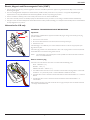
Electric, Magnetic and Electromagnetic Fields (“EMF”)
1. We manufacture and sell many products targeted at consumers, which, like any electronic apparatus, in general have the ability to emit and receive
electromagnetic signals.
2. One of our leading Business Principles is to take all necessary health and safety measures for our products, to comply with all applicable legal
requirements and to stay well within the EMF standards applicable at the time of producing the products.
3. We are committed to develop, produce and market products that cause no adverse health effects.
4. We confirm that if its products are handled properly for their intended use, they are safe to use according to scientific evidence available today.
5. We play an active role in the development of international EMF and safety standards, enabling us to anticipate further developments in standardization
for early integration in its products.
Information for U.K. only
WARNING - THIS APPLIANCE MUST BE EARTHED.
(B)
Important:
(A)
This apparatus is supplied with an approved moulded 13A plug. To change a fuse in this type of plug
proceed as follows:
1. Remove fuse cover and fuse.
2. Fit new fuse which should be a BS 1362 5A,A.S.T.A. or BSI approved type.
3. Refit the fuse cover.
If the fitted plug is not suitable for your socket outlets, it should be cut off and an appropriate 3-pin
plug fitted in its place.
If the mains plug contains a fuse, this should have a value of 5A. If a plug without a fuse is used, the fuse
at the distribution board should not be greater than 5A.
NOTE:
he severed plug must be destroyed to avoid a possible shock hazard should it be inserted
T
into a 13A socket elsewhere.
How to connect a plug
The wires in the mains lead are coloured in accordance with the following code:
BLUE - “NEUTRAL” (“N”)
BROWN - “LIVE” (“L”)
GREEN & YELLOW - “EARTH” (“E”)
1. The GREEN & YELLOW wire must be connected to the terminal in the plug which is marked with
the letter “E” or by the Earth symbol or coloured GREEN or GREEN & YELLOW.
2. The BLUE wire must be connected to the terminal which is marked with the letter “N” or coloured
BLACK.
3. The BROWN wire must be connected to the terminal which marked with the letter “L” or
coloured RED.
Before replacing the plug cover, make certain that the cord grip is clamped over the sheath of the lead
- not simply over the three wires.
v
BDL4660EL
China RoHS
中国电子信息产品污染控制标识要求 (中国RoHS法规标示要求) 产品中有毒有害物质或元素
的名称及含量
有毒有害物质或元素
部件名称
铅
(Pb)
汞
(Hg)
镉
(Cd)
六价铬
(Cr 6+)
多溴联苯
(PBB)
多溴二苯醚
(PBDE)
外壳
O
O
O
O
O
O
液晶面板
X
O
O
O
O
O
电路板组件
X
O
O
O
O
O
附件
(遥控器,电源线,连接线)
X
O
O
O
O
O
遥控器电池
X
O
O
O
O
O
O: 表示该有毒有害物质在该部件所有均质材料中的含量均在 GB/T26572-2011 标准规定的限量要求以下.
X: 表示该有毒有害物质至少在该部件的某一均质材料中的含量超出 GB/T26572-2011 标准规定的限量要求.
10
環保使用期限
此標識指期限(十年),電子信息產品中含有的有毒有害物質或元素在正常使用的條件下不會發生外泄或突變
,電子信息產品用戶使用該電子信息產品不會對環境造成嚴重污染或對其人身、財產造成嚴重損害的期限。
中国能源效率标识
根据中国大陆《能源效率标识管理办法》,本显示器符合以下要求
能源效率(cd/W)
能效等级
能效标准
>1.05
1级
GB 21520-2008
详细有关信息请查阅中国能效标识网: http://www.energylabel.gov.cn/
《废弃电器电子产品回收处理管理条例》提示性说明
为了更好地关爱及保护地球,当用户不再需要此产品或产品寿命终止时,请遵守国家废弃电器电子产品
回收处理相关法律法规,将其交给当地具有国家认可的回收处理资质的厂商进行回收处理。
vi
BDL4660EL
North Europe (Nordic Countries) Information
Placering/Ventilation
VARNING:
FÖRSÄKRA DIG OM ATT HUVUDBRYTARE OCH UTTAG ÄR LÄTÅTKOMLIGA, NÄR DU STÄLLER DIN UTRUSTNING PÅPLATS.
Placering/Ventilation
ADVARSEL:
SØRG VED PLACERINGEN FOR, AT NETLEDNINGENS STIK OG STIKKONTAKT ER NEMT TILGÆNGELIGE.
Paikka/Ilmankierto
VAROITUS:
SIJOITA LAITE SITEN, ETTÄ VERKKOJOHTO VOIDAAN TARVITTAESSA HELPOSTI IRROTTAA PISTORASIASTA.
Plassering/Ventilasjon
ADVARSEL:
NÅR DETTE UTSTYRET PLASSERES, MÅ DU PASSE PÅ AT KONTAKTENE FOR STØMTILFØRSEL ER LETTE Å NÅ.
End-of-Life Disposal
Your new Public Information Display contains materials that can be recycled and reused. Specialized companies can recycle your product to increase the
amount of reusable materials and to minimize the amount to be disposed of.
Please find out about the local regulations on how to dispose of your old display from your local Philips dealer.
(For customers in Canada and U.S.A.)
This product may contain lead and/or mercury. Dispose of in accordance to local-state and federal regulations. For additional information on recycling
contact www.eia.org (Consumer Education Initiative)
Waste Electrical and Electronic Equipment-WEEE
Attention users in European Union private households
This marking on the product or on its packaging illustrates that, under European Directive 2012/19/EU governing used electrical and
electronic appliances, this product may not be disposed of with normal household waste. You are responsible for disposal of this
equipment through a designated waste electrical and electronic equipment collection. To determine the locations for dropping off such
waste electrical and electronic, contact your local government office, the waste disposal organization that serves your household or the
store at which you purchased the product.
Attention users in United States:
Please dispose of according to all Local, State and Federal Laws. For the disposal or recycling information, contact: www.mygreenelectronics.com or www.
eiae.org.
End of Life Directives-Recycling
Your new Public Information Display contains several materials that can be recycled for new users.
Please dispose of according to all Local, State, and Federal laws.
As an ENERGY STAR Partner,
we have determined that this product meets the ENERGY STAR guidelines for energy efficiency.
vii
BDL4660EL
Table Of Contents
1.
Unpacking and Installation........................................................1
1.1. Unpacking..........................................................................................1
1.2. Package Contents.........................................................................1
1.3. Installation Notes..........................................................................1
1.4. Installing and Removing Table Stands (optional).........2
1.5. Mounting on a Wall.....................................................................3
1.5.1. VESA Grid.....................................................................3
1.6. Mounting in Portrait Position.................................................4
1.6.1. How to use the logo guider for portrait
position............................................................................4
1.6.2. How to remove the logo......................................4
1.7. Operating Instructions of Edge Alignment Kit.............5
1.7.1. Installing Edge Alignment Kit...............................5
2.
Parts and Functions....................................................................6
2.1. Control Panel..................................................................................6
2.2. Input/Output Terminals..............................................................7
2.3. Remote Control............................................................................8
2.3.1. General functions......................................................8
2.3.2. Inserting the batteries in the remote
control.............................................................................9
2.3.3. Handling the remote control..............................9
2.3.4. Operating range of the remote control.......9
3.
Connecting External Equipment.......................................... 10
3.1. Connecting External Equipment (DVD/VCR/
VCD)................................................................................................10
3.1.1. Using COMPONENT video input............... 10
3.1.2. Using Video Source input................................... 10
3.1.3. Using HDMI video input.................................... 11
3.2. Connecting a PC........................................................................11
3.2.1. Using VGA input......................................................11
3.2.2. Using DVI input.......................................................11
3.2.3. Using HDMI input..................................................12
3.2.4. Using DisplayPort input...................................... 12
3.3. Connecting Audio Equipment............................................ 12
3.3.1. Connecting external speakers........................ 12
3.3.2. Connecting an external audio device......... 13
3.4. Connecting Multiple Displays in a Daisy-chain
Configuration...............................................................................13
3.4.1. Display control connection............................... 13
3.4.2. Digital video connection..................................... 13
3.4.3. Analog video connection................................... 14
3.5. IR connection...............................................................................14
3.6. IR Pass-through Connection................................................ 15
3.7. Wire-connecting to Network............................................ 15
4.Operation.................................................................................. 16
4.1. Watch the Connected Video Source............................. 16
4.2. Change Picture Format.......................................................... 16
4.3. Choose your Preferred Picture Settings....................... 16
4.4. Choose your Preferred Sound Settings........................ 16
4.5. Play multimedia files via Local Area Network........... 16
4.5.1. Set up the network...............................................16
4.5.2. How to use DLNA-DMP.................................. 16
4.5.3. How to use DLNA-DMR from PC............. 17
4.6. Play multimedia files from USB device.......................... 18
4.7. Play options...................................................................................18
4.7.1. Playing music files...................................................18
4.7.2. Playing movie files..................................................19
4.7.3. Playing photo files..................................................19
4.8. How to use Opera browser (HTML5)........................ 19
5.
Change your settings.............................................................. 20
5.1. Quick picture and sound....................................................... 21
5.2. Settings.............................................................................................21
5.2.1. Picture...........................................................................21
5.2.2. Sound............................................................................21
5.2.3. Tiling...............................................................................22
5.2.4. General settings.......................................................23
5.3. Network Settings.......................................................................25
6.
USB device compatibility........................................................ 26
7.
Input Mode................................................................................ 27
8.
Pixel Defect Policy................................................................... 28
8.1. Pixels and Sub-Pixels................................................................28
8.2. Types of Pixel Defects + Dot Definition..................... 28
8.3. Bright Dot Defects....................................................................28
8.4. Dark Dot Defects.....................................................................29
8.5. Proximity of Pixel Defects.................................................... 29
8.6. Pixel Defect Tolerances..........................................................29
8.7. MURA..............................................................................................29
9.
Cleaning and Troubleshooting............................................... 30
9.1. Cleaning...........................................................................................30
9.2. Troubleshooting..........................................................................31
10. Technical Specifications.......................................................... 32
viii
BDL4660EL
1.
Unpacking and Installation
1.1.
Unpacking
• This product is packed in a carton, together with the standard accessories.
• Any other optional accessories will be packed separately.
• Due to the size and weight of this display it is recommended for two people to move it.
• After opening the carton, ensure that the contents are complete and in good condition.
1.2.
Package Contents
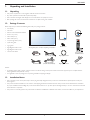
Please verify that you received the following items with your package content:
• LCD display
• CD ROM
• Remote control with AAA batteries
• Power cord (1.8 m)
• VGA cable (1.8 m)
CD ROM
• RS232 cable (1.8 m)
Quick start guide
• Loop through cable (1.8 m)
• Quick start guide
• Logo guider
• Edge Alignment Kit-1: 1PCS
• Edge Alignment Kit-2: 2PCS
Thumb Screw
* The supplied power cord varies depending on destination.
• Thumb Screw: 8PCS
Remote Control
and AAA Batteries
Power Cord
Loop through cable
Edge Alignment Kit-1
RS232 Cable
Video Signal Cable
(D-SUB to D-SUB Cable)
Edge Alignment Kit-2
Logo guider
NOTES:
• For all other regions, apply a power cord that conforms to the AC voltage of the power socket and has been approved by and complies with the
safety regulations of the particular country.
• You might like to save the package box and packing material for shipping the display.
1.3.
Installation Notes
• Due to the high power consumption, always use the plug exclusively designed for this product. If an extended line is required, please consult your
service agent.
• The product should be installed on a flat surface to avoid tipping. The distance between the back of the product and the wall should be maintained
for proper ventilation. Avoid installing the product in the kitchen, bathroom or any other places with high humidity so as not to shorten the service life
of the electronic components.
• The product can normally operate only under 3000m in altitude. In installations at altitudes above 3000m, some abnormalities may be experienced.
1
BDL4660EL
1.4.
Installing and Removing Table Stands (optional)
To install table stands:
1. Ensure your display is powered off.
2. Spread a protective sheet on a flat surface.
3. Grab the carrying handles and place the display face-down on the protective sheet.
4. After inserting the stand in the guide block, tighten the screws on both sides of the display.
NOTE: The longer side of the stand should face the front of the display.
Carrying handle
Thumbscrews
Guide block
Longer portions face the front
Table stand
To remove table stands:
1. Power off the display.
2. Spread a protective sheet on a flat surface.
3. Grab the carrying handles and place the display face-down on the protective sheet.
4. Remove screws using a screwdriver and place them in a safe place for reuse.
2
BDL4660EL
1.5.
Mounting on a Wall
To mount this display to a wall, you will have to obtain a standard wall-mounting kit (commercially available). We recommend using a mounting interface
that complies with TUV-GS and/or UL1678 standard in North America.
Protective Sheet
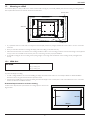
VESA Grid
Table
Tabletop stand
1. Lay a protective sheet on a table, which was wrapped around the display when it was packaged, beneath the screen surface so as not to scratch the
screen face.
2. Ensure you have all accessories for mounting this display (wall mount, ceiling mount, table stand, etc).
3. Follow the instructions that come with the base mounting kit. Failure to follow correct mounting procedures could result in damage to the equipment
or injury to the user or installer. Product warranty does not cover damage caused by improper installation.
4. For the wall-mounting kit, use M6 mounting screws (having a length 10 mm longer than the thickness of the mounting bracket) and tighten them
securely.
1.5.1. VESA Grid
BDL4660EL
400(H) x 200(V) mm
200(H) x 200(V) mm
400(H) x 400(V) mm
Caution:
To prevent the display from falling:
• For wall or ceiling installation, we recommend installing the display with metal brackets which are commercially available. For detailed installation
instructions, refer to the guide received with the respective bracket.
• To lessen the probability of injury and damage resulting from fall of the display in case of earthquake or other natural disaster, be sure to consult the
bracket manufacturer for installation location.
Ventilation Requirements for enclosure locating
To allow heat to disperse, leave space between surrounding objects as shown in the
diagram below.
100 mm
100 mm
100 mm
100 mm
3
BDL4660EL
1.6.
Mounting in Portrait Position
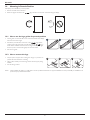
This display can be installed in portrait position.
1. Remove the table stand, if attached.
2. Rotate 90 degrees clockwise. The “
” logo should be on the LEFT side when facing the display.
90
90
1.6.1. How to use the logo guider for portrait position
1. Put the guider on the lower-left corner of the front bezel of the display.
Fold down both of its edges.
2. Peel off the protective film at the back of the “
” logo sticker.
Hold and press the guider with your left hand. Put the “
” logo
sticker with its adhesive side down into the logo hole with your right
hand, and press to make it stick tightly onto the front bezel.
3. Remove the guider.
1.6.2. How to remove the logo
1. Prepare a piece of paper with a cutting area of logo as a protector to
prevent the front bezel from scratching.
1
2
3
2. Using a knife, carefully remove the logo sticker with the paper placing
beneath.
3. Tear off the logo sticker.
NOTE:
hen installing the display on a wall, please consult a professional technician for proper installation. We accept no liability for installations not
W
performed by a professional technician.
4
BDL4660EL
1.7.
Operating Instructions of Edge Alignment Kit
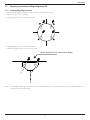
1.7.1. Installing Edge Alignment Kit
• Before install edge alignment kit, displays must be mounted to video wall frame correctly.
• Using “Thumb Screw” for easy installing.
• Using “Edge Alignment Kit-1” on adjacent four displays.
1
2
4
3
• Using “Edge Alignment Kit-2” on adjacent two displays.
• Install the “Edge Alignment Kit-2” with 2 PCS of M4 screw.
Longer edge face to the outer side of display
NOTE:
When installing the edge alignment kit, please consult a professional technician for proper installation. We accept no liability for installations not
performed by a professional technician.
5
BDL4660EL
2.
Parts and Functions
2.1.
Control Panel
9
MUTE INPUT
1
1
2
3
MENU
4
5
6
7
8
[ ] button
and [ ] buttons and hold down continuously for more than
3 (three) seconds.
Use this button to turn the display on or put the display to standby.
2
9
[MUTE] button
• Receives command signals from the remote control.
Switch the audio mute ON/OFF.
3
• Indicates the operating status of the display without OPS:
[INPUT] button
-- Lights green when the display is turned on
Choose the input source.
• Used as [
4
-- Lights red when the display is in standby mode
] button in the On-Screen-Display menu.
-- Lights amber when the display enters APM mode
[ ] button
-- When {SCHEDULE} is enabled, the light blinks green and red
[ ] button
-- Lights off when the main power of the display is turned off
-- If the light blinks red, it indicates that a failure has been
detected
Increase the adjustment while OSD menu is on, or increase the
audio output level while OSD menu is off.
5
Decrease the adjustment while OSD menu is on, or decrease the
audio output level while OSD menu is off.
6
[ ] button
Move the highlight bar up to adjust the selected item while OSD
menu is on.
7
[ ] button
Move the highlight bar down to adjust the selected item while OSD
menu is on.
8
Remote control sensor and power status indicator
[MENU] button
Return to previous menu while OSD menu is on, or to activate the
OSD menu when OSD menu is off.
NOTE:“Keyboard Control Lock Mode” This function completely
disables the access to all Keyboard Control functions. To
enable or disable the keyboard control lock, press both [ ]
6
BDL4660EL
2.2.
Input/Output Terminals
24
23
21
2
5
1
1
3
4
7
6 8
9
14
10 11 12 13
AC IN
13 DisplayPort
AC power input from the wall outlet.
2
MAIN POWER SWITCH
15 VGA
AC OUT
IR IN /
5
17 Y/CVBS
Video source input.
18 PC
NOTES:
• This display’s remote control sensor will stop working if the jack
[IR IN] is connected.
19 SPEAKER
RS232C OUT
RJ-45
HDMI1 IN /
10
21 AUDIO
OUT
22 USB
PORT
Connect your USB storage device.
HDMI2 IN
23 SPEAKERS
OUT
Audio output to external speakers.
IN
DVI-D video input.
12 DVI
IN
Audio output to external AV device.
HDMI video/audio input.
11 DVI
20 AUDIO
Audio input from external AV device (RCA).
LAN control function for the use of remote control signal from
control center.
9
SWITCH
Internal speaker on/off switch.
RS232C network input / output for the loop-through function.
8
LINE IN
Audio input for VGA source (3.5mm stereo phone).
• To remotely control your A/V device via this display, refer to
page �������
15 f���
or IR Pass Through connection.
7
IN (BNC)
Component YPbPr video source input.
IR OUT
RS232C IN /
DisplayPort OUT
IN (D-Sub)
16 COMPONENT
IR signal input / output for the loop-through function.
6
14
VGA video input.
AC power output supply to the AC IN jack of a media player.
4
IN /
DisplayPort video input / output.
Switch the main power on/off.
3
18
15 16 17 19
24 KENSINGTON
LOCK
Used for security and theft prevention.
OUT / VGA OUT
DVI or VGA video output.
7
22
20
BDL4660EL
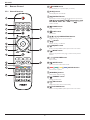
Remote Control
1
2.3.1. General functions
2
2.3.
[ ] POWER button
Turn the display on or put the display to standby.
[PLAY] buttons
Control playback of media files.
3
1
4
5
] HOME button
[
] LIST button
No function.
6
15
[ ] [ ] [ ] [ ] NAVIGATION buttons
Navigate through menus and choose items.
7
[
] button
Confirm an entry or selection.
6
8
7
8
[
Access the OSD menu.
14
4
5
] SOURCE button
Choose input source. Press [ ] or [ ] button to choose from
USB, Network, HDMI 1, HDMI 2, DisplayPort, Card
] button to
OPS, DVI-D, YPbPr, AV, or VGA. Press [
confirm and exit.
2
3
[
[ ] ADJUST button
Access currently available options, picture and sound menus.
16
9
[
] BACK button
Return to the previous menu page or exit from the previous
function.
9
10 [
] [ ] VOLUME button
Adjust volume.
10
11 [
10
] MUTE button
Press to turn the mute function on/off.
11
12 [
12
][
][
][
] COLOR buttons
Choose tasks or options.
13 [NUMERIC]
buttons
Enter text for network setting.
13
14 [
] FORMAT button
Change picture format.
15 [
] INFO button
Display information about current activity.
16 [
] OPTIONS button
Access currently available options, picture and sound menus.
8
BDL4660EL
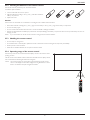
2.3.2. Inserting the batteries in the remote control
The remote control is powered by two 1.5V AAA batteries.
To install or replace batteries:
1. Press and then slide the cover to open it.
2. Align the batteries according to the (+) and (–) indications inside the
battery compartment.
3. Replace the cover.
Caution:
The incorrect use of batteries can result in leaks or bursting. Be sure to follow these instructions:
• Place “AAA” batteries matching the (+) and (–) signs on each battery to the (+) and (–) signs of the battery compartment.
• Do not mix battery types.
• Do not combine new batteries with used ones. It causes shorter life or leakage of batteries.
• Remove the dead batteries immediately to prevent them from liquid leaking in the battery compartment. Don’t touch exposed battery acid, as it can
damage your skin.
NOTE:
If you do not intend to use the remote control for a long period, remove the batteries.
2.3.3. Handling the remote control
• Do not subject to strong shock.
• Do not allow water or other liquid to splash the remote control. If the remote control gets wet, wipe it dry immediately.
• Avoid exposure to heat and steam.
• Other than to install the batteries, do not open the remote control.
2.3.4. Operating range of the remote control
Point the top of the remote control toward the display’s remote control sensor when
pressing a button.
Use the remote control within a distance of less than 8m/26ft from the display’s sensor,
and a horizontal and vertical angle of less than 30 degrees.
NOTE:
he remote control may not function properly when the remote control
T
sensor on the display is under direct sunlight or strong illumination, or when
there is an obstacle in the path of signal transmission.
30
9
30
BDL4660EL
3.
Connecting External Equipment
3.1.
Connecting External Equipment (DVD/VCR/VCD)
3.1.1. Using COMPONENT video input
Audio Out
COMPONENT Out
(YPbPr)
DVD / VCR / VCD
[R]
[AUDIO IN]
[L]
[COMPONENT IN]
(YPbPr)
3.1.2. Using Video Source input
Audio Out
Y/CVBS Out
[R]
[L]
DVD / VCR / VCD
[AUDIO IN]
[Y/CVBS IN]
10
BDL4660EL
3.1.3. Using HDMI video input
DVD / VCR / VCD
HDMI Out
[HDMI IN]
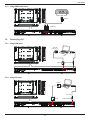
3.2.
Connecting a PC
3.2.1. Using VGA input
VGA Out
D-Sub 15 pin
Audio Out
PC
[VGA IN]
[VGA AUDIO IN]
3.2.2. Using DVI input
DVI Out
PC
Audio Out
[DVI IN]
11
[VGA AUDIO IN]
BDL4660EL
3.2.3. Using HDMI input
HDMI Out
PC
[HDMI IN]
3.2.4. Using DisplayPort input
DisplayPort Out
PC
[DisplayPort IN]
3.3.
Connecting Audio Equipment
3.3.1. Connecting external speakers
External speakers
12
BDL4660EL
3.3.2. Connecting an external audio device
Audio In
Stereo Amplifier
[AUDIO OUT]
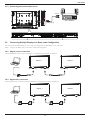
3.4.
Connecting Multiple Displays in a Daisy-chain Configuration
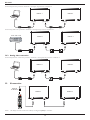
You can interconnect multiple displays to create a daisy-chain configuration for applications such as a video wall.
NOTE:
Maximum 25 displays (5x5) can be used in a daisy-chain configuration.
3.4.1. Display control connection
Connect the [RS232C OUT] connector of DISPLAY 1 to the [RS232C IN] connector of DISPLAY 2.
DISPLAY 1
DISPLAY 2
PC
[RS-232C]
[RS-232C IN]
[RS-232C OUT]
[RS-232C IN]
3.4.2. Digital video connection
Connect the [DVI OUT / VGA OUT] connector of DISPLAY 1 to the [DVI IN] connector of DISPLAY 2.
DISPLAY 1
DISPLAY 2
PC
[DVI]
[DVI IN]
[DVI/VGA OUT]
13
[DVI IN]
BDL4660EL
Connect the [DP OUT] connector of DISPLAY 1 to the [DP IN] connector of DISPLAY 2.
DISPLAY 1
DISPLAY 2
PC
[DP]
[DP IN]
[DP OUT]
[DP IN]
Connect the [HDMI OUT ] connector of DISPLAY 1 to the [DVI IN] connector of DISPLAY 2.
DVD / VCR / VCD
DISPLAY 1
DISPLAY 2
[HDMI]
[DVI IN]
[DVI OUT]
[DVI IN]
3.4.3. Analog video connection
Connect the [DVI OUT / VGA OUT] connector of DISPLAY 1 to the [VGA IN] connector of DISPLAY 2.
DISPLAY 1
DISPLAY 2
PC
[VGA]
[VGA IN]
3.5.
[VGA IN]
IR connection
External
IR Receiver
DISPLAY 1
[IR IN]
NOTE:
[DVI/VGA OUT]
DISPLAY 2
[IR OUT]
This display’s remote control sensor will stop working if the [IR IN] is connected.
14
[IR IN]
BDL4660EL
3.6.
IR Pass-through Connection
DVD / VCR / VCD
[IR OUT]
[IR IN]
(DVD / VCR / VCD)
Remote Control
(BDL4660EL)
3.7.
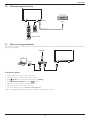
Wire-connecting to Network
If you connect this display to a home network, you can play photos, music and videos from your computer. See Play multimedia files via Local Area Network
(Page 16) for more detail.
INTERNET
ROUTER
[RJ-45]
[RJ-45]
PC
To setup the network:
1. Switch on the router and switch on its DHCP setting.
2. Connect the router to this display with an Ethernet cable.
3. Press [
] HOME button on the remote control, then select Setup.
4. Select Connect to network, then press [
] button.
5. Follow the on-screen instructions to install the network.
6. Wait for this display to find the network connection.
7. If you are prompted, agree to the “End User Licence Agreement”.
NOTE:
Connecting with a shielded CAT-5 Ethernet cable to comply with the EMC directive.
15
BDL4660EL
4.
Operation
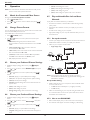
• {Movie}: Ideal settings for movies.
• {Music}: Ideal settings for listening to music.
NOTE: The control button described in this section is mainly on the
remote control unless specified otherwise.
4.1.
• {Game}: Ideal settings for games.
• {News}: Ideal settings for spoken audio, such as the news.
Watch the Connected Video Source
4.5.
See page �������������������������������������
for external equipments connection.
1. Press [
] SOURCE button.
2. Press [ ] or [ ] button to choose a device, then press [
button.
4.2.
To play files via Local Area Network, you will need:
]
• A wired home network, connected with a Universal Plug and Play
(uPnP) router.
• Optional: A LAN cable that connects your display to your home
network.
Change Picture Format
You can change the picture format to suit the video source. Each video
source has its available picture formats.
• A media server running on your computer.
• Appropriate settings on your computer firewall to allow you to run
the media server.
The available picture formats depend on the video source:
1. Press [
Play multimedia files via Local Area
Network
] FORMAT button.
2. Press [ ] or [ ] button to choose a picture format, then press [
] button.
• {Auto zoom}: Enlarge the picture to fill the screen.
Recommended for minimal screen distortion but not for HD
or PC.
4.5.1. Set up the network
1. Connect your display and the computer to the same home network.
See illustration below to connect your display to a network.
2. Switch on your computer and the router.
• Single display setup:
• {Movie expand 16:9}: Scale 4:3 format to 16:9. Not
recommended for HD or PC.
• {Wide screen}: Shows wide screen format content unstretched.
Not recommended for HD or PC.
• {Unscaled}: Provide maximum detail for PC. Only available
when PC mode is selected in the {Picture} menu.
[RJ-45]
ROUTER
[RJ-45]
PC
• {4:3}: Display the classic 4:3 format.
• Multiple display setup:
4.3.
Choose your Preferred Picture Settings
1. While this display is playing video source, press [
button.
] ADJUST
DISPLAY 1
[RJ-45]
2. Press [ ] or [ ] button to choose Picture style , then press
[
] button.
3. Press [ ] or [ ] button to choose an option, then press [
button:
• {Personal}: Apply your personalised picture settings.
ROUTER
[RJ-45]
DISPLAY 2
[RJ-45]
PC
]
• {Vivid}: Rich and dynamic settings, ideal for daytime viewing.
NOTE: If the apparatus does not return to DLNA mode due to
external electrical disturbances (e.g. electrostatic discharge), user
intervention is required.
• {Natural}: Natural picture settings.
Set up media sharing
• {Standard}: Default settings that suit most environments and
types of video.
1. Install a media server on your computer to share media files. These
are some media servers:
• For PC: Windows Media Player 11 (or higher) or TVersity
• {Movie}: Ideal settings for movies.
• {Photo}: Ideal settings for photos.
• For Mac: Twonky
• {Energy saving}: Settings that conserve the most energy.
4.4.
2. Switch on media sharing on your computer using the media server.
For more information on how to set up the media server, refer to
the website of the media server.
Choose your Preferred Sound Settings
1. While this display is playing video source, press [
button.
] ADJUST
4.5.2. How to use DLNA-DMP
1. Please connect display and your PC to the same router via RJ-45.
2. Press [ ] or [ ] button to choose Sound style , then press
[
] button.
3. Press [ ] or [ ] button to choose an option, then press [
button:
• {Personal}: Apply your personalised sound settings.
2. Run windows media player. Set stream handling as public sharing.
]
• {Original}: Settings that suit most environments and types of
audio.
16
BDL4660EL
3. Press [
button.
] HOME button, Then, choose Setup and press [
8. Press [
]
] button, then done.
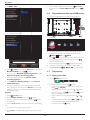
You can play photos, music and movies stored on a computer in your home network.
To do so, you need to install recent media server software on the computer. A list of
suitable media server software is available in the Help.
Setup
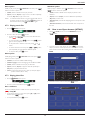
Internet
Source
4. Choose Connect to network and press [
12
] button.
3
Done
Play files from display
1. Press [ ] HOME button. Then, choose Source and press [
] button.
Quick picture and sound
Connect to network
Internet
Setup
Settings
5. Choose Connect and press [
Source
Network settings
2. Choose Browse network and press [
] button.
] button.
Connect this set to the internet to stay up to date and discover the advantages of the equipment
HDMI 1
USB
HDMI 2
DisplayPort
Card OPS
Browse network
Cancel
Connect
6. Choose Wired and press [
This equipment can be
] button.
3. Now, you can see all the PC’s connected to the same router on the
screen. Choose the right one.
123
4. Press [ ] and [ ] to choose the directory and files to play.
5. You can connect up to 4 displays to the same PC and play same
media stream.
We suggest to use DLNA-DMP function via wired network for the sake
of higher security and sufficient network bandwidth.
Wired
connected to a home
network.
4.5.3. How to use DLNA-DMR from PC
Select which connection
you want to make.
1
1. Press [
Cancel
7. Press [
] button to close.
] HOME button, and go to Setup menu.
2. Choose Network Settings and press [
23
] button.
The equipment is successfully connected to the home network!
1
Close
23
17
Quick picture and sound
Connect to network
Settings
Network settings
BDL4660EL
3. Set DMR as ON.
View network settings
Off
Network settings
On
• To clear the list of offline media servers, press [ ] OPTIONS
button. Then, choose Clear offline servers and press [
button.
4.6.
Static IP configuration
Digital Media Renderer - D...
]
Play multimedia files from USB device
1. Connect your USB device to the USB port on the display.
Network name
Clear Internet memory
USB
4. Set the name of your display.
2. Press [
button.
View network settings
Network settings
] SOURCE button, choose USB, and press [
]
Static IP configuration
Digital Media Renderer - D...
Network name
Network
Clear Internet memory
HDMI 1
HDMI 2
DisplayPort
Browse USB
3. The connected USB device is detected automatically for all its
playable files, which will be automatically sorted into 3 types:
Music,
Movie, and
Photo.
4. Press [
] BACK button to go up to the top layer in the screen.
Press [ ] or [ ] button to choose the file type. Press [
]
button to enter its play list.
testabc
Cancel
Done
5. Choose the file you want. Press [
Clear
6. Follow the on-screen instruction to control the play option.
7. Press [PLAY] buttons (H F G I J) to control playing.
] HOME button, and go to Source menu. Then, choose
] button.
Browse network and press [
6. On your PC, go to Network and Sharing Center, and click
Choose homegroup and sharing options.
7. Check the media formats. Then, click Choose media
streaming options.....
8. Go to Advanced sharing settings, and check Turn on
network discovery.
5. Press [
4.7.
1. Choose
2. Choose one music track, and press [
] button.
• To play all the tracks in a folder, choose one music file. Then,
press [
] to Play All.
• To skip to the next or previous track, press [ ] or [ ] button.
• To pause the track, press [
] button. Press [
] button
again to resume playback.
• To skip backward or forward 10 seconds, press [ ] or [ ]
button.
] SOURCE button.
] button.
3. Choose a file from the content browser, and press [
to start playing.
Music in the top bar.
Music
Play files
2. Choose Browse network, and press [
Play options
4.7.1. Playing music files
9. Now, go to the directory of your media files. Choose the media
file by right click. On the submenu from Play To, You can find all
displays connected to your network. Choose the display, and click
the media file to play..
1. Press [
] button to start playing.
• To search backward or forward, press [G] or [J] button,
press repeatedly to toggle between different speeds.
] button
• To stop the music, press [H] button.
4. Press the [PLAY] buttons on the remote control to control playing.
Tips:
• Choose the top bar to filter your files by type.
• Choose Sort to arrange the files by album name, artist, or other
fields.
18
BDL4660EL
Music options
Slideshow options
While you play music, press [
button to choose an option:
] OPTIONS button, then press [
]
While you play a slideshow, press [ ] OPTIONS button, then press
[
] button to choose an option:
• {Shuffle}: Enable or disable random play of tracks.
• {Shuffle}: Enable or disable random display of pictures in the
slideshow.
• {Repeat}: Choose {Repeat} to play a track or an album repeatedly,
or choose {Play once} to play a track once.
NOTE:
• {Repeat}: Choose {Repeat} to watch a slideshow repeatedly or {Play once} to watch once.
o view information about a song (for example, title, artist or
T
duration), choose the song, then press [ ] INFO button. To
hide the information, press [ ] INFO button again.
• {Slideshow Time}: Choose the displaying time for each photo in the
slideshow.
• {Slideshow Transitions}: Choose the transition from one photo to
the next.
4.7.2. Playing movie files
1. Choose
Movie in the top bar.
4.8.
How to use Opera browser (HTML5)
1. Press [ ] HOME button, and choose Internet and press [
] button.
Movie
2. Choose a video, and press [
] button.
• To play all the videos in a folder, choose one video file. Then,
press [
] to Play All.
• To pause the video, press [
] button. Press [
] button
again to resume playback.
• To skip backward or forward 10 seconds, press [ ] or [ ]
button.
Setup
Source
Internet
2. Move the cursor to URL address bar. Press [
] button and it
will pop out the on-screen keyboard. You can move the cursor to
enter the URL address. After finishing the URL address, choose
Done.
• To search backward or forward, press [G] or [J] button,
press repeatedly to toggle between different speeds.
• To stop the video, press [H] button.
Movie options
Internet
While playing video, press [ ] OPTIONS button, then press [
button to choose an option:
]
Web Address:X
http://
• {Subtitles}: Choose the available subtitle settings.
History
• {Subtitle Language}: Choose the language for subtitles if available.
www.google.com
w
ww.google.com
• {Shuffle}: Enable or disable random play of video files.
Bookmark
• {Repeat}: Choose {Repeat} to play the video file repeatedly or {Play once} to play the video file once.
• {Status}: To view information about a video (for example, played
position, duration, title, or date).
4.7.3. Playing photo files
1. Choose
a
b
c
d
e
f
g
i
j
k
l
m
n
o
p q r s
t
v
w x y z
h
u
<
Photo in the top bar.
abc
Done
Hide
? ! -
ABC
123 www
3. Move the cursor to “” icon and press [
Photo
2. Choose a photo thumbnail, then press
. , @ ‘
Backspace
] button.
] button.
Internet
Start a slideshow
Web Address:X
If there are multiple photos in a folder, choose a photo. Then, press [
] to Play All.
http://www.google.com
History
• To skip to the previous or next photo, press [ ] or [ ] button,
and then press [
] button.
www.google.com
w
ww.google.com
Bookmark
• To stop the slideshow, press [H] button.
19
BDL4660EL
5.
4. Now, you can see the web page.
Change your settings
Using the remote control:
NOTES:
• The Opera browser does not support FLASH format.
1. Press [
• The browser is not a video source. It will not stay at the browser
screen after you restart the display.
] HOME button to display the OSD menu.
2. Press [ ] or [ ] button to choose Setup. Press [
to enter.
] button
3. Press [ ] [ ] [ ] or [ ] button to choose Quick picture and
sound, Settings, Connect to network, or Network
] button to enter.
settings. Press [
4. Press [ ] [ ] [ ] or [ ] button to choose its menu item or to
adjust its value. Press [
] button to confirm.
5. Press [
6. Press [
] BACK button to go back to the previous menu layer.
] HOME button to exit the OSD menu.
Using the display’s control buttons
20
1. Press [
] button to display the OSD menu.
2. Press [ ] [
its value.
] [ ] or [ ] button to choose menu item or adjust
3. Press [
submenu.
] button to confirm menu selection and enter its
4. Press [
] button to exit the OSD menu.
BDL4660EL
5.1.
Quick picture and sound
Advanced
Access advanced settings such as gamma, tint, video contrast and so on.
• {Gamma}: Adjust the non-linear setting for picture luminance
and contrast.
You can choose picture and sound settings with the help of the
settings assistant, which demonstrates the effect of your chosen setting
immediately.
1. Press [
• {Tint}: Change the colour balance.
] HOME button to display the OSD menu.
2. Choose Setup. Press [
• {Custom tint}: Customise colour balance setting. Only available
if {Tint} {Custom} is chosen.
• {Video contrast}: Adjust video contrast.
] button.
3. Choose Quick picture and sound. Press [
4. Choose Continue, then press [
] button.
] button
• {Brightness}: Adjust screen brightness.
5. Follow the on-screen instructions to choose your preferred settings.
5.2.
• {Hue}: Adjust screen hue.
Game or computer
Settings
1. Press [
When viewing content from a connected game console, choose {Game}
to apply game settings. When a computer is connected through HDMI,
choose {Computer}.
] HOME button, and go to Setup menu.
2. Choose Settings and press [
] button.
Make sure that {Format and edges} {Picture format} {Unscaled}
is selected so as to view maximum detail.
5.2.1. Picture
Picture
Picture style
Format and edges
• {Picture format}: Change the picture format.
Sound
Restore style
Tiling
Backlight
See page ������������������������������
16 for the descriptions about Picture format.
General settings
Colour
5.2.2. Sound
Sharpness
um
ne
Noise reduction
MPEG artifact reducti...
Digital Crystal Clear
Advanced
Game or computer
Picture
Sound style
Sound
Restore style
Tiling
Bass
General settings
Treble
Balance
Foramat and edges
Surround mode
Audio out
Advanced
Picture style
Choose a predefined picture setting.
Restore style
Restore the last-selected predefined picture setting.
Backlight
Sound style
Adjust the brightness of this display’s backlight.
Access predefined sound settings.
Colour
Restore style
Adjust the colour saturation of the picture.
Restore the last-selected predefined sound setting.
Sharpness
Bass
Adjust the sharpness of the picture.
Adjust to increase or decrease lower-pitched sounds.
Noise reduction
Treble
Choose the amount of noise reduction for the picture.
Adjust to increase or decrease higher-pitched sounds.
MPEG artifact reduction
Balance
Smoothen transitions and haziness in the digital picture.
Adjust to emphasize left or right audio output balance.
Digital Crystal Clear
Surround mode
Fine-tune each pixel to match surrounding pixels and produce a brilliant,
high-definition image.
• {Advanced sharpness}: Enable superior sharpness, especially on
lines and contours in the picture.
Enhance your audio experience.
Audio out
Adjust audio output volume.
• {Dynamic contrast}: Dynamically enhance the details in the
dark, medium and light areas of the picture.
• {Colour enhancement}: Dynamically enhance the vividness and
details of colours.
21
BDL4660EL
Example: 5 x 5 screen matrix (25 displays)
H monitors = 5 displays
V monitors = 5 displays
Advanced
Access advanced settings to enhance your audio experience.
• {Auto volume leveling}: Enable the reduction of sudden volume
changes.
H monitors
• {Speaker settings}: Turn on or off the internal speakers.
• {Clear sound}: Enhance sound quality.
• {Audio out format}: Choose the type of audio output through
the digital audio output connector. (HDMI only)
V monitors
• {Audio out delay}: Automatically sync the image on this display
to the audio from a connected home theatre.
• {Audio out offset}: Adjust the setting for audio output delay.
Available if {Audio out delay} is switched on.
5.2.3. Tiling
1
2
3
4
5
6
11
7
12
8
13
9
14
10
15
16
21
17
22
18
23
19
24
20
25
Position
Frame comp.
Picture
Enable
Sound
H monitors
Tiling
V monitors
General settings
Position
Choose to turn the frame compensation function on or off. If selected
{On}, the display will adjust the image to compensate for the width of
the display bezels in order to accurately display the image.
{On}
Frame comp.
With this function you can create a single large-screen matrix (video
wall) that consists of up to 100 sets of this display (up to 10-sets on the
vertical and 10-sets on the horizontal sides). This function requires a
daisy-chain connection.
Enable
Choose to {On} or {Off} the Tiling function. If {On}, the display will
apply the settings in {H monitors}, {V monitors}, {Position}, and {Frame comp.}.
{Off}
H monitors
Adjust displays on the horizontal side.
V monitors
Adjust displays on the vertical side.
Position
Adjust the position of this display in the screen matrix.
Example: 2 x 2 screen matrix (4 displays)
H monitors = 2 displays
V monitors = 2 displays
V monitors
H monitors
1
2
3
4
Position
22
BDL4660EL
5.2.4. General settings
Picture
Menu language
Picture
Menu language
Sound
Group ID
Sound
Group ID
Tiling
Monitor ID
Tiling
Monitor ID
General settings
Eco mode
General settings
Eco mode
Auto search
Auto search
Clock
Clock
Scheduling
Scheduling
Sleep timer
Sleep timer
EasyLink
EasyLink
Local KB lock
Local KB lock
RC lock
RC lock
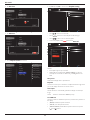
1. There are 7 schedule can be set. Go to Status and choose On.
Menu language
Choose language used for OSD menus.
Schedule 1
Status
Off
Monitor group
Schedule 2
Source
On
Schedule 3
On time
Schedule 4
Off time
Schedule 5
Repeat modes
Schedule 6
Playlist setting
Adjust the group range between 1 to 255. The default setting is 255.
Monitor ID
Adjust the ID number for controlling the display via the RS232C
connection. Each display must have a unique ID number when multiple
sets of this display are connected. Monitor ID number range is between
1 to 255. The default setting is 1.
Schedule 7
Eco mode
Set this display to reduce the power consumption automatically.
Auto search
2. Go to Source and choose input source. If {Source} {USB}
is chosen. You need to set playliist. If {Source} {BROWSER} is
chosen. You need to set URL address.
Choose to let this display detect and display available signal sources
automatically.
Clock
Set the current date and time for the display’s internal clock.
Schedule 1
Status
USB
Schedule 2
Source
HDMI 1
This function allows you to program up to 7 different scheduled time
intervals for this display to activate.
Schedule 3
On time
HDMI 2
Schedule 4
Off time
DisplayPort
You can set:
Schedule 5
Repeat modes
Card OPS
• Which input source the display will use for each scheduled
activation period.
Schedule 6
Playlist setting
DVI-D
Scheduling
Schedule 7
YPbPr
• The time for the display to turn on and turn off.
AV
• The days in a week for the display to activate.
VGA
NOTES:
BROWSER
• We recommend you to set up current date and time in the {Clock}
menu before using this function.
• After changing the {Clock} option in the {General settings} menu,
you need to set this {Scheduling} again.
23
BDL4660EL
3. Set On time.
6. If {Source} {USB} is chosen. Go to Playlist setting.
0001/0002
Photo
Schedule 1
Status
Schedule 2
Source
Schedule 3
On time
Schedule 4
Off time
Schedule 5
Schedule On
6 time
Repeat modes
Photo
Video
Playlist setting
00 : 00
Schedule 7
Cancel
Done
Options
Exit
-- Press [ ] [ ] buttons to choose files.
4. Set Off time.
-- Press [ ] [ ] buttons to switch Playlist and File Manager.
Schedule 1
Status
Schedule 2
Source
Schedule 3
On time
Schedule 4
Off time
Schedule 5
Schedule Off
6 time
Repeat modes
-- Press [
7. To save the playlist, press [
Photo
Playlist setting
Cancel
] and choose Save list.
[..]
Photo1.jpg
Photo2.jpg
Done
0004/0004
\media\photo
Movie.avi
14 : 00
Schedule 7
] button to set or clear the playlist.
Photo3.jpg
Sort
Photo
Media Type
Recursive Parser
Save list
5. Go to Repeat modes and choose.
Schedule 1
Status
No repeat
Schedule 2
Source
Every Sunday
Schedule 3
On time
Every Monday
Schedule 4
Off time
Every Tuesday
• Each Playlist supports up to 30 files.
Schedule 5
Repeat modes
Every Wednesday
Schedule 6
Playlist setting
Every Thursday
Every Friday
• Playlist will not be cleared after {Factory settings}. You have to
manually remove the files or delete usb_schedulinglist.txt in the
USB.
Every Saturday
Sleep timer
Schedule 7
Options
Exit
NOTES:
Switch off this display after a specified time.
EasyLink
Connect and control your HDMI-CEC compliant devices through HDMI
port to this display with the same remote control.
Auto adjust
Use this function to automatically optimize the display of VGA input
image.
NOTE:
This item is functional for VGA input only.
Local KB lock
Choose to enable or disable the keyboard (control buttons) function of
the display.
• {Unlock}: Enable the keyboard function.
• {Lock all}: Lock all keyboard function.
• {Lock but volume}: Disable all the keyboard function except the [ ] and [ ] button.
24
BDL4660EL
• {Lock but power}: Disable all the keyboard function except the [ ] button.
Information OSD
• {Lock all expect volume and power}: Disable all the keyboard
function except the [ ], [ ] and [ ] button:
When you press [ ] POWER button to turn on the display from
standby mode or change the input signal, the information OSD is
displayed on the upper left corner of the screen.
RC lock
Choose {Off} to turn off this function.
Choose to enable or disable the button function of the remote control.
Factory settings
• {Unlock}: Enable the keyboard function.
Reset all your customized settings to the factory defaults.
• {Lock all}: Lock all keyboard function.
• {Lock but volume}: Disable all the keyboard function except the [ ] and [ ] button.
5.3.
• {Lock but power}: Disable all the keyboard function except the [ ] POWER button.
2. Choose Network Settings and press [
1. Press [
• {Lock all expect volume and power}: Disable all the keyboard
function except the [ ] [ ] and [ ] POWER button:
NOTE:
Network Settings
] HOME button, and go to Setup menu.
] button.
View network settings
Network settings
o disable the lock function from Local KB lock or T
-RC lock item, press buttons [ ] and 1 9 9 8 on the
remote control.
Static IP configuration
Digital Media Renderer - D...
Network name
Pixel shift
Clear Internet memory
For video input sources, you may choose {On} to move the screen
image automatically to protect the display from “burn-in” or “after-image”
symptoms 30 seconds after not operating the display.
Smart power
Choose a backlight level to optimise dynamic power consumption and
picture contrast.
The options are: {Off}, {Standard}, {Best Power}, {Best Picture}.
View network settings
Wake on lan
View connected network status.
Choose {On} and you can turn on the display by network.
Network settings
Switch on state
{Network configuration}: Choose how this display should assign
addresses to the network resources. The user can choose {DHCP & Auto IP} (suggested) or {Static IP}.
Choose the display status used for the next time you connect the
power cord.
• {On} - The display will turn on when the power cord is connected
to a wall outlet.
Static IP Configuration
Define {IP address}, {Netmask}, {Gateway}, {DNS1}, and {DNS2} for
this display. If {Network settings} {Static IP} is chosen.
• {Standby} - The display will remain Standby when the power cord is
connected to a wall outlet.
• {Last status} - The display will return to the previous power status
(on/off/standby) when removing and replacing the power cord.
Digital Media Renderer - DMR
Light sensor
Network name
Choose {On} and the display will automatically adjust backlight.
In the multiple-display connection, you can rename each display for easy
identification.
Receive multimedia files from the connected device by your network.
LED
Choose {Off} to turn off the indicator.
Use the on-screen keyboard or the remote control keypad to enter the
name.
Switch on delay
Clear Internet memory
Adjust the power-on delaying time (in seconds) allows a sequential
powering-on for each display by their ID number when multiple displays
are connected.
Clear all the cookies, bookmarks, history list and text used for auto fill.
Logo
Choose {Off} and the display will not display the
you switch on.
logo when
DPMS
Choose {On}. Then, when no signal, the display will automatically turn
off.
25
BDL4660EL
6.
USB device compatibility
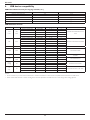
USB Video Subtitle Formats (for language subtitles, etc.)
Name
MPEG-4 time-based text
SAMI
SubRip
SubViewer
Micro DVD
File extension
.ttxt
.smi
.srt
.sub
.sub or .txt
Format
XML
HTML
string-based
string-based
string-based
USB Multimedia Formats
File extension Container
*.avi
*.mkv
AVI
MKV
*.asf
ASF
*.wmv
ASF
*.mp4
MP4
*.3gp
3GPP
*.vro
VRO
VOB
*.mpg
*.mpeg
PS
*.ts
*.trp
TS
Video Codec
DivX 3.11/4x/5.1/6.0
XviD
H.264 BP/MP/HP
MPEG4 SP/ASP
Motion JPEG
DivX 3.11/4x/5.1/6.0
XviD
H.264 BP/MP/HP
MPEG4 SP/ASP
Motion JPEG
Window Media Video v9
H.264 BP/MP/HP
MPEG4 SP/ASP
XVID
H.264 BP/MP/HP
HEMPEG4SP/ASP
MPEG1
MPEG2
MPEG1
MPEG2
H..264
MPEG2
H..264
VC1
Resolution
1920x1080
1920x1080
1920x1080
1920x1080
1920x1080
1920x1080
1920x1080
1920x1080
1920x1080
1920x1080
1920x1080
1920x1080
1920x1080
1920x1080
1920x1080
1920x1080
352x288
1920x1080
352x288
1920x1080
1920x1080
1920x1080
1920x1080
1920x1080
Frame Rate (fps)
6~30
6~30
6~30
6~30
6~30
6~30
6~30
6~30
6~30
6~30
6~30
6~30
6~30
6~30
6~30
6~30
24/25/30
24/25/30
24/25/30
24/25/30
6~30
24/25/30
6~30
6~30
Bit Rate (Mbps)
8
8
25
8
8
8
8
25
8
8
25
25
8
8
25
8
30
30
30
30
25
30
25
25
Audio Codec
MP3/AC3/LPCM/ADPCM/DTS
Core
MP3/AC3/LPCM/ADPCM/WMA
WMA
MP3/ADPCM/AAC
ADPCM/AAC/
HE-AAC
AC3/MPEG/LPCM
AC3/MPEG/LPCM/AAC
AC3/AAC/MP3/DD+/HE-AAC
NOTES:
• Sound or video may not work if the contents have a standard bit rate/frame rate above the compatible Frame/sec listed in the table above.
• Video content with a Bit rate or Frame rate larger than the rate specified in the table above can cause choppy video during playback.
26
BDL4660EL
7.
Input Mode
VGA Resolution:
Standard
Resolution
Active Resolution
H Pixels
V Lines
VGA
640
480
WVGA
720
400
SVGA
800
600
XGA
1024
768
WXGA
WXGA
SXGA
SXGA
WXGA
WXGA
UXGA
HD1080
1280
1280
1280
1280
1360
1366
1600
1920
768
800
960
1024
768
768
1200
1080
Refresh Rate
Pixel Rate
Aspect Ratio
Stand for Mode
60 Hz
72 Hz
75 Hz
70 Hz
60 Hz
75 Hz
60 Hz
75 Hz
60 Hz
60 Hz
60 Hz
60 Hz
60 Hz
60 Hz
60 Hz
60 Hz
25.175 MHz
31.5 MHz
31.5 MHz
33.75 MHz
40 MHz
49.5 MHz
65 MHz
78.75 MHz
79.5 MHz
79.5 MHz
108 MHz
108 MHz
85.5 MHz
85.5 MHz
162 MHz
148.5 MHz
4:3
Video Graphic Array
16:9
Wide Video Graphic Array
4:3
Super VGA
4:3
Extended Graphic Array
5:3
16:10
4:3
5:4
16:9
16:9
4:3
16:9
Wide XGA
Wide XGA
Super XGA
Super XGA
Wide XGA
Wide XGA
Ultra XGA
HD1080
Refresh Rate
Pixel Rate
Aspect Ratio
Stand for Mode
29.97 Hz
59.94 Hz
25 Hz
50 Hz
13.5 MHz
27 MHz
13.5 MHz
27 MHz
4:3
Modified NTSC Standard
4:3
Modified PAL Standard
Refresh Rate
Pixel Rate
Aspect Ratio
Stand for Mode
74.25 MHz
16:9
Normally DVB Mode
74.25 MHz
16:9
Normally ATSC Mode
148.5 MHz
16:9
Normally ATSC Mode
SDTV Resolution:
Standard
Resolution
480i
480p
576i
576p
Active Resolution
H Pixels
V Lines
720
480
720
480
HDTV Resolution:
Standard
Resolution
Active Resolution
H Pixels
V Lines
720p
1280
720
1080i
1920
1080
1080p
1920
1080
50 Hz
60 Hz
25 Hz
30 Hz
50 Hz
60 Hz
• The PC text quality is optimum in HD 1080 mode (1920 x 1080, 60Hz).
• Your PC display screen might appear different depending on the manufacturer (and your particular version of Windows).
• Check your PC instruction book for information about connecting your PC to a display.
• If a vertical and horizontal frequency-select mode exists, select 60Hz (vertical) and 31.5KHz (horizontal). In some cases, abnormal signals (such as
stripes) might appear on the screen when the PC power is turned off (or if the PC is disconnected). If so, press the [INPUT] button to enter the
video mode. Also, make sure that the PC is connected.
• When horizontal synchronous signals seem irregular in RGB mode, check PC power saving mode or cable connections.
• The display settings table complies to the IBM/VESA standards, and based on the analog input.
• The DVI support mode is regarded as same to the PC support mode.
• The best timing for the vertical frequency to each mode is 60Hz.
27
BDL4660EL
8.
Pixel Defect Policy
We strive to deliver the highest quality products and use some of the industry’s most advanced manufacturing processes whilst practicing stringent quality
control. However, pixel or sub-pixel defects on the PDP / TFT panels used in Plasma- & LCD- displays are sometimes unavoidable. No manufacturer can
guarantee that all panels will be free from pixel defects, but Philips guarantees that any Plasma- & LCD- displays with an unacceptable number of defects
will be repaired during the warranty period in line with your local guarantee conditions.
This notice explains the different types of pixel defects and defines the acceptable defect level for the LCD screen. In order to qualify for repair under
warranty, the number of pixel defects must exceed a certain level as shown in the reference table. If the LCD screen is within specification a warranty
exchange / claim back will be refused. Additionally, because some types or combinations of pixel defects are more noticeable than others, Philips sets even
higher quality standards for those.
8.1.
Pixels and Sub-Pixels
A pixel, or picture element, is composed of three sub-pixels in the primary colors of red, green and
blue. Many pixels together form an image. When all sub-pixels of a pixel are lit, the three colored
sub-pixels together appear as a single white pixel. When all are dark, the three colored sub-pixels
together appear as a single black pixel. Other combinations of lit and dark sub-pixels appear as
single pixels of other colors.
subpixel
pixel
8.2.
Types of Pixel Defects + Dot Definition
Pixel and sub-pixel defects appear on the screen in different ways. There are three categories of pixel defects and several types of sub-pixel defects within
each category.
Dot definition = What is a defective “Dot”? :
One or more defective, adjacent sub-pixel are defined as one “dot”. The no. of defective sub-pixels are not relevant to define a defective dot. This means
that a defective dot can consist of one, two or three defective sub-pixels which can be dark or lit.
R G B
One dot = One Pixel; consists of three sub-pixels of Red, Green, and Blue.
8.3.
Bright Dot Defects
Bright dot defects appear as pixels or sub-pixels that are always lit or “on”. These are the examples of bright dot defects:
One lit red, green or blue sub pixel
Two adjacent lit sub pixels:
Red + Blue = Purple
Red + Green = Yellow
Green + Blue = Cyan (Light Blue)
28
Three adjacent lit sub pixels (one white pixel)
BDL4660EL
8.4.
Dark Dot Defects
Black dot defects appear as pixels or sub-pixels that are always dark or “off ”. These are the examples of black dot defects:
One dark dot
8.5.
Two adjacent dark dots = 1 pair of dark dots
Two dark dots, specifications defines the
minimum distance between dark dots
Proximity of Pixel Defects
Because pixel and sub-pixels defects of the same type that are nearby one another may be more noticeable, Philips also specifies tolerances for the
proximity of pixel defects. In the table below you can find specifications about:
• Allowed amount of adjacent dark dots = (adjacent dark dots =1 pair of dark dots)
• Minimum distance between dark dots
• Total no. of all defective dots
8.6.
Pixel Defect Tolerances
In order to qualify for repair due to pixel defects during the warranty period, a PDP / TFT panel in a Philips Plasma / LCD- display must have pixel or subpixel defects exceeding the tolerances listed in the following table.
BRIGHT DOT EFFECT
ACCEPTABLE LEVEL
1 lit sub pixel
2
BLACK DOT EFFECT
ACCEPTABLE LEVEL
1 dark sub pixel
10
TOTAL DOT DEFECTS OF ALL TYPES
12
NOTE: * 1 or 2 adjacent sub pixel defects = 1 dot defect
8.7.
MURA
Dark spots or patches may occasionally appear on some liquid crystal display (LCD) panels. This is known within the industry as Mura, which is a Japanese
term for “unevenness.” It is used to describe an irregular pattern or area in which uneven screen uniformity appears under certain conditions. Mura is a
result of the deterioration of the liquid crystal alignment layer and is most commonly caused by long-term operation under high ambient temperatures. It
is an industry- wide phenomenon and Mura is not repairable. It is also not covered by our warranty terms.
Mura has been around since the introduction of LCD technology and with screens getting bigger and in operation 24/7, many displays are running in low
light conditions. This all adds to the possibility of Mura affecting displays.
HOW TO SPOT MURA
There are many symptoms of Mura and also multiple causes. Several of these are listed below:
• Impurities or foreign particles in the crystal matrix
• Uneven distribution of LCD matrix during manufacturing
• Non-uniform luminance distribution of the backlight
• Panel assembly induced stress
• Flaws within the LCD cells
• Thermal induced stress - high temperature operation over long periods of time
HOW TO AVOID MURA
Although we can not guarantee the complete eradication of Mura every time, in general the appearance of Mura can be minimized by these methods:
• Lower the backlight brightness
• Use a screen saver
• Reduce the ambient temperature around the unit
29
BDL4660EL
9.
Cleaning and Troubleshooting
9.1.
Cleaning
Caution When Using the Display
• Do not bring your hands, face or objects close to the ventilation holes of the display. The top of the display is usually very hot due to the high
temperature of exhaust air being released through the ventilation holes. Burns or personal injuries may occur if any body parts are brought too
close. Placing any object near the top of the display could also result in heat related damage to the object as well as the display itself.
• Be sure to disconnect all cables before moving the display. Moving the display with its cables attached may damage the cables and thus cause fire
or electric shock.
• Disconnect the power plug from the wall outlet as a safety precaution before carrying out any type of cleaning or maintenance procedure.
Front Panel Cleaning Instructions
• The front of the display has been specially treated. Wipe the surface gently using only a cleaning cloth or a soft, lint-free cloth.
• If the surface becomes dirty, soak a soft, lint-free cloth in a mild detergent solution. Wring the cloth to remove excess liquid. Wipe the surface of
the display to remove dirt. Then use a dry cloth of the same type to dry.
• Do not scratch or hit the surface of the panel with fingers or hard objects of any kind.
• Do not use volatile substances such as insert sprays, solvents and thinners.
Cabinet Cleaning Instructions
• If the cabinet becomes dirty, wipe the cabinet with a soft, dry cloth.
• If the cabinet is extremely dirty, soak a lint-free cloth in a mild detergent solution. Wring the cloth to remove as much moisture as possible. Wipe
the cabinet. Use another dry cloth to wipe over until the surface is dry.
• Do not allow any water or detergent to come into contact with the surface of the display. If water or moisture gets inside the unit, operating
problems, electrical and shock hazards may result.
• Do not scratch or hit the cabinet with fingers or hard objects of any kind.
• Do not use volatile substances such as insert sprays, solvents and thinners on the cabinet.
• Do not place anything made from rubber or PVC near the cabinet for any extended periods of time.
30
BDL4660EL
9.2.
Troubleshooting
Symptom
Possible Cause
Remedy
No picture is displayed
1. The power cord is disconnected.
1. Plug in the power cord.
2. The main power switch on the back of the
display is not switched on.
2. Make sure the power switch is switched on.
3. The selected input has no connection.
3. Connect a signal connection to the display.
4. The display is in standby mode.
Interference displayed on the display or audible
noise is heard
Caused by surrounding electrical appliances or
fluorescent lights.
Move the display to another location to see is the
interference is reduced.
Color is abnormal
The signal cable is not connected properly.
Make sure that the signal cable is attached firmly
to the back of the display.
Picture is distorted with abnormal patterns
1. The signal cable is not connected properly.
1. Make sure that the signal cable is attached
firmly.
2. The input signal is beyond the capabilities of
the display.
Display image doesn’t fill up the full size of the
screen
1. The zoom mode is not set correctly.
2. Scan Mode may be set incorrectly to
underscan.
2. Check the video signal source to see if it
is beyond the range of the display. Please
verify its specifications with this display’s
specification section.
Use the Zoom mode or Custom zoom function
in the Screen menu to fine tune display geometry
and time frequency parameter.
3. If the image exceeds the screen size, Scan
Mode may need to be set to Underscan.
Can hear sound, but no picture
Improperly connected source signal cable.
Make sure that both video inputs and sound
inputs are correctly connected.
Can see picture but no sound is heard
1. Improperly connected source signal cable.
1. Make sure that both video inputs and sound
inputs are correctly connected.
2. Volume is turned all the way down.
3. {Mute} is turned on.
4. No external speaker connected.
2. Press [
] or [
] button to hear sound.
3. Switch MUTE off by using the [
] button.
4. Connect external speakers and adjust the
volume to a suitable level.
Some picture elements do not light up
Some pixels of the display may not turn on.
This display is manufactured using an extremely
high level of precision technology: however,
sometimes some pixels of the display may not
display. This is not a malfunction.
After-Images can still be seen on the display
after the display is powered off. (Examples
of still pictures include logos, video games,
computer images, and images displayed in 4:3
normal mode)
A still picture is displayed for an over extended
period of time
Do not allow a still image to be displayed for
an extended period of time as this can cause a
permanent after-image to remain on the display.
31
BDL4660EL
10. Technical Specifications
Display:
Item
Specifications
Screen Size (Active Area)
46” (116.8 cm) LCD Aspect Ratio
16:9
Number of pixels
1920 (H) x 1080 (V)
Pixel pitch
0.53025 (H) x 0.53025 (V) [mm]
Displayable colors
10bits(D),1073.7 M colors
Brightness (typical)
450 cd/m2
Contrast ratio (typical)
1300:1
Viewing angle
178 degrees
In/Out Terminals:
Item
Speaker Output
Specifications
Internal Speakers
10W (L) + 10W (R) [RMS]/8Ω
External Speakers
1 Way 1 Speaker System
82 dB/W/M/160 Hz ~ 13 KHz
Audio Output
Phone Jack x 1
0.5V [rms] (Normal) / 2 Channel (L+R)
Audio Input
RCA Jack x 2
0.5V [rms] (Normal) / 2 Channel (L+R)
3.5 mm Stereo x 1
RS232C
2.5mm Phone jack x 2
RS232C in/RS232C out
RJ-45
RJ-45 Jack x 1 (8 pin)
10/100 LAN Port
HDMI Input
HDMI Jack x 2 (Type A) (18 pin)
Digital RGB: TMDS (Video + Audio)
MAX:
Video - 720p, 1080p, 1920 x 1080/60 Hz (WUXGA)
Audio - 48 KHz/ 2 Channel (L+R)
Supports LPCM only
DVI-D Input
DVI-D jack
Digital RGB: TMDS (Video)
VGA Input
D-Sub Jack x 1 (15 pin)
Analog RGB: 0.7V [p-p] (75Ω), H/CS/V: TTL (2.2kΩ), SOG: 1V [p-p] (75Ω)
DVI-I (DVI-D & VGA)
Output
DVI-I Jack x 1 (29 pin)
MAX: 720p, 1080p, 1920 x 1080/60 Hz (WUXGA)
Digital RGB: TMDS (Video)
Analog RGB: 0.7V [p-p] (75Ω), H/CS/V: TTL (2.2kΩ), SOG: 1V [p-p] (75Ω)
MAX: 720p, 1080p, 1920 x 1080/60 Hz (WUXGA)
Component Input
BNC Jack x 3
Y: 1V [p-p] (75Ω), Pb: 0.7V [p-p] (75Ω), Pr: 0.7V [p-p] (75Ω)
MAX: 480i, 576i, 480p, 576p, 720p, 1080i, 1080p
Video Input
BNC x 1 (Share with
Component_Y)
Composite 1V [p-p] (75Ω)
Displayport in/out
Displayport Jack x 2
(20 pin)
Digital RGB: TMDS (Video + Audio)
MAX:
Video - 720p, 1080p, 1920 x 1080/60 Hz (WUXGA) Audio - 48 KHz/ 2 Channel (L+R)
Supports LPCM only
32
BDL4660EL
General:
Item
Specifications
Power Input
100 - 240V ~, 50 - 60Hz, 5.5A
Power Output
100 - 240V ~, 50 - 60Hz, 2.5A
Power Consumption (Max)
250 W
Power Consumption (typ.)
109 W
Power Consumption (Standby & Off)
<0.5W (RS232 in active)
Dimensions (With Stand) [W x H x D]
1052.7 x 662.7 x 400 mm
Dimensions (Without Stand) [W x H x D]
1052.7 x 607.3 x 69 mm
Weight (With Stand)
23.6 Kg
Weight (Without Stand)
21.3 Kg
Gross Weight (Without Stand)
28.5 Kg
Environmental Condition:
Item
Temperature
Humidity
Altitude
Specifications
Operational
0 ~ 40°C
Storage
-20 ~ 60°C
Operational
20 ~ 80% RH (No condensation)
Storage
5 ~ 95% RH (No condensation)
Operational
0 ~ 3,000 m
Storage / Shipment
0 ~ 9,000 m
Internal Speaker:
Item
Specifications
Type
1 Way 1 Speaker
Input
10 W (RMS)
Impedance
8Ω
Output Sound Pressure
82 dB/W/M
Frequency Response
160 Hz ~ 13 KHz
33
2014 © Koninklijke Philips N.V. All rights reserved.
Philips and the Philips Shield Emblem are registered trademarks of
Koninklijke Philips N.V. and are used under license from
Koninklijke Philips N.V.
Specifications are subject to change without notice.