1
EN
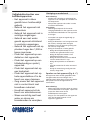
• Remove the dispenser cassette (9) from the
appliance.
• Remove the coffee dispenser filter (10)
from the dispenser cassette (9).
• Clean the coffee dispenser filter (10) in
soapy water using a soft brush to remove
coffee residue.
• Pour a small amount of descaling agent
through the opening of the coffee
dispenser filter (10) to remove calcium.
• Rinse the coffee dispenser filter (10) under
running water.
• Mount the coffee dispenser filter (10) to
the dispenser cassette (9).
• Mount the dispenser cassette (9) to the
appliance.
• Briefly press the on/off button (1) to save
the new water hardness range. If the on/
off button (1) is not pressed within ten
seconds, the appliance switches off
automatically without saving the setting.
• Repeat the first two steps to check the
water hardness range.
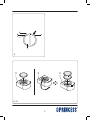
Descaling the appliance (fig. A - C)
The appliance must be descaled regularly. The
appliance has an automatic descaling indicator
which informs the user when descaling is
required.
Note: Damage caused by not regularly descaling
the appliance is not covered by the guarantee.
• If the descaling indicator (6) flashes, the
appliance must be descaled. It is still
possible to brew coffee.
• If the descaling indicator (6) lights
continuously, the descaling program is running.
The automatic descaling program of the
appliance is optimised to be used for 125 ml of
durgol® swiss espresso®. The product is used
undiluted, is highly effective and guarantees a
reliable descaling and therefore a long
operational life of the appliance. The descaling
agent is available from our service station.
Setting the water hardness range
(fig. A)
The appliance can be set to various water
hardness settings. The factory setting of the
water hardness is 4. Contact your waterworks
company or your local authorities for the water
hardness range in your area. If the water
hardness range in your area is lower than 4,
the water hardness setting can be changed to
reduce the number of times that the appliance
must be descaled.
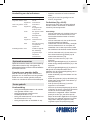
• Use the on/off button (1) to set the appliance
to the water hardness in your area. Refer
to the table below to set the correct water
hardness range.
Flashing Water hardness
signal
range
Water hardness
(°dH)
• • •
••••••
•••••••••
••••••••••••
0-7
7 - 14
14 - 21
above 21
1 (soft)
2 (medium)
3 (hard)
4 (very hard)
Warning!
- Be careful when descaling the appliance to
prevent damage to furniture or clothing.
Place an empty pot (at least 1.2 l) under
the coffee dispenser (8) in such a way as to
prevent splashes.
Caution!
- Only use durgol® swiss espresso® in the
specified quantity to descale the appliance.
- Do not use vinegar or vinegar concentrate
to descale the appliance.
- Do not use citric acid to descale the
appliance.
• Press the on/off button (1) to switch off
the appliance.
• Keep the start/stop button (3) pressed for
3-4 seconds until the descaling indicator (6)
flashes.
• Press the start/stop button (3) to increase
the water hardness range by one level.
(Range 4 is followed by range 1, etc.)
• Fill the empty water reservoir (12) with
durgol® swiss espresso® (125 ml) added
with fresh water (0,8 l).
• Place the water reservoir (12) into the
appliance.
• Insert the empty coffee pad cassette (11)
into the appliance.
16