1
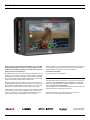
Discover Smart Production
Atomos Ninja Blade
User Manual
EDITION 1: FEB 2014
Have you registered your Ninja Blade yet? Upgrade to 3 year warranty now.
Website: www.atomos.com | Sales: [email protected] | Support: [email protected]
Contents
Safety Instructions
Warranty & Conditions. . . . . . . . . . . . . . . . . . . . . . . . . . . . . . . . . . . . . . . . . . . . . . . . . . . . . . . . . . . . . . . . . . . . . . . . . . . . . 1
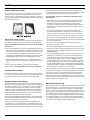
The Ninja Blade is designed to a high standard but there are some things
you should be aware of to prolong the life of the unit and for your own
safety.
Introduction. . . . . . . . . . . . . . . . . . . . . . . . . . . . . . . . . . . . . . . . . . . . . . . . . . . . . . . . . . . . . . . . . . . . . . . . . . . . . . . . . . . . . . . . . . . . . . . 2
1. What’s included . . . . . . . . . . . . . . . . . . . . . . . . . . . . . . . . . . . . . . . . . . . . . . . . . . . . . . . . . . . . . . . . . . . . . . . . . . . . . . . . . 3
2. What you also need. . . . . . . . . . . . . . . . . . . . . . . . . . . . . . . . . . . . . . . . . . . . . . . . . . . . . . . . . . . . . . . . . . . . . . . . . . . 4
Spinning Disk Drives (HDD) . . . . . . . . . . . . . . . . . . . . . . . . . . . . . . . . . . . . . . . . . . . . . . . . . . . . . . . . . . . . . . . 4
Solid State Drives (SSDs) . . . . . . . . . . . . . . . . . . . . . . . . . . . . . . . . . . . . . . . . . . . . . . . . . . . . . . . . . . . . . . . . . . 4
Mechanical Shock and Vibration . . . . . . . . . . . . . . . . . . . . . . . . . . . . . . . . . . . . . . . . . . . . . . . . . . . . . . . . 4
Backing up and archiving . . . . . . . . . . . . . . . . . . . . . . . . . . . . . . . . . . . . . . . . . . . . . . . . . . . . . . . . . . . . . . . . . . . 4
HDMI Cables . . . . . . . . . . . . . . . . . . . . . . . . . . . . . . . . . . . . . . . . . . . . . . . . . . . . . . . . . . . . . . . . . . . . . . . . . . . . . . . . . . . . . . 5
Standard 1/4” Camcorder Mount . . . . . . . . . . . . . . . . . . . . . . . . . . . . . . . . . . . . . . . . . . . . . . . . . . . . . . . 5
3. Mounting disks in the Master Caddy. . . . . . . . . . . . . . . . . . . . . . . . . . . . . . . . . . . . . . . . . . . . . . . 6
4. Connecting and powering up. . . . . . . . . . . . . . . . . . . . . . . . . . . . . . . . . . . . . . . . . . . . . . . . . . . . . . . . . . . 7
Batteries. . . . . . . . . . . . . . . . . . . . . . . . . . . . . . . . . . . . . . . . . . . . . . . . . . . . . . . . . . . . . . . . . . . . . . . . . . . . . . . . . . . . . . . . . . . . . . 7
Power ON/Power OFF. . . . . . . . . . . . . . . . . . . . . . . . . . . . . . . . . . . . . . . . . . . . . . . . . . . . . . . . . . . . . . . . . . . . . . . . 8
5. Ninja Blade connections. . . . . . . . . . . . . . . . . . . . . . . . . . . . . . . . . . . . . . . . . . . . . . . . . . . . . . . . . . . . . . . . . . . 8
6. Master Caddy and Screw Mounts. . . . . . . . . . . . . . . . . . . . . . . . . . . . . . . . . . . . . . . . . . . . . . . . . . . . 9
Master Caddy / Screw Mounts / Modularity. . . . . . . . . . . . . . . . . . . . . . . . . . . . . . . . . . . . . . . . 9
7. Using the Ninja Blade. . . . . . . . . . . . . . . . . . . . . . . . . . . . . . . . . . . . . . . . . . . . . . . . . . . . . . . . . . . . . . . . . . . . . . 10
Using the Ninja Blade . . . . . . . . . . . . . . . . . . . . . . . . . . . . . . . . . . . . . . . . . . . . . . . . . . . . . . . . . . . . . . . . . . . . . . . 10
Category 1: Operating Settings . . . . . . . . . . . . . . . . . . . . . . . . . . . . . . . . . . . . . . . . . . . . . . . . . . . . . . . . 10
Category 2: Shot Setup & Monitor Tools . . . . . . . . . . . . . . . . . . . . . . . . . . . . . . . . . . . . . . . . . . 10
Category 3: Main Controls, REC, PLAY & MENU. . . . . . . . . . . . . . . . . . . . . . . . . . . . 10
Home Screen / Menu functions. . . . . . . . . . . . . . . . . . . . . . . . . . . . . . . . . . . . . . . . . . . . . . . . . . . . . . . . 11
File Naming / Date & Time / Display Options / Screen Lock. . . . . . . . . . . . 12
Storage Capacity Indicator / Formatting HDD/SSD / Unit Name. . . . . 13
Batteries Screen / Auto Switching / Manual Switching. . . . . . . . . . . . . . . . . . . . . 13
Audio In / Audio during playback . . . . . . . . . . . . . . . . . . . . . . . . . . . . . . . . . . . . . . . . . . . . . . . . . . . . . . 14
8. Monitoring and Recording. . . . . . . . . . . . . . . . . . . . . . . . . . . . . . . . . . . . . . . . . . . . . . . . . . . . . . . . . . . . . . 15
Connect to Input. . . . . . . . . . . . . . . . . . . . . . . . . . . . . . . . . . . . . . . . . . . . . . . . . . . . . . . . . . . . . . . . . . . . . . . . . . . . . . . . 15
Before recording / Choosing your recording format . . . . . . . . . . . . . . . . . . . . . . . . . 15 SmartControl / 6 ways to start recording. . . . . . . . . . . . . . . . . . . . . . . . . . . . . . . . . . . . . . . . . . 16
Waveform Monitoring. . . . . . . . . . . . . . . . . . . . . . . . . . . . . . . . . . . . . . . . . . . . . . . . . . . . . . . . . . . . . . . . . . . . . . . . 17
Batteries and power supplies
The battery supplied with the Ninja Blade is a powerful professional device,
designed to retain enough energy to supply the Ninja Blade for hours. You
should avoid short-circuiting the battery connections because this can cause a
high current to flow which can damage the cells and even pose a fire hazard.
For example, you should not carry batteries in a bag or pocket where they may
contact other metal objects such as coins.
The power supply and battery charger included are intended for use with the
Ninja Blade only. Keep the power supply, plug and cable away from water and
unplug from the mains electricity socket when not in use.
Disconnect power supplies before cleaning the Ninja Blade or its components.
Using the Ninja Blade safely
Although the Ninja Blade is very lightweight compared to all the devices it
replaces, it is still a solid object that could cause injury if misused.
• Always make sure that the Ninja Blade is mounted securely and is unable to
fall onto anyone nearby. This is especially important when there are children
present who might be tempted to pull on cables.
• Always ensure that cable runs to the Ninja Blade are clearly visible and do
not present a trip hazard.
• Do not place on uneven or unstable surfaces.
• Do not insert anything but Ninja Blade Master Disk caddies in the Master
Disk slot on the side of the Ninja Blade.
• Do not touch the Ninja Blade’s screen with sharp, metallic or abrasive objects.
• The Ninja Blade can become warm or hot with prolonged use. Do not place it
in contact with your lap or any part of your body where such warming could
cause discomfort or injury.
• Do not expose to strong electrical or magnetic fields.
• Do not expose to or use near liquids, rain or moisture.
Luma Overlay / RGB Parade / Vectorscope. . . . . . . . . . . . . . . . . . . . . . . . . . . . . . . . . . . . . 18
• Do not dispose of the Ninja Blade or its batteries in municipal waste and do not
incinerate it or its batteries, but follow local regulations for safe disposal
Focus Assist / Zebra / False Colour. . . . . . . . . . . . . . . . . . . . . . . . . . . . . . . . . . . . . . . . . . . . . . . . . . 20
Care of disk drives
SmartLog . . . . . . . . . . . . . . . . . . . . . . . . . . . . . . . . . . . . . . . . . . . . . . . . . . . . . . . . . . . . . . . . . . . . . . . . . . . . . . . . . . . . . . . . . . 22
Spinning disks and SSDs are very sensitive to damage from static electricity.
Please observe all the usual precautions when handling them.
Monitor Assist. . . . . . . . . . . . . . . . . . . . . . . . . . . . . . . . . . . . . . . . . . . . . . . . . . . . . . . . . . . . . . . . . . . . . . . . . . . . . . . . . . . . 19
Blue Only / Grid Lines / Focus Assist Settings. . . . . . . . . . . . . . . . . . . . . . . . . . . . . . . . . 21
Exporting .xml
. . . . . . . . . . . . . . . . . . . . . . . . . . . . . . . . . . . . . . . . . . . . . . . . . . . . . . . . . . . . . . . . . . . . . . . . . . . . . . . . . .
23
Organising material on disk . . . . . . . . . . . . . . . . . . . . . . . . . . . . . . . . . . . . . . . . . . . . . . . . . . . . . . . . . . . . . . 24
Anti-shock technology. . . . . . . . . . . . . . . . . . . . . . . . . . . . . . . . . . . . . . . . . . . . . . . . . . . . . . . . . . . . . . . . . . . . . . . 25
Please see the section Mechanical shock and vibration later in this manual for
information about how to handle and care for your disk drives.
File Recovery. . . . . . . . . . . . . . . . . . . . . . . . . . . . . . . . . . . . . . . . . . . . . . . . . . . . . . . . . . . . . . . . . . . . . . . . . . . . . . . . . . . . 25
9. Timecode . . . . . . . . . . . . . . . . . . . . . . . . . . . . . . . . . . . . . . . . . . . . . . . . . . . . . . . . . . . . . . . . . . . . . . . . . . . . . . . . . . . . . . . . . . 26
10. Pulldown. . . . . . . . . . . . . . . . . . . . . . . . . . . . . . . . . . . . . . . . . . . . . . . . . . . . . . . . . . . . . . . . . . . . . . . . . . . . . . . . . . . . . . . . . . . 27
11. Playback & Playout. . . . . . . . . . . . . . . . . . . . . . . . . . . . . . . . . . . . . . . . . . . . . . . . . . . . . . . . . . . . . . . . . . . . . . . . . . 28
exFAT / FAT32 disks . . . . . . . . . . . . . . . . . . . . . . . . . . . . . . . . . . . . . . . . . . . . . . . . . . . . . . . . . . . . . . . . . . . . . . . . . 28
Loop mode. . . . . . . . . . . . . . . . . . . . . . . . . . . . . . . . . . . . . . . . . . . . . . . . . . . . . . . . . . . . . . . . . . . . . . . . . . . . . . . . . . . . . . . . 30
Playback controls. . . . . . . . . . . . . . . . . . . . . . . . . . . . . . . . . . . . . . . . . . . . . . . . . . . . . . . . . . . . . . . . . . . . . . . . . . . . . . 29
12. Connecting and Editing . . . . . . . . . . . . . . . . . . . . . . . . . . . . . . . . . . . . . . . . . . . . . . . . . . . . . . . . . . . . . . . . . . 31
Connect to Input. . . . . . . . . . . . . . . . . . . . . . . . . . . . . . . . . . . . . . . . . . . . . . . . . . . . . . . . . . . . . . . . . . . . . . . . . . . . . . . . 31 NLE Support . . . . . . . . . . . . . . . . . . . . . . . . . . . . . . . . . . . . . . . . . . . . . . . . . . . . . . . . . . . . . . . . . . . . . . . . . . . . . . . . . . . . . 31
User Manual Conventions
Transferring files . . . . . . . . . . . . . . . . . . . . . . . . . . . . . . . . . . . . . . . . . . . . . . . . . . . . . . . . . . . . . . . . . . . . . . . . . . . . . . . 31 To keep things simple but clear, we’ve only adopted two
conventions in this manual:
exFAT compatibility. . . . . . . . . . . . . . . . . . . . . . . . . . . . . . . . . . . . . . . . . . . . . . . . . . . . . . . . . . . . . . . . . . . . . . . . . . . 31
Importing / Import into Final Cut Pro. . . . . . . . . . . . . . . . . . . . . . . . . . . . . . . . . . . . . . . . . . . . . . . . . 32
SmartLog with FCPX . . . . . . . . . . . . . . . . . . . . . . . . . . . . . . . . . . . . . . . . . . . . . . . . . . . . . . . . . . . . . . . . . . . . . . . . 33
13. External Power Supply. . . . . . . . . . . . . . . . . . . . . . . . . . . . . . . . . . . . . . . . . . . . . . . . . . . . . . . . . . . . . . . . . . . . 34
14 . Using Connect Converters. . . . . . . . . . . . . . . . . . . . . . . . . . . . . . . . . . . . . . . . . . . . . . . . . . . . . . . . . . . . . 34
15. Software Upgrades. . . . . . . . . . . . . . . . . . . . . . . . . . . . . . . . . . . . . . . . . . . . . . . . . . . . . . . . . . . . . . . . . . . . . . . . . . 35
Updating AtomOS (Firmware) . . . . . . . . . . . . . . . . . . . . . . . . . . . . . . . . . . . . . . . . . . . . . . . . . . . . . . . . . . 35
16. Technical Specifications. . . . . . . . . . . . . . . . . . . . . . . . . . . . . . . . . . . . . . . . . . . . . . . . . . . . . . . . . . . . . . . . . 36
A helpful tip, suggestion or something to note because it’s
not obvious at first
Menu Monospaced text indicates a menu or touch action
Warranty & Conditions
Notice
Copyright © 2013 ATOMOS Global Pty Ltd (‘referred to as ATOMOS’).
All rights reserved. All information in this document is subject to
change without notice. No part of the document may be reproduced
or transmitted in any form, or by any means, electronic or mechanical,
including photocopying or recording, without the express written
permission of ATOMOS. A reference to ATOMOS includes its related
entities, subsidiaries and parent company.
Trademarks
Ninja Blade and ATOMOS are registered trademarks of ATOMOS, Apple,
the Apple logo, AppleShare, AppleTalk, FireWire, iPod, iPod Touch, Mac,
and Macintosh are registered trademarks of Apple Inc. Final Cut Pro,
QuickTime and the QuickTime Logo are trademarks of Apple Inc. All other
trademarks are the property of their respective holders.
International Hardware Limited Warranty
ATOMOS warrants that:
• the main product, not including TFT/LCD, or any external accessories,
will be free from defects in materials and workmanship for a period of
1 years from the date of purchase, the user may upgrade to a 3 year
warranty upon registering their product at www.atomos.com
• the TFT/LCD, batteries, battery charger, HDD/SSD docking station,
Master Caddy and Carry Case will be free from defects in materials and
workmanship for a period of 1 year from the date of purchase.
This warranty is exclusively for the benefit of the original purchaser and is
not assignable or transferable.
If during the warranty period the product is shown to be defective
ATOMOS may at its option:
a) replace the goods or supply equivalent ones, b) repair the goods, c)
pay the cost of replacing the goods or of acquiring equivalent ones and d)
paying the cost of having the goods repaired;
The customer must notify ATOMOS of any defect in the goods in writing
prior to the expiry of the warranty periods set out above. The customer
will be solely responsible for returning the goods to ATOMOS or its
authorized distributor. Upon acceptance of a warranty claim by ATOMOS,
where ATOMOS repairs or replaces the goods, it will be responsible for
reasonable shipping costs incurred in sending the goods to the Customer,
provided that customer is located in a country in which ATOMOS has an
authorized distributor or repair centre or agent.
Warranty Exclusions
This warranty applies only to defects in workmanship and does not cover
defects caused by:
•Neglect;
• Improper or negligent acts or omissions;
• Unauthorised repairs or attempted repairs;
• Tampering with or modification of the goods;
• Connection to incompatible equipment or power sources;
• Exposure to water or weather;
• Exposure to magnetic fields or corrosive liquids or substances;
• Physical damage
EXCEPT AS STATED IN THIS WARRANTY, ATOMOS, IT’S VENDORS,
AGENTS, RESELLERS AND DISTRIBUTORS DISCLAIM IN THEIR
ENTIRETY ALL OTHER WARRANTIES, EXPRESS OR IMPLIED,
INCLUDING WITHOUT LIMITATION ALL WARRANTIES OF
MERCHANTABILITY OR FITNESS FOR A PARTICULAR PURPOSE.
THE REMEDIES OUTLINED IN THIS WARRANTY ARE THE EXCLUSIVE
REMEDY A CUSTOMER HAS ARISING FROM DEFECTIVE GOODS
WHICH ARE SUBJECT TO THE WARRANTY.
ATOMOS DOES NOT WARRANT THAT THE GOODS WILL OPERATE IN A
MANNER WHICH IS ERROR FREE, OR UNINTERRUPTED. THE GOODS
ARE NOT INTENDED TO BE THE PRIMARY OR ONLY DATA STORAGE
DEVICE FOR DATA – CUSTOMERS ARE SOLELY RESPONSIBLE FOR
BACK UP AND PROTECTION OF DATA.
Software License Agreement
IMPORTANT, PLEASE READ CAREFULLY. THIS IS A LICENSE
AGREEMENT.
This ATOMOS software, related documentation, any included sample
images and other files (the “Software”), is protected by copyright laws and
international copyright treaties, as well as other intellectual property laws
and treaties. The Software is licensed, not sold.
This End User License Agreement (“EULA”) is a legal agreement between
you (either an individual or a single entity) and ATOMOS with regard to
the copyrighted Software provided with this EULA. Use of the Software
provided to you by ATOMOS in whatever form or media, will constitute
your acceptance of these terms, unless separate terms are provided
by the software supplier, in which case certain additional or different
terms may apply. If you do not agree with the terms of this EULA, do
not download, install copy or use the Software. By installing, copying or
otherwise using the Software, you agree to be bound to the terms of this
EULA. If you do not agree to the terms of this EULA, ATOMOS is unwilling
to license the Software to you.
1.Eligible licensees. This Software is available for license solely to
purchasers of the ATOMOS Ninja Blade, who have purchased a unit
manufactured by ATOMOS Ninja Blade and purchased through an
ATOMOS authorized reseller, with no right of duplication or further
distribution, licensing or sub-licensing.
2.License Grant. ATOMOS grants you a personal, non-transferable and
non-exclusive right to use the copy of the Software provided with this
EULA. You agree you will not copy the Software except as necessary
to use it with the ATOMOS Ninja Blade. You agree that you may not
copy the written materials accompanying the Software. Modifying,
reverse engineering, translating, renting, copying, transferring or
assigning all or part of the Software or any rights granted hereunder, to
any other persons or reverse engineering the hardware on which the
Software runs, is strictly prohibited. The software is license, not sold.
You acknowledge that no title to intellectual property in the Software
is transferable to you. You further acknowledge that title and full
ownership rights to the Software will remain the exclusive property of
ATOMOS and/or its suppliers, and you will not acquire any rights to the
Software, except as expressly set forth above. All copies of the software
will contain the same proprietary notices as contained in or on the
Software. All title and copyrights in and to the Software (including but not
limited to any images, animations, video, audio, text incorporated), the
accompanying printed materials, and any copies of the Software are owned
by ATOMOS or its suppliers.
3.Reverse engineering. You agree that you will not attempt, and if you are
a corporation, you will use your best efforts to prevent your employees
and contractors from attempting to reverse compile, derive circuits,
modify, translate or disassemble the Software and/or the Atomos Ninja
Blade in whole or in part. Any failure to comply with the above or any
other terms and conditions contained herein will result in the automatic
termination of this license and the reversion of the rights granted
hereunder by ATOMOS.
ATOMOS reserves the right to terminate this license without prejudice to
any additional recourse ATOMOS may have against you if you violate any
of its terms and conditions.
Registration + Warranty Upgrade
Register to upgrade your warranty FREE 1yr >3yr
www.atomos.com/registration
Atomos Ninja Blade – User Manual Edition 1: Feb 2014
1
Introduction
Thank you for choosing the Atomos Ninja Blade: your 10-bit HDMI
Recorder/Monitor/Player. It’s the most compact portable recorder
available, with extremely long battery life, a high-resolution screen,
waveform monitor and vectorscope.
Software updates for your Ninja Blade will be issued regularly. Registering
your Ninja Blade now will ensure you are kept abreast of any updates.
Software updates and information will also be available at:
www.atomos.com/support
Ninja Blade preserves the pristine uncompressed video quality from your
camera’s sensor by directly encoding it into Apple ProRes® or (optionally)
Avid DNxHD® as it records to HDD/SSD, making it instantly compatible
with your NLE timeline. The Ninja Blade’s revolutionary ‘Sensor-to-NLE’
workflow is the fastest and best quality available today!
We hope you enjoy your Ninja Blade!
With the plummeting price of hard disk storage, the 2½” disks used by
the Ninja Blade are very cheap; the cost of storage is no longer an issue.
Buying a disk for the Ninja Blade is just like buying a tape – except that
with a disk you will have instant “non-linear” access to your video.
The Ninja Blade’s one-touch IPS ‘SuperAtom’ screen interface is intuitive
and simple to use. There are no complicated menus or difficult to find
functions – everything you need is instantly accessible from the home
screen. Refer to ‘Using your Ninja Blade’ for more information.
Your Ninja Blade comes with a standard 1 year warranty on all parts and
accessories. You can upgrade to a 3 year warranty on the main Ninja
Blade Unit alone (excluding IPS screen) by registering your Ninja Blade
online at www.atomos.com/registration
This will enable us to let you know about updates to the product and other
important information surrounding your purchase.
Special thanks to Atomos user Dave Newton for kindly giving us
permission to use his footage for the screenshots.
Atomos Ninja Blade – User Manual Edition 1: Feb 2014
2
1. What’s included
We try to provide you with as complete a package as possible: you don’t
have to add anything except 2.5” storage media (you can buy additional
packs of empty Master Disk Caddies from your Atomos Reseller) and
some accessories to suit your set-up, like HDMI cables and tripod screws.
All other parts necessary to use the Ninja Blade are included.
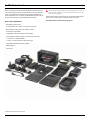
Here’s the complete list
Atomos does not sell storage and your package will not contain any
spinning disks or SSDs. You can buy these locally to keep running
costs as low as possible.
We recommend drives, please refer to Part 16 (Technical Specifications)
of this manual. For the most up-to-date information please visit:
http://www.atomos.com/discovery-what-drives/
• Ninja Blade recorder/monitor
• 2 x empty Master Disk Caddies + 8 screws for fixing disks
• Master Caddy Docking Station with USB 2 & 3 Cable
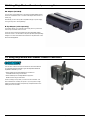
• AC Adaptor for Ninja Blade
• Single Battery Charger including AC power adaptor
• 9V AC Adaptor for Battery Charger (110-240V for AC operation)
• 1 x Atomos 7.4 V 2600mAh Battery
• 1 x 2.5mm ‘Y’ adaptor cable for LANC loop-through
• Ninja Blade QuickStart Guide (not pictured)
• Battery Adaptor
• Carry Case
Contents may differ from those shown here.
Atomos Ninja Blade – User Manual Edition 1: Feb 2014
3
2. What you also need
Spinning Disk Drives (HDD)
These are the raw storage medium for Ninja Blade. You can use either
traditional “spinning” disks, or the new solid state ones. Choose 2 ½”
spinning drives if your Ninja Blade is going to be attached to a tripod or if
it is not going to be subject to excessive vibration. For harsher conditions,
choose a solid state drive.
(but they would probably be OK if cushioned against the body of the
camera operator) and we would not advise using mechanical disks if there
is a likelihood that they might be dropped onto a hard surface.
Here are some things that you should bear in mind when using
spinning disks:
• Even though spinning drives can withstand substantial shocks when
they are not in use, they are more vulnerable when running. Harsh
treatment that may not actually damage the drive may interrupt
recordings at a much lower level of severity. We recommend that you
experiment with your drives by testing them in the conditions that you
normally work in.
• Spinning drives have a gyroscopic effect that you will feel faintly if
you rotate the Ninja Blade up or down or from side to side. They are
particularly sensitive to this type of motion. If you do this too quickly
while the drive is spinning, you may get a small gap in your recording.
Which drives should you use?
There are so many drives available, and newer models appear all the
time. We are not able to test all drives but here are some guidelines.
Speed and reliability are the main factors. Here are a few things to
bear in mind:
• Disk drive data rates tend to be given in megaBYTES per second, and
codec data rates are normally given in megaBITS per second. It’s very
easy to get confused. But there’s no need to be, because all you have
to do to convert megabits to megabytes is divide by 8. So if you’re
recording at 220 megaBITS per second, that’s going to result in 220/8
megaBYTES per second, which is 27.5 megaBYTES per second.
• We recommend at least 7200 RPM drives. Just remember that the
higher the bitrate of the codec you’re using, the faster the drive needs
to be.
Atomos regularly test hard drives – please check this link before
purchasing drives: http://www.atomos.com/discovery-what-drives/
Solid State Drives (SSDs)
These are Flash memory devices that come in the same form-factor as
2 ½” disk drives, and they are fully supported by the Ninja Blade. See
the section below about when you should consider using SSDs.
• Be very gentle when changing batteries if you are recording. Practise
this manoeuvre so that you are able to do it smoothly. It is always better
to do this in-between takes.
• Do not bang or jolt the Ninja Blade while recording. Gentle and
cushioned movement may be OK.
• You will find noticeable differences in the ability of drives to withstand
shock and to continue recording during vibration and movement. As we
receive reports of drive durability and reliability, we will post them on
www.atomos.com
• Your Ninja Blade is able to detect when the drive is under stress and it
will recover from any break in a recording by waiting until the drive is
ready to continue, and then resuming from that point. If frames have
been dropped because of shock or vibration, a “Skippy” Kangaroo
symbol will appear on the home screen on the Ninja Blade, just above
the disk capacity indicator. This means that you will not normally have
to restart the Ninja Blade, even if a recording has been interrupted by
mechanical disruption to the disk drive. (see Recording and Monitoring:
Atomos Anti-shock Technology for more information)
Taking into account most usage scenarios, we think that mechanical disks
will be suitable in the majority of cases. Spinning disks are most sensitive
when they are rotating. It is obviously best to avoid dropping them but
many disks now have a “drop detector” that will lock the most fragile
mechanical parts in place and protect them from surprisingly hard knocks.
We recommend that if you want to experiment with this, you do so with a
drive that doesn’t contain the day’s shoot!
Mechanical Shock and Vibration
Hard disks are precision mechanical devices that need to be handled
carefully. You will be using the same type of drives that are normally used
in notebook computers, and you can use this as a guide to whether you
need to use mechanical drives or Solid State ones for any proposed
projects. If you think a particular usage scenario would be suitable for a
notebook computer, then it will probably be OK for a mechanical drive
inside a Ninja Blade. If you think the drive inside your notebook might
suffer damage, then don’t use a mechanical drive.
We can’t give rigid guidelines because there are so many different kinds
of drives, each with different mechanical properties. You may even find
variations between drives of the same type.
Backing up and archiving
Remember that no storage medium, including tape, optical disks, spinning
disks and flash memory, is completely immune from failure. You should
bear this in mind when deciding how to manage your recorded content.
At the very least, you should consider the consequences for you and your
business if your storage medium were to suffer from a sudden failure, and
you should back up your content accordingly. Hard drives that you can
use for archiving are becoming increasingly affordable. You may find that
it is completely feasible for your to keep your master Ninja Blade disks
on a shelf (just like tapes!), and, as a backup, store copies on large hard
drives, RAID arrays or Network Attached Storage (NAS).
What we have found is that mechanical drives are suitable for most
purposes that don’t involve harsh vibration or mechanical shocks. They
will be perfect for tripod-mounting, and also for the majority of hand-held
work. We would advise against hard-mounting them on moving vehicles
Atomos Ninja Blade – User Manual Edition 1: Feb 2014
4
2. What you also need
HDMI cables (not included)
Standard 1/4” Camcorder Mount
HDMI cables are robust physically and electrically: you should rarely have
problems with signal transmission unless your cables are either damaged
or too long. Please remember that HDMI cables use locking connectors
and will not simply pull out if they are jerked or tripped over. They are
therefore a significant trip hazard, and also a hazard to your equipment,
which may be damaged if the cables are mishandled.
This must fit a standard 1/4” screw mount. Select the type
that best suits your application and conditions.
If the HDMI cable is removed while recording the “Skippy”
image will also be displayed. To remove touch Skippy and
he will disappear ready for his next notification.
Refer to page 25: Atomos Anti-skip Technology for more information about “Skippy”.
Atomos Ninja Blade – User Manual Edition 1: Feb 2014
5
3. Mounting disks in the Master Caddy
Mounting drives in the Master Caddy
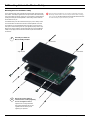
This is simplicity itself. Just insert the disk into the caddy, and secure with
four screws. The caddy is light and the disk just needs to be held securely.
Don’t over-tighten the screws. There are no connections to make because
pushing the caddy into the Ninja Blade or the Docking station makes all
the connections for you.
Spinning disks and SSDs are very sensitive to damage from static
electricity. Please observe all the usual precautions when handling
them, especially DO NOT EVER touch the exposed SATA connector
as static electricity may be harmful to your disk.
The Master Caddy can’t be inserted the wrong way round. Always make
sure that the disk connector faces the slot in the Ninja Blade. You have
to be quite firm to push the Master Caddy into place, but don’t push too
hard, just in case something isn’t set up or aligned properly. There is very
little that can cause problems and the most likely thing is that the Master
Caddy isn’t properly flush with the drive inside. A quick visual check will
confirm this.
1
Carefully assemble the
Master Caddy and disk
Insert screw
Align all parts
2
Insert screw
Ensure all 3 parts aligned
and insert 4 x screws (supplied)
Do not over-tighten screws or
alignment can not be guaranteed.
We suggest squeezing the corners
together near the screw you are
tightening for optimal fit.
Atomos Ninja Blade – User Manual Edition 1: Feb 2014
6
4. Powering up the Ninja Blade
Battery
Battery number 1
Gently slide down
into battery slot/s
and lock into
position.
Push latch to
release battery
The Ninja Blade is a battery powered device, and has a special feature to
ensure that you never have to interrupt a recording to change a battery.
We will come to this shortly.
Like all batteries, you will need to take care of them. Make sure that you
don’t short circuit the connections because this can result in very high
currents that can damage the cells and could pose a fire hazard.
Charge new batteries before using them, using the battery charger
supplied.
Batteries do not charge in a linear way. At first they charge very
quickly, and then the rate slows down to a trickle. While charging,
one or more red lights will blink. When 90% charge is reached, all
the lights will flash. It is perfectly OK to use the batteries at this point
and we recommend stopping at this stage for the longest battery life.
If you leave the batteries on charge after all four lights are flashing,
the charger goes into trickle charging mode for the final 10%.
Eventually, when trickle charging is complete, and the batteries are
at 100% charge, all the lights will go out.
Before any type of disposal the battery should be discharged
completely. Tape the contacts with electrical tape and package so
as to prevent contacts accidentally coming together at any time.
Incineration must be performed by an approved and permitted
waste treatment facility that handles lithium ion batteries. If you
are not sure if your waste facility can handle lithium ion batteries,
contact them and verify if they are permitted or not.
Always use battery slot
for the first battery. This is effectively your
primary battery and the Ninja Blade will not start without it.
Battery slot No.2 is the secondary or back-up battery and is not marked.
Once the Ninja Blade has been started from battery slot No. 1, it will
operate on battery slot No. 2 alone. No. 1 is only required for start up.
To attach the battery, gently slide it down into the slot and lock into
position. To remove a battery, push the latch to release it. Each battery
has its own latch, which is located to the right of battery No. 1 and to the
left of battery No. 2 as you look at the back of the Ninja Blade. Pull the
latches towards the batteries to release them.
Ninja Blade batteries and modular accessories (Connect
Converters, etc) are held in place very tightly because they are
on the outside of the device and there has to be no possibility
whatsoever that they could work loose, so you will have to be quite
firm with the battery latches. We suggest that you familiarise yourself
with the force required to remove the batteries and accessories so
that you can do this quickly in the field. Make sure that you hold the
top and the bottom of the battery or accessory module when sliding
it off to avoid dropping it when it is released from the main unit.
The Ninja Blade features an Atomos technology called Continuous Power
which used battery looping. When power is running low on one battery,
the Ninja Blade will automatically switch to the second battery, you can
remove one of the batteries and replace it with a fully charged one. Ninja
Blade will continue to operate as you do this. You can continue this
process indefinitely.
The Ninja Blade may be powered from NiMH & Li Ion 14.4V
battery systems. Battery adaptor required.
Atomos Ninja Blade – User Manual Edition 1: Feb 2014
7
4. Powering up the Ninja Blade
Turning ON power to the Ninja Blade
Tally Light
The start button is located on the right hand side of the unit (as you look
at the screen). Momentarily press the circular button on the right side
of the Ninja Blade as you look at the screen to power up the unit. After
a couple of seconds you will see the Atomos logo, and then the Ninja
Blade Home Screen.
Turning OFF power to the Ninja Blade
To turn the unit off, touch menu on the home screen, and then press
the red Power off icon for 4 seconds the icon will go white when
touched to indicate activation of the button. The unit will then power off.
You can also do a forced power down by depressing the on/off button
for four seconds.
Four seconds can seem like a long time! We’ve made it this way
to make absolutely certain that the Ninja Blade can’t be turned off
accidentally.
Flashes red when recording.
Battery Latch
ON
+ forced
power
down
Turning OFF power via touchscreen (preferred)
menu
power off
5. Ninja Blade connections
Video Input
Connect to camera using HDMI cable
Master Caddy Slot
Simple, locking
HDD/SSD system.
Video Output
Connect to external device via the HDMI cable
LANC Remote
Optionally control the Ninja Blade using LANC remote
control connected here (use a 2.5mm TRS/ 3-pin plug )
Share remote control with other devices (loop thru ) by
connecting them to the second LANC connector cable
Audio
Stereo Line In or Headphones
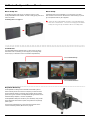
HDMI in: The video input to the Ninja Blade is HDMI. This is the
connection that is used to record to the Ninja Blade’s storage media.
HDMI out: This is for connection to an external monitor or other device
with an HDMI input. It carries a delay-free loop-through of the incoming
signal in record and standby mode, and the playout signal when the Ninja
Blade is in playout mode.
LANC Remote: In addition to direct control through HDMI, you have
the option of controlling the Ninja Blade remotely using the LANC remote
control protocol. The Ninja Blade has a LANC input and a 2.5mm ‘Y’
adaptor cable is included to allow you to connect LANC-controllable
devices.
Audio: The Ninja Blade can record 2 (left and right) channels of digital
audio embedded in the HDMI signal. There is a 3.5mm Stereo Linein socket for recording audio in sync with incoming video. Depending
on your set-up, you may find that this gives you better results than the
microphone on the camera.
You can switch between Analogue Audio Line In and HDMI as your audio
sources in the user interface, where you can also adjust the analogue
audio input level.
There is also a 3.5mm output that doubles as a Line Out or Headphone
Out, which has it’s own independent level control in the user interface.
Atomos Ninja Blade – User Manual Edition 1: Feb 2014
8
6. Master Caddy and Screw Mounts
Master Caddy Slot
Master Caddy
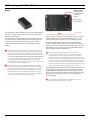
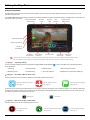
On the left hand side of the unit (as you face the screen) is a slot
for Ninja Blade Master Disk Caddies. To insert a caddy, gently push until it
clicks into position.
The Master Caddy is hot-swappable, so you can do this at any time –
even while the unit is turned on. But don’t do it while recording or you will
get a corrupted file that may be unplayable.
Formatting disks - see page 13
Unlike the Ninja-2/Ninja Blade recorders, the Ninja Blade does
NOT have a release latch - it is friction-fit. Simply pull the Master
Caddy out using the top and bottom tabs on the caddy itself.
Screw Mounts
The Ninja Blade features standard tripod ¼” screw mounts on the top
and bottom of the unit, allowing you to configure your recording setup
various ways (¼” camcorder mount not included in Ninja Blade kit).
¼” Screw mount top
¼” Screw mount base
Ninja Blade Modularity
The Ninja Blade was designed to be a flexible and modular system. It
doesn’t need any drivers to connect to a computer, you have a choice of
spinning hard disk storage or solid state, and it will work with any battery
system as long as it connects to the Ninja Blade’s NP-type slots the Canon
and Nikon battery adapters, or via the D-Tap Adaptor.
The Ninja Blade’s battery slots are the key to it’s modularity. They provide
secure attachment and continuous power, through Atomos’ loop-through
power system.
The first of the modular add-ons to be announced by Atomos are the
Connect converters (pictured). More on this in page 34.
Atomos Ninja Blade – User Manual Edition 1: Feb 2014
9
7. Using the Ninja Blade
Using the Ninja Blade
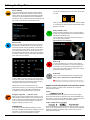
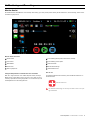
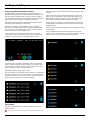
The Ninja Blade is controlled via an intuitive touchscreen interface. Icons and buttons have been designed and laid out in a specific way to ensure
operation is simple and fast.
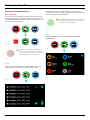
The HOME SCREEN displays all necessary technical and functional information. Everything important for operation and adjustment is no more than one
touch away. Here is how it works:
Video Input Format and
Pulldown Status
Recording
Format
Recording
Quality
Time
Remaining
Continuous Power
Battery Indicator
1
2
Waveform Monitoring
Monitor Assist Functions
Cut and Tag
Favorite/Reject
3
Headphone
Audio Channels
Line Out Volume
and Levels
Timecode and
Record Trigger
Rec / Play / Menu
Vectorscope or
Waveform
Touching the center of the screen at any time removes all overlays except any active Shot Setup or Monitor assist functions
that are enabled. This is to allow you to use the Shot Setup and Monitor assist functions at all times while shooting.
1
Category 1 – Operating Settings
This list of real-time operating settings can be adjusted or toggled WHEN a BLUE ARROW
cannot be adjusted.
2
is present. If the Blue arrow is disabled, the setting
1. Video Input
3. Recording Quality
5. Battery Indicator
7. Audio Channels and Levels
2. Recording Format
4. Time Remaining
6. Time Code & Record
8. Headphone/Line Out Volume (Slider only)
Category 2 – Shot Setup & Monitor Assist Tools
This list represents the icons and functions available for Shot Setup and Monitor Assist Tools:
Waveform Monitoring Functions
Monitor Assist Functions
Smart Log Cut and Tagging
See page 17
See page 19
See page 22
Touch these icons to reveal more functional options in a sub-category. Touch the sub category icons to toggle the functions on or off. When a Shot Setup
or Monitor Assist function is active, touch the settings icon (as seen below) to reveal detailed settings for each Shot Setup tool. Touch the Home icon (as
seen below) to go back to the Home Screen at any time.
Settings icon
3
Home icon
Category 3 – Main Controls REC, PLAY & MENU
The Main Controls of the unit are indicated by large round icons.
To enable recording
See page 15
For instant playback and review
See page 28
To make settings changes
See page 11
Atomos Ninja Blade – User Manual Edition 1: Feb 2014
10
7. Using the Ninja Blade cont.
Home Screen and Menu Functions
Rec (Record)
Ninja Blade uses a unit name, scene, shot and take
convention to name the clips. Select the clip you want to play by touching
the file name and this will start to playback.
This is the icon you touch to begin a recording. Touch it again to stop a
recording. While recording the Rec icon changes to a Stop icon. Once
your recording has started you have the option to touch the Mon icon to
view the signal you are recording.
The Play button will be dimmed and disabled
if there is no disk or the disk is not formatted.
See page 13 - Formatting disks
NO DISK
STANDBY
Menu
Pressing this takes you into a number of options which will
explained next.
Stop
RECORDING
The Rec icon is dimmed and disabled if
there is no valid video input OR, the disk is
not formatted, or the disk is full. The button is
dimmed because you cannot record.
MENU
NO INPUT
Play
Touch this icon to play previously recorded clips. When you press the
green Play button you will be taken to the navigation screen.
STANDBY
NAVIGATION
Atomos Ninja Blade – User Manual Edition 1: Feb 2014
11
7. Using the Ninja Blade cont.
File Naming
You will see Locked will flash on the screen. Press again
to Unlock.
Allows you to select the scene and shot number that will be
recorded next. To select press scene or shot at the top
and the number you wish to use from the list below (up to 999).
The number you choose will then be shown underneath the
word Scene or Shot in a larger font and will be underlined. The
take number is automatically increased with each take.
When you access the Display Icons you can choose to disable
your screen but only when the screen is locked. While Locked,
Display is > On/off
Ninja Blade Info
Shows the software (firmware) version and unique device
ID (DID) of your Ninja Blade device. This will be required to
activate the Avid DNxHD codec.
You can also check on the Atomos website to ensure you
are running the latest firmware:
http://www.atomos.com/support
Date & Time
Allows you to adjust the date and time shown by the clock
and calendar in the Ninja Blade. This will also change the
time of day timecode. Touching the Date & Time takes
you into the Date and Time Screen. At the top of the screen
is the date and the time of day. The month, day and year
are selectable by touching them, at which point a scrollable
list of dates, months or years will show below, depending on
which option has been selected. Power Off
Turns the Ninja Blade off. You need to press Power Off
for four seconds. Alternatively, you can press the physical
On/Off button on the right side of the Ninja Blade for four
seconds to force shutdown. Atomos recommends using the
touchscreen Power Off function .
Timecode
Takes you to the dedicated timecode configuration page.
Refer to Part 7 of this manual for more information.
Remember that pressing a large blue arrowhead will
always take you back to the previous menu you were in.
To enter a date, for example, begin by touching the month
at the top of the screen, and then select the required month
from the list below. Then touch the day, and then the year,
selecting the required value from the list below.
Setting the time is done in exactly the same way.
Date formats (i.e. dd-mm-yyyy or mm-dd-yyyy) are selectable
on the right of the screen. Just keep touching the date
format icon until it shows the format you want to use.
Display Options / Screen Lock
Allows you to modify the brightness of the screen. You are
presented with a horizontal slider. Touch it anywhere on it’s
length to increase or decrease the brightness of the display
or you can slide up and down the blue bar. The option to
toggle the Tally light is under this menu.
SCREEN LOCK
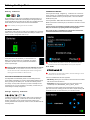
A new feature for the Ninja Blade is the ability to Lock the
screen so no changes can be made by mistakenly touching
the screen. To Lock the screen press the start button
located on the side of the Ninja Blade once quickly.
Smaller controls and indicators around the Home Screen
There are a number of smaller controls that double-up as indicators
around the Home Screen.
Input
1080i59.94
At the top left of the screen is not actually a control but will change to
display information about the signal being input to the Ninja Blade at the
time. If there is no input, it will say No Input. When a valid signal source is
connected, the display will change to (for example) 1080i50.
Video Compression Format
ProRes
At the top middle of the screen shows which version of ProRes® you are
using. You can change between versions (LT, HQ and 422) by repeatedly
touching the indicator. Avid DNxHD options will be shown here if the
codec has been activated.
Atomos Ninja Blade – User Manual Edition 1: Feb 2014
12
7. Using the Ninja Blade cont.
Battery Indicator
1
2
Shows whether you’ve got one or two batteries connected. If there is no
battery connected a number will not be displayed in the appropriate slot.
Touching the Battery Indicator takes you to the Batteries
screen where you can closely monitor the status of the Batteries.
When a battery is running low its icon will flash.
BATTERIES SCREEN
The Batteries screen indicator is made up of two Battery icons, the active
battery is shown in orange and the level of each battery is shaded in 1/4
increments with a voltage level shown on top.
In the picture above we see Battery 1 is full and active and
Battery 2 is currently inactive and 1/4 depleted. If no battery
is present it will show an X in the picture and will be Black in
colour as pictured right.
Warning: If both of the batteries are fully depleted, the unit will
turn itself off. The Ninja Blade will switch to the battery screen
for the last 5 seconds of available power before shutting down,
alerting you that shutdown is about to occur.
AUTO SWITCHING/MANUAL SWITCHING
The Ninja Blade will automatically switch to a new battery when the
current battery is depleted. You may also switch between batteries at any
time by pressing on that battery icon. The new active battery will then
turn orange. You may need to use this if you have for example 3 hours
recording but only 2.5 hours of battery in one battery, in which case you
would change to a freshly charged one.
Storage Capacity Indicator
FORMATTING HDD/SSD
Touching the Storage Capacity Indicator on the home
screen will take you to the Media Information and Format screen. Media
Information indicates the drive you have present, in this case a Hitachi
500GB spinning disk.
Touching Format HDD/SSD will format the drive inside the Ninja
Blade. A confirmation screen will give you the choice to continue or cancel
the process.
If you do not see your hard drive information, there may be a problem
with your connection. Try ejecting the drive and trying again.
Also check the drive compatibility list: http://atomos.activehosted.
com/kb/article/what-drives-do-we-recommend
The Ninja Blade file system is exFAT. We recommend that you
format each disk with the Ninja Blade and not your computer.
Unit Name
NINJABLD
BLADE
To access the unit name click on Menu, then File Naming or on the
Media icon on the home screen.
The unit name serves two main purposes:
• HDD Naming: Naming the unit names the drive if the drive is formatted
after the unit name has been set
• File Naming: File name is the current unit name as the start of the
recorded clip name; NINJABLD_S001_S002_T003
To access the unit name screen simply touch the blue arrow to the
right of the unit name. Creating your own unit name is simple. Pressing OK
will allocate the new unit name and return you to the menu screen.
04:30:15
Located in the bottom right of the screen. When a disk is inserted, the
Storage Capacity Indicator will show the recording
capacity of the drive in hours minutes and seconds, based on the
currently selected video compression, which of course, will determine the
recording bitrate.
Atomos Ninja Blade – User Manual Edition 1: Feb 2014
13
7. Using the Ninja Blade cont.
Audio In
AUDIO DURING PLAYBACK MODE
When you enter into Playback mode on the Ninja Blade it will only output
channels 1/2 on the headphones, please bear this in mind when you
select the audio channels for recording.
Located in the bottom left corner of the main screen you can see the
Audio Monitoring Levels, with access to Audio in.
You can see 2 digital channels (via HDMI input) and 2 analogue audio
channels (via the Stereo Line in). Each channel has a small rectangle
assigned to it; when there is active sound coming in you will see the level
indicator moving.
Any rectangle shown in orange is set to be recorded. To change the
record settings, adjust the gain of Analogue audio in or headphone output
levels and monitor selection access the menu
When you touch the Audio in access icon you are taken to the Audio In
Page, where you can choose to record from either or both of the digital
HDMI and analogue inputs. Underneath each pair of audio channels you
can see the R record button, when this is shown in red it is set to record,
simply select all you want to record.
You can adjust the analogue audio gain by pressing the + and - buttons
next to the channel pair. There is also a slider to control the line out level.
Press any point along the line or slide your finger to the left or right to
adjust.
It is not possible to vary the gain if the signal input is from the HDMI
connection because this is digital and is embedded in the signal.
You can usually adjust this from the camera, please see your
camera manual for operational details.
Atomos Ninja Blade – User Manual Edition 1: Feb 2014
14
8. Monitoring and Recording
Connect to input
Before recording
As soon as you connect a supported input to the Ninja Blade’s HDMI input
and have inserted a formatted drive:
• Check there is a valid signal by looking at the main screen, ensuring it
looks like the ‘ready-to-record’ screen
• The input format will be shown in the top left corner
- Progressive with 2:2 or 3:2 pulldown or
• Rec and Mon icons will go solid and colourful
• Audio inputs will show levels in bottom left corner
• Check the input signal is set to what you would like:
- Interlaced
• If you see No Input for any reason please check your camera
settings match a supported format for Ninja Blade. See technical
specifications on page 36.
• Check you have your audio in record set as you require.
• Connect any additional Analogue audio inputs and adjust gain
accordingly.
• Connect headphones and monitor the Audio channels to make sure the
sound is as expected
• Enter monitor mode to ensure the video is coming in as expected.
READY-TO-RECORD
• Check you have the correct Scene & Shot number selected.
(see page 24 – Organising Material on disk)
• Check your drive is inserted and has been formatted
• Check your timecode settings are as required
• Choose how you will start/stop your recording
• Check for clean input:
By touching the screen in Monitor mode, you can remove the
Atomos overlays to give you a clean screen. If any overlay graphics
remain, these will be coming from your camera. Please check the
settings on your camera to switch these off.
Choosing your recording format
NO INPUT / NO DISK / NO DISK FORMATTED
You can select the recording format by touching the top middle of the
touch screen where the format is indicated.
1080i59.94
IMPORTANT: You need to match the format you are recording
internally on the camera with the format recorded on the Ninja Blade.
NO INPUT / DISK PRESENT
If you are recording 24p internally on the camera you need to record
24p on the Ninja Blade so the recordings match. To adjust the
recording format simply touch the format icon repeatedly and the
Ninja Blade will cycle through the options available. The basic rule
is match the format of the internal recording on the camera (not the
external output of the camera). For more explanation on choosing
the correct format on the Ninja Blade and the relationship to camera
internal format and output format refer to Section 10 – Pulldown.
INPUT PRESENT / NO DISK
The Ninja Blade has a high-quality screen that adjusts to the scan
frequency of the incoming signal, for a smooth, accurate display.
Atomos Ninja Blade – User Manual Edition 1: Feb 2014
15
8. Monitoring and Recording cont.
SmartControl
recording at the same time as the camera.
SmartControl is a versatile set of functions used to control the starting and
stopping of recording by automatic or external means. This section outlines
the different methods to start and stop recording.
To enable this set Timecode to HDMI then set the camera manufacture in
the timecode menu.
Ninja Blade Start and Stop record control can be triggered by the
following methods:
1. Home Page Touch Screen
2. Monitor Page
3. HDMI Rolling Timecode trigger
4. HDMI Camera trigger
5. Via LANC for Sony and Canon Cameras
6. Via LANC serial port
By pressing Rec (Record)
By pressing Rec (Record)
* This function is limited to certain cameras.
Check www.atomos.com/discovery-what-cameras/
5. via LANC for Sony and Canon Cameras
6. via the LANC serial port
Controlled by a third party computer or controller. For system and OEM
integration, contact [email protected]
1. Home page Touch Screen
2. From the Monitor Page
When the manufacturer is selected in Camera trigger, this will disable
the Timecode trigger.
Once you are recording you will see:
Stop
• The Rec button has now changed to Stop on the main screen
• Play button has been disabled
3. HD-SDI Rolling Timecode Trigger record
OFF
DISABLEDENABLED
If HDMI timecode is selected and the camera is in Record run mode, the
user has the choice to start and stop recording remotely from the moving
HDMI timecode.
To enable this arm the TC icon.
Set the Timecode to HDMI
Set Camera trigger to None/Timecode.
When enabled the camera and the Ninja Blade will start and stop
recording simultaneously.
NOTE: Rolling timecode trigger is for use when the camera is in
REC RUN timecode mode only. If your camera is set to FREE RUN
this trigger will start recording immediately and cannot be stopped
until the input is removed. Please be that aware not all cameras
have Start/Stop flags for triggering record, especially older cameras.
In such cases rolling trigger in REC RUN will need to be used to
trigger recording automatically at the same time as the camera
starts recording.
4. HDMI Camera trigger record
• A transparent red boarder appears around the entire screen
Your files will be recorded to your drive with the
unitname, scene and shot you have set up.
NINJABLD_S001_S001_T002
To stop, press the stop button on the Ninja Blade monitor or the camera
record button for either HDMI trigger.
The HDMI Camera trigger is manufacturer-specific, you will need to select
the appropriate manufacturer for your camera. There is a flag within the
SDI signal that lets the Ninja Blade know the start/stop record has been
pressed on the camera; in turn this will trigger the Ninja Blade to start/stop
Atomos Ninja Blade – User Manual Edition 1: Feb 2014
16
8. Monitoring and Recording cont.
Waveform Monitoring
New to AtomOS5 and the Ninja Blade is Waveform Monitoring which can be enabled with only a few button presses.
1
2
6
3
7
4
8
9
5
10
Waveform Monitoring Overview
1
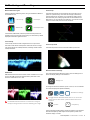
Waveform Monitoring
6
Waveform Size (1/4, 1/3 and Full Screen view)
2
Luma Overlay
7
Dynamic Range
3
RGB Parade Display
8
Transparency
4
Vectorscope
9
Waveform Monitoring settings
5
Vectorscope Zoom
10
Waveform Size touch zone
What is Waveform Monitoring?
How to use
Waveform Monitoring is used for measuring the brightness, luminance or
chroma values from a video input signal. This feature has several benefits
to the production workflow including:
To enable the Waveform Monitor, press the Waveform Monitoring icon on
the home screen.
•
Ensuring camera to camera matching accuracy when shooting
multicam.
•
Returning to locations for additional pick-up shots.
•
Assisting with colour correction.
•
Camera white and black balance
Waveform Monitoring icon
The Waveform Monitoring icon will only be visible if there is an input
signal detected.
Atomos Ninja Blade – User Manual Edition 1: Feb 2014
17
8. Monitoring and Recording cont.
Waveform Monitor Types
Vectorscope
Inside the Waveform Monitoring menu, two types of Waveform Monitors
are available for use:
The Vectorscope display shows emperical colour information of hue
(shown as a phase vector), vector and color strength (measured by
outward distance from the centre). It is invaluable for setting camera
white and black points, identifying areas that are desaturated and for
determining if your shot requires color balancing. You can also use this
function to colour match previous scenes and shots..
Luma Overlay
Vectorscope
RGB Parade
Vectorscope Zoom
Luma Parade, RGB Parade, Vectorscope and Vectorscope Zoom are
enabled simply by touching the corresponding icon and will be by default
displayed at the bottom right hand corner.
Luma Overlay
Luma Overlay shows the levels of brightness from an input source
and makes it clear where overexposed or dark areas are on an image.
Low values indicate an underexposed area, while high values indicate
overexposed areas.
RGB Parade
RGB Parade will monitor the level of Red, Green and Blue from an input
source. The RGB channels are displayed side by side. Each colour
channel is measured from -6 to 108.
Vectorscope Zoom
The Vectorscope Zoom shows an accurate scaled up view of 8:1.
Waveform Monitor Settings
From within the Waveform Monitoring menu, press the Settings icon to
access the display settings for the waveform.
Settings icon
To change the size of the waveform, press on the 1/4, 1/3 or Full Screen
icons and the display will update immediately.
Waveform Size settings
The Waveform Monitor will remain on screen when hiding the
overlays ensuring the focus remains on calibrating your image.
To toggle between Waveform Monitor sizes of 1/4, 1/3 and Full
Screen from the Home Screen, press the bottom corner of the
waveform.
Dynamic
Transparency
The Dynamic Range slider directly controls the intensity of the waveform
while the Transparency slider adjusts the transparency values of the
waveform display on screen.
Atomos Ninja Blade – User Manual Edition 1: Feb 2014
18
8. Monitoring and Recording cont.
Monitor Assist
AtomOS5 features SmartMonitor tools that help with making your shot picture perfect. Easily access Zebra bars, Focus Peaking, False Colour
and Blue Only Exposure.
1
2
6
3
8
7
9
4
10
5
Monitor Assist Overview
1
Monitor Assist
6
Focus Peaking Mode (Colour, Monochrome, Outline)
2
Focus Assist
7
Focus Peaking colour options
3
Zebra Pattern
8
Zebra Threshold
4
False Colour
9
Monitor Assist settings
5
Blue Only Exposure
10
Safe Area/Grid Lines
Using the Ninja Blade as a field monitor and viewfinder
How to use
With its 5” high-resolution color 1280x720pixel screen, the Ninja
Blade makes a great field monitor. So good, in fact, that you don’t
need any separate monitoring equipment. You could even say that
the Ninja Blade is a “Recording Monitor”.
To enable the Monitor Assist functions, press the Monitor Assist icon on
the home screen.
Monitor Assist icon
The Waveform Monitoring icon will only be visible if there is an input
signal detected.
Atomos Ninja Blade – User Manual Edition 1: Feb 2014
19
8. Monitoring and Recording cont.
Focus Assist Types
Zebra
Inside the Focus Assist menu, four types of focusing tools are available
for use:
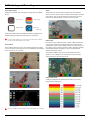
Zebra lines show the parts of the image that are over exposed
relevant to the % level set. 95% is usually used for objects, windows
and surfaces. 75% is used for checking over exposure of human
faces this will indicate reflective or shiny areas on the face.
Focus Assist
False Colour
Zebra Pattern
Blue Only
Exposure
Focus Assist, False Colour, Zebra Pattern and Blue Only Exposure are
enabled simply by touching the corresponding icon in the menu.
You can apply all filters to your monitor at the same time, however
can be set up individually for your needs
Focus Assist
Focus peaking allows the user to ensure their recordings are always
in focus. The parts of the image in focus are indicated by the selected
colour. This tool is very accurate.
False Colour
False Colour assigns different colors to areas of different exposure
in the image. Instead of just showing what parts of the image are
overexposed, it gives a more complete picture of what is going on in
the image by using a range of exposure values. Generally speaking,
overexposed elements will display as red, and underexposed
elements will display as blue.
The gradient between colour levels can be adjusted to have a
gradient or not. If gradient is not selected, the colour levels will
change instantly to the next colour level.
FOCUS ASSIST COLOUR
False Colour Scale:
To help you determine the exposure range with more accuracy,
please use the scale below:
FOCUS ASSIST MONO
FOCUS ASSIST MONO
You can change the focus peaking colors and modes in the settings.
Atomos Ninja Blade – User Manual Edition 1: Feb 2014
20
8. Monitoring and Recording cont.
Blue Only Exposure
Focus Assist Settings
Displays a black-and-white image that is based on the blue channel
of the input signal. Used to observe the noise content of a video
image and the judge the overall exposure quality.
From within the Waveform Monitoring menu, press the Settings icon to
access the display settings for for Focus Peaking, Zebra, False Colour
and Blue Only Exposure.
Settings icon
To change the Focus Assist modes, press on the Colour, Mono or Outline
icons and the display will update immediately.
Safe/Areas/Grid Lines
AtomOS5 now includes Safe Area/Grid Lines overaly to help frame
for Safe Areas, Titles Safe, Centreing and 4:3 Framing.
The color of the Focus Assist can be changed by dragging the slider, the
color selected will be reflected in the top line.
How to use
To enable the Safe Area/Grid Lines, press the Monitor Assist icon on
the home screen, then select the Safe Area/Grid Lines icon below the
settings icon.
Safe Area/Grid Line icon
The Zebra threshold value can be adjusted by moving the slider left or
right. The threshold percentage will be shown on the right of the slider.
35%
35%
All of these settings will update without the need to close
the settings.
SAFE AREA/GRID LINES SHOWN WITH MENU OVERLAYS
SAFE AREA/GRID LINES SHOWN WITHOUT MENU OVERLAYS
The Safe Area/Grid Lines will still be visible when tapping the centre
of the screen to hide the overlays.
Atomos Ninja Blade – User Manual Edition 1: Feb 2014
21
8. Monitoring and Recording cont.
SmartLog
How to use in Playback mode
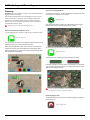
SmartLog gives you the ability to tag your clips during recording (or
playback, more on this later).
By the pressing the Favourite and Reject icons you can
assign a “good clip” or “bad clip”. This information can then be
imported into a non-linear editing system to speed up the edit
process, as you can easily see which parts of your recording you
have marked to keep or reject.
SmartLog currently only works with Apple FCP X.
To review and use the Cut and Tag feature in playback mode, press
on the Play icon on the bottom of the screen.
Playback icon
From the Playback screen, select a clip from the Media source page by
directly pressing it and it will become available for marking.
How to use in Record and Monitor mode
To access tagging press the
Cut and Tag
on the home screen.
Cut and Tag icon
You can now see your monitor in the background and the Favourite
and Reject icons for marking clips while recording.
When you have selected Favourite, the icon colours will invert (Green
background with white text) and the Reject Icon will disappear. When
Reject is selected the icon colours will invert (red background with white
text) and favourite will disappear.
To access tagging press the
Cut and Tag
on the home screen.
Cut and Tag icon
The Favourite and Reject icons will appear on screen.
Favorite
Reject
Press Play and when you see the section of the footage you would like to
mark as good or bad, press Favourite or Reject and then press
again to stop marking that section.
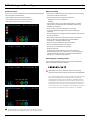
MONITORING MODE: CUT AND TAGGING FOR EASY CLIP SELECTION WHEN EDITING
A green or red line will appear in the timeline scrubbing bar so you
can idenify the region that has been selected.
MONITORING MODE: CLIP MARKED AS A GOOD TAKE
Removing tagged clips
To clear all marking point clips, press on the Clear Tagging icon below the
Home screen icon.
Clear Tagging icon
Atomos Ninja Blade – User Manual Edition 1: Feb 2014
22
8. Monitoring and Recording cont.
Your final stage is to Export the XML flag:
• Enter Play or Media Information
• On the bottom right hand side there is an icon Export XML
• Press this once
• You will be shown a please wait screen (the length of time will vary
depending on your recording time and amount of flags applied)
• Then it will return you to the previous screen
You can carry on recording but please remember before you eject
the drive to export your XML files.
Atomos Ninja Blade – User Manual Edition 1: Feb 2014
23
8. Monitoring and Recording cont.
Organising material on the disk
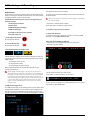
Ninja Blade uses a
convention:
unitname, scene, shot and take naming
You can see along the top you have scene and Shot with a large
underlined number, this is the current selection.
NINJABLD_S001_S001_T001
This was recorded on a Ninja Blade unit called NINJABLD, the
scene selected was 1, the shot selected was 1 and it was take 1.
Below is an example of your playback browser window showing file
names.
To change them press scene or shot (depending on the one you wish
to change) then the number you wish it to set as. In each selection this goes
up to 999.
To organise your clips you need to access the Scene & Shot. To navigate
press Menu on the main screen and then press Scene & Shot on the
menu screen.
Once selected you will see the underlined number at the top will have
changed. You can now go back to the Main screen and start your record.
If you do not set this up Ninja Blade will start recording from
Scene 1 and Shot 1 automatically.
The Ninja Blade uses the exFAT file system. This is
recognised natively by both PCs and Macs, without any
need to install driver software. It is a 64-bit file system that
will let you record to the full capacity of your storage medium
without any need to “segment” the files. The maximum
file size is so large that you do never need to worry about
exceeding it.
For Windows XP, service pack 3 and a special exFAT patch
are required. Both are available on the Microsoft® website.
For MAC OS Snow Leopard 10.6.5 or higher is required.
Atomos Ninja Blade – User Manual Edition 1: Feb 2014
24
8. Monitoring and Recording cont.
Atomos Anti-Shock Technology
File Recovery
Spinning disks are very reliable in a controlled environment where
movement and vibration are minimal and within the capabilities of the
devices. They are ideal for low-cost recording, but will suffer reduced
performance if they are jolted or receive a sudden impact.
The Ninja Blade saves the file every 8 seconds while in recording mode,
so if the recording is stopped suddenly, without closing the file properly,
you will only ever lose 8 seconds of material.
Should one of these events occur, the Ninja Blade will sense the hard
disk slowdown. If there is a break in the recording it will detect the
number of frames involved and will then continue to record when it is safe
to do so.
This means that even if you suffer a momentary break in your recording, the
video capture will continue without any intervention from you, the user.
In the event of an interrupted recording, when you restart the Ninja
Blade, or enter playback mode, you will be presented with a menu that
gives you the option to recover immediately, or recover it later.
If you recover later, every time you put the disk in, or start up the Ninja
Blade, the same menu will appear to prompt you to recover the file that
did not close properly.
It is obviously important for you to know that you have suffered from an
interrupted recording and the user interface will display a warning (in the
form of a Kangaroo sign) clearly above the disk-capacity display on the
main screen.
If you find you are working on a very active project where you are seeing
a lot of “Skippys” then you probably need to switch to SSDs, and only
use spinning disks for gentler environments.
If the drive is broken, or has become corrupted, then we will
not be able to recover the file and we recommend that you
try third-party hard disk recovery software.
“Skippy”
warning
To remove “Skippy” warning, simply touch the icon
and it will disappear.
Atomos Ninja Blade – User Manual Edition 1: Feb 2014
25
9. Timecode
Using Timecode
Time of Day
Touching the timecode display on the home screen, just above the three
main coloured controls, will take you to the Timecode setup screen (this is
also accessible by touching Menu and then Timecode)
With this selected, each new clip that is created will contain embedded
timecode accurately showing the time of day that it was recorded, based
on the internal Ninja Blade Time of Day clock. This can be set in Menu
04:08:01:23
> Date & Time
or
Occupying the lower-centre part of the screen is the timecode display with
controls to set the start-time of the timecode.
The four timecode modes supported are:
• HDMI
• Time of Day
• Record Run
• Auto Restart
Cycle through these modes by touching the timecode Source Selector.
If recording is stopped and then restarted while in this mode, there will be
a time gap between the last clip and the next one, equal to the length of
time the Ninja Blade has been out of record. The start timecode of each
clip will be the exact time of day when recording started.
Time of Day timecode is useful as a reminder of the time that clips were
recorded. It can also help with syncing-up of multiple cameras, but remember
that the accuracy of the correlation of Time of Day timecode between Ninja
Blades will depend on how closely their internal clocks are synchronised.
In Time Of Day mode, the controls on the Timecode Setup Screen
for adjusting the start-point of the Ninja Blade timecode are not
available, as the timecode is set by the Ninja Blade’s internal
clock.
HDMI embedded timecode
With this setting, the HDMI input will set the timecode (as long as the
source SDI device supports this). The controls to adjust the timecode
value are disabled in this setting because the embedded timecode in
the HDMI signal sets the Timecode value of the recording. If you want to
adjust this please, refer to the manual of your HDMI input device.
Record Run
With this setting you set the start timecode of the first clip and the
following clip will start at the frame immediately after the out point of the
preceding clip. This will continue for all clips that follow. This is often
referred to as continuous timecode.
Trigger from HDMI time code
If HDMI timecode is selected and the camera is in REC RUN mode, the
user has the choice to start and stop recording remotely from the source
camera HDMI timecode.
To enable rolling Timecode Start/Stop functions, simply press the TC icon
shown here. When enabled, pressing the camera Record Stop/Start button
will make the Ninja Blade start and stop record simultaneously as the
timecode starts and stops.
OFF
.DISABLED
Auto Restart
With this setting, the timecode will be reset to the timecode you define
here whenever you press record. All your clips will start at this timecode.
ENABLED
When using the camera in Free Run timecode, the rolling timecode
trigger might not work as expected. However, depending on the
camera, you can trigger record function by the embedded flag/
trigger in the HDMI signal. Most higher end cameras have this
functionality; if unsure contact us at [email protected]
To adjust the timecode use the “+” and “-” above and below the
hour:minute:seconds sections
Atomos Ninja Blade – User Manual Edition 1: Feb 2014
26
10. Pulldown
What is Pulldown?
1080p23.98 or 1080p24
Many professional and consumer cameras available today do
not send true 1080p24, 1080p23.98, 1080p25, 1080p29.97 or
1080p30 signals down their SDI or HDMI outputs.
Instead they send 1080i59.94 in NTSC regions (eg USA,
Japan), and 1080i50 in PAL regions (eg Europe)
In order to convert the signal from the internal recording format to
1080i5994 or 1080i50, they use a process called 3:2 or 2:2 pulldown.
Camera Setting
Pulldown
Ninja Blade Receives
1080p23.98
3:2
1080i59.94
1080p24
3:2
1080i60
1080p25
2:2
1080i50
1080p29.97
2:2
1080i59.94
1080p30
2:2
1080i60
You will, of course, want the Ninja Blade to record eg 1080p24, not
1080i60 to the disk. In many cases, it is not easy for the Ninja Blade to
detect the pulldown operation in the video, so you will have to set the
correct mode in the Ninja Blade as well as setting it on your camera.
1080p23.98
1080p24
If you have set 1080p23.98 or 1080p24 in your camera and your Ninja
Blade displays 1080i59.94 or 1080i60, then you can easily remove the
pulldown by following these steps:
• Press the blue arrow next to the video format repeatedly
until you see 1080p23.98 (or 1080p24) displayed. You will see that
the Mon button is dimmed. Your Ninja Blade needs to analyse the
video for about 1 second, in order to detect the pulldown sequence
and remove it.
• If it is not automatically detected after 1 second, wave your hand from
side to side in front of the lens, or wave the camera from side to side
for a few seconds. The Ninja Blade will detect the pulldown in the
movement, the input video format will show 1080p24 and the Mon/Rec
button will highlight.
3:2 pulldown detection is difficult, if not impossible to detect on
completely still video. This is why you should wave your hand in
front of the lens.
With some cameras, the Ninja Blade can detect and remove the pulldown
automatically, in which case the mode you expect (eg 1080p23.98) will
display on the Ninja Blade and you will not have to do anything further.
If you lose the input detection – for example you unplug the HDMI
cable or go to Playback mode, you will need to wave your hand or
the camera again, when the signal is restored to the Ninja Blade.
If there is no input detected, then toggle the input by pressing the screen
until you see the input you wish to record.
Some cameras use a variant of pulldown removal, for example
Panasonic Advanced pulldown. The Ninja Blade does NOT support
this format, and it will not be detected.
Atomos is adding auto-detection support for more cameras,
please check for firmware updates regularly at www.atomos.com
Standard Panasonic pulldown is supported, ensure in the
Panasonic camera settings that pulldown is not set to Advanced.
1080p25, 1080p29.97 or 1080p30
For these modes, simply press the blue arrow repeatedly until your
1080p desired format is displayed. There is no need to wave your hand or
the camera, as 2:2 pulldown removal does not require moving video.
1080p24
1080p29.97
1080p30
Atomos Ninja Blade – User Manual Edition 1: Feb 2014
27
11. Playback & Playout
Using the Playback and Playout features
The Ninja Blade has a powerful playback function that allows you to
playback pristine Apple ProRes or (optionally) DNxHD recordings in realtime with controls to navigate quickly to any part of a clip, the ability to
play recorded content faster than normal playback speed or step through
the clip frame-by-frame to check your footage very accurately.
Playback makes the Ninja Blade a fully-functional portable HD Deck
with quality visually identical to uncompressed!
Whenever a clip plays on the Ninja Blade’s screen, it will also be
presented as an HDMI signal through the Ninja Blade’s HDMI output.
You can view this on an HDMI monitor, or, using an optional Atomos
H2S Connect Converter, on an HDMI monitor.
To play back a clip, first touch the green Play control on the home
screen. There will be a short pause while clips are made available for
playback. You will then be taken to the Play Navigation screen.
The Play navigation screen will display the Scene and Shot folder
structure.
The first screen will show you all the Scene folders. In the picture
below we can see Scene001) within the Scene Folder are any
Shot folders. In the picture below you will see the 5 different shot
folders. Within each Shot folder will be the list of takes.
Fat 32 has a file size limitation of approx 4GB, when you recorded on
the Ninja Blade it would generate a new take each time the recording
exceeded this limit.
You will notice the take has a different icon, this indicates the file can
be played back.
You can navigate the files and folders using the blue up and down
arrows. Once you see the take you would like to playback, touch the
take icon you want to play and this will start the playback.
exFAT Disks
If the disk has been formatted on Ninja Blade it will use the ExFat file
system. The Play navigation screen will display a list of files that have
been recorded. The naming convention used includes the unit’s name,
Scene number, shot number and take number, e.g.
NINJABLD_S001_S001_T001.mov
This list is ordered in the same order it was recorded in. To navigate the
list use the up and down arrows to scroll through. If you edit the XML in
playback this will put the file to the top of the list. To play the item touch
the file you want to play and this will start the playback.
FAT32 Disks
If the disk has been formatted on a Mac/PC as FAT32, it will use the
FAT32 file system.
As a general rule, we do not recommend FAT32 for recording video.
Atomos Ninja Blade – User Manual Edition 1: Feb 2014
28
11. Playback & Playout cont.
Once a file has been selected for playback, you will see the following
options:
Pause mode
Scrub Bar
This is the thick blue line along the bottom of the playback screen. A
vertical white “now” line shows the current playback position. You can
think of the scrub bar as representing the length of the clip. If you touch
the scrub bar, playback will start from that position.
Simply by running your finger along the scrub bar, you can move forwards
or backwards through any clip - even if it is eight hours long - at any
speed.
Play/Pause
Frame Reverse/Frame Forward
This is the master playback start/stop control and is found to the right of
the scrub bar. It toggles between play and stop.
The remaining play controls have two modes depending on whether the
Ninja Blade is in Play or Pause.
Moves the clip forward/backward by a single frame
Go to end/Go to start
Play mode
Goes directly to the beginning/end of the current clip
Note that you can jump between any of the controls while in playback:
you do not have to press Stop first.
Previous/Next Clip
Prev Next
Fast Reverse/Fast Forward
Move between the previous and next clips for playback.
Plays the clip at 8x normal speed
Fast Fast Reverse/Fast Fast Forward
Plays the clip at 64x normal speed
Atomos Ninja Blade – User Manual Edition 1: Feb 2014
29
11. Playback & Playout cont.
Loop Mode
The Ninja Blade has the ability to play back a single clip in loop mode
via the HDMI output. This can performed with captured clips at full
broadcast quality or the final edited clips from your hard drive.
To do this:
• Go into Playback mode
At any time, you can hide all the visible controls by simply
touching the screen (away from any controls) once. Touch it again
to bring back the controls.
Headphone volume
• Pick the clip you want to loop
Note that when you first select a clip for playback, longer clips will
take slightly more time before they start playing. All subsequent
navigation within clips of any size will be instantaneous.
• Use the scrub bar to locate the point you wish to start from (In point)
and select the In point icon on the top left hand side of the
playback screen. This will turn red to confirm that it is active.
Allows you to adjust the headphone volume while in the playback page
Timecode
04:08:01:23
This shows the timecode of the ‘Now’ line
Interlaced playback
• Repeat this for the desired Out point by selecting the Out point
icon on the top right hand side. Again this will change to red.
Ninja Blade playback shows a frame at a time. If the video footage is
interlaced (ie with two fields, each separated by 1/50th or 1/60th of a
second) it will play back perfectly well, but when playback is stopped,
the frame showing on the screen will flicker between the two fields.
This is a useful and accurate method to determine whether your
originally captured footage is progressive (even if it is delivered via an
interlaced signal) or genuinely interlaced.
• Now select the Loop icon in the top middle of the screen - that will
also turn red to indicate that it is active.
• Press the Play button. The segment of the clip you have selected
will now loop until you press the Stop button.
To change the In and Out points, just stop playback and adjust the start
and stop points. Press Loop/Play again.
You can loop the playback of the entire clip by simply pressing
Loop, then play.
Atomos Ninja Blade – User Manual Edition 1: Feb 2014
30
12. Connecting and Editing
Connect
To access and edit your recorded material, connect the Master Caddy
Docking Station to a Mac® or Windows® editing workstation via USB 2.0
or USB 3.0.
Eject the Master Caddy from your Ninja Blade and insert it into the
Docking Station. After a short wait, the recorded video will be accessible
to the target computer via a standard disk (exFAT) file system.
NLE supported
We have chosen the Apple ProRes® and Avid DNxHD® codecs as they are
both not only visually lossless, but also edit-ready formats. All major NLEs
support ProRes and DNxHD.
The Master Caddy Docking Station is a sophisticated device
supporting two different data interfaces: USB 2 and USB 3. Note
that when using the Master Caddy Docking Station you may need
to connect an additional USB cable to the 5v power input. This
is because when it has to power a disk drive and its interface
electronics, the Docking Station may consume more power than is
available from a single USB port. We supply you with a USB to 5v
Power Supply socket for this purpose
.
Transferring Files
Now your docking station is connected and your disk is recognised by
your operating system, you can edit directly from the drive or copy the
files to your own storage.
Windows
Open the disk in My Computer > Select all the files or just the ones you
wish to transfer, copy and paste them to your desired location.
(ctrl+c copy, ctrl+v paste).
• Final Cut Pro (version 7)
• Final Cut X
• Adobe CS5 (with 5.51 update)
• EDIUS 6
Mac OS
Your Ninja Blade disk will show in Finder. Select the files you wish to
transfer, drag the files to your desired location or use the copy and paste
commands.(⌘+c copy, ⌘+v paste).
• Sony Vegas 10
• Lightworks
• Avid Media Composer 6
• Autodesk Smoke
Avid DNxHD® support requires online activation.
ExFAT compatibility
The Ninja Blade formats your disk as exFAT. We have chosen this file
system to overcome the 4GB file limitation of FAT32 and keep compatibility
on both Windows and MAC OS.
If you have used a FAT32 formatted disk in the Ninja Blade this
will have a folder structure Scene, Shot, Take. This will mean you
either transfer all the folders or utilise the Windows Search or
MACs automate program to transfer just the .mov files. There are
instructions on this in our knowledge base; visit www.atomos.com/
support for more info.
The Operating Systems that support exFAT are:
• Windows XP - install the following update :
http://www.microsoft.com/download/en/details.aspx?id=19364
• Windows Vista - install SP1 or higher
• Windows 7 (32/64bit)
• Snow Leopard 10.6.5 or higher
• Lion 10.7
• Mountain Lion 10.8
USB 2.0 and 3.0
Attach Master Caddy
Connect to Laptop/
Workstation
Ensure disk is properly attached
Atomos Ninja Blade – User Manual Edition 1: Feb 2014
31
12. Connecting and Editing cont.
Importing
Final Cut Pro (version 7), Final Cut X , Adobe CS5 (with 5.51 update),
EDIUS 6, Sony Vegas 10, Lightworks and Avid Media Composer 6
support imported files from your Ninja Blade disk.
You’ll see the folders in the Ninja Blade drive. Select the folder
containing the footage you want to import:
Importing Ninja Blade footage into Final Cut Pro
You can import Ninja Blade footage into Final Cut Pro (FCP) in just a
few simple steps.
First, connect the Ninja Blade Docking Station to your Apple Mac using
the USB 2.0 or USB 3.0 port. Insert the Ninja Blade Master Caddy
containing the disk with your footage into the Docking Station and you will
see the drive appear in your Finder window.
Start FCP and open your project (or start a new one).
The screen will look like this:
Click on Choose and go back to your FCP project window:
Go to the File menu and select Import > folder:
Your Scene, Shot and Take folders now appear in the project window,
ready for use in your FCP project.
FCP will show you a “browse” window. Look for the Ninja Blade drive,
and click on it.
Atomos Ninja Blade – User Manual Edition 1: Feb 2014
32
12. Connecting and Editing
SmartLog with FCP X
2. Manual
Prior to importing the XML files into FCP X, ensure that:
• Open FCP X
• You have exported XML whilst the drive is in your Ninja Blade
• Create a New Project (or you can use an existing project); in this
example it is called XML Import
• You have connected your Master Caddy Docking Station and inserted
your Master Caddy into the Dock
• Select File, Import, XML
• You are using an operating system that supports ExFAT
• Your QuickTime version is up to date
• FCP X is the latest version
There are 2 ways to import the XML file:
1. Directly from the docked hard drive
2. Manually into FCP X
1. Automatic Import
• Open Finder
• Select the drive (in this example it is EXCVIDEO)
• Double-click the unitname.FCPXML file
• This will open FCP X and import the .xml file
FCP X will make a event of the disk name and reference all the footage
in that event.
• Select the Ninja Blade drive under Devices (in this example it is called
EXCVIDEO)
• Choose the unitname.FCPXML, select Import
The XML will import
You will notice that on the clips you have added Smart Tags too, with
Green and Red indicating Favorite and Reject.
You can sort these by using the pull-down menu to show favorites.
This will show all the individual favorites as separate clips in the Event
Viewer.
Once imported you can expand the clip and you will see the Favourite
and Reject tags. You can also filter the view to only see Favourite, etc.
Atomos Ninja Blade – User Manual Edition 1: Feb 2014
33
13. Using Ninja Blade with external power supplies
AC Adaptor (included)
This connects on the battery slot on the back of the Ninja Blade. Please
ensure it is connected to slot 1. The end of the adaptor will connect to a
mains plug.
Alternatively you can use any NP-Compatible Charger or power supply,
as long as they use a “Dummy Battery”.
D-Tap Adaptor (sold separately)
This adaptor allows you to take the power supply from any source that
has a D-Tap connection such as V-Lock
The D-Tap also connects to the battery slot of the Ninja Blade, please
ensure it is in slot 1. You will need a D-Tap to D-Tap cable (sold separately).
Voltages 7.2 to 16.8 volts. Please refer to Atomos D-Tap document on the
Atomos Knowledge Base.
14. Using Ninja Blade with Atomos Connect Converters
You can think of Atomos Connect Converters as stand-alone devices
or as specially designed modules to give the Ninja Blade additional
capabilities. With them you can:
• Add an HDMI input to the Ninja Blade for connection to
non-HDMI devices using Connect S2H
• Add an HDMI output to the Ninja Blade for playout to
HDMI monitors using Connect H2S
There is nothing to set up when you use a Connect Converter. Just
secure the device in a battery slot (in Slot 1 if you only have a single
battery) and place the battery that previously occupied that slot in the
battery slot on the converter.
Atomos Ninja Blade – User Manual Edition 1: Feb 2014
34
15. Software updates
Updating AtomOS (Firmware)
From time to time we will issue software updates for your Ninja Blade.
To update the firmware (that’s the software that runs inside your Ninja
Blade), there is a simple procedure you have to follow.
• Go to http://www.atomos.com/ninja-blade-firmware
• Locate and download the firmware upgrade
Problems when installing AtomOS
1. Extract the file NINJABLD.FW from the firmware zip file.
Very occasionally, the firmware update process can go wrong. This might
be because of an incomplete or corrupted download.
2. Copy NINJABLD.FW onto a drive in a Master Caddy.
Please ensure your batteries have plenty of charge and that you
do not interrupt your Ninja Blade while its firmware is upgrading.
You will see a randomised colour-bar display on the screen top
and bottom of the screen while updating is taking place. When it is
finished, the Ninja Blade will restart and you will be able to use the
device as normal.
a. Atomos recommends you use a freshly formatted known good disk.
b. Always format your drives in the Ninja Blade. The Ninja Blade
formats the drive for optimal performance for Video.
c. Ensure that the firmware update file is on the root of the drive, and
not in a folder on the drive.
3. Put 2 freshly charged batteries on your Ninja Blade. It is very important
that your Ninja Blade does not lose power during a firmware upgrade.
In the unlikely event of your Ninja Blade becoming unresponsive, there is
a built-in recovery mechanism.
All you have to do is press and hold the on/off button for 10 seconds.
If you do this your Ninja Blade will revert to its factory condition,
and you will be able to retry the firmware update later (taking due
precautions to identify and remove possible reasons for the failure of
the previous attempt).
4. Power down your Ninja Blade.
5. Insert the Master Caddy with the NINJABLD.FW file.
6. Power up your Ninja Blade with a short press of the Power Button.
7. Watch the screen. The Atomos logo will appear, and then be replaced
with a Please Wait logo and after a few seconds the firmware upgrade
will start.
8. While the firmware upgrade is happening, there will be flashing
coloured lines above and below the Please Wait Logo.
9. The firmware upgrade will take up to a few minutes.
10. When the firmware upgrade is finished, the Ninja Blade will:
a. delete NINJABLD.FW from the drive.
b. Power itself down.
11. Turn on your Ninja Blade again with a short press of the Power
Button located on the side.
12. When the Ninja Blade has booted, Press “MENU” and then “Ninja
Blade Info” and check that the version number is the version expected.
Atomos Ninja Blade – User Manual Edition 1: Feb 2014
35
16. Ninja Blade Technical Specifications
Construction note:
Ninja Blade Main Unit
Your Ninja Blade is designed to operate in ambient temperatures up to
40°C/105°F. It features a fanless design which dissipates internal heat
through the aluminium chassis.
Lightweight
310g / 11oz (without batteries & HDD)
595g / 21oz (with batteries & HDD)
Dimensions (without batteries)
140mm (W) x 87mm (H) x 41mm (D)
Construction
Aircraft-grade aluminium for durability + portability.
Fanless for silent operation.
Operating Power
3.3W (Monitoring Only) / 6.8W (Rec, Mon & Play)
Batteries
7.2V-14.4V Battery System Compatible
NP Series
D-Tap
and supporting accessories
ll 7.4v
A
1. 2600mAh - Up to 4hrs
2. 5200mAh - Up to 8hrs
3. 7800mAh - Up to 12hrs
4. AC Power via Adapter plate (option)
5. D-Tap Adapter (cables sold separately)
Continuous Power* *Patent Pending
Primary-Secondary battery system.
Change batteries without losing power.
Loop batteries continuously.
Touchscreen
Size: 5” diagonal. Resolution: 1280x720
Aspect Ratio: 16:9 native /4:3 Letterbox. REC 709 HDTV Colour Specification
Native Frame Rate Playback (48-60Hz)
SuperAtom IPS (in-Plane Switching) panel
Video Input
HDMI x 1
Uncompressed 10/8-bit 4:2:2
(HD/SD-SDI x 1 with optional S2H
Simultaneously displayed on internal
Connect SDI -> HDMI converter)
5” Samurai screen
If you wish to extend the temperature of operation in high temperature
conditions, you can choose an SSD drive, and set the TFT brightness
to a minimum.
The top and bottom aluminium surfaces next to the tripod screws
are the heat sinks. Under warm or extended operating conditions, these
surfaces may get hot to the touch. This is normal part of the design, and
shows that your Ninja Blade is dissipating heat successfully.
Heat sink
HDMI v1.4
SMPTE 259/292/296 BNC
Video Output
HDMI x 1
HDMI v1.4
Uncompressed 10-bit 4:2:2
(HD/SD-SDI x 1 with optional H2S Connect SMPTE 259/292/296
Simultaneously displayed on internal
HDMI > SDI converter)
BNC
Supported Formats (In/Out)
HD 1080i60, 1080i59.94, 1080i50, 1080p30, 1080p25, 1080p24, 1080p23.98,
1080pSF23.98, 1080pSF24, 1080pSF25, 1080pSF30, 720p60, 720p59.94,
720p50, SD 480i, 576i
Realtime Hardware Encoding
Apple ProRes ®
1920x1080 8/10-bit 4:2:2 to:
HQ - 220Mbps
422 - 150Mbps
LT - 100Mbps
Avid DNxHD-220/220x - 220Mbps (8/10-bit)
Avid DNxHD ®
(Online activation Avid DNxHD-145
- 145 Mbps (8-bit)
required)
Avid DnxHD-36
- 36 Mbps (8-bit)
Onboard Processing
Auto detect pulldown cadence and
remove
25pSF (50i) > 25p
30pSF (60i) > 30p
24p (3:2-60i) > 24p
23.98p (3:2-59.94i) > 23.98p
Audio input 48kHZ PCM audio
HDMI 2 Channels + 2 analogue channels with gain controls
Audio output 48kHZ PCM audio
HDMI 2 Channels + headphone for onboard review.
(Select any pair of channels)
Remote Start and Stop
Via HDMI trigger / Via HDMI timecode / Via LANC controller & LANC camera
Master Caddy Case for HDD or SSD
2.5” SSD or HDD minimum 5400rpm to 10,000rpm standard 9.5mm height
75mm x 105mm x 12mm
For recommended drives visit: www.atomos.com
Master Caddy Dock
2.5” internal drive SATA to USB 2.0/3.0 including USB cable
Supported Applications
FCPX/FCP7+ / Media Composer 5.0+ / Premiere 5.5+
EDIUS 6.0+ / Vegas Pro 10+ / Lightworks
Accessories included
• Universal Battery Charger 110-240V • AC Adapter & Car Charger
• Docking station and leads • 2 x Master Caddy Cases
• 1 x Atomos 2600mAh battery • Rugged Carry Case
• Canon & Nikon Adapter plates
Optional extras
• 5 x Master Caddy Cases • Sun Hood • D-Tap Adapter
• Carry case • Canon® / Nikon® battery plates
• Connect H2S converter • Connect S2H converter
Heat sink
Do not be alarmed if the top and bottom surfaces seem hot to
touch. This is normal part of the design, and shows that your Ninja
Blade is dissipating heat successfully.
SSD/HDD usage:
With spinning drives, you need to be careful in handling when recording.
The drives will generally stand light/medium occasional bumps without
problems, and the Ninja Blade has an anti-shock buffer. However,
spinning drives are not suitable for use in high vibration or movement
environments, for example if the Ninja Blade is strapped to the side of a
motor bike.
With spinning hard drives, use a new drive, or one that has very little
usage. Do not use old drives. Do not use drives that have been dropped.
On all drives, when handling, keep fingers away from the SATA connector
at all times, as static electricity can damage the electronics inside.
‘A Kenyan Odyssey Safari’ footage © David Newton 2013
Have you registered your Ninja Blade
yet? Upgrade to 3 year warranty now.
Website: www.atomos.com | Sales: [email protected] | Support: [email protected]
© ATOMOS Global Pty. Ltd. trading as ATOMOS under license. All trademarks are the property of their respective owners.
Atomos Ninja Blade – User Manual Edition 1: Feb 2014
36