1
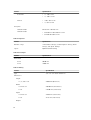
Option
Description
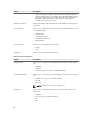
Wireless Radio Control
Allows you to enable or disable the feature that automatically switches
from wired or wireless networks without depending on the physical
connection.
•
•
•
Wake on LAN/WLAN
Allows you to enable or disable the feature that powers on the computer
from the Off state when triggered by a LAN signal.
•
•
•
•
Block Sleep
Control WLAN Radio
Control WWAN Radio
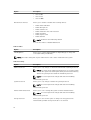
Default Setting: Control WLAN radio or Control WWAN radio is not
selected
Disabled: This option is enabled by default
LAN Only
WLAN Only
LAN or WLAN
This option lets you block entering to sleep (S3 state) in Operating
System environment.
Block Sleep (S3 state) - This option is disabled by default. POST
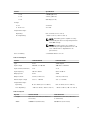
Primary Battery
Configuration
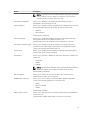
Allows you to select the charging mode for the battery. The options are:
•
•
•
•
•
Standard Charge
Express Charge
Predominately AC use
Auto Charge: This option is enabled by default.
Custom Charge
If Custom Charge is selected, you can also configure Custom Charge
Start and Custom Charge Stop.
NOTE: All charging modes may not be available for all the batteries.
Battery Slice Configuration
Allows you to select the type of charge for the battery. The options are:
•
•
Standard Charge
Express Charge : This option is enabled by default.
NOTE: Express charge may not be available for all the batteries.
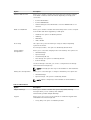
Table 21. POST Behavior
Option
Description
Adapter Warnings
Allows you to enable or disable the system setup (BIOS) warning
messages when you use certain power adapters.
Default Setting: Enable Adapter Warnings
Keypad
Allows you to choose one of two methods to enable the keypad that is
embedded in the internal keyboard.
•
Fn Key Only: This option is enabled by default.
75