1
j
k
n
l
o
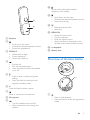
a Earpiece
b
• Scroll up on the menu.
• Increase the earpiece/speaker volume.
• Access the phonebook.
c REDIAL/C
• Delete text or digits.
• Cancel operation.
• Access the redial list.
d
e
Set the dial mode (pulse mode or
temporary tone mode).
• Scroll down on the menu.
• Decrease the earpiece/speaker volume.
• Access the call log.
• Make and receive calls.
• Recall key
m MENU/OK
• Access the main menu.
• Confirm selection.
• Enter the options menu.
• Select the function displayed on the
handset screen directly above the key.
n Loudspeaker
o Battery door
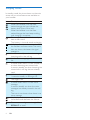
Overview of the base station
• End the call.
• Exit the menu/operation.
• Press and hold to switch the handset
on or off.
• Press to enter a space during text
editing.
• Press and hold to lock/unlock the
keypad in standby mode.
a
f #
Press and hold to enter a pause.
g
Mute or unmute the microphone.
h Microphone
i
• Turn the speaker phone on/off.
• Make and receive calls through the
speaker.
a
• Press to find handsets.
• Press and hold to enter the registration
mode.
EN
5