1
BUTTONS AND CONNECTIONS
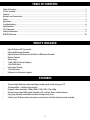
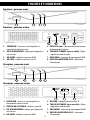
Transmitter - FRONT
1
2
3
4
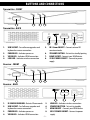
Transmitter - BACK
5
1. USB SOCKET - For software upgrades and
keyboard or mouse connection
2. POWER LED - Indicates power on
3. VIDEO LED - Indicates HDMI connection
4. LINK LED - Indicates wireless connection
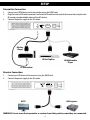
Receiver - FRONT
2
6
7
8
5. IR 3.5mm SOCKET - Connect external IR
remote extender
6. STANDBY BUTTON - Set unit to standby/pairing
7. HDMI SOCKET - Connect your HDMI device
8. 5V DC POWER SOCKET - Connect to power
supply
1
3
4
5
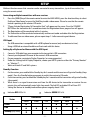
Receiver - BACK
6
1. IR SENSOR WINDOW - Detects IR commands
2. USB SOCKET - For Software upgrades and
keyboard or mouse connection
3. POWER LED - Indicates power on
4. VIDEO LED - Indicates HDMI connection
5.
6.
7.
8.
-3-
7
8
LINK LED - Indicates wireless connection
STANDBY BUTTON - Set unit to standby
HDMI SOCKET - Connect your HDMI device
5V DC POWER SOCKET - Connect to power
supply