1
®
FLIPPER
Two Device Universal
Table of Contents
Introduction --------------------------------------------- 2
Functions ------------------------------------------------- 2
Set Up ---------------------------------------------------- 3
------------------------------------- 3
Step 1: TV set up
------------------------- 4
Step 2: Set Top Box (STB)
-------------------------- 4
Step 3: Favorite Channels
------------------- 6
Step 4: Dual Mode (TV & STB)
----------------------------------------- 7
Step 5: Lock
ON / OFF Options --------------------------------------- 7
---------------------------------------------- 7
TV Only
-------------------------------------------- 8
STB Only
Channel Entry Options --------------------------------- 8
Other Set-up Options ----------------------------------- 9
------------------------- 9
Automatic Code Searching
------------------------------------ 10
Learning Set Up
Troubleshooting --------------------------------------- 11
Code Retrieval ----------------------------------------- 11
Reset the Remote --------------------------------------- 12
TV Brand Code List ------------------------------------ 13
--------------------------------- 19
STB Brand Code List
Batter y Installation
Use two (2) new AAA batteries. Please see the following
instruction when installing the batteries.
Instruction Manual
© Flipper LC 2009. US Patent Pending
Support: www.FlipperRemote.com
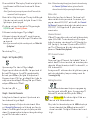
1. Open the battery cover in the back of the remote as
illustrated.
2. Match the batteries to the + and - marks inside the battery
case, then insert the batteries. If the installation is correct,
the indicator light will flash 2 times.
3. Put the battery cover back on.
4. Press any key, if the indicator light flashes, installation is
correct.
Warnings:
1. Do not mix new batteries with old ones or place the
batteries incorrectly.
1
2. Please finish the battery installation within 5 minutes ,
otherwise the programmed codes Will be lost. Do not press
any key during installation.
3. Remove the batteries if you do not plan to use the remote
for a long period of time to prevent electrolyte leaking. If
leaking occurs, clean the contaminated area of the battery
compartment and replace the old batteries with new ones.
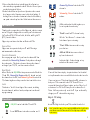
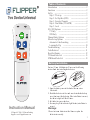
Channel Up/Down: Controls the STB
channels.
Volume Up / Down: Controls the TV
volume.
Introduction
0-9 located under the sliding door, are
for set up and channel entry.
Thank you for your purchase of the Flipper two device remote
control. Flipper is designed for use with your Television and
Set Top Box (STB). STB’s are Cable, Satellite, and Digital TV
(DTV) receiver boxes.
“Dash” is used for DTV channel entry.
LC is for “Last Channel” – returns to the
last channel you are viewing.
hi
Flipper is preset to work with most Motorola STBs.
TV and STB buttons are used to set up
your devices.
Ease of Use
Flipper remote operates both your TV and STB using a
minimum number of buttons.
ADD and DEL buttons are used to set
up favorite channels.
Favorite Channels
You can program up to 30 of your favorite channels. When
activated, the Channel Up/Down will only advance through
these channels. This feature does not change the channel
settings of your TV, STB, or other remote controls.
Indicator light - flashes during set up
and when the remote is used.
Setup
Dual Mode
Please follow these step-by-step instructions for the initial
set-up. Remember to use new AAA batteries for best results.
hi
If you receive your TV stations through an STB, please note
how your TV is connected to the STB. Newer TVs are
connected through an AV input option, such as Video 1 or 2
or Antenna 1 or 2. Older TVs may be set to channel 3 or 4.
This will allow you to easily reset the TV if you accidentally
change your TV’s channel during set up.
In Dual Mode, the ON/OFF button powers on and off both the
TV and STB; Channel Up/Down and the 0-9 keypad controls
the channels on the STB; and Volume Up/Down controls the
TV, eliminating the need to press a button to switch devices.
Lock
This feature “Locks” the settings of the remote, including
favorite channels, and dual mode, and prevents accidental
reprogramming.
Functions
ON/OFF: controls both the TV and STB.
Step 1: TV set up
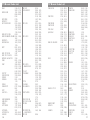
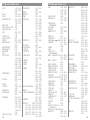
Locate the 3-digit code for your TV brand in the code list.
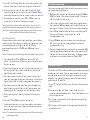
1. First, 'prime' the remote. Press and hold ADD until the light flashes
hi
Press MUTE once to turn the sound on or off.
2
once then turns solid. Then enter 954. The light stays solid then
flashes twice.
3
2. Press and hold the TV set-up key. The indicator light at the
top of the remote will flash once then turn solid. Release
the key.
Note: If you do not press any key more than 30 seconds, the
remote will exit the program.
hi
3. Enter the first 3-digit code for your TV using the 0-9 key pad.
If the code is entered correctly, the light will turn off. If the
light stays on, please try again.
hi
4. Try the remote to see if it controls the TV by pressing the
ON/OFF key and Volume Up/Down .
hi
5. If the remote is adjusting your TV, go to Step 2.
hi
6. If the remote does not adjust your TV, repeat the process
using the next 3-digit code listed for your TV brand until the
remote works.
Note: If you are unable to find a working code, see “Other Set
Up Options.”
hi
hi
The code for my TV is ______.
Note: When advancing through your favorite channels using
the Channel Up/Down buttons, please allow the
channel to switch before pressing the button again.
Make a list:
Make a list of your Favorite Channels. The channels will
advance in the order they are entered. For instance, if you
program channels 225, 125, 57, and then 563, the Channel
Up/Down will memorize them in that order and advance as
225, 125, 57, 563. Flipper does NOT place channels in
numeric order.
hi
hi
Channel Format:
STBs and TVs generally use a three or four digit channel entry
system, 000 or 0000. To enter channels, use 0’s as a place
holder. For instance, enter channel 7 as 007 (three digit) or
0007 (four digit). For channel 22, enter as 022 or 0022. If
your TV or STB requires an Enter key to change channels,
please see “Channel Entry Options.”
hi
hi
DTV channel format:
Step 2: Set Top Box (STB)
If you are using a TV without a STB, go to Step 3.
hi
Flipper is preset to Motorola cable STBs. It may not work all
Motorola STBs, however. If your STB is manufactured by
Motorola, press STB once (the light will flash) and see if
Flipper works your STB. If yes, go to Step 3. If not, follow the
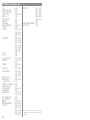
set up instructions in Step 1: TV, except find your STB code,
and press STB instead of TV in # 1.
h
i
The code for my STB is ______.
Step 3: Favorite Channels
hi
hi
Please consult your DTV manual. Use the dash “-” button, if
needed. Some DTVs do not use a dash, and instead may enter
channels in different formats, such as 401 for channel 4-1, or
0301 for channel 30-1.
If using a newer TV with an over the air digital turner, you may
need to learn the dash key from your existing remote. See
“Learning Set Up”
hi
hi
Adding Favorites:
hi
hi
I
The instructions below assume that you are programming
Favorites to work with an STB device. If you are using a TV
without a STB, substitute the TV key for the STB key.
hi
Setting Favorite Channels is optional. If you do not want a
favorite channel list, go to Step 4.
1. Press STB then ADD. The indicator light will flash once
then turn solid. Release both buttons.
hi
You can program up to 30 of your favorite channels. When
set, Channel Up/Down only scrolls through your Favorite
Channels. The 0-9 keypad allows you to key in any available
channel. Programming favorites does not change the settings
on your STB or other remote controls.
4
2. Key in the first channel and press the ADD button, key in
the next channel and then ADD, and continue until all
channels are added. The light will flash one time for each
digit.
5
Example:
007 ADD, 044 ADD, 110 ADD, etc., for channels 7, 44, 110;
For a DTV: 4 - 1 ADD; 44 - 2 ADD, for channels 4-1, and 44-2
hi
3. Press the STB button after all channels are added to
complete the process.
hi
4. Use the Channel Up/Down buttons to scroll through your
Favorites. It may be necessary to scroll through a second
time for all Favorite channels to appear.
hi
5. If you need to add more channels, repeat. Otherwise, go
to Step 4.
hi
hi
Deleting Favorites:
hi
hi
hi
hi
Follow the instructions above for adding channels, except
use the DEL button instead of the ADD button.
hi
hi
Switching Between Favorite and Regular Mode:
To exit favorite channel mode, press and hold DEL and dash at the same time until the light flashes twice and turns off.
Note: Flipper can be programmed to turn ON / OFF either
the TV or STB only – please see “ON / OFF Options.”
Step 5: Lock
This feature “Locks” the settings of the remote, including
Favorites, and Dual Mode. If you do not want to lock the set
up of your remote control, set-up is complete. Enjoy using
your Flipper remote!
hi
To Lock :
1. In Dual mode, press and hold ADD. The light will flash
once then turn solid. Release the button, and enter 955.
The light flashes twice.
2. In TV mode, press and hold TV. The light will flash once
then turn solid. Release the button, and enter 955.
3. In STB mode, press and hold STB. The light will flash
once then turn solid. Release the button, and enter 955.
hi
To Unlock :
Follow the instructions above, except use code 956 to
unlock.
hi
To re-enter, press and hold DEL and dash - at the same time
until the light flashes twice and turns off.
hi
Step 4: Dual Mode (TV & STB)
hi
ON/OFF Options:
In Dual Mode, the ON/OFF turns On and Off both the TV and
STB. Occasionally, the remote may only turn On or Off either
the STB or TV. If this happens, press the ON/OFF button again
until both devices operate at the same time. To avoid this
from happening, place the TV and STB close to each other.
If you are using a TV without a STB, go to Step 5.
hi
hi
hi
TV Only
In Dual Mode, the ON/OFF button controls both the TV and
STB; Channel Up/Down and the 0-9 keypad control the STB;
and Volume Up/Down controls the TV
hi
To Enter Dual Mode, press and release ADD. The indicator
light will flash once.
To have ON/OFF control the TV only, Channel Up/Down
control the STB, and Volume Up/Down control the TV, first
set the code for the TV and STB as shown in Step One and Two.
Then:
hi
To Exit Dual Mode, press and release either TV or STB. The
indicator light will flash once.
hi
Note: The remote works best when the TV and STB are close
to one another. If the TV and STB do not turn On and
Off at the same time, press the ON/OFF button until both
devices turn either On or Off, or manually turn On or Off
the device.
6
hi
1. Press and hold the STB button and then the ON/OFF button.
The indicator light will flash once, then remain flashing.
Release both buttons.
2. Face your existing TV remote control’s signal transmitter
(on the front) to the Flipper remote control transmitter,
with 3-5cm gap in between the remotes.
7
3. Press and release the ON/OFF key on Flipper remote
control. The indicator light will turn solid.
hi
4. Press and release the Volume Down key for your Tv’s
existing remote control. The indicator light on Flipper
remote should start flashing again.
hi
5. Press STB to save the setting.
hi
6. Enter Dual Mode by pressing and releasing ADD. The light
will flash once.
hi
7. Try the buttons. ON/OFF should control the TV only,
Channel Up/Down should control the STB, and Volume
Up/Down should control the TV. If not, repeat the process.
hi
8. If you want to Lock, use ADD for Dual Mode in Step 5.
hi
Note: Replacing the STB’s ON / OFF signal with the TV’s
Volume key deactivates the STB’s ON / OFF signal, so
that only the TV will turn On and Off.
hi
1. Press and hold the STB button and then the ON/OFF button
at the same time. The indicator light will flash once, then
remain flashing. Release both buttons.
hi
2. Face your existing remote control’s signal transmitter (on
the front) to the Flipper remote control transmitter, with
3-5cm gap in between the remotes.
hi
3. Press and release the dash - key on Flipper remote. The
indicator light should turn solid.
hi
4. Press and release the button from your existing remote that
sends the best ending signal, usually ENTER or OK/SELECT.
The indicator light on the Flipper remote should start
flashing again.
hi
5. Press STB to save the setting. The dash - is now your
ENTER key.
hi
6. Test the remote to see if the ending signal is ‘learned’ by
pressing dash - and making sure it does the same function
as your existing remote. If not, repeat the process.
STB Only:
hi
Press STB. The indicator light will flash once. The ON/OFF
will control your STB; Channel Up/Down will control the
STB, and the Volume Up/Down should control your TV.
7. In favorite channel mode, add channels by following the
set up instructions above. Then, enter channels with the
dash - / Enter. Example: 7 dash - ADD; 23 dash - ADD, etc.
hi
If Volume Up/Down does not control your TV, then follow the
instructions above under TV Only, except in #1, use the TV set
up key instead of the STB key, and follow the rest of the
instructions, including Dual Mode. This will deactivate the
TV’s ON / OFF signal, so that only the STB turns on and off,
while the Channel Up/Down will control the STB, and
Volume Up/Down should control your TV
Ch annel En tr y Op tions
Some TV / STBs may change channels faster if an ending signal
is sent, such as OK/SELECT or ENTER.
hi
Flipper does not send an ending signal in favorite channel
mode. If you require an ending signal, please follow the
instructions below.
hi
hi
hi
Note: STB’s generally do not require an enter signal. It is
recommended that the enter signal is not used when
entering three and four digit numbers.
Other Set-up Options
It is strongly recommended that you use the set up instructions
above to set up your remote control. However, there may be
instances where your device is not in the code list. If you were
not able to find the codes for your device using the
recommended process, try one of these two methods.
Automatic Code Searching:
This method automatically sends a group of codes until your
device turns OFF. Start with either TV or STB ON.
hi
1. Press and hold TV or STB. The light will flash once then
stay solid. Release the key.
hi
Note: If you are using the favorite channel mode with a TV only,
use TV instead of STB:
8
2. Press and release the ON/OFF button. The remote will send
10-15 codes to your TV or STB. The indicator light flashes
quickly when sending, and turns solid when complete.
9
3. If your TV or STB turns OFF, the code is in that group. If the
device did not turn off, repeat until your device turns off.
hi
4. Once your device turns off, wait until the indicator light
stops flashing, then press and release the Channel Down
button to send one code at a time until your device turns ON.
hi
5. Once the device turns ON, press TV or STB to set and try
your device. If all buttons do not work, repeat.
hi
Note: Some devices share codes with others. As a result, it is
possible that a code matches some but not all of your device’s
functions. If this happens, repeat the process until the correct
code controls all of your device’s function.
Learning Set Up:
Flipper remote can learn function signals from your existing
remote control. This allows you to copy the signals from your
current remote into the Flipper remote. Each key is
programmed separately. TV, STB, and ADD do not learn
functions.
hi
Note: Favorite channel mode may not work with Learning set up.
1. Press and hold the TV or STB button and the ON/OFF
button. The indicator will flash once, then remain flashing.
Release the keys.
hi
2. Face your existing remote control’s signal transmitter (on
the front) to the Flipper remote transmitter, with 3-5cm
gap in between the remotes.
hi
3. Press and release the key on Flipper remote control that
you want to program from your other remote. The indicator
light will turn solid. Each key is programmed separately.
hi
4. Press and release the same key from your existing device
remote until you see the light on the Flipper remote start
flashing again. The learning process for that key is done.
hi
5. Keep repeating step 1-4 until you learn all the keys you
want.
hi
6. Press the TV or STB button to set the remote.
hi
7. Check the buttons to see if they learned the correct signal.
If not, repeat the process as needed until all buttons learn
the desired function.
Troubleshooting
If you are experiencing difficulties with your remote control,
remember these helpful hints:
hi
1. Make sure the remote is unlocked, by pressing TV, ADD or
STB. The light will flash once, then turn solid. Then enter
956. The light will flash twice.
7
hi
2. Check to see if you are in Favorites mode or regular mode.
Press and hold DEL and dash - until the light flashes twice
and turns off. This will enter or exit favorite channel mode.
hi
3. Press TV and make sure the remote is controlling your TV
If not, reset the remote by going to Step 1 in the
recommended set up.
hi
4. Press STB and make sure the remote is controlling your
STB. If not, reset the remote by going to Step 2 in the
recommended set up.
hi
5. Restore the original factory settings. Press and hold ADD
until the light flashes once then turns solid, then enter 954.
The light will be solid, then flash twice. If settings remain
in the remote, also do the same with TV and STB.
Co de Retrieval
This feature will tell you the code that is currently programmed
into the remote control. This can come in handy if you forget
the code that was entered, if you used the automatic set up
method, or for troubleshooting purposes. This instruction
works for both TV and STB.
hi
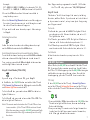
1. Press TV. The light will flash once, then press 1, and release
both.
hi
2. The indicator light will flash – count the flashes - this
represents the hundred digit 1xx. Note: If the light does not
flash, the digit is zero.
hi
3. Do the same with number 2 - this represents the ten digit
placeholder – x2x.
hi
4. Do the same with number 3 - this represents the ten digit
placeholder – xx2.
hi
Note: The remote can learn functions for any IR remote control,
including a stereo.
10
11
A
0
A
1
A
0
A
0
A
1
A
0
A
A
1
A
1
A
A
2
2
0
A
A
A
A
1
A
1
2
A
1
B
B
1
B
0
1
1
B
B
2
B
B
2
B
C
0
0
C
C
3
C
0
C
0
C
2
C
1
C
1
C
2
0
C
1
C
C
C
0
0
C
0
C
0
3
C
C
C
1
0
C
0
C
C
2
2
C
C
1
2
C
C
2
2
C
2
C
1
C
C
D
0
D
0
1
D
D
1
D
D
2
D
1
D
D
3
1
D
1
D
2
D
D
E
2
E
1
2
E
0
E
E
1
E
0
F
1
E
1
F
1
F
2
G
G
G
0
2
G
G
G
1
3
G
1
G
G
2
H
2
1
H
0
0
0
0
0
0
0
0
1
1
1
1
1
0
1
1
0
3
1
2
1
1
0
1
1
2
0
1
1
2
1
1
2
0
0
0
2
The resulting three digit number is the number of light flashes
in each position. For instance, if you see the light flash 4 times
after pressing #1, and flash 3 times after pressing #2, and flash
2 times after pressing #3, then the code in the remote is 432.
Reset the Remote
If at any time you want to reset the Flipper remote to original
factory settings, press and hold ADD until the light flashes
once then turns solid, then enter 954.
The light stays solid, then flashes twice. If settings remain in
the remote, do the same with TV and STB.
12
ABEX
ADMIRAL
R
0
N
0
N
0
R
K
O
A
7
T
7
T
7
O
N
L
8
3
U
5
N
1
2
A
1
0
0
8
4
0
3
5
8
1
5
5
2
1
2
5
1
3
8
1
1
1
4
0
7
,
,
,
,
,
,
,
,
,
,
,
,
,
,
,
,
,
,
,
,
,
,
,
,
,
,
,
,
,
,
,
,
1
6
2
,
1
1
2
,
,
,
,
,
7
1
2
,
,
6
1
2
,
1
1
3
,
7
9
2
,
2
0
3
,
,
2
0
0
,
4
8
1
,
7
4
1
,
9
1
2
,
8
3
1
,
8
8
1
,
3
3
0
,
7
3
2
,
5
1
1
,
5
9
0
,
9
9
0
,
,
4
3
1
,
2
4
1
,
1
4
1
,
2
8
1
,
9
7
0
,
5
6
1
,
3
0
0
,
4
6
1
,
0
8
0
,
8
3
1
,
3
4
2
,
1
9
0
,
2
3
1
,
,
8
9
1
8
7
0
9
3
5
8
8
8
6
9
5
7
3
0
1
3
1
1
9
1
7
3
3
5
7
4
4
0
0
5
5
1
8
0
5
1
0
1
9
9
0
0
0
4
1
0
3
7
4
1
1
6
3
5
4
9
6
5
8
3
8
0
0
3
2
0
7
N
N
3
L
E
L
1
3
1
2
S
2
3
1
0
3
0
2
3
3
1
0
1
0
1
1
1
2
1
0
3
0
0
0
2
0
0
0
0
1
0
2
2
1
0
O
1
,
,
,
,
,
,
A
S
5
N
F
9
O
U
2
I
L
,
,
,
,
,
,
,
E
,
,
,
,
,
,
,
,
,
,
,
,
,
,
,
,
,
,
,
,
,
,
,
,
,
,
,
,
,
,
,
,
,
,
,
,
,
,
,
I
L
1
8
7
9
C
6
E
2
2
H
N
8
S
4
D
E
2
8
0
6
T
7
N
4
0
7
8
1
2
7
8
4
7
8
5
9
8
0
6
7
3
5
7
5
7
5
0
5
6
7
6
1
7
3
9
O
E
6
9
1
1
I
0
C
6
0
T
O
2
I
2
N
M
2
0
3
8
D
5
O
0
9
3
3
0
8
4
8
7
4
3
7
6
6
2
2
5
8
0
4
0
0
5
9
3
3
4
1
6
1
3
6
E
W
1
1
C
0
Y
N
G
E
2
S
0
I
E
1
E
0
A
I
2
V
2
V
D
A
O
0
0
1
2
C
R
H
E
2
I
1
0
3
1
1
1
2
1
1
1
1
1
1
0
1
3
2
2
0
2
1
1
0
1
0
0
2
0
1
2
0
1
D
O
,
,
R
,
,
,
X
,
,
,
,
,
D
I
D
,
T
T
S
O
C
N
,
,
N
,
T
3
7
O
6
4
O
H
2
0
Y
5
R
N
O
8
R
I
O
I
I
O
1
L
5
N
O
C
1
A
4
7
R
T
V
0
1
N
2
0
E
C
O
3
N
2
R
&
O
4
5
K
1
O
O
O
E
3
A
A
R
I
R
N
H
1
A
1
E
T
I
&
1
2
S
0
F
S
W
L
1
H
R
B
R
U
O
G
2
R
0
Z
R
S
1
,
,
S
4
2
A
0
7
M
,
O
,
G
,
,
,
O
Y
8
T
8
R
6
9
Y
9
,
S
,
,
,
E
R
A
,
M
9
I
N
8
2
D
7
T
A
I
1
,
,
,
N
B
,
H
,
T
5
2
1
A
Y
A
O
2
O
8
V
T
3
R
3
E
C
1
A
1
E
1
S
1
V
O
O
3
1
N
3
A
T
S
6
T
Y
4
E
2
T
0
R
T
R
R
0
R
3
N
,
,
,
E
,
E
,
R
I
N
O
8
2
U
3
T
9
Y
T
1
A
V
O
I
3
R
7
S
9
E
1
A
L
0
T
L
2
C
0
2
R
R
1
E
1
I
E
2
E
G
2
L
N
2
I
2
R
O
R
1
1
O
1
M
S
N
1
C
E
0
N
2
N
0
B
S
T
T
0
T
1
E
S
S
1
E
1
T
1
R
2
W
A
0
S
T
,
,
S
,
K
,
,
,
,
,
,
,
,
,
,
,
,
,
,
,
,
,
,
,
,
,
,
,
,
,
,
,
,
,
,
,
,
O
N
1
7
I
N
7
R
8
5
2
3
8
5
8
5
3
2
1
6
6
2
7
3
5
8
8
5
1
2
8
9
7
4
5
3
6
4
8
8
E
E
0
Y
4
V
O
7
A
3
1
8
3
4
4
3
4
4
4
0
4
2
6
4
1
4
9
3
5
8
2
2
1
3
0
5
9
0
3
3
8
D
I
0
D
2
T
I
R
0
M
1
2
2
0
0
0
1
0
0
1
0
2
0
1
0
3
0
0
1
1
1
0
0
2
0
0
1
0
0
0
1
0
I
I
M
D
,
9
4
X
E
B
,
3
6
E
V
D
,
7
6
E
V
D
,
0
5
A
W
I
,
5
1
O
K
I
,
7
1
E
L
L
R
A
M
,
3
9
R
T
M
,
3
6
M
A
N
I
A
K
,
7
4
,
7
4
,
1
2
X
E
P
C
O
H
C
R
E
P
S
,
3
6
I
D
U
,
3
4
,
7
4
O
I
X
,
0
0
G
N
A
C
L
E
,
9
7
L
L
E
,
1
0
,
1
9
,
6
9
Q
N
E
E
U
L
,
5
8
D
A
R
K
O
R
,
7
4
K
O
R
D
N
A
,
1
0
,
1
0
E
P
A
E
L
E
,
0
4
E
C
,
8
4
E
L
E
,
1
2
T
N
E
,
5
1
T
N
E
,
3
5
R
T
E
,
8
3
N
A
H
,
9
1
,
1
2
E
N
I
,
5
1
I
T
I
I
A
L
S
A
L
,
2
0
,
1
2
P
L
,
9
0
P
L
,
0
2
,
2
2
Y
B
O
O
L
O
O
L
O
,
2
6
,
1
0
C
N
O
,
1
0
C
N
O
T
N
O
,
0
0
,
7
4
N
R
O
I
A
R
,
6
6
,
7
4
S
O
R
W
O
R
,
1
2
,
7
4
T
R
U
,
7
4
C
X
,
3
6
X
T
E
B
Y
W
E
A
,
5
1
T
Y
A
,
1
0
,
7
5
L
L
E
M
A
I
,
1
8
I
G
I
I
G
I
,
3
9
E
M
I
,
1
9
E
R
I
N
S
I
2
4
,
4
2
A
K
U
,
3
4
O
M
U
,
0
0
A
R
U
A
N
Y
K
E
L
,
9
1
C
E
L
,
8
8
,
5
1
C
E
L
,
1
0
T
I
L
R
E
M
,
2
0
I
V
N
,
1
0
H
S
I
,
5
5
A
S
,
2
4
I
J
U
,
2
0
U
T
U
,
7
4
E
T
A
R
B
I
E
,
0
6
,
0
0
D
L
O
V
O
D
A
R
,
6
8
,
5
3
N
U
R
,
3
9
S
E
U
S
I
V
,
8
0
E
I
A
,
6
7
,
6
9
L
L
A
,
1
0
,
3
4
,
2
2
,
1
0
,
1
7
,
7
9
,
1
0
,
4
2
,
5
5
,
1
9
,
5
1
,
1
6
,
4
7
,
4
3
,
2
2
,
9
5
,
4
8
,
6
0
,
9
3
,
8
2
,
5
5
,
4
0
,
1
0
,
3
9
,
4
7
,
7
3
,
6
8
,
2
9
,
4
5
,
8
1
,
3
9
,
1
9
,
9
1
,
5
0
,
4
4
,
1
,
6
0
049,
163,078,
188
067,073,
ADVENT
241
017
ADVENTURA
115
AIKO
050,075,
AIWA
105,158
193
ALLERON
163
AMARK
247
AMTRON
043,215,
AKAI
090,296,
302,022,
282,337,
309
ANAM NATIONAL 247,243,
035,219,
261
001,033,
AOC
138,305,
002,071,
048,101
021,077,
APEX
052,331,
211
163
ARCHER
143
ASPECT
247,306,
AUDIOVOX
295,
100,214
AXION
BANG & OLUFSEN 179
001
BELCOR
BELL & HOWELL 191,142,
161,188
196,250,
BENQ
198,317
285,015
BLUESKY
247
BRADFORD
097,045,
BROKSONIC
182,107,
184,024
001
BROKWOOD
001,138,
CANDLE
017,110
048
CAPEHART
340
CCE
021
CELERA
215
CELEBRITY
1
TV Br and Co de List
CENTRIOS
CENTURION
CETRONIC
CHANGHONG
CINERAL
CITIZEN
CLAIRTONE
CLASSIC
CLP
CLP CLASSIC
COBY
COLOR VOICE
COLORTYME
CONCERTO
CONCIERGE
CONTEC
CORNEA
CRAIG
CROSLEY
CROWN
CURTIS MATHES
CTX
CXC
CYBERVISION
DAEWOO
DAYTRON
153
138
219
021,211
115,015
001,138,
247,043,
147,155,
045,188,
110,219,
115
002
021,211,
219
009
020,004,
006
322,272
162
001,138,
162
001,138
200
247,216,
002,219
166
247,219
221
247,219
191,043,
174,001,
138,161,
142,147,
133,188,
034
163
247,219
015
174,001,
138,171,
033,122,
246,175,
141,237,
159,026,
169,219,
115,084,
162,068,
111,095,
139
001,138
13
TV Br and Co de List
TV Br and Co de List
157,112,
228
DIAMOND VISION 181,137,
224
293
DIGIMATE
306,047,
DIGISTAR
120,067,
099,228,
313,326,
333
191,161
DIMENSIA
124,045
DISNEY
143,222
DUKANE
200,001
DUMONT
155,045,
DURABRAND
257,053,
134,104,
098,283
219
DYNASTY
045
DYNEX- (See also Insignia)
188
ELEKTRA
215,002
ELECTROBAND
001,138,
ELECTROHOME
022,243,
217
102
ELITE VIDEO
001,138,
EMERSON
005,045,
142,193,
155,247,
097,141,
174,181,
105,264,
182,237,
022,107,
054,079,
086,028,
055,080,
165,192,
219,190,
030,003,
154,037,
035,085,
164,218,
004,036
001,138,
ENVISION
008,305
155
ESA
142,172,
FISHER
DELL
14
1 3 0 , 1 7 8,
216
1 0 2 , 1 93,
FUJITSU
286
1 9 3 , 1 5 5,
FUNAI
2 4 7 , 1 05,
0 8 0 , 2 19
247,219
FUTURETEC
060
GATEWAY
1 9 1 , 0 93,
GE
0 1 6 , 0 01,
1 3 8 , 0 05,
0 0 6 , 1 61,
2 3 8 , 2 43,
0 4 4 , 0 34,
2 1 7 , 2 20,
091
200,001
GIBRALTER
0 0 1 , 1 3 8,
GOLDSTAR
0 3 3 , 1 05,
1 3 2 , 2 16,
0 8 8 , 1 69,
071
GO VIDEO HDT100 1 8 6
3 3 5 , 0 01,
GRADIENTE
2 5 7 , 3 18,
311
1 9 3 , 2 47
GRUNDY
208
GUESTVISION
276
GVISION
1 9 6 , 0 7 7,
HAIER
1 0 4 , 0 98,
297
001,138
HALLMARK
247
HARVARD
HEWLETT PACKARD 2 7 7 , 2 69
1 1 8 , 1 43,
HITACHI
2 2 9 , 1 67,
2 2 2 , 0 01,
1 3 8 , 1 97,
3 2 7 , 1 88,
2 1 6 , 1 94,
0 9 6 , 1 50,
2 0 2 , 1 54,
1 0 5 , 2 40
2 4 9 , 2 33,
HISENSE
0 7 7 , 2 87
1 0 9 , 2 4 0,
HUGHES
213
273
HYUNDAI
FISHER
ILO
128,314,
271,336,
070,155
IMA
247
INFINITY
221,131
IN FOCUS
161
INITIAL
314,070,
280,308
INSIGNIA
252,155,
104,045,
255,067,
099,303,
080,140
INTEGRA
206
INTEQ
200
JANEIL
017
JBL
221
JCB
215
JC PENNEY
191,001,
033,138,
043,093,
147,006,
161,091,
110,216,
034,217,
164,220
JENSEN
001,138,
255
JVC
167,058,
102,144,
176,106,
268,216,
039,089,
202
KAWASHO
001,138,
215
KAYPANI
048
KEC
219,247
KENWOOD
001,138
KLH
021
KLOSS NOVABEAM 116,017
KOGI
276
KONKA
247,189,
057,087,
062,252,
239,265,
140
KTV
247,002,
190,219,
168
KURAZAI
LASONIC
LEGEND
LG
LIQUIDVIDEO
LODGENET
LOEWE
LOGIK
LUCE
LUXMAN
LXI
MAGNASONIC
MAGNAVOX
MAJESTIC
MARANTZ
MAXENT
MEDION
MEGATRON
MEI
MEMOREX
MGA
188
181,137
067
001,166,
138,033,
046,228,
105,132,
216,088,
169,071,
109,240,
213
100,125,
214
191,235,
161,188
209,221
191,161,
188
038
001,138
191,001,
138,142,
221,093,
147,161,
105,034
193
221,001,
138,260,
338,078,
131,080,
110,116,
040,202
191,161,
188
221,206,
001,138
060
263,128,
124
001,138,
143
002
001,138,
142,193,
045,191,
161,292,
130,184,
188
001,033,
138,193,
15
TV Br and Co de List
TV Br and Co de List
216,217,
202,178
191,200,
MIDLAND
006,093,
034
070
MINTEK
220
MINUTZ
033,203,
MITSUBISHI
193,001,
138,022,
217,202,
178,240
059,
MONIVISION
MONTGOMERY WARD 191,188,
161,
142,335,
MOTEVA
163,243,
MOTOROLA
135,
001,033,
MTC
138,043,
147,002
247
MULTITECH
009
MULTIVISION
236
MYRON & DAVIS
001,138,
NAD
147,049
206,001,
NEC
033,138,
243,162,
042,202
060,013
NETTV
330,099
NEXXTECH
219
NIKEI
001,138,
NIKKO
115
339
NIKO
077,246,
NORCENT
061
115
NTC
294,328,
OLEVIA
316,332,
291
208
ONCOMMAND
219
ONKING
247,219
ONWA
177,049,
OPTIMUS
023,210
301
OPTOMA
163,042
OPTONICA
200,045,
ORION
MGA
16
ORION
PANASONIC
PHILCO
PHILIPS
PHILIPS-MAGNAVOX
PILOT
PIONEER
PIVA
PLANAR
POLAROID
PORTLAND
PRECISION
PRICE CLUB
PRIMA
PRINCETON- GRAPHICS
PRISM
036
2 0 5 , 1 2 3,
0 0 6 , 1 7 7,
2 2 1 , 0 2 3,
2 1 0 , 1 0 8,
1 8 7 , 2 4 3,
168
2 2 1 , 0 0 1,
033,138,
260,189,
304,116,
040,202,
243,110
221,020,
018,129,
051,076,
103,001,
155,260,
156,180,
196,310,
275,131,
080,243,
110,116,
040,064,
091,202,
240
2 2 1 , 0 2 0,
1 0 3 , 2 6 0,
078,131
001
0 4 9 , 2 0 6,
222,001,
138,170,
154,027
279
292
2 3 3 , 2 5 9,
2 5 5 , 3 0 6,
289,140
0 0 1 , 0 3 3,
1 3 8 , 1 2 2,
174
072
043
3 0 6 , 0 4 7,
0 6 7 , 0 9 9,
073
163,146
006
PROSCAN
PROTON
PROTRON
PROVIEW
PULSAR
QUASAR
RADIO SHACK
RCA
REALISTIC
RHAPSODY
RUNCO
SAMPO
191,093,
034,161,
231,258,
081,138
234,001,
138,312,
251,048,
074
293,298
278,288,
294
200,001
205,123,
006,177,
221,023,
210,243,
168
191,001,
114,142,
247,177,
138,105,
238,161,
216,192,
219,042
191,001,
114,006,
010,171,
225,093,
149,207,
033,138,
161,231,
258,238,
243,034,
217,065,
253,044,
154,101,
127,136,
081,
191,001,
114,142,
247,177,
138,161,
105,216,
192,219,
042
002,
200,206,
199,
013,060,
001,138,
SAMPO
SAMSUNG
SAMSUX
SAMTRON
SANSUI
SANTECA
SANYO
SCEPTRE
SCOTCH
SCOTT
SEARS
SELECTRON
SEMP
SHARP
SHOGUN
SIGNATURE
SIMPSON
SONIC
SONY
048,216
043,090,
063,147,
083,138,
001,033,
041,232,
242,133,
216,034,
169,011,
066,266,
160
138
043
045,184
019
142,092,
172,001,
130,216,
119,178
151,331,
001,138
001,138,
193,247,
003,036,
219
191,221,
142,193,
043,001,
138,093,
147,172,
155,161,
226,145,
024,080,
216,034,
178
329,313,
321
319
145,254,
248,163,
001,138,
078,079,
056,042,
227
001
191,161,
188,245
110
002
121,244,
17
ST B Br and Co de List
TV Br and Co de List
SONY
SOVA
SOYO
SOUNDESIGN
SPECTRA
SPECTRAVISION
SQUAREVIEW
SSS
STARLITE
STAR SIGHT
SUPRA
SUPERSCAN
SUPERSONIC
SUPREMACY
SUPREME
SVA
SYLVANIA
SYMPHONIC
SYNTAX
TANDY
TATUNG
TECHNICS
TECHWOOD
TEKNIKA
TELECAPTION
18
215,195,
185,230,
267
334,281
315,324
001,138,
193,247
110,219
181
262
155
001,247,
219
247
007
001,223
226,145,
080
032
017
215
077,236
221,001,
138,045,
155,260,
325,105,
080,134,
110,116,
040,202,
204,212
247,155,
105,080,
003
294,316,
332
163
196,128,
243
006
001,138,
006
191,001,
033,138,
193,247,
043,147,
177,161,
017,188,
110,216,
219
094
1 9 1 , 1 6 1,
188
001,074
TERA
128
TEVION
0 0 1 , 1 38
TMK
1 5 2 , 1 2 6,
TOSHIBA
1 4 7 , 1 73,
2 0 6 , 0 43,
1 4 2 , 0 42,
1 7 7 , 1 83,
1 3 3 , 0 24,
0 3 1 , 2 16,
0 4 2 , 0 94,
2 0 2 , 1 09,
213
3 0 7 , 2 8 4,
TRUTECH
323
000
TV EARS
2 2 0 , 0 91
UNIVERSAL
167
VICTOR
0 0 1 , 0 33,
VIDTECH
138
0 6 0 , 2 2 2,
VIEWSONIC
2 7 0 , 2 74
017
VIKING
300
VIORE
1 9 6 , 3 2 0,
VIZIO
001
1 9 1 , 2 2 1,
WARDS
0 0 1 , 0 33,
1 3 8 , 1 93,
1 6 1 , 1 16,
0 4 0 , 0 91,
0 4 2 , 1 48,
2 2 0 , 1 88,
1 1 0 , 0 03
2 5 6 , 0 1 2,
WESTINGHOUSE
2 9 0 , 0 82,
1 7 1 , 1 74,
WHITE -WESTINGHOUSE 1 2 2 , 0 69,
2 9 9 , 1 05,
1 5 9 , 1 69
1 7 7 , 0 0 1,
YAMAHA
0 3 3 , 1 38
ZENITH , , , , 2 0 0 , 1 3 8 , 1 6 6,
1 1 7 , 1 9 7 , 1 2 2 , 1 4 3 , 2 0 1,
1 1 3 , 1 9 9 , 0 1 4 , 2 5 7 , 0 0 7,
0 0 1 , 0 4 5 , 0 7 8 , 1 0 5 , 0 5 3,
1 0 6 , 2 3 7 , 0 7 9 , 1 3 1 , 1 8 4,
0 2 5 , 1 3 3 , 2 4 5 , 1 4 1 , 1 8 8,
,,,115,029
TELERENT
ABC
ACCESS HD
ADELPHIA
ADVANCED -NEWHOUSE
ALLEGRO
ALTRIO
AMERICAST
AMPLICA
ANTRONIX
APEX* (See page 22)
ARCHER
ARTEC
AT&T
ATLANTIC -BROADBAND
BELL EXPRESSVU
BELL SOUTH
BLUE RIDGE
BRIGTH HOUSE
CABLETENNA
CABLEVIEW
CABLEVISION
CENTURY
CHANNEL MASTER
CHAPPARAL
CHARTER
CHEYENNE
CITIZEN
COGECO
COLOR VOICE
COMCAST
COMTRONICS
CONTEC
COSHIP
COX
DIGITAL MUSIC-EXPRESS
DIGITAL STREAM
DIRECTV
528,564, DIRECTV
400,417,
434,588,
589,663
665,
551,533,
625,628
625
682,683,
684,685,
686,693
560,561,
505,578,
444,414,
445,448,
450,458,
465,470,
405,421
478,488,
625
496,504,
457,598,
508,525,
623
545,563,
425
577,581,
472,491
586,
545 561
DTV PAL
416,433
472,491, DISH NETWORK
433,469,
511,529
487,559,
666
416,483,
533
501,521,
625
606,610,
618,
416,469, DISHPRO
483,501,
433,487
521,416
457,598, DRAKE
554,408,
623
463
625
DREAMBOX
524
625
DX ANTENNA
481,556
472
EASTERN
453
472
ECHOSPHERE
487
438,625
ECHOSTAR
433,469,
459,529
487,559,
462,482,
416,483,
500,667
501,521
518,537
EVERQUEST
401
625
EXPRESSVU
416,469,
537
433,487
529
FORTECSTAR
499,423,
533
442,460,
547,565
480,498
533,625
FUJITSU
540,557
401,418
GARRARD
529
435
GC ELECTRONICS 491
668
GE
450,507,
625
468,560,
404
581,527,
546,563,
669
497,670
609,611, GEMINI
427,441,
612,613,
492
616,617,
19
STB Brand Code List
GENERAL -ELECTRIC
GENERAL -INSTRUMENT
613
593,621,
634,635,
636,637,
638,639,
640,648,
652,661,
662,495,
528,417,
533,568,
477,535,
404,400,
564,467,
562,580,
415,489,
526,432,
407,424,
443,575
571,584
GLOBECAST
623
GNC
523
GO VIDEO
590
GOLDSTAR
671
GOODMIND
528,512,
HAMLIN
530,548,
591,652,
653,654,
655,656
488,505,
HITACHI
525,561,
545,465,
564,603
602
HUGHES
HUGHES NETWORK 4 8 8 , 5 6 1 ,
505,509,
543,545,
465,520
631
HUMAX
438,625
ILLICO
672
INSIGNIA
529
JASCO
495,528,
JERROLD
417,477,
564,400,
515,440,
588,593,
621,634,
635,636,
637,638,
20
ST B Br and Co de List
JERROLD
JVC
KENWOOD
LASONIC
LG
LUXOR
MACOM
MAGNAVOX
6 3 9 , 6 4 0,
6 4 8 , 6 52,
6 6 1 , 6 62
4 8 7 , 5 5 9,
6 0 6 , 6 10
484
673
4 6 5 , 5 6 1,
545
502
522
4 1 9 , 4 4 4,
5 5 9 , 5 06,
612
674,675
MAGNAVOX -MODELS 100MG9
4 3 6 , 5 8 7,
MEMOREX
624
676
MICROGEM
5 4 5 , 5 61,
MITSUBISHI
4 8 8 , 5 05,
5 2 5 , 4 65
4 8 9 , 4 8 6,
MOTOROLA
4 9 5 , 4 17,
5 6 8 , 4 77,
5 3 5 , 4 00,
5 3 3 , 4 40,
5 6 4 , 6 21,
6 2 8 , 6 29,
6 8 7 , 6 88,
6 8 9 , 6 92
454
MOVIE TIME
4 7 9 , 4 47,
NET
660
541
NORSTAT
422
NOVAPLEX
582
NOWTV
454
NSC
4 3 5 , 4 9 3,
OAK
6 5 7 , 6 58,
659
4 1 2 , 4 2 9,
PACE
4 5 1 , 6 25
4 4 9 , 4 4 5,
PANASONIC
4 4 6 , 5 10,
4 7 6 , 5 87,
6 0 1 , 6 49,
6 5 0 , 6 51
409,585
PANSAT
4 3 6 , 4 7 4,
PARAGON
PARAGON
PHILCO
PHILIPS
PHILIPS -MAGNAVOX
PIONEER
PRIMESTAR
PROSAT
PROSCAN
PULSAR
QUASAR
RADIO SHACK
RCA
RCN
REALISTIC
REGAL
REGENCY
587,624
674
529,492,
419,513,
531,549,
444,559,
543,505,
525,561,
488,545,
506,465,
428,592,
612,622
420,406,
444,559,
506
411,473,
438,566,
402,590,
597,596,
625,644,
645
467,526
572
450,468,
527,581,
546,563,
600,605,
613
436,587,
624
587
420,406,
421
450,507,
468,560,
490,581,
527,546,
563,471,
510,529,
456,600,
605,613,
614,677
570
491,576,
461
548,591,
652,653,
654,655,
656
453
REMBRANDT
RODGERS
ROGERS
RUNCO
SAMSUNG
SANSONIC
SCIENTIFIC-ATLANTA
SCIENTIFIC-ATLANTIC
SEREN
SHARP
SHAW
SIERRA I II III
SIGECOM
SIGNAL
SIGNATURE
SKARDIN
SKY NETWORK
SL MARX
SONY
SPRUCER
STANDARD
STAR SIGHT
STAR TRAK
STARCHOICE
STARCOM
STARGATE
STS
564
625
438
436,587,
624
401,402,
410,574,
577,448,
504,516,
590,611,
615,633
678
475,455,
438,422,
551,434,
437,589,
594,597,
620,625,
626,627,
641,642,
663,664
690
625
411
533
537
625
401
564
679
412,429,
451,458,
478,496
401
578,470,
508,426,
558,599,
607,608,
619
510
494
456,579
439,485
526,432,
467
528,477,
588
401
481,519,
21
ST B Br and Co de List
STS
S U PER GUIDE
SUSPUEHANN A
SYLVANIA
TANDY
TELEVIEW
TELSAT
TEXSCAN
TIME WARNE R
TIVAX
TOCOM
538
503
625
539,632
514
401
459
494
438,625
680
400,532,
568,515,
646,647,
661
436,545,
TOSHIBA
561,488,
505,525,
465,555,
413,430,
544,587,
604,624
454
TV 86
536
T VA
581,508
U L TIMATE T V
579,573,
UNIDEN
542
472,491,
UNIKA
529
464,528
UNITED
472,491,
UNIVERSAL
511,529,
550,405
630
USDIGITAL
681,691,
MOTOROLA/
692
- VERIZON
VIDEO CIPHE R I I 408
517
VIDEO TECH
438,625
VIDEOTRON
403
VIDEOWAY
418,419,
VIEWSTAR
454,514
583
VISIONETICS
553
VISIONTEC
559,426
WEBTV
623,625,
WIDEOPENWE S T
466,414,
ZENITH
452,427,
451,554,
408,463,
431,567,
22
ZENITH
421,529,
436,534,
552,569,
595,587,
598,623,
624,643,
672
Z E N I T H N E T W O R K 457
ZENTECH
679
* F or Ape x , u se lear n i n g
m ode to l e a rn the da s h
k ey.