1
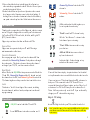
2. Press and hold the TV set-up key. The indicator light at the
top of the remote will flash once then turn solid. Release
the key.
Note: If you do not press any key more than 30 seconds, the
remote will exit the program.
hi
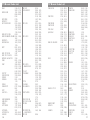
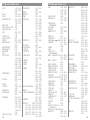
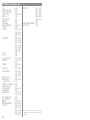
3. Enter the first 3-digit code for your TV using the 0-9 key pad.
If the code is entered correctly, the light will turn off. If the
light stays on, please try again.
hi
4. Try the remote to see if it controls the TV by pressing the
ON/OFF key and Volume Up/Down .
hi
5. If the remote is adjusting your TV, go to Step 2.
hi
6. If the remote does not adjust your TV, repeat the process
using the next 3-digit code listed for your TV brand until the
remote works.
Note: If you are unable to find a working code, see “Other Set
Up Options.”
hi
hi
The code for my TV is ______.
Note: When advancing through your favorite channels using
the Channel Up/Down buttons, please allow the
channel to switch before pressing the button again.
Make a list:
Make a list of your Favorite Channels. The channels will
advance in the order they are entered. For instance, if you
program channels 225, 125, 57, and then 563, the Channel
Up/Down will memorize them in that order and advance as
225, 125, 57, 563. Flipper does NOT place channels in
numeric order.
hi
hi
Channel Format:
STBs and TVs generally use a three or four digit channel entry
system, 000 or 0000. To enter channels, use 0’s as a place
holder. For instance, enter channel 7 as 007 (three digit) or
0007 (four digit). For channel 22, enter as 022 or 0022. If
your TV or STB requires an Enter key to change channels,
please see “Channel Entry Options.”
hi
hi
DTV channel format:
Step 2: Set Top Box (STB)
If you are using a TV without a STB, go to Step 3.
hi
Flipper is preset to Motorola cable STBs. It may not work all
Motorola STBs, however. If your STB is manufactured by
Motorola, press STB once (the light will flash) and see if
Flipper works your STB. If yes, go to Step 3. If not, follow the
set up instructions in Step 1: TV, except find your STB code,
and press STB instead of TV in # 1.
h
i
The code for my STB is ______.
Step 3: Favorite Channels
hi
hi
Please consult your DTV manual. Use the dash “-” button, if
needed. Some DTVs do not use a dash, and instead may enter
channels in different formats, such as 401 for channel 4-1, or
0301 for channel 30-1.
If using a newer TV with an over the air digital turner, you may
need to learn the dash key from your existing remote. See
“Learning Set Up”
hi
hi
Adding Favorites:
hi
hi
I
The instructions below assume that you are programming
Favorites to work with an STB device. If you are using a TV
without a STB, substitute the TV key for the STB key.
hi
Setting Favorite Channels is optional. If you do not want a
favorite channel list, go to Step 4.
1. Press STB then ADD. The indicator light will flash once
then turn solid. Release both buttons.
hi
You can program up to 30 of your favorite channels. When
set, Channel Up/Down only scrolls through your Favorite
Channels. The 0-9 keypad allows you to key in any available
channel. Programming favorites does not change the settings
on your STB or other remote controls.
4
2. Key in the first channel and press the ADD button, key in
the next channel and then ADD, and continue until all
channels are added. The light will flash one time for each
digit.
5