1
2. Please finish the battery installation within 5 minutes ,
otherwise the programmed codes Will be lost. Do not press
any key during installation.
3. Remove the batteries if you do not plan to use the remote
for a long period of time to prevent electrolyte leaking. If
leaking occurs, clean the contaminated area of the battery
compartment and replace the old batteries with new ones.
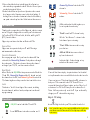
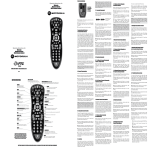
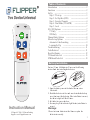
Channel Up/Down: Controls the STB
channels.
Volume Up / Down: Controls the TV
volume.
Introduction
0-9 located under the sliding door, are
for set up and channel entry.
Thank you for your purchase of the Flipper two device remote
control. Flipper is designed for use with your Television and
Set Top Box (STB). STB’s are Cable, Satellite, and Digital TV
(DTV) receiver boxes.
“Dash” is used for DTV channel entry.
LC is for “Last Channel” – returns to the
last channel you are viewing.
hi
Flipper is preset to work with most Motorola STBs.
TV and STB buttons are used to set up
your devices.
Ease of Use
Flipper remote operates both your TV and STB using a
minimum number of buttons.
ADD and DEL buttons are used to set
up favorite channels.
Favorite Channels
You can program up to 30 of your favorite channels. When
activated, the Channel Up/Down will only advance through
these channels. This feature does not change the channel
settings of your TV, STB, or other remote controls.
Indicator light - flashes during set up
and when the remote is used.
Setup
Dual Mode
Please follow these step-by-step instructions for the initial
set-up. Remember to use new AAA batteries for best results.
hi
If you receive your TV stations through an STB, please note
how your TV is connected to the STB. Newer TVs are
connected through an AV input option, such as Video 1 or 2
or Antenna 1 or 2. Older TVs may be set to channel 3 or 4.
This will allow you to easily reset the TV if you accidentally
change your TV’s channel during set up.
In Dual Mode, the ON/OFF button powers on and off both the
TV and STB; Channel Up/Down and the 0-9 keypad controls
the channels on the STB; and Volume Up/Down controls the
TV, eliminating the need to press a button to switch devices.
Lock
This feature “Locks” the settings of the remote, including
favorite channels, and dual mode, and prevents accidental
reprogramming.
Functions
ON/OFF: controls both the TV and STB.
Step 1: TV set up
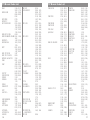
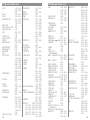
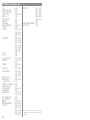
Locate the 3-digit code for your TV brand in the code list.
1. First, 'prime' the remote. Press and hold ADD until the light flashes
hi
Press MUTE once to turn the sound on or off.
2
once then turns solid. Then enter 954. The light stays solid then
flashes twice.
3