1
e
f
g
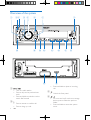
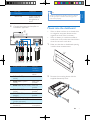
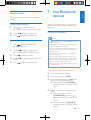
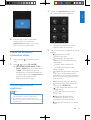
Press to turn on the system.
Press and hold to turn off the system.
Press to mute or restore sound.
Press to confirm an option.
Rotate to switch between menu
options.
• Rotate to adjust the volume level.
/
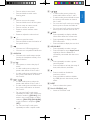
• In radio mode, press to select the
preset radio station of No. 1 and 2.
• In radio mode, press and hold to store
the current radio station at channel
No. 1 and 2.
• For .wma and .mp3 tracks on a storage
device, press to access the folder list.
• For .wma and .mp3 tracks on a storage
device, press to access the track list.
l
/DISP
• Press repeatedly to display available
information about the current track.
• Press repeatedly to display available
RDS information.
• Press and hold to display the set clock.
•
•
•
•
•
/
• Return to previous menu.
• Press and hold to save the location of
the speed camera.
• Connect to a USB storage device.
• Connect to a compatible iPod/iPhone.
h AUDIO IN
• Connect to the audio output socket
(usually the headphone socket) of an
external device.
i /
• Start, pause, or resume the play of
tracks.
• In radio mode, press to select the
preset radio station of No. 5 and 6.
• In radio mode, press and hold to store
the current radio station at channel
No. 5 and 6.
j
k
/
• In radio mode, press to select the
preset radio station of No. 3 and 4.
• In radio mode, press and hold to store
the current radio station at channel
No. 3 and 4.
• For .wma and .mp3 tracks, press
repeatedly to select a play mode: play
all tracks randomly ([SHU ALL]), play
tracks in the current folder or album
randomly ([SHU FLD]/[SHU ALBM]),
or play all tracks in sequence ([SHU
OFF]).
• For .wma and .mp3 tracks, press
repeatedly to select a repeat mode.
m APP/SOURCE
• Press repeatedly to select a source.
• Press and hold to access AppsControl
application after the Bluetooth is
successfully connected with the smart
phone.
n
o
• Press repeatedly to select a preset
sound equalizer.
• Press and hold to activate the setup of
bass, treble, balance, and fader.
• Press to enable or disable the
maximum volume.
• Press and hold to enable or disable
the DBB (dynamic bass boost) sound
effect.
p RESET
• Press to reboot the system.
q Slot for SD/SDHC card
• Insert an SD/SDHC card.
EN
5
English
• Press to select a tuner band.
• Press and hold to switch music
listening zone.