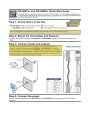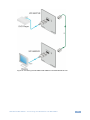
1
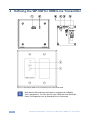
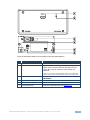
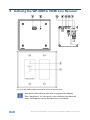
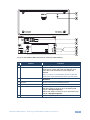
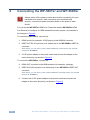
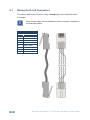
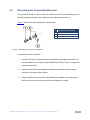
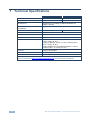
K R A ME R E LE CT R O N IC S L TD . USER MANUAL MODELS: WP-580Txr HDMI Line Transmitter WP-580Rxr HDMI Line Receiver P/N: 2900-300087 Rev 4 Contents 1 Introduction 1 2 2.1 2.2 2.3 3 3.1 3.2 Getting Started Achieving the Best Performance Safety Instructions Recycling Kramer Products Overview About HDBaseT™ Technology Using Twisted Pair Cable 2 2 2 3 4 5 5 4 Defining the WP-580Txr HDMI Line Transmitter 6 5 Defining the WP-580Rxr HDMI Line Receiver 8 6 6.1 6.2 7 Connecting the WP-580Txr and WP-580Rxr Wiring the RJ-45 Connectors Grounding the Transmitter/Receiver Technical Specifications 10 12 13 14 Figures Figure 1: WP-580Txr HDMI Line Transmitter for the US and Decora® Figure 2: WP-580Txr HDMI Line Transmitter for Europe (80mm/86mm) Figure 3: WP-580Rxr HDMI Line Receiver for the US and Decora® Figure 4: WP-580Rxr HDMI Line Receiver for Europe (80mm/86mm) Figure 5: Connecting the WP-580Txr/WP-580Rxr Transmitter/Receiver Pair Figure 6: TP PINOUT Figure 7: Grounding Connection Components 6 7 8 9 11 12 13 WP-580Txr/WP-580Rxr – Contents i 1 Introduction Welcome to Kramer Electronics! Since 1981, Kramer Electronics has been providing a world of unique, creative, and affordable solutions to the vast range of problems that confront video, audio, presentation, and broadcasting professionals on a daily basis. In recent years, we have redesigned and upgraded most of our line, making the best even better! Our 1,000-plus different models now appear in 13 groups that are clearly defined by function: GROUP 1: Distribution Amplifiers; GROUP 2: Switchers and Routers; GROUP 3: Control Systems; GROUP 4: Format/Standards Converters; GROUP 5: Range Extenders and Repeaters; GROUP 6: Specialty AV Products; GROUP 7: Scan Converters and Scalers; GROUP 8: Cables and Connectors; GROUP 9: Room Connectivity; GROUP 10: Accessories and Rack Adapters; GROUP 11: Sierra Video Products; GROUP 12: Digital Signage; and GROUP 13: Audio. Congratulations on purchasing your Kramer WP-580Txr and WP-580Rxr transmitter/receiver pair (for the US, Europe and/or Decora® wall plates), which is ideal for the following typical applications: Projection systems in conference rooms, boardrooms, auditoriums, hotels and churches, production studios Rental and staging i Note that WP-580Txr and WP-580Rxr are purchased separately, and can be connected to other HDBaseT certified transmitters and receivers, respectively. WP-580Txr/WP-580Rxr - Introduction 1 2 Getting Started We recommend that you: Unpack the equipment carefully and save the original box and packaging materials for possible future shipment Review the contents of this user manual i 2.1 Go to http://www.kramerelectronics.com/support/product_downloads.asp to check for up-to-date user manuals, application programs, and to check if firmware upgrades are available (where appropriate). Achieving the Best Performance To achieve the best performance: Use only good quality connection cables (we recommend Kramer highperformance, high-resolution cables) to avoid interference, deterioration in signal quality due to poor matching, and elevated noise levels (often associated with low quality cables) Do not secure the cables in tight bundles or roll the slack into tight coils Avoid interference from neighboring electrical appliances that may adversely influence signal quality Position your Kramer WP-580Txr and WP-580Rxr transmitter/receiver pair away from moisture, excessive sunlight and dust ! 2.2 Safety Instructions ! 2 This equipment is to be used only inside a building. It may only be connected to other equipment that is installed inside a building. Caution: There are no operator serviceable parts inside the unit Warning: Use only the Kramer Electronics input power wall adapter that is provided with the unit Warning: Disconnect the power and unplug the unit from the wall before installing WP-580Txr/WP-580Rxr - Getting Started 2.3 Recycling Kramer Products The Waste Electrical and Electronic Equipment (WEEE) Directive 2002/96/EC aims to reduce the amount of WEEE sent for disposal to landfill or incineration by requiring it to be collected and recycled. To comply with the WEEE Directive, Kramer Electronics has made arrangements with the European Advanced Recycling Network (EARN) and will cover any costs of treatment, recycling and recovery of waste Kramer Electronics branded equipment on arrival at the EARN facility. For details of Kramer’s recycling arrangements in your particular country go to our recycling pages at http://www.kramerelectronics.com/support/recycling/. WP-580Txr/WP-580Rxr - Getting Started 3 3 Overview The WP-580Txr and WP-580Rxr are a high-performance, extra range, HDBaseT technology Twisted Pair transmitter and receiver for HDMI signals. The WP-580Txr converts the HDMI signal to a twisted pair signal. The WP-580Rxr converts the twisted pair signal back into an HDMI signal. The WP-580Txr and WP-580Rxr together form an extended transmission and reception system or can separately connect to other certified HDBaseT devices to form the transmission and reception system. For example, the transmitter and receiver system can be composed of WP-580Txr that connects to the Kramer WP-580Rxr to form a transmitter / receiver pair. The WP-580Txr and WP-580Rxr transmitter/receiver pair features: A bandwidth of up to 10.2Gbps (3.4Gbps per graphic channel) in normal mode; up to 4.95Gbps (1.65Gbps per graphic channel) in ultra mode System Range - Up to 130m (430ft) normal mode; up to 180m (590ft) ultra mode (1080p @60Hz @24bpp) when using BC−HDKat6a cables i For optimum range and performance using HDBaseT™, use Kramer's BC−HDKat6a cable. Note that the transmission range depends on the signal resolution, source and display used. The distance using non−Kramer CAT 6 cable may not reach these ranges. 2K and 4K support in normal mode HDBaseT™ technology HDTV compatibility and HDCP compliance HDMI support - HDMI (deep color, x.v.Color™, lip sync, HDMI uncompressed audio channels, Dolby TrueHD, DTS−HD, CEC, 2K, 4K, 3D) 4 3D pass through EDID pass-through -passes EDID/HDCP signals from the source to the display LED status indicators for power Wall plate size of 2 gang EU/US/Decora® WP-580Txr/WP-580Rxr - Overview 3.1 About HDBaseT™ Technology HDBaseT™ is an advanced all-in-one connectivity technology (Supported by the HDBaseT Alliance). It is particularly suitable in the consumer home environment as a digital home networking alternative where it enables you to replace numerous cables and connectors by a single LAN cable used to transmit, for example, uncompressed full high-definition video, audio, IR, as well as various control signals. i 3.2 The products described in this user manual are HDBaseT certified. Using Twisted Pair Cable Kramer engineers have developed special twisted pair cables to best match our digital twisted pair products; BC−HDKat6a (CAT 6 23 AWG cable) significantly outperforms regular CAT 5 / CAT 6 cables. i We strongly recommend that you use shielded twisted pair cable. WP-580Txr/WP-580Rxr - Overview 5 4 Defining the WP-580Txr HDMI Line Transmitter Figure 1: WP-580Txr HDMI Line Transmitter for the US and Decora® i 6 Note that the Decora® type wall plate is supplied with a Midway Size 2 gang frame. You can also fit it into a different sized Decora® frame (not supplied) such as Standard Size or Oversized. WP-580Txr/WP-580Rxr - Defining the WP-580Txr HDMI Line Transmitter Figure 2: WP-580Txr HDMI Line Transmitter for Europe (80mm/86mm) # 1 Feature HDMI IN Connector Function Connects to the HDMI source 2 ON LED Lights red when receiving power only, orange when either input or output and power are attached, and green when both an active input and output are attached Note, if no input is connected the device invokes the power save mode automatically turning off the power 3 HDBT OUT RJ-45 Connector Connects to the HDBT IN RJ-45 connector on the WP-580Rxr 4 5V DC +5V DC connector for powering the unit 5 PROG 4-pin Connector For internal use 6 Grounding Screw Connect to grounding wire, see Section 6.2 WP-580Txr/WP-580Rxr - Defining the WP-580Txr HDMI Line Transmitter 7 5 Defining the WP-580Rxr HDMI Line Receiver Figure 3: WP-580Rxr HDMI Line Receiver for the US and Decora® i 8 Note that the Decora® type wall plate is supplied with a Midway Size 2 gang frame. You can also fit it into a different sized Decora® frame (not supplied) such as Standard Size or Oversized. WP-580Txr/WP-580Rxr - Defining the WP-580Rxr HDMI Line Receiver Figure 4: WP-580Rxr HDMI Line Receiver for Europe (80mm/86mm) # 1 Feature HDMI OUT Connector Function Connects to the HDMI acceptor 2 ON LED Lights red when receiving power only, orange when either input or output and power are attached, and green when both an active input and output are attached Note, if no input is connected the device invokes the power save mode automatically turning off the power 3 HDBT IN RJ-45 Connector Connects to the HDBT OUT RJ-45 connector on the WP-580Txr 4 +5V DC +5V DC connector for powering the unit 5 PROG 4-pin Connector For internal use 6 XR Jumper For providing extra transmitter-receiver range: With the Jumper: a range of up to 150 meters (490 feet) at 1080p@60Hz@24bpp Without the Jumper: A range of up to 100 meters (330 feet) at 1080p@60Hz@36bpp 7 Grounding Screw Connect to grounding wire, see Section 6.2 WP-580Txr/WP-580Rxr - Defining the WP-580Rxr HDMI Line Receiver 9 6 Connecting the WP-580Txr and WP-580Rxr ! Always switch off the power to each device before connecting it to your transmitter and receiver. After connecting your transmitter and receiver, connect their power and then switch on the power to each device. You can use the WP-580Txr HDMI Line Transmitter and the WP-580Rxr HDMI Line Receiver to configure an HDMI transmitter/receiver system, as illustrated in the example in Figure 5. To connect the WP-580Txr, connect the: 1. HDMI source (for example, a DVD player) to the HDMI IN connector. 2. HDBT OUT RJ-45 connector over twisted pair to the WP-580Rxr HDBT IN connector. Alternatively, you can use any other certified HDBaseT receiver device (for example, the Kramer TP-580Rxr) 3. 5V DC power adapter to the power socket and connect the adapter to the mains electricity (not shown in Figure 5). To connect the WP-580Rxr, connect the: 4. HDMI OUT connector to the HDMI acceptor (for example, a display). 5. HDBT IN RJ-45 connector over twisted pair to the WP-580Txr HDBT OUT connector. Alternatively, you can use any other certified HDBaseT transmitter device (for example, the Kramer TP-580Txr) 6. Connect the 5V DC power adapter to the power socket and connect the adapter to the mains electricity (not shown in Figure 5). 10 WP-580Txr/WP-580Rxr - Connecting the WP-580Txr and WP-580Rxr Figure 5: Connecting the WP-580Txr/WP-580Rxr Transmitter/Receiver Pair WP-580Txr/WP-580Rxr - Connecting the WP-580Txr and WP-580Rxr 11 6.1 Wiring the RJ-45 Connectors This section defines the TP pinout, using a straight pin-to-pin cable with RJ-45 connectors. i Note, that the cable Ground shielding must be connected / soldered to the connector shield. Figure 6: TP PINOUT EIA /TIA 568B 12 PIN 1 Wire Color Orange / White 2 Orange 3 Green / White 4 Blue 5 Blue / White 6 Green 7 Brown / White 8 Brown WP-580Txr/WP-580Rxr - Connecting the WP-580Txr and WP-580Rxr 6.2 Grounding the Transmitter/Receiver The grounding screw is used to earth the chassis of the unit to the building ground preventing static electricity from impacting the performance of the unit. Figure 7 defines the grounding screw components. # Component Description 1 M3X6 screw 2 1/8" Toothed Lock Washer 3 M3 Ring Tongue Terminal Figure 7: Grounding Connection Components To ground the room controller: 1. Connect the Ring Tongue terminal to the building grounding point wire (it is recommended to use a green-yellow AWG#18 (0.82mm2) wire, crimped with a proper hand-tool). 2. Insert the M3x6 screw through the toothed lock washers and the tongue terminal in the order shown above. 3. Insert the M3x6 screw (with the two toothed lock washers and ring tongue terminal) into the grounding screw hole and tighten the screw. WP-580Txr/WP-580Rxr - Connecting the WP-580Txr and WP-580Rxr 13 7 Technical Specifications WP-580Txr WP-580Rxr INPUTS: 1 HDMI connector 1 RJ-45 connector OUTPUTS: 1 RJ-45 connector 1 HDMI connector BANDWIDTH: Supports up to 10.2Gbps (3.4Gbps bandwidth per graphic channel) COMPLIANCE WITH HDMI STANDARD: Supports HDMI and HDCP POWER SOURCE: 5V DC, 390mA OPERATING TEMPERATURE: 0° to +40°C (32° to 104°F) STORAGE TEMPERATURE: -40° to +70°C (-40° to 158°F) HUMIDITY: 10% to 90%, RHL non-condensing DIMENSIONS: 2 gang for the USA: 11.4cm x 2.6cm x 11.4cm (4.49" x 1.02" x 4.49"), W, D, H 2 gang for Europe: 15.2cm x 1.9cm x 8.6cm (5.98" x 0.75" x 3.39"), W, D, H 2 gang (Midway Size) for Decora® 12.6cm x 2.5cm x 12.4cm (4.95” x 1” x 4.88”), W, D, H WEIGHT: 0.6kg (1.4lbs) approx. INCLUDED ACCESSORIES: Power supply OPTIONS: Kramer BC−HDKat6a cable 5V DC, 1.03A Specifications are subject to change without notice Go to our Web site at http://www.kramerelectronics.com to access the list of resolutions 14 WP-580Txr/WP-580Rxr - Technical Specifications For the latest information on our products and a list of Kramer distributors, visit our Web site where updates to this user manual may be found. We welcome your questions, comments, and feedback. Web site: www.kramerelectronics.com E-mail: [email protected] ! SAFETY WARNING Disconnect the unit from the power supply before opening and servicing P/N: 2900- 300087 Rev: 4