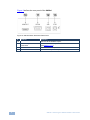
1
6.2.4
#
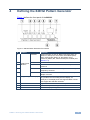
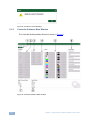
Feature
Function
1
CONNECT Button
Press to connect to a device (see Section 6.2.2)
2
COMMON Resolutions
Buttons
Press to select a pre-configured output resolution
3
USER DEFINED
Resolutions Buttons
Press to select a user-defined output resolution
4
User Defined
Resolution Edit Buttons
Press to edit the relevant user defined output resolution
5
Patterns Buttons
Press to select an output pattern
6
Output Settings
Buttons
Press to modify the output settings:
Signal Mode—HDMI, DVI, Auto
HDCP—HDCP, No HDCP
Color Space—RGB, YUV 444, YUV 422, Auto
Color Depth—24 bit, 30 bit, 36 bit, Auto
Audio Sample Rate—44kHz, 48kHz, 88kHz, 96kHz, 176kHz,
192kHz, Auto
Audio Sample Depth—16 bit, 20 bit, 24 bit, Auto
7
Status of Connected
Display
Information on the currently connected display
8
Status of Output
Information on the currently selected output settings
Editing User Defined Resolutions
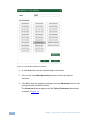
To edit a user defined resolution:
1. Click on one of the user defined resolution edit buttons.
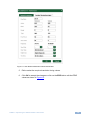
The User Defined Resolution Window appears as shown in Figure 10.
840Hxl - Operating the 840Hxl Pattern Generator
17