1
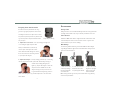
Properly focus the binocular
ACCESSORIES
For the best views, follow this two-step
Carry Case
The protective case of the Razor HD provides safe storage between
process to properly adjust the center focus
viewing sessions. The carry strap is already attached to the case.
and diopter. Choose an object that is about
Lens Covers
20 yards away from you and stay in the same
spot until you have adjusted the binocular
Adjust Diopter Setting
The Razor HD comes with a rainguard for the ocular lenses and
for your eyes.
tethered objective lens covers. Use these covers to protect the
1. Adjust the center focus—start by closing your right eye
lenses whenever you are not viewing.
or covering the right objective lens
Neckstrap
with your hand. Focus your left eye
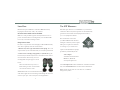
Attach the padded neckstrap to the Razor HD in three simple
on the object and adjust the center
steps. Begin with the right barrel of the binocular and repeat the
focus wheel until the image is in focus.
process for the left barrel.
Leave the center focus in this position
as you adjust the diopter.
2. Adjust the diopter—start by closing your left eye or covering
the left objective lens with your hand. Lift the diopter ring to
unlock and, looking through your
right eye, adjust the diopter so that the
object is in focus. Make note of this
diopter setting in case you need to set
it again. Push the diopter ring down to
lock—from this point on, you will only need to use the center
focus wheel.
4
1. Push a few inches
of the strap through
the strap attachment
on the binocular.
2. Hold the buckle and
thread the end of the
strap through the buckle.
3. Adjust the overall
length, then pull tight
until strap secured
within the buckle.
Note: If using another type of strap, never attach metal o-rings directly
onto the strap attachment.
5