1
KeyMander User Manual
Function Keys
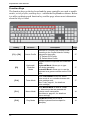
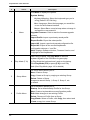
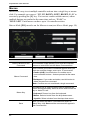
The function keys on the keyboard and the game controller are used to enable
modes, switch profiles, and map keys - without the KeyMander software. Below
is a table explaining each function key and the page where more information
about the key is found.
Hotkey
Description
Page
Switch Profile
Switches to a Profile in the Group in Use according to the Profile Selection Hotkey
assigned to the profile.
[F1]: Default PS3 Profile
[F2]: Default Xbox Profile
17
Keyboard /
Controller
Mode
Toggles between Keyboard and Controller
Mode.
Keyboard Mode: Allows you to type
text during gameplay.
Controller Mode: Allows you to use the
keyboard as a game controller on the PS3/
Xbox.
17
Turbo Mode
Turns Turbo Mode on and off. When
Turbo mode is on, controller buttons with
Turbo settings work.
(See Turbo, page 41, for details on
Turbo settings)
17
[F11]
Macro Mode
Turns Macro Mode on and off. When
on, Macro keys that are pressed will
execute macro commands.
(See Macros, page 42, for details on
Macro settings)
18
[F12]
Play Mode
Play Mode allows you to use a
laptop’s keyboard and touchpad for
gameplay.
18
[F1] ~ [F8]
[F9]
[F10]
12
Function