1
Firmware User’s Manual V6.04.15
Table of Contents
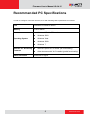
Recommended PC Specifications
4
Preparation
5
Connect the Equipment .............................................................................5
Configure the IP Addresses .......................................................................5
Access the Camera.....................................................................................9
Live View
11
Login .......................................................................................................... 11
Live View ...................................................................................................12
ePTZ View Mode................................................................................... 15
Panorama View Mode ........................................................................... 15
Fisheye View Mode ............................................................................... 16
Setup
17
Access the Setup Page ............................................................................17
Host............................................................................................................18
Date & Time ...............................................................................................19
Network .....................................................................................................21
IP Address Filtering ............................................................................... 21
Port Mapping......................................................................................... 23
HTTPS .................................................................................................. 24
IEEE 802.1X ......................................................................................... 25
SNMP Setting ....................................................................................... 27
RTP ....................................................................................................... 29
Network (ToS, UPnP, Bonjour, ONVIF) ................................................. 30
IP Settings .................................................................................................33
Connection Type ................................................................................... 33
2
www.acti.com