1
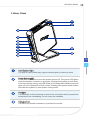
Wind Box Series Rear View 1 2 3 4 3 5 6 7 8 9 10 3 11 1-5 1 Card Reader Drive The built-in card reader may support various types of memory cards. 2 Power Button/ LED Press the power button to turn the system on and off. The power LED glows when the system is turned on and goes off when the system is shut down. In terms of power saving, the LED blinks in S3 (Suspend to RAM) mode and goes off in S4 (Suspend to Disk) mode. Pressing the system power button will wake the system up from power saving mode. 3 Ventilator The ventilator on the enclosure is used for air convection and to prevent the equipment from overheating. Do not cover the ventilator. 4 VGA-Out Port The DB15-pin female connector is provided for monitor.