1
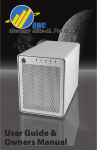
OWC Mercury Elite Pro Dual mini
Chapter 3 - Formatting
3.2 Removing the GUID Partition Scheme
Only for XP, 2000, ME and earlier. (XP 64-BIT, Vista & Windows 7 can continue to the next section)
If you are not installing a brand-new hard drive into your enclosure, it
may have a GUID drive partition already installed on it, especially if it
was originally used with a Macintosh. Unfortunately, this is not readable
by Windows without special software. If you wish to use your storage
solution on a computer running Windows, you will need to repartition
and reformat using the following instructions.
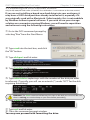
➀ Go to the DOS command prompt by
selecting “Run” from the Start Menu.
➁ Type cmd into the text box, and click
the“OK” button.
➂ Type diskpart and hit enter.
➃ Type list disk and hit enter.
➄ Type select disk x replacing x with the number of the disk you want
to reformat. (Typically, you will see an asterisk (*) under “GPT” for the disk
requiring formatting.)
WARNING: The clean command will destroy ALL data on the disk you run it on!!! Be sure
there is nothing you need to keep on your drive before proceeding.
➅ Type clean and hit enter.
➆ Type exit and hit enter.
➇ Close the command prompt window.
You may now proceed with formatting the drive.