1
4.
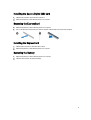
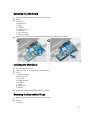
Remove the screw that secures the optical-drive latch to the optical drive. Slide the optical-drive latch and remove
it from the optical-drive.
5.
Remove the screws that secure the optical-drive latch bracket to the optical drive. Remove the latch bracket from
the optical drive.
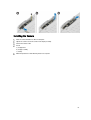
Installing the Optical Drive
1.
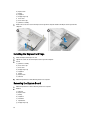
Align the optical-drive latch bracket to its position on the optical drive.
2.
Tighten the screw to secure the optical-drive latch bracket to the optical drive.
3.
Slide the optical-drive latch in the optical-drive latch bracket.
4.
Tighten the screws to secure the optical-drive latch to the optical-drive latch bracket.
5.
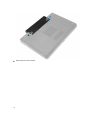
Slide the optical drive into the drive bay.
21