1
6Troubleshooting
Warning
•• Risk of electric shock. Never remove the casing of the
device.
To keep the warranty valid, never try to repair
the device yourself.
If you have problems using this device, check
the following points before you request service.
If you still have a problem, register your device
and get support at www.philips.com/support.
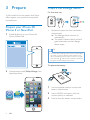
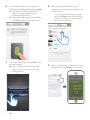
Failed to set up Bluetooth connection
between my iPhone 4S/iPhone 5/New iPad
and InRange device.
•
Tap Rescan on the app screen of Philips
InRange to try again.
•
Check whether the InRange device is
switched on and the power indicator
flashes red and green. Press and hold
on the InRange device for more than 3
seconds to switch on the device.
•
Check whether you have enabled
Bluetooth on your iPhone 4S/iPhone 5/
New iPad.
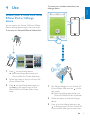
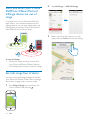
Why is that there is no beep when my iPhone
4S/iPhone 5/New iPad and InRange device are
out of range?
•
Check whether you have set the safe
range.
•
Check whether you have switched off the
InRange device.
•
Check whether the battery in the InRange
deice is drained. Replace the battery.
12
EN