1
Map Mode
D
E
D
I
G
H
C
B
J
A
F
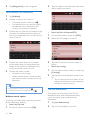
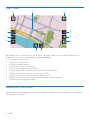
Map displays your current position on the map if navigation mode is not activated. If navigation is in
progress, you can switch to map mode by tapping button J.
• A: Go back to top menu.
• B: Display the whole map.
• C: Mute or restore sound.
• D: Zoom in or zoom out the map.
• E: The current navigation route (blue)
• F: Route sheet : lists maneuvers (turns) for the calculated route.
• G: Save the position under the central cursor as POI.
• H: View the total route and the vehicle's position on it.
• I: View the remaining route starting from the vehicle's current position.
• J: Go back to the navigation mode.
Additional information
Tap copyright on the navigation home menu to display the software that is installed on your navigator
and copyright information.
16
EN