1
5 Record
Table of contents
1 Important safety information
1.1 Safety instructions
2 About this user manual
2.1 Symbols used
3 Digital Voice Tracer
3.1 Product highlights
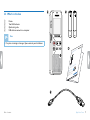
3.2 What's in the box
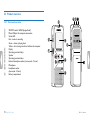
3.3 Product overview
3.3.1 Front and rear sides
3.3.2 Keys
3.4 Start-up screen
3.4.1 Menu overview
4 First steps
4.1 Inserting the batteries
4.2 Power on/off
4.3 Initial installation process
4.3.1 Setting date & time
4.4 Enabling/disabling the keypad lock
4.5 Accessories
4.5.1 Connecting the headphones
4.5.2 Connecting an external microphone
4.6 Connecting to a computer
4.6.1 Transferring files from or to the device
4.6.2 Disconnecting from a computer
Table of contents
5
5
7
7
8
8
9
10
10
11
12
13
14
14
15
15
15
16
16
16
17
17
18
18
19
5.1 Recording settings
5.1.1 Displaying the remaining recording time
5.1.2 Recording using an external microphone
5.2 Starting recording automatically
5.2.1 Using voice activation
19
20
20
20
20
6 Playback
21
6.1 Selecting a recording
6.2 Playing a recording back
6.3 Adjusting playback speed
6.4 Quick search
6.5 Repeating playback
6.5.1 Endless loop / sequence repeating
6.6 Protecting a recording / lock file
6.7 Unprotect / unlock file
21
21
21
21
22
22
23
23
7 Delete
24
7.1 Deleting recordings on the device
7.2 Deleting all recordings in the folder
24
24
8 Settings
25
8.1 Recording settings
8.1.1 Setting recording quality
8.1.2 Enabling/disabling the record indicator
8.1.3 Setting microphone sensitivity
8.1.4 Enabling/disabling voice-activated recording
8.1.5 Monitoring during recording
8.1.6 Setting auto divide
8.2 Device settings
8.2.1 Enabling/disabling key and signal tones
25
25
25
26
26
27
27
27
27

3