1
User’s Manual—Please read before using this equipment
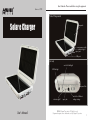
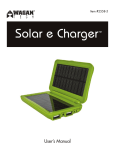
Solar e Charger by Wagan Tech
Thank you for purchasing Solar e Charger by Wagan Tech. This product will
provide years of reliable service with normal care and proper treatment. Please
read all operating instructions carefully before use.
Under sunlight the Solar e Charger converts daylight into electricity to charge
cell phones or other electronic devices, then stores the power in the built-in
Lithium-ion, depending on the intensity of the light.
Power different kinds of electronic products, including MP3 and MP4 players,
PDAs, digital cameras, cell phones and more by changing voltages through a
wide range of 4.5–9 volts. Simply adjust the switch on the Solar e Charger to
quickly change to the appropriate voltage for the particular electronic device.
The Solar e Charger features an elegant, compact body, high charge capacity
and long battery life. Besides by solar power, it can also be charged at home
using the AC adapter or in the car with the DC adapter. The built-in battery
works as a power supply even without sunlight.
Charging by Sunlight
•
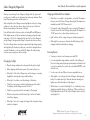
Open the charger and place the solar panels directly under sunlight.
•
When charging, switch the main power off to speed up the process.
•
When Light 1 of the Solar e Charger turns red, the charger is converting
daylight into electricity and storing it with the battery.
•
When Light 2 is red there is insufficient charge of the battery.
•
If Light 1 becomes orange, it indicates sufficient charge of the built-in
Li-ion battery and the voltage is around 3.8V–4.1V.
•
If Light 1 turns green, the built-in Li-ion battery is fully charged.
•
When the solar panels are folded closed, Light 1 will turn off and the
unit will stop charging
•
When Light 1 turns red or orange, the voltage of the solar panel is being
reached, not charged.
R
2
Charging with Included Power Adapters
•
When there is no sunlight or cloudy weather, connect the AC adapter to
the input socket of the Solar e Charger, then plug the AC adapter into a
standard household 110V AC power outlet.
•
To charge the Solar e Charge by DC power, connect the DC adapter to
the input socket of the Solar e Charger, then plug the DC adapter into a
12V DC power socket, such as the type found in your car.
•
Light 1 will turn red first, orange, then green, indicating charge level.
•
When Light 1 becomes green, it indicates the built-in battery is fully
charged, and will automatically stop charging.
Powering Devices
•
To power your devices, turn the main power switch ON.
•
To use the adjustable voltage adapters, switch the Solar e Charger to
the correct voltage and plug the appropriate adaptor included in the kit
to your device and the other end into the socket labeled OUTPUT on the
side of the unit.
•
You also can use the two USB ports to power compatible devices.
•
When Light 2 is on, it indicates the Solar e Charger is discharging the
battery. It is normal when Light 1 alternates between red and green
lights because the built-in battery is fully charged.
•
When a device is connected and Light 2 is on, it indicates you are
charging your mobile devices or cell phones. When your device is
fully charged, please turn off the Solar e Charger’s power switch to
avoid power loss.
© 2008 Wagan Corporation. All Rights Reserved.
Wagan and wagan.com are trademarks used by Wagan Corporation.
3