1
EN
HaloMount: Quick Install
The HiRes Video Company
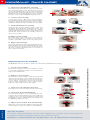
7. Insert sensor module into outer ring
Insert the inner ring with the sensor module into
the outer ring from below. Turn the inner ring in
such a way that the two notches are positioned
above the two retaining collars in the outer ring.
Engage the inner ring holding the sensor module
into the outer ring by applying slight pressure.
8. Connect sensor module
Connect the sensor cable to the sensor module:
Turn the blue bayonet catch to the left and remove
it. Remove the plug,then insert the sensor cable,
attach the bayonet catch and turn it to the right.
9. Insert HaloMount into opening
Push the two spring clamps of the outer ring
upwards and insert the HaloMount into the
opening. Note that the position of the two spring
clamps determines the position of the inner ring‘s
swivel axis and, therefore, the final position of
the sensor module.
10.Adjust sensor module
The inner ring can be tilted up to 20° (without
the use of tools), thus, you can focus the sensor
module optimally on the area to be monitored.
11. Adjust camera image
For proper adjustment of the camera image use the
black module wrench (provided with the camera).
Use the wrench to turn the sensor module in either
direction until the desired position is shown on
the computer monitor.
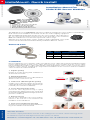
Replacing Sensor module
1. Loosen sensor module
Tilt the inner ring up to the stop and press hard
on one side of the ring‘s edge to loosen the inner
ring of the HaloMount.
2. Replace sensor module
Remove the sensor module of the inner ring and
disconnect it from the sensor cable (turn bayonet
catch to the left and remove it, then remove the
sensor cable). Connect the new sensor module
to the sensor cable (insert sensor cable, attach
bayonet catch and turn it to the right).
3. Insert sensor module into inner ring
Insert the new sensor module into the inner ring.
4. Insert inner ring into HaloMount
Turn the inner ring in such a way that the two
notches are positioned above the two retaining
collars in the outer ring. Engage the inner ring
holding the sensor module into the HaloMount
by applying slight pressure.
www.mobotix.com
5. Adjust sensor module and camera image
Adjust the sensor module and the camera image
as described in steps 10. and 11. in „Installation“.
HiRes Video Innovations
The German company MOBOTIX AG is known as the leading pioneer in network camera technology and its
decentralized concept has made high-resolution video systems cost efficient.
MOBOTIX AG • D-67722 Langmeil • Tel: +49 6302 9816-0 • Fax: +49 6302 9816-190 • [email protected]
Copyright © MOBOTIX AG 2013 • Made in Germany • Technical information subject to change without notice.
All MOBOTIX sensor modules can be mounted in the HaloMount housing.