1
Installing the DUB-H4
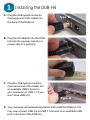
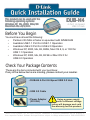
A. Plug the USB type B connector
(the larger end of the cable) into
the back of the DUB-H4.
Type B
B. Plug the AC adapter into the DUBH4 and into a power socket in a
power-strip or a wall jack.
C. Plug the USB type A connector
(the narrow end of the cable) into
an available USB 2.0 port on
your computer (or USB 1.1 if you
don’t have USB 2.0).
Type A
D. Your computer will automatically detect and install the DUB-H4. You
may now connect USB 2.0 or USB 1.1 devices to an available USB
port on the front of the DUB-H4.