1
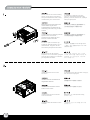
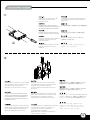
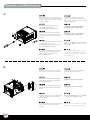
7.
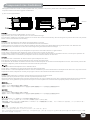
Tab
Remove the tab of optical drive
bay with a screw driver.
С помощью отвертки уберите накладку
отсека для оптического привода.
Entfernen Sie Klappe des optischen
Laufwerkschachtes mithilfe eines
Schraubenziehers.
請以螺絲起子折斷光碟機槽上的檔片。
Retirez l’attache de la baie du lecteur
optique avec un tournevis.
请以螺丝起子折断光驱槽上的文件片。。
Quite la presilla de la bahía del
dispositivo óptico con un
destornillador.
光学ドライブベイのタブをドライバーで取り外します。
Rimuovere la mascherina del bay
del lettore ottico con un cacciavite.
스크류 드라이버를 이용해, 광드라이브
베이의 탭을 제거합니다.
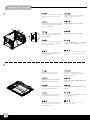
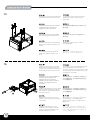
Reinstall the front panel onto the
chassis.
Снова установите переднюю панель.
Installieren Sie die Frontabdeckung
wieder am Chassis.
將前面板裝回機殼上。
Réinstallez le panneau frontal sur
le boîtier.
将前面板装回机壳上。
8.
Reinstale el panel frontal en el chasis. フロントパネルをケースに戻します。
Reinstallare il pannello frontale.
전면 패널을 케이스에 재 설치합니다.
6