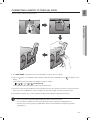
1
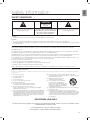
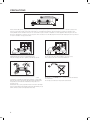
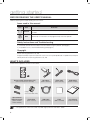
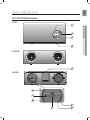
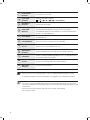
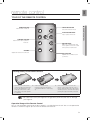
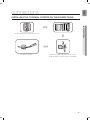
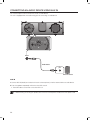
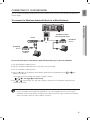
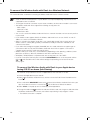
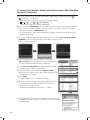
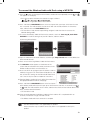
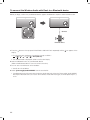
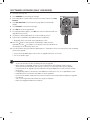
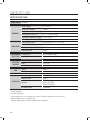
DA-E670 Wireless Audio with Dock user manual imagine the possibilities Thank you for purchasing this Samsung product. To receive more complete service, please register your product at www.samsung.com/register features AllShare Play Play music saved on your devices (such as your PC, Smart phone, or NAS) through the Wireless Audio with Dock via a network connection. AirPlay Play music saved on your Apple devices on the Wireless Audio with Dock. Dual Docking Audio Speaker System Using the system's dual docking station, dock, charge, and then play either Samsung Galaxy devices or Apple devices through the system's built-in speakers. USB Host support Connect and play music files from external USB storage devices such as MP3 players, USB flash memory, etc. using the Wireless Audio with Dock's USB HOST function. Bluetooth Function Connect a Bluetooth device to the Wireless Audio with Dock and enjoy music from the device with high quality stereo sound, all without wires! aptX® aptX enables high quality Bluetooth stereo audio, delivering wired audio quality wirelessly. License AirPlay, AirPlay logo, iPhone, iPod, iPod classic, iPod nano, iPod shuffle, and iPod touch are trademarks of Apple Inc., registered in the U.S. and other countries. iPad is a trademark of Apple lnc. 2 EnG safety information Safety Warnings CAUTION RISK OF ELECTRIC SHOCK DO NOT OPEN The lighting flash and arrowhead within the triangle indicates that there is dangerous voltage Inside the product. CAUTION: TO REDUCE THE RISK OF ELECTRIC SHOCK, DO NOT REMOVE THE COVER (OR BACK). NO USER SERVICEABLE PARTS INSIDE. REFER SERVICING TO QUALIFIED SERVICE PERSONNEL. The explanation point within the triangle indicates that there are important instructions accompanying the product. WARNING • To reduce the risk of fire or electric shock, do not expose this appliance to rain or moisture. CAUTION • Do not expose this apparatus to dripping or splashing. Do not put objects filled with liquids, such as vases on the apparatus. • To turn this apparatus off completely, you must pull the power plug out of the wall socket. Consequently, the power plug must be easily and readily accessible at all times. This product satisfies FCC regulations when shielded cables and connectors are used to connect the unit to other equipment. To prevent electromagnetic interference with electric appliances, such as radios and televisions, use shielded cables and connectors for connections. FCC NOTE (for U.S.A): This equipment has been tested and found to comply with the limits for a Class B digital device, pursuant to Part 15 of the FCC Rules. These limits are designed to provide reasonable protection against harmful interference in a residential installation. This equipment generates, uses and can radiate radio frequency energy and, if not installed and used in accordance with the instructions, may cause harmful interference to radio communications. However, there is no guarantee that interference will not occur in a particular installation. If this equipment does cause harmful interference to radio or television reception, which can be determined by turning the equipment off and on, the user is encouraged to try to correct the interference by one or more of the following measures: • Reorient or relocate the receiving antenna. • Increase the separation between the equipment and receiver. • Connect the equipment to an outlet that is on a different circuit than the radio or TV. • Consult the dealer or an experienced radio/TV technician for help. Caution : FCC regulations state that any unauthorized changes or modifications to this equipment may void the user's authority to operate it. Important Safety Instructions Read these operating instructions carefully before using the unit. Follow all the safety instructions listed below. Keep these operating instructions handy for future reference. 1) 2) 3) 4) 5) 6) 7) Read these instructions. Keep these Instructions. Heed all warnings. Follow all instructions. Do not use this apparatus near water. Clean only with dry cloth. D o not block any ventilation openings. Install in accordance with the manufacturer's instructions. 8) D o not install near any heat sources such as radiators, heat registers, stoves, or other apparatus (including amplifiers) that produce heat. 9) D o not defeat the safety purpose of the polarized or grounding-type plug. A polarized plug has two blades with one wider than the other. A grounding type plug has two blades and a third grounding prong. The wide blade or the third prong are provided for your safety. If the provided plug does not fit into your outlet, consult an electrician for replacement of the obsolete outlet. 10) Protect the power cord from being walked on or pinched particularly at plugs, convenience receptacles, and the point where they exit from the apparatus. 11) Only use attachment/accessories specified by the manufacturer. 12) Use only with the cart, stand, tripod, bracket, or table specified by the manufacturer, or sold with the apparatus. When a cart is used, use caution when moving the cart/apparatus combination to avoid injury from tip-over. 13) Unplug this apparatus during lightning storms or when unused for long periods of time. 14) Refer all servicing to qualified service personnel. Servicing is required when the apparatus has been damaged in any way, such as power-supply cord or plug is damaged, liquid has been spilled or objects have fallen into the apparatus, the apparatus has been exposed to rain or moisture, does not operate normally, or has been dropped. CALIFORNIA USA ONLY This perchlorate warning applies only to primary CR ( Manganese Dioxide ) Lithium coin cells in the product sold or distributed ONLY in California USA " Perchlorate Material - special handling may apply, See www.dtsc.ca.gov/hazardouswaste/perchlorate. " 3 PrecaUtions 2.7 inch 3.9 inch 3.9 inch 3.9 inch Ensure that the AC power supply in your house complies with the power requirements listed on the identification sticker located on the back of your product. Install your product horizontally, on a suitable base (furniture), with enough space around it for ventilation (3~4 inches). Make sure the ventilation slots are not covered. Do not place the unit on amplifiers or other equipment which may become hot. This unit is designed for continuous use. To fully turn off the unit, disconnect the AC plug from the wall outlet. Unplug the unit if you intend to leave it unused for a long period of time. During thunderstorms, disconnect the AC plug from the wall outlet. Voltage peaks due to lightning could damage the unit. Do not expose the unit to direct sunlight or other heat sources. This could cause the unit to overheat and malfunction. Phones Protect the product from moisture (i.e. vases) , and excess heat (e.g.fireplaces) or equipment creating strong magnetic or electric fields Disconnect the power cable from the AC supply if the unit malfunctions. Your product is not intended for industrial use. This product is for personal use only. Condensation may occur if your product has been stored in cold temperatures. If transporting the unit during the winter, wait approximately 2 hours until the unit has reached room temperature before using. 4 The batteries used with this product contain chemicals that are harmful to the environment. Do not dispose of batteries in the general household trash. EnG contents features 2 3 6 7 9 safety information 2Features 2License 3 Safety warnings 4Precautions getting started 6 6 Before reading the user’s manual What’s included descriptions 7 Top/Front/Rear Panel remote control 9 Tour of the remote control power on and volume control 10 11 connections playing 23 functions 28 31 32 troubleshooting appendix 10 Turning the Power on/off 10 Adjusting the volume 11 Installing the Toroidal ferrite on the Power cable 12 Using the Spacer Cover 13 Connecting a device to the Dual Dock 14 Connecting an audio device using AUX IN 15 Connecting to your Network 21 Connecting to Bluetooth devices 23 Using the TV mode (SoundShare) 23 Using the docking mode with Samsung Galaxy and Apple Devices 25 Using the Bluetooth mode 26 Using the USB mode 27 Using AirPlay and AllShare Play mode 28 Basic functions 29 Advanced functions 30 Software upgrade (only USB mode) 31Troubleshooting 32Specifications 5 getting started Before Reading the User’s Manual Note the following terms before reading the user manual. Icons used in this manual Icon Term Caution Note Definition Indicates a situation where a function does not operate or settings may be canceled. Indicates tips or instructions on the page that help a function operate. Safety Instructions and Troubleshooting 1) Familiarize yourself with the Safety Instructions before using this product. (See page 3) 2) If a problem occurs, check Troubleshooting. (See page 31) Copyright ©2012 Samsung Electronics Co.,Ltd. All rights reserved; no part or whole of this user’s manual may be reproduced or copied without the prior written permission of Samsung Electronics Co.,Ltd. WHAT’s inclUDED Check for the supplied accessories shown below. FUNCTION MUTE VOL BASS Remote Control / Lithium Battery (3V) (AH59-02482A/4301-000108) DC Adapter (BN44-00461A) Power Cable (3903-000598) Audio Cable (BN39-01286A) LAN Cable (GL39-00050A) Cloth (BN63-02368B) User Manual (AH68-02481M) (Large) (For Power Cable 1EA) Spacer Cover/ Protection Cover (AH63-02996A/ AH63-03008A) Ferrite Core (3301-000144) ▪▪ The appearance of the accessories may differ slightly from the illustrations above. 6 EnG descriptions DOCK TOP/Front/Rear Panel LAN DC 14V 4A WPS/ RESET AUX IN USB 5V 500mA <TOP> 1 DOCK ● Descriptions 2 DC 14V 4A 3 LAN WPS/ RESET AUX IN USB 5V 500mA 4 <FRONT> LAN DC 14V 4A WPS/ RESET AUX IN USB 5V 500mA PUSH LAN DC 14V 4A WPS/ RESET AUX IN ONLY FOR SERVICE 5 USB 5V 500mA <REAR> LAN DC 14V 4A WPS/ RESET AUX IN USB 5V 500mA PUSH LAN DC 14V 4A WPS/ RESET AUX IN ONLY FOR SERVICE USB 5V 500mA PUSH 6 LAN DC 14V 4A 7 WPS/ RESET AUX IN ONLY FOR SERVICE USB 5V 500mA 8 PUSH LAN DC 14V 4A WPS/ RESET AUX IN ONLY FOR SERVICE USB 5V 500mA 11 9 10 PUSH LAN DC 14V 4A WPS/ RESET AUX IN USB 5V 500mA ONLY FOR SERVICE 7 PLAY/PAUSE BUTTON Play or pause a music file. FUNCTION BUTTON Switches the mode as follows : ; ; ; ; ; ; AUX (LED Off) VOLUME +/BUTTON Controls the volume level. FUNCTION DISPLAY When you change the mode with the Function button, the icon of the selected mode is displayed in white on the Function Display. The LED blinks when you turn the power on and stops blinking when the unit is on and ready to play. 5 DUAL DOCK Provides a 5 pin dock for Samsung Galaxy devices and a 30 pin dock for Apple devices. 6 LAN TERMINAL Lets you connect to a network using a LAN cable. 7 DC 14V Connect the unit's DC adapter to this jack. 8 WPS/RESET BUTTON Used in procedures for connecting the unit to wireless networks. 9 USB PORT Connect an external USB storage device such as an MP3 player here to play files located on the device. 10 AUX IN Connect to the Analog output of an external device. 11 ONLY FOR SERVICE This jack is for service only. ▪▪ When you turn on this unit, there will be a 4 to 5 second delay before it produces sound. ▪▪ To update the product’s software via USB port, it is required to use a USB memory device. ▪▪ This unit can connect to mobile devices with high audio output levels. When you connect this unit to external devices with high output levels, it may lower the audio output to protect the amp and speakers. ▪▪ When disconnecting the power cable from the wall outlet, hold the plug. Do not pull the cable. 8 EnG remote control Tour of the Remote Control FUNCTION ● remote control POWER BUTTON Turns the unit on and off. FUNCTION BUTTON Selects the Function mode. PLAY/PAUSE BUTTON Play or pause a music file. CONTROL BUTTON Search for the next or previous music file. MUTE VOL BASS VOLUME Adjusts the volume level of the unit. MUTE BUTTON Mutes the sound from this unit. Press again to restore the sound to the previous volume level. BASS BUTTON Optimize the sound based on your tastes. Installing battery in the Remote Control 1. Open the cover of the remote control by putting your fingernail into the gap between the cover and body of the remote control. Then, lift the cover and separate it completely. 2. Install a 3V Lithium battery. Insert the battery into the battery compartment with the + side facing up. 3. Fit the remote control's cover to the remote control. Next, lower the cover so that it is flush with the body of the remote, and then press the cover into the body by pushing the edges down with your hand. ▪▪ Be careful not to catch your fingernail in the gap when you lift the cover. You can damage your fingernail. Operation Range of the Remote Control You can use the remote control up to 23 feet (7 meters) in a straight line from the unit. You can also operate the remote at a horizontal angle of up to 30° from the remote control sensor. 9 power on and volume control DOCK tUrning the PoWer on/off DOCK DOCK DOCK FUNCTION or FUNCTION MUTE VOL BASS MUTE VOL DOCK BASS DOCK 1. To turn on this unit, press any button on the unit's top panel when the unit is in Standby mode. or, Press POweR on the remote control. 2. To turn off this unit, press the +# button on the unit's top panel for more than 3 seconds. or, Press POweR on the remote control again. DOCK adJUsting the VoLUMe DOCKvolume. The function LEDs light from left to right when you turn the volume up and Use +,- buttons to adjust the from right to left when you turn the volume down. The LEDs do not light if you try to increase the volume when it has already been set to maximum or try to decrease the volume when it has already been set to minimum. FUNCTION DOCK DOCK FUNCTION or MUTE MUTE VOL BASS VOL Press the +/– button on the right side of the top panel. or, Press vOL +/– on the remote control. DOCK BASS DOCK ▪ The volume level increases or decreases when you press VOL +/–. ▪ You can also use the volume controls of devices connected using the Dual Dock or Bluetooth to control the volume. However, your ability to control the volume using the volume controls of devices connected using Bluetooth may be limited. 10 ENG connections instaLLing the toroidaL ferrite on the PoWer caBLe ● CONNECTIONS Lift up to release the lock and open the core. Close the lock back. Wind Power cable around the core three times. (Start winding at 2-4 inches away from the plugs) 11 Using the sPacer coVer Attach the space cover if you want to dock a Samsung Galaxy or Apple device having no protective case onto the Dual Dock. - Use it for stable installation of your device considering the shape of the device. The Dual Dock also comes with a protective cover for the 30-pin Apple device connector. Use the protective cover for the 30-pin connector when you attach the 5-pin Samsung Galaxy device. See the illustrations below for additional instructions. <for apple device Users> <for galaxy device Users> When docking a device, use appropriate support considering the docking device’s protective case or the device’s shape for further stability. Protective Cover Used for docking devices having no protective case on it. Protective Cover Spacer Cover Spacer Cover ▪ It is impossible to attach a device to the Dual Dock that has a case thicker than 1.5 mm or an unusual rounded bottom. 12 ENG connecting a deVice to the dUaL docK How to connect a device to the Dual Dock. SH PU LAN X AU V C 14 D IN R LY FO ON ICE SERV / WPS 4A RESET mA PUSH 00 V5 B5 US PUSH LAN LAN WPS/ RESET AUX IN DC 14V 4A ONLY FOR SERVICE WPS/ RESET AUX IN ONLY FOR SERVICE ● CONNECTIONS DC 14V 4A USB 5V 500mA USB 5V 500mA PUSH SH PU LAN LAN X AU DC 14V IN R LY FO ON ICE SERV X AU / WPS 4A RESET B US DC 5V A R LY FO ON ICE SERV mA 00 V5 B5 0m 50 IN / WPS 4A RESET 14V US PUSH LAN DC 14V 4A WPS/ RESET AUX IN ONLY FOR SERVICE USB 5V 500mA 1. The DUAL DOCK is located on the back of the product. To open, push it in gently. 2. Press the button on the top panel of the Wireless Audio with Dock repeatedly until the display. • Eachtimeyoupressthebutton,theselectionchangesasfollows: ; ; ; ; ; ; aUX (Led off) icon appears in the • The selected mode is displayed in white in the Function Display. PUSH 3. If you have a Samsung Galaxy device, connect the device to the 5 pin (smaller) connector to connect to the Dual Dock. If you have a Apple device, connect the device to the 30 pin (larger) connector on the Dual Dock. 4. Lift the device support up as shown to prevent the device from sliding or falling off the Dual Dock. ▪ Turn on your Samsung Galaxy device before you attach it to the Dual Dock. ▪ This unit doesn't support the simultaneous docking of Samsung Galaxy and Apple devices. ▪ Connect your Samsung Galaxy or Apple device to the Dual Dock before starting Docking mode. LAN X AU IN R LY FO ON ICE SERV / DC WPS 4A RESET 14V mA 00 V5 B5 US (See page 23) 13 CONNECTING AN AUDIO DEVICE USING AUX IN This section explains how to connect the unit to an audio device. PUSH This unit is equipped with one audio analog jack for connecting an audio device. LAN DC 14V 4A WPS/ RESET AUX IN ONLY FOR SERVICE USB 5V 500mA PUSH LAN DC 14V 4A WPS/ RESET AUX IN ONLY FOR SERVICE USB 5V 500mA PUSH LAN DC 14V 4A WPS/ RESET AUX IN ONLY FOR SERVICE USB 5V 500mA PUSH LAN DC 14V 4A WPS/ RESET AUX IN ONLY FOR SERVICE AUX IN ONLY FOR SERVICE USB 5V 500mA AUX IN PUSH LAN DC 14V 4A WPS/ RESET Audio Cable USB 5V 500mA Earphones jack External device AUX IN 1.Connect AUX IN (Audio) on the back of the unit to the earphone jack of the external device or audio device. 2.Press the button repeatedly until the function LEDs are off. • The AUX mode is active when no function LED is lit. ▪▪ Before moving or installing this product, be sure to turn off the power and disconnect the power cord. PUSH LAN 14 DC 14V 4A WPS/ RESET AUX IN USB 5V 500mA ONLY FOR SERVICE You can connect your Wireless Audio with Dock to your network router using one of the methods illustrated on the next few pages. EnG CONNECTING TO YOUR NETWORK To connect the Wireless Audio with Dock to a Wired Network DOCK PUSH ● connections LAN DC 14V 4A WPS/ RESET AUX IN ONLY FOR SERVICE USB 5V 500mA Broadband modem (with integrated router) Router Broadband service or PUSH LAN DC 14V 4A WPS/ RESET AUX IN ONLY FOR SERVICE USB 5V 500mA Broadband service Broadband modem Please turn off the power of the Wireless Audio with Dock before you connect the LAN Cable. 1.Turn off the Wireless Audio with Dock. 2.Connect the Wireless Audio with Dock to the router using a LAN cable. 3.Turn on the Wireless Audio with Dock. 4.Press the button on the top panel of the Wireless Audio with Dock repeatedly until the appears in the display. or icon •Each time you press the button, the selection changes as follows : ; ; ; ; ; ; AUX (LED Off) or indicator lights up in red, and changes to solid white once the Wireless Audio with Dock 5.The connects to the router. ▪▪ If you connected the LAN cable when the product is on, turn the product off, then turn it on again. ▪▪ If failed to connect to the network, unplug the LAN cable and connect it again, and restart the product. ▪▪ xDSL user needs a router to make a network connection. 15 To connect the Wireless Audio with Dock to a Wireless Network This section describes 4 methods of connecting the Wireless Audio with Dock to a wireless network. ▪▪ Some of network related operations may be different than explained depending on performance and supported functions of used AP. ▪▪ To configure the network connection to your router or modem, see the router or modem's user manual. ▪▪ The Wireless Audio with Dock supports the following security protocols: -- WEP ; Open -- WPA-PSK ; TKIP -- WPA2-PSK ; AES ▪▪ You can also connect the Wireless Audio with Dock to a network that does not have security and has no password. ▪▪ If your wireless router supports DHCP, this Wireless Audio with Dock can use a DHCP or static IP address to connect to the wireless network. ▪▪ Select a channel on the wireless router that is not currently being used, if the channel set for the wireless router is currently being used by another device nearby, it will result in interference and communication failure. ▪▪ If you select the Pure High-throughput (Greenfield) 802.11n mode and set the encryption type on your router to WEP or TKIP, then the Wireless Audio with Dock will not support a connection in compliance with new Wi-Fi certification specifications. ▪▪ Wireless LAN, by its nature, may cause interference, depending on the operating conditions (router performance, distance, obstacles, interference with other radio devices, etc) ▪▪ WPS(PBC) / WPS(PIN) does not operate when the security protocol is set to WEP. ▪▪ If you fail to set up the network, press and hold the WPS/RESET button on the rear panel until the or indicator blinks twice. Wait until the red light stops blinking, turn off and on the unit. And try again. To connect the Wireless Audio with Dock to your Apple device having iOS 5.0 or above (Info Sharing) This network set-up method is for users of Apple devices that have iOS 5.0 or later. 1.Connect the Apple device to your network. on the Wireless Audio with Dock, and then connect the iPod /iPhone /iPad device to the 2.Select Dual Dock. 3.Press and hold the WPS/RESET button on the rear panel of the Wireless Audio with Dock with a pen tip or similar item for more than 1 second. The icon will blink once. Release the buttom. 4.Select <Allow> in the pop-up menu on the display of the Apple device. and then the indicator will blink in red and changes to solid white. After 5.Change the mode to the the Wireless Audio with Dock connects, the indicator stops blinking in red, and glows in white. • The network connection is complete. 16 EnG To connect the Wireless Audio with Dock using WPS (PBC) 1.Press the button on the top panel of the Wireless Audio with Dock repeatedly until the or icon appears in the display. DOCK • Each time you press the button, the selection changes as follows : ; ; ; ; ; ; AUX (LED Off) The indicator changes from white to red and blinks. LAN DC 14V 4A WPS/ RESET AUX IN ONLY FOR SERVICE USB 5V 500mA ● connections 2.Press and hold the WPS/RESET button on the rear panel with a pen tip or similar item for more than 1 second. The indicator blinks once in white. After the indicator blinks, release the button. PUSH LAN DC 14V 4A WPS/ RESET AUX IN ONLY FOR SERVICE USB 5V 500mA • The indicator blinks in red. 3.Push the WPS/RESET button on your router or modem within 90 seconds. 4.After the Wireless Audio with Dock connects, the indicator changes from blinking red to white. or • The network connection is complete. PUSH LAN DC 14V 4A WPS/ RESET AUX IN ONLY FOR SERVICE USB 5V 500mA LAN DC 14V 4A WPS/ RESET AUX IN ONLY FOR SERVICE USB 5V 500mA 17 To connect the Wireless Audio with Dock through a JBC (JukeBox Connect) Connection 1.Press the button on the top panel of the Wireless Audio with Dock repeatedly until the icon appears in the display. or • Each time you press the button, the selection changes as follows : ; ; ; ; ; ; AUX (LED Off) The indicator changes from white to red and blinks. 2.Press and hold the WPS/RESET button on the back panel with a pen tip or similar item for more than 5 seconds. The indicator blinks in white once. Wait until the indicator blinks in white twice more, and then release the WPS/RESET button. • The indicator blinks in red, and then stops blinking and glows in red when the unit accesses the Network Setting mode. 3.To connect the Wireless Audio with Dock to the network, search for "Samsung W_Audio E670 XXXXXXX" in the Wi-Fi Setting list of your WI-Fi device, and then select it. ex) Samsung Galaxy Device 4.Open the web browser of the Wi-Fi device, and then type "http://192.168.1.1" into the address bar of the Internet browser to access the Wireless Audio with Dock's web page. 5.In the "Service Set ID (SSID)" field, select the AP device (router or modem) your Wi-Fi device is connected to. 5 6.Type the AP device's password into the "WPA Passphrase" filed. If you want to set the static IP, press advanced settings. Fill in the desired static IP address. 6 7.Press <Apply>. If a warning appears on your Wi-Fi device, click OK. 6 8.When the connection between the Wireless Audio with Dock and AP you selected is completed, the indicator on the Wireless Audio with Dock changes to white. • The Wireless Audio with Dock connection is complete. 7 The picture above is the screen which will appear on the display after completing the network connection successfully, so you can run AirPlay or DLNA normally. 18 1.Press the button on the top panel of the Wireless Audio with Dock repeatedly until the icon appears in the display. EnG To connect the Wireless Audio with Dock using a WPS PIN or • Each time you press the button, the selection changes as follows : ; ; ; ; ; ; AUX (LED Off) The indicator changes from white to red and blinks. • The icon blinks in red, and then stops blinking and glows in red when the unit accesses the Network Setting mode. 3.To connect the Wireless Audio with Dock to the network, search for "Samsung W_Audio E670 XXXXXXX" in the Wi-Fi Setting list of your WI-Fi device, and then select it. ex) Samsung Galaxy Device 4.Open the web browser of the Wi-Fi device, and then type "http://192.168.1.1" into the address bar of the Internet browser. 5.Press or touch Samsung Wireless Audio with Dock Status. 6.The WPS PIN number appears on the bottom of the screen. Note or write down the number, and then turn the Wireless Audio with Dock unit off and then on. 7.Access the Wi-Fi set-up page of your AP (wireless router or modem) using your PC or other Internet ready device, and then set the Wi-Fi settings to the PIN method. Refer to the user's manual of your router or modem for instructions. 8.Type the Wireless Audio with Dock's WPS PIN number into the appropriate field of the Wi-Fi setup page. 6 9.Press and hold the WPS/RESET button on the back panel of the Wireless Audio with Dock with a pen tip or similar item for more than 10 seconds in the or mode. The indicator blinks once in white, and then twice. Wait until the indicator blinks three times, and then release the button. • The icon blinks in red. 10.If the connection between the Wireless Audio with Dock and the AP is completed within 90 seconds, the indicator changes from red to white. • The Wireless Audio with Dock connection is complete. ▪▪ The Wi-Fi Direct function is not supported by this product. Direct connection may succeed in some cases, but it is not supported function by this product. 19 ● connections 2.Press and hold the WPS/RESET button on the back panel with a pen tip or similar item for more than 5 seconds. The indicator blinks in white once. Wait until the indicator blinks in white twice more, and then release the WPS/RESET button. BLUETOOTH You can connect the Wireless Audio with Dock to Bluetooth devices and enjoy music with high quality stereo sound, all without wires! What is Bluetooth? Bluetooth technology lets Bluetooth-compliant devices interconnect easily with each other using a short wireless connection. • A Bluetooth device may cause noise or malfunction, depending on usage, when: -- A part of your body is in contact with the receiving/transmitting system of the Bluetooth device or the Wireless Audio with Dock. -- It is subject to electrical variation from obstructions caused by a wall, corner, or by office partitioning. -- It is exposed to electrical interference from same frequency-band devices including medical equipment, microwave ovens, and wireless LANs. • Keep the Wireless Audio with Dock and the Bluetooth device close together when pairing. • The further the distance between the Wireless Audio with Dock and Bluetooth device, the worse the quality. If the distance exceeds the Bluetooth operational range, the connection is lost. • In poor reception-sensitivity areas, the Bluetooth connection may not work properly. • The Bluetooth connection only works when the Bluetooth device is close to the set. The connection is automatically cut off if the Bluetooth device moves out of range. Even within range, the sound quality may be degraded by obstacles such as walls or doors. • This wireless device may cause electric interference during its operation. ▪▪ You may be required to enter a PIN code (password) when connecting the Bluetooth device to the Wireless Audio with Dock. If the PIN code input window appears, enter <0000>. ▪▪ The Wireless Audio with Dock supports SBC data (44.1kHz, 48kHz). ▪▪ The AVRCP feature is not supported. ▪▪ Connect only to a Bluetooth device that supports the A2DP (AV) function. ▪▪ You cannot connect to a Bluetooth device that supports only the HF (Hands Free) function. ▪▪ Only one Bluetooth device can be paired at a time. ▪▪ Once you have turned off the Wireless Audio with Dock and the pairing is disconnected, the pairing will not be restored automatically. To reconnect, you must pair the devices again. ▪▪ The Wireless Audio with Dock may not search or connect properly in the following cases: -- If there is a strong electrical field around the Wireless Audio with Dock. -- If several Bluetooth devices are simultaneously paired to the Wireless Audio with Dock. -- If the Bluetooth device is turned off, not in place, or malfunctions -- Note that such devices as microwave ovens, wireless LAN adaptors, fluorescent lights, and gas stoves use the same frequency range as the Bluetooth device, which can cause electric interference. 20 EnG CONNECTING TO BLUETOOTH DEVICES This section explains how to connect the Wireless Audio with Dock to Bluetooth compatible TVs and other Bluetooth devices. To connect the Wireless Audio with Dock to a Bluetooth compatible 2012 Samsung TV (SoundShare) DOCK ● connections Connect <To pair to your TV> To produce TV sound on your Wireless Audio with Dock via Bluetooth connection, you need to pair your system to the Bluetooth compliant TV first. Once the pairing is established, the pairing information is recorded and kept and no further Bluetooth connection message will appear from the next time. Keep the Wireless Audio with Dock and the TV close together before pairing. (It is recommended to pair devices within 3.3 feet.) 1.Turn on the Samsung TV and Wireless Audio with Dock. •Set "Add New Device" menu to "On" in the TV. (For more information, refer to the user's guide of TV) Menu ; System ; Device Manager ; SoundShare Settings ; Add New Device. 2.When you change the mode of Wireless Audio with Dock to , a message asking whether to proceed with Bluetooth pairing appears. Select <Yes> on the TV screen, then the pairing with the Wireless Audio with Dock will be completed. •The indicator blinks, and stops blinking. •The Wireless Audio with Dock Bluetooth pairing is complete. <To cancel pairing to your TV> If you want to pair your Wireless Audio with Dock to a TV other than the connected TV, you should cancel the existing pairing in the Wireless Audio with Dock. It is possible to cancel the pairing in the way below. The LED will blink once when you press the WPS/RESET button on the rear panel of the unit for 1 second in . This unit will automatically pair to a TV once you cancel the existing pairing and the new TV is ready for connection. ▪▪ If the TV cannot be connected, please try to reconnect it after pressing the WPS/RESET button on the rear panel of the set in the Bluetooth mode. ▪▪ You should update TV software to the latest version to operate TV pairing (SoundShare) function. ▪▪ Check the instructions for updating and applicable models from the support page on website (http://www.samsung.com) or contact the call center. 21 To connect the Wireless Audio with Dock to a Bluetooth device Before you begin, confirm that your Bluetooth device supports the Bluetooth compliant stereo headset function. DOCK DOCK DOCK Connect External device 1.Press the display. button on the top panel of the Wireless Audio with Dock repeatedly until the icon appears in the •Each time you press the button, the selection changes as follows : ; ; ; ; ; ; AUX (LED Off) • The selected mode is displayed in white in the Function Display. 2.Select the Bluetooth menu on your Bluetooth device. (Refer to the Bluetooth device's user manual for instructions.) 3.Scan or search for All Devices or for Headsets. •You will see a list of devices. 4.Select "[Samsung]W_Audio XXXXXX" from the searched list. • If the Bluetooth device fails to pair with the Wireless Audio with Dock, delete the "[Samsung]W_Audio XXXXXX" found by the Bluetooth device, and search for the Wireless Audio with Dock again, and then repeat Steps 2, 3, and 4. 22 EnG playing DOCK USING THE TV MODE (SoundShare) ● playing Press the button to select the mode, and then connect the TV to the Wireless Audio with Dock. (See page 21) • The unit will play the TV's audio when it is connected to the TV. • If you change the Wireless Audio with Dock's Bluetooth input source or turn it off, you will hear audio from the TV again. ▪▪ You can control the volume only with the Wireless Audio with Dock. DOCK Using the Docking mode with Samsung Galaxy and Apple Devices DOCK Press the button to select the Dock. (See page 13) mode, and then connect the Samsung Galaxy or Apple device to the Dual <Samsung Galaxy Devices> To use your Samsung Galaxy series device with the Dual Dock, you must download and install the Docking Mode application from the Android Market on the device. To download, follow these steps: 1. Tap the Play Store (Android Market) icon on the Samsung Galaxy device's main screen. 2. Tap the search icon on the screen to access the search bar. 3. In the search bar, type in the [Samsung Wireless Audio Dock], and then search. 4. In the search result list, find, and then tap [Samsung Wireless Audio Dock] to start downloading. 5. Tap [install]. To play music, follow these steps: 1-1.If you start the app when the Wireless Audio with Dock is the only device for the Bluetooth connection, selecting PLAY in your device automatically establishes the Bluetooth connection to the Wireless Audio with Dock and the unit plays music. 1-2.If there are multiple devices for Bluetooth connection including Wireless Audio with Dock, 1) When you start the app, the list of the devices which you can connect to the Wireless Audio with Dock will appear. 2) Play music after connecting to the Wireless Audio with Dock by selecting it on the list of devices. -- If there exists a Bluetooth device paired to the Wireless Audio with Dock before, it will not appear in the list and be connected automatically. 2. If you replace the Wireless Audio with Dock which you have paired to your mobile device, you should delete the remaining settings saved in your device before pairing to the new one. • ; [Clear data]. 23 ▪▪ Once you started the application, running is not disturbed by charging your mobile device with an ordinary charger. ▪▪ When you connect other device to the Wireless Audio with Dock after connecting Samsung Galaxy device in docking mode, you may have to turn off the Bluetooth mode of the Samsung Galaxy device. ▪▪ If you have trouble connecting the Samsung Galaxy device to the Dual Dock, turn off the devices's Bluetooth mode. <Apple Devices> 1.Select the mode as described above, and then connect the Apple device to the Dual Dock as described in Connecting a Device to the Dual Dock (Page 13). You will hear a ringing sound. 2.Select the <Music> menu in the main screen of the Apple device. 3.Select and play the desired music. •The music will play through the Wireless Audio with Dock's speakers. ▪▪ While playing a video with your device, Play/Pause/Next/Back operations may not be available. Use the button on your source device to operate it. Compatibility list (Apple Device) Docking mode compatible iPod/iPhone/iPad models Update the software of your iPod/iPhone/iPad to the latest version before using it with this unit. -- iPod touch (4th generation) -- iPod touch (3rd generation) -- iPod nano (6th generation) -- iPod nano (5th generation) -- iPhone 4S -- iPhone 4 -- iPhone 3GS -- iPad 2 -- iPad • Depending on its version of iPod Software, your device may not be compatible or may operate abnormally. If you connect an incompatible Apple device, the iPod Function LED will blink. 24 DOCK EnG USING THE BLUETOOTH MODE Press the button to select the mode, and then connect the Bluetooth device to the Wireless Audio with Dock. (See page 22) To connect your Bluetooth device when the Wireless Audio with Dock is in Bluetooth mode, search for the Wireless Audio with Dock on the device's Bluetooth list. Select the Wireless Audio with Dock, and then connect. Once the Wireless Audio with Dock has connected, select and play the desired music. ● playing The music will play through the Wireless Audio with Dock's speakers. ▪▪ If you want to change the device which is connected through Bluetooth mode to other device, disconnect the existing device and try to connect to the other device which you want to use. ▪▪ While in Bluetooth communication, Play/Pause/Next/Back operations may not be available depending on used mobile device and application. ▪▪ Operating Bluetooth device paired to the Wireless Audio with Dock may cause stuttering if operated while the Wireless Audio with Dock is playing back from AUX input. To disconnect the Bluetooth device from the Wireless Audio With Dock You can cancel Bluetooth pairing from the Wireless Audio with Dock. For instructions, see the Bluetooth device's user manual. • The Wireless Audio with Dock will be disconnected. To disconnect the Wireless Audio with Dock from the Bluetooth device Press the button on the top panel of the Wireless Audio with Dock to switch from or press the Power button on the remote to turn the Wireless Audio with Dock off. to another mode • The currently connected device will be disconnected. ▪▪ The Bluetooth connection only works when the Bluetooth device is close to the set. The connection is automatically cut off if the Bluetooth device moves out of range. Even within range, the sound quality may be degraded by obstacles such as walls or doors. ▪▪ If the Bluetooth device comes back into the effective range, you can restart to restore the pairing with the Bluetooth device. 25 DOCK USING THE USB MODE 1.Connect the USB device to the USB port on the back of the unit. 2.Press the button on the top panel of the Wireless Audio with Dock repeatedly until the icon appears in the display. •Each time you press the button, the selection changes as follows : ; ; ; ; ; ; AUX (LED Off) •The selected mode is displayed in white in the Function Display. Before you connect a USB device Read the list below to check compatibility. • This product may not be compatible with certain types of USB storage media. DOCK • The FAT16 and FAT32 file systems are supported. -- The NTFS file system is not supported. PUSH • Connect a USB device directly to the USB port of the product. Otherwise, you may encounter a USB compatibility problem. • Do not connect multiple storage devices to the product via a multi-card reader. It may not operate properly. • Digital camera PTP protocols are not supported. • Do not remove the USB device while it is being read. • DRM-protected music files (MP3, WMA) from a commercial web site can not be played. • External HDDs are not supported. • Compatibility list Format File name File extension Bit rate Version Sampling Frequency Music MP3 WMA .MP3 .WMA 80~320 56~128 kbps kbps V8 44.1KHz 44.1KHz LAN DC 14V 4A WPS/ RESET AUX IN ONLY FOR SERVICE USB 5V 500mA LAN DC 14V 4A WPS/ RESET AUX IN ONLY FOR SERVICE USB 5V 500mA PUSH LAN DC 14V 4A WPS/ RESET AUX IN USB 5V 500mA ONLY FOR SERVICE Do not connect your mobile device to the USB port and the Docking station at the same time for recharging. 26 EnG USING airplay and allshare play mode DOCK To use the or function, the Wireless Audio with Dock and the device which you are trying to connect must be connected to the same AP. <AirPlay mode_ > 1.Play the desired music in the <Music> menu on main screen of the Apple device. icon on the screen of ● playing 2.Select "Samsung W_Audio E670 XXXXXXX" by pressing the the Apple device. •The music will play through the Wireless Audio with Dock's speakers. When you succeed the connection between iTunes and the Wireless Audio with Dock through same IP once, the mode will be switched automatically to AirPlay mode when you select the Wireless Audio with Dock and play DOCK musics in iTunes in a mode other than the AirPlay mode. ▪▪ It takes 3~5 seconds to respond for the set from your remote control operation. <AllShare Play mode_ 1.Select the > menu on the main screen of the Galaxy device. 2.After going into [Audio] in AllShare Play, select the desired music. 3.When the <Select device> pop-up appears, select "Samsung W_Audio E670 XXXXXXX". •The music will play through the Wireless Audio with Dock's speakers. ▪▪ The control function may not be supported by your device depending on the functions of the application and the Audio Dock of your device. 27 functions Basic fUnctions Using the input mode DOCK DOCK DOCK You can select the following inputs: ; ; ; ; ; ; aUX (Led off). Press an appropriate button on the remote control to select a desired mode, or press to select from: ; ; ; ; ; ; aUX (Led off). input mode display tV mode DOCK DOCK docking mode BLUetooth mode UsB mode FUNCTION FUNCTION VOL BASS MUTE VOL 28 airPlay mode allshare Play mode MUTE BASS aUX input LED Off POWER FUNCTION VOL MUTE VOL BASS FUNCTION Play/Pause During playback, press the +# button. MUTE VOL EnG advanced functions BASS • Press the +# button to stop playing the file temporarily. Press the +# button again to play the selected file. ● functions ▪▪ This function may not operate in certain mode. POWER FUNCTION VOL MUTE VOL BASS FUNCTION During playback, press the [,] button. MUTE VOL Skip Forward/Back BASS • When there is more than one file and you press the ] button, the next file is selected. • When there is more than one file and you press the [ button, the previous file is selected. ▪▪ This function may not operate in certain mode. FUNCTION Muting the sound FUNCTION MUTE MUTE VOL BASS VOL BASS This is useful when answering a doorbell or telephone call. 1.To mute sound of this unit, press the MUTE ( control. ) button of the remote 2.Press MUTE ( ) on the remote control again (or press VOLUME +/-) to restore the sound. FUNCTION Using the BASS function FUNCTION MUTE MUTE VOL Lets you optimize the bass sound according to your tastes. Press BASS on the remote control of this unit. BASS VOL BASS • Each time the button is pressed, the selection changes as follows : BASS ON ; OFF 29 SOFTWARE UPGRADE (only USB mode) 1. Visit www.samsung.com. DOCK 2. Click SUPPORT on the top right of the page. 3. Enter the product's model number into the search field, and then click Find Product. PUSH LAN DC 14V 4A WPS/ RESET 4. Click Get downloads in the Center of the page below the Downloads header. 5. Click Firmware in the Center of the page. 6. Click ZIP file icon of the upgrade file. AUX IN ONLY FOR SERVICE USB 5V 500mA LAN DC 14V 4A WPS/ RESET 7. Once popup window appears, click OK and continue to download and save upgrade file onto your PC. AUX IN ONLY FOR SERVICE USB 5V 500mA 8. Uncompress downloaded .zip file into a certain folder of your PC. 9. Copy all files in the folder to the USB flash drive’s root directory. • Upgrading allows only one file set for upgrading at a time. 10.Press the button on the top panel of the Wireless Audio with Dock repeatedly until the icon appears in the display. Insert the USB drive into the USB port on the back panel of the unit. 11.The LED will blink during the Software update process. The product will turn off automatically after completing the firmware upgrade. PUSH LAN DC 14V 4A WPS/ RESET AUX IN ONLY FOR SERVICE USB 5V 500mA • It may take longer depending on the functions to upgrade. (Maximum 10 minutes) • Turn on the product again. ▪▪ Do not disconnect the power or remove the USB drive while an upgrade is being applied. The main unit will turn off automatically after completing the firmware upgrade. ▪▪ When software is upgraded, settings you have made will return to their default (factory) settings. We recommend you write down your settings so that you can easily reset them after the upgrade. ▪▪ If the firmware fails to upgrade, we recommend formatting the USB drive in the FAT16 format and then trying again. ▪▪ For upgrading purposes, do not format the USB drive in NTFS format. It is not a supported file system. ▪▪ Depending on the manufacturer, the USB may not be supported. ▪▪ Disconnect the Wireless Audio with Dock from the Internet and any external devices before you upgrade the software. ▪▪ You cannot charge other external devices through this USB port. ▪▪ Refer to the Upgrade Guide from the website. LAN DC 14V 4A WPS/ RESET AUX IN USB 5V 500mA 30 ONLY FOR SERVICE EnG troubleshooting Before requesting service, please check the following. Symptom Check Remedy • Is the power cord plugged into the outlet? • Connect the power plug to the outlet. A function does not work when the button is pressed. • Has the Wireless Audio with • Disconnect the power plug Dock or the remote been and connect it again. exposed to static electricity? Sound is not produced. • Is the unit properly connected to device? • Is the Mute function on? • Is the volume set to minimum? • Connect it correctly. • Press the Mute button to cancel the function. • Adjust the volume. The remote control does not work. • Are the batteries drained? • Is the distance between remote control and main unit too far? • Replace with new batteries. • Operate closer to the main unit. Wi-Fi network connection failed • Check if your Wi-Fi router is Wi-Fi certified. • Make sure the Network Connection is set to Wireless (General). • Make sure the Wireless Audio with Dock unit is connected to a wireless IP router or modem. The SoundShare (TV pairing) failed. • Is your TV a supporting model? • Is your TV firmware the latest version? • Does an error occur in connection? • Check whether your TV is a supporting model or not. (http://www.samsung.com) • Update your TV with the latest firmware. • Reset the unit. Press the WPS/RESET button in the TV mode. • Contact the call center. 31 ● troubleshooting The unit will not turn on. appendix Specifications Model name DA-E670 GENERAL AMPLIFIER Power supply DC 14V 4A Power consumption 29.8W Weight 9.26 Ibs Dimensions (W x D x H) 15.7 x 7.9 x 5.6 inches Operating temperature range +41°F to +95°F Operating humidity range 10 % to 75 % Rated output power 40W, 4OHM, THD = 10%, 1kHz Input sensitivity/Impedance 800mV/56Kohm S/N ratio (analog input) 65 dB Separation(1kHz) 65 dB FREQUENCY Analog input RESPONSE Digital input/48kHz PCM DOCKING RATING USB NETWORK 20Hz~20kHz(±3 dB) 20Hz~20kHz(±3 dB) iPad 5 V 2.0 A iPod 5 V 1.0 A Galaxy 5 V 1.0 A Type A USB 1.1 DC output 500mA Ethernet 100BASE-TX Terminal Wireless LAN Built-in Security WEP (OPEN) WPA-PSK (TKIP) WPA2-PSK (AES) WPS(PBC/PIN) Supported * S/N ratio, distortion, separation, and usable sensitivity are based on measurement using AES (Audio Engineering Society) guidelines. * Nominal specification - Samsung Electronics Co., Ltd reserves the right to change the specifications without notice. - Weight and dimensions are approximate. - Network speeds equal to or below 10Mbps are not supported. 32 Warranty LIMITED WARRANTY TO ORIGINAL PURCHASER This SAMSUNG brand product, as supplied and distributed by Samsung Electronics America, Inc. (SAMSUNG) and delivered new, in the original carton to the original consumer purchaser, is warranted by SAMSUNG against manufacturing defects in materials and workmanship for a limited warranty period of: One (1) Year Parts and Labor* (*90 Days Parts and Labor for Commercial Use) This limited warranty begins on the original date of purchase, and is valid only on products purchased and used in the United States. To receive warranty service, the purchaser must contact SAMSUNG for problem determination and service procedures. Warranty service can only be performed by a SAMSUNG authorized service center. The original dated bill of sale must be presented upon request as proof of purchase to SAMSUNG or SAMSUNG's authorized service center. Transportation of the product to and from the service center is the responsibility of the purchaser. SAMSUNG will repair or replace this product, at our option and at no charge as stipulated herein, with new or reconditioned parts or products if found to be defective during the limited warranty period specified above. All replaced parts and products become the property of SAMSUNG and must be returned to SAMSUNG. Replacement parts and products assume the remaining original warranty, or ninety (90) days, whichever is longer. SAMSUNG’s obligations with respect to software products distributed by SAMSUNG under the SAMSUNG brand name are set forth in the applicable end user license agreement. Non-SAMSUNG hardware and software products, if provided, are on an “AS IS” basis. Non-SAMSUNG manufacturers, suppliers, publishers, and service providers may provide their own warranties. This limited warranty covers manufacturing defects in materials and workmanship encountered in normal, and except to the extent otherwise expressly provided for in this statement, noncommercial use of this product, and shall not apply to the following, including, but not limited to: damage which occurs in shipment; delivery and installation; applications and uses for which this product was not intended; altered product or serial numbers; cosmetic damage or exterior finish; accidents, abuse, neglect, fire, water, lightning or other acts of nature; use of products, equipment, systems, utilities, services, parts, supplies, accessories, applications, installations, repairs, external wiring or connectors not supplied and authorized by SAMSUNG, or which damage this product or result in service problems; incorrect electrical line voltage, fluctuations and surges; customer adjustments and failure to follow operating instructions, cleaning, maintenance and environmental instructions that are covered and prescribed in the instruction book; product removal or reinstallation; reception problems and distortion related to noise, echo, interference or other signal transmission and delivery problems. SAMSUNG does not warrant uninterrupted or error-free operation of the product. THERE ARE NO EXPRESS WARRANTIES OTHER THAN THOSE LISTED AND DESCRIBED ABOVE, AND NO WARRANTIES WHETHER EXPRESS OR IMPLIED, INCLUDING, BUT NOT LIMITED TO, ANY IMPLIED WARRANTIES OF MERCHANTABILITY OR FITNESS FOR A PARTICULAR PURPOSE, SHALL APPLY AFTER THE EXPRESS WARRANTY PERIODS STATED ABOVE, AND NO OTHER EXPRESS WARRANTY OR GUARANTY GIVEN BY ANY PERSON, FIRM OR CORPORATION WITH RESPECT TO THIS PRODUCT SHALL BE BINDING ON SAMSUNG. SAMSUNG SHALL NOT BE LIABLE FOR LOSS OF REVENUE OR PROFITS, FAILURE TO REALIZE SAVINGS OR OTHER BENEFITS, OR ANY OTHER SPECIAL, INCIDENTAL OR CONSEQUENTIAL DAMAGES CAUSED BY THE USE, MISUSE OR INABILITY TO USE THIS PRODUCT, REGARDLESS OF THE LEGAL THEORY ON WHICH THE CLAIM IS BASED, AND EVEN IF SAMSUNG HAS BEEN ADVISED OF THE POSSIBILITY OF SUCH DAMAGES. NOR SHALL RECOVERY OF ANY KIND AGAINST SAMSUNG BE GREATER IN AMOUNT THAN THE PURCHASE PRICE OF THE PRODUCT SOLD BY SAMSUNG AND CAUSING THE ALLEGED DAMAGE. WITHOUT LIMITING THE FOREGOING, PURCHASER ASSUMES ALL RISK AND LIABILITY FOR LOSS, DAMAGE OR INJURY TO PURCHASER AND PURCHASER’S PROPERTY AND TO OTHERS AND THEIR PROPERTY ARISING OUT OF THE USE, MISUSE OR INABILITY TO USE THIS PRODUCT SOLD BY SAMSUNG NOT CAUSED DIRECTLY BY THE NEGLIGENCE OF SAMSUNG. THIS LIMITED WARRANTY SHALL NOT EXTEND TO ANYONE OTHER THAN THE ORIGINAL PURCHASER OF THIS PRODUCT, IS NONTRANSFERABLE AND STATES YOUR EXCLUSIVE REMEDY. Some states do not allow limitations on how long an implied warranty lasts, or the exclusion or limitation of incidental or consequential damages, so the above limitations or exclusions may not apply to you. This warranty gives you specific legal rights, and you may also have other rights which vary from state to state. To obtain warranty hardware service, please contact SAMSUNG customer care center. Open Source Announcement To send inquiries and requests for questions regarding open sources, contact Samsung via Email ([email protected]). • This product uses some software programs which are distributed under the Independent JPEG Group. FLAC decoder, Copyright (C) 2001,2002,2003,2004,2005,2006,2007 Josh Coalson Redistribution and use in source and binary forms, with or without modification, are permitted provided that the following conditions are met: -- Redistributions of source code must retain the above copyright notice, this list of conditions and the following disclaimer. -- Redistributions in binary form must reproduce the above copyright notice, this list of conditions and the following disclaimer in the documentation and/or other materials provided with the distribution. -- Neither the name of the Xiph.org Foundation nor the names of its contributors may be used to endorse or promote products derived from this software without specific prior written permission. THIS SOFTWARE IS PROVIDED BY THE COPYRIGHT HOLDERS AND CONTRIBUTORS ``AS IS'' AND ANY EXPRESS OR IMPLIED WARRANTIES, INCLUDING, BUT NOT LIMITED TO, THE IMPLIED WARRANTIES OF MERCHANTABILITY AND FITNESS FOR A PARTICULAR PURPOSE ARE DISCLAIMED. IN NO EVENT SHALL THE FOUNDATION OR CONTRIBUTORS BE LIABLE FOR ANY DIRECT, INDIRECT, INCIDENTAL, SPECIAL, EXEMPLARY, OR CONSEQUENTIAL DAMAGES (INCLUDING, BUT NOT LIMITED TO, PROCUREMENT OF SUBSTITUTE GOODS OR SERVICES; LOSS OF USE, DATA, OR PROFITS; OR BUSINESS INTERRUPTION) HOWEVER CAUSED AND ON ANY THEORY OF LIABILITY, WHETHER IN CONTRACT, STRICT LIABILITY, OR TORT (INCLUDING NEGLIGENCE OR OTHERWISE) ARISING IN ANY WAY OUT OF THE USE OF THIS SOFTWARE, EVEN IF ADVISED OF THE POSSIBILITY OF SUCH DAMAGE.“ Ogg/Vorbis decoder, Copyright (c) 2002, Xiph.org Foundation Redistribution and use in source and binary forms, with or without modification, are permitted provided that the following conditions are met: -- Redistributions of source code must retain the above copyright notice, this list of conditions and the following disclaimer. -- Redistributions in binary form must reproduce the above copyright notice, this list of conditions and the following disclaimer in the documentation and/or other materials provided with the distribution. -- Neither the name of the Xiph.org Foundation nor the names of its contributors may be used to endorse or promote products derived from this software without specific prior written permission. THIS SOFTWARE IS PROVIDED BY THE COPYRIGHT HOLDERS AND CONTRIBUTORS ``AS IS'' AND ANY EXPRESS OR IMPLIED WARRANTIES, INCLUDING, BUT NOT LIMITED TO, THE IMPLIED WARRANTIES OF MERCHANTABILITY AND FITNESS FOR A PARTICULAR PURPOSE ARE DISCLAIMED. IN NO EVENT SHALL THE FOUNDATION OR CONTRIBUTORS BE LIABLE FOR ANY DIRECT, INDIRECT, INCIDENTAL, SPECIAL, EXEMPLARY, OR CONSEQUENTIAL DAMAGES (INCLUDING, BUT NOT LIMITED TO, PROCUREMENT OF SUBSTITUTE GOODS OR SERVICES; LOSS OF USE, DATA, OR PROFITS; OR BUSINESS INTERRUPTION) HOWEVER CAUSED AND ON ANY THEORY OF LIABILITY, WHETHER IN CONTRACT, STRICT LIABILITY, OR TORT (INCLUDING NEGLIGENCE OR OTHERWISE) ARISING IN ANY WAY OUT OF THE USE OF THIS SOFTWARE, EVEN IF ADVISED OF THE POSSIBILITY OF SUCH DAMAGE. QUESTIONS OR COMMENTS? COUNTRY CALL OR VISIT US ONLINE AT WRITE IN THE US 1-800-SAMSUNG (726-7864) www.samsung.com/us Samsung Electronics America, Inc. 85 Challenger Road Ridgefield Park, NJ 07660-2112 Code No. AH68-02481M (01)