1
MC17/MC17A/
MC17T/MC17U
PRODUCT REFERENCE
GUIDE
MC17/MC17A/MC17T/MC17U
Product Reference Guide
72E-100467-05
Rev. A
January 2013
ii
MC17/MC17A/MC17T/MC17U Product Reference Guide
© 2007-13 by Motorola Solutions, Inc. All rights reserved.
No part of this publication may be reproduced or used in any form, or by any electrical or mechanical means,
without permission in writing from Motorola. This includes electronic or mechanical means, such as
photocopying, recording, or information storage and retrieval systems. The material in this manual is subject to
change without notice.
The software is provided strictly on an “as is” basis. All software, including firmware, furnished to the user is on
a licensed basis. Motorola grants to the user a non-transferable and non-exclusive license to use each
software or firmware program delivered hereunder (licensed program). Except as noted below, such license
may not be assigned, sublicensed, or otherwise transferred by the user without prior written consent of
Motorola. No right to copy a licensed program in whole or in part is granted, except as permitted under
copyright law. The user shall not modify, merge, or incorporate any form or portion of a licensed program with
other program material, create a derivative work from a licensed program, or use a licensed program in a
network without written permission from Motorola. The user agrees to maintain Motorola’s copyright notice on
the licensed programs delivered hereunder, and to include the same on any authorized copies it makes, in
whole or in part. The user agrees not to decompile, disassemble, decode, or reverse engineer any licensed
program delivered to the user or any portion thereof.
Motorola reserves the right to make changes to any software or product to improve reliability, function, or
design.
Motorola does not assume any product liability arising out of, or in connection with, the application or use of
any product, circuit, or application described herein.
No license is granted, either expressly or by implication, estoppel, or otherwise under any Motorola, Inc.,
intellectual property rights. An implied license only exists for equipment, circuits, and subsystems contained in
Motorola products.
iii
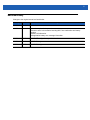
Revision History
Changes to the original manual are listed below:
Change
Date
Description
-01 Rev. A
08/27/07
Initial release.
-02 Rev. A
11/16/07
Update battery installation procedures.
Add note to wait 1 minute before inserting MC17 into cradle after new battery
insertion.
Add 802.11d information.
Add application battery error message information.
-03 Rev. A
09/08
Add MC17T configuration specific information.
-04 Rev. A
03/10
Add MC17A support.
-05 Rev. A
01/13
Add MC17U support.
iv
MC17/MC17A/MC17T/MC17U Product Reference Guide
TABLE OF CONTENTS
Revision History.............................................................................................................................. ii
About This Guide
Introduction .....................................................................................................................................
Documentation Set ...................................................................................................................
Configurations.................................................................................................................................
Software Versions.....................................................................................................................
OEM Software...........................................................................................................................
Fusion Software ........................................................................................................................
Chapter Descriptions ......................................................................................................................
Notational Conventions...................................................................................................................
Related Documents and Software ..................................................................................................
Service Information.........................................................................................................................
xi
xi
xii
xiii
xiii
xiii
xiv
xv
xv
xvi
Chapter 1: Getting Started
Introduction ....................................................................................................................................
Unpacking ......................................................................................................................................
Features .........................................................................................................................................
Accessories ...................................................................................................................................
LED Indicators ...............................................................................................................................
Keypad ...........................................................................................................................................
Getting Started ...............................................................................................................................
Connecting the Battery .................................................................................................................
Charging the Battery ................................................................................................................
Manual Release of MC17 Series from the Charging Cradle ....................................................
Software Release of MC17 Series from the Charging Cradle .................................................
Starting the MC17 Series Mobile Computer ..................................................................................
Non-Touch and Touch Screens .....................................................................................................
Data Capture .................................................................................................................................
Scanning Considerations .........................................................................................................
Scanning Bar Codes ................................................................................................................
Scanning Tips ....................................................................................................................
LED Indications ........................................................................................................................
1-1
1-1
1-2
1-4
1-5
1-5
1-6
1-6
1-9
1-10
1-11
1-12
1-13
1-13
1-13
1-13
1-14
1-14
vi
MC17/MC17A/MC17T/MC17U Product Reference Guide
Resetting the MC17 Series Mobile Computer ...............................................................................
Performing a Warm Boot .........................................................................................................
Performing a Cold Boot ............................................................................................................
Replacing the Bezel .......................................................................................................................
1-15
1-15
1-15
1-16
Chapter 2: Staging and Provisioning
Introduction ....................................................................................................................................
Staging ...........................................................................................................................................
Bar Code Staging .....................................................................................................................
On-Demand Staging ................................................................................................................
ActiveSync Connection Mode ............................................................................................
Already existing IP Connection Mode ................................................................................
Well-known WLAN Connection Mode ................................................................................
RD Client Main Menu ...............................................................................................................
Client Info ...........................................................................................................................
Log Menu ...........................................................................................................................
View Log ............................................................................................................................
View Job Log .....................................................................................................................
Set Log Level .....................................................................................................................
Set Job Log Level ..............................................................................................................
Package List ......................................................................................................................
Provisioning ...................................................................................................................................
MSP Agent ...............................................................................................................................
MSP Agent Main Menu ............................................................................................................
Monitor Processing ............................................................................................................
Force Check-In ..................................................................................................................
Package List ......................................................................................................................
Client Info ...........................................................................................................................
Log Menu ...........................................................................................................................
View Log ............................................................................................................................
View Job Log .....................................................................................................................
Set Log Level .....................................................................................................................
Set Job Log Level ..............................................................................................................
Hide UI ...............................................................................................................................
2-1
2-1
2-2
2-4
2-4
2-4
2-4
2-6
2-6
2-7
2-7
2-8
2-8
2-9
2-9
2-11
2-11
2-11
2-12
2-12
2-12
2-13
2-13
2-14
2-14
2-15
2-15
2-16
Chapter 3: Wireless Applications
Introduction ....................................................................................................................................
802.11d Overview ..........................................................................................................................
Configuring My Country for Use with WLAN on an MC17 Series ..................................................
Enabled 802.11d Network ........................................................................................................
Disabled 802.11d Network .......................................................................................................
Create WCS Options Registry File .....................................................................................
Update MC17 via 802.11d Enabled Staging Network ........................................................
Connect to the Non-802.11d Network ................................................................................
Wireless Application on the MC17T/MC17U .................................................................................
Signal Strength Icon ......................................................................................................................
Turning Off the Radio ....................................................................................................................
3-1
3-1
3-1
3-2
3-2
3-2
3-2
3-3
3-3
3-4
3-5
Table of Contents
Chapter 4: ActiveSync
ActiveSync .....................................................................................................................................
Installing ActiveSync ......................................................................................................................
Mobile Computer Setup .................................................................................................................
Setting Up an ActiveSync Connection on the Host Computer .......................................................
Setting up a Partnership ..........................................................................................................
4-1
4-1
4-2
4-2
4-3
Chapter 5: Using the Windows CE Desktop
Introduction ....................................................................................................................................
ActiveSync .....................................................................................................................................
Remote Control Software ...............................................................................................................
Connection to Host Computer ........................................................................................................
Development Cable Removal ..................................................................................................
App Launcher Window ...................................................................................................................
Windows CE 5.0 Desktop ..............................................................................................................
Status Icons .............................................................................................................................
Battery Unknown Icon ..............................................................................................................
Start Button ..............................................................................................................................
Programs Menu .......................................................................................................................
Desktop Display Button ............................................................................................................
Entering Information Using the Keyboard Input Panel .............................................................
Task Bar and Start Menu Properties ........................................................................................
Properties ...........................................................................................................................
Advanced Tab ....................................................................................................................
Screen Calibration .........................................................................................................................
Waking the MC17 Series ...............................................................................................................
5-1
5-1
5-1
5-1
5-5
5-6
5-7
5-7
5-8
5-9
5-9
5-10
5-10
5-10
5-10
5-11
5-11
5-12
Chapter 6: Special Considerations
Introduction ....................................................................................................................................
Fonts ..............................................................................................................................................
Asian Font Installation ..............................................................................................................
Software Development Considerations ..........................................................................................
Tips for Improving Battery Charge Time ........................................................................................
Cradle-Backlight Feature .........................................................................................................
Tips for Improving Battery Life .......................................................................................................
Changing the Power Settings ..................................................................................................
Changing the Display Backlight Settings .................................................................................
MC17U Non-touch Support ......................................................................................................
6-1
6-1
6-2
6-2
6-2
6-3
6-3
6-4
6-4
6-5
Chapter 7: Pocket Browser
Introduction .................................................................................................................................... 7-1
Sample Application ........................................................................................................................ 7-1
Chapter 8: Cradle Installation
Introduction .................................................................................................................................... 8-1
Installation of the Charging Cradle ................................................................................................. 8-1
Removing the Front Cover ....................................................................................................... 8-1
vii
viii
MC17/MC17A/MC17T/MC17U Product Reference Guide
Mounting the Cradle .................................................................................................................
Wiring .............................................................................................................................................
Assembly .......................................................................................................................................
Cradle Location Bar Code ........................................................................................................
System Cabling ..............................................................................................................................
Mounting the Power Supply Housing .............................................................................................
8-2
8-4
8-5
8-6
8-7
8-9
Chapter 9: Application Deployment
Software Installation on Development PC .....................................................................................
Device Configuration Package .................................................................................................
Platform SDK ...........................................................................................................................
Enterprise Mobility Developer Kits ...........................................................................................
Installing Other Development Software ...................................................................................
Deployment ....................................................................................................................................
ActiveSync ...............................................................................................................................
IPL ............................................................................................................................................
Creating Hex Images .....................................................................................................................
Starting Terminal Configuration Manager ................................................................................
Defining Script Properties ........................................................................................................
Creating the Script for the Hex Image ......................................................................................
Opening a New or Existing Script ......................................................................................
Updating TCM 1.X Scripts .................................................................................................
Copying Components to the Script ....................................................................................
Saving the Script ................................................................................................................
Building the Image ...................................................................................................................
Sending the Hex Image Using IPL .................................................................................................
TCM Error Messages ...............................................................................................................
IPL Error Detection ..................................................................................................................
Creating a Splash Screen ........................................................................................................
Splash Screen Format .............................................................................................................
OS Update .....................................................................................................................................
MC17 and MC17A ...................................................................................................................
MC17T/MC17U ........................................................................................................................
Flash Storage ................................................................................................................................
FFS Partitions ..........................................................................................................................
Working with FFS Partitions .....................................................................................................
RegMerge.dll ......................................................................................................................
CopyFiles ...........................................................................................................................
Non-FFS Partitions ..................................................................................................................
Downloading Partitions to the Mobile Computer ......................................................................
9-1
9-1
9-2
9-2
9-2
9-3
9-3
9-4
9-5
9-5
9-7
9-8
9-8
9-8
9-8
9-9
9-9
9-10
9-14
9-16
9-18
9-18
9-19
9-19
9-21
9-23
9-23
9-23
9-23
9-24
9-24
9-25
Chapter 10: Maintenance and Troubleshooting
Introduction ....................................................................................................................................
Maintaining the Mobile Computer ..................................................................................................
Battery Safety Guidelines ..............................................................................................................
Battery Management .....................................................................................................................
Clearing the Battery .................................................................................................................
Long Term Storage ........................................................................................................................
Cleaning .........................................................................................................................................
10-1
10-1
10-1
10-2
10-2
10-3
10-4
Table of Contents
Materials Required ...................................................................................................................
Cleaning the MC17 Series .......................................................................................................
Housing ..............................................................................................................................
Display ...............................................................................................................................
Scanner Exit Window .........................................................................................................
Connector ...........................................................................................................................
Cleaning Cradle Connectors ....................................................................................................
Cleaning Frequency .................................................................................................................
Troubleshooting .............................................................................................................................
Mobile Computer ......................................................................................................................
Charging Cradle .......................................................................................................................
10-4
10-4
10-4
10-4
10-4
10-4
10-5
10-5
10-6
10-6
10-9
Appendix A: Technical Specifications
Technical Specifications ................................................................................................................
Charging Cradle .......................................................................................................................
Cable Specifications ......................................................................................................................
Power Supply Cable, Y-type ....................................................................................................
Cradle Interconnection Cable ..................................................................................................
A-1
A-3
A-6
A-6
A-6
Appendix B: AirBEAM Smart Client
Introduction ....................................................................................................................................
AirBEAM Package Builder .............................................................................................................
AirBEAM Smart Client ....................................................................................................................
AirBEAM License .....................................................................................................................
Configuring the AirBEAM Smart Client ....................................................................................
Packages(1) Tab ................................................................................................................
Packages(2) Tab ................................................................................................................
Server Tab .........................................................................................................................
Misc(1) Tab ........................................................................................................................
Misc(2) Tab ........................................................................................................................
Misc(3) Tab ........................................................................................................................
Misc(4) Tab ........................................................................................................................
Synchronizing with the Server ............................................................................................
Manual Synchronization .....................................................................................................
Automatic Synchronization .................................................................................................
AirBEAM Staging .....................................................................................................................
B-1
B-1
B-2
B-2
B-2
B-2
B-3
B-4
B-4
B-5
B-6
B-7
B-8
B-9
B-9
B-9
Appendix C: App Launcher Configuration
Configuration .................................................................................................................................. C-1
Glossary
Index
ix
x
MC17/MC17A/MC17T/MC17U Product Reference Guide
ABOUT THIS GUIDE
Introduction
This guide provides information about setting up and configuring MC17 mobile computers and accessories.
NOTE Screens and windows pictured in this guide are samples and can differ from actual screens.
Documentation Set
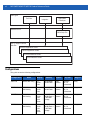
The documentation set for the MC17 is divided into guides that provide information for specific user needs.
• MC17/MC17A/MC17T/MC17U Mobile Computer Quick Reference Guide - describes how to set up the
MC17,MC17A and MC17T mobile computers.
• MC17/MC17A/MC17T/MC17U Mobile Computer Product Reference Guide - describes how to set up,
operate and program the MC17 series mobile computer and the accessories.
• Microsoft Applications for Windows Mobile and WinCE 5.0 User Guide - describes how to use Microsoft
developed applications.
•
Application Guide for Motorola Enterprise Mobility Devices - describes how to use Motorola developed
applications.
• EMDK Help File - provides API information for writing applications.
xii
MC17/MC17A/MC17T/MC17U Product Reference Guide
User Types
End-User
Integrator
Application
Developer
SMDK for eVC4
SMDK Help File
Box or Support Central
Web Site
Microsoft Appication Guide
Symbol Application Guide
Product Reference Guide
Quick Reference Guide
Configurations
This guide covers the following configurations:
Configuration
Radio
Display
Memory
Data
Capture
Operating
System
Keypad
MC17-00
WLAN: 802.11b/g
2.8”
QVGA
Color
64 MB RAM/
64 MB Flash
Laser
scanner
Windows
CE 5.0
Professional
6-key
MC17A-00
WLAN:
802.11a/b/g
2.8”
QVGA
Color
64 MB RAM/
64 MB Flash
Laser
scanner
Windows
CE 5.0
Professional
6-key
MC17T-00
WLAN:
802.11a/b/g
2.8”
QVGA
Color
touch
screen
64 MB RAM/
64 MB Flash +
1 GB Flash
storage
Laser
scanner
Windows
CE 5.0
Professional
6-key
MC17U-00
WLAN:
802.11a/b/g
2.8”
QVGA
Color
touch
screen
64 MB RAM/
64 MB Flash +
1 GB Flash
storage
Laser
scanner
Windows
CE 5.0
Professional
6-key
About This Guide
xiii
Software Versions
This guide covers various software configurations and references are made to operating system or software
versions.
OEM Software
To determine the OEM software version on the MC17:
1.
Connect the mobile computer to a host computer using the Development Cable.
2.
Connect to the mobile computer using remote control software. See Remote Control Software on page 5-1
for more information.
3.
Click Start > Settings > Control Panel > System Info icon.
To determine the OEM software version on the MC17 series with OEM Version 01.30.06 or greater:
In App Launcher, select 3 - Device Info.
Fusion Software
To determine the Fusion software version on MC17 series with OEM version 01.30.06 or greater:
In App Launcher, select 3 - Device Info.
xiv
MC17/MC17A/MC17T/MC17U Product Reference Guide
Chapter Descriptions
Topics covered in this guide are as follows:
• Chapter 1, Getting Started, lists the accessories for the mobile computer and explains how to install and
charge the batteries and start the mobile computer for the first time.
• Chapter 2, Staging and Provisioning, provides information for staging and provisioning the mobile
computer using Mobility Software Platform (MSP).
• Chapter 3, Wireless Applications, provides instructions for configuring the wireless adapter.
• Chapter 4, ActiveSync, provides instructions on installing ActiveSync and setting up a partnership
between the mobile computer and a host computer.
• Chapter 5, Using the Windows CE Desktop, Provides instructions for accessing the OS desktop of the
mobile computer.
• Chapter 6, Special Considerations, provides information to consider when using and developing
applications for the mobile computer.
• Chapter 7, Pocket Browser, provides instructions for installing ActiveSync and setting up a partnership
between the mobile computer and a host computer.
• Chapter 8, Cradle Installation, provides the installation instructions for the Charging cradle and other
accessories.
• Chapter 9, Application Deployment, provides instructions for installing the Device Configuration Package
(DCP) for MC17x0 and the EMDK for C on the host computer and downloading software and files to the
mobile computer.
• Chapter 10, Maintenance and Troubleshooting, includes instructions on cleaning and storing the mobile
computer, and provides troubleshooting solutions for potential problems during mobile computer
operation.
• Appendix A, Technical Specifications, includes a table listing the technical specifications for the mobile
computer and accessories.
• Appendix B, AirBEAM Smart Client, provides information for staging and provisioning the mobile
computer using the AirBEAM Smart Client.
• Appendix C, App Launcher Configuration, provides information for configuring the App Launcher
application.
About This Guide
xv
Notational Conventions
The following conventions are used in this document:
• “Mobile computer” refers to the Motorola MC17 series of mobile computers.
• Italics are used to highlight the following:
• Chapters and sections in this guide
• Related documents
• Bold text is used to highlight the following:
• Dialog box, window and screen names
• Drop-down list and list box names
• Check box and radio button names
• Icons on a screen
• Key names on a keypad
• Button names on a screen.
• Bullets (•) indicate:
• Action items
• Lists of alternatives
• Lists of required steps that are not necessarily sequential.
Sequential lists (e.g., those that describe step-by-step procedures) appear as numbered lists.
NOTE This symbol indicates something of special interest or importance to the reader. Failure to read the note
will not result in physical harm to the reader, equipment or data.
CAUTION
WARNING!
This symbol indicates that if this information is ignored, the possibility of data or material damage
may occur.
This symbol indicates that if this information is ignored the possibility that serious personal
injury may occur.
Related Documents and Software
The following documents provide more information about the MC17 mobile computers.
• MC17 Quick Reference Guide, p/n 72-100298-xx
• MC17 STEP User Guide, p/n 72E-103347-xx
• Mobility Services Platform 3.X User’s Guide, p/n 72E-100158-xx
• Application Guide for Motorola Enterprise Mobility Devices, p/n 72E-68901-xx
• Microsoft Applications for Windows Mobile and CE 5.0 User Guide, p/n 72E-78456-xx
• Symbol Mobility Developer Kits, available at: http://supportcentral.motorola.com
• Device Configuration Package (DCP for MC17xxc50) and Platform SDK for MC17 with Windows CE 5.0,
available at: http://supportcentral.motorola.com
xvi
MC17/MC17A/MC17T/MC17U Product Reference Guide
• Latest ActiveSync software, available at: http://www.microsoft.com.
For the latest version of this guide and all guides, go to: http://supportcentral.motorola.com.
Service Information
If you have a problem with your equipment, contact Motorola Solutions Global Customer Support for your
region. Contact information is available at: http://www.motorolasolutions.com/support.
When contacting Motorola Solutions Global Customer Support, please have the following information
available:
• Serial number of the unit
• Model number or product name
• Software type and version number.
Motorola responds to calls by E-mail or telephone within the time limits set forth in support agreements.
If your problem cannot be solved by Motorola Solutions Global Customer Support, you may need to return your
equipment for servicing and will be given specific directions. Motorola is not responsible for any damages
incurred during shipment if the approved shipping container is not used. Shipping the units improperly can
possibly void the warranty.
If you purchased your Motorola Solutions business product from a Motorola business partner, contact that
business partner for support.
CHAPTER 1 GETTING STARTED
Introduction
This chapter describes the features of the MC17 series mobile computer and explains how to install and
charge the battery, how to capture data using the integrated laser scanner and how to reset the mobile
computer.
Unpacking
Carefully remove all protective material from the mobile computer and save the shipping container for later
storage and shipping.
Verify that box contains all the equipment listed below:
• MC17 mobile computer
• Lithium-ion battery (installed in handle)
• Quick Reference Guide.
Inspect the equipment for damage. If you are missing any equipment or if you find any damaged equipment,
contact the Motorola Solutions Global Customer Support immediately. See Service Information on page xvi for
contact information.
1-2
MC17/MC17A/MC17T/MC17U Product Reference Guide
Features
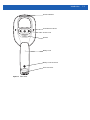
LED
Bezel
Display
MC17
series
Keypad
Figure 1-1 Front View
Introduction
Scan Exit Window
Front Bezel Torx Screw
Access Cover
Speaker
Battery Cover
Battery Cover Torx Screw
Power Connector
Figure 1-2 Back View
1-3
1-4
MC17/MC17A/MC17T/MC17U Product Reference Guide
Accessories
Table 1-1 Accessories
Item
Part Number
Description
Locking Charging Cradle
PSS-3CR01-00R
Provides power and storage for the mobile computer.
Non-Locking Charging
Cradle
PSS-3CR01-NLR
Provides power and non-locking storage for the mobile
computer.
Cradle Key
PSS-3KY01-00R
Manually releases the mobile computer from the
Charging cradle.
Cradle Key Pack
PSS-3KY01-20R
Manually releases the mobile computer from the
Charging cradle. (20-pack)
Power Supply
50-14000-241R
Provides power to the Charging cradle.
Power Supply Housing
PSS-3PS04-00R
Encloses the power supply.
Daisy Chain Cable
25-66431-01R
Interconnects two Charging cradles.
Power Cable
25-66420-01R
Connects the power supply to up to six Charging cradle
(using the daisy chain cable).
Y-Power Cable
25-67592-01R
Connects the power supply to up to 12 Charging cradles
(using the daisy chain cable).
Cradle Location Labels
PSS-3LB02-00R
PSS-3LB03-00R
PSS-3LB04-00R
Contains “1” - “300” pre-printed bar code labels.
Contains six each, “1” - “300” pre-printed bar code labels.
Contains “1” - “1000” pre-printed bar code labels.
Development Cable
25-101374-01R
Connects the mobile computer to a host computer along
with the USB cable.
USB Cable
25-68596-01R
Connects the mobile computer to a host computer along
with the Development cable.
Cart Holder
PSS-3SH01-00R
Provides a mounting solution for the mobile computer on
a shopping cart.
Screen Protector Kit
KT-114012-01R
Package of 3 screen protectors.
MC17 and MC17A Bezel
KT-098273-01R
Package of 50 replacement bezels for the MC17 and
MC17A.
MC17T and MC17U Bezel
KT-098274-00R
Package of 50 replacement bezels for the MC17T and the
MC17U.
Introduction
1-5
LED Indicators
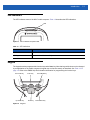
The LED indicates status of the MC17 mobile computer. Table 1-2 describes the LED indications.
LED
Figure 1-3 MC17 Mobile Computer LED
Table 1-2 LED Indications
LED State
Indication
Solid red
Scanner is enabled.
Solid green
Bar code decoded successfully.
Keypad
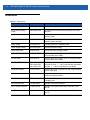
The keypad contains programmable function keys and a Scan key. Note that keypad functions can be changed
by an application so the mobile computer’s keypad may not function exactly as described. See Table 1-3 on
page 1-6. Refer to the EMDK Help file for detailed information for programming the function keys.
Scroll Left Key
Enter Key
Up Arrow Key
Scan Key
Figure 1-4 Keypad
Scroll Right Key
Down Arrow Key
1-6
MC17/MC17A/MC17T/MC17U Product Reference Guide
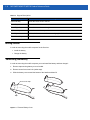
Table 1-3 Keypad Descriptions
Key
Description
Scroll Left Key
Moves the cursor focus to the left.
Enter Key
Executes a selected item or function.
Scroll Right Key
Moves the cursor focus to the right.
Up Arrow Key
Moves the cursor focus up.
Scan Key
Enables the laser scanner when a scanning application is active.
Down Arrow Key
Moves the cursor focus down.
Getting Started
In order to start using the mobile computer for the first time:
• Install the battery
• Charge the battery.
Connecting the Battery
In order to start using the mobile computer you must install the battery and then charge it.
1.
Remove tape securing battery cover to handle.
2.
Remove screw from screw hole (under tape).
3.
Slide the battery cover toward the bottom of the handle and then lift.
Screw Under Tape
Tape
Figure 1-5 Remove Battery Cover
Introduction
1-7
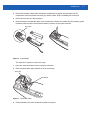
4.
Ensure that the black rubber pad in the battery compartment is lying flat along the bottom of the
compartment, with its smoother side facing up, and the rubber “fingers” straddling the screw boss.
5.
Ensure the wire latch is in the up position.
6.
Place the battery, rounded side down, in the compartment. Using a non-metallic tool (if necessary), guide
the battery cable connector into the female battery connector on the mobile computer.
Wire Latch
Figure 1-6 Insert Battery
The connector is keyed so it only fits one way.
7.
Press the connector down to ensure a positive connection.
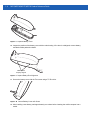
8.
Place wire latch down until just below top of the screw boss.
Wire Latch
Screw Boss
Figure 1-7 Close Wire Latch
9.
Place the battery cover onto the handle and slide it as shown.
1-8
MC17/MC17A/MC17T/MC17U Product Reference Guide
Figure 1-8 Replace Battery Cover
10. Inspect the position of the battery cover with the main housing. If the door is misaligned, remove battery
and black rubber pad and re-install.
Battery Door
Properly Aligned
Figure 1-9 Inspect Battery Door Alignment
11. Secure the battery cover with the Torx screw using a T8 Torx drive.
Figure 1-10 Secure Battery Cover with Screw
12. After installing a new battery, wait approximately one minute before inserting the mobile computer into a
cradle.
Introduction
1-9
NOTE When installing a new battery or performing an OS Update, wait approximately one minute before inserting the
MC17 into a cradle.
13. Run the battery service procedure. See Clearing the Battery on page 10-2 for information.
Charging the Battery
CAUTION
Ensure that you follow the guidelines for battery safety described in Battery Safety Guidelines on page
10-1.
NOTE Charge time is based upon the following; WLAN radio is set to maximum power mode, WLAN is
associated with an Access Point and display backlight set to 25% brightness.
Before using the mobile computer for the first time, charge the battery. The battery fully charges in
approximately five hours.
To charge the battery:
1.
Ensure the Charging cradle is connected to the appropriate power source. See Chapter 8, Cradle
Installation for more information.
2.
Insert the mobile computer into a cradle.
Red Charging LED Location
Figure 1-11 Insert MC17 Series into Cradle
3.
The mobile computer starts to charge automatically. While charging, a red charging LED can be seen
through the front panel of the cradle behind the mobile computer.
1 - 10 MC17/MC17A/MC17T/MC17U Product Reference Guide
Manual Release of MC17 Series from the Charging Cradle
The Charging cradle, p/n PSS-3CR01-00R, contains a locking mechanism that locks the mobile computer into
the cradle. The mobile computer releases from the cradle via a software command to the cradle. If the mobile
computer does not have the capability to un-lock the cradle, un-lock it manually using the optional dispenser
(cradle) key, (p/n PSS-3KY01-00R).
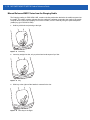
1.
Hold key with hook end pointing to the right.
Figure 1-12 Insert Key
2.
Insert key straight into slot, only to point where bend stops on lip of slot.
Figure 1-13 Key
3.
Slide key to the right until the handle is centered in the slot.
Figure 1-14 Slide Key to the Right
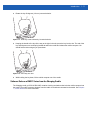
Introduction 1 - 11
4.
Rotate the key 90 degrees (1/4 turn) counterclockwise.
Figure 1-15 Slide Key to the Rotate Key Counterclockwise
5.
Keeping the handle of the key all the way to the right in the slot, press the key into the slot. The end of the
key should press on a small spring loaded tab within the cradle and release the mobile computer. You
should feel the tab moving as you press down.
Figure 1-16 Press Key into Slot
6.
While holding the key down, lift the mobile computer out of the cradle.
Software Release of MC17 Series from the Charging Cradle
The Charging cradle, p/n PSS-3CR01-00R, contains a locking mechanism that locks the mobile computer into
the cradle. The mobile computer releases from the cradle via a software command to the cradle. See Chapter
7, Pocket Browser for more information.
1 - 12 MC17/MC17A/MC17T/MC17U Product Reference Guide
Starting the MC17 Series Mobile Computer
The mobile computer starts automatically as soon as power is applied; either with a charged battery installed or
when inserted into the cradle. If the mobile computer does not power on, perform a cold boot. See Performing
a Cold Boot on page 1-15.
When the mobile computer is powered on for the first time, it initializes its system. The splash screen (Figure
1-17) appears for a short period of time.
Figure 1-17 Splash Screen
On the MC17 and the MC17A, the splash screen is followed by the App Launcher window.
On the MC17T and the MC17U, the splash screen is followed by the Calibration screen. Carefully press and
briefly hold a pointing instrument on the center of each target that appears on the screen. Repeat as the target
moves around the screen, then tap the screen to continue. After completing the screen calibration, the App
Launcher window appears.
NOTE App Launcher window may vary depending upon the MC17 series’s operating system version.
Figure 1-18 App Launcher Window
Introduction 1 - 13
Non-Touch and Touch Screens
The MC17 and MC17A configurations do not have touch screens. All interactions are preformed using the
keypad. The MC17T and the MC17U configurations have touch screens. Interactions are performed either with
the keypad or by tapping on the screen.
Throughout this guide, the procedures are listed using the keypad for actions. On the MC17T and the MC17U
these same procedures can be completed by tapping the buttons or menus on the display whenever
supported.
Data Capture
The MC17 series uses a laser scanner to allow collection of data by scanning one dimensional bar codes.
The scanner has the following features:
• Reads a variety of bar code symbologies, including the most popular linear, postal, and 1-D code types.
• Contains advanced intuitive laser aiming for easy point-and-shoot operation.
Scanning Considerations
Typically, scanning is a simple matter of aim, scan/decode and a few quick trial efforts master it. However, two
important considerations can be used to optimize any scanning performance:
• Range
Any scanning device decodes well over a particular working range — minimum and maximum distances
from the bar code. This range varies according to bar code density and scanning device optics.
Scanning within range brings quick and constant decodes; scanning too close or too far away prevents
decodes. Move the mobile computer closer and further away to find the right working range for the bar
codes being scanned. However, the situation is complicated by the availability of various integrated
scanning modules. The best way to specify the appropriate working range per bar code density is through
a chart called a decode zone for each scan module. A decode zone simply plots working range as a
function of minimum element widths of bar code symbols.
• Angle
Scanning angle is important for promoting quick decodes. When laser beams reflect directly back into the
scanner from the bar code, this specular reflection can “blind” the scanner.
To avoid this, scan the bar code so that the beam does not bounce directly back. But don’t scan at too
sharp an angle; the scanner needs to collect scattered reflections from the scan to make a successful
decode. Practice quickly shows what tolerances to work within.
NOTE Contact the Motorola Solutions Global Customer Support if chronic scanning difficulties develop.
Decoding of properly printed bar codes should be quick and effortless.
Scanning Bar Codes
1.
Ensure that a scan enabled application is loaded on the mobile computer.
2.
Aim the scan exit window at the bar code.
3.
Press the Scan key.
1 - 14 MC17/MC17A/MC17T/MC17U Product Reference Guide
• Ensure the red scan beam covers the entire bar code. The LED lights red to indicate that the laser is on.
The LED changes to green and audible beep might sound, if the application determines, to indicate the
bar code was decoded successfully.
Figure 1-19 Laser Scanner Aiming Pattern
Release the trigger.
4.
Scanning Tips
Optimal scanning distance varies with bar code density and scanner optics.
• Hold the scanner farther away for larger symbols.
• Move the scanner closer for symbols with bars that are close together.
NOTE Scanning procedures depend on the application and mobile computer configuration. An application may
use different scanning procedures from the one listed above.
LED Indications
The LED on the mobile computer provides a visual indication of the scan status.
Table 1-4 LED Indicators
LED Status
Indication
Off
Not scanning.
Solid red
Laser enabled, scanning in process.
Solid green
Successful decode.
Introduction 1 - 15
Resetting the MC17 Series Mobile Computer
There are two types of resets, warm boot and cold boot. A warm boot restarts the mobile computer by closing
all running programs.
Perform a warm boot first. This restarts the mobile computer and saves all stored records and entries. If the
mobile computer still does not respond, perform a cold boot.
A cold boot restarts the mobile computer, but erases all stored records and entries in RAM. Data saved in flash
memory is not lost. In addition it returns formats, preferences, time zone information and other settings to the
factory default settings except for the real-time clock.
Performing a Warm Boot
To perform a warm boot, press and simultaneously hold the Up Arrow and the Down Arrow keys for 10
seconds and then press the Scan key. Release the Up Arrow and the Down Arrow keys. Wait one second and
then release the Scan key.
Performing a Cold Boot
A cold boot restarts the mobile computer and erases all user stored records and entries that are not saved in
flash memory (Application and Platform folders). Never perform a cold boot unless a warm boot does not solve
the problem.
NOTE Any data previously synchronized with a computer can be restored during the next ActiveSync operation.
To perform a cold boot, press and simultaneously hold the Up Arrow and Down Arrow keys for 10 seconds and
then press and hold the Scan key. Release the Up and Down Arrow keys and continue to hold the Scan key
until the display turns off. Release the Scan key.
1 - 16 MC17/MC17A/MC17T/MC17U Product Reference Guide
Replacing the Bezel
The plastic bezel that covers the display can be replaced if broken or to install a customer specific bezel.
1.
Place the mobile computer on a desktop with the display facing down.
2.
Using a T6 Torx drive, remove two screws securing the bezel to the housing.
Figure 1-20 Bezel Removal
3.
Align the replacement bezel on the housing.
4.
Using a T6 Torx drive, secure the bezel to the housing using the two Torx screws.
5.
Torque the screws to 2.5 ± 0.2 kgf/cm (2.17 ± 0.17 in-lbs.).
CHAPTER 2 STAGING AND PROVISIONING
Introduction
This chapter describes how to stage and provision the MC17 series mobile computers using Mobility Services
Platform (MSP) 3.X.
Staging
Staging is the process of setting up the mobile computer to download packages for provisioning. The mobile
computer uses the Rapid Deployment (RD) Client for staging.
The RD Client enables simple and rapid provisioning of new (out of the box) mobile computers and simplifies
the out-of-box provisioning by scanning bar codes or connecting to a profile server. The RD Client acts as a
frontend for wireless radio configuration and AirBEAM Smart components, automating the manual
configurations that would normally be required to use these tools.
NOTE The MSP 3.0 Rapid Deployment Client enables staging by scanning staging profiles encoded into staging
bar code sheets. It also enables staging to be performed without scanning bar codes through the use of
On-Demand Staging.
When using On-Demand Staging, the RD Client pulls staging profiles directly from an On-Demand Profile
Server over some form of pre-configured or automatically-configured IP connection.
For detailed information about the MSP 3.X, refer to the Mobility Services Platform 3.X User’s Guide.
An MSP Administrator uses the MSP Console for the creation of an RD profile that contains all the wireless
network and security information (for example, ESSID, WEP Keys, etc.) required to get a mobile computer
onto the wireless network. The profile also contains FTP server access information needed to connect to the
provisioning MSP and the list of software packages to be provisioned to the mobile computer from the
provisioning MSP. The RD profile can then be encoded into an RD bar code sheet and printed from the MSP
Console or loaded onto a profile server.
2-2
MC17/MC17A/MC17T/MC17U Product Reference Guide
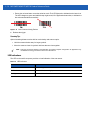
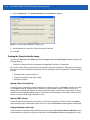
Figure 2-1 RD Bar Code Printout Sample
Bar Code Staging
When the mobile computer boots for the first time (or after a cold boot) the App Launcher window appears. The
RD Client option is highlighted.
NOTE If the App Launcher screen does not display see your administrator.
1.
Obtain the appropriate RD bar code sheet from the MSP Administrator.
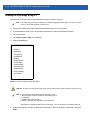
2.
Press the Enter key to launch the RD Client. The Scan Barcodes To Deploy window displays.
Figure 2-2 Waiting for Bar Codes
The RD Client waits for the first bar code scan.
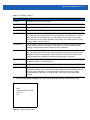
3.
Scan the first bar code. The window indicates which bar code to scan next.
NOTE Multi-part linear bar codes (1-D bar codes) can require scanning several bar codes. Bar codes can be
scanned in any order. The display indicate the bar code to scan.
Staging and Provisioning
Figure 2-3 Rapid Deployment Window - Scanning Bar Codes
4.
After all the bar codes are scanned successfully, the mobile computer connects to the server and the
PROCESSING PROFILE window displays while network settings are configured.
Figure 2-4 Rapid Deployment Window - Processing Profile
5.
When staging is complete the STAGING COMPLETE window displays.
Figure 2-5 Staging Complete Window
6.
Press the left function key to exit the RD Client.
2-3
2-4
MC17/MC17A/MC17T/MC17U Product Reference Guide
On-Demand Staging
The MSP 3.0 RD Client also enables staging without having to scan bar codes through the use of On-Demand
Staging (Electronic Staging).
When using On-Demand Staging, the RD Client pulls staging profiles directly from an On-Demand Profile
Server over some form of pre-configured or automatically-configured IP connection. The following types of IP
connection modes are currently supported for Electronic Staging:
ActiveSync Connection Mode
This mode uses the IP connection that is established when the mobile computer is directly connected (via a
USB cable, serial cable or cradle) to a host computer running ActiveSync. The most common scenario would
be where the On-Demand Profile Server is running on the host computer to which the mobile computer is
connected via ActiveSync. It would, however, also work with the On-Demand Profile Server running on any
other host computer that is on the same subnet as the host computer to which the mobile computer is
connected via ActiveSync.
Already existing IP Connection Mode
This mode uses any IP connection that is already active on the mobile computer. This could be a direct
Ethernet port (if available), or a WLAN connection that was configured and established before the RD Client
was launched. It could also be any other form of IP connection that might be available on the mobile computer.
The RD Client does not do anything to configure or establish such connections, but uses them if they exist. The
On-Demand Profile Server must be running on a host computer that is on the same subnet that is accessible
from the connection.
Well-known WLAN Connection Mode
This mode works only on supported Motorola WLAN adapters. The RD Client attempts to configure and
establish WLAN IP connections using pre-defined Motorola WLAN settings. If the RD Client is able to
successfully configure and establish such a connection, and if an On-Demand Profile Server is running on a
host computer that is on the same subnet that is accessible from the connection, then Electronic Staging
proceeds using that connection.
To perform On-Demand Staging:
1.
In the App Launcher menu, press the center function key to launch the RD Client. The Scan Barcodes To
Deploy window displays.
Figure 2-6 Waiting for Bar Codes
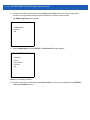
2.
Press the left function key to select Options. The Main Menu window appears.
Staging and Provisioning
2-5
Figure 2-7 RD Client Main Menu
3.
Use the up/down arrow keys to select Search Connected Networks or Search Unconnected Networks
and then press the center function key. The SEARCHING NETWORKS window appears.
Connected networks are networks that are already connected and can be checked to see if a Staging
Server can be found. Unconnected Networks are the well-known WLAN connections that are automatically
configured and established to see if a Staging Server can be found.
Figure 2-8 RD Client Searching for On-Demand Profile Server
4.
When complete, the STAGING COMPLETE window displays.
Figure 2-9 Staging Complete Window
Press the left function key to exit.
2-6
MC17/MC17A/MC17T/MC17U Product Reference Guide
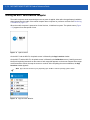
RD Client Main Menu
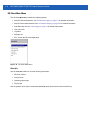
The RD Client Main Menu contains the following options:
• Search Connected Networks. See On-Demand Staging on page 2-4 for detailed information.
• Search Unconnected Networks. See On-Demand Staging on page 2-4 for detailed information.
• Scan Barcodes See Bar Code Staging on page 2-2 for detailed information.
• View Client Info
• Log Menu
• Package List
• Exit - Closes the RD Client application.
Figure 2-10 RD Client Main Menu
Client Info
Use the Client Info window to view the following information:
• RD Client version
• Product name
• Operating system type
• Plug-in type.
Use the up/down arrow keys to select View Client Info option and press the center function key.
Staging and Provisioning
Figure 2-11 Client Info Window
Press the left function key to return to the Main Menu.
Log Menu
The Log Menu contains the following options:
• View Log
• View Job Log
• Set Log Level
• Set Job Log Level.
Use the up/down arrow keys to select Log Menu option and press the center function key.
Figure 2-12 Log Menu Window
Press the left function key to return to the Main Menu.
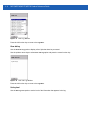
View Log
Use the View Log option to display a list of events that have occurred.
Use the up/down arrow keys to select View Log option and press the center function key.
2-7
2-8
MC17/MC17A/MC17T/MC17U Product Reference Guide
Figure 2-13 View Log Window
Press the left function key to return to the Log Menu.
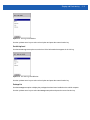
View Job Log
Use the View Job Log option to display a list of jobs that have be processed.
Use the up/down arrow keys to select View Job Log option and press the center function key.
Figure 2-14 View Job Log Window
Press the left function key to return to the Log Menu.
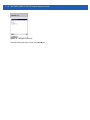
Set Log Level
Use the Set Log Level option to set the level of the information that appears in the log.
Staging and Provisioning
Figure 2-15 Set Log Level Window
Use the up/down arrow keys to select a level option and press the center function key.
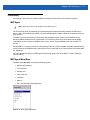
Set Job Log Level
Use the Set Job Log Level option to set the level of the information that appears in the Job log.
Figure 2-16 Set Job Log Level Window
Use the up/down arrow keys to select a level option and press the center function key.
Package List
Use the Package List option to display the packages that have been installed on the mobile computer.
Use the up/down arrow keys to select the Package List option and press the center function key.
2-9
2 - 10 MC17/MC17A/MC17T/MC17U Product Reference Guide
Figure 2-17 Package List Window
Press the left function key to return to the Main Menu.
Staging and Provisioning 2 - 11
Provisioning
Provisioning is the process of installing software packages onto the MC17 series mobile computers.
MSP Agent
NOTE MSP Agent is also known as MSP 3.X Provisioning Client.
The Provisioning Client is responsible for implementing device-side provisioning activities as defined by a
policy. A policy is evaluated on the MSP 3.X system and delivered to mobile computers as job documents via
relay servers.
The MSP 3.X Provisioning Client is 100% backward compatible to prior versions of the AirBEAM Client.
Existing AirBEAM Smart users can use the MSP 3.X Provisioning Client as a 100% backward compatible
replacement for prior versions of AirBEAM Client, when used in classic AirBEAM mode with existing FTP
servers.
Existing MSP 2.X users can use the new Provisioning Client as a 100% backward compatible replacement for
previous versions of AirBEAM Client, when used in Level 2 Agent and Level 3 Agent modes with existing MSP
2.X Appliances.
For more detailed information on MSP Agent (Provisioning Client), refer to the MSP 3.X User's Guide (p/n
72E-100158-xx).
MSP Agent Main Menu
The MSP Agent Main Menu contains the following options:
• Monitoring Processing
• Force Check-In
• Package List
• View Client info
• Log Menu
• Hide UI
• Exit - exits the MSP Agent application.
Figure 2-18 MSP Agent Main Menu
2 - 12 MC17/MC17A/MC17T/MC17U Product Reference Guide
Monitor Processing
Use the Monitor Processing option to view the status of packages being processed.
Use the up/down arrow keys to select the Monitor Processing option and press the center function key.
Figure 2-19 Monitor Processing Window
Press the left function key to return to the Main Menu.
Force Check-In
Use the Force Check-In option to check instantly for pending package downloads instead of waiting for the next
automatic check that the client performs.
Use the up/down arrow keys to select the Force Check-In option and press the center function key.
Figure 2-20 Force Check-in Window
Press the left function key to return to the Main Menu.
Package List
Use the Package List option to display the packages that have been installed on the mobile computer.
Use the up/down arrow keys to select the Package List option and press the center function key.
Staging and Provisioning 2 - 13
Figure 2-21 Package List Window
Press the left function key to return to the Main Menu.
Client Info
Use the Client Info window to view the following information:
• RD Client version
• Product name
• Operating system type
• Plug-in type.
Use the up/down arrow keys to select View Client Info option and press the center function key.
Figure 2-22 Client Info Window
Press the left function key to return to the Main Menu.
Log Menu
The Log Menu contains the following options:
• View Log
• View Job Log
• Set Log Level
2 - 14 MC17/MC17A/MC17T/MC17U Product Reference Guide
• Set Job Log Level.
Use the up/down arrow keys to select Log Menu option and press the center function key.
Figure 2-23 Log Menu Window
Press the left function key to return to the Main Menu.
View Log
Use the View Log option to display a list of events that have occurred.
Use the up/down arrow keys to select View Log option and press the center function key.
Figure 2-24 View Log Window
Press the left function key to return to the Log Menu.
View Job Log
Use the View Job Log option to display a list of jobs that have be processed.
Use the up/down arrow keys to select View Job Log option and press the center function key.
Staging and Provisioning 2 - 15
Figure 2-25 View Job Log Window
Press the left function key to return to the Log Menu.
Set Log Level
Use the Set Log Level option to set the level of the information that appears in the log.
Figure 2-26 Set Log Level Window
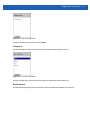
Use the up/down arrow keys to select a level option and press the center function key.
Set Job Log Level
Use the Set Job Log Level option to set the level of the information that appears in the Job log.
2 - 16 MC17/MC17A/MC17T/MC17U Product Reference Guide
Figure 2-27 Set Job Log Level Window
Use the up/down arrow keys to select a level option and press the center function key.
Hide UI
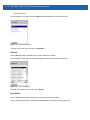
Use the Hide UI option to minimize the MSP Agent application. The MSP Agent application runs in the
background while minimized.
To un-hide the application, select the MSP Agent icon in the task tray and select the UnHide UI menu item.
Figure 2-28 UnHide UI Selection
CHAPTER 3 WIRELESS APPLICATIONS
Introduction
Wireless Local Area Networks (WLANs) allow the MC17 series mobile computers to communicate wirelessly
and send captured data to a host device in real time. The mobile computer supports the 802.11a, 802.11b and
802.11g standards. Before using the mobile computer on a WLAN, the facility must be set up with the required
hardware to run the wireless LAN and the mobile computer must be configured. Refer to the documentation
provided with the access points (APs) for instructions on setting up the hardware.
For all MC17 series devices, use the Fusion APIs in the Enterprise Mobility Developer’s Kit (EMDK) to
configure the radio in the mobile computer. Refer to the EMDK Help file for detailed information.
The MC17 series contain the Wireless Applications to allow configuration of the WLAN radio. On the
MC17T/MC17U, use the touch screen to access the Wireless Application. MC17 and MC17A devices
(non-touch screen) require the use of remote control software. See Remote Control Software on page 5-1 for
more information.
802.11d Overview
IEEE 802.11d, is an amendment to the IEEE 802.11 specification that adds support for additional regulatory
domains. This includes additional country information to beacons, probe requests, and probe responses. The
country information simplifies the creation of 802.11 wireless access points (APs) and clients that meet the
different regulations enforced in various parts of the world.
Fusion fully supports 802.11d for Regulatory purposes. By using 802.11d, the MC17 series can easily connect
to a wireless network and use only the valid channels for the country specified in the AP's beacons. By default,
the MC17 series software enables 802.11d mode to determine regulatory requirements.
Configuring My Country for Use with WLAN on an MC17 Series
Configuration can be done on:
• an enabled 802.11d network
• a disabled 802.11d network.
3-2
MC17/MC17A/MC17T/MC17U Product Reference Guide
Enabled 802.11d Network
There is no need to configure a country if 802.11d is used by the Access Point (AP). Verify that the wireless
network infrastructure has 802.11d enabled.
To connect to a network with 802.11d enabled:
1.
Use Mobility Services Platform (MSP) to generate bar codes that contain a Fusion wireless network profile
for use with Rapid Deployment (RD). This profile should match the network that is being connected to (a
properly configured ESSID).
2.
On the MC17, use RD to scan the MSP Fusion Profile bar codes.
3.
RD imports the Fusion Profile into the Fusion Database and attempts to connect to the network configured
in the profile. Fusion uses the country code information provided in the AP's beacon (802.11d) to
determine the regulatory requirements and connect to the network using a valid WLAN channel.
Disabled 802.11d Network
If the network does not have 802.11d enabled, it is necessary to create:
• an WCS Options Registry file on another device
• a new staging network dedicated to the transition from 802.11d to using a specific country code.
This staging network needs to have 802.11d enabled. This staging network could be as simple as an AP
connected to a host computer and multiple MC17s. A separate non-MC17 Fusion based device (MC70,
MC9090, MC3000, etc.) is needed to create the WCS Options Registry file.
Create WCS Options Registry File
To export a WCS Options Registry file that contains the proper settings for the network, perform the following
steps:
1.
Obtain another device that has the Fusion application on it. This device should have Fusion version 2.4 or
greater.
2.
Using the Fusion application on a separate device, tap the Wireless icon in the system tray and select
Options from the menu. The Options window appears.
3.
In the Options drop-down list, select Regulatory.
4.
a.
In the Settings drop-down list, select the country code to use.
b.
Un-check the Enable 802.11d checkbox.
c.
Tap Save.
In the Options drop-down list, select Export.
a.
Tap the Export Options button. The Save As window appears.
b.
Save the WCS Options Registry file to the device (name the file as desired).
5.
Tap X to close the Options window.
6.
Using ActiveSync, copy the WCS Options Registry file to a host computer. This file will be downloaded to
configure MC17 devices with the correct country and 802.11d mode.
Update MC17 via 802.11d Enabled Staging Network
Use the staging network to configure all devices with the correct country code and 802.11d mode:
Wireless Applications
3-3
1.
Configure RD to download packages from a FTP server that is accessible from the staging network. This
may require MSP bar codes, etc.
2.
The Out of Box magic profile for the MC17 devices automatically attempts to connect to a wireless network
with an ESSID of “101”. This should be the same ESSID of the staging network.
3.
Place the WCS Options Registry file (created using the alternate Fusion based device), on the staging
network's FTP server.
4.
The MC17 should download the WCS Options Registry file from the staging network and configure
802.11d mode and the country code.
5.
The MC17 should perform a cold boot so that the new configuration takes effect.
Connect to the Non-802.11d Network
Since the MC17 is now setup to not use 802.11d and is configured with the correct country code for the
network, the normal RD procedure should be used from this point forward.
Wireless Application on the MC17T/MC17U
To configure the mobile computer, a set of wireless applications provide the user with the tools to configure and
test the wireless radio embedded the mobile computer. The following wireless applications are available on the
task tray from the Wireless Application menu:
• Wireless Status
• Wireless Diagnostics
• Find WLANs
• Manage Profiles
• Options
• Log On/Off
• Enable/Disable Radio.
Refer to the Wireless Fusion Enterprise Mobility Suite User Guide for Version X.XX, for information on
configuring wireless profiles, where X.XX indicates the Fusion version. To determine the Fusion version see
Fusion Software on page xiii.
NOTE The Windows CE 5.0 desktop may not be visible because the App Launcher application is active. To view
the desktop, close all running applications.
Close all applications to access the Windows CE 5.0 desktop (if required).
By default, the taskbar is set to hide below the screen. To display the Taskbar place the cursor over the portion
of the Taskbar that is visible (a thin gray line at the bottom of the screen). The Taskbar automatically appears.
Tap the Signal Strength icon to display the Wireless Application menu.
3-4
MC17/MC17A/MC17T/MC17U Product Reference Guide
Signal Strength Icon
Figure 3-1 Wireless Applications Menu
Signal Strength Icon
The Signal Strength icon in the task tray indicates the mobile computer’s wireless signal strength as follows:
Table 3-1 Wireless Applications Icons, Signal Strength Descriptions
Icon
Status
Action
Excellent signal strength
Wireless LAN network is ready to use.
Very good signal strength
Wireless LAN network is ready to use.
Good signal strength
Wireless LAN network is ready to use.
Fair signal strength
Wireless LAN network is ready to use. Notify the network
administrator that the signal strength is only “Fair”.
Poor signal strength
Wireless LAN network is ready to use. Performance may not
be optimum. Notify the network administrator that the signal
strength is “Poor”.
Out-of-network range (not
associated)
No wireless LAN network connection. Notify the network
administrator.
No wireless LAN network card
detected.
No wireless LAN network card detected. Notify the network
administrator.
Wireless Applications
3-5
Turning Off the Radio
To turn off the WLAN radio tap the Wireless Connection Status icon on the task tray and select Disable Radio.
Wireless Connection Status Icon
Figure 3-2 Wireless Connection Status Icon - Radio On
A red X appears across the icon indicating that the radio is disabled (off).
To turn the radio back on, tap the Wireless Connection Status icon on the task tray and select Enable Radio.
Wireless Connection Status Icon
Figure 3-3 Wireless Connection Status Icon - Radio On
The red X disappears from the icon indicating that the radio is enabled (on).
3-6
MC17/MC17A/MC17T/MC17U Product Reference Guide
CHAPTER 4 ACTIVESYNC
ActiveSync
To communicate with various host devices, install Microsoft ActiveSync (version 4.5 or higher) on the host
computer. Use ActiveSync to synchronize information on the mobile computer with information on the host
computer. Changes made on the mobile computer or host computer appear in both places after
synchronization.
ActiveSync software:
• Allows working with mobile computer-compatible host applications on the host computer. ActiveSync
replicates data from the mobile computer so the host application can view, enter, and modify data on the
mobile computer.
• Synchronizes files between the mobile computer and host computer, converting the files to the correct
format.
• Backs up the data stored on the mobile computer. Synchronization is a one-step procedure that ensures
the data is always safe and up-to-date.
• Copies (rather than synchronizes) files between the mobile computer and host computer.
• Controls when synchronization occurs by selecting a synchronization mode, e.g., set to synchronize
continually while the mobile computer is connected to the host computer, or set to only synchronize on
command.
• Selects the types of information to synchronize and controls how much data is synchronized.
Installing ActiveSync
To install ActiveSync on the host computer, download version 4.5 or higher from the Microsoft web site at
http://www.microsoft.com. Refer to the installation included with the ActiveSync software.
4-2
MC17/MC17A/MC17T/MC17U Product Reference Guide
Mobile Computer Setup
NOTE Microsoft recommends installing ActiveSync on the host computer before connecting the mobile
computer.
The mobile computer is set by default to communicate using a USB connection. Chapter 8, Cradle Installation
provides the accessory setup and cable connection information for use with the mobile computer. The mobile
computer communication settings must be set to match the communication settings used with ActiveSync.
Setting Up an ActiveSync Connection on the Host Computer
NOTE The normal function of the product may be disturbed by Strong Electro Magnetic Interference (for example,
static electricity). If so, simply remove and re-insert the mobile computer to resume normal operation. In case
the function does not resume, please use the product in another location.
To start ActiveSync:
1.
Select Start > Programs > Microsoft ActiveSync on the host computer. The ActiveSync window displays.
Figure 4-1 ActiveSync Window
NOTE Assign each mobile computer a unique device name. Do not try to synchronize more than one mobile
computer to the same name.
2.
In the ActiveSync window, select File > Connection Settings. The Connection Settings window appears.
ActiveSync
4-3
Figure 4-2 Connection Settings Window
3.
Select Allow USB connections check box.
4.
Select the Show status icon in Taskbar check box.
5.
Select OK to save any changes made.
Setting up a Partnership
To set up a partnership:
1.
If the Get Connected window does not appear on the host computer, select Start > All Programs > Microsoft
ActiveSync.
Figure 4-3 New Partnership Window
2.
Select if you want to set up a partnership. Select either the Yes or No radio button.
3.
Click Next.
4.
If No is selected, skip to step 7.
4-4
MC17/MC17A/MC17T/MC17U Product Reference Guide
Figure 4-4 Select Synchronization Setting Window
5.
Select the appropriate settings and click Next.
Figure 4-5 Setup Complete Window
6.
Click Finish.
7.
The Microsoft ActiveSync window displays.
ActiveSync
4-5
Figure 4-6 ActiveSync Connected Window
During the first synchronization, information stored on the mobile computer is copied to the host computer.
When the copy is complete and all data is synchronized, the mobile computer can be disconnected from the
host computer.
NOTE The first ActiveSync operation must be performed with a local, direct connection. To retain partnerships
after a cold boot, capture partnership registry information in a .reg file and save it in the Flash File
System, See the detailed information provided in the EMDK Windows CE Help File for Mobile
Computers.
For more information about using ActiveSync, start ActiveSync on the host computer, then see ActiveSync
Help.
4-6
MC17/MC17A/MC17T/MC17U Product Reference Guide
CHAPTER 5 USING THE WINDOWS CE
DESKTOP
Introduction
The MC17 and MC17A runs Windows CE 5.0 operating system and the operating system is only available for
configuration when connected to a host computer via ActiveSync. Since these devices are non-touch and has
a limited keypad, control is only available using remote control software.
The MC17T and MC17U are touch enabled devices and control is available using the user interface (UI).
ActiveSync
See Chapter 4, ActiveSync for information on downloading and installing ActiveSync.
Remote Control Software
To control the device from a host computer, a remote control software application, such as ActiveSync Remote
Display, is required.
Download WindowsMobilePowerToys.msi application from the Microsoft web site: http://www.microsoft.com.
Following the instructions with the software to install the application on a host computer.
Connection to Host Computer
To connect the mobile computer to a host computer:
1.
Ensure that ActiveSync is installed properly on the host computer. See Chapter 4, ActiveSync for more
information.
2.
Using a T8 Torx drive, remove the two Torx screws securing the access panel to the back housing.
5-2
MC17/MC17A/MC17T/MC17U Product Reference Guide
Torx Screw
Access Panel
Figure 5-1 Remove Access Panel
CAUTION
Do not remove the access cover while the mobile computer is on and do not operate the mobile
computer with the access cover removed. Follow proper Electro-Static Discharge (ESD) precautions
to avoid damaging the MC17. Proper ESD precautions include, but are not limited to, working on an
ESD mat and ensuring that the operator is properly grounded.
3.
Align the Development Cable connector with the connector on the mobile computer.
4.
Hand-tighten the two thumbscrews until tight.
Development Cable
ActiveSync Connector
Figure 5-2 Install Development Cable
5.
Insert the mobile computer into a cradle.
Using the Windows CE Desktop
5-3
Figure 5-3 Insert Mobile Computer into Cradle
6.
Connect the mini USB B male connector of the USB cable to the mini USB female connector of the
development cable.
7.
Connect the USB A connector of the USB cable to the host computer.
Development Cable (P/N 25-101374-01R)
Mini USB B Female Connector
Mini USB B Male Connector
USB Cable (P/N 25-68596-01R)
Figure 5-4 Connect to Host Computer
8.
If ActiveSync was installed properly, the host computer automatically detects the mobile computer and
begins ActiveSync. The ActiveSync window appears.
5-4
MC17/MC17A/MC17T/MC17U Product Reference Guide
Figure 5-5 New Partnership Window
9.
Select the Yes radio button to create a partnership with the host computer or select the No radio button to
connect as a guest.
10. Click Next. The Microsoft ActiveSync window indicates that it is connected to the mobile computer.
Figure 5-6 ActiveSync Connected Window
NOTE In this procedure, ActiveSync Remote Display is used as the remote control software. Refer to the
documentation supplied with the remote control software for operating instructions. Some programs
require installation and setup.
11. On the host computer, click Start > Programs > ActiveSync Remote Display. The ActiveSync Remote
Display window displays with the MC17 series desktop shown.
Using the Windows CE Desktop
5-5
Figure 5-7 ActiveSync Remote Display Window
Use the host computer mouse to control the WinCE desktop.
Development Cable Removal
CAUTION
1.
Follow proper Electro-Static Discharge (ESD) precautions to avoid damaging the MC17 series. Proper
ESD precautions include, but are not limited to, working on an ESD mat and ensuring that the operator
is properly grounded.
Loosen the two thumb screws securing the Development cable to the back housing and lift cable straight
up.
Figure 5-8 Remove Development Cable
2.
Using a T8 Torx drive, secure with access cover to the mobile computer using the two Torx screws.
5-6
MC17/MC17A/MC17T/MC17U Product Reference Guide
Torx Screw
Access Panel
Figure 5-9 Access Cover Replacement
3.
Torque the screws to 3.3 ± 0.3 kgf/cm (2.86 ± 0.26 in-lbs.).
App Launcher Window
The App Launcher window allows the user to launch specific applications by using the keypad. Scroll up and
down using the arrow keys and select Enter to select an item. If the App Launcher window is closed, launch
the App Launcher window by selecting AppLauncher.exe in the Windows directory.
See Appendix C, App Launcher Configuration for instructions on modifying the App Launcher menu.
NOTE App Launcher window may vary depending upon the operating system version.
Figure 5-10 App Launcher Window
Using the Windows CE Desktop
5-7
Table 5-1 App Launcher Item Descriptions
Launch
Number
Item
Description
RD (Rapid Deployment)
Client
1
Launches the Rapid Deployment application.
SPB (Symbol Pocket
Browser)
2
Launches the SPB sample application.
Device Info
3
Display information about the MC17series mobile computer.
MC17-Scan
4
Launches a sample scan application with presentation mode.
Reset
5
Performs a warm boot that resets the mobile computer.
Exit
6
Closes the Start Up window.
Windows CE 5.0 Desktop
NOTE The Windows CE 5.0 desktop may not be visible because the App Launcher application is active. To view
the desktop, close all running applications.
The following paragraphs describe the Windows CE 5.0 desktop. Depending upon the customer’s
configuration of the mobile computer, the desktop may not be available.
Status Icons
The Taskbar at the bottom of the window displays the active programs, battery status and communication
status. The taskbar (at the bottom of the screen) displays the Start button, active programs, battery status and
communication status. The taskbar icons are described in Table 5-2. The taskbar icons display the function
status, indicate what programs are active and indicate the battery charge status. The Taskbar buttons are used
to access menus, select/deselect functions or to change display windows.
• Status Icons: The status icons indicate the function key status.
• Active Programs Icons: The active applications icons are displayed on the taskbar. If more than one
program is active, icons can be used to toggle between the open programs (applications). Tap on a
taskbar application to maximize the application.
• AC Power/Battery Status Icons: The AC Power/Battery Status icons are shown in the taskbar to indicate
the present power supply status of the mobile computer. The main battery status icons provide the
battery status in 10% increments from 10% to 100%. The backup battery low icon indicates that the
backup battery charge is low. See Charging the Battery on page 1-9 for backup battery charging
instructions.
By default, the Taskbar is set to automatically hide below the screen. To display the Taskbar place the cursor
over the portion of the Taskbar that is visible (a thin gray line at the bottom of the screen). The Taskbar
automatically appears. To set the properties of the taskbar, see Properties on page 5-10.
5-8
MC17/MC17A/MC17T/MC17U Product Reference Guide
Status Icons
Hidden Taskbar
Start Button
Figure 5-11 Taskbar
Open Programs and Status Icons
Start Button
Window Title
Scroll Status Icons
Desktop Display Button
Keyboard Input Panel Button
(MC17T/MC17U only)
Figure 5-12 Taskbar
Table 5-2 Taskbar Icons
Icon
Description
Indicates that the battery is charging.
Indicates that the battery is fully charged (100% charged).
The battery status icons provide the battery status in 10% increments from 10% to 100%.
Indicates that the battery is fully charged and the mobile computer is running on external power.
Indicates IP status. Only displays when the mobile computer is in emulation mode.
Indicates that the ActiveSync application is running.
Indicates that the wireless application radio is connected to a wireless LAN network with excellent
signal strength.
Indicates that the wireless application radio is not connected to a wireless LAN network.
Battery Unknown Icon
The Battery Unknown icon displays when communication with the smart battery has not been established. As
part of normal operation this icon may be displayed for 30 seconds following a mobile computer reset.
Using the Windows CE Desktop
5-9
If the icon displays beyond this 30 second period:
1.
Remove and re-seat the battery.
2.
If after re-seating the battery, the icon remains, warm boot the mobile computer.
3.
If after warm booting the mobile computer, the icon remains, then cold boot the mobile computer.
4.
If after cold booting the mobile computer, the icon remains, install a new (tested and working) battery.
5.
If the icon remains, return the mobile computer for servicing.
Start Button
Tap the Start button to launch the Start menu.
• Programs: Use to access available programs.
• Favorites: Displays files in Favorites directory.
• Documents: Displays files in Documents directory.
• Settings: Accesses the Control Panel, the Network and Dial-up Connections and the Taskbar and Start
menu.
• Help: Accesses the Windows CE Help. Not available on mobile computers running Windows CE .NET
5.0 Core.
• Run . . . : Runs a program or application.
• Suspend: Places the mobile computer in the suspend state.
Figure 5-13 Start Menu
Programs Menu
From the Start menu, tap Programs to launch the Programs menu. Refer to the Application Guide for
Motorola Enterprise Mobility Devices, p/n 72-68901-xx and the Microsoft® Applications for Windows Mobile
and WinCE 5.0 User Guide, p/n 72E-78456-xx for application information.
5 - 10 MC17/MC17A/MC17T/MC17U Product Reference Guide
Figure 5-14 Programs Menu
Desktop Display Button
Use the Desktop Display button to minimize all open programs and display the desktop.
Entering Information Using the Keyboard Input Panel
NOTE The Keyboard Input Panel is only available on the MC17T and MC17U.
Use the keyboard input panel (soft keyboard) to enter information in any program. To launch the keyboard
input panel, tap the
button on the taskbar. Tap a key to enter the value. Tap the keyboard input panel
button to display or to hide the keyboard input panel.
Figure 5-15 Keyboard Input Panel
Task Bar and Start Menu Properties
Use the Properties functions to set display and clock options.
Properties
1.
Tap Start > Settings > Taskbar and Start Menu ... . The Taskbar and Start Menu window displays.
Using the Windows CE Desktop 5 - 11
Figure 5-16 Taskbar and Start Menu- General Tab
2.
This window provides taskbar options:
• Check the Always on Top checkbox to keep the taskbar on top of all other windows.
• Check the AutoHide checkbox to make the taskbar disappear, touch the bottom of the display to make
the taskbar return.
• Check the Show Clock checkbox to display the clock on the taskbar.
3.
Tap OK to save the settings and exit the window.
Advanced Tab
1.
Tap the Advanced tab.
2.
Tap the Clear button to delete all of the documents listed in the Start > Documents entry, see Start Button
on page 5-9. Typically this list is empty, but if there were documents in the list the Clear button would
delete them.
3.
Tap the Expand Control Panel checkbox to display the entire contents of the Control Panel in list form,
rather than icons.
Figure 5-17 Taskbar and Start Menu-Advanced Tab
4.
Tap OK to save the settings and exit the window.
Screen Calibration
On the MC17T and MC17U, if the screen does not react properly to screen touches, the screen might require
re-calibration.
1.
Select Start > Settings > Control Panel > Stylus icon > Calibration tab.
2.
Tap the Recalibrate button.
5 - 12 MC17/MC17A/MC17T/MC17U Product Reference Guide
3.
Carefully press and briefly hold a pointing instrument on the center of each target that appears on the
screen.
4.
Repeat as the target moves around the screen, then tap the screen to continue.
Waking the MC17 Series
The wake up conditions define what actions wake up the mobile computer after it has gone into suspend mode.
The mobile computer can go into suspend mode automatically by control panel time-out settings. These
settings are configurable and the factory default settings are shown in Table 5-3. To set the wake up conditions
select Start > Control Panel > Power icon > Wakeup tab.
Table 5-3 Wakeup Default Settings
Condition for Wakeup
Automatic Time-out
AC power is applied.
Yes
Mobile computer is inserted into a cradle.
Yes
Mobile computer is removed from a cradle.
Yes
Mobile computer is connected to a USB device.
Yes
Mobile computer is disconnected from a USB device.
Yes
A key is pressed.
Yes
Trigger is pressed.
Yes
Screen Tap (MC17T MC17U only)
No
Figure 5-18 Wakeup Tab
CHAPTER 6
SPECIAL CONSIDERATIONS
Introduction
The chapter provides information for:
• Using language fonts
• software development considerations
• Improving battery charge time
• Improving battery life.
Fonts
The MC17 series supports the following language fonts:
• Simplified Chinese
• Korean
• Japanese
• Greek
• Swedish
• Russian.
The MC17 series supports the installation of font libraries for use with application and web development.
Simplified Chinese, Korean, and Japanese font libraries are available on the Support Central Web site,
http://supportcentral.motorola.com. Other standard UTF-8 encoded fonts are available from third party font
vendors. Developers should refer to Microsoft and third party vendor documentation for development and
usage details.
It should be noted that installing a language font library will not change the language configuration of the
operating system image, i.e., Windows messages will still be displayed in the language designated in the
factory supplied operating system image.
6-2
MC17/MC17A/MC17T/MC17U Product Reference Guide
Asian Font Installation
The Asian fonts must be installed onto the mobile computer:
1.
Download the font package from Support Central.
2.
Copy the language font files into the Application folder on the mobile computer:
• .ttf, .ttc or .ac3 files
• .reg files (required for Asian fonts)
• .cpy files.
3.
Cold boot the mobile computer.
After the mobile computer re-boots, the installed fonts are available for use.
Refer to http://msdn2.microsoft.com/en-us/library/aa911446.aspx for an explanation of font usage and
installation.
Software Development Considerations
• Dim or turn off the backlight when the mobile computer is idle.
• Whenever possible use default key code settings.
• To improve performance, use RAM instead of flash memory.
• Always lock the cradle after unlocking it.
• Cold booting the mobile computer erases all files in RAM. Be sure to save any critical files in Application
folder, e.g.; Radio profile, time zone setting, license keys etc.
• It is not recommended to configure the mobile computer to suspend when in the cradle. The mobile
computer will be unable to communicate with a server. Consequently, the server would be unable to
unlock the cradle or toggle the cradle LEDs.
• User developed applications should provide a method for exiting or launching Rapid Deployment to
enable re-staging the mobile computer.
• For detailed information on how to control the cradle LEDs and locking/unlocking the mobile computer in
the cradle, refer to the EMDK Help file.
• Applications and servers should always treat a value of 255 (-1) as “unknown battery capacity.” Once the
battery is fully charged the 255 value goes away.
Tips for Improving Battery Charge Time
To improve battery charging time:
• Avoid unnecessary wireless communication while the mobile computer is in the cradle.
• Use maximum power save mode when setting up the wireless profile. (This greatly improves charging
time since the radio accounts for a large amount of power).
• Ensure there is a good wireless signal nearby (a poor signal causes the radio to enter high power mode
much more often then normal.)
Special Considerations
6-3
• Turn off display while in the cradle. If customer requires display on all the time then reducing the
brightness to minimum acceptable when in cradle will also help. See Cradle-Backlight Feature below.
Cradle-Backlight Feature
The cradle-backlight feature provides improved battery charge time when the mobile computer is placed in the
cradle. When the mobile computer is in the cradle, the backlight brightness is reduced to 25% of the maximum
brightness. When the mobile computer is removed from the cradle, the brightness returns to the default value.
This value can be using a registry setting.
NOTE By default this feature is enabled. To disable this feature, set ACINBackLightChangeEnable to
0.
Key Name: [HKEY_LOCAL_MACHINE\Drivers\BuiltIn\CradleLock]
• Name: ACINBackLightChangeEnable
• Data Type: dword
• Description: Enable =1; Disable=0
• Default: 1
• Name: ACINBackLightLevel
• Data Type: dword
• Description: Backlight Level in cradle: 0 to 4 (dimmest to brightest)
• Default: 0
Tips for Improving Battery Life
The MC17 series has many functions to allow server/client applications control over its power management. To
improve battery life:
• Place the mobile computer in a Charging cradle connected to AC power when not in use.
NOTE In suspend mode, the radio cannot communicate with an AP.
• After the customer check-out, place the mobile computer in suspend mode. This prevents the mobile
computer’s battery from discharging while sitting at a counter before being returned to the Charging
cradle. Once inserted in the cradle the mobile computer wakes up automatically.
• When the mobile computer is not used after a time-out period place it in suspend mode. Any key press
wakes up the mobile computer. This can greatly increase battery life.
• If the user application does not allow placing the mobile computer in suspend mode, turn off the backlight
after the time-out period.
• Set the backlight brightness to the minimum required by the application.
• Ensure a good wireless signal.
• Set the wireless profile to MAX Power Save mode. If CAM mode is selected, the device does not
maximize power savings.
Running time for the MC17 series is expected to be approximately 6 to 7 hours with the following profile:
6-4
MC17/MC17A/MC17T/MC17U Product Reference Guide
• 2 scans/minute
• transmitting 32K bytes of data per scan
• 75% display brightness
• 50% On/Off backlight
• Associate to an access point (AP) with “Good” signal strength and configure the wireless profile to MAX
Power Save mode.
Changing the Power Settings
NOTE Use remote control software to navigate the operating system. See Chapter 5, Using the Windows CE
Desktop for instructions.
To set the mobile computer to turn off after a short period of non-use:
1.
Select Start > Settings > Control Panel > Power icon > Power Off tab.
2.
Select the On battery power: Turn off device if not used for: check box and select a value from the
drop-down list box.
3.
Select OK.
Changing the Display Backlight Settings
NOTE Use remote control software to navigate the operating system. See Chapter 5, Using the Windows CE
Desktop for instructions.
To change the display backlight settings in order to conserve battery power:
1.
Select Start > Settings > Control Panel > Backlight icon > Battery Power tab.
2.
Select the On battery power: Disable backlight if not used for: check box and select a value from the
drop-down list box.
3.
Select the Brightness tab.
4.
Select the Disable backlight check box to completely turn off the display backlight.
5.
Use the slider to set the brightness of the backlight. Set it to a low value to save battery power.
6.
Select OK.
Special Considerations
MC17U Non-touch Support
The MC17U is a touch screen device. The touch screen can be disabled by adding a registry setting.
Using a registry editor, navigate to the following:
[HKEY_LOCAL_MACHINE\HARDWARE\DEVICEMAP\TOUCH]
Create the following key:
"DriverName"=" "
After creating the registry key, warm boot the MC17U.
To re-enable the touch screen, use a registry editor to delete the key created above.
6-5
6-6
MC17/MC17A/MC17T/MC17U Product Reference Guide
CHAPTER 7 POCKET BROWSER
Introduction
This feature-rich, mobile application development tool is designed to allow Web developers to rapidly create
robust mobile applications that can include a wide range of advanced data capture capabilities. Whether you
want to streamline your warehouse, delivery or service operations, or enable more robust asset tracking or
visibility, Pocket Browser will help you get your enterprise mobility solution up and running faster — and more
cost efficiently.
The Pocket Browser Developer Help provides detailed information about how to use each feature of the
browser. Each feature includes a sample for you to use, however, please be aware that the sample does not
necessarily show the only way to implement each feature.
Pocket Browser enables developers and integrators to provide advanced Web-based solutions to select
Microsoft® Windows Mobile and Windows CE mobile computers. PocketBrowser makes the most of
enterprise-level applications while speeding up development time and reducing costs. With it, making the
transition to web-based solutions is now fast, easy and affordable - especially in high-volume mobile
environments.
Pocket Browser is a software tool that extends the core rendering engine functionality of Microsoft PocketIE or
Microsoft IE with Motorola application programming interfaces (APIs). It provides interfaces to the mobile
computer hardware and features using meta tags and Microsoft ActiveX® components designed specifically
for Motorola Solutions systems. Pocket Browser offers easy integration with bar code scanners, RFID readers
and other peripherals such as printers and magnetic stripe readers (MSR) for complete transaction processing.
Sample Application
The mobile computer comes with a sample PocketBrowser applications factory-installed. The sample
application is accessible from the App Launcher menu.
From the App Launcher menu, select SPB. The PocketBrowser window appears.
7-2
MC17/MC17A/MC17T/MC17U Product Reference Guide
Battery Status Indicator
Wireless Signal Strength Indicator
Figure 7-1 Sample PocketBrowser Screen
The sample PocketBrowser provides the following information:
• Battery level status bars
• WLAN signal strength status bars
• Battery Details:
• Battery strength in percentage
• Whether in cradle of not
• WLAN details:
• ESSID name
• Signal
• IP Address of the mobile computer
• MAC address of the mobile computer.
The three buttons at the bottom of the screen:
• Unlock/Lock - Unlocks and locks the mobile computer into the cradle.
• LEDS - Illuminates the cradle LEDs
• Quit - Exits the sample PocketBrowser application.
CHAPTER 8 CRADLE INSTALLATION
Introduction
A system is comprised of a family of hardware devices interconnected through a WLAN radio backbone to the
retail establishment’s server(s). The hardware devices are the MC17 mobile computers, charging cradles (one
per MC17 mobile computer), power supplies, and cables. A dispenser typically refers to a piece of furniture
which has mounted to it the Charging cradles, their power supplies, and cables.
Customers (retail establishments) design their own dispensers to meet their particular floor space and display
requirements. The information in this chapter should help a customer to design a dispenser and to understand
the installation requirements.
Installation of the Charging Cradle
Removing the Front Cover
To remove the front cover:
1.
Loosen two captive screws securing the front cover to the base.
Figure 8-1 Remove Screws
2.
Pull front cover away from base and then lift out of the base.
8-2
MC17/MC17A/MC17T/MC17U Product Reference Guide
Alignment Holes
Figure 8-2 Cover Removal
Mounting the Cradle
The Charge cradle contains mounting holes in the back housing so that it can be bolted to supporting furniture.
In addition, it come with plugs and a variety of cable routing outlets. Cable outlets not used can be concealed
with the plugs provided. Figure 8-3 provide the information required to design correct mounting holes for the
charge cradles.
Cradle Installation
127 mm ± 0.4 mm
(5.0” ± 0.02”)
Mounting holes (4)
271.8 mm ± 0.7 mm
(10.70” ± 0.03”)
154 ± 0.2 mm
(6.06” ± 0.01”)
10 mm
(0.40”)
86 ± 0.2 mm
(3.39 ± 0.01”)
Figure 8-3 Cradle Mounting Template
20.5 mm
(0.80”)
8-3
8-4
MC17/MC17A/MC17T/MC17U Product Reference Guide
Depth of cradle:
99 mm
(3.9”)
Figure 8-4 Overall Depth of Cradle
Wiring
NOTE During installation ensure all interconnect cables are fully enclosed within the power supply or cradle enclosure.
1.
Install power supply, including AC line cord and power cable, into Decorative Housing.
Power Supply 50-14000-241R
(inside Decorative Housing)
Figure 8-5 Connecting Power Supply
Power Cable 25-66420-01R
Cradle Installation
2.
Insert power cable through a cable outlet of cradle back housing.
3.
Plug connector into power connector on printed circuit board.
4.
If more than one cradle, connect the interconnect cable from the first cradle to the second cradle.
Interconnect Cable 25-66431-01R
Figure 8-6 Daisy-Chaining Cradles
5.
Use plugs to cover un-used cable outlets.
Figure 8-7 Cable Hole Plug Installation
Assembly
6.
Replace cover.
7.
Secure cover with screws.
8-5
8-6
MC17/MC17A/MC17T/MC17U Product Reference Guide
Figure 8-8 Replace Cover
NOTE Do not install the target cover until you are sure that you do not need to remove the front cover again.
8.
Insert bar code target cover.
9.
Push target cover into front cover until it snaps into place.
Figure 8-9 Replace Target Bar Code Cover
Cradle Location Bar Code
Note that a cradle location bar code can be mounted on the underside of the target plastic cover.
Cradle Installation
8-7
System Cabling
There are some general limitations that must be taken into account when designing a dispenser and ordering
hardware elements of a system:
• No more than six Charging cradles can be powered off of one power supply and power cable
25-66420-01R.
• No more than 12 Charging cradles can be powered off of one power supply and “Y” power cable
25-67592-01R.
• No more than six Charging cradles can be powered off each leg of the “Y” power cable.
• A power supply cable runs from the power supply to one or two Charging cradles.
• Cradle interconnection cables run between each successive cradle in the chain.
• The power supply is air cooled, and as such expects some circulation of fresh air around it. Do not
enclose it in a small airtight enclosure.
• Power supplies must be mounted in their natural, landscape orientation. They contain fans and their
vents must allow for the free flow of air.
• Power supplies should be mounted either above or below dispensers and entrance heads. Mounting of
power supplies to the right or left is not preferred.
• When laying out furniture, cable routing should be as direct as possible. Routing should follow vertical
and horizontal runs through the modules. As part of each power supply that is shipped is a set of labels
numbered 1 through 12. These labels are to be used to track the number of loads on a particular supply.
Each label is affixed to the cradle interconnection cable when a cradle is added to the daisy chain. When
all labels are used, the supply is fully loaded.
Figure 8-10 shows how the maximum number of Charging cradles can be cabled to a power supply using
power cable 25-66420-01R.
Figure 8-11 shows how the maximum number of Charging cradles can be cabled to a power supply using the
“Y” power cable 25-67592-01R. Note that there are only six cradles per leg of the power supply cable, and only
12 cradles in total.
Figure 8-10 Maximum Number of Charge Cradles per Power Supply
8-8
MC17/MC17A/MC17T/MC17U Product Reference Guide
Figure 8-11 Maximum Number of Charge Cradles per Power Supply with “Y” Power Cable
Cradle Installation
8-9
Mounting the Power Supply Housing
The power supply can be housed in a plastic housing, p/n PSS-3PS04-00R, to match the Charging cradles and
hide bare power supplies and cables. This section provides the information required to mount the plastic
housing.
NOTE The power supply should be mounted in landscape orientation.
109.4 mm
(4.307”)
68.4 mm
(2.693”)
38.1 mm
(1.50”)
UP
135.9 mm
(5.35”)
115.9 mm
(4.562”)
254.0 mm
(10.00”)
10 mm
(0.394”)
(View from Inside Housing)
The depth of the fully-assembled power supply decorative housing is 81.23 mm (3.198”).
Figure 8-12 Power Supply Housing Mounting Template
1.
Feed cables through access holes in bottom housing.
2.
Plug connectors into power supply.
3.
Place power supply into bottom housing.
4.
Place two mounting brackets over power supply and secure each mounting bracket with two screws.
8 - 10 MC17/MC17A/MC17T/MC17U Product Reference Guide
Screws
Mounting bracket
Power Supply Cable
Bottom Housing
Output Cable
Figure 8-13 Power Supply Assembly
5.
Align top housing over bottom housing and secure using six screws.
Screws
Top Housing
Figure 8-14 Top Housing Installation
CHAPTER 9 APPLICATION DEPLOYMENT
Software Installation on Development PC
To develop applications to run on the mobile computer, use one or all of the following:
• Enterprise Mobility Developer Kit (EMDK) for C
• Enterprise Mobility Developer Kit (EMDK) for .NET
• Enterprise Mobility Developer Kit (EMDK) for Java
• Enterprise Mobility Developer Kit (EMDK) for Pocket Browser
• Windows CE Platform SDK for MC17xxc50
• Device Configuration Package (DCP) for MC17xxc50.
Refer to the Developer Guide, p/n 72E-71161-xx, for detailed information on the EMDKs.
The Windows CE Platform SDK for the MC17xxc50 is used in conjunction with the EMDK for C to create
Windows CE applications for the MC17xxc50 mobile computer. The Platform SDK installs a new Windows CE
device type and its associated libraries onto the development PC.
The Device Configuration Package (DCP) is required to create and download hex images that represent flash
partitions to the mobile computer. The DCP includes the user documentation, flash partitions, Terminal
Configuration Manager (TCM) and the associated TCM scripts.
Device Configuration Package
To install the DCP for MC17xxc50:
1.
2.
Download the DCP from the Support Central web site, http://supportcentral.motorola.com:
a.
On http://supportcentral.motorola.com, select Software Downloads.
b.
Select Mobile Computers and then select MC17.
c.
Select the Device Configuration Package (DCP).
d.
Save the .exe file to the development computer.
Locate the .exe file on the development computer, double-click the file, and follow the install screen
prompts.
9-2
MC17/MC17A/MC17T/MC17U Product Reference Guide
3.
Once installed, access the major components of the DCP from the Symbol Device Configuration Package
(DCP) for MC17xxc50 program group of the Windows Start Menu.
Platform SDK
Different Platform SDKs are required for the Microsoft® Windows CE 5.0 Professional and Microsoft®
Windows CE 5.0 Core platforms. To download and install the appropriate Platform SDK:
1.
2.
Download the appropriate Platform SDK from the Support Central web site,
http://supportcentral.motorola.com:
a.
On http://supportcentral.motorola.com, select Software Downloads.
b.
Select Mobile Computers and then select MC17.
c.
Select the Platform SDK.
d.
Save the .exe file to the development computer.
Run the file and follow the screen prompts to install.
Enterprise Mobility Developer Kits
To install an EMDK:
1.
2.
Download the EMDK from the Support Central web site, http://supportcentral.motorola.com:
a.
On http://supportcentral.motorola.com, select Developer Downloads and sign in.
b.
Select Mobile Computers and then select MC17.
c.
Select the latest version of the Enterprise Mobility Developer Kit.
d.
Download the .exe file to the development computer.
Double-click the executable file and follow the install screen prompts.
Installing Other Development Software
Developing applications for the mobile computer may require installing other development software such as
application development environments on the development PC. Follow the installation instructions provided
with this software.
Application Deployment
9-3
Deployment
With the appropriate accessory, software, and connection, the mobile computer can share information with the
host device. This section provides information about installing software and files on the mobile computer.
Download/install software using:
• ActiveSync
• IPL.
ActiveSync
Use ActiveSync to copy files from a host computer to the mobile computer.
1.
Ensure that ActiveSync is installed and that a partnership has been created, see Chapter 4, ActiveSync.
2.
Connect the mobile computer to the host computer using the Charging cradle, see Chapter 8, Cradle
Installation for connection information.
3.
On the host computer, select Start > Programs > ActiveSync.
4.
Select Explore.
Figure 9-1 ActiveSync Explorer
5.
Double-click the folder to expand the contents of the folder.
9-4
MC17/MC17A/MC17T/MC17U Product Reference Guide
Figure 9-2 My Pocket PC Contents
6.
Use Explorer to locate the host computer directory that contains the file to download. Tap that directory in
the left pane to display its contents in the right pane.
7.
Drag the desired file(s) from the host computer to the desired mobile device folder.
• Program Files folder: files stored in this folder are discarded after a cold boot.
• Application folder: files stored in this folder are retained after a cold boot.
IPL
Use IPL to download files onto the mobile computer, to download customized flash file system partitions to the
mobile computer and load hex files to the flash memory of the mobile computer.
There are two types of updates supported by the mobile computer: partitions and files. The file system used by
the mobile computer is the same as the file system used on a desktop computer. A file is a unit of data that can
be accessed using a file name and a location in the file system. When a file is replaced, only the contents of the
previous file are erased. The operating system must be running for a file to be updated, so the IPL cannot
perform individual file updates as it is a stand-alone program that does not require the operating system to be
running.
A typical partition is a group of files, combined into a single “partition” that represents a specific area of storage.
Examples of partitions are the flash file systems such as Platform or Application. (Using the desktop computer
comparison, these partitions are roughly equivalent to a C: or D: hard disk drive.) In addition to the “hard disk”
partitions, some partitions are used for single items such as the operating system, monitor, or splash screen.
(Again using a desktop computer comparison, these partitions are roughly the equivalent of the BIOS or
special hidden system files.) When a partition is updated, all data that was previously in its storage region is
erased - i.e. it is not a merge but rather a replacement operation. Typically, the operating system is not running
when partitions are updated, so IPL can perform partition updates.
Partition images for selected partitions can be created by TCM. All partition images suitable for use by IPL are
in hex file format for transfer by TCM from the development computer to the mobile computer.
Upgrade requirements:
• The hex files to be downloaded (on development computer)
• A connection from the host computer and the mobile computer (either serial or wireless)
Application Deployment
9-5
• TCM (on development computer) to download the files.
Once these requirements are satisfied, the mobile computer can be upgraded by invoking IPL and navigating
the menus. See Sending the Hex Image Using IPL on page 9-10 for procedures on downloading a hex file to
the mobile computer.
Creating Hex Images
Terminal Configuration Manager (TCM) is an application used to customize flash file system partitions for the
mobile computer. The most common use is to create an application partition hex file that contains the
customer's application. TCM can also be used to load hex files to the flash memory of the mobile computer.
The program resident on the mobile computer that receives the hex file and burns it to the flash memory is
called Initial Program Loader (IPL).
The customization of partitions is controlled by TCM scripts. The scripts contain all of the necessary
information for building an image. The script is a list of copy commands specifying the files to copy from the
development computer to the partition.
TCM works with a pair of directory windows, one displaying the script and the other displaying the source files
resident on the development computer. Using standard windows drag and drop operations, files can be added
and deleted from the script window.
The DCP for MC17xxc50 includes scripts used by Motorola to build the standard factory installed Platform and
Application partitions provided on the mobile computer. The standard Platform partition contains drivers while
the Application partition contains demo applications and optional components. The standard TCM scripts can
be found in the following folder: C:\Program Files\Symbol Device Configuration Packages\MC17xxc50
v1.0\TCM Scripts.
NOTE Before creating a script to build a hex image, identify the files required (system files, drivers, applications,
etc.) and locate the files’ source directories to make the script building process easier.
The required processes for building a hex image in TCM include:
• Starting TCM
• Defining script properties
• Creating the script for the hex image
• Building the image
• Sending the hex image
• Creating a splash screen
• Flash storage.
Starting Terminal Configuration Manager
Click the Windows Start menu TCM icon (Symbol Device Configuration Packages, MC17xxc50) to start TCM.
The TCM window appears displaying two child windows: Script1 and File Explorer. The Script1 window
contains a newly created script and the File Explorer window contains a file explorer view used for selecting
files to be placed in the script.
9-6
MC17/MC17A/MC17T/MC17U Product Reference Guide
Figure 9-3 TCM Startup Window
The following table lists the components of the TCM window.
Table 9-1 TCM Components
Icon
Component
Function
Script Window
Displays the files to be used in the creation of the partition(s).
File Explorer Window
Used to select the files to be added to the script.
Create button
Create a new script file.
Open button
Open an existing script file.
Save button
Save the current script file.
Large icons button
View the current script items as large icon.
Small icons button
View the current script items as small icon.
List button
View the current script items as a list.
Details button
View the current script items with more details.
About button
Display version information for TCM.
Properties button
View/change the current script properties.
Application Deployment
9-7
Table 9-1 TCM Components (Continued)
Icon
Component
Function
Build button
Build the current script into a set of hex files.
Check button
Check the script for errors (files not found).
Send button
Download the hex image to the vehicle computer.
Tile button
Arrange the sub-windows in a tiled orientation.
Build and Send
Build the current script into a set of hex images and send the hex
images to the vehicle computer.
Preferences button
View/change the global TCM options.
Defining Script Properties
Before a script is created, the script properties must be defined. This defines the type of mobile computer, flash
type, number of disks being created and the memory configuration of each disk partition.
To define the script properties:
1.
Select the Script window to make it active.
2.
Click the Properties button. The Script Properties window > Partition Data tab appears.
Figure 9-4 Script Properties Window - Partition Data Tab
3.
In the Terminal drop-down list, select the mobile computer type.
4.
Use the default Flash Type.
5.
In the Disks drop-down list, select the number of disk partitions to create.
6.
Select the (memory) Size for each partition. Note that adding space to one disk. partition subtracts it from
another.
7.
In the Access drop-down list for each disk partition, determine and select the Read/Write access option.
9-8
MC17/MC17A/MC17T/MC17U Product Reference Guide
8.
Click the Options tab. The Script Properties window Options tab appears.
Figure 9-5 Script Properties Window - Options Tab
9.
Set the paths for the Script File, Flash File and Hex File Build.
10. Click OK.
Creating the Script for the Hex Image
On start-up, TCM displays the TCM window with the Script1 window and File Explorer window pointing to the
following directory:
\Program Files\Symbol Device Configuration Packages\MC17xxc50\v0.1\TCMScripts\
The Script1 window directory pane displays two partitions: Platform and Application. Depending on the type of
flash chip, the number of partitions may change. Files can be added to each of the partitions. TCM functionality
includes:
• Opening a new or existing script file
• Copying components to the script window
• Saving the script file.
Opening a New or Existing Script
A script file can be created from scratch or based on an existing script file. Click Create to create a new script
or click Open to open an existing script (for example, a script provided in the DCP for MC17xxc50). If an
existing script is opened and changes are made, saving the changes overwrites the original script. To use an
original or Symbol supplied standard script as a base and save the changes in a new script, use the Save As
function to save the script using a different file name.
Updating TCM 1.X Scripts
Script files that were created with older versions of TCM can be upgraded to TCM 2.0 scripts. Click Open to
open an existing script created with an older version of TCM. The Conversion window appears automatically.
Copying Components to the Script
Script contents are managed using standard file operations such as New Folder, Delete and Rename. Items
can be added to the script by clicking files and folders in the File Explorer window and dragging them to the
Application Deployment
9-9
Script window. The File Explorer window supports standard windows; multiple files may be selected by
clicking while holding the SHIFT or CTRL keys.
Saving the Script
Modifications to a script file can be saved using the Save or the Save As function. Saving changes to an
existing script writes over the original script. To use a Symbol-supplied standard script as a base and save the
changes in a new script, use the Save As function.
Building the Image
Once the script is created, the hex image defined by the script can be built.
As part of the build, TCM performs a check on the script which verifies that all files referenced in the script
exist. This check is important for previously created scripts to ensure that files referenced in the script are still
in the designated locations.
To build scripts:
1.
Click Build on the TCM toolbar. The Configure Build window appears.
Figure 9-6 Configure Build Window
2.
Select the items (partitions) to build using the check box(es) to the left of each named partition.
3.
The Build Path defines where to store all built partitions.
4.
Select (hex image) COMPRESSION to reduce the size and speed up the download.
5.
Click OK and follow the on-screen instructions.
If one of the partitions being built is the Splash Screen, a prompt appears requesting both the source
Bitmap file and the destination HEX file.
6.
A check is performed and if there are no errors, the partition hex files are created.
If the build fails, the hex files are not be created and TCM displays an error message. Two of the most common
reasons for a build failure are:
• Files defined in the script can not be found. This error can occur when the files referenced by the script
are no longer stored on the development computer or the folders where they are stored were renamed.
• The total amount of flash memory space required by the script exceeds the image size. To correct this,
reduce the number of files in the partition or increase the size of the partition. See Defining Script
Properties on page 9-7 for more information about setting the image size appropriately.
9 - 10 MC17/MC17A/MC17T/MC17U Product Reference Guide
Sending the Hex Image Using IPL
Once the hex file is built, it can be downloaded to the mobile computer using IPL.
NOTE The mobile computer must be inserted in the cradle with appropriate power supply connected to a power
source, for the mobile computer to reset into IPL.
1.
Press and simultaneously hold the Up Arrow and Down Arrow keys for 10 seconds.
2.
Press and hold the Scan key for 10 seconds and release the Up Arrow and Down Arrow keys.
3.
The screen blanks.
4.
The Initial Program Loader menu displays.
5.
Release the Scan key.
Initial Program Loader
Platform
Application
Config Block
Windows CE
Monitor
Splash Screen
Power Micro
Partition Table
Command File
System Reset
Service Battery
Auto Select
Figure 9-7 Initial Program Loader (IPL) Menu
CAUTION
To insure a successful download, do not remove power from the mobile computer while in IPL mode.
NOTE The hex images must be downloaded in the following order:
1. Monitor (mobile computer resets after downloading monitor)
2. Config Block
3. Partition Table and Power Micro
4. Platform, Splash Screen, Application and Windows CE.
If the platform or application partition sizes are changed, you must download a new partition table first.
6.
Choose Auto Select or use the up and down scroll buttons to select the partition to download, then press
Enter.
Application Deployment 9 - 11
Table 9-2 IPL Menu Partitions
Partition Name
Description
Platform
Contains the files in the Platform folder.
Application
Contains the files in the Application folder.
Windows CE
Contains the operating system for the mobile computer.
Monitor
Contains the Monitor and IPL programs.
Splash Screen
Contains the splash screen that displays while booting the mobile computer.
Note: Splash screens are generated from .bmp images and must be less than or equal to
240 pixels wide and 296 pixels deep. For color screens the color depth must be 8 bpp.
Note: 8 bits per pixel only applies to splash screen images. Once Windows CE is running,
the color density is 16 bits per pixel.
Power Micro
The Power Micro is a small computer contained within the mobile computer that controls
several system resources. In the unlikely event that the Power Micro Firmware needs
updating, selecting this item allows the device to be programmed.
Partition Table
Contains the partition information for all other partitions.
Note: The partition table should never need changing unless the sizes of the platform and
application images are changed within TCM. If this is done, then the new partition table
should be loaded first, followed by both platform and application in any order.
Command File
Select to load a command file. A command file is a file that allows you to automatically load
a number of partitions in a batch process.
System Reset
Selecting this item provides a simple method to exit IPL and to boot the operating system.
Auto Select
Selecting this item allows one or more files to be downloaded without having to manually
select the destination. (The content of the files being downloaded automatically directs the
file to the correct destination.) For technical reasons, Auto Select cannot be used to
download Monitor, Power Micro, or Partition Table. These items must be specifically
selected.
7.
IPL displays the Select Transport menu which lists the available methods of downloading the file.
Select Transport
USB
ActiveSync UART - Serial
Previous
Top
Figure 9-8 Select Transport Menu
9 - 12 MC17/MC17A/MC17T/MC17U Product Reference Guide
8.
Use the up and down scroll buttons to select USB and press Enter. If this is the first time using USB
transport, you might need to install the Symbol USB driver. Follow the screen prompts.
The USB Configuration menu appears.
USB Configuration
USB Standard
Previous
Top
9.
Select USB Standard and press ENTER. The Download File? menu appears.
Download File?
Download
Cancel
Show Parms
Previous
Top
Figure 9-9 Download File? Menu
10. Use the up and down scroll buttons to select Show Parms to verify the file to download. Press ENTER to
display the Parameters screen.
Application Deployment 9 - 13
Download:
“Partition Name” via
USB USB Standard
Press Enter to continue
Figure 9-10 Parameters Screen
Partition Name is the name of the partition selected in the Initial Program Loader menu.
11. Press Enter to return to the Download File? menu.
12. Use the up and down scroll buttons to select Download. Press Enter. The Downloading screen appears.
Downloading:
Partition Name
via USB USB Standard
waiting for input . . .
Figure 9-11 Downloading Screen
13. On the development computer, click Load on the TCM toolbar. The Load Terminal window > Serial tab
appears.
9 - 14 MC17/MC17A/MC17T/MC17U Product Reference Guide
Figure 9-12 Load Terminal Window - Serial and Ethernet Tabs
14. Select the Image Files To Load.
15. In the Comm Port drop-down list, select USB: Symbol Device.
16. Click Download to begin the operation.
17. During download, the Downloading screen on mobile computer displays the Device Status and a
progress bar.
18. When complete, Device Status displays Result was: Success!, or in the case of an error, the cause of
the error.
19. On completion, press ENTER to return to the IPL menu to select the next partition to download.
20. To exit IPL, select the System Reset item from the IPL menu (see Figure 9-7 on page 9-10).
TCM Error Messages
TCM validates the cells in the partition table when the Execute button is clicked. Cells highlighted in red contain
an error. Partition loading is disabled until all errors are corrected.
Table 9-3 TCM Error Messages
Error
Description/Solution
Failed to build images:
flash file system DLL not
loaded!
TCM could not load the DLL required to build images for the targeting flash file
system. Reinstall TCM or recover the DLL.
Failure finding directory
xxx
Building process failed because directory xxx was not found.
Failure creating volume
Building process failed because a certain disk volume could not be created.
Failure adding system file
to image
Build process failed because TCM failed to add a certain system file to the disk
image.
INVALID PATH
The path for the image file to build is not valid.
Nothing Selected To Build
In the Config Build window, no item is selected to build.
Illegal ESS ID
In the Build ESSID Partition window, no ESS ID was entered or the ESS ID entered
was illegal.
Application Deployment 9 - 15
Table 9-3 TCM Error Messages (Continued)
Error
Description/Solution
Disk Full
TCM failed to create Hex image file at the selected path. Check available disk
space.
Target Disk Full
Build process failed because TCM failed to add file to the image of a disk volume.
Remove some files or increase the disk size.
Hex file is READ ONLY
The Hex image file to be created exists and is read-only. Delete the existing file or
change its attribute.
Error opening the file xxx
with write access
TCM could not open file xxx with write access. Check if file is in use.
Failure creating binary file
TCM failed to open/create an intermediate binary file.
Hex File To load is missing
or invalid
In Load Terminal window, the file selected to load has invalid status.
Could not locate mobile
computer name in TCM.ini
file
While loading the Script Properties window, TCM could not find the TCM.ini section
corresponding to the mobile computer type specified by the current opening script.
Either TCM.ini or the script file is invalid.
Incorrect disk sizes in
TCM.ini file
The total disk size specified in the script does not match the total disk size defined
in the corresponding TCM.ini section. Check if the script is corrupt or the TCM.ini
has changed after the script was created.
INVALID DIRECTORY
In Script Properties window, the selected System File Path is not a valid directory.
One of the disk sizes is
one sector in size
In Script Properties window, one of the disks is too small (one sector in size). This
may cause problem while building images, especially when cushion is enabled.
Increase the disk size.
INVALID VOLUME NAME
In Script Properties window, one of the volume labels is not valid.
Corrupt TCM.INI file!
(Invalid value of
VolumeDivisor)
The VolumeDivisor entry is missing or invalid in the TCM.ini. Reinstall TCM or
recover TCM.ini.
Invalid version of TCM
script file
The TCM script was not created by this version of TCM.
Corrupt or missing
TCM.ini file
TCM could not find TCM.ini file.
FAILED CONNECTION
TO COM PORT (Could
not get status)
While downloading images to mobile computer, TCM failed to connect to the
selected COM port. Check if the COM port is free and is properly configured.
FAILED CONNECTION
TO TERMINAL (Terminal
Not Connected
Properly/Terminal Not
Ready to Receive)
While downloading images, TCM failed to connect to the mobile computer. Check
if the correct flow control protocol is selected and the mobile computer is properly
connected and is in a listening state.
9 - 16 MC17/MC17A/MC17T/MC17U Product Reference Guide
IPL Error Detection
While receiving data, IPL performs many checks on the data to ensure that the data is received correctly. If an
error is detected, IPL immediately aborts the download, and reports the error on an error screen.
Error screens may vary depending on the action being performed. A sample error screen may look like the
screen pictured below:
Downloading:
Platform
via Serial Port 115200
Error # -2: Messages:
Cancelled by user
Press any key to continue
Figure 9-13 IPL Error Screen
This error message screen displays until you press any key. Once the screen is acknowledged, IPL returns to
the Initial Program Loader main menu to wait for a new selection.
To find the probable cause of the error, use the error number and/or the error text displayed on the screen to
look up the error in Table 9-4.
Table 9-4 IPL Errors
Error
Number
Error Text
Probable Cause
Unknown error
-1
A general error occurred. Retry the download. If the failure persists,
it is most likely due to a hardware failure; the mobile computer
requires servicing.
Cancelled by user
-2
The user canceled the download.
Can't open the source
-7
An error occurred opening the source device (either radio card or
Serial port). Check source device connectivity and retry.
Can't open the
destination
-8
An error occurred opening the destination device (either flash ROM
or Power Micro). Retry the download. If the failure persists, it is most
likely due to a hardware failure; the mobile computer requires
servicing.
Can't read from the
source device
-9
The source device (either radio card or Serial port) could not be
read from. Check source device connectivity and retry.
Can't write to the
destination device
-10
The destination device (either flash ROM or Power Micro) could not
be written to. Retry the download. If the failure persists, it is most
likely due to a hardware failure; the mobile computer requires
servicing.
Application Deployment 9 - 17
Table 9-4 IPL Errors (Continued)
Error Text
Error
Number
Probable Cause
Transmission checksum
error
-11
An error occurred during transmission from the source device
(either radio card or Serial port) and the checksum check failed.
Check source device connectivity and retry.
Readback checksum
error
-12
A checksum, generated from reading back data that was written to
the destination device, was incorrect. An error during transmission
or a write error to the destination device could cause this.
There is no more heap
space available
-14
There is no more heap space available for the download procedure.
Restart IPL and retry the download. If the failure persists, contact
service with details of what is being downloaded.
Insufficient data
available to complete
record
-21
A Symbol HEX file download was attempted but the HEX file is
invalid. Ensure the file is in Symbol HEX file format.
Invalid Symbol HEX file
-23
A Symbol HEX file download was attempted but the HEX file is
invalid. Ensure the file is in Symbol HEX file format.
Unrecognized or
unsupported HEX
record
-24
The Symbol HEX file being downloaded contains an invalid or
unrecognized HEX record. Ensure the file is in proper Symbol HEX
file format.
Invalid data in HEX file
-25
The Symbol HEX file being downloaded contains invalid data.
Ensure the file is in proper Symbol HEX file format with valid HEX
data.
Exceeded max size
-26
The download file is too large to fit into the space allocated for it.
Either make the file smaller or increase the space allocated for it by
altering the partition table.
Partition is not valid on
this device
-27
The downloaded file specifies a partition entry that does not exist on
the device. Only download files that are valid for this device, or
change the partition table so that the new file is valid on the device.
Wrong destination code
-28
A specific partition was chosen from the Main Menu (not Auto
Select) but the file selected for download was for another partition.
Ensure that the partition selected from the Main Menu matches the
file selected for download.
File type does not
support IPL Auto Select
-29
Monitor, Power Micro and Partition Table cannot be loaded with
Auto Select. Select the appropriate area, and try again.
Non-contiguous record
found
-30
A Symbol HEX file download was attempted but the HEX file is
invalid. Ensure the file is in Symbol HEX file format.
Timed Out - No data
-31
IPL was waiting for data from the source device but timed out before
receiving any. Check the source device connectivity and retry.
9 - 18 MC17/MC17A/MC17T/MC17U Product Reference Guide
Table 9-4 IPL Errors (Continued)
Error
Number
Error Text
Probable Cause
Fail: Buffer Overrun
-32
The serial port device could not keep up with incoming data. Retry
the serial download with a lower baud rate.
Partition Table not Valid
-33
The size of flash memory is different than that described in the
partition table. Retry the download with the correct partition table
file.
Invalid file format
-34
The file format is invalid. Only Symbol HEX files are supported by
IPL.
Creating a Splash Screen
The source bitmap files used to create the default splash screens for the mobile computer are supplied with the
DCP for MC17xxc50. These files can be modified using any of the standard windows image editors, allowing
customization for particular customers.
To create a custom splash screen, perform the following steps:
1.
Open the Splashcolor.bmp file supplied with the DCP for MC17xxc50 using an image editor.
2.
Modify the bitmap file and save.
3.
Create a splash partition using the steps shown in the Building the Image on page 9-9.
Splash Screen Format
If the default files are not used to create the new splash screens, be sure to preserve the image format. The
formats are as follows:
Table 9-5 Splash Screen Format
Screen Type
Color
Dimensions
320 x 216
Color Format
8 bits per pixel*
* 8 bits per pixel only applies to splash screen images. Once Windows CE is running, the color density is 16
bits per pixel.
See Sending the Hex Image Using IPL on page 9-10 for information about loading the splash screen using
TCM and IPL.
Application Deployment 9 - 19
OS Update
MC17 and MC17A
When operating system images are updated, new update images will be available as part of the Device
Configuration Package (DCP) on the Support Central web site at: http://supportcentral.motorola.com.
To load a new operating system using OS Update:
1.
Download the latest DCP for the MC17 or MC17A from the Support Central web site. See for Device
Configuration Package on page 9-1 detailed instructions.
2.
Connect the mobile computer to a host computer using ActiveSync.
Figure 9-14 ActiveSync - Connected
3.
Use a remote control software on the host computer to view the CE desktop. See Remote Control
Software on page 5-1 for more information.
4.
Open your ActiveSyncRemoteDisplay application on your desktop to give you a remote view to the WinCE
device.
5.
Select Start > Settings > Control Panel. The Control Panel window appears.
6.
Click the System icon. The System Properties window appears.
7.
Click the Memory tab.
8.
Move the slider bar towards the right to increase total Storage memory to around 36000KB total.
9 - 20 MC17/MC17A/MC17T/MC17U Product Reference Guide
Figure 9-15 Memory Tab
9.
Select OK to close the System Properties window.
10. Close the Control Panel window.
11. On the host computer, open a Windows Explorer window and navigate to the C:\Program Files\Symbol
Device Configuration Packages\MC17xxc50Ben\V1.x folder.
12. In the ActiveSync window, click the Explore button. A Windows Explorer window appears.
Figure 9-16 Explorer Window
13. Copy the /OSupdate folder to the /Temp folder on the mobile computer.
14. Using the remote control software, navigate to /Temp/OSUpdate folder on the mobile computer. Select
View > Details to display the whole filename.
Application Deployment 9 - 21
Figure 9-17 Temp Directory
15. Double-click the 17xxc50BenColor_TEMP.lnk filename to launch the OSUpdate utility.
16. Once the update is competed the mobile computer automatically cold boots.
17. Remove the MC17 series mobile computer from the cradle and re-insert after approximately one minute.
MC17T/MC17U
When operating system images are updated, new update images will be available as part of the Device
Configuration Package (DCP) on the Support Central web site at: http://supportcentral.motorola.com.
The OS Update files can be loaded in the /Temp directory or the /Storage Card directory. To load the files into
the /Temp directory follow the procedures for the MC17 and MC17A, above.
To load a new operating system using OS Update and the /Storage Card folder:
1.
Download the latest DCP for MC17T/MC17U from the Support Central web site. See for Device
Configuration Package on page 9-1 detailed instructions.
2.
Connect the mobile computer to a host computer using ActiveSync.
Figure 9-18 ActiveSync - Connected
3.
On the host computer, open a Windows Explorer window and navigate to the C:\Program Files\Symbol
Device Configuration Packages\MC17xxc50Ben\V1.x folder.
4.
In the ActiveSync window, click the Explore button. A Windows Explorer window appears.
9 - 22 MC17/MC17A/MC17T/MC17U Product Reference Guide
Figure 9-19 Explorer Window
5.
Copy the /OSupdate folder to the /Storage Card folder on the mobile computer.
6.
Navigate to /Storage Card/OSUpdate folder on the mobile computer.
7.
Select View > Details to display the whole filename.
Figure 9-20 Storage Card Directory
8.
Double-tap the 17xxc50BenColor_SD.lnk filename to launch the OSUpdate utility.
9.
Once the update is competed the mobile computer automatically cold boots.
10. Remove the MC17 series mobile computer from the cradle and re-insert after approximately one minute.
Application Deployment 9 - 23
Flash Storage
In addition to the RAM-based storage standard on Windows CE mobile computers, the mobile computer is also
equipped with a non-volatile Flash-based storage area which can store data (partitions) that can not be
corrupted by a cold boot. This Flash area is divided into two categories: Flash File System (FFS) Partitions and
Non-FFS Partitions.
FFS Partitions
The mobile computer includes two FFS partitions. These partitions appear to the mobile computer as a hard
drive that the OS file system can write files to and read files from. Data is retained even if power is removed.
The two FFS partitions appear as two separate folders in the Windows CE file system and are as follows:
• Platform: The Platform FFS partition contains Symbol-supplied programs and Dynamic Link Libraries
(DLLs). This FFS is configured to include DLLs that control system operation. Since these drivers are
required for basic mobile computer operation, only experienced users should modify the content of this
partition.
• Application: The Application FFS partition is used to store application programs needed to operate the
mobile computer.
Working with FFS Partitions
Because the FFS partitions appear as folders under the Windows CE file system, they can be written to and
read like any other folder. For example, an application program can write data to a file located in the
Application folder just as it would to the Windows folder. However, the file in the Application folder is in
non-volatile storage and is not lost on a cold boot (e.g., when power is removed for a long period of time).
Standard tools such as ActiveSync can be used to copy files to and from the FFS partitions. They appear as
the “Application” and “Platform” folders to the ActiveSync explorer. This is useful when installing applications
on the mobile computer. Applications stored in the Application folder are retained even when the mobile
computer is cold booted.
There are two device drivers included in the Windows CE image to assist developers in configuring the mobile
computer following a cold boot: RegMerge and CopyFiles.
RegMerge.dll
RegMerge.dll is a built-in driver that allows registry edits to be made to the Windows CE Registry.
Regmerge.dll runs very early in the boot process and looks for registry files (.reg files) in certain Flash File
System folders during a cold boot. It then merges the registry changes into the system registry located in RAM.
Since the registry is re-created on every cold boot from the default ROM image, the RegMerge driver is
necessary to make registry modifications persistent over cold boots.
RegMerge is configured to look in the root of two specific folders for .reg files in the following order:
\Platform
\Application
Regmerge continues to look for .reg files in these folders until all folders are checked. This allows folders later
in the list to override folders earlier in the list. This way, it is possible to override Registry changes made by the
9 - 24 MC17/MC17A/MC17T/MC17U Product Reference Guide
Platforms partitions folders. Take care when using Regmerge to make Registry changes. The DCP for
MC17xxc50 contains examples of .reg files.
NOTE Regmerge only merges the .reg files on cold boots. The merge process is skipped during a warm boot.
Typically, do not make modifications to registry values for drivers loaded before RegMerge. However, these
values may require modification during software development. Since these early loading drivers read these
keys before RegMerge gets a chance to change them, the mobile computer must be cold booted. The warm
boot does not re-initialize the registry and the early loading driver reads the new registry values.
Do not use Regmerge to modify built-in driver registry values, or merge the same Registry value to two files in
the same folder, as the results are undefined.
CopyFiles
Windows CE expects certain files to be in the Windows folder, residing in volatile storage. Windows CE
maintains the System Registry in volatile storage. CopyFiles copies files from one folder to another on a cold
boot. Files can be copied from a non-volatile partition (Application or Platform) to the Windows or other volatile
partition during a cold boot. During a cold boot CopyFiles looks for files with a .CPY extension in the root of the
Platform and Application FFS partitions (Platform first and then Application). These files are text files
containing the source and destination for the desired files to be copied separated by “>”. The following example
from the file application.cpy is contained on the demo application partition included in the DCP for MC17xxc50.
It can also be obtained from the web site at http://supportcentral.motorola.com.
Files are copied to the Windows folder from the Flash File System using copy files (*.cpy) in the following
order:
\Platform
\Application
Example:
\Application\ScanSamp2.exe>\Windows\ScanSamp2.exe
This line directs CopyFiles to copy the ScanSamp2.exe application from the \Application folder to the
\Windows folder.
Non-FFS Partitions
Non-FFS Partitions include additional software and data pre-loaded on the mobile computer that can be
upgraded. Unlike FFS Partitions, these partitions are not visible when the operating system is running. They
also contain system information. Non-FFS partitions include the following:
• Windows CE: The complete Windows CE operating system is stored on Flash devices. If necessary, the
entire OS image may be downloaded to the mobile computer using files provided by Motorola. The
current OS partition on the mobile computer is included as part of the TCM installation package. Any
upgrades must be obtained from Motorola. This partition is mandatory for the mobile computer.
• Splash Screen: a bitmap smaller than 16 kb (and limited to 8 bits per pixel) is displayed as the mobile
computer cold boots. To download a customized screen to display, see Creating a Splash Screen on
page 9-18.
NOTE 8 bits per pixel only applies to splash screen images. Once Windows CE is running, the color density is
16 bits per pixel.
Application Deployment 9 - 25
• IPL: This program interfaces with the host computer and allows downloading via cradle or serial cable
any or all of the partitions listed above, as well as updated versions of IPL. Use caution downloading
updated IPL versions; incorrect downloading of an IPL causes permanent damage to the mobile
computer. IPL is mandatory for the mobile computer.
• Partition Table: Identifies where each partition is loaded in the mobile computer.
Downloading Partitions to the Mobile Computer
TCM is used to specify a hex destination file for each partition and download each file to the mobile computer.
This download requires a program loader stored on the mobile computer. The mobile computer comes with a
program loading utility, Initial Program Loader (IPL), stored in the mobile computer’s write-protected flash.
9 - 26 MC17/MC17A/MC17T/MC17U Product Reference Guide
CHAPTER 10MAINTENANCE AND
TROUBLESHOOTING
Introduction
This chapter includes instructions on cleaning and storing the mobile computer, battery maintenance and
provides troubleshooting solutions for potential problems during mobile computer operating.
Maintaining the Mobile Computer
For trouble-free service, observe the following tips when using the mobile computer:
• Protect the mobile computer from temperature extremes.
• Do not store or use the mobile computer in any location that is extremely dusty, damp, or wet.
• Use a soft lens cloth to clean the mobile computer. If the surface of the mobile computer screen becomes
soiled, clean it with a soft cloth moistened with a diluted window-cleaning solution. Do not use bleach or
ammonia.
• Periodically replace the rechargeable Li-ion battery to ensure maximum battery life and product
performance. Battery life depends on individual usage patterns.
• Take care not to scratch the screen of the mobile computer.
• The display of the mobile computer contains glass. Take care not to drop the mobile computer or subject
it to strong impact.
Battery Safety Guidelines
• The area in which the units are charged should be clear of debris and combustible materials or
chemicals. Particular care should be taken where the device is charged in a non-commercial
environment.
• Do not use incompatible batteries and chargers. If you have any questions about the compatibility of a
battery or a charger, contact Motorola Solutions Global Customer Support. See Service Information on
page xvi for contact information.
• Do not crush, puncture, or place a high degree of pressure on the battery.
10 - 2 MC17/MC17A/MC17T/MC17U Product Reference Guide
• Severe impact from dropping any battery-operated device on a hard surface could cause the battery to
overheat.
• Do not leave or store the equipment in or near areas that might get very hot, such as in a parked vehicle
or near a radiator or other heat source. Do not place battery into a microwave oven or dryer.
• Do not dispose of batteries in fire.
• If you suspect damage to your equipment or battery, call Motorola Solutions Global Customer Support to
arrange for inspection. See Service Information on page xvi for contact information.
Battery Management
Clearing the Battery
After replacement of the battery.
NOTE The mobile computer must be inserted in the cradle with appropriate power supply connected to a power
source, for the mobile computer to reset into IPL.
1.
Press and simultaneously hold the Up Arrow and Down Arrow keys for 10 seconds.
2.
Press and hold the Scan key.
3.
Release the Up and Down Arrow keys and continue to hold the Scan key until the display turns off.
4.
Continue holding the Scan key.
5.
The Initial Program Loader menu displays.
6.
Release the Scan key and place into a cradle.
Initial Program Loader
Platform
Application
Config Block
Windows CE
Monitor
Splash Screen
Power Micro
Partition Table
Command File
System Reset
Service Battery
Auto Select
Figure 10-1 Initial Program Loader (IPL) Menu
7.
Select Service Battery.
Maintenance and Troubleshooting 10 - 3
8.
Press Entry key.
Erase Battery History?
Cancel
Confirm Erase
Previous
Top
Figure 10-2 Erase Battery History Screen
9.
Select Confirm Erase.
10. Press Enter key.
History Successfully Erased
Press Enter to continue
Figure 10-3 History Successfully Erased Screen
11. Press Enter key.
Long Term Storage
When storing the mobile computer for a long period of time it is recommended to remove the battery.
When returning the mobile computer to everyday operation, install a fully charged battery.
10 - 4 MC17/MC17A/MC17T/MC17U Product Reference Guide
Cleaning
CAUTION
Always wear eye protection.
Read warning label on compressed air and alcohol product before using.
If you have to use any other solution for medical reasons please contact Motorola for more
information.
WARNING! Avoid exposing this product to contact with hot oil or other flammable liquids. If such
exposure occurs, unplug the device and clean the product immediately in accordance with
these guidelines.
Materials Required
• Alcohol wipes
• Lens tissue
• Cotton tipped applicators
• Isopropyl alcohol
• Can of compressed air with a tube.
Cleaning the MC17 Series
Housing
Using the alcohol wipes, wipe the housing including keys and in-between keys.
Display
The display can be wiped down with the alcohol wipes, but care should be taken not to allow any pooling of
liquid around the edges of the display. Immediately dried the display with a soft, non-abrasive cloth to prevent
streaking.
Scanner Exit Window
Wipe the scanner exit window periodically with a lens tissue or other material suitable for cleaning optical
material such as eyeglasses.
Connector
1.
Remove the main battery from mobile computer. See
2.
Close battery door.
3.
Dip the cotton portion of the cotton tipped applicator in isopropyl alcohol.
4.
Rub the cotton portion of the cotton tipped applicator back-and-forth across the connector on the bottom of
the MC17 mobile computer. Do not leave any cotton residue on the connector.
5.
Repeat at least three times.
6.
Use the cotton tipped applicator dipped in alcohol to remove any grease and dirt near the connector area.
Maintenance and Troubleshooting 10 - 5
7.
Use a dry cotton tipped applicator and repeat steps 4 through 6.
8.
Spray compressed air on the connector area by pointing the tube/nozzle about ½ inch away from the
surface. CAUTION: Do not point nozzle at yourself and others, ensure the nozzle or tube is away from your
face.
9.
Inspect the area for any grease or dirt, repeat if required.
Cleaning Cradle Connectors
To clean the connectors on a cradle:
1.
Remove power from the cradle.
2.
Dip the cotton portion of the cotton tipped applicator in isopropyl alcohol.
3.
Rub the cotton portion of the cotton tipped applicator along the pins of the connector. Slowly move the
applicator back-and-forth from one side of the connector to the other. Do not let any cotton residue on the
connector.
4.
All sides of the connector should also be rubbed with the cotton tipped applicator.
5.
Spray compressed air in the connector area by pointing the tube/nozzle about ½ inch away from the
surface. CAUTION: do not point nozzle at yourself and others, ensure the nozzle or tube is pointed away
from your face.
6.
Ensure that there is no lint left by the cotton tipped applicator, remove lint if found.
7.
If grease and other dirt can be found on other areas of the cradle, use lint free cloth and alcohol to remove.
8.
Allow at least 10 to 30 minutes (depending on ambient temperature and humidity) for the alcohol to air dry
before applying power to cradle.
If the temperature is low and humidity is high, longer drying time is required. Warm temperature and dry
humidity requires less drying time.
Cleaning Frequency
The cleaning frequency is up to the customer’s discretion due to the varied environments in which the mobile
devices are used. They may be cleaned as frequently as required. However when used in dirty environments it
may be advisable to periodically clean the scanner exit window to ensure optimum scanning performance.
10 - 6 MC17/MC17A/MC17T/MC17U Product Reference Guide
Troubleshooting
Mobile Computer
Table 10-1 Troubleshooting the Mobile Computer
Problem
Mobile computer does
not turn on.
Rechargeable
lithium-ion battery did
not charge.
During data
communication, no data
was transmitted, or
transmitted data was
incomplete.
Cause
Solution
Lithium-ion battery
not charged.
Charge or replace the lithium-ion battery in the mobile
computer.
Lithium-ion battery
not installed properly.
Ensure battery is installed properly. See Connecting the
Battery on page 1-6.
System crash.
Perform a warm boot. If the mobile computer still does not
turn on, perform a cold boot. See Resetting the MC17
Series Mobile Computer on page 1-15.
Mobile Computer is in
a critical suspend
state due to low
battery.
Place the mobile computer in the Charging cradle. The
mobile computer re-boots and begins charging. Depending
on how depleted the battery is, the mobile computer may
take up to five minutes before it turns on.
Battery failed.
Replace battery. If the mobile computer still does not
operate, try a warm boot, then a cold boot. See Resetting
the MC17 Series Mobile Computer on page 1-15.
Mobile computer
removed from cradle
while battery was
charging.
Insert mobile computer in the Charging cradle and begin
charging. The battery fully charges in approximately five
hours.
Ambient temperature
of the Charging
cradle is too warm or
too cold.
The ambient temperature must be between 0 °C and 40 °C
(32 °F and 104 °F).
Mobile computer
removed from
Charging cradle or
unplugged from host
computer during
communication.
Replace the mobile computer in the Charging cradle, or
reattach the Development cable and re-transmit.
Incorrect cable
configuration.
See the System Administrator.
Communication
software was
incorrectly installed or
configured.
Perform setup. See Chapter 8, Cradle Installation for
details.
Ensure that Microsoft ActiveSync 4.5 or greater is installed
on the host computer.
Maintenance and Troubleshooting 10 - 7
Table 10-1 Troubleshooting the Mobile Computer (Continued)
Problem
Mobile computer turns
itself off.
Cause
Solution
Mobile computer is
inactive.
The mobile computer turns off after a period of inactivity. If
the mobile computer is running on battery power, this period
can be set to 30 sec., 1, 2, 3, 4, 5 or 6 minutes. If the mobile
computer is running on external power, this period can be set
to 1, 2, 3, 5, 10, 15 and 30 minutes.
Check the power settings by selecting Start > Settings >
Control Panel > Power icon > Power Off tab.
Change the setting if you need a longer delay before the
automatic shutoff feature activates.
Battery is depleted.
Place the mobile computer in the Charging cradle to
re-charge the battery.
Battery is not inserted
properly.
Insert the battery properly (see Connecting the Battery on
page 1-6).
The mobile
computer’s battery is
low and it powers
down to protect
memory content.
Place the mobile computer in the Charging cradle to
re-charge the battery.
Tapping the window
buttons or icons does
not activate the
corresponding feature.
Screen is not
calibrated correctly.
Re-calibrate the screen. See Screen Calibration on page
5-11.
A message appears
stating that the mobile
computer memory is
full.
Too many files stored
on the mobile
computer.
Delete unused memos and records. You can save these
records on the host computer.
Too many
applications installed
on the mobile
computer.
If you have installed additional applications on the mobile
computer, remove them to recover memory.
Select Start > Settings > Control Panel > Remove Programs
icon.
Select the unused program and select Remove.
Applications and
servers a return an
error value of 255 (-1).
Unknown battery
charge level is
returned to the
application.
Remove the battery from the mobile computer and re-install.
Wait approximately one minute before inserting into a cradle.
10 - 8 MC17/MC17A/MC17T/MC17U Product Reference Guide
Table 10-1 Troubleshooting the Mobile Computer (Continued)
Problem
The mobile computer
does not accept scan
input.
During data
communications, no
data was transmitted, or
transmitted data was
incomplete.
Cannot ActiveSync with
Host Computer
Cause
Solution
Scanning application
is not loaded.
Verify that the mobile computer is loaded with a scanning
application. See the System Administrator.
Unreadable bar code.
Ensure the symbol is not defaced.
Distance between
exit window and bar
code is incorrect.
Ensure mobile computer is within proper scanning range.
Mobile computer is
not programmed for
the bar code.
Program the mobile computer to accept the type of bar code
being scanned. Ensure that the bar code parameters are set
properly for the bar code being scanned.
Mobile computer is
not programmed to
generate a beep.
If a beep on a good decode is expected and a beep is not
heard, check that the application is set to generate a beep
on good decode.
Battery is low.
If the scanner stops emitting a laser beam when the Scan
key is pressed, check the battery level. When the battery is
low, the scanner shuts off before the mobile computer low
battery condition notification.
Note: If the scanner is still not reading symbols, contact the
distributor or service.
Incorrect cable
configuration.
See the System Administrator.
Communications
software is not
installed or
configured properly.
Perform setup as described in Chapter 8, Cradle
Installation.
Wrong USB cable
used.
Ensure that the cable has a USB A connector on one end
and a USB mini B connector on the other end.
Host computer not
configured properly.
Ensure that ActiveSync on the host computer is set to allow
USB connections. See Chapter 4, ActiveSync for more
information.
Ensure that Microsoft ActiveSync 4.5 or greater is installed
on the host computer.
Maintenance and Troubleshooting 10 - 9
Charging Cradle
Table 10-2 Troubleshooting the Charging Cradle
Symptom
Possible Cause
Solution
The red LED
does not light
when mobile
computer is
inserted.
Cradle is not receiving
power.
Ensure the power cable is connected securely to both the cradle
and to AC power.
Mobile computer is not
seated firmly in the
cradle.
Remove and re-insert the mobile computer into the cradle,
ensuring it is firmly seated.
Mobile computer
battery is not
charging.
Mobile computer was
removed from cradle or
cradle was unplugged
from AC power.
Ensure cradle is receiving power. Ensure mobile computer is
seated correctly. Confirm main battery is charging. The standard
capacity battery fully charges in approximately five hours.
View battery status by selecting Start > Settings > Control Panel
> Power icon.
Battery is faulty.
Verify that other batteries charge properly. If so, replace the
faulty battery.
The mobile computer is
not fully seated in the
cradle.
Remove and re-insert the mobile computer into the cradle,
ensuring it is firmly seated.
Ambient temperature of
the cradle is too warm or
too cold.
Move the cradle to an area where the ambient temperature is
between 0 °C and 40 °C (32 °F and 104 °F).
Mobile computer is not
optimized for low radio
signal strength.
Refer to Tips for Improving Battery Charge Time on page 6-2
for information on optimizing the mobile computer.
It is taking longer
than five hours to
charge the
mobile computer.
10 - 10 MC17/MC17A/MC17T/MC17U Product Reference Guide
APPENDIX A
TECHNICAL
SPECIFICATIONS
Technical Specifications
The following tables summarize the mobile computer’s intended operating environment and general technical
hardware specifications.
Table A-1 Technical Specifications
Item
Description
Physical and Environmental Characteristics
Dimensions
206 mm L x 58.5 mm H x 81 mm W
(8.11 inches L x 2.30 inches H x 3.19 inch W)
Weight
270 g (9.52 oz) with battery
Keyboard
6-key keypad
Display
MC17/MC17A: Color 2.8 inch 320 x 240 QVGA non-touch screen
MC17T/MC17U: Color 2.8 inch 320 x 240 QVGA touch screen
Main Battery
Removable, rechargeable 3.7 VDC Lithium Ion battery.
Standard capacity: 2400 mAh
Performance Characteristics
CPU
MC17/MC17A: XScale PXA270 processor at 312 MHz
MC17T/MC17U: XScale PXA270 processor at 520 MHz
Operating System
Microsoft Windows CE 5.0 Professional
Memory
MC17/MC17A: 64MB Flash/64MB RAM
MC17T/MC17U: 64 MB RAM/64 MB Flash + 1 GB Flash storage
Application Development
PSDK, DCP and EMDK available through Support Central web site
Data Capture Options
Laser scanning
A-2
MC17/MC17A/MC17T/MC17U Product Reference Guide
Table A-1 Technical Specifications (Continued)
Item
Description
User Environment
Operating Temperature
0 °C to 40 °C (32 °F to 104 °F)
Storage Temperature
-20 °C to 60 °C (-4 °F to 140 °F)
Battery Charging Temperature
0 °C to +40 °C (32 °F to 104 °F) ambient temperature range.
Humidity
5% to 95% non condensing
Drop Specification
Multiple 4 ft.(1.2 m) drops to tile linoleum over concrete across operating
temperature range
ESD
± 15k VDC air discharge
± 8k VDC direct discharge
± 8k VDC indirect discharge
WLAN Wireless Data Communications
WLAN radio
MC17: 802.11b/g
MC17A/MC17T/MC17U: 802.11a/b/g
Operating Channels
Channel 1 - 13 (2412 - 2472 MHz)
Channel 14 (2484 MHz) Japan only
Actual operating frequencies depend on regulatory rules and certification
agency
Security
WEP (40 or 128 bit), TKIP, TLS, TTLS (MS-CHAP), TTLS (MS-CHAP v2),
TTLS (CHAP), TTLS-MD5, TTLS-PAP, PEAP-TLS, PEAP (MS-CHAP v2),
AES, LEAP, WPA2
Output Power
100 mW U.S. and International
Data Rate
802.11b: up to 11Mb per second
802.11g: up to 54Mb per second
Frequency Range
802.11a: 5 Ghz; country-dependent (MC17T and MC17U only)
802.11b: 2.4 GHz; country-dependent
802.11g: 2.4 GHz; country-dependent
Antenna
Internal
Laser Safety
IEC/FDA Class 1 in accordance with IEC/EN 60825-1 & 21 CFR 1040.10 &
11 (Laser Notice No. 50)
Laser Decode Capability
Code 39
Codabar
Interleaved 2 of 5
MSI
UPC/EAN supplementals
Webcode
Code 128
Code 11
EAN-8
UPCA
Coupon Code
Chinese 2 of 5
Code 93
Discrete 2 of 5
EAN-13
UPCE
Trioptic 39
RSS
Technical Specifications
Table A-1 Technical Specifications (Continued)
Item
Description
Peripherals and Accessories
Cradles
Charging cradle.
Printers
Supports various printers from Zebra, Monarch, O’Neil and Epson.
Regulatory
Electrical Safety
Certified to UL/cUL 60950-1, EN/IEC 60950-1
EMC
North America: FCC Part 15
Canada: ICES 003 Class B
EU: EN55022 Class B, EN 301 489-1, EN 301 489-17, EN 60601-1-2
Australia: AS/NZS CISPRA 22
RF
USA: FCC Part 15.247
Canada: RSS-210
EU: EN 300 328
Japan: ARIB STD-T33, ARIB STD-T66
Australia: AS/NZS 4268
Charging Cradle
Table A-2 Charging Cradle Specifications
Item
Description
Operating Temperature
0 °C to +50 °C (32 °F to 122 °F)
Storage Temperature
-40 °C to 70 °C (-40 °F to 158 °F)
Battery Charging Temperature
0 °C to +40 °C (32 °F to 104 °F) ambient temperature
Humidity
5% to 95% non-condensing
Size (L x W x H)
98 mm x 127 mm x 272 mm (4 in. x 5 in. x 10.7 in.)
Weight
652 g (23 oz)
Power Supply
12.0 VDC,9.0 A
Electrostatic Discharge (ESD)
±15 kV air discharge, ± 8 kV contact discharge
A-3
A-4
MC17/MC17A/MC17T/MC17U Product Reference Guide
Mobile Computer Interface Connector Pin-Outs
Pin 1
Figure A-1 Power Connector Pin-Outs
Table A-3 Power Connector Pin-Outs
PIN
Signal Name
Function
1
BATT+
Input power.
2
LED
Controls the cradle LEDs.
3
LOCK
Controls the cradle locking mechanism.
4
GND
Ground
Technical Specifications
Pin 1
Pin 3
Pin 2
Pin 5
Pin 4
Pin 7
Pin 6
Pin 8
Figure A-2 ActiveSync Connector Pin-Outs
Table A-4
ActiveSync Connector Pin-Outs
PIN Number
Signal Name
Function
1
USB_5V
+5 VDC
2
USB_P
USB Data +
3
USB_N
USB Data -
4
GND
Ground
5
Not Used
Pin not used
6
Not Used
Pin not used
7
Not Used
Pin not used
8
Not Used
Pin not used
A-5
A-6
MC17/MC17A/MC17T/MC17U Product Reference Guide
Cable Specifications
Power Supply Cable, Y-type
Table A-5 Wire Run List & Specifications
Wire Color
AWG
Connector 1
Molex 39-01-2060
housing; 4x,
39-00-0211
contacts
Connector 2
Molex 39-01-2025
housing; 2x,
39-00-0211
contacts
Connector 3
Molex 39-01-2025
housing; 2x,
39-00-0211
contacts
Function
Red
16
1
1
(+) term
Black
16
6
2
(-) term
Red
16
2
1
(+) term
Black
16
5
2
(-) term
The 16 AWG wire should have the following specifications: UL1007, 300 Volt, PVC, -40°C to 80°C operating
temperature.
Cradle Interconnection Cable
Table A-6 Wire Run List & Specifications
Wire Color
Connector 1
Molex 39-01-2025
housing; 2x,
39-00-0211 contacts
AWG
Connector 2
Molex 39-01-2025
housing; 2x,
39-00-0211 contacts
Function
Red
16
1
1
(+) term
Black
16
2
2
(-) term
The 16 AWG wire should have the following specifications: UL1007, 300 Volt, PVC, -40°C to 80°C operating
temperature.
APPENDIX B
AIRBEAM SMART CLIENT
Introduction
The AirBEAM Smart product allows specially designed software packages to be transferred between a host
server and a mobile computer. Before transfer, AirBEAM Smart checks and compares package version, so that
only updated packages are loaded.
AirBEAM Smart resides on the mobile computer and allows it to request, download and install software, as well
as to upload files and status data. Both download and upload of files can be accomplished in a single
communications session. The ability to transfer software over a wireless network can greatly reduce the
logistical efforts of client software management.
In an AirBEAM Smart system, a network-accessible host server acts as the storage point for the software
transfer. The AirBEAM Smart Client uses the industry standard FTP or TFTP file transfer protocols to check the
host system for updates and, if necessary, to transfer updated software.
NOTE For more detailed information about AirBEAM Smart, refer to the AirBEAM® Smart Windows® CE Client
Product Reference Guide (p/n 72-63060-xx).
AirBEAM Package Builder
In a typical distributed AirBEAM system, software to be transferred is organized into packages. In general, an
AirBEAM package is simply a set of files that are assigned attributes both as an entire package and as
individual component files. The package is assigned a version number and the transfer occurs when an
updated version is available.
An AirBEAM package can optionally contain developer-specified logic to be used to install the package.
Installation logic is typically used to update client device flash images or radio firmware. Examples of common
AirBEAM packages would include packages for custom client application software, radio firmware and
AirBEAM Smart Client software.
Once these packages are built, they are installed on the host server for retrieval by the mobile computer. The
AirBEAM Package Builder is a utility used to define, generate and install AirBEAM packages to a server. The
packages are then loaded from the server onto a client device equipped with an AirBEAM Smart Client
executable.
B-2
MC17/MC17A/MC17T/MC17U Product Reference Guide
For detailed instructions on how to define, generate and install AirBEAM packages to the server, refer to the
AirBEAM Package Builder Product Reference Guide, p/n 72-55769-xx.
AirBEAM Smart Client
The AirBEAM Smart Client is installed on the mobile computer. It is configured with the server access
information, the names of the packages to be downloaded and other controlling parameters. When the
AirBEAM Smart Client is launched, the device connects to the specified FTP server and checks the packages
it is configured to look for. If the package version was updated, the client requests the transfer.
AirBEAM License
The AirBEAM Smart Client is a licensed software product. The AirBEAM Smart Client's version
synchronization functionality is enabled through a license key file that is stored on the mobile computer. The
license key file can be built into AirBEAM Smart Client's image, or downloaded in a special AirBEAM package.
The AirBEAM license key file contains a unique key and a customer specific banner that is displayed when the
AirBEAM Smart Client version synchronization logic is invoked.
Configuring the AirBEAM Smart Client
1.
Connect the mobile computer to a host computer using the Development Cable.
2.
Connect to the mobile computer using Remote Desktop. See
3.
Select Start > Programs > AirBEAM Smart Client. The AirBEAM Smart CE window appears.
4.
Select File > Configure. The AirBEAM configuration window appears.
Figure B-1 AirBEAM Configuration Window
The configuration window is used to view and edit AirBEAM Smart Client configurations. This dialog box has
seven tabs that you can modify - Packages(1), Packages(2), Server, Misc(1), Misc(2), Misc(3) and Misc(4).
Packages(1) Tab
Use this tab to specify the package name of the first four of eight packages that are to be loaded during the
AirBEAM synchronization process. The specified package name must correspond to a package that is
available on the specified package server.
AirBEAM Smart Client
B-3
Figure B-2 Package (1) Tab
Table B-1 Package (1) Tab Descriptions
Field
Description
Package 1
Package name of the first of eight packages. This is an optional field.
Package 2
Package name of the second of eight packages. This is an optional field.
Package 3
Package name of the third of eight packages. This is an optional field.
Package 4
Package name of the fourth of eight packages. This is an optional field.
NOTE No inadvertent trailing spaces should be entered on the Packages(1) tab. Information entered in these
fields are case and space sensitive.
Packages(2) Tab
Use this tab to specify the package name of the last four of eight packages that are to be loaded during the
AirBEAM synchronization process. The specified package name must correspond to a package that is
available on the specified package server.
Figure B-3 Package (2) Tab
Table B-2 Package (2) Tab Descriptions
Field
Description
Package 5
Package name of the fifth of eight packages. This is an optional field.
Package 6
Package name of the sixth of eight packages. This is an optional field.
Package 7
Package name of the seventh of eight packages. This is an optional field.
Package 8
Package name of the eighth of eight packages. This is an optional field.
Upload Pkg
Package name of a package that is to be processed for “upload files” during the AirBEAM
synchronization process. The specified package name must correspond to a package that is
available on the specified package server. This is an optional field.
B-4
MC17/MC17A/MC17T/MC17U Product Reference Guide
NOTE No inadvertent trailing spaces should be entered on the Packages(2) tab. Information entered in these
fields are case and space sensitive.
Server Tab
Use this tab to specify the configurations of the server to which the client connects during the package
synchronization process.
Figure B-4 Server Tab
Table B-3 Server Tab Descriptions
Field
Description
IP Address
The IP Address of the server. It may be a host name or a dot notation format.
Directory
The directory on the server that contains the AirBEAM package definition files. All AirBEAM
package definition files are retrieved from this directory during the package synchronization
process.
User
The FTP user name that is used during the login phase of the package synchronization process.
Password
The FTP password that corresponds to the FTP user specified in the User field. The specified
password is used during the login phase of the package synchronization process.
NOTE No inadvertent trailing spaces should be entered on the Server tab. Information entered in these fields
are case and space sensitive.
Misc(1) Tab
Use this tab to configure various miscellaneous features.
Figure B-5 Misc (1) Tab
AirBEAM Smart Client
B-5
Table B-4 Misc (1) Tab Descriptions
Field
Description
Auto-load
This drop-down list is used to specify how the AirBEAM Smart Client is to be invoked
automatically when the client device is rebooted. The selections are:
Disable: the AirBEAM Smart Client is not invoked automatically during the boot
sequence.
Interactive: the AirBEAM Smart Client is invoked automatically during the boot
sequence. The package synchronization process is started automatically. The
Synchronization Dialog box appears and the user is required to press the OK button
when the process is complete.
Non-interactive: the AirBEAM Smart Client is invoked automatically during the boot
sequence. The package synchronization process is started automatically. The
Synchronization Dialog box is displayed, but the user is not required to select OK when
the process is complete. The Synchronization Dialog box terminates automatically.
Background: the AirBEAM Smart Client is invoked automatically during the boot
sequence. The package synchronization process is started automatically. Nothing is
displayed while the synchronization process is occurring.
RAM Management
This check box specifies whether the automatic RAM management is enabled during the
package synchronization process.
If enabled, RAM management logic is invoked when there is not enough free disk space
to download a package. The RAM management logic attempts to remove any
discardable AirBEAM packages resident on the client.
Suppress Separator
This check box specifies whether the automatic insertion of a file path separator
character should be suppressed when the client generated server package definition file
names.
When enabled, the parameter also disables the appending of .apd to the package. This
feature is useful for AS/400 systems, in which the file path separator character is a
period. When this feature is enabled, the server directory (Directory) and package name
(Package 1, Package 2, Package 3 and Package 4) are appended “as is” when building
the name for the server package definition file.
When this feature is disabled, a standard file path separator is used to separate the
server directory (Directory) and package name (Package 1, Package 2, Package 3 and
Package 4) when building the name for the server package definition file. In addition,
an .apd extension is appended automatically.
TFTP
This check box specifies whether the TFTP protocol is to be used to download files. By
default, the AirBEAM Smart Client uses the FTP protocol.
WNMS
This check box specifies whether the AirBEAM Smart Client uploads a WNMS
information file at the end of each version synchronization.
Misc(2) Tab
This tab is used to configure various miscellaneous features.
B-6
MC17/MC17A/MC17T/MC17U Product Reference Guide
Figure B-6 Misc (2) Tab
Table B-5 Misc (2) Tab Descriptions
Field
Description
Auto-retry
This field is used to specify whether the AirBEAM Smart Client automatically retries if there is a
failure during the synchronization process.
If this feature is enabled, the AirBEAM Smart Client displays a popup dialog indicating the
attempt of a retry. The popup dialog is displayed for the number of seconds specified in the
Retry Delay field.
The valid values for this field are:
-1: the AirBEAM Smart Client automatically retries indefinitely.
0: the AirBEAM Smart Client does not automatically retry.
-0: the AirBEAM Smart Client automatically retries up to the number of times specified.
Retry Delay
This field specifies the amount of time, in seconds, that the AirBEAM Smart Client delays
before automatically retrying after a synchronization failure.
In-use Test
This check box specifies whether the AirBEAM Smart Client tests to determine if a file is in-use
before downloading. If the In-use Test feature is enabled, the AirBEAM Smart Client downloads
a temporary copy of any files that are in-use. If any temporary in-use files are downloaded the
AirBEAM Smart Client automatically resets the client to complete the copy of the in-use files. If
the In-use Test feature is disabled, the synchronization process fails (-813) if any download
files are in-use.
Wait Welcome This check box specifies whether the AirBEAM Smart Client waits for the WELCOME windows
to be completed before automatically launching the synchronization process after a reset.
Close Apps
This check box specifies whether the AirBEAM Smart Client automatically attempts to close
non-system applications prior to resetting the mobile unit. If enabled the AirBEAM Smart Client
sends a WM_CLOSE message to all non-system applications before resetting the mobile unit.
This feature offers applications the opportunity to prepare (i.e. close open files) for the pending
reset.
Misc(3) Tab
Use this tab to configure various miscellaneous features.
Figure B-7 Misc (3) Tab
AirBEAM Smart Client
B-7
Table B-6 Misc (3) Tab Descriptions
Field
Description
Use DHCP
server
This check box control specifies whether the AirBEAM Smart Client uses the DHCP
response option 66 to specify the IP address of the FTP/TFTP server.
If enabled, special RF network registry settings are required to force the DHCP server to
return the “TFTP server name” field (option 66). The special RF network registry settings are
included, but commented out, in the radio network registry initialization files
(essid_xxxx_yy.reg).
Use DHCP
bootfile
This check box control specifies whether the AirBEAM Smart Client uses the DHCP
response option 67 to specify the Package and Package 1 parameters.
If enabled, special RF network registry settings are required to force the DHCP server to
return the “Bootfile name” field (option 67). The special RF network registry settings are
included, but commented out, in the radio network registry initialization files
(essid_xxxx_yy.reg).
Misc(4) Tab
Use this tab to configure various miscellaneous features.
Figure B-8 Misc (4) Tab
B-8
MC17/MC17A/MC17T/MC17U Product Reference Guide
Table B-7 Misc (4) Tab Descriptions
Field
Description
Sched Mode
Specifies whether (and how) the scheduled mode is enabled. If enabled, schedule mode
causes the AirBEAM synchronization process to occur periodically. The selections are:
Disable - The schedule mode is disabled.
Fixed time - The schedule mode is enabled. The AirBEAM synchronization will be launched
once per day at the time specified in the Sched Time setting. The synchronization will be
launched every day Sched Time minutes past midnight.
Fixed period - The schedule mode is enabled. The AirBEAM synchronization will be
launched at a period by the Sched Time setting. The synchronization will be launched every
Sched Time minutes.
Sched Time
This edit control specifies, in minutes, the period for the schedule mode. The Sched Mode
setting specifies how the Sched Time value is used.
Sched Load
This drop-down menu specifies the load mode to be used for scheduled synchronization, if
enabled. The selections are:
Default - Specifies that the load mode specified in the Auto-load setting is to be used for
scheduled synchronization sessions.
Interactive - The Synchronization Dialog displays when a scheduled synchronization
session occurs. The user is required to press the OK button to dismiss the dialog.
Non-interactive - The Synchronization Dialog displays when a scheduled synchronization
session occurs. The dialog is automatically dismissed when the synchronization is complete,
unless an error occurs. If an error occurs the user is required to press the OK button to
dismiss the dialog.
Background - Nothing is displayed when the scheduled synchronization sessions occur.
Sched Prompt
Specifies whether the AirBEAM client prompts the user when updates are available in
schedule mode. The settings are:
Disable - Updated packages are automatically downloaded. The user is not prompted.
Alert - Updated packages are not automatically downloaded. The user is prompted to warm
boot the device to initiate the package downloads.
Launch - Updated packages are not automatically downloaded. The user is prompted to start
the package download. The user can defer the package download by responding no to the
prompt. The MAXNOPRESS registry setting can be used to limit the number of times the
user can defer the update.
Confirm - Updated packages are not automatically downloaded. This value behaves the
same as the Launch value, except that the user is required to confirm an additional prompt
before the download starts.
Synchronizing with the Server
When the synchronization process is initiated, the AirBEAM Smart Client attempts to open an FTP session
using the AirBEAM Smart Client configuration. Once connected, the client processes the specified packages.
Packages are loaded only if the server version of a given package is different from the version loaded on the
client. Once the upload process is complete, the AirBEAM Smart Client closes the FTP session with the server.
The AirBEAM Smart Client can launch an FTP session with the server either manually, when initiated by the
user, or automatically.
AirBEAM Smart Client
B-9
Manual Synchronization
1.
Configure the AirBEAM Smart Client. See Configuring the AirBEAM Smart Client on page B-2.
2.
From the main AirBEAM CE window, press ALT - ALT and select Synchronize.
3.
Once connected, the AirBEAM Synchronize window appears.
Figure B-9 AirBEAM Synchronize Window
•
The Status List displays status messages that indicate the progress of the synchronization process.
•
Press ENTER to return to the Main Menu. This button remains inactive until the synchronization process
is complete.
•
Select Retry and press ENTER to restart the synchronization process. This button is activated only if there
is an error during the synchronization process.
Automatic Synchronization
The AirBEAM Smart Client can be configured to launch automatically using the Misc (1) Preference tab (see
Misc(1) Tab on page B-4). When setting automatic synchronization, use the Auto-load drop-down list to specify
how the AirBEAM Smart Client should be invoked automatically when the client device is rebooted. See
Misc(1) Tab on page B-4 for instructions on enabling Auto Sync.
AirBEAM Staging
The AirBEAM Smart staging support is intended to speed up and simplify the process of staging custom or
updated operating software onto mobile devices directly from manufacturing. The staging support is part of the
AirBEAM Smart CE Client that is integrated into the mobile computer.
The AirBEAM Smart support works by defaulting the AirBEAM Client configuration to a known set of values
and launching the AirBEAM Smart package download logic. A staging environment, including an RF network,
FTP server and AirBEAM packages must be setup. Ideally a staging network and server should be setup to
match the default AirBEAM Staging client configuration.
The AirBEAM Staging support provides several benefits:
•
Many devices can be simultaneously loaded over the RF network.
•
The AirBEAM staging utility provides a simple single dialog user interface that is used to quickly start the
software installation process.
B - 10 MC17/MC17A/MC17T/MC17U Product Reference Guide
APPENDIX C
APP LAUNCHER
CONFIGURATION
Configuration
The menu on the App Launcher window can be modified to display and launch any application on the mobile
computer.
Figure C-1 Default App Launcher Window
To customize the App Launcher menu:
1.
ActiveSync the mobile computer with a host computer.
2.
Copy the file launcher.reg from the /Application folder on the mobile computer to a local directory on the
host computer.
3.
Open the file using a text editor.
4.
The following lists the five default menu items that appear on the App Launcher display. Note that Exit
menu item is not listed in the registry file.
[HKEY_CURRENT_USER\Software\Symbol\Launcher\Default\Programs\Prog1]
"Description"="RD Client"
"Name"="\\windows\\rdclient.exe"
"Command"=""
[HKEY_CURRENT_USER\Software\Symbol\Launcher\Default\Programs\Prog2]
C-2
MC17/MC17A/MC17T/MC17U Product Reference Guide
"Description"="SPB"
"Name"="\\program files\\SPB2_CE.exe"
"Command"=""
[HKEY_CURRENT_USER\Software\Symbol\Launcher\Default\Programs\Prog3]
"Description"="Device Info"
"Name"="\\Windows\\DeviceInfoApp.exe"
"Command"=""
[HKEY_CURRENT_USER\Software\Symbol\Launcher\Default\Programs\Prog4]
"Description"="MC17-Scan"
"Name"="\\Application\\MC17-Scan.EXE"
"Command"=""
[HKEY_CURRENT_USER\Software\Symbol\Launcher\Default\Programs\Prog5]
"Description"="Reset"
"Name"="\\Windows\\WarmBoot.EXE"
"Command"=""
To add a sixth item to the list, enter the following after the warm boot entry:
[HKEY_CURRENT_USER\Software\Symbol\Launcher\Default\Programs\Prog6]
"Description"="Control Panel"
"Name"="\\Windows\\CtlPanel.EXE"
"Command"=""
1.
Save the registry file.
2.
Copy the file back to the /Application folder on the mobile computer.
3.
Cold boot the mobile computer.
Figure C-2 Customized App Launcher Window
GLOSSARY
Numeric
802.11. A group of wireless specifications developed by the Institute of Electrical and Electronics Engineers (IEEE). It
specifies an over-the-air interface between a wireless client and a base station or between two wireless clients.
802.11b. Operates in the 2.4 GHz Industrial, Scientific and Measurement (ISM) band (2.4 to 2.4835 GHz) and provides
signaling rates of up to 11Mbit/sec. This is a very commonly used frequency. Microwave ovens, cordless phones,
medical and scientific equipment, as well as Bluetooth devices, all work within the 2.4 GHz ISM band.
802.11g. Similar to 802.11b, but this standard supports signaling rates of up to 54Mbit/sec. It also operates in the heavily
used 2.4 GHz ISM band but uses a different radio technology to boost overall throughput. Compatible with the 802.11b.
A
Access Point. Provides a bridge between Ethernet wired LANs and the wireless network. Access points are the connectivity
point between Ethernet wired networks and devices (laptops, hand-held computers, point-of-sale terminals) equipped
with a wireless LAN adapter card.
Ad Hoc Mode. A wireless network framework in which devices communicate directly with one another without using an
access point.
API. Application Programming interface - An interface by means of which one software component communicates with or
controls another. Usually used to refer to services provided by one software component to another, usually via software
interrupts or function calls
Association. The process of determining the viability of the wireless connection and establishing a wireless network's root
and designated access points. A mobile computer associates with its wireless network as soon as it is powered on or
moves into range.
Glossary - 2
MC17/MC17A/MC17T/MC17U Product Reference Guide
B
Bar Code. A pattern of variable-width bars and spaces which represents numeric or alphanumeric data in
machine-readable form. The general format of a bar code symbol consists of a leading margin, start character, data
or message character, check character (if any), stop character, and trailing margin. Within this framework, each
recognizable symbology uses its own unique format. See Symbology.
Bits per Second (bps). Bits transmitted or received.
Bit. Binary digit. One bit is the basic unit of binary information. Generally, eight consecutive bits compose one byte of
data. The pattern of 0 and 1 values within the byte determines its meaning.
Byte. On an addressable boundary, eight adjacent binary digits (0 and 1) combined in a pattern to represent a specific
character or numeric value. Bits are numbered from the right, 0 through 7, with bit 0 the low-order bit. One byte in
memory is used to store one ASCII character.
boot or boot-up. The process a computer goes through when it starts. During boot-up, the computer can run
self-diagnostic tests and configure hardware and software.
C
CAM. (Continuously Aware Mode) Mode in which the adapter is instructed to continually check for network activity.
CDRH. (Center for Devices and Radiological Health) A federal agency responsible for regulating laser product safety.
This agency specifies various laser operation classes based on power output during operation.
CDRH Class 1. This is the lowest power CDRH laser classification. This class is considered intrinsically safe, even if all
laser output were directed into the eye's pupil. There are no special operating procedures for this class.
CDRH Class 2. No additional software mechanisms are needed to conform to this limit. Laser operation in this class
poses no danger for unintentional direct human exposure.
CHAP. (Challenge Handshake Authentication Protocol) A type of authentication in which the authentication agent
(typically a network server) sends the client program a random value that is used only once and an ID value. Both
the sender and peer share a predefined secret. The peer concatenates the random value (or nonce), the ID and the
secret and calculates a one-way hash using MD5. The hash value is sent to the authenticator, which in turn builds
that same string on its side, calculates the MD5 sum itself and compares the result with the value received from the
peer. If the values match, the peer is authenticated.
Character. A pattern of bars and spaces which either directly represents data or indicates a control function, such as a
number, letter, punctuation mark, or communications control contained in a message.
Character Set. Those characters available for encoding in a particular bar code symbology.
Cold Boot. A cold boot restarts the mobile computer and erases all user stored records and entries.
COM port. Communication port; ports are identified by number, e.g., COM1, COM2.
Continuous Code. A bar code or symbol in which all spaces within the symbol are parts of characters. There are no
intercharacter gaps in a continuous code. The absence of gaps allows for greater information density.
Glossary - 3
Cradle. A cradle is used for charging the mobile computer battery and for communicating with a host computer, and
provides a storage place for the mobile computer when not in use.
D
DCP. See Device Configuration Package.
Decode. To recognize a bar code symbology (e.g., UPC/EAN) and then analyze the content of the specific bar code
scanned.
Decode Algorithm. A decoding scheme that converts pulse widths into data representation of the letters or numbers
encoded within a bar code symbol.
Decryption. Decryption is the decoding and unscrambling of received encrypted data. Also see, Encryption and Key.
Depth of Field. The range between minimum and maximum distances at which a scanner can read a symbol with a
certain minimum element width.
Device Configuration Package. The Device Configuration Package provides flash partitions, Terminal Configuration
Manager (TCM) and the associated TCM scripts. With this package hex images that represent flash partitions can
be created and downloaded to the mobile computer.
E
EAN. (European Article Number) This European/International version of the UPC provides its own coding format and
symbology standards. Element dimensions are specified metrically. EAN is used primarily in retail.
EAP. (Extensible Authentication Protocol) A general authentication protocol used to control network access. Many
specific authentication methods work within this framework.
EAP-PEAP. (Extensible Authentication Protocol-Protected Extensible Authentication Protocol) A mutual authentication
method that uses a combination of digital certificates and another system, such as passwords.
EAP-TLS. (Extensible Authentication Protocol-Transport Layer Security) A mutual authentication method that uses
digital certificates.
Encoded Area. Total linear dimension occupied by all characters of a code pattern, including start/stop characters and
data.
Encryption. Encoding data to prevent it from being read by unauthorized people.
ENQ (RS-232). ENQ software handshaking is also supported for the data sent to the host.
EMDK. Enterprise Mobility Developer’s Kit.
Ethernet. An IEEE standard network protocol that specifies how data is placed on and retrieved from a common
transmission medium.
Glossary - 4
MC17/MC17A/MC17T/MC17U Product Reference Guide
F
Flash Memory. Flash memory is nonvolatile, semi-permanent storage that can be electronically erased in the circuit
and reprogrammed.
File Transfer Protocol (FTP). A TCP/IP application protocol governing file transfer via network or telephone lines. See
TCP/IP.
H
Hard Reset. See Cold Boot.
Hz. Hertz; A unit of frequency equal to one cycle per second.
Host Computer. A computer that serves other mobile computers in a network, providing such services as computation,
database access, supervisory programs and network control.
I
IEC. International Electrotechnical Commission. This international agency regulates laser safety by specifying various
laser operation classes based on power output during operation.
IEC (825) Class 1. This is the lowest power IEC laser classification. Conformity is ensured through a software restriction
of 120 seconds of laser operation within any 1000 second window and an automatic laser shutdown if the scanner's
oscillating mirror fails.
IEEE Address. See MAC Address.
Internet Protocol Address. See IP.
Input/Output Ports. I/O ports are primarily dedicated to passing information into or out of the mobile computer’s
memory.
IP. (Internet Protocol) The IP part of the TCP/IP communications protocol. IP implements the network layer (layer 3) of
the protocol, which contains a network address and is used to route a message to a different network or subnetwork.
IP accepts “packets” from the layer 4 transport protocol (TCP or UDP), adds its own header to it and delivers a
“datagram” to the layer 2 data link protocol. It may also break the packet into fragments to support the maximum
transmission unit (MTU) of the network.
IP Address. (Internet Protocol address) The address of a computer attached to an IP network. Every client and server
station must have a unique IP address. A 32-bit address used by a computer on a IP network. Client workstations
have either a permanent address or one that is dynamically assigned to them each session. IP addresses are written
as four sets of numbers separated by periods; for example, 204.171.64.2.
Glossary - 5
K
Key. A key is the specific code used by the algorithm to encrypt or decrypt the data. Also see, Encryption and
Decrypting.
L
laser scanner. A type of bar code reader that uses a beam of laser light.
LASER. (Light Amplification by Stimulated Emission of Radiation) The laser is an intense light source. Light from a laser
is all the same frequency, unlike the output of an incandescent bulb. Laser light is typically coherent and has a high
energy density.
LCD. See Liquid Crystal Display.
LEAP. (Lightweight Extensible Authentication Protocol) A mutual authentication method that uses a username and
password system.
LED Indicator. A semiconductor diode (LED - Light Emitting Diode) used as an indicator, often in digital displays. The
semiconductor uses applied voltage to produce light of a certain frequency determined by the semiconductor's
particular chemical composition.
Liquid Crystal Display (LCD). A display that uses liquid crystal sealed between two glass plates. The crystals are
excited by precise electrical charges, causing them to reflect light outside according to their bias. They use little
electricity and react relatively quickly. They require external light to reflect their information to the user.
M
Mobile Computer. In this text, mobile computer refers to the MC17 mobile computer. It can be set up to run as a
stand-alone device, or it can be set up to communicate with a network, using wireless radio technology.
MS CHAP. (Microsoft Challenge Handshake Authentication Protocol) is the Microsoft version of CHAP and is an
extension to RFC 1994. Like the standard version of CHAP, MS-CHAP is used for PPP authentication; in this case,
authentication occurs between a PC using Microsoft Windows NT or Microsoft Windows 95 and a Cisco router or
access server acting as a network access server (NAS).
N
Nominal. The exact (or ideal) intended value for a specified parameter. Tolerances are specified as positive and
negative deviations from this value.
Nominal Size. Standard size for a bar code symbol. Most UPC/EAN codes are used over a range of magnifications
(e.g., from 0.80 to 2.00 of nominal).
Glossary - 6
MC17/MC17A/MC17T/MC17U Product Reference Guide
O
ODI. See Open Data-Link Interface.
Open Data-Link Interface (ODI). Novell’s driver specification for an interface between network hardware and
higher-level protocols. It supports multiple protocols on a single NIC (Network Interface Controller). It is capable of
understanding and translating any network information or request sent by any other ODI-compatible protocol into
something a NetWare client can understand and process.
Open System Authentication. Open System authentication is a null authentication algorithm.
P
Parameter. A variable that can have different values assigned to it.
PING. (Packet Internet Groper) An Internet utility used to determine whether a particular IP address is online. It is used
to test and debug a network by sending out a packet and waiting for a response.
Programming Mode. The state in which a scanner is configured for parameter values. See Scanning Mode.
Q
Quiet Zone. A clear space, containing no dark marks, which precedes the start character of a bar code symbol and
follows the stop character.
R
RAM. Random Access Memory. Data in RAM can be accessed in random order, and quickly written and read.
RF. Radio Frequency.
ROM. Read-Only Memory. Data stored in ROM cannot be changed or removed.
Router. A device that connects networks and supports the required protocols for packet filtering. Routers are typically
used to extend the range of cabling and to organize the topology of a network into subnets. See Subnet.
RS-232. An Electronic Industries Association (EIA) standard that defines the connector, connector pins, and signals
used to transfer data serially from one device to another.
S
Scanner. An electronic device used to scan bar code symbols and produce a digitized pattern that corresponds to the
bars and spaces of the symbol. Its three main components are:
Glossary - 7
1. Light source (laser or photoelectric cell) - illuminates a bar code.
2. Photodetector - registers the difference in reflected light (more light reflected from spaces).
3. Signal conditioning circuit - transforms optical detector output into a digitized bar pattern.
Scanning Mode. The scanner is energized, programmed and ready to read a bar code.
Scanning Sequence. A method of programming or configuring parameters for a bar code reading system by scanning
bar code menus.
SDK. Software Development Kit
Secure Sockets Layer (SSL). SSL is a commonly-used protocol for managing the security of a message transmission
on the Internet. SSL uses a program layer located between the Internet's Hypertext Transfer Protocol (HTTP) and
Transport Control Protocol (TCP) layers. SSL is included as part of both the Microsoft and Netscape browsers and
most Web server products. Developed by Netscape, SSL also gained the support of Microsoft and other Internet
client/server developers as well and became the de facto standard until evolving into Transport Layer Security. The
“sockets” part of the term refers to the sockets method of passing data back and forth between a client and a server
program in a network or between program layers in the same computer. SSL uses the public-and-private key
encryption system from RSA, which also includes the use of a digital certificate.
Shared Key. Shared Key authentication is an algorithm where both the AP and the MU share an authentication key.
Soft Reset. See Warm Boot.
Specular Reflection. The mirror-like direct reflection of light from a surface, which can cause difficulty decoding a bar
code.
Subnet. A subset of nodes on a network that are serviced by the same router. See Router.
Subnet Mask. A 32-bit number used to separate the network and host sections of an IP address. A custom subnet mask
subdivides an IP network into smaller subsections. The mask is a binary pattern that is matched up with the IP
address to turn part of the host ID address field into a field for subnets. Default is often 255.255.255.0.
Substrate. A foundation material on which a substance or image is placed.
Symbol. A scannable unit that encodes data within the conventions of a certain symbology, usually including start/stop
characters, quiet zones, data characters and check characters.
Symbology. The structural rules and conventions for representing data within a particular bar code type (e.g. UPC/EAN,
Code 39, PDF417, etc.).
T
TCP/IP. (Transmission Control Protocol/Internet Protocol) A communications protocol used to internetwork dissimilar
systems. This standard is the protocol of the Internet and has become the global standard for communications. TCP
provides transport functions, which ensures that the total amount of bytes sent is received correctly at the other end.
UDP is an alternate transport that does not guarantee delivery. It is widely used for real-time voice and video
transmissions where erroneous packets are not retransmitted. IP provides the routing mechanism. TCP/IP is a
routable protocol, which means that all messages contain not only the address of the destination station, but the
address of a destination network. This allows TCP/IP messages to be sent to multiple networks within an
organization or around the world, hence its use in the worldwide Internet. Every client and server in a TCP/IP
network requires an IP address, which is either permanently assigned or dynamically assigned at startup.
Glossary - 8
MC17/MC17A/MC17T/MC17U Product Reference Guide
TFTP. (Trivial File Transfer Protocol) A version of the TCP/IP FTP (File Transfer Protocol) protocol that has no directory
or password capability. It is the protocol used for upgrading firmware, downloading software and remote booting of
diskless devices.
TKIP. (Temporal Key Integrity Protocol) A wireless encryption protocol that periodically changes the encryption key,
making it harder to decode.
Transmission Control Protocol/Internet Protocol. See TCP/IP.
TLS. (Transport Layer Security) TLS is a protocol that ensures privacy between communicating applications and their
users on the Internet. When a server and client communicate, TLS ensures that no third party may eavesdrop or
tamper with any message. TLS is the successor to the Secure Sockets Layer (SSL).
Trivial File Transfer Protocol. See TFTP.
U
UDP. (User Datagram Protocol) A protocol within the IP protocol suite that is used in place of TCP when a reliable
delivery is not required. For example, UDP is used for real-time audio and video traffic where lost packets are simply
ignored, because there is no time to retransmit. If UDP is used and a reliable delivery is required, packet sequence
checking and error notification must be written into the applications.
W
Warm Boot. A warm boot restarts the mobile computer by closing all running programs. All data that is not saved to
flash memory is lost.
WAP. (Wireless Application Protocol) A set of specifications, developed by the WAP Forum, that lets developers using
Wireless Markup Language build networked applications designed for handheld wireless devices. WAP was
designed to work within the constraints of these devices: a limited memory and CPU size, small, monochrome
screens, low bandwidth and erratic connections.
WEP. Wired-Equivalent Privacy protocol was specified in the IEEE 802.11 standard to provide a WLAN with a minimal
level of security and privacy comparable to a typical wired LAN, using data encryption.
WPA. Wi-Fi Protected Access is a data encryption specification for 802.11 wireless networks that replaces the weaker
WEP. It improves on WEP by using dynamic keys, Extensible Authentication Protocol to secure network access,
and an encryption method called Temporal Key Integrity Protocol (TKIP) to secure data transmissions.
WPA2. Wi-Fi Protected Access 2 is an enhanced version of WPA. It uses Advanced Encryption Standard instead of
TKIP.
WLAN. Wireless local-area networks use radio waves instead of a cable to connect a user device, such as a mobile
computer, to a LAN. They provide Ethernet connections over the air and operate under the 802.11 family of
specifications developed by the IEEE.
INDEX
Numerics
802.11b/g . . . . . . . . . . . . . . . . . . . . . . . . . . . . . . . . . A-2
A
accessories . . . . . . . . . . . . . . . . . . . . . . . . . . . . . . . .
active and indicate programs . . . . . . . . . . . . . . . . . .
ActiveSync . . . . . . . . . . . . . . . . . . . . . . . . . . . . . . . .
downloading files . . . . . . . . . . . . . . . . . . . . . . . .
installing . . . . . . . . . . . . . . . . . . . . . . . . . . . . . . .
setting up a connection . . . . . . . . . . . . . . . . . . . .
AirBEAM
Client . . . . . . . . . . . . . . . . . . . . . . . . . . . . . . . . .
configuring . . . . . . . . . . . . . . . . . . . . . . . . . . . . .
package builder . . . . . . . . . . . . . . . . . . . . . . . . .
staging . . . . . . . . . . . . . . . . . . . . . . . . . . . . . . . .
synchronization with server . . . . . . . . . . . . . . . .
AirBEAM configuration
Misc(1) tab . . . . . . . . . . . . . . . . . . . . . . . . . . . . .
Misc(2) tab . . . . . . . . . . . . . . . . . . . . . . . . . . . . .
Packages(2) tab . . . . . . . . . . . . . . . . . . . . . . . . .
Server tab . . . . . . . . . . . . . . . . . . . . . . . . . . . . . .
App Launcher
configuration . . . . . . . . . . . . . . . . . . . . . . . . . . . .
1-4
5-7
4-1
9-3
4-1
4-2
B-2
B-2
B-1
B-9
B-8
B-4
B-5
B-3
B-4
C-1
B
backlight . . . . . . . . . . . . . . . . . . . . . . . . . . . . . . . 6-2, 6-3
battery
charging . . . . . . . . . . . . . . . . . . . . . . . . . . . . 1-6, 1-9
temperature range . . . . . . . . . . . . . . . . . . . . A-3
clearing . . . . . . . . . . . . . . . . . . . . . . . . . . . . . . . 10-2
improving battery life . . . . . . . . . . . . . . . . . . . . . 6-3
installing . . . . . . . . . . . . . . . . . . . . . . . . . . . . . . . 1-6
replacement . . . . . . . . . . . . . . . . . . . . . . . . . . . 10-2
service . . . . . . . . . . . . . . . . . . . . . . . . . . . . . . . 10-2
status . . . . . . . . . . . . . . . . . . . . . . . . . . . . . . . . . . 5-7
battery charge status . . . . . . . . . . . . . . . . . . . . . . . . . 5-7
battery charging temperature . . . . . . . . . . . . . . . . . . . A-2
battery management . . . . . . . . . . . . . . . . . . . . . . . . 10-2
battery status . . . . . . . . . . . . . . . . . . . . . . . . . . . 5-7, 5-8
bezel . . . . . . . . . . . . . . . . . . . . . . . . . . . . . . . . . . . . 1-16
bezel replacement . . . . . . . . . . . . . . . . . . . . . . . . . . 1-16
boot
cold . . . . . . . . . . . . . . . . . . . . . . . . . . . . . 1-12, 1-15
warm . . . . . . . . . . . . . . . . . . . . . . . . . . . . . . . . . 1-15
bullets . . . . . . . . . . . . . . . . . . . . . . . . . . . . . . . . . . . . . . xv
C
changing the power settings . . . . . . . . . . . . . . . . . . . 6-4
charging
temperature range . . . . . . . . . . . . . . . . . . . . . . . . A-3
charging battery . . . . . . . . . . . . . . . . . . . . . . . . . . . . . 1-9
charging cradle . . . . . . . . . . . . . . . . . . . . 1-4, 1-10, 1-11
cleaning . . . . . . . . . . . . . . . . . . . . . . . . . . . . . . . . . . 10-1
clock, display . . . . . . . . . . . . . . . . . . . . . . . . . . . . . . 5-11
cold boot . . . . . . . . . . . . . . . . . . . . . . . . 1-12, 1-15, 9-23
communication status . . . . . . . . . . . . . . . . . . . . . . . . 5-7
configuration . . . . . . . . . . . . . . . . . . . . . . . . . . . . . . . . xii
configurations . . . . . . . . . . . . . . . . . . . . . . . . . . . . . . . . xii
conventions
notational . . . . . . . . . . . . . . . . . . . . . . . . . . . . . . . . xv
CPU . . . . . . . . . . . . . . . . . . . . . . . . . . . . . . . . . . . . . . A-1
cradle key . . . . . . . . . . . . . . . . . . . . . . . . . . . . . . . . . . 1-4
creating splash screen . . . . . . . . . . . . . . . . . . . . . . . 9-18
D
daisy chain cable . . . . . . . . . . . . . . . . . . . . . . . . . . . . 1-4
data capture . . . . . . . . . . . . . . . . . . . . . . . . . . . . . . . . . xii
adjusting the distance . . . . . . . . . . . . . . . . . . . . 1-14
indicator . . . . . . . . . . . . . . . . . . . . . . . . . . . . . . . 1-14
Index - 2
MC65 User Guide
scan angle . . . . . . . . . . . . . . . . . . . . . . . . . . . . . 1-13
scan range . . . . . . . . . . . . . . . . . . . . . . . . . . . . 1-13
scanning . . . . . . . . . . . . . . . . . . . . . . . . . . . . . . 1-13
DCP . . . . . . . . . . . . . . . . . . . . . . . . . . . . . . . . . . . . . . 9-1
DCP for MC17xxc50 . . . . . . . . . .xv, 9-5, 9-8, 9-18, 9-24
development cable . . . . . . . . . . . . . . . . . . . . . . . . . . 1-4
Device Configuration Package . . . . . . . . . . . . . . . . . 9-1
Device Configuration Package for MC17xxc50 . . xv, 9-5,
9-8, . . . . . . . . . . . . . . . . . . . . . . . . . . . . . . . . .9-18, 9-24
dimensions . . . . . . . . . . . . . . . . . . . . . . . . . . . . . . . . A-1
dispenser key . . . . . . . . . . . . . . . . . . . . . . . . . . . . . 1-10
display . . . . . . . . . . . . . . . . . . . . . . . . . . . . . . . . . xii, A-1
display backlight
saving power . . . . . . . . . . . . . . . . . . . . . . . . . . . . 6-4
display clock . . . . . . . . . . . . . . . . . . . . . . . . . . . . . . 5-11
documents . . . . . . . . . . . . . . . . . . . . . . . . . . . . . . . . . 5-9
downloading files . . . . . . . . . . . . . . . . . . . . . . . . . . . . 9-3
drop specification . . . . . . . . . . . . . . . . . . . . . . . . . . . . A-2
G
E
K
electrical safety . . . . . . . . . . . . . . . . . . . . . . . . . . . . . A-3
EMDK for C . . . . . . . . . . . . . . . . . . . . . . . . . . . . . . . . 9-1
EMDK for eVC4 . . . . . . . . . . . . . . . . . . . . . . . . . . . . . . xv
Enterprise Mobility Developer Kit for C . . . . . . . . . . . 9-1
Enterprise Mobility Developer Kit for eVC4 . . . . . . . . . xv
error messages . . . . . . . . . . . . . . . . . . . . . . . .9-14, 9-16
key . . . . . . . . . . . . . . . . . . . . . . . . . . . . . . . . . . . . . . 1-10
key descriptions
two-color alphanumeric . . . . . . . . . . . . . . . . . . . . 1-6
keyboard . . . . . . . . . . . . . . . . . . . . . . . . . . . . . . . . . . .A-1
keypads . . . . . . . . . . . . . . . . . . . . . . . . . . . . . . . . . . . . xii
getting started . . . . . . . . . . . . . . . . . . . . . . . . . . . . . . . 1-6
H
hard reset . . . . . . . . . . . . . . . . . . . . . . . . . . . . 1-12, 1-15
help . . . . . . . . . . . . . . . . . . . . . . . . . . . . . . . . . . . . . . . 5-9
humidity . . . . . . . . . . . . . . . . . . . . . . . . . . . . . . . . . . .A-2
I
information, service . . . . . . . . . . . . . . . . . . . . . . . . . . xvi
Initial Program Loader . . . . . . . . . . . . . . . . . . . . . . . 9-25
installing development tools . . . . . . . . . . . . . . . . . . . . 9-2
IPL . . . . . . . . . . . . . . . . . . . . . . . . . . . . . . . . . . . . . . 9-25
error messages . . . . . . . . . . . . . . . . . . . . . . . . . 9-16
error screen . . . . . . . . . . . . . . . . . . . . . . . . . . . . 9-16
L
F
favorites . . . . . . . . . . . . . . . . . . . . . . . . . . . . . . . . . . . 5-9
file explorer . . . . . . . . . . . . . . . . . . . . . . . . . . . . . . . . 9-5
flash file system . . . . . . . . . . . . . . . . . . . . . . . . . . . . 9-23
downloading partitions . . . . . . . . . . . . . . . . . . . 9-25
non-FFS partitions . . . . . . . . . . . . . . . . . . . . . . 9-24
IPL . . . . . . . . . . . . . . . . . . . . . . . . . . . . . . . 9-25
splash screen . . . . . . . . . . . . . . . . . . . . . . . 9-24
partitions . . . . . . . . . . . . . . . . . . . . . . . . . . . . . . 9-23
copyfile . . . . . . . . . . . . . . . . . . . . . . . . . . . . 9-24
regmerge . . . . . . . . . . . . . . . . . . . . . . . . . . 9-23
flash memory . . . . . . . . . . . . . . . . . . . . . . . . . . . . . . . 6-2
flash storage . . . . . . . . . . . . . . . . . . . . . . . . . . . . . . 9-23
fonts . . . . . . . . . . . . . . . . . . . . . . . . . . . . . . . . . . . . . . 6-1
asian font installation . . . . . . . . . . . . . . . . . . . . . 6-2
greek . . . . . . . . . . . . . . . . . . . . . . . . . . . . . . . . . . 6-1
japanese . . . . . . . . . . . . . . . . . . . . . . . . . . . . . . . 6-1
korean . . . . . . . . . . . . . . . . . . . . . . . . . . . . . . . . . 6-1
russian . . . . . . . . . . . . . . . . . . . . . . . . . . . . . . . . 6-1
simplified chinese . . . . . . . . . . . . . . . . . . . . . . . . 6-1
swedish . . . . . . . . . . . . . . . . . . . . . . . . . . . . . . . . 6-1
function status . . . . . . . . . . . . . . . . . . . . . . . . . . . . . . 5-7
laser safety . . . . . . . . . . . . . . . . . . . . . . . . . . . . . . . . .A-2
laser scanning
See data capture . . . . . . . . . . . . . . . . . . . . . . . . 1-13
LED indicators . . . . . . . . . . . . . . . . . . . . . . . . . . . . . . 1-5
lithium-ion battery . . . . . . . . . . . . . . . . . . . . . . . . . . . . 1-1
M
main battery
charging
temperature range . . . . . . . . . . . . . . . . . . . . .A-3
maintenance . . . . . . . . . . . . . . . . . . . . . . . . . . . . . . . 10-1
memory . . . . . . . . . . . . . . . . . . . . . . . . . . . . . . . . xii, A-1
mobile computer
cold boot . . . . . . . . . . . . . . . . . . . . . . . . . . . . . . 9-23
starting . . . . . . . . . . . . . . . . . . . . . . . . . . . . . . . . 1-12
O
operating system . . . . . . . . . . . . . . . . . . . . . . . . . xii, A-1
operating temperature . . . . . . . . . . . . . . . . . . . . . . . .A-2
P
partitions
Index - 3
downloading . . . . . . . . . . . . . . . . . . . . . . . . . . . 9-25
FFS . . . . . . . . . . . . . . . . . . . . . . . . . . . . . . . . . . 9-23
non-FFS . . . . . . . . . . . . . . . . . . . . . . . . . . . . . . 9-24
IPL . . . . . . . . . . . . . . . . . . . . . . . . . . . . . . . 9-25
splash screen . . . . . . . . . . . . . . . . . . . . . . . 9-24
parts of the mobile computer . . . . . . . . . . . . . . . . . . 1-1
pin-outs
mobile computer . . . . . . . . . . . . . . . . . . . . . . . . . A-4
power cable . . . . . . . . . . . . . . . . . . . . . . . . . . . . . . . . 1-4
power settings . . . . . . . . . . . . . . . . . . . . . . . . . . . . . . 6-4
power supply . . . . . . . . . . . . . . . . . . . . . . . . . . . . . . . 1-4
power supply housing . . . . . . . . . . . . . . . . . . . . . . . . 1-4
accessories . . . . . . . . . . . . . . . . . . . . . . . . . . . . . 1-4
program menu . . . . . . . . . . . . . . . . . . . . . . . . . . . . . . 5-9
programs
flash file system . . . . . . . . . . . . . . . . . . . . . . . . 9-23
properties . . . . . . . . . . . . . . . . . . . . . . . . . . . . . . . . 5-10
provisioning . . . . . . . . . . . . . . . . . . . . . . . . . . . . . . . . 2-1
status icons
Windows CE 5.0 . . . . . . . . . . . . . . . . . . . . . . . . . 5-7
storage temperature . . . . . . . . . . . . . . . . . . . . . . . . . . A-2
suspend . . . . . . . . . . . . . . . . . . . . . . . . . . . . . . . . . . . 5-9
T
taskbar . . . . . . . . . . . . . . . . . . . . . . . . . . . . . . . . . . . . 5-7
TCM
building hex image . . . . . . . . . . . . . . . . . . . 9-5, 9-9
creating script . . . . . . . . . . . . . . . . . . . . . . . . . . . 9-8
defining properties . . . . . . . . . . . . . . . . . . . . . . . . 9-7
error messages . . . . . . . . . . . . . . . . . . . . . . . . . 9-14
hex image download . . . . . . . . . . . . . . . . . . . . . 9-10
saving script . . . . . . . . . . . . . . . . . . . . . . . . . . . . 9-9
starting . . . . . . . . . . . . . . . . . . . . . . . . . . . . . . . . . 9-5
temperature
battery charging . . . . . . . . . . . . . . . . . . . . . . . . . . A-3
troubleshooting . . . . . . . . . . . . . . . . . . . . . . . . . . . . 10-6
R
radios . . . . . . . . . . . . . . . . . . . . . . . . . . . . . . . . . . . . . xii
RAM . . . . . . . . . . . . . . . . . . . . . . . . . . . . . . . . . . . . . 6-2
reset
hard . . . . . . . . . . . . . . . . . . . . . . . . . . . . . 1-12, 1-15
soft . . . . . . . . . . . . . . . . . . . . . . . . . . . . . . . . . . 1-15
resetting . . . . . . . . . . . . . . . . . . . . . . . . . . . . . . . . . 1-15
run . . . . . . . . . . . . . . . . . . . . . . . . . . . . . . . . . . . . . . . 5-9
S
scan status . . . . . . . . . . . . . . . . . . . . . . . . . . . . . . . 1-14
scan status See also data capture
scanning
bar codes . . . . . . . . . . . . . . . . . . . . . . . . . . . . . 1-13
LED indicators . . . . . . . . . . . . . . . . . . . . . . . . . 1-14
See data capture . . . . . . . . . . . . . . . . . . . . . . . 1-13
screen
Symbol splash screen . . . . . . . . . . . . . . . . . . . 1-12
scripts
creating . . . . . . . . . . . . . . . . . . . . . . . . . . . . . . . . 9-8
saving . . . . . . . . . . . . . . . . . . . . . . . . . . . . . . . . . 9-9
service information . . . . . . . . . . . . . . . . . . . . . . . . . . . xvi
setting up a partnership
partnership . . . . . . . . . . . . . . . . . . . . . . . . . . . . . 4-3
settings . . . . . . . . . . . . . . . . . . . . . . . . . . . . . . . . . . . 5-9
show clock . . . . . . . . . . . . . . . . . . . . . . . . . . . . . . . 5-11
soft reset . . . . . . . . . . . . . . . . . . . . . . . . . . . . . . . . . 1-15
splash screen . . . . . . . . . . . . . . . . . . . . . . . . . . . . . 9-24
creating . . . . . . . . . . . . . . . . . . . . . . . . . . . . . . . 9-18
staging . . . . . . . . . . . . . . . . . . . . . . . . . . . . . . . . . . . 2-1
start menu . . . . . . . . . . . . . . . . . . . . . . . . . . . . . . . . . 5-9
starting the mobile computer . . . . . . . . . . . . . . . . . . 1-12
status icon . . . . . . . . . . . . . . . . . . . . . . . . . . . . . . 5-7, 5-8
U
unpacking . . . . . . . . . . . . . . . . . . . . . . . . . . . . . . . . . . 1-1
USB cable . . . . . . . . . . . . . . . . . . . . . . . . . . . . . . . . . 1-4
W
wake up conditions . . . . . . . . . . . . . . . . . . . . . . . . . 5-12
warm boot . . . . . . . . . . . . . . . . . . . . . . . . . . . . . . . . 1-15
weight . . . . . . . . . . . . . . . . . . . . . . . . . . . . . . . . . . . . . A-1
WLAN 802.11a/b/g . . . . . . . . . . . . . . . . . . . . . . . . . . . . xii
WLAN radio . . . . . . . . . . . . . . . . . . . . . . . . . . . . . . . . A-2
Y
Y-power cable . . . . . . . . . . . . . . . . . . . . . . . . . . . . . . 1-4
Index - 4
MC65 User Guide
Motorola Solutions, Inc.
One Motorola Plaza
Holtsville, New York 11742, USA
1-800-927-9626
http://www.motorolasolutions.com
© 2013 Motorola Solutions, Inc.
72E-100467-05 Revision A - January 2013