1
Installing the Palmrest
1.
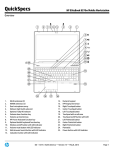
Align the palmrest to its original position on the computer and press on the positions indicated until it snaps in
place.
2.
Tighten the screw that secures the palmrest to the computer.
3.
Connect the following cables:
a)
b)
c)
d)
e)
bluetooth module
power button
touchpad
media board
speaker
4.
Affix the adhesive tape that secures the media card cable, speaker cable and touchpad cable to the palmrest.
5.
Tighten the screws at the bottom of the computer.
6.
Connect the smart card cable and affix the adhesive tape that secures it to the computer.
7.
Install the:
a)
b)
c)
d)
e)
f)
g)
8.
secondary hard drive
primary hard drive
optical drive
keyboard
keyboard trim
base cover
battery
Follow the procedures in After Working Inside Your Computer.
41